Types of Software Testing: Everything You Need to Know
By Sriram
Updated on Jul 05, 2026 | 10 min read | 4.11K+ views
Share:

All courses
Certifications
More
By Sriram
Updated on Jul 05, 2026 | 10 min read | 4.11K+ views
Share:
Table of Contents
Key Takeaways
In this blog, you will learn what each major type of software testing means, how it works, and when teams use it. We will cover testing levels like unit and system testing, testing techniques like black box and white box, and practical comparisons like manual versus automated testing.
By the end, you will know exactly which type of testing fits which situation, and you will be able to explain the difference between terms that often get confused, like smoke testing and sanity testing.
Enroll in Data Science Courses from upGrad and enhance your software development skills with hands-on expertise that employers are actively seeking today.
Popular Data Science Programs
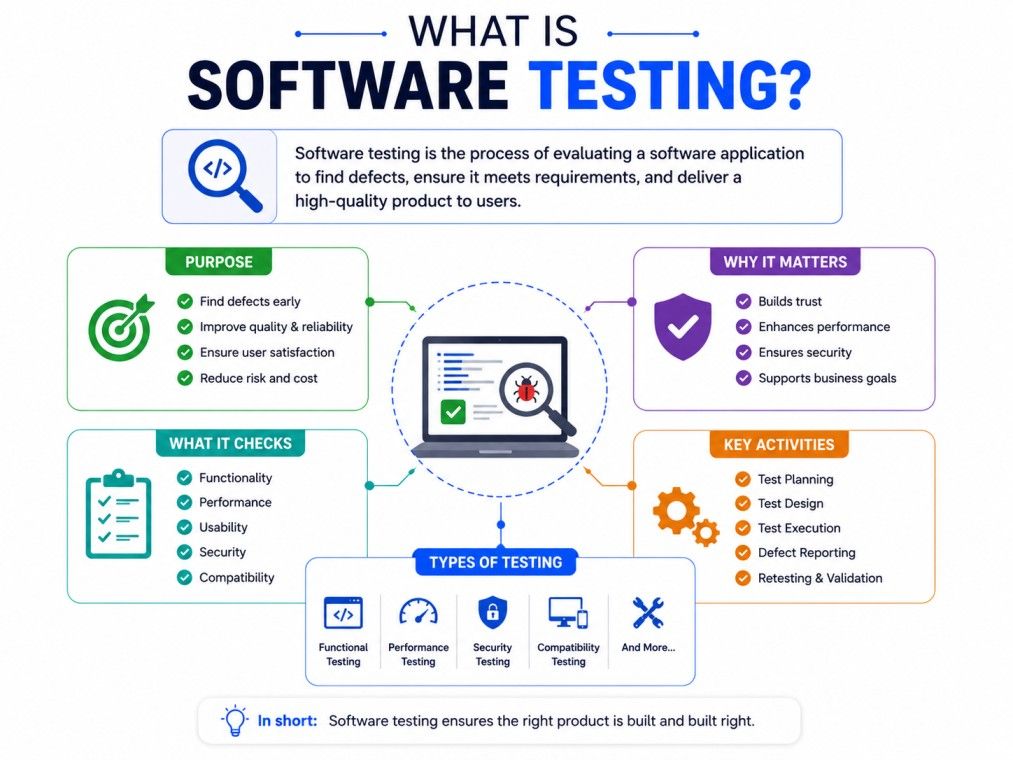
Software testing is the process of evaluating a software application to verify that it functions as expected and meets intended business and technical requirements. It involves identifying defects, validating features, and ensuring the software functions correctly across different scenarios before it is released to users. By testing an application throughout its development lifecycle, teams can detect issues early, improve reliability, and deliver a product that performs consistently.
Beyond finding bugs, software testing helps ensure quality, security, performance, and a positive user experience. It verifies that new features work as expected, existing functionality remains unaffected after updates, and the application can handle real-world usage. Whether performed manually or through automation, software testing plays a critical role in reducing risks, lowering maintenance costs, and building software that users can trust.
Also Read: Top 50+ Software Testing Questions and Answers to Excel in Your Interview
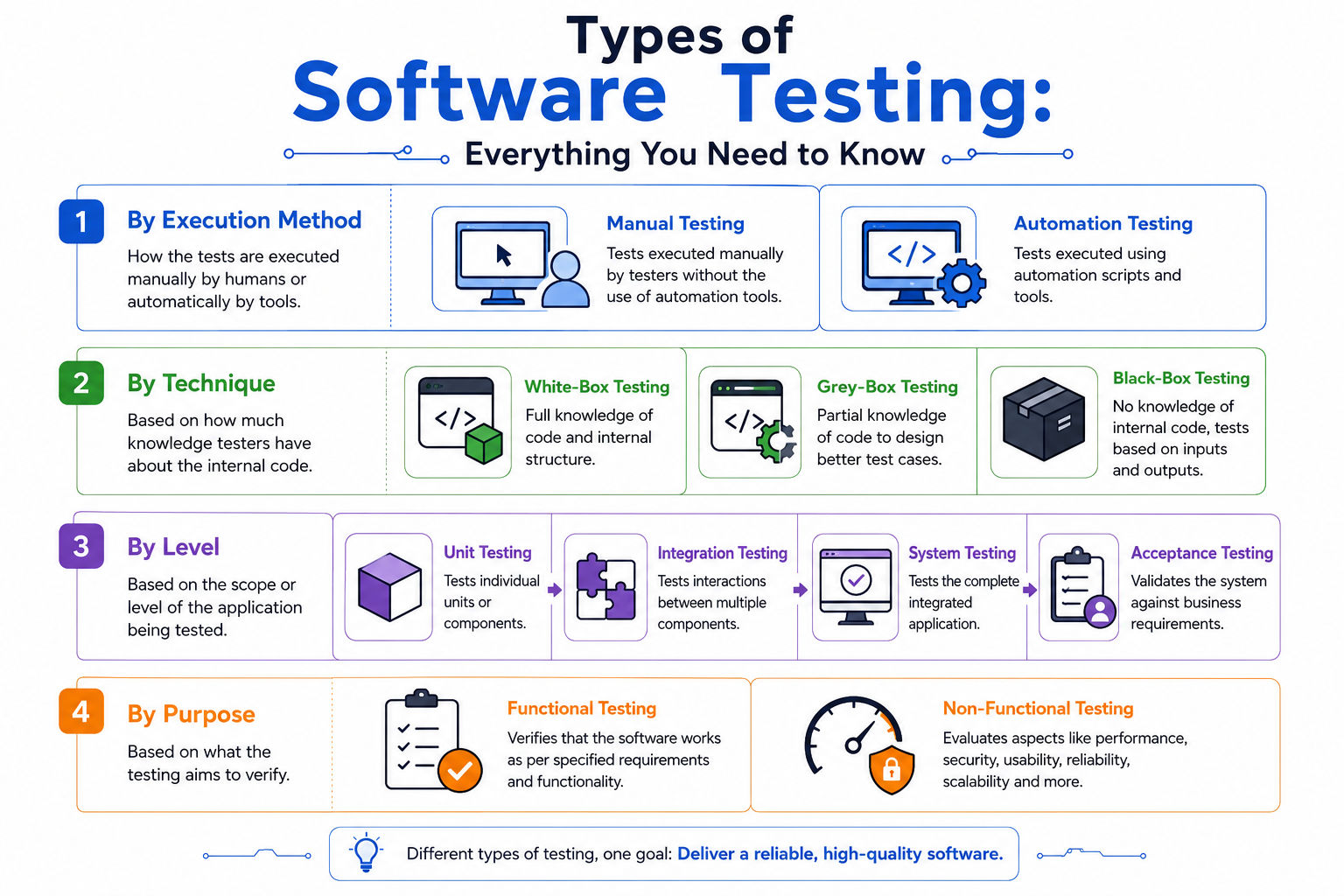
Before diving into the different types of software testing in software engineering, it is important to understand how they are categorised and on what basis. There are four main ways used to organize them:
1. By Execution Method: It classifies testing into manual and automatic. This looks at how the test is carried out: is a human manually clicking through the application, or is a script running the checks automatically? This distinction (manual vs. automated testing) is often the first thing teams decide when planning a QA strategy, since it affects cost, speed, and repeatability.
2. By Technique: Here, testing is classified into white-box, grey-box, and black-box. These are based on how much the tester knows about the internal code. White box testing assumes full visibility into the code's logic and structure, while black box testing treats the application as a sealed unit and judges it only by inputs and outputs, and grey box testing sits in between, using partial knowledge to design smarter test cases.
3. By Level: In this classification, testing is subdivided into unit, integration, system, and acceptance testing. This is about scope, how much of the system is being tested at once. It ranges from unit testing (a single function or component) to integration testing (multiple components working together) to system testing (the whole application) and finally acceptance testing (validating the system against real business needs).
4. By Purpose: It classifies testing into functional and non-functional testing. These testing methods are grouped on the basis of what they're trying to verify. Functional testing checks whether the software does what it's supposed to do, while non-functional testing covers everything else, performance, security, usability, scalability, and more.
Together, these four categories form a simple mental map: execution method tells you how a test is run, technique tells you what the tester can see, level tells you how much is being tested, and purpose tells you why the test exists. Most types of testing in software development fit neatly into one or more of these buckets, and understanding this framework makes it much easier to make sense of the many software testing methods and types covered in the rest of this guide.
Category |
Type of Testing |
Main Question It Answers |
| Execution method | Manual, Automated | Who runs the test? |
| Testing level | Unit, Integration, System, Acceptance | How much of the system is tested? |
| Testing technique | Black box, White box, Gray box | How much does the tester know about the code? |
| Testing purpose | Functional, Non-functional | What quality is being checked? |
You Can Also Read: Difference between Testing and Debugging
Free Courses
Software testing is a collection of multiple checks, each aimed at a specific goal. Some types confirm that features work correctly. Others check speed, security, or how the software behaves under pressure. Understanding these types helps teams build software that holds up once it is live.
Each category answers a different question. Execution method asks who or what is running the test. Testing level asks how much of the system is being checked at once. Technique asks how much internal knowledge the tester has. And purpose asks what exactly is being verified, whether that's a feature working correctly or the system holding up under load.
Most QA teams do not pick just one type. They combine several, often in a structured order, to build confidence in the software before release. A typical project might start with unit tests written by developers, move through integration and system testing done by QA, and finish with acceptance testing done by the client or end users.
Knowing this structure matters because it prevents teams from wasting time. Running a full system test on a single function is overkill. Skipping integration testing before release is risky. The right type, used at the right stage, saves both time and money. In the sections below, we will break down each of these categories one by one, starting with the levels of testing that most projects follow from the first line of code to final release.
Also Read: How to Become a Software Tester: Skills, Certifications & Salary
Data Science Courses to upskill
Explore Data Science Courses for Career Progression
IIIT Bangalore
Executive Post Graduate Certificate in Data Science & AIPlacement Assistance
Testing levels refer to the stage at which testing happens during software development. Think of it as testing, zooming in and out, starting small and getting broader with each level. This is often called the testing pyramid, and it is one of the most widely followed structures in QA.
Unit testing checks the smallest piece of code you can test on its own, usually a single function or method. Developers write these tests, often before or right after writing the actual code. The goal is simple: catch bugs at the source before they spread further into the system.
Unit tests are fast, cheap to run, and easy to automate. Most modern projects run hundreds or even thousands of unit tests every time code changes.
Once individual units work, the next step is to check if they work together. Integration testing looks at how different modules or services interact, like whether your payment module correctly talks to your order module.
This is where a lot of real-world bugs show up. A function might work perfectly on its own but fail when it has to pass data to another part of the system.
System testing checks the entire application, instead of testing pieces, testers evaluate the complete, integrated product against the requirements it was built to meet. This includes checking workflows a real user would follow, from login to checkout to logout.
Acceptance testing is the final check before release. It confirms that the software meets business needs and is ready for real users. This is often done by the client, a product owner, or a small group of end users, and it is sometimes called User Acceptance Testing, or UAT.
Here is how these levels compare side by side:
Level |
Who Performs It |
What It Checks |
| Unit Testing | Developers | Individual functions or components |
| Integration Testing | Developers or QA | How components work together |
| System Testing | QA team | The complete application |
| Acceptance Testing | Client or end users | Readiness for real-world use |
These four levels build on each other. Skipping one usually means bugs slip through and get caught later, when they are more expensive to fix. That is why most experienced teams treat these levels as a sequence, not a checklist to pick from.
Ready to pivot from testing into data-driven roles? Explore Executive Post Graduate Certificate Programme in Data Science & AI from IIITB in Data Science & AI, build the skills top employers value.
Beyond levels, software testing is also grouped by purpose. This is where functional and non-functional testing come in, and understanding the difference is one of the most common questions beginners ask.
Functional testing checks whether the software does what it is supposed to do. It focuses on features and requirements, not on how fast or secure the system is. If you click "submit" and the form saves correctly, that is functional testing at work.
Some common functional testing types include:
Smoke and sanity testing often get confused. Smoke testing is broader and happens first, right after a new build. Sanity testing is narrower and happens after a specific fix. One checks if the build is usable at all. The other checks if a particular change worked.
Also Read: Functional Testing Interview Questions and Answers
Non-functional testing checks how well the software performs, not what it does. This includes speed, security, and behavior under stress. A feature can work perfectly and still fail non-functional testing if it is too slow or crashes under load.
Key non-functional testing types include:
Type |
Focus |
Example Question It Answers |
| Functional Testing | What the software does | Does the login button work correctly? |
| Non-Functional Testing | How well the software performs | Can the site handle 10,000 users at once? |
Both are necessary. A shopping app that processes orders correctly but crashes during a sale is a functional success and a non-functional failure. Good QA strategies test for both, not just one.
Testing techniques describe how much a tester knows about the internal code while testing. This is a different lens than levels or purpose. It is about the tester's point of view.
In black box testing, the tester has no knowledge of the internal code. They only look at inputs and outputs, treating the software like a sealed box. They test based on requirements and expected behavior, not implementation.
This approach works well for functional and acceptance testing, since it mirrors how real users interact with software. Users do not see the code either. They just expect things to work.
White box testing is the opposite. The tester has full access to the source code and tests the internal logic, structure, and paths directly. This is common during unit testing, where developers already know exactly what the code is supposed to do.
White box testing is good at catching logical errors and inefficient code paths that black box testing would never find, since those issues are invisible from the outside.
Gray box testing sits in between. The tester has partial knowledge of the system, maybe some database structure or API details, but not the full source code. This is common in integration testing, where testers need some technical context but do not need to see every line of code.
Technique |
Code Knowledge |
Best Suited For |
| Black Box Testing | None | Functional, acceptance testing |
| White Box Testing | Full | Unit testing, code-level checks |
| Gray Box Testing | Partial | Integration testing |
Choosing a technique depends on who is testing and what they are trying to verify. Developers naturally lean toward white box testing because they already understand the code. QA teams and end users lean toward black box testing because they are testing the experience, not the implementation.
Subscribe to upGrad's Newsletter
Join thousands of learners who receive useful tips
One of the biggest decisions in any QA process is whether to test manually or automate the process. Both have their place, and most mature teams use a mix of both rather than picking one exclusively.
Manual testing means a person runs the test cases by hand, without scripts or tools doing the work automatically. A tester clicks through the app, enters data, and checks the results against what is expected.
Manual testing is useful for:
Also Read: Most Asked Manual Testing Interview Questions: For Freshers & Experienced
Automated testing uses scripts and tools to run test cases without human involvement. Once written, these tests can run repeatedly, quickly, and consistently, which makes them ideal for tasks like regression testing that need to happen every time code changes.
Automated testing is useful for:
Factor |
Manual Testing |
Automated Testing |
| Speed | Slower | Much faster |
| Initial cost | Lower | Higher, due to script setup |
| Best for | Exploratory, usability testing | Regression, performance testing |
| Human judgment | Required | Not required |
| Long-term cost | Higher over time | Lower over time |
Neither approach replaces the other completely. Automated testing cannot judge whether a design "feels right," and manual testing cannot realistically repeat the same 500 test cases every single day. Most teams automate repetitive, predictable tasks and keep exploratory and usability checks manual.
Must Check: Automated Testing Interview Questions and Answers
Beyond the core categories, a few other testing types come up often enough that they're worth a quick mention.
1. Alpha Testing
It is done in-house by a company's own developers or QA team before the product goes anywhere near real users, aiming to catch bugs early in a controlled environment.
2. Beta Testing
It happens after alpha testing, once the product is released to a limited group of real, external users who use it in real-world conditions and report back issues or feedback. The key difference in alpha vs beta testing comes down to who's testing and where: alpha is internal and controlled, while beta is external and closer to real-world use.
3. Load Testing
It checks how the system performs under expected, real-world levels of user traffic or data volume, helping teams confirm the application holds up under normal-to-peak conditions.
4. Stress Testing
It pushes the system beyond its expected limits to see how, and where it breaks, revealing the application's breaking point and how gracefully (or badly) it fails.
With so many types of software testing available, picking the right mix can feel overwhelming, especially for smaller teams. A few factors usually guide the decision.
1. Project stage – Early-stage projects lean on unit and manual testing since features change often. Mature products rely more on automated regression testing.
2. Risk level – High-risk areas, like payment systems, need thorough functional and security testing. Low-risk features can get by with lighter checks.
3. Release frequency – Teams releasing weekly or daily depend heavily on automated regression and smoke testing to move fast without breaking things.
4. Team size and skill – Smaller teams often prioritize manual and exploratory testing, since building automation frameworks takes time and expertise.
A simple way to think about it: test early with unit tests, test integration points before they become a bigger problem, test the full system before release, and always confirm with acceptance testing that the software actually solves the problem it was built for.
Read this for more insights: Artificial Intelligence in Software Testing: Transforming Quality Assurance
The Software Testing Life Cycle is a structured sequence of phases that guide testing. It includes the entire cycle from planning through execution and closure. It typically runs alongside the Software Development Life Cycle (SDLC) rather than as an afterthought at the end. Here are the core stages:
Testers review requirements, specifications, and user stories to understand what needs to be tested. This is where testability is assessed, can this requirement actually be verified? and any ambiguities or gaps are flagged early, before they turn into costly issues later.
The test lead or manager defines the overall strategy: scope, objectives, resources, timelines, tools, and environments needed. This stage also estimates effort and cost, and identifies risks that could affect the testing process.
Testers write detailed test cases and test scripts based on the requirements, including expected results. This phase also involves preparing test data and, where applicable, developing automation scripts.
A dedicated environment: hardware, software, network configurations, and test data, is prepared to closely mirror production conditions. This is often done in parallel with test case design to save time.
Test cases are run against the build, and actual results are compared to expected outcomes. Any discrepancies are logged as defects/bugs and sent back to developers for fixing, followed by retesting and regression testing once fixes are made.
Once testing is complete, the team evaluates the results, coverage, defect density, exit criteria met, etc., and documents lessons learned for future cycles. A test closure report is typically prepared and shared with stakeholders.
Quick summary table:
Stage |
Key Output |
| Requirement Analysis | Requirement Traceability Matrix (RTM) |
| Test Planning | Test Plan document |
| Test Case Design | Test cases, test scripts, test data |
| Environment Setup | Ready test environment |
| Test Execution | Bug reports, execution logs |
| Test Cycle Closure | Test closure report |
The right tool depends entirely on the type of testing you're doing — here's a quick reference to match them up.
Testing Type |
Popular Tools |
| Unit Testing | JUnit (Java), pytest / unittest (Python), Jest, Mocha (JavaScript), NUnit (.NET) |
| Integration Testing | Postman, SoapUI, JUnit + Mockito, Citrus |
| Functional / UI Testing | Selenium, Cypress, Playwright, TestComplete, Katalon Studio |
| Regression Testing | Selenium, Katalon Studio, TestComplete, Ranorex |
| Performance/Load Testing | JMeter, LoadRunner, Gatling, k6, BlazeMeter |
| Stress Testing | JMeter, LoadRunner, NeoLoad |
| Security Testing | OWASP ZAP, Burp Suite, Nessus, Acunetix |
| API Testing | Postman, SoapUI, RestAssured, Insomnia |
| Mobile Testing | Appium, Espresso (Android), XCUITest (iOS), BrowserStack |
| Cross-Browser/Compatibility Testing | BrowserStack, Sauce Labs, LambdaTest |
| Accessibility Testing | axe DevTools, WAVE, Lighthouse |
| Test Management | TestRail, Zephyr, qTest, Xray |
| CI/CD Integration & Automation Orchestration | Jenkins, GitLab CI, CircleCI, GitHub Actions |
| Exploratory/Manual Testing Documentation | TestRail, Azure Test Plans, PractiTest |
How to Choose the Best Tool?
Software testing is not a single task. It is a layered process built from different types, each catching a different kind of issue. Unit testing checks small pieces of code. Integration testing checks how those pieces connect. System and acceptance testing confirm that the whole product works and meets real needs.
Functional and non-functional testing make sure the software both works correctly and performs well. And techniques like black box, white box, and gray box testing shape how testers approach the process depending on what they know about the code.
The right way to learn software testing depends on your project, your team, and how much risk you can afford to take. But understanding these types of software testing gives you a solid foundation for building a testing strategy that works whether you are shipping your first small app or managing testing across a large enterprise system.
Ready to start your journey? Book a free consultation with upGrad today to find the best path for your career.
There is no single most important type. Unit testing catches issues early and cheaply, while acceptance testing confirms the software meets user needs. Most teams combine several types of software testing throughout development rather than relying on just one.
There is no fixed number since testing can be grouped by level, technique, or purpose. Broadly, software testing includes four to six major categories, such as unit, integration, system, acceptance, functional, and non-functional testing, along with dozens of specialized sub-types.
Quality assurance, or QA, is the broader process of preventing defects through planning and process improvement. Software testing is one part of QA, focused specifically on finding and reporting bugs by running different types of tests against the application.
No. Regression testing checks that existing features still work after a code change, covering the wider application. Retesting specifically confirms that a previously failed test case now passes after a fix. They often happen together but serve different purposes.
Beginners usually start with manual testing and functional testing, since these require less technical setup. Learning black box testing concepts and basic test case writing builds a strong foundation before moving on to automation and technical testing types.
No. Automated testing works well for repetitive tasks like regression testing, but it cannot judge usability, design, or unexpected user behavior the way a human tester can. Most teams use both types together rather than replacing one with the other.
Smoke testing is a quick check done right after a new build to confirm basic stability. Regression testing is more thorough and confirms that a wider set of existing features still work correctly after code changes, and it happens more frequently.
Exploratory testing is used when testers actively explore the software without following a fixed script, relying on their own judgment to find issues. It works well for uncovering bugs that scripted test cases might miss, especially in new or changing features.
Mobile apps typically need a mix of functional testing, compatibility testing across devices, and usability testing, since screen sizes and operating systems vary widely. Performance testing is also important to check how the app behaves on different network conditions.
Non-functional testing is sometimes skipped because it does not directly relate to a specific feature request, so it can seem less urgent. However, skipping performance or security testing often causes bigger problems later, especially once the software scales to more users.
Verification checks whether the software is being built correctly, according to specifications, usually through reviews and static analysis. Validation checks whether the finished software meets user needs, typically through testing types like system and acceptance testing.
730 articles published
Sriram K is a Senior SEO Executive with a B.Tech in Information Technology from Dr. M.G.R. Educational and Research Institute, Chennai. With over a decade of experience in digital marketing, he specia...
Speak with Data Science Expert
By submitting, I accept the T&C and
Privacy Policy
Start Your Career in Data Science Today
Top Resources
Master's Degree
18 Months
Executive Diploma
12 Months
Bootcamp
6 Months