Best Laptops for AI and Machine Learning: Top Picks 2026
By Sriram
Updated on Jul 02, 2026 | 5 min read | 2.94K+ views
Share:

All courses
Certifications
More
By Sriram
Updated on Jul 02, 2026 | 5 min read | 2.94K+ views
Share:
Table of Contents
The best laptops for AI and Machine Learning need a NVIDIA GPU for CUDA support. They need high unified memory if you use macOS. For local development, pick a laptop with an Intel Core Ultra 7 or 9 processor. Go with an AMD Ryzen AI processor. You should also have at least 16GB to 32GB of RAM for smooth performance. AI and Machine Learning require laptops. Laptops for AI need processors, like Intel Core Ultra 7/9 or AMD Ryzen AI. AI and Machine Learning laptops should have RAM.
In this blog, you'll learn what makes a laptop suitable for AI and machine learning, the hardware specifications that matter most, and some of the best laptop options available today.
Choose the right laptop for the job then back it up with the skills to match. Learn from industry-leading Artificial Intelligence Courses & Machine Learning Courses Online at upGrad and set yourself up to build, train, and deploy real-world AI models.
Popular AI Programs
The best laptop for you depends on what you do how much you can. What you want to learn. Some people use their laptops for things like Python programming and basic machine learning.
Others use them for complex tasks like training big deep learning models or playing with generative AI. Here are some laptops that are good at handling AI tasks:
Laptop |
Best For |
Processor |
GPU |
RAM |
| Apple MacBook Pro 16 (M4 Pro) | AI development on macOS | Apple M4 Pro | Integrated GPU | 24–48 GB |
| ASUS ROG Zephyrus G16 | Deep learning | Intel Core Ultra 9 | RTX 4070 | 32 GB |
| Lenovo Legion Pro 7i | Professional AI workloads | Intel Core Ultra 9 | RTX 4080 | 32 GB |
| Dell XPS 16 | Students and developers | Intel Core Ultra 7 | RTX 4060 | 32 GB |
| HP Omen Transcend 16 | Budget-conscious AI learners | Intel Core Ultra 7 | RTX 4060 | 16–32 GB |
| MSI Raider 18 HX AI | Large-scale AI model training | Intel Core Ultra 9 285HX | NVIDIA RTX 5090 | 64 GB (Upgradeable to 96–192 GB, model dependent) |
| Razer Blade 16 (2025) | AI developers needing portability and performance | AMD Ryzen AI 9 HX 370 | NVIDIA RTX 5080/5090 | 32–64 GB |
| ASUS ProArt P16 | AI creators, ML engineers, and content creators | AMD Ryzen AI 9 HX 370 | NVIDIA RTX 4070 | 32–64 GB |
| Acer Predator Helios Neo 16 AI | AI students and research projects | Intel Core Ultra 9 275HX | NVIDIA RTX 5070 Ti | 32 GB |
| Gigabyte AORUS Master 16 | GPU-intensive deep learning and LLM experimentation | Intel Core Ultra 9 275HX | NVIDIA RTX 5080 | 32–64 GB |
This laptop is an excellent choice for developers who prefer macOS. Apple's latest silicon delivers impressive CPU performance while maintaining excellent battery life.
Pros
Cons
Best for:
The ASUS ROG Zephyrus G16 strikes a strong balance between portability and raw GPU performance. Equipped with an NVIDIA RTX 4070, it handles demanding machine learning tasks without becoming excessively bulky.
Pros
Cons
Best for:
If your projects involve training larger datasets locally, the Legion Pro 7i is one of the strongest Windows laptops available. Its advanced cooling system allows sustained GPU performance during long training sessions.
Pros
Cons
Ideal for:
The Dell XPS series remains one of the most balanced productivity laptops available. It combines premium design with strong performance, making it suitable for students and professionals alike.
Pros
Cons
Best suited for:
For learners looking for strong performance without stretching their budget too far, the HP Omen Transcend 16 is a practical option. It offers modern processors and dedicated NVIDIA graphics capable of handling most machine learning projects.
Pros
Cons
Best for:
The MSI Raider 18 HX AI is a desktop replacement built for intensive AI, deep learning, and LLM development. Featuring Intel's latest high-performance processor and an NVIDIA RTX 5090 GPU, it delivers exceptional compute power for training large models locally.
Pros
Cons
Best for
The Razer Blade 16 offers workstation-level AI performance in a sleek and portable chassis. Powered by AMD Ryzen AI processors and NVIDIA RTX 5080/5090 graphics, it's perfect for professionals who need both mobility and high-end GPU acceleration.
Pros
Cons
Best for
Designed for AI developers and creative professionals, the ASUS ProArt P16 combines powerful Ryzen AI processors with RTX graphics to deliver excellent performance for machine learning, image generation, video editing, and generative AI applications.
Pros
Cons
Best for
The Acer Predator Helios Neo 16 AI provides strong AI performance at a competitive price. Equipped with Intel Core Ultra processors and RTX 5070 Ti graphics, it is an excellent option for students and professionals working on deep learning, computer vision, and AI research.
Pros
Cons
Best for
The Gigabyte AORUS Master 16 is built for users who need maximum GPU performance for AI model training, LLM experimentation, and high-performance computing. Its RTX 5080 GPU and high-end processor make it suitable for demanding research and enterprise AI tasks.
Pros
Cons
Best for
Also Read: Artificial Intelligence Products: What They Are and Why They're Everywhere
Your choice depends on how you plan to use it. A lot of people make mistakes when buying a laptop. They go for the expensive one without thinking about what they actually need. If you are learning machine learning through courses or small projects, a mid-range laptop will do.
You do not need a powerful laptop. 16-32 GB RAM and an RTX 4060 or RTX 4070 GPU is more than enough, for Kaggle competitions or small personal projects. As your machine learning projects grow, you can use cloud platforms to train models. This way, you do not have to rely on your laptop's hardware.
You can use your laptop and cloud platforms together.
If you are... |
Recommended Laptop |
| A beginner learning Python | HP Omen Transcend 16 |
| A college student | Dell XPS 16 |
| A macOS user | Apple MacBook Pro 16 |
| A deep learning enthusiast | ASUS ROG Zephyrus G16 |
| An AI professional | Lenovo Legion Pro 7i |
Learn Artificial Intelligence Courses & Machine Learning Courses Online from upGrad today. And choose the right laptop.
Free Courses
When you want to buy a laptop for AI, you should not just go for the one with the specs. The right laptop for Artificial Intelligence depends on what you want to make, how often you will train Artificial Intelligence models on your laptop, and how much money you must spend. If you are learning Python and the basics of machine learning, you need a kind of laptop, then an Artificial Intelligence engineer who works with large language models (LLM)
Do not worry about getting a laptop. Try to get a laptop that has a balance of everything and will still be good to use in four or five years.
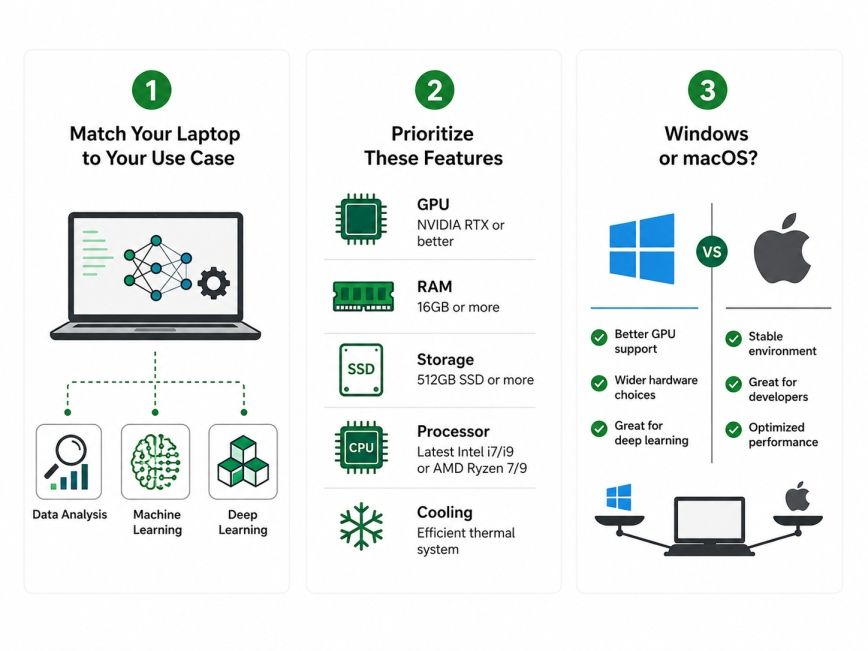
If you are planning to use cloud services like Google Colab, Kaggle, Microsoft Azure, or AWS for model training, you do not necessarily need the powerful GPU. In cases cloud services like Google Colab, Kaggle Microsoft Azure or AWS provide better performance when you have more RAM and faster storage.
This is because RAM and faster storage help with everyday performance when you are using cloud services like Google Colab, Kaggle, Microsoft Azure, or AWS for model training. You get results from cloud services, like Google Colab, Kaggle, Microsoft Azure, or AWS when you invest in more RAM and faster storage instead of spending extra money on a very good graphics card.
Here's a simple way to narrow your options.
Use Case |
Recommended Configuration |
| Learning Python and AI basics | Intel Core Ultra 7 or Ryzen 7, 16 GB RAM, RTX 4060 |
| Machine learning coursework | Intel Core Ultra 7, 32 GB RAM, RTX 4060 or RTX 4070 |
| Deep learning projects | Intel Core Ultra 9 or Ryzen AI 9, 32–64 GB RAM, RTX 4070 or RTX 4080 |
| Research and professional AI development | High-end CPU, 64 GB RAM, RTX 4080 or RTX 4090 |
These features make a difference in your daily life. They are more important than how something looks or how thin it's. The features are what matter to you every day.
When comparing laptops, focus on these components first:
Both operating systems can handle AI and machine learning tasks, but they excel in different situations. Both operating systems can do intelligence and machine learning tasks.
If your projects really need CUDA to work fast, then Windows laptops with NVIDIA graphics cards are still the way to go. MacBook Pro models are great for writing code looking at data and making machine learning programs when you do not need to use CUDA libraries.
These MacBook Pro models are really good for people who do coding and data analysis. They can handle machine learning tasks very well.
Windows |
macOS |
| Better NVIDIA GPU support | Excellent battery life |
| CUDA compatibility | Optimized Apple Silicon performance |
| Easier hardware upgrades | Premium build quality |
| Larger laptop selection | Great for app development and programming |
AI Courses to upskill
Explore Artificial Intelligence Courses for Career Progression
Many buyers overspend or choose hardware that doesn't match their needs. A balanced laptop will usually outperform a poorly configured premium model over the long run.
Avoid these common mistakes:
Look for a good balance of specifications for the best laptops for AI and machine learning overspending on features you may never use. Beginners often find it more helpful with extra RAM and SSD storage. This is better for them than buying expensive graphics cards that are available.
Component |
Minimum |
Recommended |
| CPU | Intel Core i7 / Ryzen 7 | Intel Core Ultra 9 / Ryzen AI 9 / Apple M4 Pro |
| GPU | RTX 4050 | RTX 4070 or better |
| RAM | 16 GB | 32 GB |
| Storage | 512 GB SSD | 1 TB NVMe SSD |
| Display | Full HD | 2K or higher |
| Battery | 6 hours | 8–12 hours |
Finding the best laptops for AI and machine learning doesn't mean buying the most expensive device available. The goal is to choose hardware that matches your learning path and future goals. Rather than focusing only on benchmark scores, consider your daily workflow. A laptop that balances performance, portability, battery life, and upgradeability will provide the best long-term value for most AI learners and professionals.
For beginners, a laptop with a modern Intel Core Ultra or AMD Ryzen processor, 16 GB of RAM, a 1 TB SSD, and an NVIDIA RTX 4060 GPU offers an excellent starting point. Intermediate users should consider upgrading to 32 GB RAM and an RTX 4070 for smoother model training and multitasking. Professionals working with advanced AI models can benefit from RTX 4080 or RTX 4090 graphics, higher memory capacity, and premium cooling systems.
Want to explore more about management accounting? Book your free 1:1 personal consultation with our expert today.
The best laptop depends on your workload and budget. For most users, laptops with an Intel Core Ultra 9 or AMD Ryzen AI processor, 32 GB RAM, and an NVIDIA RTX 4070 GPU offer an excellent balance of performance and value. Beginners can also start with an RTX 4060 and upgrade later if their projects become more demanding.
If you're learning artificial intelligence, choose a laptop with at least 16 GB RAM, a dedicated NVIDIA RTX graphics card, and a fast SSD. This configuration handles coding, machine learning libraries, and small AI models comfortably while giving you room to grow as your skills improve.
AI automation often involves running scripts, automation tools, APIs, and machine learning workflows. A laptop with a modern multi-core processor, 32 GB RAM, and a dedicated GPU provides reliable performance for automation tasks, data processing, and model deployment without frequent slowdowns.
Modern Intel Core Ultra processors, AMD Ryzen AI series chips, and Apple M4 Pro processors all perform well for AI workloads. If you plan to train deep learning models locally, pairing a powerful processor with an NVIDIA RTX GPU delivers the best overall performance.
For beginners, 16 GB RAM is sufficient for most coding and machine learning exercises. If you regularly work with larger datasets, virtual machines, or multiple development tools, 32 GB offers a smoother experience. Professional AI workloads often benefit from 64 GB or more.
A dedicated GPU is highly recommended if you plan to train deep learning models locally. While traditional machine learning algorithms can run on a CPU, GPU acceleration significantly reduces training time for neural networks and computer vision projects.
Yes. Many beginners successfully learn AI using mid-range laptops and cloud platforms like Google Colab or Kaggle. A balanced laptop combined with cloud computing can be more cost-effective than investing in high-end hardware from the beginning.
MacBook Pro models are excellent for programming, data analysis, and many machine learning workflows. However, some deep learning libraries that rely on NVIDIA CUDA perform better on Windows laptops equipped with dedicated RTX graphics cards.
A minimum of 512 GB SSD works for beginners, but 1 TB is a better long-term choice. AI datasets, development tools, virtual environments, and model files can consume storage quickly, making additional capacity worthwhile.
Yes. Many gaming laptops include powerful processors and NVIDIA RTX GPUs, making them suitable for AI development. Before buying, check the cooling system, RAM capacity, battery life, and upgrade options rather than focusing only on gaming performance.
A well-configured laptop with a modern processor, 32 GB RAM, and a dedicated RTX GPU can comfortably support AI learning and development for four to six years. Choosing upgradeable hardware where possible also helps extend its useful lifespan as software requirements increase.
730 articles published
Sriram K is a Senior SEO Executive with a B.Tech in Information Technology from Dr. M.G.R. Educational and Research Institute, Chennai. With over a decade of experience in digital marketing, he specia...
Speak with AI & ML expert
By submitting, I accept the T&C and
Privacy Policy
Top Resources
Master's Degree
18 Months
Executive Diploma
12 Months
IIIT Bangalore
Executive Programme in Generative AI & Agentic AI for LeadersIndia’s #1 Tech University
Dual Certification
5 Months