Sanity Testing vs Smoke Testing: Key Differences
By Sriram
Updated on Jul 01, 2026 | 5 min read | 7.87K+ views
Share:

All courses
Certifications
More
By Sriram
Updated on Jul 01, 2026 | 5 min read | 7.87K+ views
Share:
Table of Contents
Smoke testing and sanity testing might sound similar, in fact, many beginners even use them interchangeably, but they check very different things. Smoke testing is like a quick pulse check on a brand-new build. Before testers dive into detailed testing, they run a smoke test to see if the software even holds up on the surface.
Sanity testing, on the other hand, comes into play after a specific bug fix or code change. Instead of checking the whole system, it zooms in on that one change to confirm it actually works the way it's supposed to.
In this blog, you'll learn what smoke testing and sanity testing are, how they differ, when each should be used, and whether they can work together.
Enroll in Data Science Courses from upGrad and enhance your software development skills with hands-on expertise employers are actively seeking today.
Popular Data Science Programs
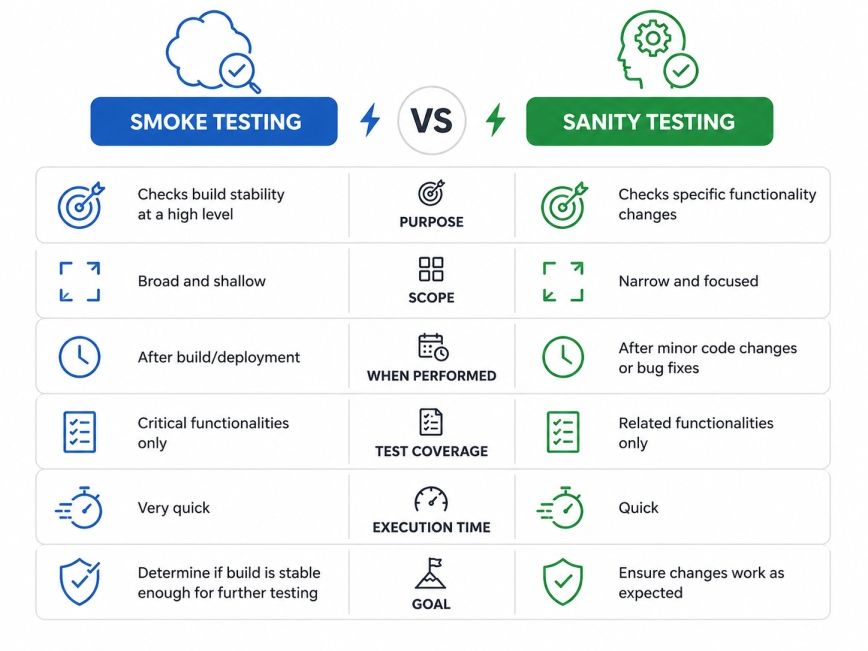
These two techniques are ways to test things, but they have different goals and are used at different times. Knowing what makes them different helps the people who test software make decisions quickly and make the software better.
Aspect |
Smoke Testing |
Sanity Testing |
| Definition | Tests the basic stability of a new build | Tests specific functionality after changes |
| Objective | Verify the build is stable | Verify a bug fix or update works correctly |
| Testing Scope | Wide but shallow | Narrow but deep |
| Trigger | New build release | Bug fix or feature enhancement |
| Test Cases | Covers major workflows | Covers affected modules only |
| Performed By | QA engineers or automation tools | QA engineers |
| Automation | Commonly automated | Often manual but can be automated |
| Execution Time | Usually 15–60 minutes | Usually 10–30 minutes |
| Build Status | Determines whether testing can proceed | Confirms specific changes are successful |
| Regression Coverage | Minimal | Limited to related areas |
The biggest difference in sanity testing vs smoke testing is the purpose.
Smoke testing covers several major modules across the application.
Examples include:
Whereas sanity testing focuses only on modules affected by recent changes.
A build usually passes smoke testing before detailed testing begins. Later, when developers resolve reported defects, sanity testing confirms the fixes.
Because the testing goals differ, the sequence also differs.
Smoke testing asks whether essential functions work.
For example:
Smoke Test
Whereas sanity testing explores one specific area in greater detail.
Sanity Test
The second set is much more focused.
Both testing methods save time.
Together, they improve productivity while maintaining software quality.
Also Read: How to Become a Software Tester: Skills, Certifications & Salary
Ready to pivot from testing into data-driven roles? Explore Executive Post Graduate Certificate Programme in Data Science & AI from IIITB in Data Science & AI, build the skills top employers value.
Free Courses
To understand what sanity testing is and what smoke testing is, we need to look at each type of testing on its own. Sanity testing and smoke testing are both quick forms of software testing with different goals to achieve.
Smoke testing is broad and shallow by design; the goal is to catch any major issues early, so no one wastes time testing a build that's fundamentally broken. Sanity testing is narrower than smoke testing, but it digs a bit deeper into a particular piece of functionality.
Smoke testing is done first after a new software build is released. It checks if the important parts of the application work properly. This is done before testers spend a lot of time testing everything in detail.
It's like a check to see if everything is okay. Testers don't test every feature. They only check the essential things. Smoke testing gives an idea of how good the build is. That's why it is also called Build Verification Testing or BVT for short.
For example, in a shopping app smoke testing might include:
If one of these things doesn't work, the building is considered no good. The testing team sends it back. Developers fix the problems before testing continues.
When people make changes to the code or fix bugs, they do something called sanity testing. This is a way to check if the changes they made work correctly. They do not look at the application they just check the parts that were changed.
The goal is simple: people just want to make sure the change they made works the way it should and does not cause any problems. For example, let's say someone fixed a problem where discount coupons were not working when people were checking out.
A sanity test may verify:
But there is no need to test that is not related to this problem, like how people sign up for the site or look for products.
Feature |
Smoke Testing |
Sanity Testing |
| Purpose | Verify build stability | Verify recent changes |
| Scope | Broad but shallow | Narrow but detailed |
| Performed After | New software build | Bug fix or enhancement |
| Covers | Major application features | Modified functionality only |
| Time Required | Short | Very short |
| Goal | Decide whether testing can continue | Confirm the fix works correctly |
Related Article: Top Automation Testing Courses Online in 2025
Data Science Courses to upskill
Explore Data Science Courses for Career Progression
IIIT Bangalore
Executive Post Graduate Certificate in Data Science & AIPlacement Assistance
It is useful to know the theory behind sanity testing vs smoke testing. What really makes you a better tester is knowing when to use sanity testing and when to use in a real project. The choice of sanity testing or smoke testing depends on the type of software change, the stage of the release, and the team's testing strategy.
In many software development teams, smoke testing and sanity testing work together. They do not compete with each other; Smoke testing checks the health of a build, while Sanity testing checks a specific change, whether it behaves as it is supposed to.
Read this for better insights: Artificial Intelligence in Software Testing: Transforming Quality Assurance
Choose smoke testing when:
Choose sanity testing when:
Read this for better insights: 32 Software Testing Projects You Must Try in 2025!
Many teams unintentionally mix these approaches. Avoiding these mistakes helps to speed up testing. It also makes testing more efficient and easier to handle. Understanding the difference between sanity testing and smoke testing is important.
It helps testers to choose confidently which approach fits a specific release and ensure software development stays on track, with fewer delays.
Some common mistakes include:
Understanding the key difference between sanity and smoke testing is important for testers. It helps them choose the right strategy and avoid work that is not needed.
The difference lies in what they validate:
Smoke testing asks: "Is this build stable enough for testing?"
Sanity testing asks: "Did this specific change work correctly?"
Many learners confuse sanity testing vs smoke testing because both:
Modern software teams release code more often than traditional teams. This makes automated smoke testing a part of the CI/CD pipeline. This process prevents unstable builds from reaching later testing stages and saves significant engineering time.
Whenever developers commit code:
When we do not run all the regression suites again, testers will only check the parts that were changed and a few areas that are related to it. This way we can get the software release cycles faster. Still, be sure that it works correctly.
Sanity testing is especially valuable after:
Following these practices helps teams find problems early. This also reduces the effort needed for testing. Teams can then release software with confidence.
To get the most value from both testing methods:
Subscribe to upGrad's Newsletter
Join thousands of learners who receive useful tips
Understanding sanity testing vs smoke testing is essential for anyone involved in software development or quality assurance. Although the two terms are often used together, they solve different problems.
Rather than replacing one another, these testing techniques work best together. Smoke testing catches major issues before detailed testing begins, while sanity testing confirms that targeted updates have not introduced new problems. Combined with System Integration Testing (SIT) and regression testing, they form a practical and efficient testing strategy that supports faster releases and better software quality.
Sanity testing is a focused testing method used to verify that a recent bug fix or small code change works as expected. For example, if developers fix a coupon code issue in an e-commerce app, testers check whether the coupon applies correctly and updates the final price without testing unrelated features.
Yes. Smoke and sanity testing often complement each other in real-world projects. A team may first perform smoke testing on a new build to ensure it is stable. After developers fix specific defects found during testing, sanity testing is performed to verify those fixes before moving forward.
No. Although both are lightweight testing techniques, they have different purposes. Smoke testing checks whether a new software build is stable enough for detailed testing, while sanity testing verifies that a specific bug fix or enhancement works correctly after changes have been made.
Smoke testing is commonly known as Build Verification Testing (BVT). The name reflects its primary purpose of confirming that a new software build is stable enough for further testing. Many Agile and DevOps teams use automated BVT as part of their continuous integration pipeline.
The key difference lies in scope and objective. Smoke testing validates the core functionality of an entire build, whereas sanity testing focuses only on the functionality affected by recent code changes. Smoke testing is broader, while sanity testing is narrower and more targeted.
If a smoke test fails, the build is generally rejected and returned to the development team for fixes. Detailed testing usually does not begin because critical functionality is already broken. This approach saves time by preventing QA teams from testing an unstable application.
The four widely accepted levels of software testing are Unit Testing, Integration Testing, System Testing, and Acceptance Testing. Each level validates software from a different perspective, beginning with individual components and ending with user or business validation before deployment.
Smoke testing verifies that a new build is stable enough for testing by checking essential application functions. System Integration Testing (SIT), on the other hand, validates whether different modules or external systems communicate and exchange data correctly after integration.
Smoke testing can be performed manually or through automation. In modern Agile and DevOps environments, organizations often automate smoke tests to validate every new build quickly. Manual smoke testing is still common for smaller projects or applications with limited automation coverage.
The duration depends on the application size and complexity. Smoke testing typically takes between 15 and 60 minutes because it covers major workflows. Sanity testing is usually faster, often lasting 10 to 30 minutes, since it focuses only on the modified functionality.
Agile teams release software frequently, making quick validation essential. Smoke testing ensures every new build is stable before detailed testing begins, while sanity testing confirms that recent fixes work correctly. Together, they reduce testing effort, identify defects early, and support faster, more reliable software releases.
730 articles published
Sriram K is a Senior SEO Executive with a B.Tech in Information Technology from Dr. M.G.R. Educational and Research Institute, Chennai. With over a decade of experience in digital marketing, he specia...
Speak with Data Science Expert
By submitting, I accept the T&C and
Privacy Policy
Start Your Career in Data Science Today
Top Resources
Master's Degree
18 Months
Executive Diploma
12 Months
Bootcamp
6 Months