AWS Redshift: Architecture, Features, Benefits, Use Cases and How It Works
By Sriram
Updated on Jul 16, 2026 | 9 min read | 4.45K+ views
Share:

All courses
Certifications
More
By Sriram
Updated on Jul 16, 2026 | 9 min read | 4.45K+ views
Share:
Table of Contents
Key Highlights
In this blog You'll learn what AWS Redshift is, how it works, its architecture, key features, security, and real-world use cases. Whether you're a beginner, data professional, or preparing for an interview, this AWS Redshift tutorial will help you build a strong foundation.
Understanding AWS Redshift is a great step toward building data analytics and cloud data warehousing skills. Advance your expertise with upGrad's Data Science programs, where you'll gain hands-on experience in SQL, cloud technologies, machine learning, and real-world projects.
Popular Data Science Programs
Organizations generate massive amounts of data every day from websites, applications, business systems, and IoT devices. The challenge is analyzing that data quickly to make informed business decisions. That's where AWS Redshift comes in.
AWS Redshift is a fully managed cloud data warehouse service from Amazon Web Services that stores structured and semi-structured data for large-scale analytics. It uses columnar storage and Massively Parallel Processing (MPP) to execute SQL queries much faster than traditional transactional databases.
If you're wondering what is Redshift in AWS, think of it as a cloud-based analytics database built specifically for reporting, business intelligence, and data warehousing rather than everyday transactions.
For example, an e-commerce company can use AWS Redshift to analyze years of sales, customer, and website data in minutes instead of hours.
Also Read: Step-by-Step Guide to Learning Python for Data Science
Understanding the purpose of a technology is just as important as knowing how it works. AWS Redshift isn't designed for everyday transaction processing like an online banking system or an e-commerce checkout. Instead, it's built for analyzing large amounts of historical and operational data to uncover patterns, trends, and business insights.
If you're wondering what is Amazon Redshift used for, the answer is simple. It helps organizations turn raw data into useful information that supports faster and smarter decisions.
Businesses often collect data from many different sources, such as:
Instead of analyzing these datasets separately, organizations load them into AWS Redshift, where they can be queried together using SQL.
Here's a quick look at some common business uses.
Business Need |
How AWS Redshift Helps |
| Business intelligence | Builds dashboards and reports from large datasets |
| Sales reporting | Tracks revenue, customer behavior, and product performance |
| Financial analytics | Generates forecasting and profitability reports |
| Marketing analytics | Measures campaign performance and customer engagement |
| Operational reporting | Combines data from multiple business systems |
| Machine learning | Prepares datasets for predictive models |
Also read : What is AWS: Introduction to Amazon Cloud Services
Free Courses
How does AWS Redshift analyze billions of records so quickly?
The answer lies in its architecture and the way it stores and processes data. Unlike traditional databases that read entire rows of information, AWS Redshift combines columnar storage with Massively Parallel Processing (MPP). Together, these technologies reduce the amount of data scanned and divide workloads across multiple computing resources.
This design is one of the main reasons organizations choose AWS Redshift for enterprise analytics.
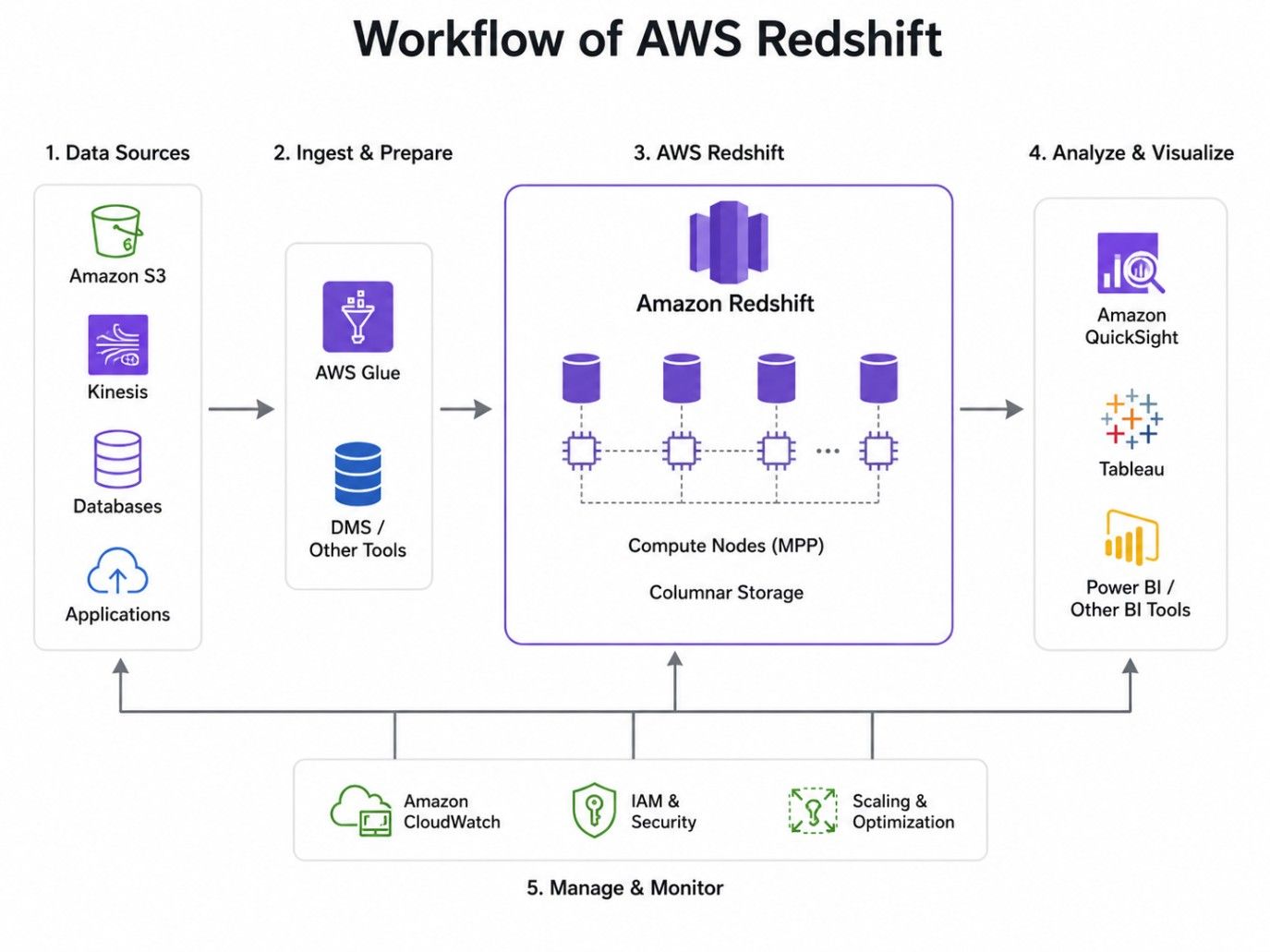
The workflow usually includes these stages:
This approach helps organizations analyze massive datasets while reducing processing time.
Must read: AWS Architecture Explained: Function, Components, Deployment Models & Advantages
Data Science Courses to upskill
Explore Data Science Courses for Career Progression
IIIT Bangalore
Executive Post Graduate Certificate in Data Science & AIPlacement Assistance
Understanding the architecture makes it much easier to see why AWS Redshift delivers fast analytical performance. You don't need to know every internal component to start using it, but learning the basic building blocks helps you design better data warehouses and troubleshoot performance issues later.
At its core, AWS Redshift separates query coordination, data processing, and storage. This division allows different parts of the system to work independently while handling large workloads efficiently.
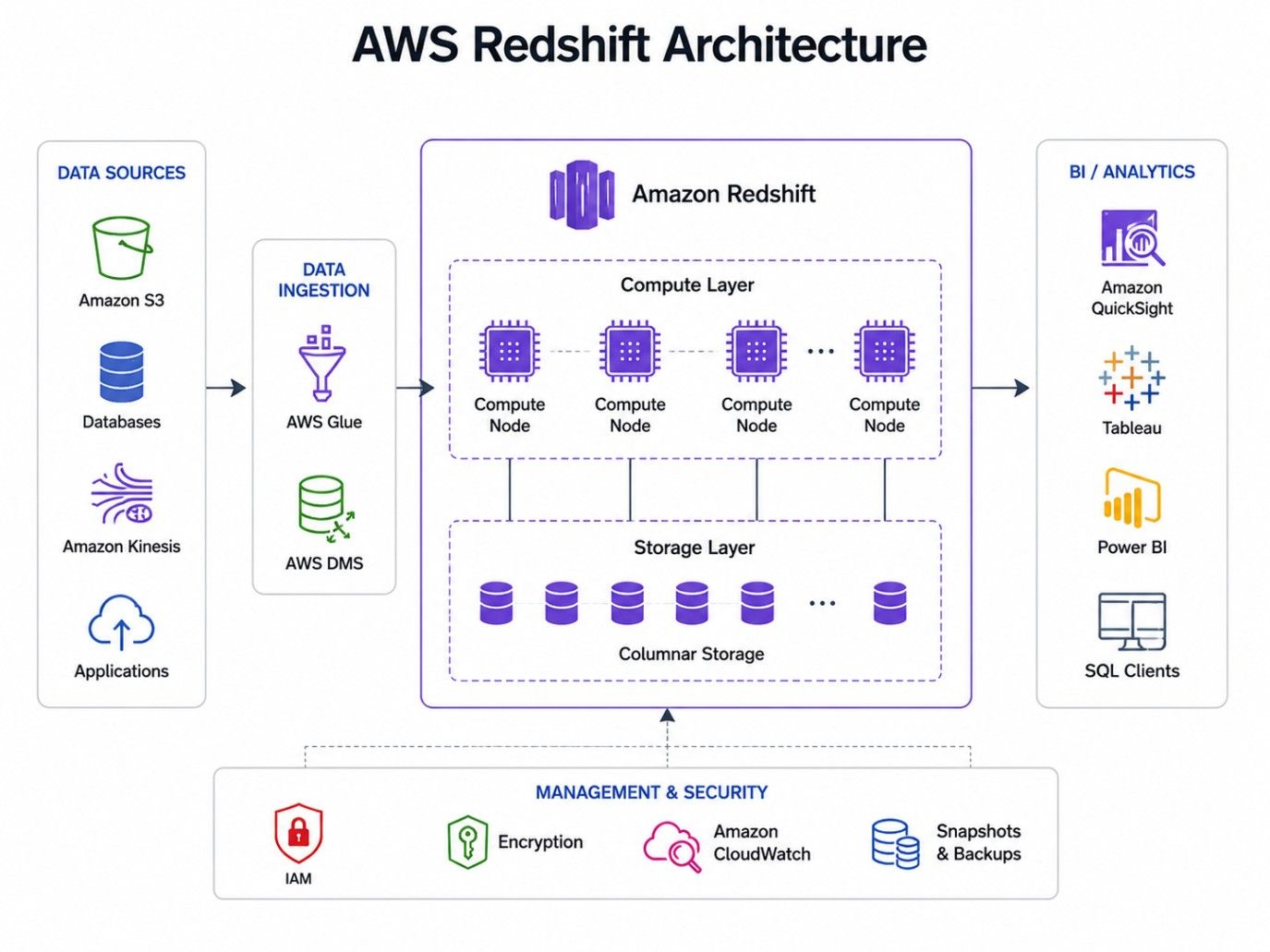
Every Redshift cluster has a leader node. Think of it as the coordinator.
It doesn't store your business data. Instead, it receives SQL queries from users, creates an execution plan, distributes tasks to compute nodes, and combines the results before returning them to the user.
Without the leader node, every compute node would have to decide what to process. That would slow everything down.
This is where the real work happens.
Compute nodes store the actual data and execute the SQL queries assigned by the leader node. Since multiple compute nodes work simultaneously, large analytical queries finish much faster than they would on a single server.
As your data grows, you can increase the number of compute nodes to improve performance and storage capacity.
Also read : AWS Tutorial for Beginners Is Out. Here’s What’s In
Modern workloads don't always need large amounts of local storage.
Redshift Managed Storage automatically moves less frequently accessed data to Amazon S3 while keeping frequently used data on high-performance local storage. This gives you the flexibility to grow storage without manually managing disks or hardware.
It also helps reduce costs because storage and compute resources aren't tightly coupled.
Traditional data warehouses often require storage and compute resources to scale together.AWS Redshift takes a different approach.
Storage can grow independently while compute resources can be adjusted based on workload demands. This flexibility allows organizations to optimize costs without sacrificing performance.
AWS offers two deployment options.
Provisioned |
Serverless |
| Fixed cluster size | No infrastructure management |
| Best for predictable workloads | Best for variable workloads |
| Manual scaling | Automatic scaling |
| Greater configuration control | Faster setup |
Provisioned clusters are ideal when workloads remain relatively stable throughout the day.
Serverless is better for organizations that experience changing workloads and don't want to manage infrastructure.
Also read : 15 Best AWS Project Ideas for Beginners You Must Try in 2026!
Before data can be analyzed, it must be loaded into AWS Redshift. The platform supports multiple loading methods, allowing businesses to import data efficiently from various sources based on their analytics needs.
1. Using the COPY Command
The COPY command is the fastest way to load large datasets into AWS Redshift. It imports data from Amazon S3, Amazon EMR, DynamoDB, or remote hosts using parallel processing for high-speed performance.
2. Loading Data from Amazon S3
Amazon S3 is the most common data source for AWS Redshift. It supports file formats such as CSV, JSON, Parquet, and ORC, making it ideal for data lakes and batch data loading.
3. Using AWS Glue
AWS Glue automates ETL (Extract, Transform, and Load) tasks. It cleans, transforms, and loads data into AWS Redshift while reducing manual effort and improving data quality.
4. Streaming Data
For near real-time analytics, AWS Redshift integrates with streaming services like Amazon Kinesis. This enables continuous data ingestion for monitoring dashboards, fraud detection, and live reporting.
5. ETL Pipelines
Many organizations use ETL pipelines to prepare data before analysis. A typical workflow includes:
Choosing the right data loading method improves performance and simplifies your analytics workflow. Here's a quick comparison of the available options.
Method |
Best For |
Main Advantage |
| COPY Command | Large batch imports | High-speed parallel loading |
| Amazon S3 | Data lakes and file storage | Simple integration |
| AWS Glue | Automated ETL | Minimal manual effort |
| Streaming Data | Real-time analytics | Continuous updates |
| ETL Pipelines | Enterprise workflows | Centralized data processing |
Choosing the right loading method depends on your business needs. Small organizations may only need scheduled imports from Amazon S3, while large enterprises often combine streaming services, ETL pipelines, and automated workflows to keep their analytics environment up to date.
Also read: Types of Cloud Computing & Cloud Computing Services
Business data often contains sensitive financial records, customer details, and operational information. Protecting that data is essential.
AWS Redshift includes multiple security features that help organizations control access, encrypt information, and monitor activity without adding unnecessary complexity.
Encryption protects information while it's stored and while it's moving across networks.
AWS Redshift supports encryption at rest using AWS Key Management Service (KMS) or hardware security modules. It also supports SSL encryption to secure data during transmission between applications and the warehouse.
This reduces the risk of unauthorized access.
Not everyone should have the same permissions.AWS Identity and Access Management (IAM) allows administrators to define who can access AWS Redshift and what actions they can perform.
Permissions can be assigned based on users, teams, or application roles.
AWS Redshift operates within Amazon Virtual Private Cloud (VPC).
Organizations can isolate clusters from public networks, create firewall rules, and restrict inbound traffic to trusted systems. Security groups add another layer of protection by controlling network access.
This setup helps reduce exposure to external threats.
Monitoring activity is just as important as preventing unauthorized access.
AWS Redshift records connection attempts, user activities, and database operations through audit logging. These logs support compliance requirements while helping administrators investigate unusual activity.
Many industries must follow strict regulatory standards. Strong security isn't achieved through a single feature. It comes from combining encryption, controlled access, network protection, and continuous monitoring into one security strategy.
AWS Redshift supports compliance programs such as:
These certifications help organizations build secure analytics environments while meeting industry regulations.
Build on your AWS Redshift knowledge with upGrad's Master of Science in Data Science from Liverpool John Moores University. Gain hands-on experience in data science, machine learning, cloud technologies, and real-world analytics to prepare for in-demand careers.
Subscribe to upGrad's Newsletter
Join thousands of learners who receive useful tips
Not every dataset needs to be stored inside a data warehouse.Some organizations keep historical or infrequently accessed data in Amazon S3 because it's more cost-effective. AWS Redshift Spectrum allows users to analyze that external data without loading it into Redshift tables first.
This expands analytical capabilities while reducing storage costs.
AWS Redshift Spectrum is a feature that lets you run SQL queries directly on data stored in Amazon S3.
Instead of importing every file into the warehouse, Spectrum reads external datasets while combining them with information already stored in AWS Redshift.This saves both time and storage space.
Spectrum uses external tables that reference data stored in Amazon S3.
When a SQL query runs, AWS Redshift automatically retrieves only the required data, processes it, and combines the results with internal warehouse tables if needed.
The process happens behind the scenes, making it feel like you're querying a single database.
Spectrum offers several practical advantages.
Organizations can continue expanding their data lake without sacrificing analytical capabilities.
Spectrum is useful when:
AWS Redshift stores and analyzes warehouse data, while AWS Redshift Spectrum extends those analytics to external data stored in Amazon S3. Together, they allow organizations to build flexible and cost-effective analytics platforms without moving every dataset into the warehouse.
Here is the key difference :
AWS Redshift |
AWS Redshift Spectrum |
| Stores data inside the warehouse | Queries data stored in Amazon S3 |
| Best for frequently accessed analytics | Best for external or historical datasets |
| Managed warehouse storage | External table architecture |
| Optimized for internal datasets | Extends analytics to the data lake |
If you're learning through this AWS Redshift tutorial, remember one key difference.
Also read: Top 20+ Cloud Computing Projects GitHub For Beginners (With Source Code)
AWS Redshift is built for organizations that need to analyze large volumes of data quickly. It's an excellent choice for reporting, business intelligence, and data warehousing, but it isn't designed for high-volume transactional applications.
AWS Redshift performs best for analytical workloads that process large datasets. It helps businesses generate reports and insights much faster than traditional databases.
Use AWS Redshift for:
AWS Redshift isn't suitable for transactional applications. If your workload involves frequent inserts, updates, or real-time transactions, a relational database is a better option.
Use another database when you need:
Also read: Top 9 Cloud Computing Examples
A cloud data warehouse isn't useful simply because it stores data. It needs to process queries quickly, integrate with other services, protect sensitive information, and support growing workloads without becoming difficult to manage.
Its features are designed to reduce administrative work while improving analytical performance.
AWS Redshift Feature |
Description |
| High-Performance Analytics | Processes large datasets quickly using columnar storage and MPP for faster query execution. |
| SQL Compatibility | Supports standard SQL, making it easy for analysts and developers to run queries. |
| Automatic Scaling | Scales resources automatically based on workload demands to maintain performance. |
| Data Sharing | Shares data securely across teams without creating duplicate copies. |
| Machine Learning Integration | Connects with Amazon SageMaker to prepare and analyze data for ML workloads. |
| Backup and Recovery | Creates automatic backups and supports point-in-time recovery for data protection. |
| AWS Ecosystem Integration | Integrates with services like Amazon S3, AWS Glue, QuickSight, Lambda, Kinesis, and DMS for seamless analytics workflows. |
The combination of these features explains why AWS Redshift is widely adopted for enterprise analytics. It isn't just a storage platform. It provides the performance, flexibility, and integrations needed to analyze growing datasets while keeping operational overhead low.
Also Read: Top 20 Uses of AWS: How Amazon Web Services Powers the Future of Cloud Computing
Choosing a data warehouse isn't only about technical capabilities. It also depends on cost, performance, maintenance, and how easily teams can use the platform.
AWS Redshift offers several practical benefits that make it suitable for organizations handling large-scale analytics.
AWS Redshift Benefit |
Description |
| Faster Query Performance | Uses columnar storage and MPP to execute complex queries quickly, reducing report generation time. |
| Cost Efficiency | Eliminates the need for on-premises infrastructure, helping organizations pay only for the resources they use. |
| Easy Administration | Automates backups, updates, and maintenance, reducing administrative effort. |
| Flexible Growth | Scales compute and storage as data grows without major infrastructure changes. |
| Strong AWS Integration | Integrates seamlessly with AWS services for data storage, analytics, security, and machine learning. |
One of the easiest ways to understand AWS Redshift is to see how businesses apply it in real scenarios. Organizations across industries use it to centralize data, improve reporting, and make faster business decisions.
Although the industries differ, the overall goal remains the same. Bring together large volumes of data and analyze them efficiently.
Use Case |
How AWS Redshift Helps |
| Business Intelligence | Combines data from multiple sources to create dashboards, reports, and business performance insights. |
| Retail Analytics | Analyzes sales trends, inventory, customer behavior, and demand forecasts for better business decisions. |
| Financial Analytics | Supports financial reporting, transaction analysis, risk assessment, and forecasting using large datasets. |
| Healthcare Analytics | Centralizes patient and operational data for reporting while supporting security and compliance requirements. |
| Marketing Analytics | Consolidates marketing and sales data to measure campaign performance, ROI, and customer engagement. |
| SaaS Analytics | Tracks user activity, feature adoption, subscription renewals, customer retention, and product usage trends. |
Many organizations use AWS Redshift to process large datasets and generate faster business insights. Its ability to handle complex analytical queries makes it valuable across different industries.
Here are a few real-world examples:
Learning how to use AWS Redshift effectively also means understanding what to avoid. Small configuration mistakes can reduce performance and increase storage costs over time.
Fortunately, most of these issues are easy to prevent.
Some common mistakes include:
Avoiding these mistakes helps organizations maintain consistent performance as data volumes grow.
Good architecture and thoughtful planning often make a bigger difference than simply adding more computing resources. Following proven best practices helps improve performance while keeping operational costs under control.
If you're completing this AWS Redshift tutorial, these recommendations provide a solid foundation for production environments.
Some practical best practices include:
AWS Redshift has become one of the leading cloud data warehouse solutions because it combines high-performance analytics with managed infrastructure. Organizations can analyze massive datasets, build interactive dashboards, and generate business insights without managing complex hardware or database environments.
Whether you're exploring what is Redshift in AWS, planning your first analytics project, or working through an AWS Redshift tutorial, understanding its architecture, features, security, and practical use cases provides a strong foundation. As your data grows, AWS Redshift offers the flexibility to support modern analytics while integrating smoothly with the broader AWS ecosystem.
Ready to start your journey? Book a free consultation with upGrad today to find the best path for your career.
AWS Redshift is used for analyzing large volumes of data stored across different sources. Businesses use it for data warehousing, reporting dashboards, customer analytics, financial analysis, and machine learning workloads. It helps teams run complex queries on large datasets faster than traditional databases designed for transactional operations.
AWS Redshift uses SQL to query and manage data, but it is not a traditional relational database. It is a cloud data warehouse built for analytical workloads. While you can write SQL queries similar to other databases, Redshift is optimized for processing large-scale data analysis rather than frequent application transactions.
AWS Redshift is not an ETL tool itself. It works as a data warehouse where processed data is stored and analyzed. ETL tools such as AWS Glue, Apache Airflow, or third-party platforms can extract and transform data before loading it into Redshift for reporting and analytics.
AWS Redshift and Amazon Athena serve different analytics needs. Redshift is a dedicated data warehouse designed for frequent queries on structured data, while Athena is a serverless query service that analyzes data directly in Amazon S3. Your choice depends on data size, query frequency, performance needs, and cost preferences.
AWS Redshift improves analytics performance through features such as columnar storage, data compression, massively parallel processing, and optimized query execution. Instead of processing data sequentially, it distributes workloads across multiple nodes, allowing teams to analyze billions of records and generate reports faster.
Traditional databases are mainly designed for storing and retrieving application data, while Amazon Redshift focuses on analytical processing. Redshift handles complex queries across large datasets, such as sales trends or customer behavior analysis, whereas operational databases usually support everyday tasks like transactions and application workflows.
Beginners can start with an AWS Redshift tutorial that covers data warehouse concepts, cluster creation, SQL queries, loading sample datasets, and performance optimization. Practicing with real datasets helps you understand how Redshift connects with services like Amazon S3, AWS Glue, and business intelligence tools.
AWS Redshift supports near real-time analytics by integrating with services that continuously stream and process data. For example, organizations can use Amazon Kinesis, AWS Glue, or streaming pipelines to move updated data into Redshift. However, workloads requiring millisecond-level responses may need specialized real-time databases.
AWS Redshift architecture includes clusters, nodes, databases, tables, and query processing layers. A cluster contains compute nodes that process queries and store data. Understanding these components helps you design better warehouse solutions, manage workloads efficiently, and choose the right configuration for your analytics requirements.
AWS Redshift can support machine learning workflows by connecting analytics data with machine learning services such as Amazon SageMaker. Teams can prepare datasets, run analysis, and build predictive models using data stored in Redshift. This reduces the need to move large datasets between multiple platforms.
Redshift in AWS can be suitable for small businesses that need scalable analytics without managing physical infrastructure. However, the right choice depends on data volume, query requirements, and budget. Smaller teams with limited analytics needs may find serverless options or simpler databases more practical initially.
699 articles published
Sriram K is a Senior SEO Executive with a B.Tech in Information Technology from Dr. M.G.R. Educational and Research Institute, Chennai. With over a decade of experience in digital marketing, he specia...
Speak with Data Science Expert
By submitting, I accept the T&C and
Privacy Policy
Start Your Career in Data Science Today
Top Resources
Master's Degree
18 Months
Executive Diploma
12 Months
Bootcamp
6 Months