Containerization Explained: What It Is, How It Works, Benefits, and Use Cases
By upGrad
Updated on Jul 13, 2026 | 7 min read | 1.84K+ views
Share:

All courses
Certifications
More
By upGrad
Updated on Jul 13, 2026 | 7 min read | 1.84K+ views
Share:
Table of Contents
Key takeaway
This blog breaks down the containerization meaning in, how it actually works under the hood, and where it fits compared to virtualization.
Explore upGrad's Data Science programs to build practical skills in containerization, Docker, Kubernetes, cloud-native application development, DevOps, CI/CD, microservices architecture, and modern deployment practices.
Popular Data Science Programs
Imagine you've built an application on your computer. It runs perfectly there, but once it's moved to another machine, it suddenly stops working because the operating system, libraries, or software versions are different. Frustrating, isn't it?
That's exactly the problem containerization was designed to solve.
Containerization is a software deployment method that packages an application along with its code, runtime, libraries, configuration files, and dependencies into a single lightweight unit called a container. Since everything the application needs is bundled together, it behaves consistently across different computing environments.
It works anywhere the container platform is available. Unlike traditional deployment, where applications depend heavily on the underlying operating system, containers create isolated environments. Each container runs independently while sharing the host operating system's kernel, which keeps them lightweight and efficient.
The concept wasn't created by chance. It addressed a long-standing deployment challenge where applications failed after being moved between environments due to missing libraries, incompatible runtimes, or different system configurations. Docker containerization helped solve this issue by standardizing how applications are packaged and distributed.
Before containers became popular, software teams often faced a common problem.
A developer would build an application that worked perfectly during development. After deployment, the application failed because the production environment was configured differently. Small differences caused big issues.
These differences included:
Containerization removes these inconsistencies by packaging everything together.
Traditional Deployment |
Containerization |
| Depends on server configuration | Includes everything the application needs |
| Environment differences cause failures | Runs consistently across environments |
| Harder to migrate applications | Easy to move between systems |
| Slower deployments | Faster deployments |
| Higher maintenance effort | Simplified deployment process |
Also read: What is Docker Container? Function, Components, Benefits & Evolution
Free Courses
This whole containerization process works through a layered structure, and each layer plays a specific role.
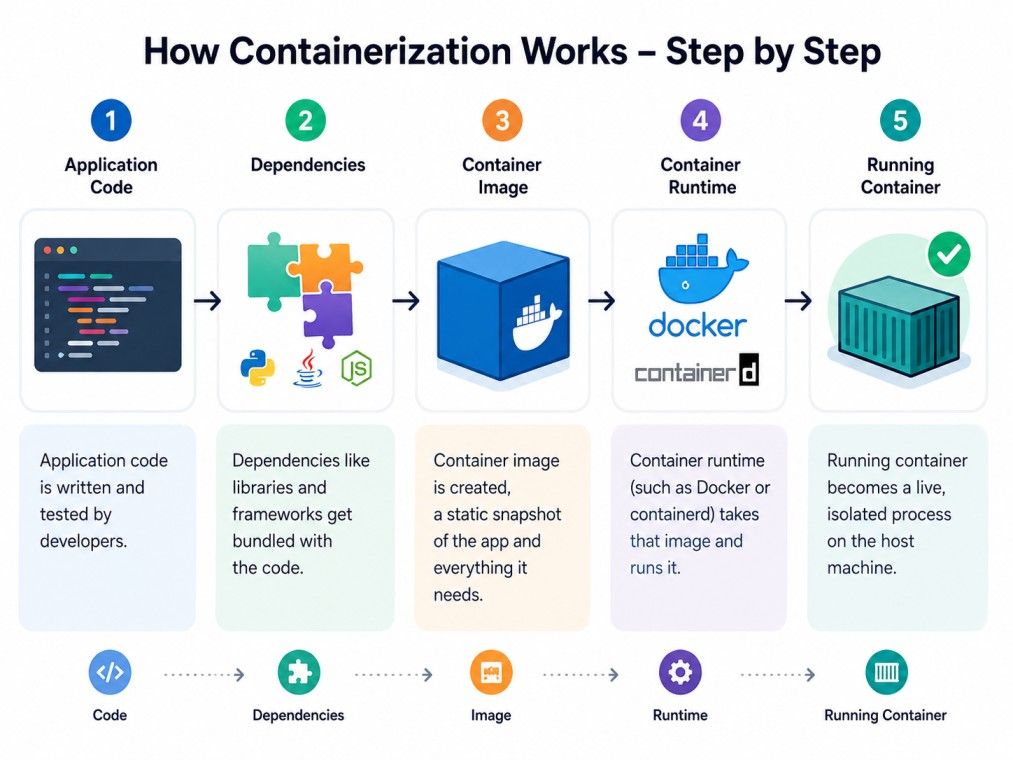
Once built, that image doesn't change. Need to update the app? Build a new image version. This keeps deployments consistent and rollbacks simple, since older images stay available if something breaks.
Here are the key components of containerization:
Component |
What It Does |
| Container Image | A packaged, read-only template of the app and its dependencies |
| Container | A running instance of that image |
| Container Runtime | Software that runs and manages containers (Docker, containerd) |
| Registry | A storage hub for container images (Docker Hub, for example) |
| Host OS | The operating system that containers share and run on top of |
Notice how containers share the host's operating system kernel. That's the biggest structural difference from virtual machines, and it's why containers start in seconds instead of minutes.
Do read: Introduction to Docker: What is, Architecture, Workflow
Data Science Courses to upskill
Explore Data Science Courses for Career Progression
IIIT Bangalore
Executive Post Graduate Certificate in Data Science & AIPlacement Assistance
Understanding the architecture makes containerization much easier to grasp. Once you see how each component fits together, the deployment process starts to make sense.
Unlike traditional software deployment, containers don't carry an entire operating system. They share the host operating system while keeping each application isolated. That balance between efficiency and isolation is what makes the architecture so effective.
A typical containerized environment consists of several layers that work together.
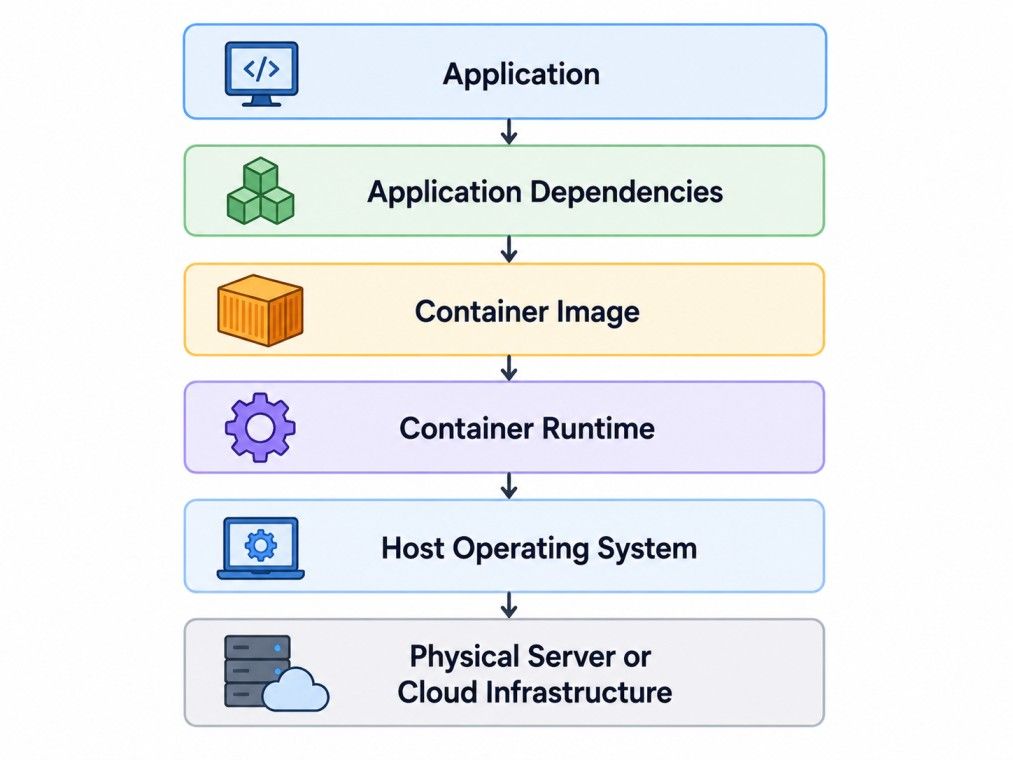
Each layer has a distinct responsibility.
Layer |
Purpose |
| Application | The software users interact with |
| Dependencies | Libraries, frameworks, and packages required by the application |
| Container Image | Packages the application and all its dependencies into a reusable unit |
| Container Runtime | Creates and runs containers from the image |
| Host Operating System | Shares its kernel with running containers |
| Infrastructure | Physical server, virtual machine, or cloud instance that hosts containers |
This layered design keeps applications portable. Instead of rebuilding software for every environment, teams simply move the container image wherever it's needed.
People mix these two up constantly, since both isolate applications. But they do it in completely different ways.
Virtualization runs multiple virtual machines on one physical server, and each VM carries its own full operating system. Containers skip that overhead entirely by sharing the host OS between them.
Containerization |
Virtualization |
| Shares host OS kernel | Runs a separate OS per VM |
| Starts in seconds | Takes minutes to boot |
| Lightweight, low overhead | Heavier, more resource use |
| Best for microservices, CI/CD | Best for running different OS types on one machine |
| Isolation at process level | Isolation at hardware level |
If you need to run Windows and Linux workloads side by side, virtualization still makes sense. If you're deploying microservices at scale, containerization usually wins on speed and cost. Many companies actually run containers inside VMs, combining both approaches.
Explore upGrad's Executive Post Graduate Certificate Programme in Data Science & AI from IIIT Bangalore to build practical skills in Python, SQL, machine learning, deep learning, generative AI, predictive analytics, and real-world data science through hands-on projects and industry case studies.
Docker didn't invent containers, but it made them accessible. Before Docker showed up in 2013, container technology existed mostly in complex Linux-specific tools that few developers touched.
Docker simplified the whole workflow of packaging apps this way. Write a Dockerfile, build an image, run it anywhere Docker is installed. That's the pitch, and it mostly holds up.
A few other tools matter here too.
Technology |
Role in Containerization |
| Kubernetes | Manages, deploys, and scales containers across clusters of machines. |
| containerd | A lightweight container runtime that powers Docker under the hood. |
| Podman | A daemonless alternative to Docker that offers a similar container workflow. |
You don't need to master all of these at once. Most beginners start with Docker, get comfortable building images, and move to Kubernetes once they're managing more than a handful of containers.
Why do so many engineering teams default to containers now? Why have organizations across industries embraced containerization?
Because it solves practical deployment problems while improving development speed and infrastructure efficiency. It's not just about moving applications between servers. It's about making software delivery faster, more reliable, and easier to manage.
Benefit |
Why It Matters |
| Portability | Runs the same across dev, test, and production |
| Faster deployment | Images spin up in seconds, not minutes |
| Resource efficiency | No duplicate OS overhead per app |
| Consistency | Eliminates environment mismatch bugs |
| Scalability | Easy to spin up more instances under load |
| Isolation | Each container runs independently, limiting the blast radius of failures |
Faster deployment alone changes how teams work. A developer can test a fix locally, push it, and see it running in production within minutes instead of waiting on a lengthy provisioning process.
Do read: Docker vs Container: Difference Between Docker and Container
Containerized applications isn't limited to large technology companies. Businesses of all sizes use it to simplify application deployment, improve consistency, and reduce operational overhead.
The best use case depends on the application's architecture and business goals. Some organizations adopt containers from day one. Others introduce them gradually while modernizing existing systems.
Let's look at where containerization delivers the most value.
Cloud-native applications are designed specifically for cloud environments. Instead of relying on fixed servers, they run across distributed infrastructure where workloads can move between environments as demand changes. Containerization fits naturally into this model because applications remain portable.
For example, a video streaming platform can deploy identical application containers across multiple cloud regions during peak viewing hours without rebuilding the software for each location.
Modern applications are often divided into smaller independent services. A food delivery platform, for example, might separate:
Each service runs inside its own container. If the payment service needs an update, developers don't have to redeploy the entire application. They only replace that individual container. That's a major reason containerization has become closely associated with microservices.
Many modern websites and web applications rely on containers. Typical examples include:
Because each deployment uses the same container image, updates become more predictable and downtime stays minimal.
Software development moves quickly. Teams might release new features several times each week, or even several times a day. Containers make automated testing and deployment easier because every testing environment starts from the same application image. That consistency reduces deployment failures and speeds up release cycles.
Development teams often struggle with inconsistent environments. One developer uses a newer software library. Another installs a different runtime version. Suddenly, the application behaves differently on each machine. Containers solve this problem. Everyone works from the same image, which creates identical development environments across the team.
Must read: What is Client Server Architecture? Components, Types, Examples Explained
No technology is perfect, and this approach has real trade-offs worth knowing before you commit to it. Containerization offers clear operational benefits, but it also introduces challenges that organizations should understand before adopting it widely.
Knowing both sides leads to better architectural decisions.
Advantages |
Disadvantages |
| Fast startup and shutdown | Persistent storage setup requires extra planning |
| Lower infrastructure costs | Container networking can become complex as applications grow |
| Consistent behavior across environments | Security requires active management because containers share the host kernel |
| Easier scaling to handle changing workloads | Teams face a learning curve when using orchestration tools like Kubernetes |
That security point deserves attention. Because containers share the host kernel, a vulnerability there can affect every container running on it. Regular image scanning and patching aren't optional. They're part of the job.
Do read: 40 DevOps Examples: Exploring Key DevOps Use Cases
Choosing the right deployment model depends on the application's architecture, update frequency, infrastructure, and long-term maintenance requirements.
Will portability, consistency, and rapid deployment improve the way your application is built and managed? If the answer is yes, containerization is probably worth considering.
Use Containerization When |
Use Virtual Machines When |
| Building cloud-native applications | Running legacy enterprise applications |
| Developing microservices architectures | Complete operating system isolation is required |
| Deploying frequently updated software | Applications need to run multiple operating systems |
| Managing multi-cloud deployments | Infrastructure has strict compliance requirements |
| Creating development and testing environments | Legacy dependencies aren't compatible with containers |
| Scaling applications quickly to meet demand | Full virtual machine environments are necessary |
If you're building something that needs to scale, deploy often, or run across multiple environments, it's worth the setup cost. If you're running a simple, low-traffic app that rarely changes, the added complexity might not pay off.
Ask a few practical questions to yourself.
The answers often make the decision much clearer. Here is a decision guide on how you can take the correct decision:
Scenario |
Containerization Recommended? |
Why |
| Modern web application | Yes | Fast deployment and easy scaling |
| Microservices application | Yes | Independent service management |
| Development environment | Yes | Consistent setup across teams |
| Legacy enterprise software | Usually No | Existing dependencies may require virtual machines |
| Single desktop application | Usually No | Containers may add unnecessary complexity |
| High-frequency software releases | Yes | Faster deployment process |
Containerization solves a problem developers have dealt with for years, getting software to run the same way everywhere. By packaging an app with its dependencies, it removes the guesswork from deployment and cuts down on wasted infrastructure.
Whether you're weighing containerization vs virtualization for a new project or trying to understand Docker for the first time, the core idea stays simple. Package once, run anywhere, scale as needed. Containerize one service, learn how images and runtimes behave, then build from there.
Ready to start your journey? Book a free consultation with upGrad today to find the best path for your career.
No. Docker containerization is one implementation of containerization, not the technology itself. Containerization is the broader concept of packaging applications with their dependencies, while Docker is a platform that helps developers build, run, and manage those containers. Other container runtimes and tools are also available.
A container image is a read-only package that stores an application's code, dependencies, and runtime. A container is the running instance created from that image. One image can launch multiple independent containers, making application deployment consistent across different environments.
Yes. Containerization works across Windows and Linux environments, provided the host supports a compatible container runtime. The same container image can also run on on-premises servers and public cloud platforms, making application deployment more consistent and portable.
Traditional deployments rely heavily on server configuration, which often creates compatibility problems. Containerization packages everything an application needs into a portable unit, reducing environment-related errors, speeding up deployments, and making collaboration between development and operations teams much easier.
Yes. A single host can run many containerized applications as long as sufficient CPU, memory, and storage resources are available. Since containers share the host operating system instead of running separate operating systems, they consume significantly fewer resources than traditional virtual machines.
Start with operating system basics, command-line usage, networking, and application deployment concepts. Then learn how container images, registries, and runtimes work before exploring Docker or orchestration platforms. Understanding these fundamentals makes advanced container technologies much easier to learn.
In the debate around virtualization vs containerization, containers usually start faster and use fewer system resources because they share the host operating system. Virtual machines offer stronger isolation but require a complete guest operating system, which increases resource usage and startup time.
Popular containerization examples include e-commerce websites, streaming platforms, banking applications, development environments, and APIs. Many organizations also use containers for automated testing and software delivery because they provide consistent behavior across development, staging, and production systems.
Yes. Since applications are packaged with their dependencies, teams can deploy updated container images without manually configuring every server. This simplifies software releases, reduces deployment errors, and makes rolling back to an earlier version much quicker if issues occur.
The containerization meaning goes beyond packaging software. It represents a standardized way to build, distribute, and run applications consistently across different environments. This approach improves portability, simplifies deployment, and helps development teams deliver software more reliably.
Not always. Containerization delivers the greatest value for applications that are updated frequently, deployed across multiple environments, or expected to scale over time. Small, stable applications with simple deployment needs may continue running efficiently using traditional deployment methods or virtual machines.
1200 articles published
We are an online education platform providing industry-relevant programs for professionals, designed and delivered in collaboration with world-class faculty and businesses. Merging the latest technolo...
Speak with Data Science Expert
By submitting, I accept the T&C and
Privacy Policy
Start Your Career in Data Science Today
Top Resources
Master's Degree
18 Months
Executive Diploma
12 Months
Bootcamp
6 Months