Git Rebase vs Merge: Which One Should You Use?
By Rahul Singh
Updated on Jun 30, 2026 | 10 min read | 4.61K+ views
Share:

All courses
Certifications
More
By Rahul Singh
Updated on Jun 30, 2026 | 10 min read | 4.61K+ views
Share:
Table of Contents
Git rebase and Git merge are two Git commands used to combine changes from different branches. The main difference is how they handle commit history. Git Merge preserves the existing history by creating a new merge commit, while Git Rebase rewrites the commit history by replaying your commits on top of the latest branch.
In this blog, you will get a full breakdown of git rebase vs merge. We will compare them side by side, walk through what each command does under the hood, look at real examples, and cover when you should reach for one over the other.
Want to strengthen your software development and Git skills while learning data-driven technologies? Explore upGrad's Data Science Course and build practical expertise in programming, version control, machine learning, and AI for real-world projects.
Popular Data Science Programs
Before going deep into definitions, it helps to see both commands side by side. This table covers the ten parameters developers care about most when comparing git rebase vs merge.
Parameter |
Git Rebase |
Git Merge |
| Definition | Moves your branch commits on top of another branch | Combines two branches into a new merge commit |
| Commit history | Linear and clean | Shows the full branching history |
| New commits | Creates new commit hashes for moved commits | Keeps original commit hashes intact |
| Merge commit | No extra commit added | Adds a merge commit (unless fast-forward) |
| Conflict resolution | May need to resolve conflicts multiple times, once per commit | Conflicts are resolved once in a single commit |
| Safety on shared branches | Risky on public or shared branches | Safe to use on shared branches |
| Command used | git rebase branch-name | git merge branch-name |
| Traceability | Harder to trace original branch context | Easy to trace when and where a branch was merged |
| Best for | Cleaning up local feature branches before pushing | Integrating finished features into main branches |
| Complexity for beginners | Slightly harder to understand at first | Easier to understand and reverse if needed |
This table is useful as a quick reference for Git Rebase vs Merge, but understanding why these differences exist matters more. Let's break down each command individually.
Also Read: Top 28 Git Commands for Developers in 2026: Key Benefits and Examples
Free Courses
Git rebase rewrites your commit history by moving a sequence of commits to a new base commit. Instead of creating a merge commit, rebase takes the changes from your branch and replays them one by one on top of another branch.
Say you created a feature branch from main a few days ago. Since then, main has moved forward with new commits. If you run a rebase, Git will:
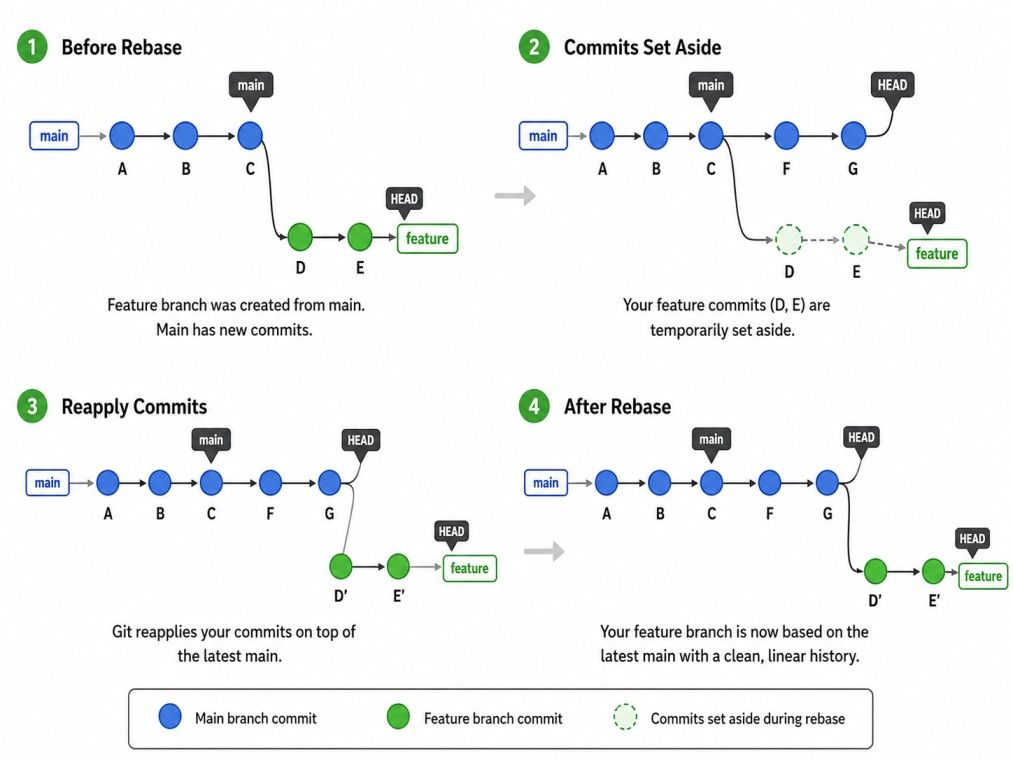
A basic rebase command looks like this:
git checkout feature-branch
git rebase mainGit also offers interactive rebase, which lets you edit, reorder, squash, or delete commits before they are applied. This is commonly used to clean up messy commit history before opening a pull request.
git rebase -i HEAD~5This command lets you interactively rework your last five commits.
Also Read: How to Use GitHub: A Beginner's Guide to Getting Started and Exploring Its Benefits in 2026
Pros:
Cons:
Rebase is a powerful tool, but it comes with responsibility. Once you rebase commits that others have already pulled, you risk creating duplicate commits and confusion across the team.
Ready to build stronger software engineering and data skills? Take the next step with upGrad's Executive Post Graduate Certificate Programme in Data Science & AI from IIITB and Master of Science in Data Science from Liverpool John Moores University to gain hands-on expertise in modern data science and AI.
Data Science Courses to upskill
Explore Data Science Courses for Career Progression
IIIT Bangalore
Executive Post Graduate Certificate in Data Science & AIPlacement Assistance
Git merge takes the changes from one branch and combines them into another. Unlike rebase, it does not rewrite history. Instead, it usually creates a new commit, called a merge commit, that ties the two histories together.
There are two common types of merges in Git.
Also Read: What is Github? and How to Use it?
A basic merge command looks like this:
git checkout main
git merge feature-branchPros:
Cons:
Merge is generally considered the safer default, especially for teams working on the same branches at the same time.
Also Read: 5 Essential Data Science Topics Every Beginner Should Learn
Even though git rebase vs merge often gets framed as a choice between two opposites, the two commands share a fair amount in common.
The real difference is not what they accomplish, but how they get there. Merge preserves history exactly as it happened. Rebase rewrites it to look cleaner. Understanding this distinction is the key to deciding which one fits your situation.
Choosing between git rebase vs merge usually comes down to where you are in your workflow and who else is touching that branch.
Use rebase when:
Use merge when:
A common pattern many teams follow is rebasing local feature branches to keep them tidy, then merging them into main once they are ready. This gives you the best of both approaches.
Also Read: Top 10 Data Science Projects For Resume
The git rebase vs merge decision is not about which command is better. It is about which one fits your situation. Rebase gives you a clean, linear history and works well for personal feature branches. Merge preserves the full picture of how your project evolved and is the safer choice for shared branches.
Once you understand how each command actually works, the choice becomes much easier. Start with merge if you are unsure, and move to rebase once you are comfortable with how Git handles commit history.
Want personalized guidance on Data Science and upskilling? Speak with an expert for a free 1:1 counselling session today.
Use Git Rebase when working on a local feature branch that has not been shared with others. Rebasing keeps your commit history clean and linear, making pull requests easier to review. Avoid rebasing branches that other developers are actively using.
Instead of creating a merge commit, Git Rebase moves your branch's commits to the tip of another branch. This rewrites commit history to produce a straight timeline, making it easier to follow project changes without introducing additional merge commits.
git pull downloads and integrates changes from a remote repository, usually by performing a merge. Git Rebase, on the other hand, reorganizes your local commits on top of the latest branch history. You can also combine them using git pull --rebase.
Neither command is always better. Merge is ideal for shared branches because it preserves the original commit history, while Rebase creates a cleaner timeline for local development. The best choice depends on your team's collaboration and version control workflow.
The key difference in Git rebase vs merge is how commit history is managed. Merge preserves existing history by creating a merge commit, while Rebase rewrites commit history by replaying commits on top of another branch to create a linear timeline.
The basic Git workflow consists of five steps: create or clone a repository, create a branch, make code changes, stage and commit the changes, and finally push them to a remote repository. Teams then review and merge changes through pull requests.
Yes. Since Rebase rewrites commit history, it generates new commit hashes for every rebased commit. This is why developers should avoid using it on public branches where other team members may already depend on the original commits.
Yes. Beginners should first understand how both commands combine branches, then practice each on local repositories. Learning Git rebase vs merge together helps you understand when to preserve history and when to maintain a cleaner commit timeline.
When Git encounters conflicting changes, it pauses the rebase process. Resolve the conflicts manually, stage the updated files using git add, and continue with git rebase --continue. Repeat the process until all commits have been successfully replayed.
Yes. Interviewers frequently ask Git rebase vs merge questions to evaluate your understanding of version control, collaborative development, branching strategies, and conflict resolution. Being able to explain practical use cases is often more valuable than simply defining each command.
Most organizations use feature branches with pull requests. Developers often rebase their local branches before submitting code reviews, while maintainers merge approved changes into the main branch. This approach balances a readable history with safe collaboration across multiple contributors.
98 articles published
Rahul Singh is an Associate Content Writer at upGrad, with a strong interest in Data Science, Machine Learning, and Artificial Intelligence. He combines technical development skills with data-driven s...
Speak with Data Science Expert
By submitting, I accept the T&C and
Privacy Policy
Start Your Career in Data Science Today
Top Resources
Master's Degree
18 Months
Executive Diploma
12 Months
Bootcamp
6 Months