Arduino vs Raspberry Pi: Which One Should You Pick?
By Sriram
Updated on Jun 29, 2026 | 6 min read | 1.58K+ views
Share:

All courses
Certifications
More
By Sriram
Updated on Jun 29, 2026 | 6 min read | 1.58K+ views
Share:
Table of Contents
The primary difference between Arduino vs Raspberry Pi is that Arduino is a microcontroller-based development board designed to run a single program continuously for hardware control and embedded applications, whereas Raspberry Pi is a microprocessor-based single-board computer that runs a full operating system, enabling complex computing, multitasking, and software-driven applications.
That distinction explains why the two platforms excel in different situations. If your project focuses on direct hardware control with low power consumption, Arduino is usually the better fit. If you need computing power, networking, storage, or AI capabilities, Raspberry Pi offers far greater flexibility.
This blog breaks down exactly how these two boards differ, what each one does best, and how to decide which one fits your project or learning goal.
Explore upGrad's Artificial intelligence programs to go beyond Arduino and Raspberry Pi fundamentals. Learn machine learning, computer vision, deep learning, IoT, and intelligent automation through hands-on projects that help you build real-world AI-powered systems and smart applications.
Popular AI Programs
Arduino is a microcontroller. It runs a single program continuously without an operating system. You write the code, upload it to the board, and it starts executing immediately. This makes Arduino highly responsive for controlling sensors, motors, LEDs, and other hardware in real time.
Raspberry Pi is a single-board computer. It runs a full Linux-based operating system, allowing you to install software, browse the internet, connect to Wi-Fi, manage files, and run multiple applications simultaneously. In many ways, it's a compact computer rather than just a development board.
Feature |
Arduino |
Raspberry Pi |
| Board Type | Microcontroller | Single-board computer |
| Operating System | None | Linux-based operating system |
| Primary Purpose | Controls electronic hardware | Runs software applications and operating systems |
| Processor | Microcontroller (ATmega, ARM, etc.) | Multi-core ARM processor |
| Processing Power | Low | High |
| RAM | 2 KB to 8 KB (varies by board) | 1 GB to 8 GB (varies by model) |
| Storage | Built-in flash memory | microSD card storage |
| Programming Languages | C, C++ | Python, C, C++, JavaScript, Java and more |
| Real-Time Performance | Excellent | Limited due to the operating system |
| Power Consumption | Very low | Moderate |
| Typical Price | Rs. 500 to Rs. 2,000 | Rs. 3,500 to Rs. 9,000 |
| Best For | Robotics, sensors, automation, embedded systems | IoT, AI, web servers, media centers, edge computing |
Neither platform is objectively better. They're designed for different jobs. Arduino focuses on reliable hardware interaction and low-power operation, while Raspberry Pi delivers the computing capabilities needed for more complex applications. Choosing the right one depends on what you want your project to accomplish.
Arduino shines when precision timing matters. Think of tasks like reading a temperature sensor every 10 milliseconds, controlling a servo motor at exact intervals, or detecting a button press without lag. That's where Arduino is almost unbeatable.
It doesn't have the distraction of an operating system. Nothing interrupts your code unexpectedly. That predictability is exactly what hardware-level control requires. You don't need a Wi-Fi connection, a screen, or an OS. You just need reliable, fast execution, and Arduino delivers that without fuss.
Also read: Types of AI: Explained with Examples, Learning & Agents
Getting started is also genuinely beginner-friendly. The Arduino IDE is straightforward. You write a setup function and a loop function. That's the structure.
One limitation worth knowing is that Arduino can't do complex computation on its own. If your project involves image recognition, machine learning inference, or running a web server, you'll hit a ceiling fast.
Raspberry Pi is a proper computer. You can run a web server on it. You can do computer vision with a camera module. You can build a home automation hub, a retro gaming console, a desktop workstation, or a media center. Raspberry Pi projects with active communities behind them.
The Raspberry Pi 5, released in late 2023, pushed performance further with a faster processor and more I/O options. For anything that demands real computing horsepower in a compact form, it's hard to beat. That said, it's not perfect for everything. It draws more power than Arduino. It takes longer to boot. And if your project only needs to blink an LED or read a sensor, Raspberry Pi is frankly overkill. You're also paying more for hardware you won't fully use.
Must read: What Is Information Technology?
Free Courses
Both are designed to help users build electronics projects, learn programming, and experiment with embedded systems. Whether you're a student, hobbyist, or professional, either board provides an excellent starting point for hands-on learning.
Both platforms also have large developer communities, detailed documentation, and thousands of free tutorials. That means you'll rarely struggle to find project ideas, troubleshooting guides, or sample code.
Here's a side-by-side look at what Arduino and Raspberry Pi have in common.
Similarity |
Arduino |
Raspberry Pi |
| Open-source ecosystem | Yes | Yes |
| Suitable for beginners | Yes | Yes |
| Supports GPIO pins | Yes | Yes |
| Used for electronics projects | Yes | Yes |
| Can interface with sensors and actuators | Yes | Yes |
| Supports IoT applications | Yes | Yes |
| Large developer community | Yes | Yes |
| Extensive documentation | Yes | Yes |
| Compatible with multiple communication protocols | UART, I2C, SPI | UART, I2C, SPI |
| Supports multiple programming libraries | Yes | Yes |
| Works with popular IDEs and development tools | Yes | Yes |
| Suitable for education and prototyping | Yes | Yes |
Do read: Top 15 Humanoid Robots To Look For
Although the hardware architecture is different, both platforms let you build practical projects such as home automation systems, weather stations, robots, smart sensors, and IoT devices. They also support common electronic components including LEDs, motors, relays, displays, cameras, and environmental sensors.
If you're learning programming, both boards encourage hands-on experimentation. You'll write code, connect hardware, test your ideas, and improve them through trial and error. That's one reason they're widely used in engineering colleges, maker spaces, and research labs.
Another major advantage is community support. Both Arduino and Raspberry Pi have been around for years, so almost every beginner question has already been answered through official documentation, GitHub repositories, YouTube tutorials, and developer forums.
The biggest similarity is simple. Both platforms are excellent learning tools. The choice isn't about which one is better overall. It's about which one matches the type of project you want to build.
AI Courses to upskill
Explore Artificial Intelligence Courses for Career Progression
Yes, and it's actually a common approach in more advanced projects.
Raspberry Pi handles the heavy lifting, like processing data, running a web interface, or connecting to cloud services. Arduino handles real-time hardware interactions, like reading sensors at high speed or driving motors precisely.
They communicate over serial (UART), I2C, SPI, or even USB. It's not complicated once you understand the basics.
Take the next step from embedded systems to enterprise AI with upGrad's Professional Certificate Programme in AI by IIM Kozhikode. Build practical expertise in generative AI, machine learning, AI strategy, automation, and real-world business applications through industry-led learning and hands-on projects.
Your decision should depend on your project's requirements rather than the specifications alone. If your work revolves around sensors, motors, and embedded electronics, Arduino is usually the better choice. If your project needs computing power, networking, or multimedia capabilities, Raspberry Pi is the stronger option. Here's a straightforward way to think about it.
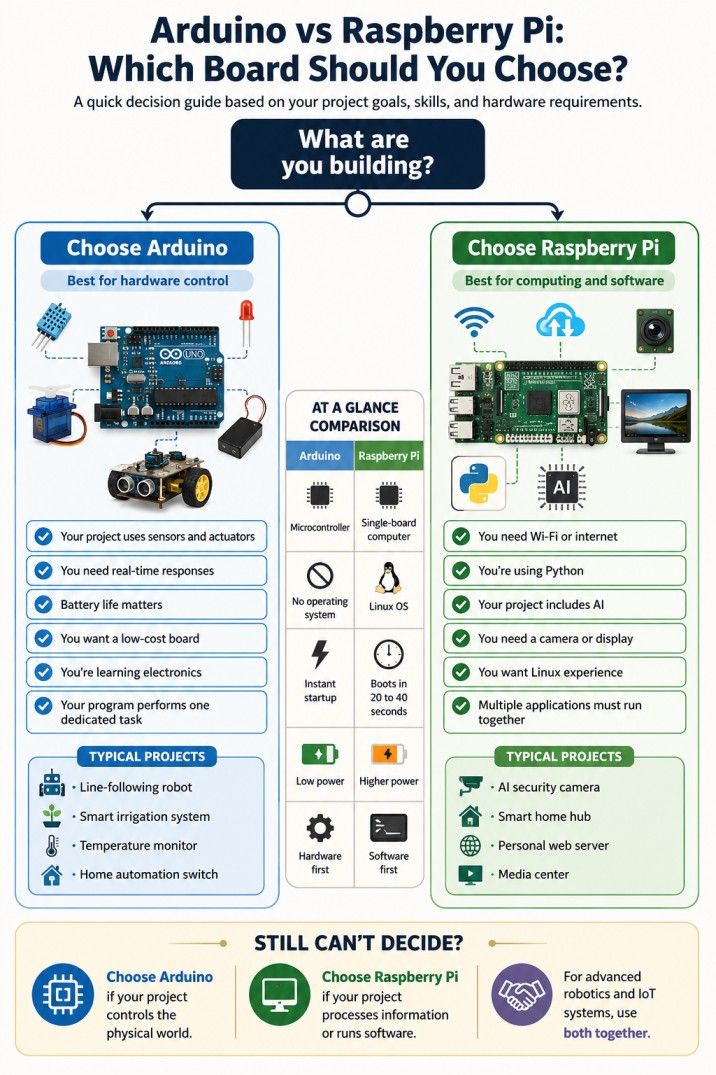
There's no wrong answer as long as you match the board to the task. Buying a Raspberry Pi to blink an LED is wasteful. Using an Arduino to run a live dashboard is pointless.
If you're genuinely unsure, Arduino is the lower-risk starting point. It's cheaper, simpler, and teaches you fundamentals that carry over to other platforms including Raspberry Pi later.
The comparison between arduino vs raspberry pi isn't about finding a winner. It's about choosing the right tool for the job.
Arduino is ideal for projects that interact directly with hardware, consume little power, and require consistent real-time performance. Raspberry Pi works better when your project needs an operating system, internet connectivity, graphical interfaces, AI applications, or multitasking.
If you're beginning your journey in electronics, robotics, IoT, or embedded systems, learning both platforms gives you a broader skill set and opens the door to more advanced projects.
Whether you start with Arduino or Raspberry Pi, the best way to learn is by building. Every sensor you connect and every line of code you write adds practical experience that no tutorial alone can provide.
Ready to start your journey? Book a free consultation with upGrad today to find the best path for your career.
For most AI projects, Raspberry Pi is the better choice because it supports Python, TensorFlow Lite, OpenCV, and other machine learning frameworks. Arduino doesn't have enough memory or processing power for AI inference, although it can work alongside a Raspberry Pi by controlling sensors and actuators in AI-powered systems.
Arduino boards are usually much cheaper, with entry-level models starting around ₹500. Raspberry Pi boards generally start above ₹3,500, and you'll also need accessories like a power adapter, microSD card, and sometimes a monitor or keyboard. The total project cost depends on your application rather than the board alone.
For motor control, obstacle avoidance, and precise movement, Arduino is usually the preferred option because it offers reliable real-time control. Raspberry Pi becomes valuable when your robot needs computer vision, voice recognition, autonomous navigation, or AI processing. Many advanced robots use both boards together.
Arduino projects often include LED blinkers, automatic plant watering systems, line-following robots, and weather stations. Raspberry Pi projects commonly involve media servers, home automation hubs, retro gaming consoles, AI cameras, and personal web servers. Start with a project that matches your learning goal rather than the board's specifications.
Traditional Arduino boards are primarily programmed using C and C++. While some newer boards support MicroPython, Raspberry Pi remains the better platform if your goal is learning Python because it runs a complete operating system and supports standard Python libraries and development tools.
Both platforms support IoT, but they play different roles. Arduino works well as a sensor node that collects and transmits data with low power consumption. Raspberry Pi is better suited as an IoT gateway, dashboard server, or edge computing device that processes and stores data locally.
Not necessarily, but it has a steeper learning curve than Arduino. You'll spend time installing an operating system, configuring storage, and learning basic Linux commands before building projects. If you're comfortable exploring software as well as hardware, Raspberry Pi is an excellent platform for beginners.
Only in specific situations. Arduino is ideal for projects that require hardware control, sensor monitoring, and low power consumption. If your application needs multitasking, internet browsing, databases, multimedia, or advanced computing, Raspberry Pi provides capabilities that Arduino simply isn't designed to handle.
Arduino development mainly relies on C and C++ using the Arduino IDE. Raspberry Pi supports Python, C, C++, JavaScript, Java, Rust, Go, and many other languages because it runs Linux. That flexibility makes Raspberry Pi suitable for both embedded programming and general software development.
If your primary goal is understanding circuits, sensors, and embedded programming, Arduino is the easier first step. If you're more interested in Linux, Python, networking, or software development, Raspberry Pi offers a broader computing experience. Many learners eventually progress from Arduino to Raspberry Pi.
Yes. This is a common architecture in advanced electronics and robotics projects. Arduino handles time-sensitive tasks such as reading sensors or controlling motors, while Raspberry Pi manages data processing, cloud connectivity, dashboards, or AI workloads through interfaces like UART, I2C, SPI, or USB.
730 articles published
Sriram K is a Senior SEO Executive with a B.Tech in Information Technology from Dr. M.G.R. Educational and Research Institute, Chennai. With over a decade of experience in digital marketing, he specia...
Speak with AI & ML expert
By submitting, I accept the T&C and
Privacy Policy
Top Resources
Master's Degree
18 Months
Executive Diploma
12 Months
IIIT Bangalore
Executive Programme in Generative AI & Agentic AI for LeadersIndia’s #1 Tech University
Dual Certification
5 Months