Azure Data Factory: Architecture, Components, Pipelines, Tutorial, and Use Cases
By Rahul Singh
Updated on Jul 03, 2026 | 10 min read | 3.63K+ views
Share:

All courses
Certifications
More
By Rahul Singh
Updated on Jul 03, 2026 | 10 min read | 3.63K+ views
Share:
Table of Contents
TL;DR
This blog explains what is Azure Data Factory, its architecture, core components, pipeline creation process, common use cases, and best practices.
Looking to build practical data engineering and analytics skills? Enroll in upGrad's Data Science Course to gain hands-on experience with Azure Data Factory, ETL and ELT pipelines, cloud data integration, SQL, Python, and real-world projects.
Popular Data Science Programs
Azure Data Factory, often shortened to ADF, is Microsoft's cloud-based data integration service. It lets you create workflows that move data between different systems and transform it along the way.
Think of it as the traffic controller for your data. It does not store data itself. Instead, it connects to storage systems, databases, and applications, then moves and shapes data based on rules you define.
Azure Data Factory supports more than 100 connectors, allowing organizations to integrate data from cloud platforms, on-premises databases, SaaS applications, REST APIs, file systems, and big data platforms.
Organizations often use multiple databases, cloud platforms, ERP systems, and business applications. Each system stores information differently, making data integration difficult.
Azure Data Factory addresses these challenges by providing:
Instead of maintaining multiple custom scripts, organizations can manage all data workflows from one platform.
Also Read: Introduction to Cloud Computing: Concepts, Models, Characteristics & Benefits
This is one of the most common questions people ask. The honest answer is that it supports both.
Because it does not force one pattern, teams can choose whichever approach fits their architecture. This flexibility is part of why so many organizations rely on it for both traditional and modern data warehousing.
Also Read: ETL vs ELT: Key Differences, Use Cases, and How to Choose
Here are the main things ADF can do:
Free Courses
Understanding the architecture helps you see how data actually flows through the system. It is less about memorizing terms and more about picturing the journey data takes from source to destination.
A typical workflow follows these steps:
This orchestration allows organizations to automate thousands of data operations every day.
Also Read: What is Azure? Working, Features, Benefits, and Key Insights
Picture the architecture as five connected layers:
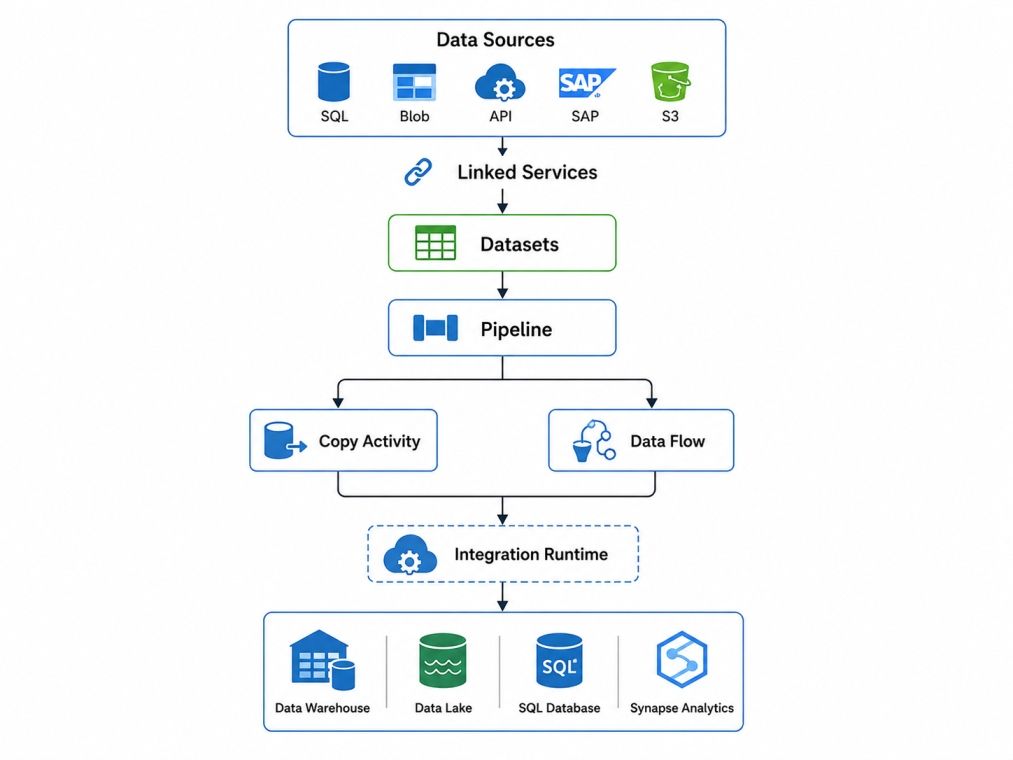
Every Azure Data Factory workflow depends on multiple components working together.
For example, consider an e-commerce company that transfers daily sales data from SQL Server into Azure Synapse Analytics.
Each component has a dedicated responsibility, making pipelines easier to build, manage, and troubleshoot.
Also Read: Data Factory: A Beginner's Guide to Modern Data Integration
Data Science Courses to upskill
Explore Data Science Courses for Career Progression
IIIT Bangalore
Executive Post Graduate Certificate in Data Science & AIPlacement Assistance
This section breaks down every major building block you will work with. Knowing these terms well is the foundation for everything else in ADF, including designing your first azure data factory pipeline.
A pipeline is a logical grouping of activities that together perform a task. Every azure data factory pipeline acts as a container that holds one or more activities in a defined order. For example, one pipeline might copy sales data from an on premises SQL Server to Azure Data Lake, then trigger a transformation job. Pipelines are the top level containers you build and manage in ADF.
Activities are the individual tasks within a pipeline. Every pipeline contains at least one activity.
Common activity types include:
Multiple activities can run sequentially or in parallel depending on business requirements.
Linked services define the connection details for a data source or destination, similar to a connection string. They tell ADF how to authenticate and connect to systems such as Azure SQL Database, Amazon S3, or an on premises file share.
Also Read: What is Azure Active Directory? Features, Security, Pricing, and More
A dataset represents the data that an activity reads or writes.
Examples include:
A dataset references a Linked Service and specifies the exact data location.
The integration runtime, or IR, is the compute infrastructure that executes activities. There are three types: Azure IR for cloud based data movement, Self hosted IR for on premises or private network data, and Azure SSIS IR for running existing SSIS packages in the cloud.
Triggers determine when a pipeline runs. You can use schedule triggers for time based execution, tumbling window triggers for periodic batch processing, or event based triggers that fire when a file appears in storage.
Control Flow manages the execution logic inside pipelines.
It allows you to:
This helps automate complex workflows without writing custom orchestration code.
Also Read: 6 Game Changing Features of Apache Spark [How Should You Use]
Mapping Data Flow is ADF's visual data transformation tool. It runs on managed Apache Spark clusters behind the scenes, so you can design complex transformations like joins, aggregations, and filters without writing Spark code directly.
Copy Activity is the most commonly used activity in Azure Data Factory. It transfers data between supported source and destination systems.
Common scenarios include:
Copy Activity supports both full and incremental data loads.
Azure Data Factory includes an expression language for creating dynamic pipelines.
Expressions help you:
For example, you can automatically create a folder using the current date during every pipeline to run.
Also Read: Oracle Salary in India 2026: Roles, Pay Structure & Career Growth
Component |
Purpose |
Example |
| Pipeline | Groups activities into a workflow | Daily sales data load pipeline |
| Linked Service | Stores connection details | Connection to Azure SQL Database |
| Dataset | Defines the data structure | Customer table in SQL Database |
| Integration Runtime | Executes activities | Self hosted IR for on premises data |
| Trigger | Starts pipeline execution | Schedule trigger running every night |
Ready to build a career in data science and cloud analytics? upGrad's Master of Science in Data Science from Liverpool John Moores University helps you develop practical skills in data engineering, machine learning, cloud technologies, and analytics through industry-relevant projects and an internationally recognized master's degree.
Creating a pipeline in Azure Data Factory involves connecting a data source, defining datasets, adding activities, and scheduling execution.
The process can be completed using the Azure portal without extensive coding.
Once deployment finishes, launch Azure Data Factory Studio.
Select Manage → Linked Services.
Create a new connection for your source system.
Examples include:
Verify the connection before saving.
Also Read: DBMS Tutorial For Beginners: Everything You Need To Know
Configure authentication details.
Typical settings include:
A successful connection confirms Azure Data Factory can access the source.
Create datasets for both the source and destination.
For example:
Source Dataset
Destination Dataset
Datasets define exactly what data the pipeline will process.
Navigate to Author → Pipeline.
Create a new pipeline and give it a meaningful name, such as:
Daily Sales Pipeline
This pipeline becomes the container for all activities.
Drag activities from the toolbox into the pipeline canvas.
A simple ETL pipeline may include:
Configure each activity by selecting the appropriate source and destination datasets.
Choose how the pipeline should run.
Common options include:
Triggers automate recurring workflows.
Also Read: A Complete Roadmap for Database Administrator Skills in 2026
Select Debug to test the pipeline.
After validation, click Publish and then Trigger Now to execute it.
Azure Data Factory displays the execution status in real time.
After execution completes:
Successful validation confirms the pipeline is working as expected.
Building a pipeline is only half the job. Keeping it healthy over time matters just as much, especially as data volumes grow.
1. Monitor pipeline runs
ADF has a built in Monitor tab that shows the status of every pipeline run, including duration, success or failure, and detailed activity logs. This is your first stop whenever something looks off.
2. Debug failed pipelines
When a pipeline fails, click into the specific run to see which activity caused the issue. ADF shows error messages directly, which usually point to authentication problems, schema mismatches, or timeout issues.
Also Read: SQL For Data Science: Why Or How To Master Sql For Data Science
3. Resolve common pipeline errors
Some frequent issues include incorrect linked service credentials, missing permissions on storage accounts, schema drift between source and destination, and timeout errors on large data copies. Most of these can be fixed by reviewing the linked service configuration or adjusting timeout settings.
4. Improve pipeline performance
Common implementation mistakes
Avoid these common issues when building Azure Data Factory pipelines:
Following naming standards and reusable components makes maintenance easier.
Also Read: Best SQL Free Online Course with Certification [2026 Guide]
Subscribe to upGrad's Newsletter
Join thousands of learners who receive useful tips
ADF fits into a wide range of real world scenarios. Here are the most common ones.
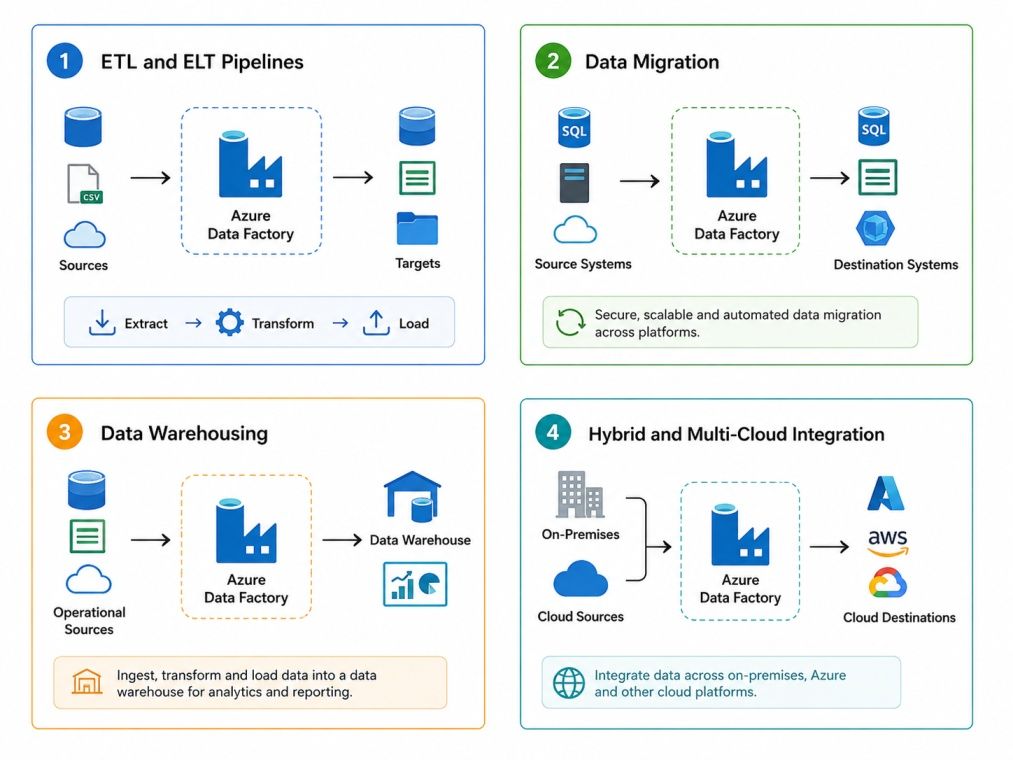
A retail company might use ADF to combine sales data from multiple regional databases into one central warehouse every night. A healthcare provider might use it to move patient records from an on premises system into a secure cloud data lake for analysis, following strict compliance rules.
Industry |
Use Case |
Business Value |
| Retail | Consolidating sales data nightly | Faster, unified reporting |
| Healthcare | Migrating records to the cloud | Secure, compliant data access |
| Finance | Aggregating transaction data | Real time fraud detection support |
| Manufacturing | Connecting IoT sensor data | Predictive maintenance insights |
Different Microsoft data services solve different problems. Choosing the right one depends on your workload and architecture.
Aspect |
Azure Data Factory |
SSIS |
| Deployment | Cloud-native | Primarily on-premises |
| Infrastructure | Fully managed | Requires dedicated SQL Server infrastructure |
| Scalability | Automatic scaling | Depends on available hardware |
| Best For | Cloud and hybrid data integration | Traditional SQL Server ETL |
| Migration Support | Runs SSIS packages using Azure SSIS Integration Runtime | Native SSIS package execution |
Also Read: Top 14 SSIS Interview Questions and Answer [For Beginners & Answers]
Aspect |
Azure Data Factory |
Azure Synapse Pipelines |
| Primary Focus | Enterprise data integration | Data integration within Synapse workspace |
| Analytics | Connects to analytics services | Built-in analytics and warehousing |
| Workspace | Standalone service | Integrated with Azure Synapse |
| Best For | Multi-source orchestration | Unified analytics platform |
| Underlying Engine | Azure Data Factory engine | Same engine as Azure Data Factory |
Also Read: Building a Data Pipeline for Big Data Analytics: 7 Key Steps, Tools and More
Aspect |
Azure Data Factory |
Azure Databricks |
| Primary Purpose | Data orchestration | Large-scale data processing |
| Processing Engine | Pipeline-based activities | Apache Spark |
| Coding Requirement | Low-code | Python, SQL, Scala, or R |
| Best For | Scheduling and moving data | Machine learning and advanced transformations |
| Common Usage | Coordinates workflows | Processes complex datasets |
Also Read: Azure Databricks: Everything You Need to Know
Aspect |
Azure Data Factory |
Azure Data Lake |
| Primary Purpose | Data orchestration | Data storage |
| Stores Data | No | Yes |
| Moves Data | Yes | No |
| Main Role | Builds and manages pipelines | Stores structured and unstructured data |
| Relationship | Transfers data to and from Data Lake | Acts as a source or destination for ADF pipelines |
Also Read: Data Modeling for Data Lakes: Structuring Unstructured Data
Azure Data Factory is best suited for organizations that need to automate large-scale data movement and orchestration.
Benefits |
Limitations |
| Cloud-native service | Learning curve for beginners |
| 100+ connectors | Data Flow can increase costs |
| Low-code development | Limited advanced transformations compared to Spark |
| Automatic scaling | Requires Azure ecosystem for maximum value |
| Enterprise security | Debugging complex pipelines can take time |
Choose another platform if:
Azure Data Factory follows a pay-as-you-go pricing model. There is no fixed monthly subscription, you pay based on the services you use.
Pricing Component |
Typical Starting Price (USD) |
What You're Charged For |
| Pipeline orchestration | From ~$1 per 1,000 activity runs |
Pipeline and activity execution |
| Data movement (Copy Activity) | From ~$0.25 per DIU-hour |
Data copied between sources and destinations |
| Mapping Data Flow | From ~$0.84 per vCore-hour |
Spark cluster used for data transformations |
| Azure Integration Runtime | Included for orchestration; data movement and Data Flow billed separately |
Compute used during execution |
| Self-hosted Integration Runtime | No ADF compute charge (only your infrastructure costs) |
Running pipelines on your own servers |
Estimated monthly costs
You can reduce costs by using incremental loads, scheduling pipelines efficiently, minimizing Mapping Data Flow execution time, and avoiding unnecessary pipeline runs.
Note: Pricing varies by Azure region and may change over time. Check the official Azure Data Factory pricing page before estimating production costs.
Also Raed: Data Lake vs Data Warehouse: Difference Between Data Lake & Data Warehouse
ADF gives teams a practical way to move and transform data without managing heavy infrastructure. Once you understand pipelines, activities, and the integration runtime, the rest of the platform becomes much easier to navigate. Whether you are following your first azure data factory tutorial or scaling pipelines for a large organization, the core concepts in this guide will carry you through.
Want personalized guidance on Data Science and upskilling? Speak with an expert for a free 1:1 counselling session today.
Azure Data Factory (ADF) is Microsoft's cloud-based data integration service that creates, schedules, and manages data pipelines. It helps organizations move, transform, and orchestrate data across cloud and on-premises systems without managing infrastructure.
Azure Data Factory is used to automate ETL and ELT workflows, migrate data between systems, build data pipelines, synchronize data from multiple sources, and prepare data for analytics, reporting, and machine learning applications.
ADF connects to source systems using Linked Services, defines input and output data with Datasets, executes Activities inside Pipelines, and uses Integration Runtime to securely move or transform data before delivering it to the destination.
Yes. Azure Data Factory supports both ETL (Extract, Transform, Load) and ELT (Extract, Load, Transform) workflows. It can transform data before loading it or use services like Azure Synapse Analytics to transform data after loading.
The main components include Pipelines, Activities, Linked Services, Datasets, Integration Runtime, Triggers, Control Flow, Mapping Data Flow, Copy Activity, and Expression Language. Together, these components automate data movement and workflow orchestration.
Integration Runtime (IR) is the compute infrastructure that executes pipeline activities and transfers data between cloud and on-premises systems. Azure Data Factory supports Azure Integration Runtime, Self-hosted Integration Runtime, and Azure SSIS Integration Runtime.
It depends on your workload. Azure Data Factory is better for cloud-native and hybrid environments because it scales automatically and supports numerous cloud connectors. SSIS is a good option for organizations that already use SQL Server Integration Services and have existing ETL packages.
Azure Data Factory and Azure Databricks serve different purposes. ADF focuses on workflow orchestration and data movement, while Databricks specializes in large-scale data processing, Apache Spark workloads, and machine learning. Many organizations use both services together.
Use the Monitor hub to track pipeline runs, execution history, activity status, and error logs. Improve performance by enabling parallel execution, using incremental data loads, partitioning large datasets, optimizing Integration Runtime, and reusing pipeline components.
Common issues include authentication failures, incorrect Linked Service configurations, missing datasets, permission errors, activity timeouts, and network connectivity problems. Most errors can be resolved by validating connections, credentials, and pipeline configurations before deployment.
Azure provides four primary storage services:
98 articles published
Rahul Singh is an Associate Content Writer at upGrad, with a strong interest in Data Science, Machine Learning, and Artificial Intelligence. He combines technical development skills with data-driven s...
Speak with Data Science Expert
By submitting, I accept the T&C and
Privacy Policy
Start Your Career in Data Science Today
Top Resources
Master's Degree
18 Months
Executive Diploma
12 Months
Bootcamp
6 Months