AWS LightSail: Features, Pricing, Use Cases and How It Works
By Sriram
Updated on Jul 16, 2026 | 10 min read | 4.45K+ views
Share:

All courses
Certifications
More
By Sriram
Updated on Jul 16, 2026 | 10 min read | 4.45K+ views
Share:
Table of Contents
Key Takeaways
This guide explains AWS Lightsail, including how it works, its features, pricing, use cases, and comparisons with other hosting options. By the end, you'll understand what is AWS Lightsail and whether AWS Lightsail is the right cloud hosting solution for your project.
Ready to build cloud-powered data solutions? Strengthen your cloud and analytics skills with upGrad's Data Science programs and learn how AWS, Python, machine learning, and big data work together in real-world projects.
Popular Data Science Programs
Many beginners struggle when they first open the AWS Management Console because they see dozens of services, each with its own configuration options. That's exactly the problem AWS wanted to solve. If you've been wondering what is AWS Lightsail, the simplest answer is that it's a cloud hosting service built to make deploying virtual servers fast, affordable, and straightforward.
So, what is Lightsail in AWS? Think of it as an all-in-one cloud platform that bundles everything needed to host a website or application into a predictable monthly plan. Instead of setting up separate networking, storage, security groups, and virtual machines one by one, AWS Lightsail combines these resources into a single service that's much easier to manage.
Unlike Amazon EC2, which offers extensive customization for enterprise workloads, AWS Lightsail focuses on simplicity. You can launch a server within minutes, even if you've never worked with cloud infrastructure before.
AWS already had powerful cloud services, but many users didn't need that level of complexity. Small businesses, developers, students, and website owners often wanted a faster way to deploy applications without learning every AWS service first.
AWS Lightsail was introduced to bridge that gap.
It combines essential cloud resources into one platform so users can spend less time configuring infrastructure and more time building websites or applications.
Some common goals behind AWS Lightsail include:
This approach answers another common search query, what is AWS Lightsail, because the service isn't just another virtual machine. It's a simplified cloud hosting environment built around ease of use.
Also Read: Step-by-Step Guide to Learning Python for Data Science
Not every project needs hundreds of cloud services. Sometimes, you simply need a virtual server that's quick to deploy, affordable to maintain, and easy to manage. That's where AWS Lightsail stands out.
It's especially suitable for users who want predictable costs and straightforward management instead of advanced cloud customization.
Before choosing any hosting platform, it's helpful to understand where AWS Lightsail fits best.
User |
Why AWS Lightsail Works Well |
| Beginners | Easy interface with minimal setup |
| Students | Great for learning cloud computing concepts |
| Developers | Quickly deploy development and test environments |
| Bloggers | Launch WordPress sites in minutes |
| Small Businesses | Host business websites with fixed monthly pricing |
| Freelancers | Deploy client websites without managing complex infrastructure |
| Startups | Build MVPs and proof-of-concept applications quickly |
Also read : What is AWS: Introduction to Amazon Cloud Services
Free Courses
Instead of asking you to configure multiple AWS services separately, AWS Lightsail combines compute, storage, networking, security, and management tools into a single platform. Once you understand the workflow, you'll realize why so many beginners choose it as their first cloud service. If you're still wondering what is AWS Lightsail, this section explains how everything works behind the scenes without overwhelming technical details.
At its core, AWS Lightsail lets you create a virtual server, choose an operating system or application blueprint, and deploy your project within minutes. Every instance comes with bundled resources, making pricing easy to understand and infrastructure much easier to manage.
Deploying an application with AWS Lightsail follows a simple sequence. Each step builds on the previous one, allowing you to launch a working server without manually configuring dozens of cloud resources.
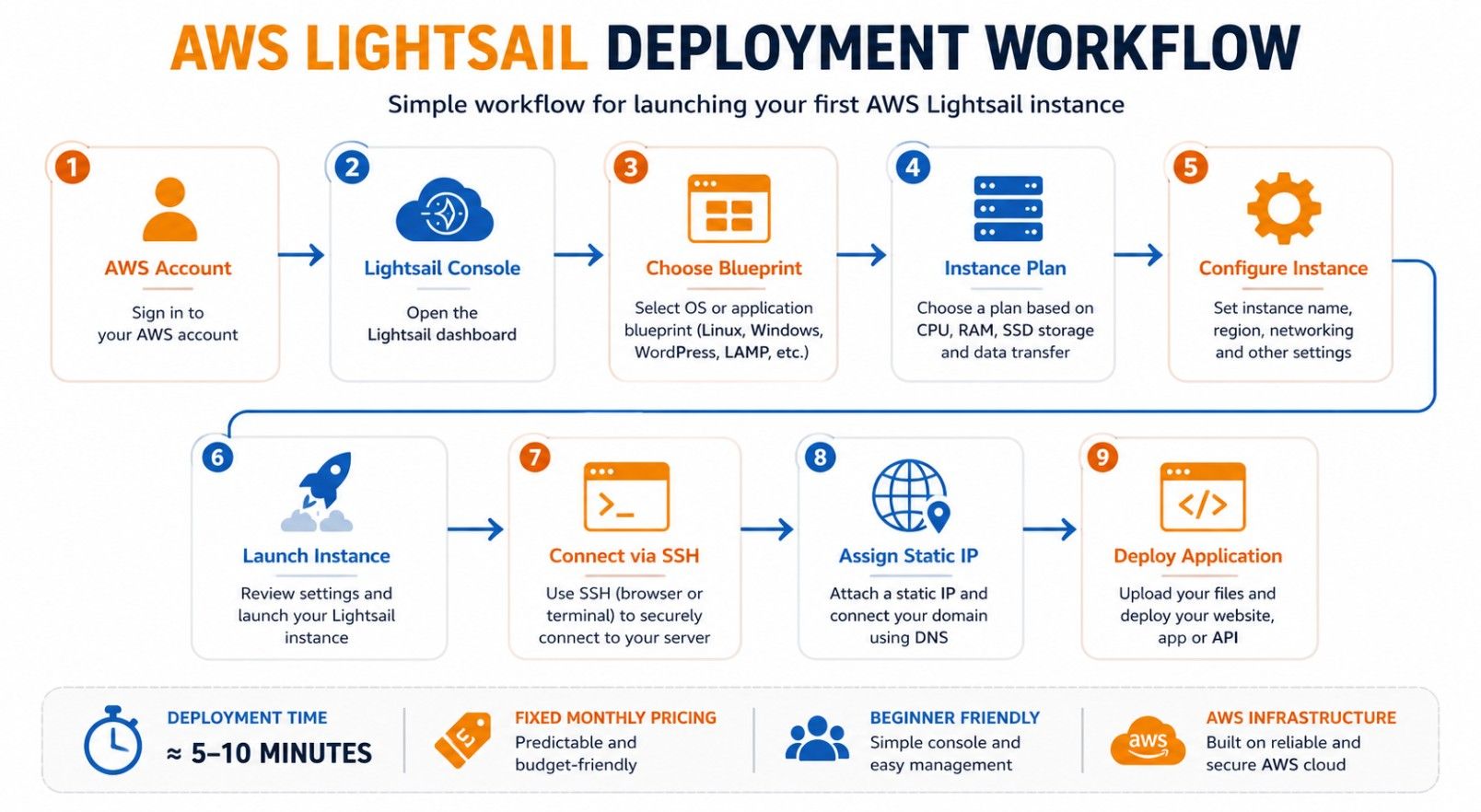
Unlike traditional cloud deployments, you don't have to spend hours configuring networking rules before launching your first application. That's one reason many beginners searching what is Lightsail in AWS quickly discover that it offers a much smoother learning experience.
Also read : What is AWS: Introduction to Amazon Cloud Services
Data Science Courses to upskill
Explore Data Science Courses for Career Progression
IIIT Bangalore
Executive Post Graduate Certificate in Data Science & AIPlacement Assistance
Although AWS Lightsail feels simple, several cloud components work together in the background to keep your applications running reliably.Understanding these components helps you make better deployment decisions and troubleshoot issues more effectively.
Component |
Purpose |
Why It Matters |
| Instance | Virtual server that runs your application | Hosts websites and software |
| SSD Storage | Stores operating system and files | Delivers faster performance |
| Static IP | Permanent public IP address | Keeps your website accessible |
| Firewall | Controls incoming network traffic | Improves security |
| DNS Zone | Manages domain records | Connects domains to your server |
| Snapshot | Backup of your instance | Simplifies recovery |
| Managed Database | Separate database service | Improves performance and maintenance |
| Monitoring | Tracks CPU, memory, and traffic | Helps identify performance issues |
Each component has a specific role, but AWS Lightsail presents them through a single dashboard. That simplicity is one of the biggest reasons beginners choose it over more advanced cloud services.
By now, both what is AWS Lightsail and what is Lightsail in AWS should feel much less confusing. Instead of thinking of it as just another virtual server, you can view it as a complete cloud hosting platform that combines infrastructure, networking, storage, and management into one beginner-friendly service.
Must read: AWS Architecture Explained: Function, Components, Deployment Models & Advantages
AWS Lightsail combines several cloud services into a single platform. Instead of configuring separate AWS resources one by one, you get the essential tools needed to host websites, applications, databases, and development environments from one dashboard. That makes it an attractive option for beginners while still offering enough flexibility for many production workloads.
Choosing a hosting platform becomes easier when you compare its core capabilities in one place. The following table summarises the most important AWS Lightsail features and the benefits they provide.
Feature |
Purpose |
Primary Benefit |
| Virtual Instances | Run applications | Simple cloud hosting |
| SSD Storage | Store operating system and files | Faster performance |
| Static IP | Permanent server address | Stable website connectivity |
| DNS Management | Connect custom domains | Easier domain setup |
| Snapshots | Backup servers | Faster recovery |
| Managed Databases | Store application data | Reduced administration |
| Load Balancer | Distribute traffic | Better availability |
| Containers | Deploy containerized apps | Modern application hosting |
| Monitoring | Track server health | Performance optimization |
| Firewall | Control network access | Improved security |
Also read : AWS Tutorial for Beginners Is Out. Here’s What’s In
AWS Lightsail offers fixed monthly pricing, making it easy to estimate hosting costs. Each plan bundles compute, storage, networking, and data transfer, so you don't have to manage separate cloud service charges.
Each plan includes the essential resources needed to host websites and applications.
Included Resource |
Purpose |
| Virtual Instance | Runs your website or application |
| vCPU & RAM | Provides computing power and memory |
| SSD Storage | Stores files and operating system |
| Data Transfer | Handles website traffic |
| Static IP | Keeps a consistent public IP address |
| DNS Management | Connects custom domains |
| Monitoring | Tracks server performance |
Your monthly cost depends on the resources and services you use.
Choosing the right instance size helps control costs while providing enough resources for your workload.
Also read : 15 Best AWS Project Ideas for Beginners You Must Try in 2026!
Creating your first server doesn't require advanced cloud knowledge. AWS Lightsail guides you through a straightforward setup process, allowing you to deploy an application in just a few minutes.
Following these steps helps you avoid common configuration mistakes while becoming familiar with the platform.
Once you're ready to begin, complete the following tasks.
Within a few minutes, your application is ready for further configuration and testing.
Also read: Types of Cloud Computing & Cloud Computing Services
Choosing between AWS Lightsail and Amazon EC2 is one of the most common decisions for anyone starting with AWS. Both services provide virtual servers, but they're built for different types of users and workloads.
AWS Lightsail focuses on simplicity and predictable pricing, while Amazon EC2 offers greater flexibility and control for complex applications. Understanding these differences helps you select
The following comparison highlights where each platform performs best:
Feature |
AWS Lightsail |
Amazon EC2 |
| Primary Purpose | Simple cloud hosting for websites and applications | Highly configurable cloud computing platform |
| Target Users | Beginners, students, startups, small businesses | Developers, enterprises, DevOps teams |
| Pricing Model | Fixed monthly plans | Pay-as-you-go pricing |
| Server Setup | Quick and simple | Highly customizable |
| Operating Systems | Linux and Windows Server | Wide range of operating systems and custom AMIs |
| Instance Configuration | Limited predefined plans | Hundreds of instance types |
| Storage | Bundled SSD storage | Amazon EBS with multiple storage options |
| Networking | Basic networking features | Advanced VPC networking |
| Load Balancing | Built-in Lightsail Load Balancer | Elastic Load Balancer with advanced features |
| Auto Scaling | Not supported | Fully supported |
| Best Use Cases | Blogs, WordPress, business websites, development projects | Enterprise applications, large-scale systems, high-traffic websites |
| Learning Curve | Beginner-friendly | Moderate to advanced |
Both platforms solve different problems. Choosing the right one depends on your technical experience, budget, and the complexity of your application.
Scenario |
Recommended Service |
Reason |
| Personal blog | AWS Lightsail | Fast setup with predictable pricing |
| WordPress website | AWS Lightsail | Preconfigured blueprints simplify deployment |
| Portfolio website | AWS Lightsail | Easy management and low maintenance |
| Startup MVP | AWS Lightsail | Launch applications quickly with minimal configuration |
| Learning AWS | AWS Lightsail | Beginner-friendly interface |
| Enterprise application | Amazon EC2 | Greater flexibility and scalability |
| High-traffic application | Amazon EC2 | Supports Auto Scaling and advanced networking |
| Custom infrastructure | Amazon EC2 | Complete control over resources and architecture |
Ready to build expertise beyond cloud hosting? Enroll in upGrad's Executive Diploma in Data Science & Artificial Intelligence from IIITB and gain hands-on skills in Python, machine learning, AI, cloud technologies, and data analytics through industry-relevant projects.
AWS Lightsail and DigitalOcean are often compared because both simplify cloud hosting for developers and small businesses. They offer virtual private servers with straightforward pricing, making them popular alternatives to traditional cloud infrastructure.
Although they share similar goals, there are important differences in ecosystem integration, managed services, and long-term scalability.
Both platforms provide virtual servers and developer-friendly tools, but each has strengths depending on your requirements. The following table compares the key features.
Feature |
AWS Lightsail |
DigitalOcean |
| Cloud Provider | Amazon Web Services | DigitalOcean |
| Primary Focus | Simplified AWS cloud hosting | Developer-focused cloud hosting |
| Pricing | Fixed monthly plans | Fixed monthly plans |
| Beginner Experience | Very beginner-friendly | Beginner-friendly |
| AWS Service Integration | Native integration with AWS services | Limited integration outside DigitalOcean ecosystem |
| Instance Deployment | Preconfigured blueprints | Droplets with marketplace images |
| Storage Options | SSD storage and managed databases | Block storage, volumes, managed databases |
| Networking | Static IP, DNS, firewall, load balancer | Floating IPs, VPC, firewall, load balancer |
| Container Support | Lightsail Containers | Kubernetes and App Platform |
| Managed Databases | Available | Available |
| Global Infrastructure | AWS Regions worldwide | Global DigitalOcean data centers |
| Best For | Users planning to expand within AWS | Independent developers and startups |
Selecting between AWS Lightsail and DigitalOcean depends on your long-term goals. If you expect to use additional AWS services in the future, Lightsail offers a smoother path. If you prefer a lightweight cloud platform focused mainly on virtual servers, DigitalOcean is also a strong option.
Requirement |
Better Choice |
Why |
| First cloud project | AWS Lightsail | Easier integration with AWS ecosystem |
| Learning AWS | AWS Lightsail | Introduces AWS services gradually |
| Independent VPS hosting | DigitalOcean | Simple developer experience |
| Small business website | AWS Lightsail | Managed AWS infrastructure |
| Cloud-native development | DigitalOcean | Strong container and Kubernetes support |
| Future AWS migration | AWS Lightsail | Easier transition to other AWS services |
Also read: Top 20+ Cloud Computing Projects GitHub For Beginners (With Source Code)
Many users compare AWS Lightsail with traditional Virtual Private Server (VPS) hosting because both provide dedicated virtual servers. While they appear similar at first, the underlying infrastructure and management experience are quite different.
AWS Lightsail combines cloud capabilities with simplified management, whereas traditional VPS hosting focuses primarily on renting virtual servers with varying levels of provider support.
Understanding the differences helps you choose the right hosting solution based on flexibility, maintenance, and future growth.
Feature |
AWS Lightsail |
Traditional VPS Hosting |
| Infrastructure | AWS global cloud infrastructure | Individual hosting provider infrastructure |
| Pricing | Fixed monthly plans | Usually fixed monthly plans |
| Server Deployment | Few minutes | Varies by hosting provider |
| Management Console | Unified AWS Lightsail dashboard | Provider-specific control panel |
| Scalability | Upgrade to larger plans easily | Often requires manual migration |
| Static IP | Included | Usually available, depending on provider |
| Snapshots | Built-in snapshots | Depends on hosting provider |
| Load Balancing | Available | Often requires additional configuration |
| Managed Databases | Available | Usually separate service |
| Global Regions | Multiple AWS Regions | Limited by hosting provider |
| Reliability | AWS infrastructure | Provider dependent |
| Integration | AWS ecosystem | Limited third-party integrations |
AWS Lightsail combines simplicity, predictable pricing, and reliable AWS infrastructure, making it an excellent choice for beginners, developers, and small businesses.
Benefit |
Description |
| Easy to Learn | Beginner-friendly interface with a simple setup process. |
| Predictable Monthly Costs | Fixed pricing helps you estimate hosting expenses easily. |
| Quick Deployment | Launch websites and applications in just a few minutes using preconfigured blueprints. |
| Reliable AWS Infrastructure | Runs on AWS's global, secure, and high-performance cloud infrastructure. |
| Easy Management | Manage instances, networking, snapshots, and monitoring from a single dashboard. |
Also read: Top 9 Cloud Computing Examples
AWS Lightsail is suitable for a wide range of small to medium-sized projects. Its simple setup, fixed pricing, and built-in features make it a practical choice for beginners, developers, and businesses.
Use Case |
How AWS Lightsail Helps |
| Personal & Portfolio Websites | Quickly host blogs, portfolios, and resume websites with minimal setup. |
| Business Websites | Deploy company websites, service portals, and landing pages with predictable costs. |
| Development & Testing | Create affordable environments for software testing, API development, and proof-of-concept projects. |
| Blogs & CMS | Launch WordPress and other content management systems using preconfigured blueprints. |
| Learning Cloud Computing | Practice server deployment, networking, SSH, and cloud hosting in a beginner-friendly environment. |
AWS Lightsail is designed for simplicity, making it a great choice for small and medium-sized workloads. However, it doesn't offer the same level of flexibility and advanced features as other AWS compute services.
Understanding these limitations helps you decide whether it's the right fit for your project.
AWS Lightsail simplifies cloud management, but that comes with a few trade-offs.
These limitations aren't drawbacks for every project. For websites, blogs, development environments, and small business applications, AWS Lightsail remains a practical and cost-effective solution.
Planning your deployment carefully can help you get the best performance from AWS Lightsail while avoiding common issues later.
Follow these best practices before launching your application.
Also Read: Top 20 Uses of AWS: How Amazon Web Services Powers the Future of Cloud Computing
AWS Lightsail is a simple and cost-effective cloud hosting solution for websites, applications, and development projects. Its fixed pricing, easy setup, and built-in features make it an excellent choice for beginners, developers, startups, and small businesses.
Whether you're launching your first website or testing an application, AWS Lightsail offers a straightforward way to get started on AWS. As your project grows, you can also expand into other AWS services to meet more advanced requirements.
Ready to start your journey? Book a free consultation with upGrad today to find the best path for your career.
AWS Lightsail is a simplified cloud hosting service from Amazon Web Services that lets you launch virtual servers quickly. It combines compute, storage, networking, and management tools into fixed monthly plans, making it a practical choice for beginners, developers, startups, and small business websites.
Amazon Lightsail is part of the Amazon Web Services (AWS) cloud platform. Although it offers a simplified experience, it runs on the same global AWS infrastructure used by services such as Amazon EC2, Amazon S3, and Amazon RDS, providing reliable performance and security.
AWS Lightsail is designed for simple workloads with fixed monthly pricing and easy management, while Amazon EC2 provides advanced networking, customization, and scaling capabilities. Lightsail suits beginners and small projects, whereas EC2 is better for enterprise applications and complex cloud environments.
AWS Lightsail offers fixed monthly plans based on the instance configuration you choose. Pricing varies depending on CPU, RAM, SSD storage, and included data transfer. This predictable pricing model makes it easier to estimate hosting costs compared to usage-based cloud services.
Yes. AWS Lightsail can host production websites for blogs, portfolios, business sites, and small web applications. Choosing the appropriate instance plan, enabling backups, monitoring performance, and following security best practices help maintain a reliable production environment as traffic grows.
Yes. AWS Lightsail supports managed databases for MySQL and PostgreSQL, allowing you to separate database workloads from your application server. This improves reliability, simplifies management, and helps maintain better application performance compared to storing everything on one instance.
AWS Lightsail supports several Linux distributions, including Ubuntu, Debian, AlmaLinux, Amazon Linux, and CentOS Stream, along with Windows Server images. You can also choose application blueprints such as WordPress, LAMP, Node.js, and Magento for faster deployments.
Yes. AWS Lightsail is widely recommended for learning cloud computing because it simplifies server deployment without hiding core cloud concepts. Beginners can practice networking, SSH access, storage management, DNS configuration, and application hosting before exploring more advanced AWS services.
AWS Lightsail can support growing websites by upgrading to larger instance plans, adding load balancers, and increasing storage when needed. However, applications experiencing rapid or unpredictable traffic growth may eventually benefit from the advanced scaling features available in Amazon EC2.
Yes. Most websites hosted on shared hosting platforms can be migrated to AWS Lightsail by transferring website files, databases, and DNS records. Planning the migration carefully and testing the website before switching DNS settings helps reduce downtime and service interruptions.
AWS Lightsail is a good choice when you want predictable pricing, simplified server management, and access to AWS infrastructure without dealing with complex cloud configuration. Traditional VPS hosting may suit users who prefer provider-specific control panels or don't require AWS integration.
724 articles published
Sriram K is a Senior SEO Executive with a B.Tech in Information Technology from Dr. M.G.R. Educational and Research Institute, Chennai. With over a decade of experience in digital marketing, he specia...
Speak with Data Science Expert
By submitting, I accept the T&C and
Privacy Policy
Start Your Career in Data Science Today
Top Resources
Executive Diploma
12 Months
Master's Degree
18 Months
Bootcamp
6 Months