Warp AI Terminal: What It Is, Features & How to Use It?
By upGrad
Updated on Oct 12, 2026 | 6 min read | 24.35K+ views
Share:

All courses
Certifications
More
By upGrad
Updated on Oct 12, 2026 | 6 min read | 24.35K+ views
Share:
Table of Contents
Key Points:
If you are interested in AI-powered tools like Artificial Intelligence Warp then explore our top AI courses and gain practical skills in AI, machine learning, and automation.
Popular AI Programs
Artificial Intelligence Warp terminal is a modern terminal application that uses AI to make command line tasks more simpler & easier. It helps developers to write commands, create scripts, and understand errors by using simple English instead of remembering complex commands.
How Is Warp AI Terminal Different from Traditional Terminals?
Want to build expertise in AI and machine learning? Enroll in our Executive Diploma in Machine Learning and AI course to gain top practical skills in AI and machine learning.
Free Courses
Warp AI terminal comes with a set of convenient tools that allow developers to execute commands more efficiently and spend less time on repetitive tasks.
The Most Common Features of Warp AI Terminal are:
Also Read: Types of AI: From Narrow to Super Intelligence with Examples
AI Courses to upskill
Explore Artificial Intelligence Courses for Career Progression
Installing Warp AI Terminal is very simple and takes only a few minutes to be done. Follow the steps below to download and set up Warp on your computer.
Steps to Install Warp AI Terminal:
Here’s a pro tip: Make sure your internet connection is active during installation so Warp can download any required updates.
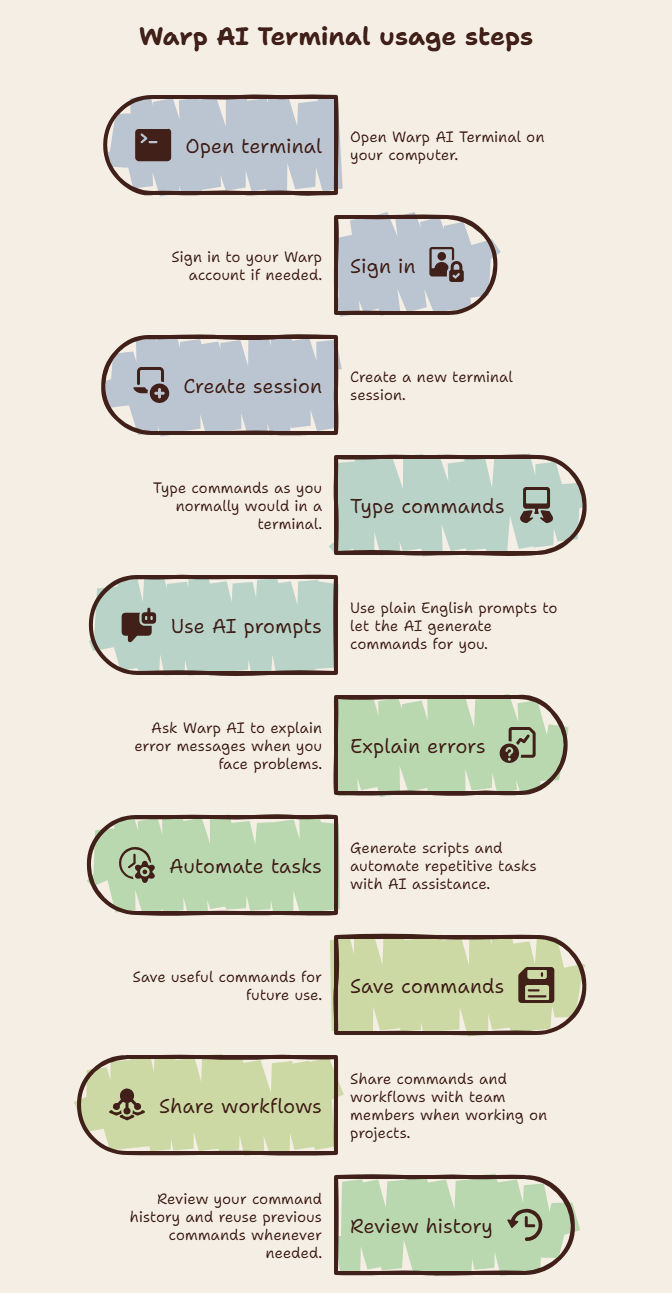
Artificial Intelligence Warp terminal is created to make command-line tasks more easier and faster. Users can use its AI features to give commands, solve errors, and manage work more efficiently without any problem.
Steps to Use Warp AI Terminal:
Both Warp AI Terminal and traditional terminals help users to run commands and manage system tasks. However, Warp includes AI-powered features which makes terminal work more easier, especially for beginners and developers.
Difference Between Warp AI Terminal and Traditional Terminal:
| Feature | Warp AI Terminal | Traditional Terminal |
| AI Support | Includes built-in AI assistance | No AI support |
| Command Input | Accepts plain English prompts | Requires manual commands |
| Error Help | Explains errors and suggests fixes | Users must troubleshoot themselves |
| Interface | Modern visual block-based layout | Text-based interface |
| Script Creation | Can generate scripts with AI | Scripts must be written manually |
| Collaboration | Supports sharing commands and workflows | Limited collaboration features |
| Ease of Use | Beginner-friendly | Requires more technical knowledge |
| Productivity | Helps complete tasks faster | More manual effort needed |
Overall, Artificial Intelligence Warp terminal offers a more modern and user-friendly experience, while traditional terminals provide a basic command-line environment without AI-powered features.
Related Article: Generative AI vs Traditional AI
Subscribe to upGrad's Newsletter
Join thousands of learners who receive useful tips
Warp AI Terminal offers various different useful features that make command-line tasks more easier. However, like any tool, artificial intelligence warp also has some limitations that users should know.
Must Read: Top Advantages and Disadvantages of AI
Conclusion
Artificial Intelligence Warp is changing the usage of the command line through its combination of the functionalities of a traditional terminal with top AI tools. AI Warp made everything easier for users, from the generation of English commands, explanation of errors, and automation of tasks.
If you are a beginner or a experienced developer, mastering artificial intelligence warp will definitely increase your efficiency.
For all those who wish to enhance their AI skills for the future, schedule for a free consultation with our experts today.
Developers like Artificial Intelligence Warp because it helps them with the command-line. It simplifies the command-line and allows for quick actions by being able to ask in plain English. The AI-powered functions make it a time saver and a helpful tool for new and experienced developers.
Yes, Artificial Intelligence Warp helps with debugging and let developers quickly interpret error messages. Developers get to understand what is happening while being able to get suggested fixes.
Yes, Artificial Intelligence Warp allow team collaboration. Developers can work together and share commands, runbooks, and other features. This makes it easy for teams to work together and increases productivity.
Yes, anyone can use Artificial Intelligence Warp. Developers who are not familiar with using the terminal can easily use the application by simply asking in plain English. This makes learning the terminal very straight forward and not so intimidating.
Artificial Intelligence Warp boosts productivity in various ways. It reduces manual tasks such as generating commands, scripts, and resolves errors. Additionally, the visual block interface makes it easy to manage actions within the terminal.
Artificial Intelligence Warp works with all major operating systems used by developers. It runs on Windows, Mac, and Linux.
Yes, Artificial Intelligence Warp can help with automating recurring tasks at the command line. Developers use the application to generate scripts required to perform specific tasks. They can also store frequently used commands.
Some of the tasks that can be automated using Artificial Intelligence Warp include:
The Visual Block Interface is a way of presenting the material within the terminal in blocks. The blocks make it easier to read and edit. This interface also helps organize the terminal and make it easy to manage.
Yes, professionals use Artificial Intelligence Warp. The application is powerful enough to handle the demands of professional developers and supports collaboration, coding, debugging, and automation.
Yes, the command history feature allows users to go through previously used commands. This increases productivity because it becomes easy to reuse previous commands.
The advantages of using Artificial Intelligence Warp come in various ways. Developers benefit from being able to create commands by simply asking. Additionally, they simplify the interpretation of errors and make it easy to automate repetitive tasks.
Some of the benefits are:
People should always review commands generated by AI. The commands are not always accurate, and it is a good practice to ensure that they are appropriate. This is an important step that should never be overlooked.
1023 articles published
We are an online education platform providing industry-relevant programs for professionals, designed and delivered in collaboration with world-class faculty and businesses. Merging the latest technolo...
Speak with AI & ML expert
By submitting, I accept the T&C and
Privacy Policy
Top Resources
Master's Degree
18 Months
Executive Diploma
12 Months
IIIT Bangalore
Executive Programme in Generative AI & Agentic AI for LeadersIndia’s #1 Tech University
Dual Certification
5 Months