Microsoft AI Agent: What It Is, How It Works & How to Use It
By Sriram
Updated on Jul 16, 2026 | 11 min read | 5.04K+ views
Share:

All courses
Certifications
More
By Sriram
Updated on Jul 16, 2026 | 11 min read | 5.04K+ views
Share:
Table of Contents
Quick Overview
This blog covers everything you need to know, in one place. You will learn what it is, how it works behind the scenes, the different types available, and the tools you can use to build one, whether you are a business user with no coding background or a developer who wants full control. We also cover real use cases, pricing, security, and how these agents compare with tools like ChatGPT and Google's AI agents. By the end, you will know exactly where to start.
If topics like AI agents, designing intelligent workflows, automating business processes, and integrating large language models with real-world applications interest you, upGrad's Agentic AI Programs can help you develop the practical skills to build, deploy, and scale production-ready AI agents with confidence.
Agentic AI Courses to upskill
Explore Agentic AI Courses for Career Progression
IIIT Bangalore
EPGP in Applied AI and Agentic AIIIIT Bangalore
Executive Diploma in Machine Learning and AI360° Career Support
A Microsoft AI agent is a software system built to complete tasks on your behalf, using Microsoft's AI models, data, and tools. Unlike a simple chatbot that only answers questions, an agent can look at information, make a decision, and take action. AI Agent can pull data from your CRM, draft a report, update a record, or run a multi-step process without you doing each step manually.
Microsoft has built this technology into everything from Microsoft 365 to Azure, and it is quickly becoming one of the most talked about parts of the Microsoft AI ecosystem.
It is an AI-powered system designed to handle a specific task or process on its own. It uses large language models along with your company data, connectors, and business logic to understand a goal and carry it out.
Think of it this way. Copilot is the assistant you talk to. An agent is a specialised tool that Copilot can call on, or that can work in the background by itself. Microsoft describes agents as the apps of the AI era, with Copilot acting as the interface that connects you to them.
A Microsoft AI Agent can:
Read More: Difference between AI Assistant and ChatBot
Microsoft has built agent capability into almost every major product. Here is a quick snapshot:
Platform |
What Agents Do There |
| Microsoft 365 | Answer questions, draft content, automate tasks in Word, Excel, Teams |
| Microsoft Copilot | Acts as the interface where you access and use agents |
| Copilot Studio | Lets you build and customise your own agents |
| Azure / Microsoft Foundry | Lets developers build advanced, custom agents at scale |
| Dynamics 365 | Runs agents for sales, finance, service, and supply chain tasks |
This spread is what makes it useful across so many teams. A sales rep, an IT admin, and a developer can all use agents, just in different ways and through different tools.
Also Read: Types of Agents in AI: A Complete Guide to How Intelligent Agents Work
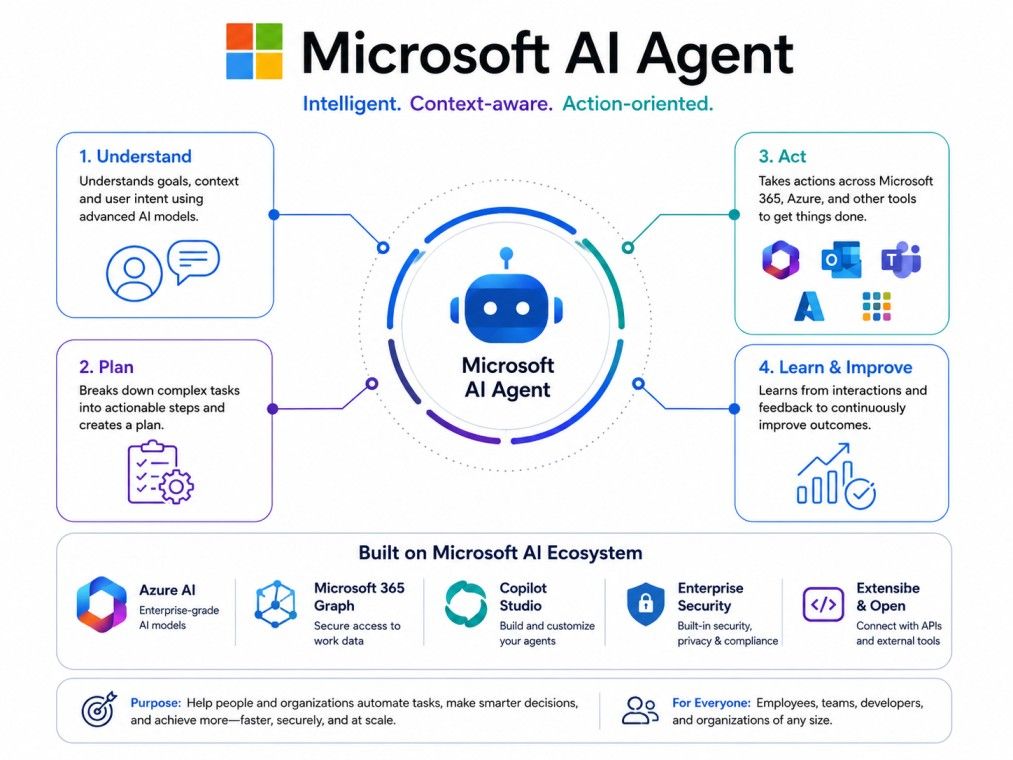
At a basic level, every agent follows a simple loop: it perceives, decides, and acts.
This loop can happen once, for a simple question, or many times in sequence, for a complex workflow.
Microsoft's own AI research team points to three things that make an agent genuinely useful, not just a one-off script.
The stronger these three pieces are, the more independently an agent can work.
For developers, Microsoft offers the Microsoft Agent Framework, an open source framework for building and running agents in Python and .NET. It brings together two earlier projects:
The Agent Framework combines the best of both. It gives developers a consistent way to build single agents or coordinate multiple agents working together, with support for Microsoft Foundry, Azure OpenAI, and other model providers. If you are exploring how to build one from scratch, this framework is usually where technical teams start.
Also Read: Future of Agentic AI
A well-built agent is not just about answering questions. It brings a mix of capabilities that make it genuinely useful in daily work.
These capabilities are what set a modern agent apart from older automation tools, which could only follow fixed, rigid rules.
If topics like AI agents, designing intelligent workflows, automating business processes, and integrating large language models with real-world applications interest you, upGrad's Agentic AI Programs can help you develop the practical skills to build, deploy, and scale production-ready AI agents with confidence.
This is one of the most common points of confusion, so it is worth clearing up early.
Copilot is the AI assistant you interact with directly. It drafts emails, summarises meetings, and answers questions in real time, based on what you type.
An AI agent is a specialised tool built for one job. It can work inside Copilot as a skill you call on, or it can run independently in the background, without needing you to prompt it each time.
Copilot |
AI Agent |
|
| Role | Personal assistant | Specialised task performer |
| Interaction | Real time, conversational | Can act on its own, with or without prompts |
| Scope | General purpose help | Built for a specific process or goal |
| Example | Drafting an email for you | Automatically qualifying sales leads overnight |
A simple way to remember this is Copilot partners with you on daily tasks. An agent works for you, often without needing to be asked each time.
Also Read: Agentic AI Learning Path Complete Guide for Developers and AI Professionals
Not all agents are built the same way or serve the same purpose. Microsoft groups agents into a few broad categories.
Understanding these categories helps you pick the right starting point when you decide to build one for your own use case.
Also Read: Types of Agents in AI
Microsoft gives you several ways to get one working, depending on your technical skill and how complex the task is. The general rule is simple: start with the easiest option that gets the job done, and move up only if you need more.
You do not always need to build anything. Microsoft already ships ready-made agents for common jobs.
These are switched on, not built. This is the fastest way to get started.
Agent Builder sits inside Microsoft 365 Copilot. It is a no-code tool made for business users, not developers.
It works well for simple Q&A style agents, such as one that answers questions about your team's internal procedures.
Copilot Studio is the step up from Agent Builder. It is a low-code platform built for more advanced, organisation-wide agents.
Use Copilot Studio when the task needs to reach across systems, or when it is meant for a whole department rather than just you.
Microsoft Foundry, formerly known as Azure AI Foundry, is the pro-code option for developers. It gives full control over model selection, fine-tuning, and multi-agent orchestration, and is best suited for teams building custom AI applications at scale.
If you need |
Use this |
| A quick answer bot from your own files | Agent Builder |
| An agent that automates a business process across systems | Copilot Studio |
| Full control over models and code | Microsoft Foundry |
| Something Microsoft already offers | A built-in agent |
A Microsoft AI agent is useful across almost every role in a business. Here is how different teams typically use one.
Developers use Microsoft Foundry and the Agent Framework to build custom agents that call APIs, run multi-agent workflows, and integrate with their own applications. This is the route for teams that need full flexibility over how the agent behaves.
Large organisations lean on Copilot Studio and Dynamics 365 agents to automate processes at scale, such as supplier communication, order processing, or customer data syncing. Governance and security controls matter more here, since many people and systems are involved.
Smaller teams often start with Agent Builder or ready-made agents. A small professional services firm, for example, might build a simple agent that answers staff questions from a shared set of internal documents, cutting down time spent searching for information.
Sales teams use agents like the Dynamics 365 Sales Agent to research leads and prioritise outreach. Customer service teams use case-management agents that review past interactions and speed up resolution times, so reps spend less time on repetitive lookups.
Microsoft is not the only company building AI agents. Here is how it compares with a few well-known alternatives.
Agent Builder |
Copilot Studio |
|
| Skill needed | No code | Low code |
| Best for | Individuals or small teams | Departments or whole organisations |
| Data sources | SharePoint, files, email | Connectors, APIs, external systems |
| Governance | Basic | Advanced, enterprise grade |
Copilot Studio is built for business users and makers who need an agent to run a defined process. Microsoft Foundry is built for developers who need custom models, deep orchestration, and full code level control.
If your need still mostly lives inside Microsoft 365 and everyday business workflows, Copilot Studio is usually enough. Foundry is for teams building something closer to a custom AI product.
ChatGPT's agent tools are strong for general purpose tasks and quick experimentation. A Microsoft AI agent has a clear advantage when your work already lives inside Microsoft 365, Teams, or Dynamics 365, since it can plug directly into your existing data and permissions without extra setup.
The OpenAI Assistants API gives developers a flexible way to build agents using OpenAI's models directly. Microsoft's approach, through Foundry and the Agent Framework, is built to work natively across Azure, Microsoft 365, and enterprise identity and security systems, which matters if your organisation is already deep in the Microsoft stack.
Salesforce Agentforce is tightly built around the Salesforce CRM and its data model. A Microsoft AI agent has a wider reach, since it spans productivity tools, CRM, ERP, and custom development, not just one platform. The right choice usually comes down to which ecosystem your business already runs on.
An agent is only as useful as the systems it can connect to. Microsoft agents typically integrate through:
When planning an integration, start by mapping out exactly what data the agent needs and what actions it should be allowed to take. This keeps the setup focused and avoids giving an agent more access than it actually needs.
As organisations roll out more agents, managing them becomes its own challenge. Microsoft addresses this with a few connected tools.
Agent 365 is Microsoft's platform for managing agents across the organisation, no matter where they were built, whether on Microsoft tools, open source frameworks, or third-party platforms. It brings together five capabilities: registry, access control, visualisation, interoperability, and security.
The core idea is simple. As the number of agents in a company grows, IT teams need one place to see all of them, control what they can do, and shut down any that should not exist.
This is often called preventing agent sprawl, where unmanaged or unauthorised agents, sometimes called shadow agents, quietly pile up across an organisation without oversight.
Even a well-configured Microsoft AI agent can run into problems. Here are common issues and quick fixes.
Issue |
Likely Cause |
Fix |
| Agent not responding | Licensing or permission issue | Check the user has an active Copilot license and correct role access |
| Agent gives wrong answers | Weak or outdated knowledge source | Update the documents or data the agent is grounded on |
| Connector errors | Authentication expired or misconfigured | Reconnect the connector and verify API credentials |
| Agent stuck mid-workflow | A step lacks proper trigger or condition logic | Review the workflow in Copilot Studio for broken logic |
| Agent blocked from a system | Governance or DLP policy blocking access | Check Purview policies and adjust entitlements if appropriate |
If an issue persists, Microsoft Learn documentation and the Copilot Studio admin logs are usually the fastest way to trace what went wrong.
A Microsoft AI agent is no longer a futuristic idea. It is already built into the tools most businesses use every day, from Microsoft 365 to Dynamics 365 and Azure. Whether you are a business user who wants a quick answer bot, or a developer building a custom multi-agent system, Microsoft gives you a clear path to start, with tools that scale as your needs grow. The best way to begin is simple: pick one repetitive task, choose the lowest effort tool that can handle it, and build from there.
Want to get started with Agentic AI? Speak with an expert for a free 1:1 counselling session today.
A chatbot mostly answers questions based on a script or a knowledge base. A Microsoft AI agent goes further. It can reason through a task, connect to other systems, and take action on its own, such as updating a record or completing a workflow, not just replying with text.
Yes. Agent Builder inside Microsoft 365 Copilot lets you create a simple agent using natural language, with no coding required. You describe what the agent should do, add knowledge sources like documents, and publish it in minutes.
Most agent features require a Microsoft 365 Copilot license, which covers Agent Builder and Copilot Studio access. Some agents, like web grounded ones in Agent Builder, are available for free even without a paid license.
Microsoft Agent Framework is the newer, unified successor to both Semantic Kernel and AutoGen. It combines Semantic Kernel's enterprise features, like state management and telemetry, with AutoGen's simpler multi-agent patterns, giving developers one consistent toolkit.
Yes, when set up correctly. Agents respect existing Microsoft 365 permissions through Microsoft Graph, and tools like Microsoft Purview and Microsoft Entra Agent ID add extra layers of data protection and identity control for enterprise use.
Agent sprawl happens when many agents get created across an organisation without proper tracking or approval, sometimes called shadow agents. This creates security and compliance risks, which is why Microsoft built Agent 365 as a central place to monitor and manage every agent.
Yes. Through connectors, APIs, and the Model Context Protocol, Microsoft agents can integrate with many third-party systems, not just Microsoft products. Agent 365 also extends governance to agents built on open source or third-party platforms.
Start with a built-in agent already available in Microsoft 365 Copilot, such as Facilitator for meetings or the Researcher agent. These need no setup and give you a quick sense of how a Microsoft AI agent works before you build your own.
Yes. Agents built through Agent Builder or Copilot Studio can be deployed directly into Microsoft Teams, letting employees interact with them the same way they chat with a colleague, without leaving the app.
If your agent only needs to answer questions from a small set of files for yourself or a small team, Agent Builder is enough. If it needs to run multi-step workflows, connect to external systems, or serve a whole department, move up to Copilot Studio.
Financial services, healthcare, retail, and manufacturing are among the heaviest adopters, mainly for automating repetitive back office work, customer service, and data heavy processes. That said, any business using Microsoft 365 can start using agents regardless of industry size or sector.
716 articles published
Sriram K is a Senior SEO Executive with a B.Tech in Information Technology from Dr. M.G.R. Educational and Research Institute, Chennai. With over a decade of experience in digital marketing, he specia...
Speak with AI & ML expert
By submitting, I accept the T&C and
Privacy Policy