Claude AI Agent: What It Is and How It Works
By Sriram
Updated on Jul 15, 2026 | 14 min read | 4.43K+ views
Share:

All courses
Certifications
More
By Sriram
Updated on Jul 15, 2026 | 14 min read | 4.43K+ views
Share:
Table of Contents
Quick Overview
This blog breaks down what it actually is, how it works behind the scenes, and what it can and cannot do. By the end, you will know its key features, how it compares to other AI agents, where it fits best, and how to get started with it.
If topics like AI agents, designing intelligent workflows, automating business processes, and integrating large language models with real-world applications interest you, upGrad's Agentic AI Programs can help you develop the practical skills to build, deploy, and scale production-ready AI agents with confidence.
Agentic AI Courses to upskill
Explore Agentic AI Courses for Career Progression
IIIT Bangalore
EPGP in Applied AI and Agentic AIIIIT Bangalore
Executive Diploma in Machine Learning and AI360° Career Support
Claude AI agent is not just another chatbot that answers questions. It is a system designed to plan tasks, use tools, and perform multi-step work with minimal human input. Instead of waiting for you to type every instruction, it can browse, write code, call APIs, and complete a chain of actions on its own.
It is Anthropic's approach to giving Claude the ability to act, not just respond. In standard chat mode, Claude reads your message and gives you an answer. In agent mode, it goes further. It breaks a goal into steps, decides which tools to use, executes those steps, and checks its own output before moving forward.
Think of the difference this way: a regular chatbot is like asking a colleague for advice. This kind of agent is like handing that colleague a task and letting them work through it independently, checking in only when needed.
The core difference comes down to autonomy and action.
Aspect |
Standard Claude Chat |
Claude Agent Mode |
| Interaction style | Single question, single answer | Multi-step task execution |
| Tool access | Limited or none | Can call tools, APIs, files, code |
| Decision making | User drives every step | Agent plans and executes steps |
| Output type | Text response | Text, actions, files, completed tasks |
| Best suited for | Quick answers, explanations | Research, coding, automation workflows |
Also Read: Know the Difference between AI Assistant and Chatbot
It is described as autonomous because it does not need a new prompt for every small step. Once you give it a goal, it can:
This loop of planning, acting, and checking is what separates an agent from a simple assistant.
Also Read: Open Source AI Agents: A Complete Guide to Autonomous AI Systems
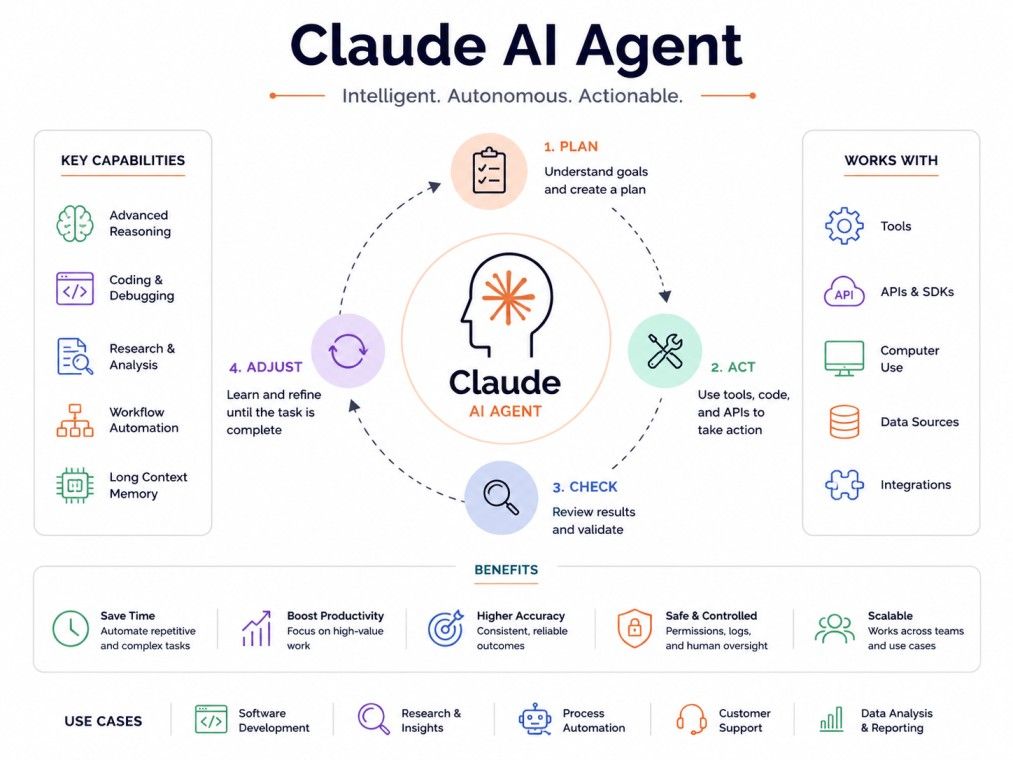
Understanding how it works helps you use it more effectively. At a high level, it follows a repeating cycle: understand the goal, decide on an action, take that action using a tool, review the result, and repeat until the task is done.
Every one of these systems runs on a reasoning loop. Here is a simplified version of how one task typically flows.
This loop can run for several cycles without any human input, which is what makes agent-based work faster than manual back-and-forth prompting.
Tool use is the backbone of what makes it useful. Without tools, Claude can only generate text. With tools, it can search the web, read files, run code, query databases, or interact with third-party apps.
When a task requires external information or action, the agent decides which tool fits the job, formats a request for that tool, and interprets the result once it comes back. This happens automatically, without the user specifying which tool to use each time.
One of the more advanced capabilities under this umbrella is computer use. A Claude computer use agent can interact directly with a computer screen. It can move a cursor, click buttons, type into fields, and navigate software interfaces the same way a person would.
This matters because not every task has a clean API. Some older systems or internal tools only work through a graphical interface. A computer use agent lets Claude operate those systems without needing a custom integration built for it.
For more complex jobs, a single agent running one loop is not always enough. Claude agent orchestration refers to coordinating multiple agents or steps across different tools and systems so they work together toward a single larger outcome.
For example, one part of the process might gather data, another might analyze it, and a third might generate a report. Orchestration is what ties these pieces into a single coherent workflow instead of separate disconnected tasks.
Also Read: Agentic AI Learning Path A Complete Guide for Developers and AI Professionals
Take your skills to the next level with upGrad's Executive Post Graduate Programme in Applied AI and Agentic AI from IIITB. The program covers AI fundamentals, agentic AI, large language models, prompt engineering, RAG, AI workflows, and real-world projects to help you build job-ready expertise and advance your career in Agentic AI.
Getting started with one is more approachable than it sounds. You do not need to build anything from scratch to try it out.
You can access Claude's agent capabilities through:
Agents perform better with a specific, well-scoped goal rather than a vague instruction.
Instead of asking it to "help with marketing," give it a specific task, such as "research five competitor pricing pages and summarize their plans in a table."
Depending on the platform, you may need to approve which tools or files the agent can access. This step matters because it directly affects what the agent can do during the task.
Before handing over a large or sensitive workflow, run a small test. This helps you understand how the agent breaks down tasks, how it handles errors, and how much oversight you want to maintain.
Even with strong autonomy, its output should be reviewed, especially for tasks involving external actions like sending emails, editing files, or making purchases.
It brings together several capabilities that work in combination rather than isolation. Each one plays a specific role in how the agent completes tasks.
Claude tool calling is the mechanism that lets the agent invoke external functions during a conversation or task. Instead of guessing an answer, it can call a defined function, such as a search API or a calculator, get a real result, and use that result in its response.
This is different from the model simply generating text that looks like a tool output. Function calling produces an actual, verifiable result from a real system.
Claude agent memory allows the system to retain relevant details across a task or conversation, so it does not lose track of earlier instructions or findings.
Closely tied to this is the claude agent context window, which determines how much information the agent can hold and reference at one time. A larger context window means the agent can work with longer documents, more detailed instructions, and more complex multi-step tasks without losing earlier context.
Developers can build directly on top of it using:
This makes it possible to embed agentic behavior into existing products rather than only using it through a chat interface.
Giving an AI system the ability to take action naturally raises questions about control and safety. Claude agent permissions and safety measures are designed to keep that autonomy in check.
Claude AI agent security concerns typically center around three areas: data exposure, unintended actions, and over-permissioned access. To address these, safeguards generally include:
None of this makes an agent completely risk-free. It reduces risk, but human oversight still matters, especially for tasks tied to real-world consequences like payments, deployments, or customer communication.
There are several AI agent systems on the market today, and comparing them helps clarify where Claude's version stands out and where it doesn't.
Comparison |
Claude AI Agent |
Key Difference |
| Claude ai agent vs chatgpt agent | Claude focuses on structured reasoning and longer context handling | ChatGPT agent has a broader consumer plugin ecosystem |
| Claude agent vs autogpt | Claude is a managed, supported agent framework | AutoGPT is open-source and requires more manual setup |
| Claude ai agent vs gemini agent | Claude emphasizes controlled tool use and safety layers | Gemini agent is tightly integrated with Google's own product suite |
| Claude agent vs openai operator | Claude supports broader API-level customization | Operator is more consumer-facing and browser-task focused |
LangChain is a framework for building agents, not an agent itself. You can actually build a Claude-powered agent using LangChain as the orchestration layer. The real comparison here is between using Claude's native agent tools directly and building custom logic on top of LangChain for more flexibility.
Also Read: What is LangChain Used For?
Microsoft Copilot agents are deeply embedded into the Microsoft 365 ecosystem, which makes them a strong fit if your workflows already live in Word, Excel, or Teams. Claude's agent, on the other hand, is more platform-agnostic and often preferred for custom-built applications or workflows outside the Microsoft stack.
Gemini agents, developed by Google, stand out for their deep integration with the Google ecosystem, including Gmail, Docs, Drive, Calendar, and Search, enabling seamless productivity across Google Workspace.
If your work involves complex reasoning, coding, and structured task execution, Claude AI agents are often a better fit. If you rely heavily on Google's apps and services, Gemini agents provide a more tightly integrated experience.
The right choice ultimately depends on your workflow, existing tools, and the type of tasks you want your AI agent to handle.
OpenAI Operator is built around using a web browser to complete real-world actions on behalf of the user, such as filling out forms, navigating websites, booking services, or completing online workflows.
While Claude agents are often the stronger choice for developer workflows and enterprise automation, OpenAI Operator is better suited for browser-based tasks that require interacting with websites like a human would.
The best option depends on whether your priority is intelligent task execution across tools and code or hands-on automation within a web browser.
ChatGPT agents, powered by OpenAI, combine reasoning with a broad ecosystem of capabilities, including web browsing, code execution, file analysis, image generation, and integrations with external tools, making them highly versatile for both personal and professional use.
While Claude AI agents often appeal to developers and businesses that prioritize complex reasoning and workflow automation, ChatGPT agents offer a more comprehensive, multimodal experience that spans research, productivity, content creation, coding, and browser-based task execution.
Claude is a strong fit for deep analytical and coding workflows, while ChatGPT agents are ideal if you want a single AI assistant that handles a wide range of tasks across text, code, files, images, and the web.
Also Read: Types of Agents in AI
No agent system is without constraints, and it helps to know these upfront before relying on one for critical work.
These are not dealbreakers, but they are practical realities worth planning around.
It fits a wide range of workflows across different roles and industries.
Whether it is worth adopting depends on the type of work you do and how much repetitive, multi-step effort is involved in your current process.
It tends to be worth it when:
It may be less necessary when:
Compared to alternatives, it stands out for its reasoning quality and controlled autonomy, though the right choice ultimately depends on your existing tools and technical setup.
A Claude AI agent changes what it means to work with an AI system. Instead of just answering questions, it plans, acts, and completes tasks using real tools and real data. It offers genuine capabilities in coding, research, automation, and support, but it also has real limitations around cost, oversight, and error handling.
If you are considering using one, start small. Test it on a scoped task, understand how it handles tool use and permissions, and build up from there. Used the right way, it can meaningfully cut down the manual work behind repetitive, multi-step tasks.
Want to get started with Agentic AI? Speak with an expert for a free 1:1 counselling session today.
Yes, when given web browsing access, it can search and read live web pages rather than relying only on its trained knowledge. This is useful for tasks that need current information, like recent news, pricing data, or product comparisons that change frequently.
It can be, provided proper permission controls and review processes are in place. Enterprises typically scope tool access, log agent actions, and require human confirmation for sensitive steps like data changes or external communication before trusting an agent with critical workflows.
Not necessarily. Basic agent features are accessible through the Claude app without any coding. Building custom, deeply integrated agent workflows using the API or SDK does require some development experience.
A chatbot responds to one message at a time and relies entirely on the user to direct each step. This kind of agent can independently plan multiple steps, use tools, and complete a task with minimal ongoing input.
Yes, like any AI system, it can misinterpret instructions or misuse a tool, particularly with vague or ambiguous goals. This is why reviewing output, especially for important or irreversible tasks, remains important.
Depending on setup, it can access web search, file systems, code execution environments, APIs, and third-party integrations. The exact tools available depend on the platform and permissions configured for that specific agent.
Access to agent features often depends on the specific plan or platform being used, since more advanced agentic capabilities typically require paid API or subscription access. It is worth checking current plan details directly, since availability can change.
Yes, particularly with a larger context window that lets it retain information across multiple steps. However, extremely long or highly complex tasks may still need to be broken into smaller stages for the best results.
It follows the permission scope set by the user or organization, and sensitive actions typically require explicit confirmation. Data handling practices also depend on how the agent is deployed and what safeguards are configured around it.
Yes, this is often referred to as agent orchestration, where separate agents or agent steps handle different parts of a larger workflow, such as one gathering data and another generating a report from it.
The most common limitation is the need for human oversight on sensitive or irreversible actions. While the agent can plan and execute tasks independently, it is not yet reliable enough to be left completely unsupervised for high-stakes work.
724 articles published
Sriram K is a Senior SEO Executive with a B.Tech in Information Technology from Dr. M.G.R. Educational and Research Institute, Chennai. With over a decade of experience in digital marketing, he specia...
Speak with AI & ML expert
By submitting, I accept the T&C and
Privacy Policy