MCP Tutorial for Beginners with Real World AI Examples
By Rahul Singh
Updated on Oct 26, 2026 | 4 min read | 2.88K+ views
Share:

All courses
Certifications
More
By Rahul Singh
Updated on Oct 26, 2026 | 4 min read | 2.88K+ views
Share:
Table of Contents
Model Context Protocol (MCP) is an open standard that allows AI applications to connect with external tools, databases, APIs, and files through a consistent interface. Instead of building separate integrations for every AI application, developers can use MCP to make tools discoverable and reusable across different AI systems.
In this MCP Tutorial, you'll read more about the problem MCP solves, how its architecture works, and the core components that power it. You'll also learn how to set up your first MCP project, explore real-world use cases, and compare MCP with traditional API integrations.
Interested in building AI agents that can use tools, APIs, and protocols like MCP? Explore upGrad's Agentic AI Courses to learn agentic AI concepts, multi-agent systems, and real-world AI automation through practical use cases.
Agentic AI Courses to upskill
Explore Agentic AI Courses for Career Progression
IIIT Bangalore
EPGP in Applied AI and Agentic AIIIIT Bangalore
Executive Diploma in Machine Learning and AI360° Career Support
Think about an AI coding assistant. Answering programming questions is useful, but developers often expect it to search a code repository, read project files, create issues, or query a database. Without MCP, each of these actions usually requires a custom connection. With MCP, the AI can access approved tools through a standard protocol, making development easier and reducing repeated work.
In simple terms, MCP acts as a bridge between an AI model and the systems it needs to interact with. The AI focuses on understanding the user's request, while MCP handles how it finds and uses the right tools or resources.
Also Read: Agentic AI vs Generative AI: What Sets Them Apart
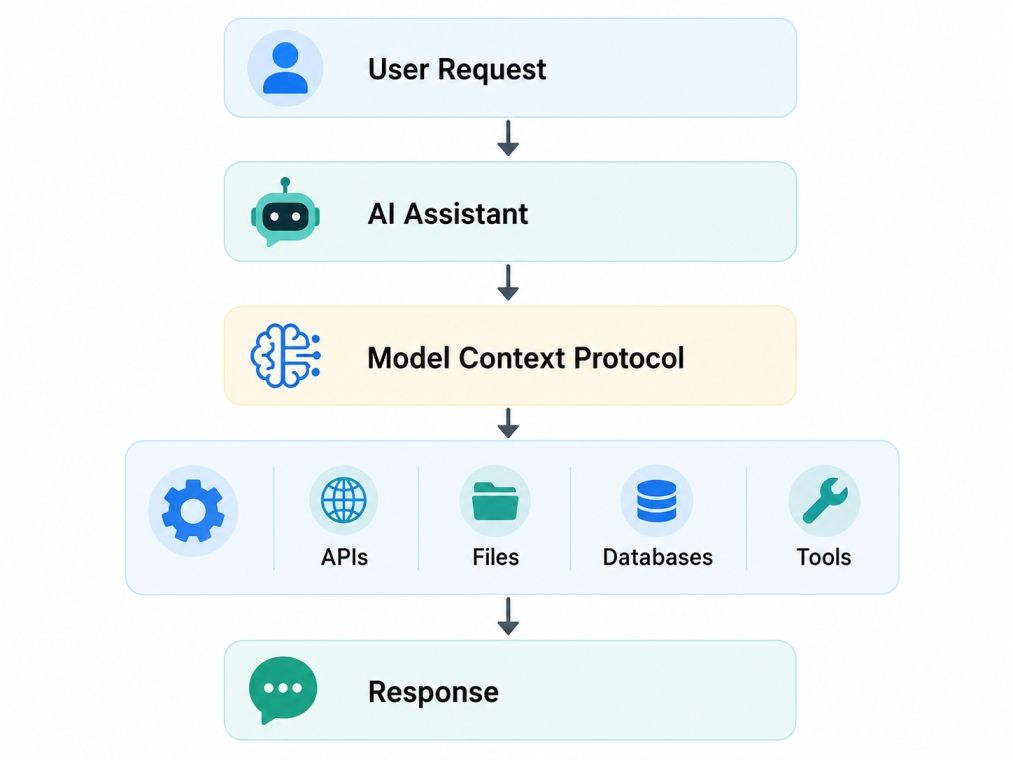
The process is straightforward.
Component |
Purpose |
| Host | Runs the AI application, such as a chatbot or coding assistant. |
| Client | Communicates with MCP servers on behalf of the AI. |
| Server | Makes tools, resources, and prompts available. |
| Tools | Perform actions such as searching data or sending emails. |
| Resources | Provide information the AI can read, such as documents or files. |
| Prompts | Store reusable instructions for common tasks. |
As AI applications become more capable, they also need access to more business systems. Building and maintaining custom integrations for every project can quickly become difficult.
MCP addresses this by offering a shared way to connect AI with external services.
Some practical benefits include:
Also Read: Top 10 Prompt Engineering Tools in 2026
Traditional AI
AI → Answers Questions
AI with MCP
AI → MCP → External Tools → Better, Actionable Answers
Learning an MCP tutorial is becoming valuable for developers who want to build practical AI agents and enterprise applications.
Also read: Agentic AI Engineer: Skills, Career & How to Become One
One of the easiest ways to understand MCP Tutorial is to follow what happens after you ask an AI assistant to perform a task. Instead of answering only from its existing knowledge, the AI can use MCP to find the right tool, retrieve information, and complete the request.
For example, imagine you ask an AI assistant:
"Show me the total sales for this month and create a short summary."
The AI may not have access to your company's sales data on its own. With MCP, it can securely communicate with an approved reporting tool or database before generating a response.
Also Read: Agentic AI Architecture: Components, Workflow, and Design
An MCP request usually follows these steps:
Stage |
What Happens |
| User Request | The user asks the AI to perform a task. |
| Intent Detection | The AI determines whether external data is needed. |
| Tool Discovery | MCP finds the right tool or resource. |
| Execution | The selected tool performs the requested action. |
| Response | Results are returned to the AI. |
| Final Output | The AI explains the result in a user friendly format. |
Suppose a sales manager asks:
"Which products generated the highest revenue last quarter?"
Without MCP:
With MCP:
The user receives an answer based on live business data instead of a guess.
Once you understand this request flow, the rest of an MCP tutorial becomes much easier.
Also Read: Agentic AI Learning Path: A Complete Guide for Developers and AI Professionals
After understanding how an MCP request travels, the next step is to build a simple MCP server.
For your first project in this MCP Tutorial, you do not need a complex setup. A basic server that exposes a simple tool, such as a weather lookup or calculator, is enough to understand how the protocol works.
Make sure you have the following installed:
The overall process is simple and follows a logical sequence.
Install Tools
     │
     ▼
Create Project Folder
     │
     ▼
Install MCP SDK
     │
     ▼
Define Your Server
     │
     ▼
Add Tools
     │
     ▼
Run the Server
     │
     ▼
Connect an AI ClientCreate a new folder and initialize your project.
Your folder might look like this:
my-mcp-server/
│
├── server.py
├── requirements.txt
└── README.md
Keeping your project structure clean makes it easier to add more tools later.
Install the SDK for your chosen language using the appropriate package manager. The SDK provides the libraries needed to create an MCP server and register tools.
At this stage, you also install any additional packages your project requires.
Also Read: How to Install Python in Windows (Even If You're a Beginner!)
Now define the server itself.
The server is responsible for:
Think of it as a directory that tells the AI:
"These are the capabilities I can provide."
Ready to build AI applications that use protocols like MCP and intelligent agents? Explore these upGrad programs to strengthen your AI and leadership skills:
A tool is an action the AI can perform.
For a beginner project, you could create tools such as:
Once registered, the AI can automatically discover these tools when needed.
Start the server and verify that it launches without errors.
If everything is configured correctly, the server waits for requests from compatible AI applications.
Also Read: What Is REST API? Main Elements, Examples & Challenges
Finally, configure an MCP compatible client to communicate with your server.
When the AI receives a request, it checks the available tools and selects the one that best matches the user's intent.
Task |
Purpose |
| Install Python | Run the MCP project |
| Install MCP SDK | Build the server |
| Create server file | Define available capabilities |
| Register tools | Give the AI useful actions |
| Run the server | Accept incoming requests |
| Connect client | Test the complete workflow |
While building your first MCP tutorial project, you may run into a few common issues.
These include:
Most of these problems can be solved by checking error logs carefully and verifying your project configuration.
Also Read: How to Open a JSON File? A Complete Guide on Creating and Reading JSON
If you are following this MCP tutorial, the examples below will help you understand where the protocol is already making AI applications more useful.
Modern coding assistants do more than generate code. They can also work with development tools.
Using MCP, an AI assistant can:
This helps developers complete routine tasks without switching between multiple applications.
Also Read: AI Coding Agents: Complete Guide for Developers in 2026
Large organizations store information across many platforms. Finding the right document can take time.
An MCP powered assistant can connect with:
Employees can ask questions in natural language and receive answers based on company information instead of public data.
Support teams often need information from several systems before responding to a customer.
With MCP, an AI assistant can:
The support agent receives relevant information from one interface, helping reduce manual searching.
Managers regularly review sales, inventory, and financial data.
Instead of opening reporting dashboards, they can ask questions such as:
"Which region recorded the highest sales this month?"
The AI uses MCP to retrieve the required data and presents a clear summary.
An AI assistant can also help manage everyday work by connecting with workplace tools.
Common tasks include:
This allows users to complete routine activities through a single conversation.
Also Read: Top 8 AI Tools for Coding: A Practical Guide for Developers
Industry |
How MCP Is Used |
| Software Development | Code search, repository access, issue management |
| Customer Support | CRM lookup, ticket management, knowledge search |
| Finance | Reporting, expense analysis, dashboard queries |
| Healthcare | Medical record search, appointment management |
| Human Resources | Employee records, leave requests, policy lookup |
If you have worked with software development before, you may wonder whether Model Context Protocol (MCP) replaces APIs. The answer is no. APIs and MCP serve different purposes, and they often work together. Below is a quick comparison of both:
Feature |
Traditional API Integrations |
Model Context Protocol (MCP) |
| Primary purpose | Enables communication between two software applications. | Enables AI applications to discover and use external tools through a standard interface. |
| Target users | Software developers building application integrations. | AI developers building assistants, agents, and enterprise AI applications. |
| Tool discovery | Developers manually define every API endpoint. | AI automatically discovers available tools from the MCP server. |
| Integration effort | A separate integration is needed for each service. | One MCP server can expose multiple tools to AI applications. |
| Communication standard | Varies across APIs and service providers. | Uses a consistent protocol for AI tool interactions. |
| Scalability | Becomes harder to manage as the number of APIs grows. | Easier to expand by registering new tools on the MCP server. |
| Maintenance | Every API integration may need separate updates. | Most changes are handled at the MCP server level. |
| AI readiness | Requires custom logic for every AI application. | Designed specifically for AI assistants and AI agents. |
| Security management | Authentication is managed separately for each API. | Access can be managed centrally through the MCP server. |
| Typical use cases | Mobile apps, websites, payment gateways, and third party software integrations. | AI coding assistants, enterprise chatbots, customer support bots, document search, and business automation. |
| Best suited for | Standard software applications communicating with external services. | AI systems that need to work with multiple tools, databases, APIs, and business applications. |
Also Read: MCP vs API: Understanding the Key Differences and Use Cases
If you are following this MCP tutorial, the roadmap below will help you progress from the basics to building practical projects.
Before working with MCP, you should be comfortable with a programming language commonly used for AI development.
Focus on learning:
These skills will help you understand MCP examples and create your own projects.
Since MCP works with external services, understanding APIs is essential.
Study topics such as:
At the same time, learn the basics of:
These concepts explain how AI applications make decisions before calling external tools.
Once the fundamentals are clear, start learning the building blocks of MCP.
Study:
Try to understand how these components work together instead of memorizing definitions.
The best way to learn MCP is by creating simple applications.
Start with projects such as:
Each project teaches a different part of the protocol.
Also Read: Top 10 Agentic AI Project ideas
After completing beginner projects, move to more realistic applications.
Examples include connecting your MCP server with:
At this stage, you begin building applications similar to those used in production environments.
The final step is combining MCP with other AI technologies.
Learn how to use MCP alongside:
This helps you create AI assistants that can retrieve information, interact with business systems, and complete complex tasks.
Stage |
Main Focus |
Estimated Time |
| 1 | Python or JavaScript basics | 2 to 3 weeks |
| 2 | APIs and AI fundamentals | 1 to 2 weeks |
| 3 | MCP architecture and workflow | 1 week |
| 4 | Beginner MCP projects | 2 to 3 weeks |
| 5 | Real tool integrations | 2 weeks |
| 6 | Advanced AI applications | Ongoing |
Employers often value practical experience more than certificates alone. By following this roadmap, you will not only understand the concepts covered in this MCP tutorial but also gain the skills needed to build AI applications that interact with real world tools and services.
Learning Model Context Protocol helps you build AI applications that can interact with real tools, data, and business systems through a standard interface. This MCP tutorial covered the core concepts, architecture, request flow, practical use cases, and the steps needed to build your first MCP server.
Keep practicing with small projects and gradually connect more tools and services. As AI agents become more common, understanding MCP can help you build scalable, real world applications and strengthen your AI development skills.
Want personalized guidance on Agentic AI and upskilling? Speak with an expert for a free 1:1 counselling session today.
Model Context Protocol (MCP) is an open standard that enables AI applications to interact with external tools, APIs, databases, and files through a consistent interface. Learning MCP helps you build AI assistants and AI agents that can perform real tasks instead of only generating text, making it a valuable skill for modern AI development.
Yes. This MCP tutorial is designed for beginners with basic programming knowledge. If you understand Python or JavaScript and have a general idea of how APIs work, you can start learning MCP. The concepts become easier to grasp when you build small projects alongside the theory.
You should be familiar with Python or JavaScript, JSON, REST APIs, and Git. A basic understanding of Large Language Models (LLMs) and prompt engineering is also helpful. These skills make it easier to understand how AI applications communicate with external tools through MCP.
Most learners can understand the basics of MCP in one to two weeks with regular practice. Building production ready applications takes longer because it involves learning APIs, authentication, AI frameworks, and cloud deployment. Hands on projects are the fastest way to improve your skills.
Yes. MCP is widely used for building AI agents that interact with external systems. For example, an AI agent can search documents, query databases, schedule meetings, or update customer records by using MCP to access approved tools securely.
Traditional APIs allow applications to communicate directly with each other, while MCP provides a standard way for AI applications to discover and use those APIs. Instead of creating separate integrations for every AI application, developers can expose tools through an MCP server for easier access and maintenance.
MCP can connect AI applications with a wide range of tools, including databases, file systems, Git repositories, email platforms, calendars, customer relationship management (CRM) systems, and cloud services. The exact integrations depend on the available MCP servers and the tools they expose.
MCP is useful for roles such as AI Engineer, Generative AI Engineer, LLM Engineer, Machine Learning Engineer, AI Application Developer, and Solutions Architect. As more organizations adopt AI assistants and AI agents, professionals with MCP knowledge are becoming more valuable in enterprise AI projects.
Common challenges include understanding the MCP architecture, configuring servers, managing authentication, defining tools correctly, and debugging client server communication. Breaking projects into smaller tasks and referring to official documentation can make the learning process much smoother.
Start with a simple MCP server that exposes one tool, such as a calculator or weather service. Once you understand the request flow, connect APIs, databases, and document repositories. Building real projects will strengthen your practical skills and portfolio. If you want structured guidance, you can also explore upGrad's Agentic AI Courses, which cover the AI, agentic workflows, and development concepts that complement MCP.
Yes. As AI applications move beyond text generation and begin interacting with business systems, protocols like MCP are becoming more relevant. Learning MCP, along with Python, APIs, cloud platforms, and AI frameworks, can prepare you to build practical AI solutions and improve your opportunities in AI focused roles.
96 articles published
Rahul Singh is an Associate Content Writer at upGrad, with a strong interest in Data Science, Machine Learning, and Artificial Intelligence. He combines technical development skills with data-driven s...
Speak with AI & ML expert
By submitting, I accept the T&C and
Privacy Policy