AI Coding Agents: Complete Guide for Developers in 2026
By Sriram
Updated on Jul 01, 2026 | 8 min read | 2.47K+ views
Share:

All courses
Certifications
More
By Sriram
Updated on Jul 01, 2026 | 8 min read | 2.47K+ views
Share:
Table of Contents
AI coding agents are changing the way people make software. These agents are different from the coding helpers that just gave you a little piece of code. AI coding agents can do a lot more. They can understand what you want to do, come up with a plan, write the code test, fix problems, and even update the project with very little help from a person.
Over the few years, these tools have gotten a lot better. They used to help you complete a line of code. Now they can do a lot on their own. Developers use them for all sorts of things. They use them to make code and to fix really tough problems.
This blog explains what AI coding agents are, how they work, their benefits and limitations, the best tools available today, and how you can build your own.
Build, deploy, and scale intelligent AI coding agents with upGrad’s expert-led Agentic AI Courses Online gain practical skills and stay future-ready.
Generative AI Courses to upskill
Explore Generative AI Courses for Career Progression
IIIT Bangalore
Executive Diploma in Machine Learning and AI360° Career Support
AI coding agents are computer programs that use language models to execute software development work on their own.
Also Read: Agentic AI Learning Path: A Complete Guide for Developers and AI Professionals
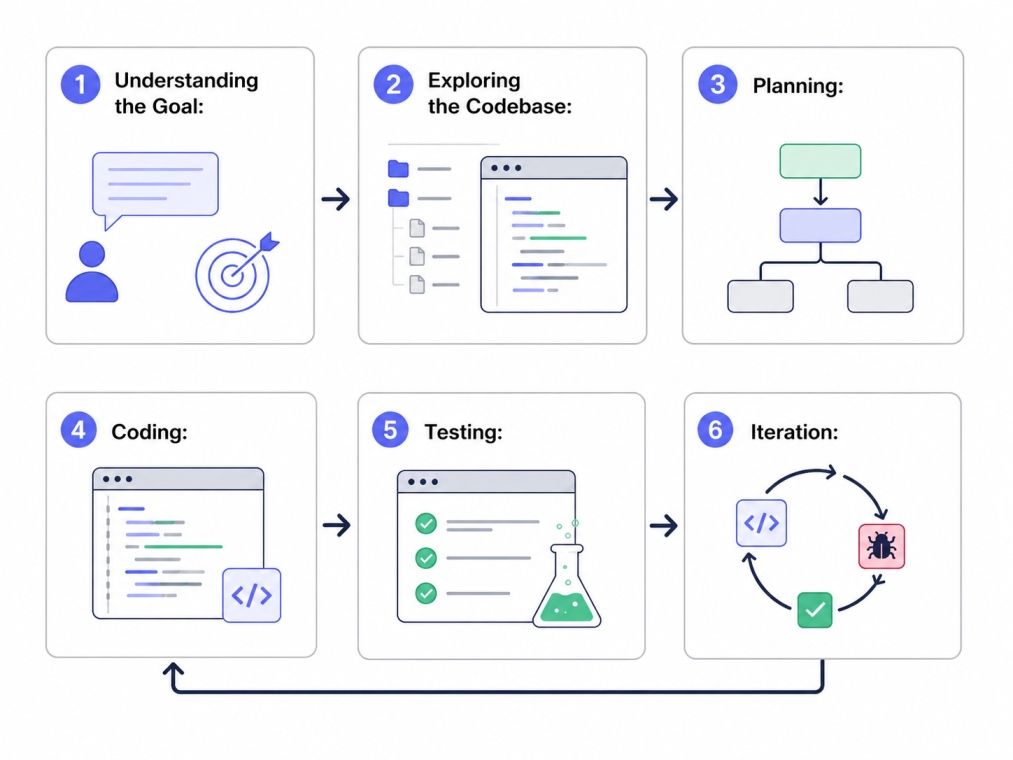
To understand AI coding agents, think of them as a combination of reasoning, memory, tools, and execution systems.
At the core sits a large language model trained on programming languages and software development patterns. The model acts as the brain of the agent.
Step 1: Understanding the Goal:
A developer provides instructions such as: "Add user authentication to this application."
The agent interprets the requirement and identifies the necessary steps.
Step 2: Exploring the Codebase:
This helps it understand context before making changes.
The agent examines:
Step 3: Planning:
The system creates an execution plan.
Example:
Step 4: Coding:
The agent writes and modifies files based on the plan.
Step 5: Testing:
Many modern AI coding agents can run tests automatically and analyze failures.
Step 6: Iteration:
If something breaks, the agent attempts to fix and reruns tests.
Also Read: Top 8 AI Tools for Coding: A Practical Guide for Developers
Component |
Purpose |
| LLM | Reasoning and code generation |
| Memory | Stores context and previous actions |
| Tools | Access to IDEs, terminals, APIs |
| Planner | Breaks tasks into steps |
| Evaluator | Reviews results |
| Execution Engine | Performs actions |
Explore the future of autonomous AI systems with the Executive Programme in Generative AI & Agentic AI for Leaders and learn how Generative AI is reshaping decision-making and business operations.
People often think that AI coding agents are going to take the place of developers. That is not what really happens.
In life teams that do a good job use AI coding agents to help the developers do more work. Developers define goals, review outputs, and make architectural decisions. The agent handles repetitive implementation work.
Research and industry reports show that productivity gains are real. But they come with a catch: without human eyes on the output, code quality can quietly slip, and technical debt has a way of sneaking up on you.
Imagine building a task management application.
Instead of writing every feature manually, you ask an AI coding agent to: "Create task creation, editing, deletion, authentication, tests, and documentation."
The agent generates most of the implementation while you focus on product decisions and code review. That shift is why many experts view agentic development as the next major phase of software engineering.
Also Read: Agentic AI Use Cases: Real Applications
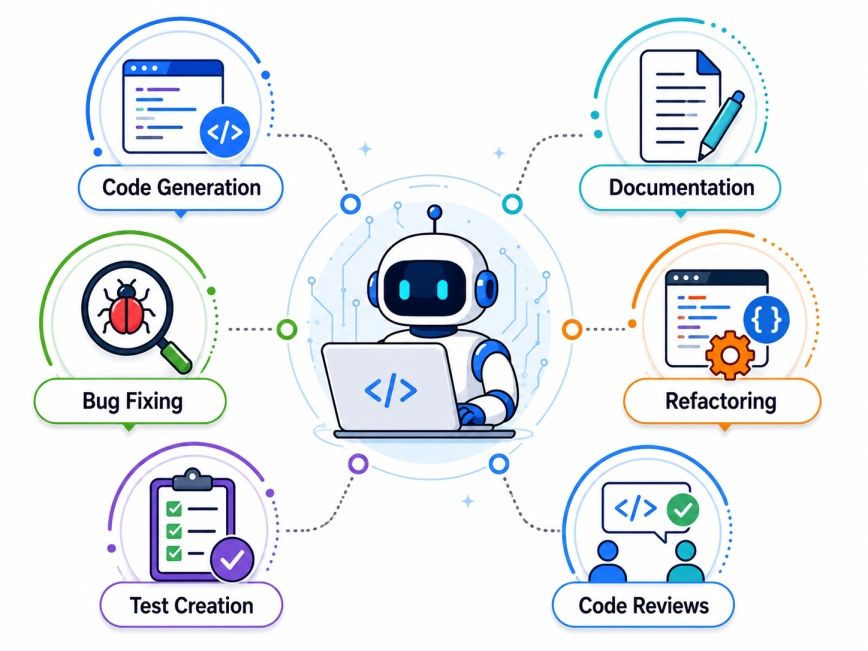
The biggest shift is that developers increasingly assign outcomes rather than individual coding tasks. The agent figures out how to achieve the goal.
Also Read: What is Debugging in Coding: Tools & Techniques for Debugging Explained
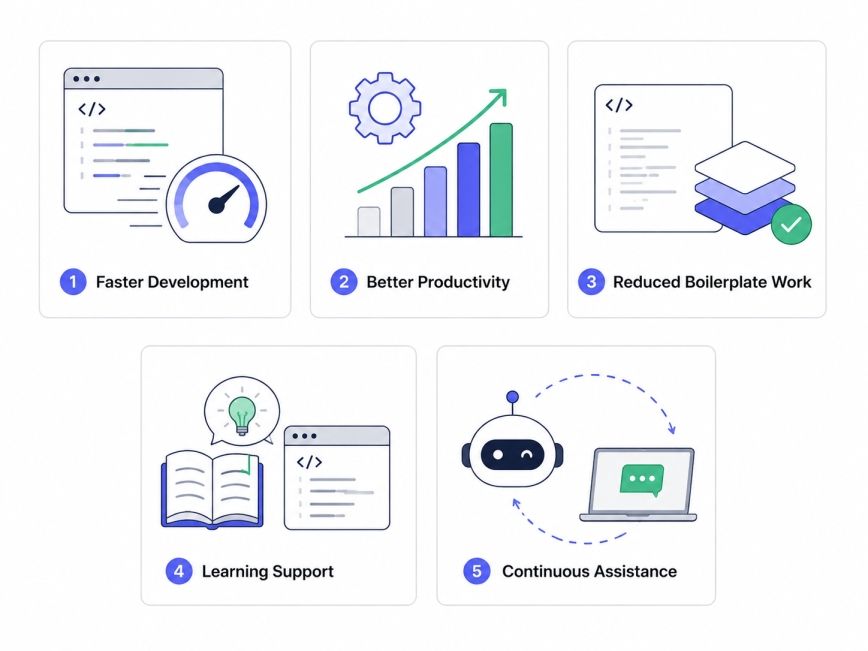
AI coding agents offer significant advantages, but they also introduce new challenges.
1.Faster Development
Routine coding tasks can be completed much faster than manual implementation. Developers spend less time writing repetitive code and more time solving business problems.
2. Better Productivity
Teams can tackle larger projects without, proportionally increasing engineering headcount.
3. Reduced Boilerplate Work
Tasks such as:
4. Learning Support
Junior developers use AI coding agents to understand unfamiliar frameworks and concepts.
5. Continuous Assistance
Unlike human teammates, agents can work across multiple tasks simultaneously.
Also Read: Top 10 Free AI Agents in 2026
Organizations that treat AI coding agents as collaborators rather than replacements tend to see the strongest results.
The market for AI coding agents is evolving rapidly. Different tools excel in different workflows.
Popular AI Coding Agents and their primary strength:
Several benchmark studies compare these tools across coding, debugging, testing, and pull request workflows. Results vary depending on task type, meaning there is no universal winner.
Also Read: Agentic AI Risk and Challenges: Key Issues and Solutions
The biggest productivity gains usually come from workflow design rather than tool selection. An average developer with strong processes often outperforms someone using the most advanced agent without structure.
Successful developers:
Understanding both sides helps teams adopt AI Coding Agents effectively.
Feature |
Traditional Coding Assistant |
AI Coding Agent |
| Code suggestions | Yes | Yes |
| Understand project context | Limited | Extensive |
| Multi-step reasoning | Minimal | Advanced |
| Run tests | No | Yes |
| Debug automatically | Limited | Yes |
| Execute workflows | No | Yes |
| Task planning | No | Yes |
Also Read: Generative AI vs Traditional AI: Which One Is Right for You?
Industry experts think software development will change. They expect it to use agent-driven workflows more. In these workflows, developers will give objectives.
They will not write every line of code manually. Some benchmarks and data are emerging. They show that these systems are getting fast. Human oversight will still be very important.
AI coding agents represent one of the biggest shifts in software development since the rise of cloud computing and modern frameworks. They can understand requirements, generate code, run tests, debug issues, and automate parts of the development lifecycle.
This makes developers faster, more productive, and more focused on solving business problems rather than repetitive coding tasks. However, they are not a replacement for engineering judgment.
Want to explore more about AI coding agents? Book your free 1:1 personal consultation with our expert today.
AI coding agents use large language models, planning systems, memory, and development tools to complete software tasks. They analyze requirements, inspect codebases, generate code, run tests, and iterate until a goal is achieved. Human oversight remains important to ensure quality and security.
To build AI coding agents, start with an LLM, then add memory, tool integrations, task planning, and execution capabilities. Frameworks like LangGraph, AutoGen, and CrewAI can simplify development. Most projects begin with narrow workflows before expanding to broader software engineering tasks.
Popular options include GitHub Copilot, Cursor, Devin, Claude Code, OpenAI Codex agents, Aider, and Cline. The best choice depends on your workflow, project complexity, and preferred development environment. Testing multiple tools is often the best approach.
Code completion predicts the next line or function while you write. AI coding agents go much further by planning tasks, editing multiple files, running tests, debugging issues, and executing workflows. They focus on outcomes rather than isolated code suggestions.
No. AI coding agents can automate many repetitive tasks, but they still struggle with business context, architecture decisions, stakeholder communication, and long-term system design. Human expertise remains critical for successful software projects.
They can be safe when used with proper safeguards. Teams should review generated code, run security scans, enforce testing standards, and follow code review processes. Blindly accepting outputs can create risks.
Most modern AI coding agents support popular languages including Python, JavaScript, TypeScript, Java, C#, Go, Rust, PHP, and Ruby. Support quality varies depending on training data and ecosystem maturity.
Many developers report meaningful productivity gains, especially for boilerplate code, testing, documentation, and debugging. However, actual improvements depend on review practices, team processes, and project complexity.
Yes. Beginners often use AI coding agents to learn programming concepts, understand frameworks, and accelerate project development. However, relying entirely on generated code can slow long-term learning if concepts are not understood.
AI coding agents are being used across software companies, financial services, healthcare, retail, SaaS businesses, startups, and enterprise IT teams. Any organization that develops software can potentially benefit from agent-assisted workflows.
The future points toward increasingly autonomous software development workflows. Developers will spend more time defining objectives, reviewing outputs, and making strategic decisions while AI coding agents handle implementation and repetitive engineering tasks.
730 articles published
Sriram K is a Senior SEO Executive with a B.Tech in Information Technology from Dr. M.G.R. Educational and Research Institute, Chennai. With over a decade of experience in digital marketing, he specia...
Speak with AI & ML expert
By submitting, I accept the T&C and
Privacy Policy