SQL UNION vs UNION ALL: Key Differences Explained
By Sriram
Updated on Jul 27, 2026 | 16 min read | 4.59K+ views
Share:

All courses
Certifications
More
By Sriram
Updated on Jul 27, 2026 | 16 min read | 4.59K+ views
Share:
Table of Contents
Quick Overview
This blog breaks down everything you need to know about SQL UNION vs UNION ALL in plain language. You will learn what each operator does, how they handle duplicates and NULL values, how they perform on large datasets, and when to use one over the other.
If you're curious about how technologies like SQL, Python, and data visualization power real-world analytics, upGrad's Data Science courses can help you build these skills hands-on, from data analysis to machine learning, and open doors across industries that run on data.
Popular Data Science Programs
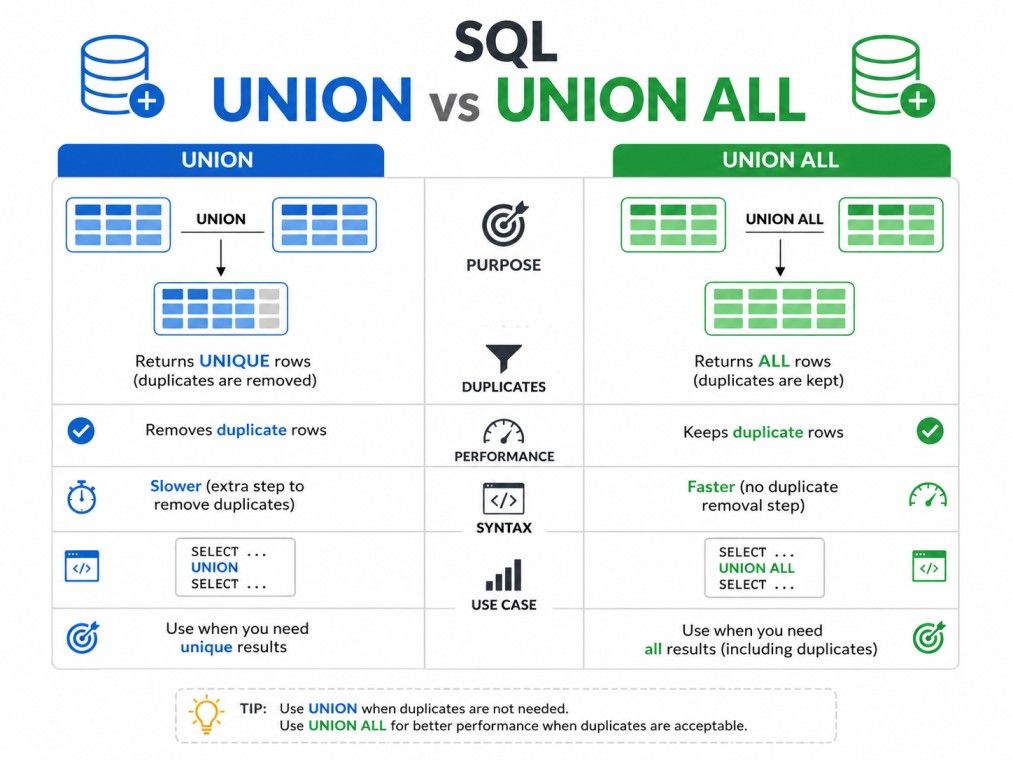
The core difference in SQL UNION vs UNION ALL comes down to one thing: duplicates.
Here is the simplest way to picture it. Imagine you have two lists of customer names, and some names appear on both lists. UNION would give you one clean list with no name repeated. UNION ALL would give you both lists stacked together, repeats and all.
This single difference drives almost every other distinction between the two operators, including speed, memory usage, and how they affect your data analysis.
Feature |
UNION |
UNION ALL |
| Removes duplicates | Yes | No |
| Speed | Slower | Faster |
| Memory usage | Higher | Lower |
| Use case | Need unique results | Need all records, including duplicates |
Both operators exist in nearly every major database system, including SQL Server, MySQL, PostgreSQL, Oracle, and Spark SQL. The syntax stays almost identical across platforms, which makes this concept easy to carry from one database to another.
Before we go deeper into performance and use cases, it helps to understand each operator on its own. The next two sections cover UNION and UNION ALL individually, so you have a solid base before comparing them side by side.
Also Read: SQL Tutorials: Complete Learning Guide
Free Courses
UNION is a set operator in SQL that combines the results of two or more SELECT statements into a single result set. It automatically removes any duplicate rows, so every row in the final output is unique.
Think of UNION as a merge-and-clean operation. It runs each SELECT statement, stacks the results together, then scans the combined set and drops any row that appears more than once.
Basic Syntax
SELECT column1, column2 FROM table1
UNION
SELECT column1, column2 FROM table2;
A few rules apply every time you use UNION:
Example
Suppose you have two tables, online_customers and store_customers, and some people show up in both.
SELECT customer_name FROM online_customers
UNION
SELECT customer_name FROM store_customers;
If "Rahul Mehta" exists in both tables, UNION returns his name only once. This makes UNION useful whenever you need a clean, deduplicated list, such as building a master list of unique customers, products, or locations from multiple sources.
UNION is common in reporting scenarios where duplicate entries would distort the picture. If you are merging customer emails from a website and an app database, you probably do not want the same email showing up twice in your final list. That is the exact situation UNION is built for.
Keep in mind that this deduplication step means UNION has to do extra work internally. It needs to sort or hash the combined data to identify duplicates before returning results. This becomes important later when we compare performance between SQL union vs union all.
Also Read: SQL For Beginners: Essential Queries, Joins, Indexing & Optimization Tips
Data Science Courses to upskill
Explore Data Science Courses for Career Progression
IIIT Bangalore
Executive Post Graduate Certificate in Data Science & AIPlacement Assistance
UNION ALL is a set operator in SQL that combines the results of two or more SELECT statements into a single result set, but unlike UNION, it does not remove duplicates. Every row from every SELECT statement appears in the final output, even if some rows are identical.
This makes UNION ALL a simpler and more direct operation. It does not need to compare rows against each other or filter anything out. It just appends the results together.
Basic Syntax of UNION ALL in SQL
SELECT column1, column2 FROM table1
UNION ALL
SELECT column1, column2 FROM table2;
The same fundamental rules apply here as with UNION. Column count, order, and compatible data types are still required across all SELECT statements.
Example
Using the same customer tables from before:
SELECT customer_name FROM online_customers
UNION ALL
SELECT customer_name FROM store_customers;
If "Rahul Mehta" exists in both tables, UNION ALL returns his name twice. Nothing gets filtered.
This SQL UNION vs UNION ALL example shows exactly why UNION ALL matters for analytics. If you are counting total transactions, total orders, or total events across multiple tables, you usually want every row counted, including repeats. Removing duplicates in that case would give you a wrong, lower number.
UNION ALL is the better default in most performance-sensitive scenarios because it skips the deduplication step entirely. Database engines process it faster since there is no sorting or comparison overhead.
If you already know your data has no duplicates, or you actually want to keep every row, UNION ALL is almost always the right choice over UNION.
Also Read: Understanding the Types of SQL Operators: Practical Examples and Best Practices
Before looking deeper at how SQL union vs union all differ, it helps to know what they have in common. Both operators serve the same basic purpose, just with one key behavioral difference in how they treat duplicate rows.
Here is what stays consistent across both:
In other words, structurally, UNION and UNION ALL are identical operators. The only functional difference is that UNION checks for and removes duplicate rows, while UNION ALL does not.
This is worth remembering because it means switching between the two in your query is usually a one-word change. If you write a query using UNION and later realize you actually want to keep duplicates, you can simply add the word ALL without restructuring anything else.
It also means both operators carry the same column-matching restrictions. If your query fails with UNION due to a column mismatch, the exact same query will fail with UNION ALL for the same reason. The error has nothing to do with duplicates and everything to do with structure.
Understanding this overlap makes the differences easier to grasp, because you are only tracking one variable: how duplicates are handled. Everything else about syntax, structure, and requirements stays the same. With that foundation set, let's look closely at where the two operators actually diverge, starting with duplicate handling and NULL values.
upGrad's Executive Post Graduate Certificate Programme in Data Science & AI from IIITB helps you build these in-demand skills, from data analytics to machine learning and AI, backed by IIIT Bangalore's academic rigor and industry-relevant curriculum. Explore the programme and take the next step toward a career in Data Science & AI.
Now that you know what each operator does individually, let's line up the differences directly. This is the section most people are really searching for when they type SQL union vs union all into Google.
This is the defining difference. UNION scans the combined result set and removes any row that matches another row exactly across all selected columns. UNION ALL skips this step completely and returns every row as is.
A row only counts as a duplicate in UNION if every column value matches. If even one column differs, the rows are treated as unique and both are kept.
A common point of confusion is how UNION treats NULL values when checking for duplicates. In SQL, NULL is generally not equal to NULL in comparisons. But UNION treats two rows with NULL in the same column position as duplicates for deduplication purposes, as long as every other column also matches.
So, if two rows are identical and both have NULL in the same column, UNION will still remove one of them. This is a special case built into how the set operation works, different from how NULL behaves in a WHERE clause comparison.
UNION ALL is faster in almost every case. Since it does not need to check for or remove duplicates, the database engine avoids the extra sorting or hashing step that UNION requires.
UNION, on the other hand, needs to process the entire combined result set to identify and remove duplicates. On large datasets, this extra step can add noticeable time and resource usage.
The syntax difference is just one word:
-- UNION
SELECT city FROM warehouse_a
UNION
SELECT city FROM warehouse_b;
-- UNION ALL
SELECT city FROM warehouse_a
UNION ALL
SELECT city FROM warehouse_b;
Aspect |
UNION |
UNION ALL |
| Duplicate rows | Removed | Kept |
| NULL handling in duplicates | Treated as matching | Treated as matching (not filtered anyway) |
| Speed on large data | Slower | Faster |
| Resource usage | Higher (sorting/hashing) | Lower |
| Best for | Unique value lists | Full row counts, logs, transactions |
Understanding these four points, duplicates, NULLs, performance, and syntax, covers most of what people need when comparing SQL union vs union all in SQL server, MySQL, or any other platform.
Also Read: Top SQL Queries in Python Every Python Developer Should Know
Subscribe to upGrad's Newsletter
Join thousands of learners who receive useful tips
Both operators come with structural rules you need to follow, or your query will fail. These rules apply the same way whether you use UNION or UNION ALL.
You are not limited to two SELECT statements. You can chain as many as you need:
SELECT product_name FROM store_1
UNION ALL
SELECT product_name FROM store_2
UNION ALL
SELECT product_name FROM store_3;
Each additional SELECT statement must follow the same column rules as the first two.
If you try to combine a query returning 3 columns with one returning 4 columns, you will get an error. This is one of the most common mistakes beginners run into.
You can only use ORDER BY once, and it must go at the very end of the entire combined query, not after each individual SELECT statement.
SELECT employee_name, department FROM team_a
UNION ALL
SELECT employee_name, department FROM team_b
ORDER BY employee_name;
WHERE clauses work inside each individual SELECT statement, before the union happens. This lets you filter each source table differently before combining them.
SELECT order_id FROM orders_2024 WHERE status = 'completed'
UNION ALL
SELECT order_id FROM orders_2025 WHERE status = 'completed';
You can use UNION or UNION ALL inside a subquery, or wrap a UNION query as a subquery itself. This is common when you need to combine data before applying additional filtering or aggregation.
SELECT region, SUM(sales) AS total_sales
FROM (
SELECT region, sales FROM sales_north
UNION ALL
SELECT region, sales FROM sales_south
) combined_sales
GROUP BY region;
This pattern is especially useful in SQL union vs union all in SQL server scenarios where you need to merge partitioned tables before running aggregate calculations.
Also Read: Most Asked Oracle Interview Questions and Answers - For Freshers and Experienced
If you look at the execution plan for a UNION query versus a UNION ALL query, the difference becomes very visible. This is one of the clearest ways to understand why SQL union vs union all matters beyond just the final output.
When you run UNION, the database engine typically adds a sort or hash step after combining the result sets. This step scans through all the rows to identify and remove duplicates. On small tables, this barely registers. On large tables with millions of rows, this step can become one of the most expensive parts of the entire query.
UNION ALL skips this step entirely. The execution plan simply shows a concatenation of the result sets, with no extra sorting or comparison operation. This is why UNION ALL consistently uses less CPU and memory than UNION for the same data.
Here is a general breakdown of what happens internally:
Step |
UNION |
UNION ALL |
| Run each SELECT statement | Yes | Yes |
| Combine results | Yes | Yes |
| Sort or hash for duplicate check | Yes | No |
| Remove duplicate rows | Yes | No |
| Return final result | Yes | Yes |
When comparing SQL Server UNION vs. UNION ALL directly, you can view this cost difference by checking the actual execution plan.
A UNION query usually shows a "Distinct Sort" or "Hash Match" operator that does not appear in the UNION ALL version of the same query. This single operator is often responsible for most of the performance gap.
The practical takeaway is simple: if you already know your combined data will not contain duplicates, or if duplicates do not matter for your use case, always use UNION ALL. You get the same result faster, without wasting resources on a deduplication step you did not need in the first place.
This becomes especially important in Spark SQL and other distributed systems, which we will touch on later, since the deduplication step in UNION requires shuffling data across nodes, which is expensive at scale.
Also Read: Top 27 SQL Projects in 2026 With Source Code: For All Levels
This is where getting SQL union vs union all wrong can cause real damage. If you are building reports or calculating business metrics, this choice is not just a performance question. It can change your actual numbers.
Imagine you are counting total customer interactions from two log tables, one for app events and one for website events. If you use UNION instead of UNION ALL, and a row happens to be identical across both columns you selected, that row gets removed.
Your interaction count comes out lower than reality, even though nothing was technically wrong with your data.
This mistake is especially easy to make when your SELECT statement only pulls a few columns. Fewer columns means a higher chance that two genuinely different events look identical to the database, and get treated as duplicates.
Revenue reporting is even more sensitive. If two separate transactions happen to have the same customer ID, same amount, and same date, UNION would treat them as duplicates and drop one.
That means your reported revenue would be understated, potentially by a significant amount if this happens across many rows.
For any query involving SUM(), COUNT(), or AVG() across combined tables, UNION ALL is almost always the safer choice, unless you specifically want deduplicated values.
Retention metrics often rely on counting user activity across multiple time periods or multiple event tables. Using UNION here can silently merge two separate but identical-looking activity records into one, which understates how active your users actually are.
The safest rule of thumb: use UNION ALL by default for any metric calculation, and only switch to UNION when you specifically need a deduplicated list, such as a unique customer list or unique product list. Getting this wrong does not throw an error. It just quietly gives you the wrong number, which is often worse.
Also Read: SQL for Data Science: A Complete Guide for Beginners
Choosing between UNION and UNION ALL comes down to one question: do you need unique rows, or do you need every row.
Use UNION when:
This decision looks slightly different depending on your platform. In sql server union vs union all scenarios, teams often lean on UNION ALL for reporting pipelines where speed matters. In Spark SQL union vs union all situations, the choice matters even more, since UNION triggers a shuffle across distributed nodes that can noticeably slow down a job.
Use UNION ALL when:
Also Read: 52+ PL SQL Interview Questions Every Developer Should Know
On large datasets, this decision matters even more. UNION ALL scales better because it avoids the sorting and comparison overhead that UNION requires.
If you are working with millions of rows across multiple large tables, that overhead can turn a fast query into a slow one.
A practical approach many teams use: start with UNION ALL by default, and only add the deduplication step, either through UNION or a separate DISTINCT clause, if you actually confirm duplicates are a problem.
This way, you are not paying a performance cost for a scenario that might not even exist in your data.
A useful SQL union vs union all example to try on your own data: if you are unsure whether duplicates exist, run a quick UNION ALL query first and check the row count.
Compare it to a UNION version of the same query. If the counts match, you do not have duplicates, and UNION ALL is safe to use going forward.
Also Read: Is SQL Hard to Learn? Challenges, Tips, and Career Insights
Both UNION and UNION ALL can throw errors if the underlying queries are not structured correctly. Here are the most common issues and how to resolve them.
This happens when your SELECT statements return a different number of columns.
-- This will fail
SELECT name, email FROM customers
UNION ALL
SELECT name FROM leads;
Fix: Make sure both SELECT statements return the same number of columns. If one table is missing a column, you can add a placeholder.
SELECT name, email FROM customers
UNION ALL
SELECT name, NULL AS email FROM leads;
If you are seeing duplicate rows and did not expect them, remember that UNION ALL never removes duplicates by design. If you need unique rows, switch to UNION, or wrap your query with a DISTINCT clause if you need more control.
SELECT DISTINCT * FROM (
SELECT customer_name FROM online_customers
UNION ALL
SELECT customer_name FROM store_customers
) combined;
If your UNION query feels slow, check whether you actually need deduplication. Switching to UNION ALL, if duplicates are not a concern, often resolves the slowdown immediately. You can also check your execution plan to confirm whether the sort or hash step is the bottleneck.
Indexing the columns used in your SELECT statements can also help both UNION and UNION ALL run faster, since the database can retrieve matching rows more efficiently before combining them. This applies to traditional databases as much as it does to spark sql union vs union all workloads, where partition pruning plays a similar role.
Anyone learning SQL UNION vs. UNION ALL eventually runs into the same handful of mistakes. Here are the ones that come up again and again:
Most of these mistakes are easy to catch once you know to look for them. The biggest one, by far, is defaulting to UNION without thinking about whether you actually need deduplication. That single habit is responsible for a large share of unnecessary slow queries in production systems.
Keep these practices in mind whenever you are combining result sets:
These practices apply whether you are working in SQL Server UNION vs. UNION ALL scenarios, MySQL, PostgreSQL, or Spark SQL. The logic stays consistent across platforms, even if small syntax details shift.
UNION and JOIN solve different problems, even though both combine data from multiple sources. JOIN combines columns from two tables based on a matching condition, producing wider rows. UNION combines rows from two tables with the same columns, producing a longer result set.
If you need to add more columns, use JOIN. If you need to stack similar rows together, use UNION or UNION ALL. This distinction holds true whether you are looking at union vs union all in SQL server or any other relational database.
These three operators all work with two result sets, but they answer different questions:
Operator |
What it returns |
| UNION ALL | All rows from both result sets, including duplicates |
| INTERSECT | Only rows that appear in both result sets |
| EXCEPT (or MINUS) | Rows that appear in the first result set but not the second |
If you are trying to find customers who appear in both your email list and your purchase list, INTERSECT is the right tool, not UNION.
If you want customers who signed up but never purchased, EXCEPT is what you need. UNION and UNION ALL are specifically for combining and stacking, not comparing sets against each other.
Let's walk through a complete sql union vs union all example using two small tables.
Table: north_sales
product |
amount |
| Laptop | 50000 |
| Mouse | 500 |
Table: south_sales
product |
amount |
| Laptop | 50000 |
| Keyboard | 1500 |
Using UNION:
SELECT product, amount FROM north_sales
UNION
SELECT product, amount FROM south_sales;
Result:
product |
amount |
| Laptop | 50000 |
| Mouse | 500 |
| Keyboard | 1500 |
Notice "Laptop, 50000" appears only once, even though it exists in both tables.
Using UNION ALL
SELECT product, amount FROM north_sales
UNION ALL
SELECT product, amount FROM south_sales;
Result:
product |
amount |
| Laptop | 50000 |
| Mouse | 500 |
| Laptop | 50000 |
| Keyboard | 1500 |
Here, "Laptop, 50000" appears twice, once from each table.
If you were calculating total sales revenue, UNION ALL gives you the correct total. UNION would understate it by leaving out one Laptop sale, since it looks identical to the row in the other table.
This same logic applies in Spark SQL UNION vs. UNION ALL scenarios, where you are often combining large distributed datasets, and Spark SQL supports both operators with the same behavior described here, though UNION in Spark SQL can be more resource-intensive due to the distributed shuffle required to check for duplicates across partitions.
Also Read: Attributes in DBMS: Types & Their Role in Databases
The decision between choosing SQL UNION and UNION ALL comes down to the question of whether you want unique rows or all rows. Keep the column rules, NULL behavior, and execution plan differences in mind, and you will avoid the most common mistakes people run into with these two operators, whether you are working in SQL Server, MySQL, PostgreSQL, or Spark SQL.
Want personalized guidance on Data Science and upskilling? Speak with an expert for a free 1:1 counselling session today.
UNION removes duplicate rows from the combined result set, while UNION ALL keeps every row, including duplicates. This is the core distinction in SQL UNION vs UNION ALL, and it affects both the accuracy of your results and how fast the query runs.
In almost every case, yes. UNION ALL skips the sorting or hashing step needed to identify duplicates, so it uses less CPU and memory. UNION has to scan the full combined result set to remove repeats, which adds processing time, especially on large tables.
Yes, SQL does not require column names to match across SELECT statements, only the number of columns and compatible data types. The final result set uses the column names from the first SELECT statement, regardless of what the other tables call them.
Mostly yes. Spark SQL supports both operators with the same duplicate-handling logic as standard SQL. The key difference is that UNION in Spark SQL can be more expensive, since removing duplicates across distributed partitions requires shuffling data between nodes.
Nothing changes in your output. If there are no duplicate rows to begin with, UNION and UNION ALL return identical results. In that case, UNION ALL is still the better choice since it avoids the unnecessary deduplication step.
The behavior is the same in SQL Server as in MySQL, PostgreSQL, and other major databases. SQL Server does show the deduplication step clearly in its execution plan, often as a Sort or Hash Match operator, which makes it a good platform for visually comparing the performance difference.
Yes, you can chain as many SELECT statements as needed, separated by UNION or UNION ALL. Each additional SELECT statement must follow the same column count, order, and data type rules as the rest of the query.
UNION removes entire duplicate rows, not just duplicate values in one column. Two rows are only considered duplicates if every selected column matches exactly. If even one column differs, both rows stay in the result set.
For most performance and analytics use cases, yes, UNION ALL is the safer default since it does not accidentally remove data you need. Only switch to UNION when you specifically require a deduplicated, unique result set.
This usually happens because UNION removed rows it considered duplicates, even if you did not intend that. Check whether any rows across your source tables have identical values across all selected columns. If so, switch to UNION ALL to keep every row.
Yes, but ORDER BY can only be used once, at the very end of the entire combined query, not after each individual SELECT statement. It sorts the final combined result set, not each source table separately.
695 articles published
Sriram K is a Senior SEO Executive with a B.Tech in Information Technology from Dr. M.G.R. Educational and Research Institute, Chennai. With over a decade of experience in digital marketing, he specia...
Speak with Data Science Expert
By submitting, I accept the T&C and
Privacy Policy
Start Your Career in Data Science Today
Top Resources
Executive Diploma
12 Months
Master's Degree
18 Months
Bootcamp
6 Months