Python Data Cleaning: A Complete Beginner’s Guide
By Sriram
Updated on Jun 22, 2026 | 7 min read | 2.56K+ views
Share:

All courses
Certifications
More
By Sriram
Updated on Jun 22, 2026 | 7 min read | 2.56K+ views
Share:
Table of Contents
Python data cleaning is an important skill in data analytics, data science, and machine learning. No matter how good your model is, bad data will usually give you poor quality results. Real-world data sets are rarely perfect. They have missing values, duplicate records, inconsistent formats, and wrong entries that can affect analysis.
In this blog, you'll learn about Python data cleaning, data quality problems, practical cleaning methods, useful Pandas functions, and real-world examples. By the end, you'll have a plan for turning messy data into reliable data that is ready for analysis and machine learning.
Explore upGrad's hands-on Data Science Courses & Artificial Intelligence Courses, master Python data cleaning techniques and beyond.
Popular Data Science Programs
Python data cleaning is when we identify mistakes and fix errors, inconsistencies, and inaccuracies in a dataset. Before we start writing code, it is useful to know what data cleaning is all about. IBM research found out that bad data quality costs companies a lot of money every year. This is because bad data leads to incorrect decisions and people waste time and money on things that are not needed.
When we work with Python data cleaning, our goal is simple: we want to make the data correct, consistent, and make the data usable
Also Read: Data Cleaning Techniques: 15 Simple & Effective Ways To Clean Data
Most datasets contain at least one of these issues:
Consider a customer dataset:
Name |
Age |
City |
| John | 25 | Delhi |
| john | 25 | delhi |
| Sarah | Null | Mumbai |
| Mike | 200 | Bangalore |
Several problems immediately stand out:
A model that is trained on poor-quality data often makes predictions that are not correct. This means you cannot really trust what a model says when it is trained on poor-quality data.
Clean data improves:
Also Read: The Importance of Data Quality in Big Data Analytics
Most data cleaning python workflows use the following libraries:
Library |
Purpose |
| Pandas | Data manipulation |
| NumPy | Numerical operations |
| SciPy | Statistical analysis |
| OpenPyXL | Excel handling |
Import them using:
import pandas as pd
import numpy as np
Also Read: Top 32+ Python Libraries for Machine Learning Projects in 2025
Before cleaning anything, explore the data.
df.head()
df.info()
df.describe()
These commands help identify:
Many beginners rush into cleaning without understanding the dataset. This process makes data cleaning in Python work effectively. It helps to prevent us from accidentally getting rid of useful information in Python.
A better approach is:
Also Read: Step-by-Step Guide to Learning Python for Data Science
Free Courses
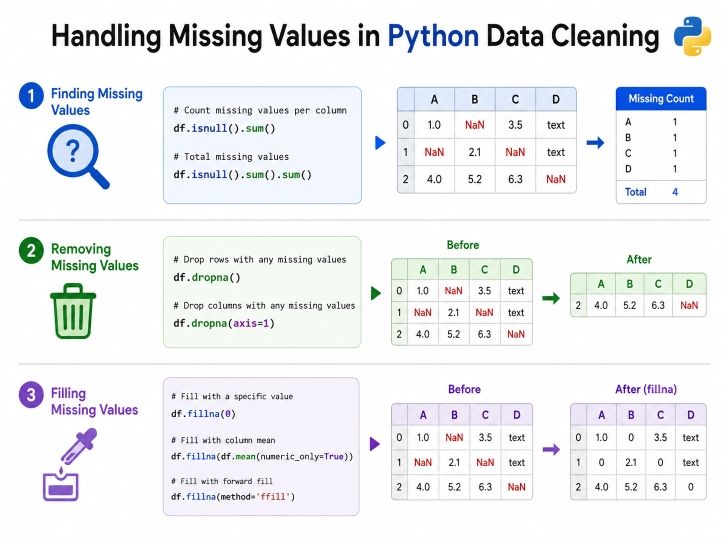
Missing values are a big problem that you will run into a lot.
Sometimes there might occur space and it might seem harmless; missing values can really affect the results of statistical calculations and how well machine learning models work.
Identify where are the missing values, first.
df.isnull().sum() Example output:
Column |
Missing Values |
| Name | 0 |
| Age | 15 |
| Salary | 8 |
| City | 3 |
This quickly shows which columns need attention.
If only a few records are affected, dropping them may be reasonable.
df.dropna() Remove rows with missing values in specific columns:
df.dropna(subset=['Age']) Deleting records causes unnecessary data loss, in many cases. So, instead, replace missing values.
Fill with Mean
df['Age'].fillna(df['Age'].mean(), inplace=True) Fill with Median
df['Salary'].fillna(df['Salary'].median(), inplace=True) Fill with Mode
df['City'].fillna(df['City'].mode()[0], inplace=True) Situation |
Recommended Action |
| Very few missing rows | Drop rows |
| Numerical data | Mean or median |
| Categorical data | Mode |
| Large missing portion | Investigate further |
Imagine an e-commerce dataset with 50,000 customers. If only 20 customers have missing ages, removing them may be acceptable.
If 20,000 customers have missing ages, dropping rows would destroy valuable information. This is where thoughtful python data cleaning becomes important.
Always verify your work:
df.isnull().sum()Analysts often miss this part and assume everything went well. Checking if it works can save a lot of time of troubleshooting later.
Avoid automatically deleting missing data. Sometimes missing information carries business meaning.
For example:
Context matters as much as code in data cleaning python projects.
Data Science Courses to upskill
Explore Data Science Courses for Career Progression
IIIT Bangalore
Executive Post Graduate Certificate in Data Science & AIPlacement Assistance
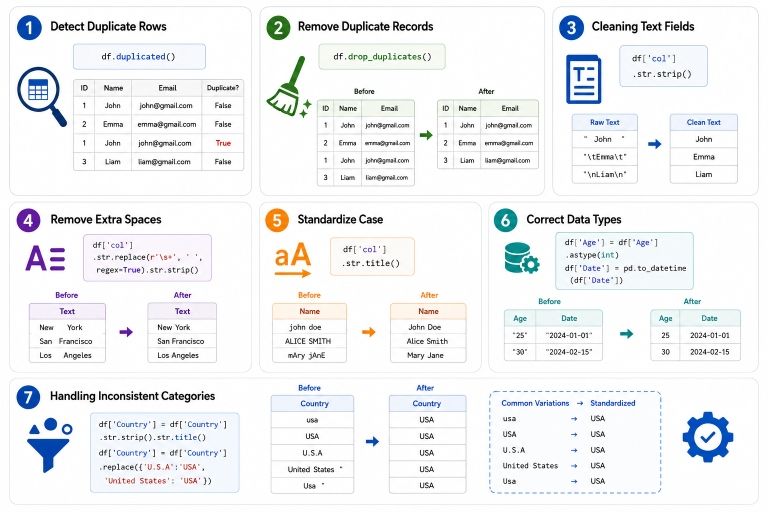
Duplicates and inconsistent formatting often create misleading results. A sales report might show inflated revenue simply because records were entered twice.
Find duplicates:
df.duplicated() Count duplicates:
df.duplicated().sum() Delete duplicate rows:
df.drop_duplicates(inplace=True) Remove duplicates based on selected columns:
df.drop_duplicates(subset=['Email']) Text columns frequently contain formatting issues.
Examples:
Original |
Clean Version |
| " Delhi " | Delhi |
| DELHI | Delhi |
| delhi | Delhi |
df.columns = df.columns.str.strip() For column values:
df['City'] = df['City'].str.strip() Convert text to lowercase:
df['City'] = df['City'].str.lower() Convert text to title case:
df['City'] = df['City'].str.title() Incorrect data types can break calculations.
Check types:
df.dtypes Convert age to integer:
df['Age'] = df['Age'].astype(int) Convert dates:
df['Date'] = pd.to_datetime(df['Date']) Suppose a dataset contains:
These should represent one category.
df['Gender'] = df['Gender'].replace({
   'M':'Male',
   'male':'Male',
   'MALE':'Male'
}) Even tiny differences in how things are set up can make a big difference, in the information we get. Good data cleaning in Python can help us get rid of problems before we start looking at the data.
A dashboard might signify:
as three separate cities.
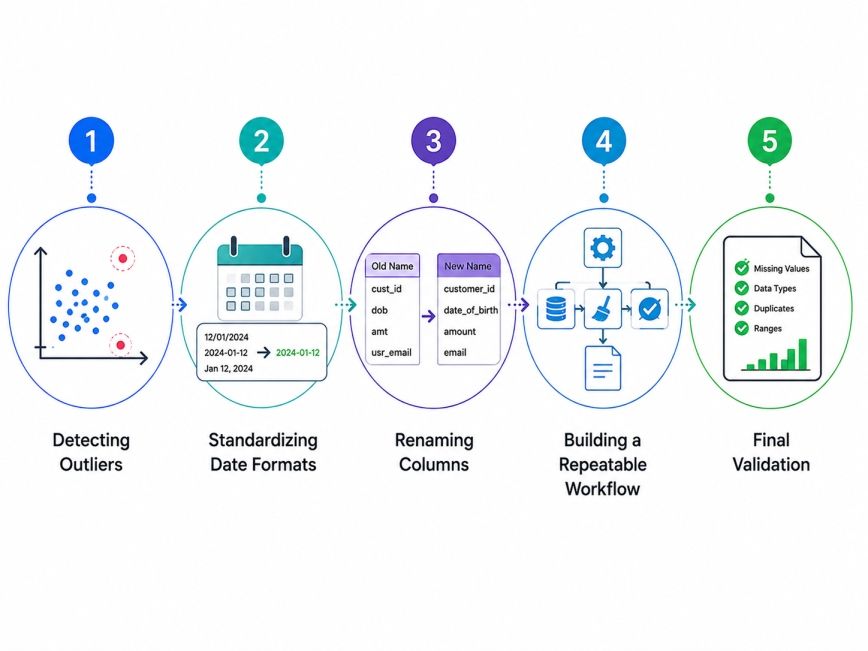
Once the basic issues are fixed, we can use better ways to clean the data and make the data quality even better.
Outliers are values that differ significantly from the rest of the dataset.
Example: Age:- 22, 28, 31, 35, 250
Age 250 is clearly suspicious.
Q1 = df['Age'].quantile(0.25)
Q3 = df['Age'].quantile(0.75)

IQR = Q3 - Q1
Filter outliers:
df = df[
(df['Age'] >= Q1 - 1.5*IQR) &
(df['Age'] <= Q3 + 1.5*IQR)
] Datasets often contain mixed formats:
Convert everything:
df['Date'] = pd.to_datetime(df['Date']) Clean column names improve readability.
df.columns = (
df.columns
.str.strip()
.str.lower()
.str.replace(" ", "_")
)
Result:
Before |
After |
| Customer Name | customer_name |
| Order Date | order_date |
Professional analysts do not clean the data manually every time. Instead, they make scripts that can be reused.
Typical workflow:
Before analysis, check:
df.info()
df.describe()
df.isnull().sum() The best python data cleaning approach is not the one with the most code. It is the one that preserves data quality while keeping the dataset useful.
Many experienced analysts spend more time understanding data than writing cleaning scripts. That extra effort usually leads to better results.
Python data cleaning is the foundation of every successful analytics and machine learning project. Clean data improves accuracy, reduces errors, and creates trustworthy insights. Whether you're dealing with missing values, duplicate records, inconsistent formatting, or outliers, Python provides powerful tools to solve these problems efficiently.
The key is to approach cleaning systematically. Explore the data first. Understand the problem. Apply the right cleaning technique. Then validate the results. As you gain experience, these steps become second nature and significantly improve the quality of your work.
Want to explore more about Python data cleaning? Book your free 1:1 personal consultation with our expert today.
You can clean column names using Pandas string functions. The most common approach is combining str.strip(), str.lower(), and str.replace() to remove spaces and standardize formatting. This method creates consistent column names that are easier to reference in code. It is one of the first steps many professionals perform during python data cleaning.
Use the drop_duplicates() function in Pandas to remove repeated records. You can remove duplicates from the entire dataset or target specific columns such as email addresses or customer IDs. Duplicate removal improves reporting accuracy and prevents inflated counts. It is a standard task in data cleaning python workflows.
The fastest method is: df.isnull().sum()
This command returns the number of missing values in each column. It helps prioritize cleaning efforts and identify fields that require imputation or further investigation.
Drop rows when only a small percentage of records are missing and removing them will not affect analysis of quality. Imputation is usually better when missing data appears frequently. The right choice depends on dataset size, business context, and the importance of the affected column within your data cleaning in Python project.
Pandas is generally considered the primary library for cleaning datasets. It offers functions for handling missing values, duplicates, text processing, data conversion, and data transformation. Many analysts also combine Pandas with NumPy for numerical operations and more advanced data manipulation tasks.
Outliers can be detected using statistical methods such as the Interquartile Range (IQR), Z-score analysis, or visualization tools like box plots. The best technique depends on the dataset. Outlier detection is an important part of python data cleaning because unusual values can distort analysis results.
Yes. Visualizations built on messy data often produce misleading insights. Duplicate records, missing values, and inconsistent categories can significantly affect charts and dashboards. Cleaning first ensures that your visual analysis accurately reflects the underlying data.
The most reliable method is using pd.to_datetime(). This function converts multiple data formats into a consistent datetime structure. Standardized dates simplify filtering, grouping, and time-series analysis while reducing formatting-related errors.
Many beginners remove data too aggressively, ignore validation checks, or overwrite raw datasets. Others apply generic cleaning rules without understanding the business context. A careful and documented workflow usually produces much better outcomes than rushing through the process.
Some models can tolerate limited data quality issues, but most perform better with clean and consistent datasets. Missing values, duplicates, and incorrect formats often reduce predictive accuracy. Investing time in data cleaning python processes typically improves model performance significantly.
Create reusable Python scripts or functions that perform common cleaning operations automatically. This can include handling missing values, formatting text, removing duplicates, and validating outputs.
727 articles published
Sriram K is a Senior SEO Executive with a B.Tech in Information Technology from Dr. M.G.R. Educational and Research Institute, Chennai. With over a decade of experience in digital marketing, he specia...
Speak with Data Science Expert
By submitting, I accept the T&C and
Privacy Policy
Start Your Career in Data Science Today
Top Resources
Executive Diploma
12 Months
Master's Degree
18 Months
Bootcamp
6 Months