Negative Prompts: A Complete Beginner’s Guide
By Sriram
Updated on Jun 22, 2026 | 7 min read | 2.47K+ views
Share:

All courses
Certifications
More
By Sriram
Updated on Jun 22, 2026 | 7 min read | 2.47K+ views
Share:
Table of Contents
Negative prompts are important because they help in guiding AI systems by telling them what to avoid instead of only telling them what to create. Artificial intelligence tools have the ability to create images, text, videos, and designs by using simple instructions or prompts. However, it is not always easy to get the content as our preference; this is where negative prompts become important.
In this guide, you’ll learn what negative prompts are, how AI systems use them, why it’s important, and how to write prompts in a way that works well. You will also see life examples and common mistakes, best practices that can help you get better results from AI tools, in image generators, chatbots, and creative assistants.
Explore upGrad's Agentic AI Courses Online, Artificial Intelligence Courses and Machine Learning Courses Online today and master the art of negative prompts and AI techniques.
Generative AI Courses to upskill
Explore Generative AI Courses for Career Progression
IIIT Bangalore
Executive Diploma in Machine Learning and AI360° Career Support
A negative prompt is telling the Artificial Intelligence model what you do not want in the output; it is just the opposite of giving, a list of things you want. Instead of describing desired elements, here you ask the AI to remove unwanted ones.
It is like talking to a designer and saying here is what I want, but please make sure you do not include these things.
For example, let us say you want a picture of a woman.
Prompt: I want a picture of a woman that looks real taken in light.
Negative prompt: I do not want the face to be blurry, distorted, I do not want her to have fingers, I do not want the picture to be of low quality, I do not want a watermark on the picture, and I do not want any text, on the picture.
Here, the negative prompt is: face, distorted face, extra fingers, low quality, watermark, text.
This helps the AI model understand what you want and what you do not want.
Also Read: Can I Learn Prompt Engineering for Free?
Without clear restrictions, AI models may generate:
Thus, by putting a restriction in prompts, it helps reduce these issues.
Aspect |
Positive Prompt |
Negative Prompt |
| Purpose | Tells AI what to create | Tells AI what to avoid |
| Focus | Desired elements | Undesired elements |
| Example | Realistic mountain landscape | Blurry, cartoon, low quality |
| Impact | Shapes output | Refines output |
A Simple Analogy:
Imagine ordering a pizza.
A positive prompt is saying: “Give me a large pizza with mushrooms and olives."
A negative prompt is saying: "No pineapple, no anchovies, and no extra cheese."
Both instructions work together to deliver the desired result.
Also Read: Learning Models in Machine Learning: 16 Key Types and How They Are Used
Most modern AI systems learn from large collections of datasets to find patterns. When generating content, they predict what should appear based on the prompt provided.
A negative prompt acts like a filter. It reduces the probability of unwanted elements appearing in the final output.
Also Read: Generative AI for Beginners: A Practical Guide to Understanding Modern AI
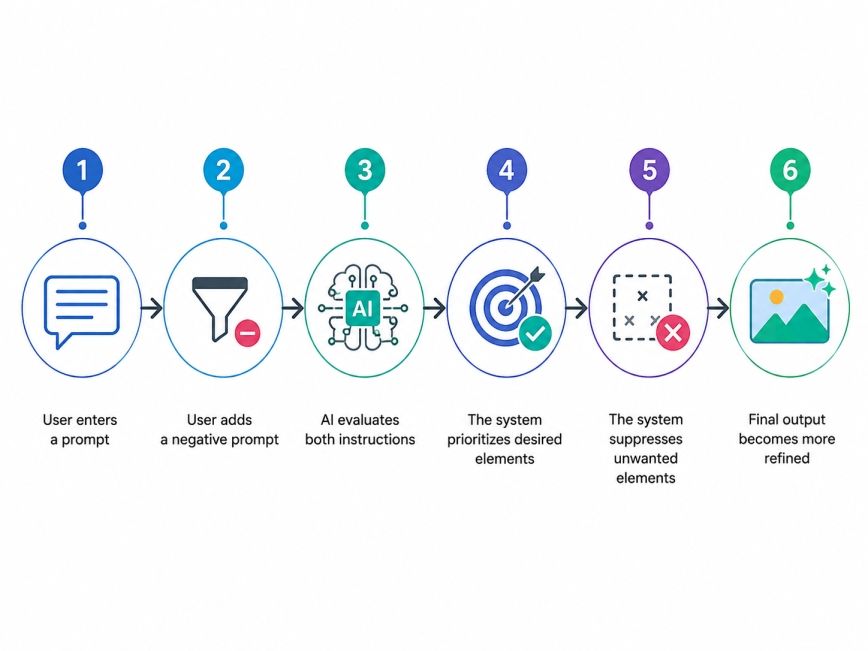
Suppose you enter:
Prompt: A professional business portrait.
Without negative prompts, you might receive:
To significantly improves the outcome, we can add a negative prompt such as:
"Low quality, watermark, blurry, distorted face, cartoon style"
Category |
Examples |
| Quality Issues | blurry, low resolution, pixelated |
| Human Errors | extra fingers, extra limbs, distorted face |
| Style Issues | cartoon, anime, sketch |
| Text Elements | watermark, logo, text |
| Composition Problems | cropped image, bad framing |
When users give negative prompts to the model, it is like they are telling it what not to do. This helps the AI model by bringing less chances to generate that are not supposed to be in the artifacts.
Beyond Images
Negative prompts are increasingly used in:
For example, in writing, users may specify:
"Do not use jargon, passive voice, repetitive phrases, or promotional language."
This helps create cleaner and more readable content.
Also Read: Top 7 Generative AI Models in 2026
Writing negative prompts is not that hard, and it is also about being smart. Beginners often think that the more they write the better it is. The truth is that it is better to be clear and precise than to write a lot of words. Writing negative prompts is about being clear and saying what you mean.
Identify recurring problems in your output.
Examples include:
Then list those issues directly.
Good negative prompts:
Less effective negative prompts:
Specific languages work better.
Also Read: Generative AI Fundamentals: A Practical Guide to Understanding How Modern AI Works
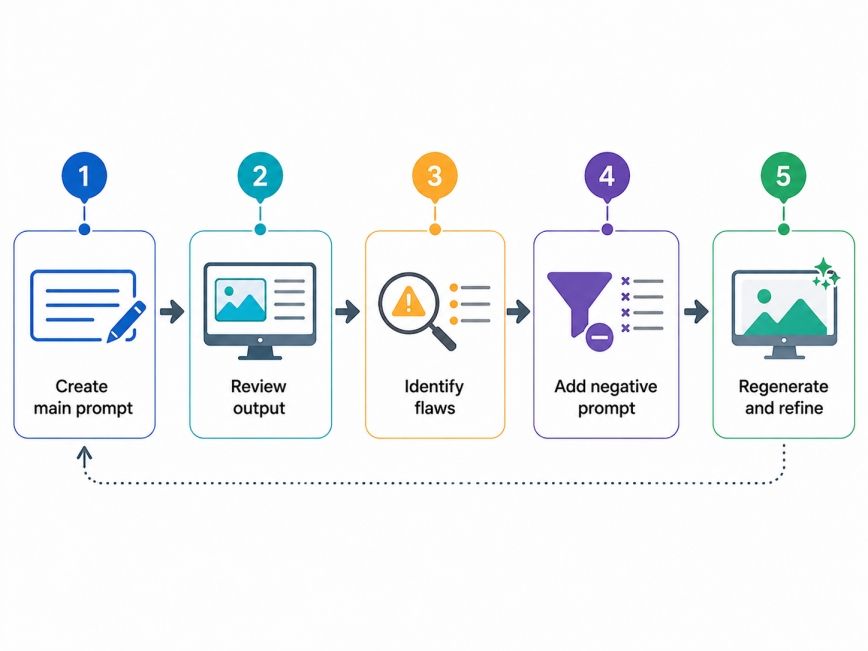
Many people treat prompting as a one-time task, but the best results come from refining prompts and learning outcomes.
Many beginners ask for a ready-made list of negative prompts. While there is no universal formula, some commonly used options work across different projects.
General Negative Prompt List:
Prompt Type |
Negative Prompt |
| Portrait | extra fingers, distorted face, asymmetrical eyes, blurry |
| Fashion | bad anatomy, low quality, duplicate limbs |
| Corporate | cartoon style, watermark, poor lighting |
Common exclusions:
Common exclusions:
Negative prompts are useful beyond images.
Example
Prompt: Write a beginner-friendly article on cloud computing.
Negative Prompt: Avoid jargon, avoid technical complexity, avoid promotional language.
Example
Prompt: Generate Python code for data cleaning.
Negative Prompt: Avoid deprecated libraries, avoid unnecessary comments, avoid inefficient loops.
Experienced prompt engineers often spend a lot of time working on the negative prompts as they do on the primary prompt. They want to make sure the negative prompts are good because it helps the prompt work better. The primary prompt is what tells the computer what to do, and the negative prompt tells the computer what, not to do.
The reason is simple. Removing unwanted elements often improves quality faster than endlessly adding new instructions.
Also Read: Artificial Intelligence Technology: A Complete Guide
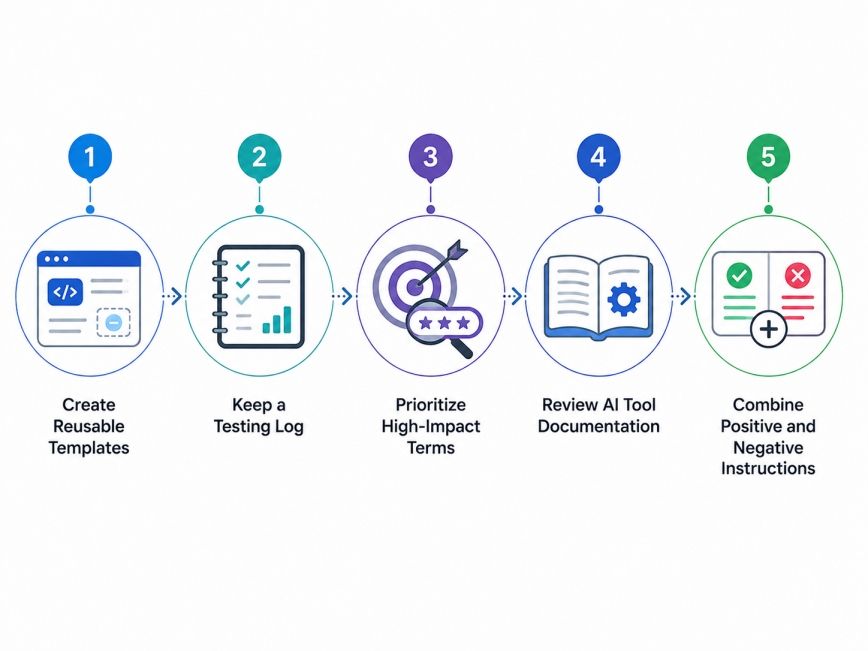
Many users discover negative prompts through trial and error. While experimentation is valuable, following a few proven practices can accelerate learning.
Build a personal library of negative prompts for different projects.
Example categories:
Track:
This helps identify patterns over time.
Focus first on issues that create the biggest quality problems.
Examples:
Different AI models interpret negative prompts differently. Popular tools often publish recommended prompt structures and examples.
The strongest results usually come from balance.
Example:
Positive Prompt: Realistic portrait, soft lighting, professional photography.
Negative Prompt: Blurry, low quality, extra fingers, distorted face, watermark.
As AI systems get better, it will probably become easier to tell them what we do not want. However, people will still need to help the models get the results we want. Clear instructions and thoughtful constraints will remain important parts of effective prompt engineering.
The better people are, at figuring out what the AI system should not say, the better the final outcomes from the AI system are likely to be.
Negative prompts are one of the simplest yet most powerful tools for improving AI-generated results. They help remove unwanted elements, improve quality, and make outputs more aligned with user expectations.
Whether you are generating images, writing content, designing graphics, or building creative projects, learning how to use negative prompts effectively can save time and reduce frustration. Start with common issues, stay specific, test different variations, and refine your approach over time. Small changes in a negative prompt can often produce surprisingly large improvements in output quality.
Want to explore more about Negative prompts? Book your free 1:1 personal consultation with our expert today.
A negative prompt is an instruction that tells an AI model what should not appear in the output. It works alongside the main prompt to remove unwanted elements such as blurry images, extra objects, poor-quality details, or irrelevant content. This helps improve overall output quality and accuracy.
Good negative prompts depend on the project, but common examples include "blurry," "low quality," "watermark," "text," "duplicate objects," and "distorted face." These terms are widely used because they target common AI generation errors and improve output consistency.
Start by identifying recurring problems in your AI-generated results. Then list those issues clearly and specifically. Instead of vague terms like "bad image," use direct descriptions such as "pixelated," "cropped," or "extra fingers" for better results.
The five commonly discussed prompt categories are instructional prompts, contextual prompts, role-based prompts, creative prompts, and negative prompts. Each serves a different purpose and helps guide AI systems toward specific outcomes depending on the task.
Not every AI platform supports negative prompts in the same way. Image generation tools typically provide dedicated fields for them, while text-generation systems may use instructions within the main prompt. Checking platform documentation helps ensure proper usage.
Yes. Negative prompts can reduce common image issues such as blur, poor anatomy, unwanted text, and low-resolution details. While they do not guarantee perfection, they often increase the likelihood of receiving cleaner and more accurate outputs.
Absolutely. Writers can use negative prompts to avoid jargon, repetitive phrases, passive voice, or promotional language. This makes AI-generated content easier to read and more aligned with a specific audience or writing style.
There is no fixed number. Most users start with a short list targeting major issues. Too many restrictions can sometimes reduce creativity or create unexpected results, so it is usually better to begin small and refine gradually.
AI models work with probabilities rather than strict rules. Even strong negative prompts may not completely eliminate certain issues. Iteration, testing, and prompt refinement are often necessary to achieve the desired result consistently.
Yes. The basic concept is straightforward because it focuses on identifying unwanted outcomes. With a little practice and experimentation, beginners can quickly understand how negative prompts influence results and improve AI-generated content.
Prompt engineering is the broader process of designing instructions for AI systems. Negative prompting is one technique within that process. It focuses specifically on preventing unwanted outputs while the main prompt focuses on defining desired outcomes.
727 articles published
Sriram K is a Senior SEO Executive with a B.Tech in Information Technology from Dr. M.G.R. Educational and Research Institute, Chennai. With over a decade of experience in digital marketing, he specia...
Speak with AI & ML expert
By submitting, I accept the T&C and
Privacy Policy