Git Repository: What It Is, How It Works, Structure, Benefits and Best Practices
By Sriram
Updated on Jul 23, 2026 | 10 min read | 4.42K+ views
Share:

All courses
Certifications
More
By Sriram
Updated on Jul 23, 2026 | 10 min read | 4.42K+ views
Share:
Table of Contents
Key Highlights
Understanding a git repository is just the beginning. Advance your skills with upGrad's
Data Science programs, where you'll gain hands-on experience with Git, Python, machine learning, and real-world projects.
Popular Data Science Programs
A git repository is a storage location where Git keeps your project files and tracks every change made over time. Instead of storing only the latest version, it maintains a complete history of your project, making it easy to compare versions, restore previous changes, and collaborate with others.
Unlike a regular folder that only stores files, a git repository stores both your files and their version history. This eliminates the need for multiple backup copies like Project_v1 or Project_Final.
A git repository helps developers manage code changes efficiently, especially when multiple people work on the same project. It also allows you to experiment with new features and easily revert to an earlier version if something goes wrong.
Key benefits include:
At first glance, a project folder and a git repository may look identical. Both contain your project files, images, documents, and source code. The difference lies in what happens behind the scenes.
Regular Folder |
Git Repository |
| Stores project files | Stores project files and version history |
| Doesn't track changes | Records every committed change |
| No rollback capability | Restore earlier versions easily |
| Limited collaboration support | Built for individual and team collaboration |
| No change history | Complete history of every commit |
The version history is stored inside a hidden folder named .git. This directory contains metadata, commit information, references, and configuration files that allow Git to reconstruct the entire history of your project whenever needed.
Also read : Azure Blob Storage: Architecture, Features, Types and Use Cases Explained
Git repositories aren't limited to software engineering. Today, they're used anywhere people need reliable version tracking and collaboration.
Common use cases include:
As projects grow larger and involve more contributors, the value of a well-managed git repository becomes even more obvious. It provides a reliable foundation for tracking progress, reviewing changes, and maintaining project quality over time.
Also read : Git Installation on Windows: A Complete Step-by-Step Guide
Free Courses
Understanding how a git repository works becomes much easier once you see the complete lifecycle of a change. Git doesn't simply overwrite files whenever you save them. Instead, it records snapshots of your project at different points in time, allowing every important update to become part of the repository's history.
The process is straightforward. You create or edit files, review your changes, save them as a commit, and then share them with others if you're working in a team. Every step is tracked, making it easy to understand what changed and when.
Here's the typical flow.
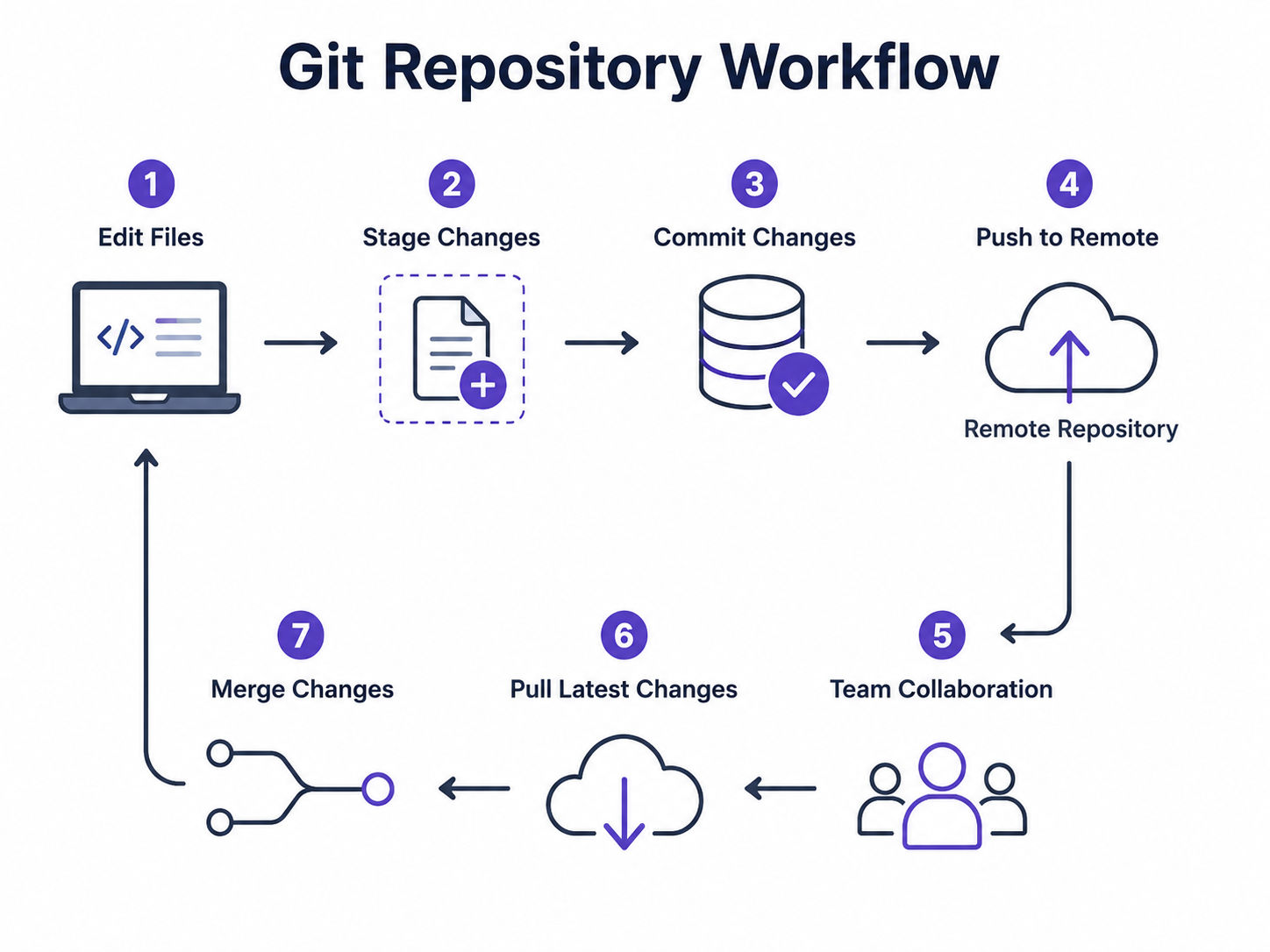
The working directory is where you actively create and edit project files. This is the folder you interact with every day while writing code, updating documentation, or modifying project assets.
At this stage, Git hasn't permanently recorded your changes.You can edit files freely, remove content, or create entirely new folders without affecting the repository's history until you decide to save those changes.
Instead of committing every modified file automatically, Git lets you choose exactly which changes should become part of the next commit. This gives you much greater control over your project history.
For example, imagine you've fixed a bug and updated your project's documentation on the same day. Rather than combining everything into one commit, you can stage only the bug fix first and save the documentation separately.
This creates a cleaner and more meaningful commit history.
Once the staged changes are committed, they're stored in the local repository.
Every commit becomes a permanent checkpoint in your project's history. Git records information such as:
These snapshots don't duplicate your entire project each time. Git stores data efficiently by recording only the changes needed to reconstruct each version.
That's one reason Git performs well even on large projects.
Also Read: Types of Cyber Security threats.
A remote repository is hosted on platforms like GitHub, GitLab, or Bitbucket, allowing teams to share code and collaborate from anywhere. After committing changes locally, developers push them to the remote repository, while others pull the latest updates to stay synchronised. This shared workflow makes collaboration efficient and keeps everyone working on the latest version of the project.
Also read : Azure Active Directory: What It Is and How It Works
Data Science Courses to upskill
Explore Data Science Courses for Career Progression
IIIT Bangalore
Executive Post Graduate Certificate in Data Science & AIPlacement Assistance
A git repository structure is more than a collection of project files. Behind every repository is a hidden system that stores commit history, tracks changes, manages branches, and keeps the project organized. Most of this information is stored inside the .git directory, which Git creates automatically when you initialize a repository.
You don't need to interact with these internal files every day. Still, understanding the git repository structure helps you see how Git manages version control so efficiently and why it can restore previous versions without duplicating an entire project.
Although your project may contain hundreds of files, Git relies on a few key components to manage everything behind the scenes.
1. .git Directory
This hidden folder is the heart of the repository. It stores all the information Git needs to track your project.Without it, your project becomes an ordinary folder instead of a Git repository.
2. Objects
Git stores commits, file versions, and other repository data as objects. Rather than saving duplicate copies of files, it records only the information needed to recreate every version efficiently.
This approach keeps repositories smaller than many people expect.
3. HEAD
HEAD points to the branch you're currently working on. Whenever you create a new commit, Git knows exactly where to place it because HEAD identifies your current location in the project's history.
4. References (Refs)
References keep track of branches and tags.
Instead of searching through every commit manually, Git uses references to quickly locate important points in the repository.
5. Index (Staging Area)
The index records files that are ready for the next commit.
It sits between your working directory and the repository, allowing you to review changes before permanently saving them.
6. Configuration File
Every repository contains configuration settings that define user information, repository behavior, and other Git preferences.
Also read : Azure Active Directory: What It Is and How It Works
A git repository stores much more than just source code. Along with your project files, it keeps commit history, branches, tags, and repository metadata, allowing Git to track changes and restore previous versions whenever needed.
A git repository stores much more than your project files. It also maintains the complete history and metadata needed to track changes, restore earlier versions, and manage development efficiently.
A Git repository typically includes:
Files that aren't needed for version control are usually excluded using a .gitignore file. Common examples include:
Keeping only essential project files makes the repository smaller, cleaner, and easier to manage.
Also Read: Types of Cloud Service Models & Which One Should You Choose?
Not every git repository works the same way. Depending on where it's stored and how it's used, a repository can serve different purposes during development.
Most developers work with two primary types of repositories. One exists on their own computer, while the other is shared with teammates through a hosting platform.
Understanding these types makes collaboration much easier.
A local repository lives on your own computer.When you initialize a repository or clone an existing project, Git creates a complete copy that includes your files, commit history, branches, and metadata. You can continue working even without an internet connection because everything you need is stored locally.
A local repository is commonly used for:
Developers usually perform most of their daily work here before sharing updates with others.
A remote repository is hosted on platforms like GitHub, GitLab, or Bitbucket, allowing multiple developers to collaborate on the same project. After committing changes locally, developers push them to the remote repository, while others pull the latest updates. It also serves as a shared backup and keeps the entire team synchronized throughout development.
Learning how to use a git repository is a valuable first step for anyone working with code and collaborative projects. Take the next step with upGrad's Master of Science in Data Science from Liverpool John Moores University and gain hands-on expertise in Python, machine learning, AI, and real-world data science projects.
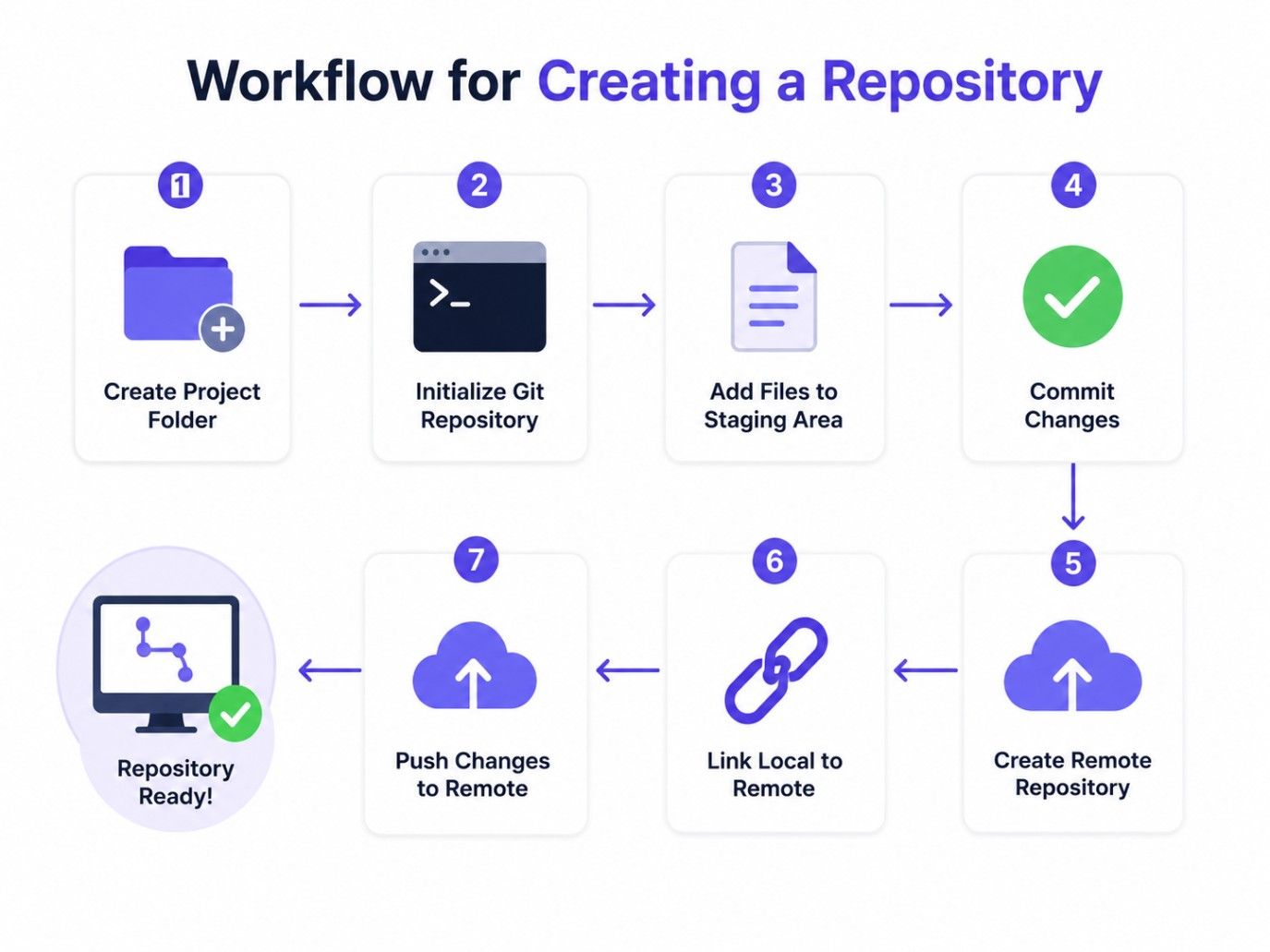
Learning how to create a git repository is one of the first practical skills every developer should master. The process is straightforward, and Git gives you multiple ways to create a repository depending on your starting point.
Whether you're beginning a brand-new project or adding version control to an existing folder, the basic workflow remains simple.
Creating a new git repository is the first step in tracking your project's changes with Git. Once initialised, Git starts recording your project history, making it easier to manage versions and collaborate as your project grows.
The typical steps are:
Once initialized, the folder becomes a git repository, and Git begins tracking your changes.
Git allows you to convert an existing project into a repository without affecting your files. Simply initialize Git inside the project directory, review the files, and create the first commit.
This is a common approach when developers decide to add version control to older projects.
Sometimes you don't need to create a repository yourself. Instead, you can clone an existing one.
Cloning downloads a complete copy of another repository, including its files, branches, and commit history. After cloning, you have your own local copy where you can begin making changes immediately. This is the standard method used when joining an existing software project.
Creating a Repository :
Many beginners assume that a Git project exists in only one place. In reality, most projects use both a local and a remote repository. Each serves a different purpose, and together they create an efficient development workflow.
Understanding the difference between a local vs remote git repository helps you know where your changes are stored, when they're shared with others, and how teams collaborate without overwriting each other's work.
Local vs Remote Git Repository Comparison :
Feature |
Local Repository |
Remote Repository |
| Location | Your computer | Shared server or cloud platform |
| Internet required | No | Yes |
| Primary purpose | Individual development | Team collaboration |
| Commit history | Complete local history | Shared project history |
| Collaboration | Limited | Supports multiple contributors |
| Backup | Stored locally | Acts as a shared backup |
Also read : AWS LightSail: Features, Pricing, Use Cases and How It Works
Many beginners use the terms Git repository and GitHub repository interchangeably. While they're closely related, they aren't the same thing.
Git is a version control system that manages your project's history. A git repository is the database where that history is stored. GitHub, on the other hand, is a cloud-based platform that hosts Git repositories and adds collaboration features such as pull requests, issue tracking, code reviews, and project management. You can use Git without GitHub. However, you can't use GitHub repositories without Git.
The easiest way to understand the difference is to compare their roles.
Feature |
Git Repository |
GitHub Repository |
| Definition | A version-controlled project managed by Git | A Git repository hosted on GitHub |
| Location | Local computer or remote server | GitHub cloud platform |
| Internet required | Not always | Required to access online features |
| Collaboration | Possible through remote repositories | Built-in collaboration tools |
| Main purpose | Track file history and versions | Host, share, and manage Git repositories |
GitHub is useful when you need to:
For personal experiments, a local git repository is often enough. Once collaboration or remote backup becomes important, hosting the repository on GitHub is the next logical step.
Once you understand what is a git repository, the next question is obvious. Why do millions of developers rely on it every day?
The answer goes beyond version control. A git repository helps developers organize projects, collaborate efficiently, recover from mistakes, and maintain a complete history of changes. Whether you're working on a personal application or contributing to a large team, these advantages make Git an essential development tool.
Benefit |
How It Helps |
Example |
| Keeps a Complete Version History | Records every commit, making it easy to review changes, compare versions, or restore previous work. | Roll back to an earlier version after a faulty update. |
| Makes Team Collaboration Easier | Allows multiple developers to work on the same project using separate branches without overwriting each other's changes. | Two developers work on different features simultaneously. |
| Helps Recover Previous Versions | Lets you restore deleted files or revert unwanted changes from the commit history. | Recover a file that was accidentally deleted. |
| Supports Faster Development | Enables developers to test new features in separate branches without affecting the main project. | Build and test a new feature in its own branch. |
| Improves Project Organization | Keeps project files, commit history, branches, and configuration organized in one place. | Track project progress through clear commit history. |
Understanding what is a git repository becomes much easier with a real-world example. Let's see how a simple project is managed using Git from start to finish.
Example Project
Imagine you're building a personal portfolio website. You create a folder named portfolio-website and initialize Git. This turns the folder into a git repository that can track every change you make.
portfolio-website
│
├── index.html
├── style.css
├── script.js
└── .git
A Git repository evolves as you add features, fix bugs, and improve your project over time. Each commit captures a milestone, creating a clear development history that's easy to review, compare, and restore when needed.
Day |
Activity |
| Day 1 | Create the repository and homepage |
| Day 2 | Add an About page |
| Day 3 | Improve the website styling |
| Day 5 | Add a Contact page |
| Day 7 | Fix a navigation issue |
| Day 10 | Release Version 1.0 |
Creating a git repository is just the first step. Following a few best practices helps keep your project organized, improves collaboration, and makes version control easier to manage.
A git repository is more than a storage space for code. Understanding what is a git repository, how it works, and how to create a git repository gives you the foundation to manage projects with confidence. It helps track changes, organize files, and collaborate efficiently while maintaining a complete version history.
Whether you're building your first application or contributing to a team, using a git repository and following proven best practices will make development more organized and reliable. As your projects grow, Git becomes an essential tool for managing code, reducing errors, and streamlining collaboration.
Ready to start your journey? Book a free consultation with upGrad today to find the best path for your career.
A git repository is a version-controlled storage location that keeps your project files along with their complete change history. It allows developers to track updates, restore previous versions, and collaborate without overwriting each other's work. This makes project management more organized and reliable.
To create a Git repository, first install Git, create a project folder, and initialize it using Git. Once initialized, add your project files and make your first commit. You can also connect it to a remote hosting platform later for backup and team collaboration
Git is a distributed version control system that tracks changes in your code locally. GitHub is a cloud-based platform that hosts Git repositories and provides collaboration features such as pull requests, issue tracking, and code reviews. You can use Git without GitHub, but GitHub relies on Git.
Yes. Git works perfectly without GitHub. You can create, update, and manage a git repository entirely on your local computer. GitHub becomes useful when you want to store repositories online, collaborate with others, or maintain a remote backup of your projects.
A typical git repository workflow includes creating or cloning a repository, editing files, staging changes, committing updates, and pushing them to a remote repository. Team members then pull the latest changes before continuing development, keeping everyone synchronized throughout the project.
A local git repository lets you work on your project without an internet connection. You can create branches, edit files, commit changes, and review version history directly on your computer. Once you're ready, you can push your commits to a remote repository for collaboration.
Deleting the .git folder removes the repository's version history, branches, tags, and configuration files. Your project files remain, but Git no longer recognizes the folder as a repository. You'll need to initialize Git again or restore the deleted .git directory from a backup.
It depends on your project. A single repository works well for most applications, especially smaller ones. Multiple repositories are useful when different services or components need independent development, release cycles, or access controls. Choose the structure that best fits your project's complexity.
You can move a git repository by cloning it from a remote platform like GitHub or by copying the entire project folder, including the hidden .git directory. This preserves your commit history, branches, tags, and repository configuration without losing version control.
New users often skip meaningful commit messages, commit too many unrelated changes together, ignore the .gitignore file, or forget to pull the latest updates before pushing. Following git repository best practices for beginners helps avoid these issues and keeps projects easier to manage.
A properly configured git repository should track file changes, maintain commit history, and allow you to create commits without errors. If you've successfully initialized Git, created your first commit, and verified the repository status, your setup is ready for development and future collaboration.
724 articles published
Sriram K is a Senior SEO Executive with a B.Tech in Information Technology from Dr. M.G.R. Educational and Research Institute, Chennai. With over a decade of experience in digital marketing, he specia...
Speak with Data Science Expert
By submitting, I accept the T&C and
Privacy Policy
Start Your Career in Data Science Today
Top Resources
Executive Diploma
12 Months
Master's Degree
18 Months
Bootcamp
6 Months