Azure Blob Storage: Architecture, Features, Types and Use Cases Explained
By Sriram
Updated on Jul 21, 2026 | 10 min read | 4.44K+ views
Share:

All courses
Certifications
More
By Sriram
Updated on Jul 21, 2026 | 10 min read | 4.44K+ views
Share:
Table of Contents
Key Highlights
This blog explains what is azure blob storage, its architecture, features, security, access tiers, lifecycle management, use cases, and how it compares with Azure Files in simple terms.
Ready to advance your cloud and data skills? Explore upGrad’s Data Science programs to learn cloud computing, analytics, AI, and machine learning through industry-relevant projects.
Popular Data Science Programs
If you've uploaded a photo to the cloud or streamed a video online, you've already used the concept of object storage. Azure blob storage is Microsoft's cloud-based object storage service that stores unstructured data as individual objects called blobs. Instead of using traditional folders and drives, it organizes data into storage accounts, containers, and blobs, making it easy to manage billions of files.
Simply put, what is blob storage in azure? It's a service built to store large volumes of unstructured data, including documents, images, videos, backups, application logs, and AI datasets. Azure blob storage is a flexible solution that automatically scales as your storage needs grow, so you only pay for the storage you use.
Traditional file servers become difficult to manage as applications generate millions of files. Azure Blob Storage removes that complexity by providing highly available, cloud-based object storage without requiring businesses to maintain physical infrastructure.
For example, an online learning platform can store student assignments, lecture videos, and course materials in Blob Storage, allowing users to upload and access files from anywhere.
Azure Blob Storage supports almost every type of unstructured data, including:
Azure Blob Storage follows a simple three-level structure that keeps data organized.
Component |
Purpose |
| Storage Account | The top-level Azure resource that manages storage services. |
| Container | A logical grouping used to organize related blobs. |
| Blob | The actual file or object, such as an image, video, or document. |
For example, a company might create one storage account with separate containers for product images, invoices, and backups. Every uploaded file is stored as an individual blob, making large-scale data management simple and efficient.
Also Read: Cloud Computing Architecture: A Comprehensive Guide For Beginners
Free Courses
Understanding how azure blob storage works is simple. When an application uploads a file, Azure stores it as a blob inside a container, secures it with the chosen access controls, and retrieves it whenever an authorized user or application requests it.
Since azure blob storage is a fully managed service, Microsoft handles the underlying infrastructure, including storage, replication, and hardware maintenance, so you can focus on managing your data.
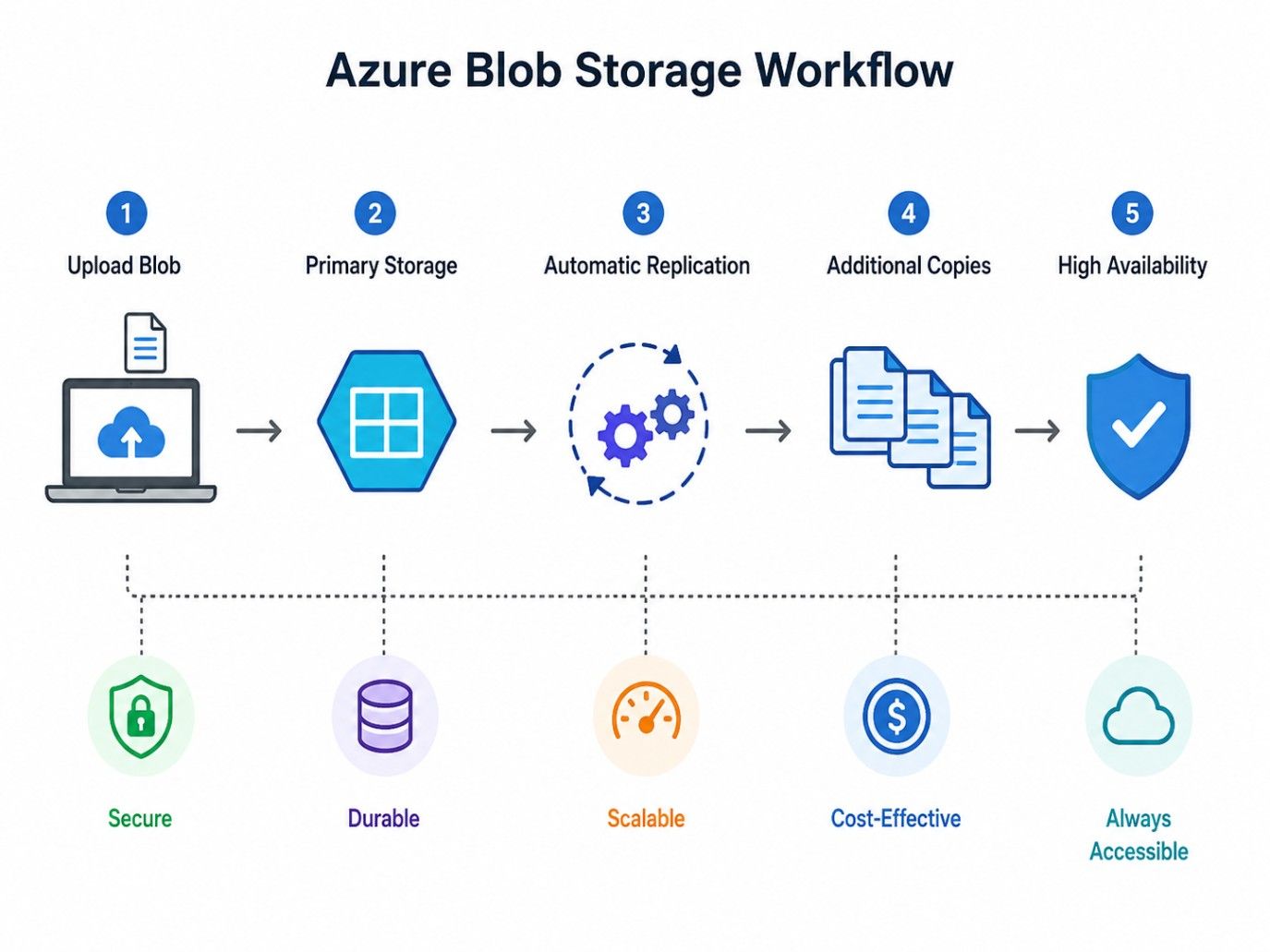
When a customer uploads an image, the application first verifies the user's identity. Once authenticated, the file is sent to a designated container inside the storage account. Azure stores the image as a blob and immediately makes it available whenever the customer's profile page needs to display it.
The application never needs to know where the physical storage disks are located. Azure handles everything automatically.
Practical example
Consider a hospital that stores MRI scans in Azure Blob Storage. Doctors upload images to a secure container, and only authorized staff can access them using Microsoft Entra ID. Older records are automatically archived through lifecycle policies to reduce storage costs.
This example shows how azure blob storage works by combining secure access, automated data management, and reliable storage in a single cloud service.
Also Read: Types of Cyber Security threats.
Data Science Courses to upskill
Explore Data Science Courses for Career Progression
IIIT Bangalore
Executive Post Graduate Certificate in Data Science & AIPlacement Assistance
Once you understand how azure blob storage works, the next step is to look at the architecture behind it. The design is intentionally simple, yet it's powerful enough to store everything from a few documents to billions of objects across multiple regions.
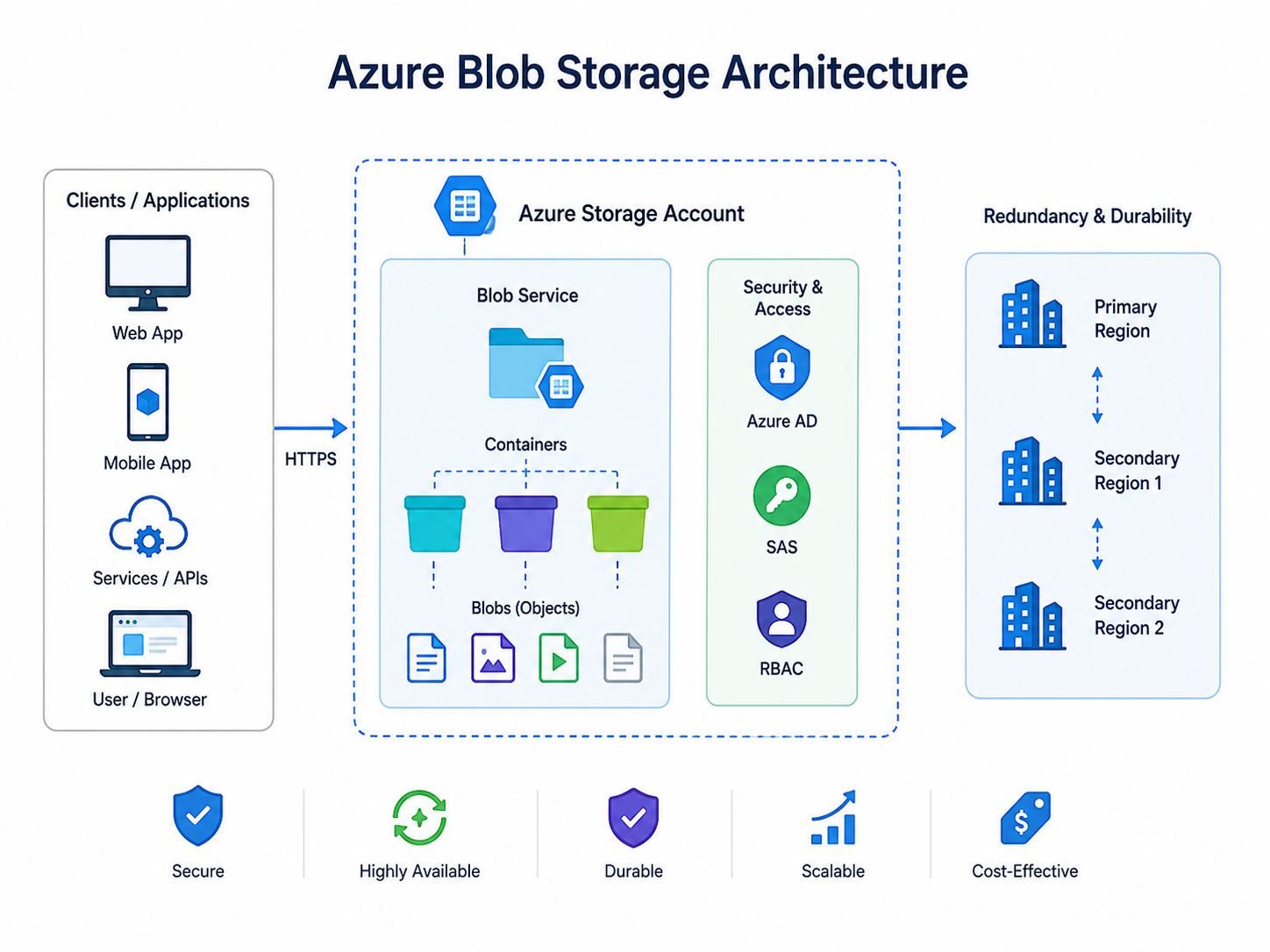
At first glance, the architecture seems straightforward. Dig a little deeper, though, and you'll find several layers working together to keep data organized, protected, and easy to access. That's one reason azure blob storage is a popular choice for organizations that need reliable cloud storage without managing physical infrastructure.
Every Blob Storage deployment follows the same hierarchy. Each component has a specific role, and together they create an organized storage environment.
Component |
Purpose |
| Storage Account | The top-level Azure resource that holds all storage services. |
| Container | A logical grouping used to organize related blobs. |
| Blob | The actual file or object being stored. |
| Metadata | Descriptive information attached to a blob. |
| Blob Index Tags | Searchable key-value pairs used to categorize blobs. |
Keeping data organized like this makes searching, managing, and securing large storage environments much easier.
Also Read: What is TCP/IP Model? Computer Networking Guide
Every object stored in Azure follows a predictable hierarchy.
Azure Subscription → Storage Account → Container → Blob
Each level has a distinct purpose.
This layered approach improves organization while allowing applications to scale without changing the overall structure.
If you're still wondering what is blob storage in azure, this hierarchy offers one of the clearest explanations. Instead of storing files directly on disks, Azure stores every object inside a structured cloud environment that simplifies management and access.
Also read : 15 Best AWS Project Ideas for Beginners You Must Try in 2026!
A blob isn't just a file.It can also include additional information that describes the object without changing its contents.
For example, a company storing product images might add metadata such as:
Unlike metadata, index tags are searchable. That means applications can quickly locate blobs based on specific attributes without scanning every object manually.
Imagine an insurance company storing millions of scanned claim documents.
Instead of searching every PDF individually, the application can retrieve files tagged with values like ClaimStatus = Approved or Region = South within seconds.
This feature becomes especially valuable as storage grows.
Also read : Azure Active Directory: What It Is and How It Works
One of the biggest strengths of Azure Blob Storage is its ability to protect data against hardware failures.
Whenever a blob is uploaded, Azure automatically creates multiple copies according to the redundancy option selected for the storage account.
The replication process happens behind the scenes.You don't have to copy files manually or configure additional storage servers.
Upload Blob → Primary Storage → Automatic Replication → Additional Copies → High Availability
For example, if a physical storage device fails inside a data center, Azure can still retrieve another copy of the blob without interrupting the application.
That's one reason businesses trust Azure for storing critical business documents, healthcare records, and backup data.
Also Read: Types of Cloud Service Models & Which One Should You Choose?
Blob Storage rarely works alone. Instead, it connects with many Azure services to build complete cloud solutions.
Some common integrations include:
Azure Service |
How It Uses Blob Storage |
| Azure Functions | Processes uploaded files automatically |
| Azure CDN | Delivers images and videos faster worldwide |
| Azure Backup | Stores backup data securely |
| Azure Synapse Analytics | Reads large datasets for analytics |
| Microsoft Fabric | Uses Blob Storage as part of modern data workflows |
This integration capability is another reason azure blob storage is a foundational service within the Azure ecosystem.
Consider a university's online learning portal. Students upload assignments, professors access submissions, and older files are automatically archived.
The setup includes one storage account, separate containers for assignments and lecture materials, and lifecycle policies to manage older data. This simple architecture keeps files organized, secure, and easy to manage as storage grows.
Build your expertise in cloud technologies and data-driven solutions with the Executive Post Graduate Certificate Programme in Data Science & AI from IIITB. Learn data science, AI, machine learning, and cloud concepts through industry-focused learning and hands-on projects.
The architecture provides the foundation, but the capabilities built on top of it are what make azure blob storage useful in real-world applications. Whether you're storing a few thousand files or billions of objects, the service includes features that improve performance, protect data, and simplify day-to-day management.
Not every feature will matter to every project. A small business storing invoices won't have the same requirements as a streaming platform serving millions of videos. That's why Azure lets you enable the capabilities you need without adding unnecessary complexity.
Let's look at the features that make the biggest difference.
Feature |
Description |
| High scalability | Automatically scales storage as your data grows. |
| High availability and durability | Replicates data to keep it available during failures. |
| Built-in security | Secures data with encryption, authentication, RBAC, and SAS. |
| Versioning and snapshots | Restores previous versions or point-in-time copies of blobs. |
| Soft delete | Recovers accidentally deleted blobs within the retention period. |
| Lifecycle management | Automatically moves or deletes data based on lifecycle rules. |
| Static website hosting | Hosts static websites directly from Azure Blob Storage. |
| Event-driven integration | Triggers automated workflows when blobs are uploaded or updated. |
Also Read: Top 12 Prerequisites for Cloud Computing
A server log receives new entries throughout the day. A virtual machine disk is updated constantly. A product image usually stays unchanged after it's uploaded. Storing all these files in the same format wouldn't be efficient, which is why azure blob storage offers three different blob types.
Each blob type is optimized for a specific workload. Choosing the right one improves performance, simplifies management, and helps applications run more efficiently.
If you're learning what is blob storage in azure, understanding these blob types is one of the most practical concepts because it directly affects how applications store and retrieve data.
Block blobs are the most commonly used blob type.
A file is divided into smaller blocks during upload. Once every block reaches Azure, they're assembled into a single blob. This approach makes uploading large files more reliable because interrupted uploads only need to resend the missing blocks instead of the entire file.
Block blobs are ideal for:
For example, an online retailer storing thousands of product images would almost always use block blobs.
Because of their flexibility, azure blob storage is a preferred solution for applications that primarily work with files rather than continuously changing data.
Append blobs are designed for data that keeps growing.
Instead of modifying existing content, new information is simply added to the end of the blob. Existing data remains untouched.
This makes append blobs particularly useful for:
Imagine a payment gateway recording every transaction throughout the day.
Each new transaction is appended to the existing log without changing previous entries. This approach improves efficiency while preserving historical records.
Page blobs work differently.Instead of sequential blocks, data is stored in fixed-size pages. Individual pages can be updated independently, making page blobs well suited for workloads requiring random read and write operations.
Common uses include:
Suppose an Azure virtual machine is running a business application.
The virtual hard disk attached to that machine uses page blobs because different parts of the disk change constantly rather than being rewritten from beginning to end.
Also read : AWS Tutorial for Beginners Is Out. Here’s What’s In
Subscribe to upGrad's Newsletter
Join thousands of learners who receive useful tips
Choosing the right blob type depends on how your application accesses data rather than simply what kind of file you're storing.
A photo and a database backup may both be large files, but they have very different access patterns.
The table below highlights the differences.
Feature |
Block Blob |
Append Blob |
Page Blob |
| Best For | Documents, images, videos | Logs and audit records | Virtual machine disks |
| Data Updates | Upload blocks, then commit | Append new data only | Random read and write |
| Modification | Existing blocks can be replaced | Existing data isn't modified | Individual pages updated |
| Performance Focus | Large file storage | Continuous logging | Frequent updates |
| Common Example | Product catalog images | Application logs | Azure VM disks |
The right blob type depends on how your application accesses data.
Choosing the appropriate blob type improves performance, storage efficiency, and application reliability.
Also read: Types of Cloud Computing & Cloud Computing Services
A product image on an e-commerce website might be downloaded thousands of times every day, while a five-year-old backup may never be accessed unless there's an emergency. Keeping both types of data in the same storage tier would increase costs unnecessarily.
That's why azure blob storage offers multiple access tiers. Each tier is designed for a different access pattern, allowing you to balance storage cost against retrieval speed and access frequency.
If you're learning what is blob storage in Azure, understanding access tiers is essential because they directly affect both performance and monthly storage costs.
Access Tier |
Best For |
Access Frequency |
| Hot | Website images, active business documents, mobile app assets, frequently accessed files | High – Accessed frequently |
| Cool | Monthly reports, project files, compliance records, occasional backups | Medium – Accessed occasionally |
| Cold | Historical data, seasonal files, long-term operational records | Low – Rarely accessed |
| Archive | Compliance records, financial documents, medical archives, long-term backups | Very Low – Almost never accessed |
Choose an access tier based on how frequently data is accessed, not how important it is.
The biggest advantage is flexibility. As access patterns change, azure blob storage lets you move data between tiers manually or automatically using lifecycle management policies, helping reduce storage costs while maintaining availability.
Data doesn't stay equally valuable forever.A sales report created yesterday might be opened several times today, occasionally next month, and never again after a year. Keeping every file in high-performance storage throughout its lifetime increases costs without providing any real benefit.
That's where azure blob storage lifecycle management becomes valuable. It allows you to create rule-based policies that automatically move data between storage tiers or delete blobs when they're no longer needed. Instead of managing thousands or even millions of files manually, Azure performs these tasks automatically.
For organizations handling large datasets, this saves both time and storage costs.
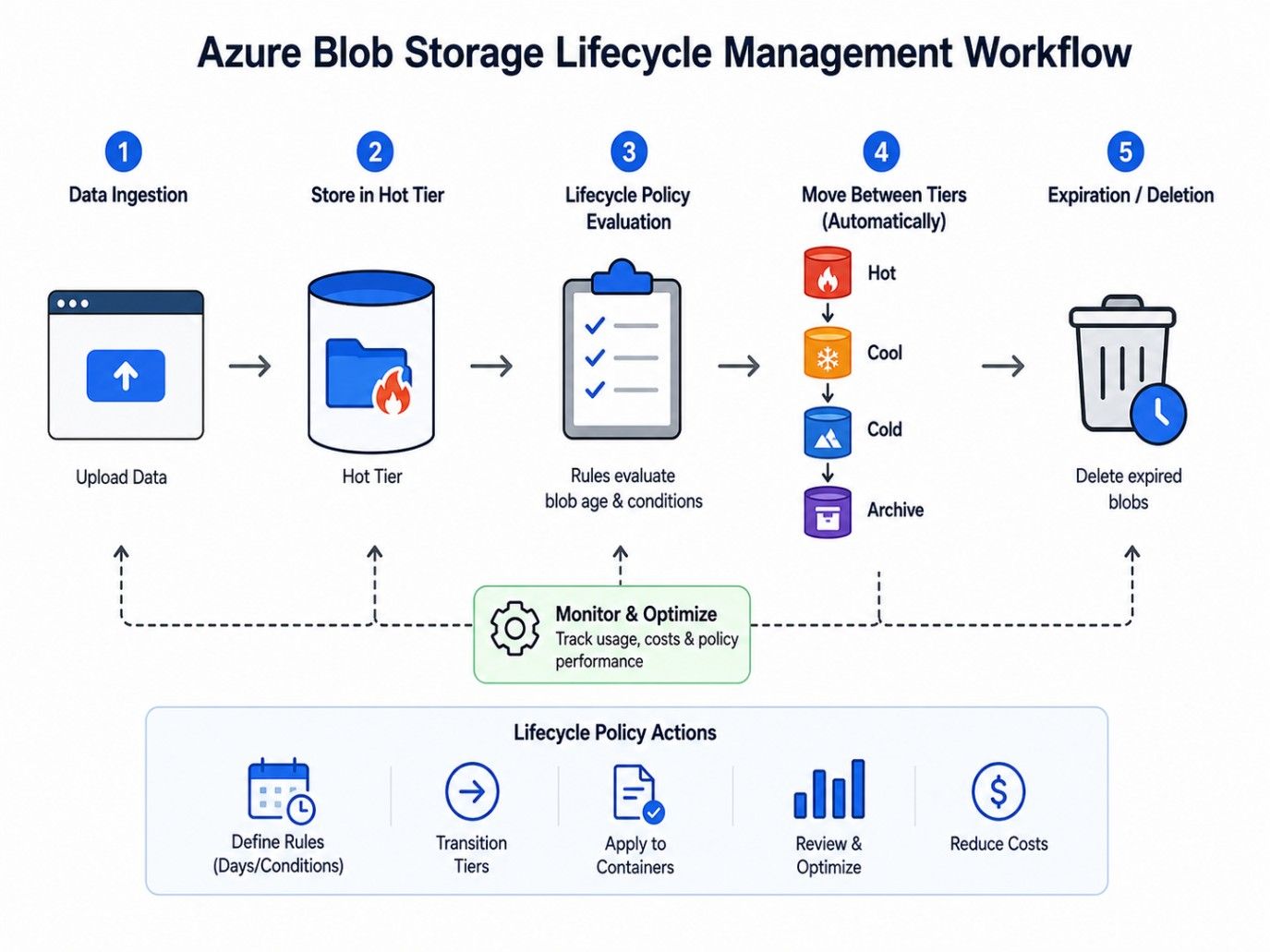
A video surveillance company stores daily camera recordings in Azure Blob Storage. Recent footage stays in the Hot tier, older files move to the Cool and Archive tiers, and expired recordings are deleted automatically based on lifecycle policies. This reduces manual effort and optimizes storage costs.
By automating storage policies, azure blob storage lifecycle management helps organizations manage growing datasets efficiently while reducing operational overhead.
Also read : AWS LightSail: Features, Pricing, Use Cases and How It Works
Azure blob storage supports a wide range of workloads, from small websites to enterprise applications. It stores large volumes of unstructured data securely while offering high scalability and reliability.
Use Case |
How Azure Blob Storage Is Used |
| Backup and disaster recovery | Stores backups securely for quick recovery during failures. |
| Application file storage | Stores images, documents, videos, and other user-uploaded files. |
| Media storage and streaming | Hosts videos, audio, and media content for streaming applications. |
| Data lakes and analytics | Stores large datasets for analytics and business intelligence. |
| AI and machine learning | Holds training datasets such as images, documents, and text files. |
| Log storage and monitoring | Stores application logs, IoT data, and diagnostic information. |
| Static website hosting | Hosts static websites built with HTML, CSS, JavaScript, and images. |
| Enterprise document management | Manages contracts, invoices, reports, and other business documents securely. |
These examples show what is blob storage in azure used for in real-world scenarios. From backups and media streaming to analytics and AI, azure blob storage is a versatile object storage service that supports diverse business workloads.
Azure blob storage is a reliable object storage service that helps businesses store, manage, and access unstructured data at any scale. From documents and backups to media files and analytics datasets, it offers the flexibility, security, and storage options needed for a wide range of cloud applications.
By understanding what is blob storage in azure, its architecture, blob types, access tiers, security features, and lifecycle management, you can choose the right storage strategy for your workload. With the right configuration, azure blob storage is a practical solution that balances performance, scalability, and cost efficiency.
Ready to start your journey? Book a free consultation with upGrad today to find the best path for your career.
Azure Blob Storage and Azure Files are both cloud storage services in Azure, but they serve different purposes. Blob Storage is designed for object-based storage of large amounts of unstructured data, while Azure Files provides shared file storage that applications can access using standard file system protocols.
Yes, Azure Blob Storage and Amazon S3 are similar because both provide scalable object storage for cloud applications. However, they belong to different cloud ecosystems. Azure Blob Storage integrates deeply with Microsoft services, while S3 is designed for AWS environments and related cloud workloads.
Files can be uploaded to Azure Blob Storage using multiple methods, including the Azure Portal, Azure Storage Explorer, command-line tools, and programming languages such as Python, Java, and .NET. Developers can also use Azure SDKs to automate file uploads directly from applications.
Azure Blob Storage automatically scales as your data requirements increase, so you do not need to manually resize storage like traditional servers. If you need additional capacity, you can manage your storage account configuration, optimize resource usage, and choose suitable Azure subscription options.
Azure Blob Storage is designed to handle extremely large amounts of data, but storage limits depend on factors such as the type of storage account, blob type, and account configuration. Organizations can store billions of objects, making it suitable for enterprise-scale cloud applications.
Azure Blob Storage pricing depends on several factors, including storage capacity, data access frequency, redundancy options, operations, and data transfer. Businesses can reduce costs by selecting the right storage configuration, deleting unnecessary data, and applying automated storage management strategies.
Azure Blob Storage is not a traditional database because it does not support relational queries or transactional database operations. However, it can store large datasets, files, and objects that are processed by analytics platforms, AI systems, and applications requiring scalable cloud storage.
Applications can connect to Azure Blob Storage using Azure SDKs, REST APIs, or connection strings. Developers typically authenticate applications through Microsoft Entra ID, shared access signatures (SAS), or access keys to securely upload, download, and manage stored data.
If a blob is accidentally deleted, recovery depends on the storage account settings and enabled protection features. Organizations can restore deleted data using recovery options such as soft delete, versioning, and snapshots when these capabilities are configured.
Azure Blob Storage is mainly designed for unstructured data, but it can also store structured and semi-structured files such as CSV files, JSON datasets, and analytics data. These files can later be processed using Azure analytics services for reporting and machine learning workflows.
Companies choose Azure Blob Storage because it removes the need to manage physical storage infrastructure while offering scalability, reliability, and flexible pricing. It helps organizations handle growing data volumes efficiently for applications, analytics, backups, AI workloads, and digital content management.
724 articles published
Sriram K is a Senior SEO Executive with a B.Tech in Information Technology from Dr. M.G.R. Educational and Research Institute, Chennai. With over a decade of experience in digital marketing, he specia...
Speak with Data Science Expert
By submitting, I accept the T&C and
Privacy Policy
Start Your Career in Data Science Today
Top Resources
Executive Diploma
12 Months
Master's Degree
18 Months
Bootcamp
6 Months