Hypervisor in Cloud Computing: Types, Working, Features, and Use Cases
By Sriram
Updated on Jul 21, 2026 | 10 min read | 4.47K+ views
Share:

All courses
Certifications
More
By Sriram
Updated on Jul 21, 2026 | 10 min read | 4.47K+ views
Share:
Table of Contents
Key Highlights
This blog explains hypervisors in cloud computing in simple terms. You'll learn what a hypervisor in cloud computing, how it works, its key benefits, and the types of hypervisor in cloud computing, including the differences between type 1 and type 2 hypervisors in cloud computing.
Learn how cloud infrastructure, virtualisation, AI, and big data work together with upGrad's Data Science programs. Gain hands-on experience with Python, machine learning, cloud platforms, and real-world projects to prepare for high-demand data roles.
Popular Data Science Programs
A hypervisor in cloud computing is the software layer that creates and manages multiple virtual machines (VMs) on a single physical server. It allows different operating systems and applications to share the same hardware while keeping each virtual machine isolated and independent.
In simple terms, instead of running one operating system on one server, a hypervisor divides the server's CPU, memory, storage, and network resources among multiple virtual machines. This improves hardware utilization, reduces costs, and forms the foundation of cloud computing.
To understand what is hypervisor in cloud computing, think of a hypervisor as the bridge between physical hardware and virtual machines. It manages hardware resources and allocates them to each VM as needed.
Its key functions include:
Component |
Purpose |
| Physical Server | Provides hardware resources |
| Hypervisor | Creates and manages virtual machines |
| Virtual Machine | Runs its own operating system and applications |
| Guest Operating System | Operates independently inside a VM |
Suppose a company has one powerful server. Instead of using it for a single application, a hypervisor creates multiple virtual machines. One VM hosts a website, another runs a database, while others support business applications or testing. Even if one VM fails, the remaining virtual machines continue to run normally. This is how virtualization powers modern cloud environments.
Also read :Difference between Big Data and Cloud Computing
Cloud computing relies on virtualization, and virtualization depends on hypervisors. A hypervisor in cloud computing allows multiple virtual machines to run on a single physical server, making infrastructure more efficient, flexible, and cost-effective.
Key benefits include:
These advantages are why every major cloud provider relies on hypervisors to deliver scalable and reliable cloud services.
Must read: AWS Architecture Explained: Function, Components, Deployment Models & Advantages
Before virtualization became common, businesses followed a simple model.
One server.--One operating system--One application.
That approach worked, but it wasted expensive hardware because most servers remained underused.
A hypervisor in cloud computing changes this model by allowing several operating systems and applications to run on the same hardware without interfering with one another.
The comparison below makes the difference easier to understand.
Feature |
Traditional Physical Server |
Hypervisor-Based Environment |
| Operating Systems | One | Multiple |
| Hardware Usage | Low to moderate | High |
| Server Deployment | Slow | Fast |
| Resource Sharing | Not supported | Supported |
| Workload Isolation | Physical separation | Virtual isolation |
| Hardware Cost | Higher | Lower |
| Scalability | Limited | Easier |
| Disaster Recovery | More difficult | Simpler with virtual machine backups |
Also read : AWS Tutorial for Beginners Is Out. Here’s What’ In
Free Courses
A hypervisor in cloud computing sits between the physical hardware and the operating systems running inside virtual machines. Instead of letting every operating system access the hardware directly, the hypervisor acts as the controller. It decides how CPU cores, memory, storage, and network resources are shared.
The process happens in milliseconds. Users never notice it, even when hundreds of virtual machines are running simultaneously.
Step-by-Step Hypervisor Workflow

To understand a hypervisor in cloud computing, think of it as a layered architecture where each layer has a specific role. The hypervisor sits between the physical hardware and virtual machines, allowing multiple operating systems to run independently on the same server.
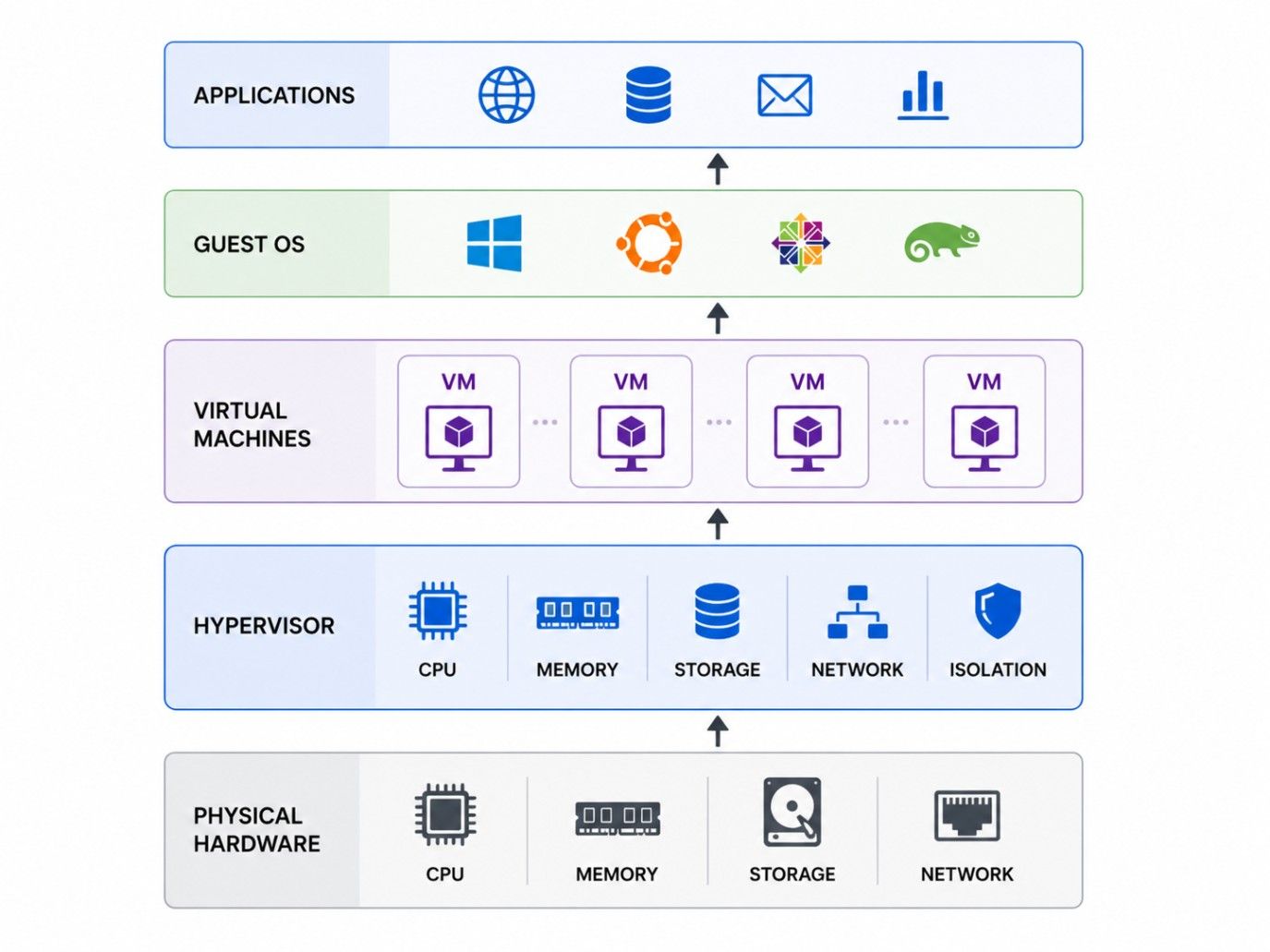
The architecture consists of the following layers:
Together, these layers create an efficient virtualization environment where multiple workloads share the same physical hardware without interfering with one another.
Also read : Top 10 Steps to Get a Job in Cloud Computing
Data Science Courses to upskill
Explore Data Science Courses for Career Progression
IIIT Bangalore
Executive Post Graduate Certificate in Data Science & AIPlacement Assistance
Not every hypervisor works the same way. The types of hypervisor in cloud computing differ based on where they're installed and how they interact with hardware. Understanding these differences helps you choose the right virtualization approach for development, enterprise workloads, or cloud infrastructure.
The two main types of hypervisor in cloud computing are Type 1 and Type 2. While both create and manage virtual machines, they differ in performance, security, and use cases. Let's look at each in detail.
A Type 1 hypervisor in cloud computing runs directly on the physical hardware without requiring a host operating system. Because it has direct access to hardware resources, it offers better performance, lower latency, and stronger security.
Cloud providers and large enterprises rely heavily on Type 1 hypervisors because they support large-scale virtualization.
Common characteristics include:
Common use cases include:
Popular examples include:
These platforms are designed to run hundreds or even thousands of virtual machines efficiently.
A Type 2 hypervisor in cloud computing runs on top of an existing operating system such as Windows, macOS, or Linux. Instead of interacting directly with hardware, it depends on the host operating system to access system resources.
This makes installation simple but introduces some performance overhead.
You'll often find Type 2 hypervisors in personal computers and development environments rather than enterprise cloud platforms.
Typical characteristics include:
Common use cases include:
Popular examples include:
If you're learning virtualization for the first time, a Type 2 hypervisor is usually the easiest place to start.
Take your cloud computing skills to the next level. Build expertise in cloud technologies, virtualization, Python, and AI with upGrad's Executive Diploma in Data Science & Artificial Intelligence from IIIT Bangalore (IIITB). Gain hands-on experience through industry projects and prepare for high-demand roles in cloud and data-driven technologies.
Subscribe to upGrad's Newsletter
Join thousands of learners who receive useful tips
Many beginners compare type 1 and type 2 hypervisors in cloud computing before deciding which one fits their needs. While both support virtualization, their architecture makes them suitable for different workloads.
The comparison below highlights the key differences.
Feature |
Type 1 Hypervisor |
Type 2 Hypervisor |
| Installation | Directly on hardware | On top of a host operating system |
| Performance | High | Moderate |
| Security | Strong | Depends on host OS |
| Hardware Access | Direct | Indirect |
| Resource Efficiency | Better | Lower |
| Best For | Cloud computing and enterprise servers | Personal computers and testing |
| Downtime | Minimal | Depends on host operating system |
| Examples | VMware ESXi, Hyper-V, Xen, KVM | VirtualBox, VMware Workstation |
The answer depends on your workload.
Choose a Type 1 hypervisor in cloud computing if you need:
Choose a Type 2 hypervisor in cloud computing if you need:
For most cloud environments, Type 1 remains the preferred choice because it delivers better efficiency and stability.
Also read : What is AWS: Introduction to Amazon Cloud Services
People often confuse a hypervisor with a virtual machine. They're closely related, but they aren't the same thing.
A hypervisor creates and manages virtual machines. A virtual machine is the environment created by the hypervisor. Without a hypervisor, a virtual machine can't exist.
The table below makes the distinction clearer.
Feature |
Hypervisor |
Virtual Machine |
| Purpose | Creates and manages VMs | Runs applications and operating systems |
| Role | Virtualization software layer | Independent computing environment |
| Hardware Access | Controls physical resources | Uses virtual resources |
| Operating System | Doesn't require a guest OS | Runs its own guest operating system |
| Number | One hypervisor manages many VMs | Multiple VMs can run on one hypervisor |
Also read: Types of Cloud Computing & Cloud Computing Services
After learning what a hypervisor in cloud computing, it's useful to know which platforms organisations actually use.
Different hypervisors are designed for different environments. Some focus on enterprise virtualization, while others are ideal for development and testing.
Hypervisor |
Type |
Open Source |
Common Use |
| VMware ESXi | Type 1 | No | Enterprise virtualization |
| Microsoft Hyper-V | Type 1 | No | Windows-based infrastructure |
| KVM | Type 1 | Yes | Linux virtualization and cloud platforms |
| Xen | Type 1 | Yes | Public cloud infrastructure |
| Oracle VM VirtualBox | Type 2 | Yes | Learning and software testing |
Large cloud providers typically build their infrastructure using enterprise-grade Type 1 hypervisors because they offer excellent performance and resource isolation.
Developers, on the other hand, often prefer VirtualBox or VMware Workstation for local testing.
Every virtualization technology has strengths and trade-offs. Understanding both helps you decide where a hypervisor fits best.
A hypervisor in cloud computing offers several advantages that make virtualization more efficient and cost-effective. By allowing multiple virtual machines to share the same physical hardware, it helps organizations improve resource utilization, reduce operational costs, and simplify infrastructure management.
A hypervisor in cloud computing provides several important benefits.
For growing organizations, these benefits translate into lower operational costs and more efficient resource management.
While a hypervisor in cloud computing offers many benefits, it also comes with certain limitations. Understanding these challenges helps organizations plan their virtual infrastructure more effectively and avoid potential performance or management issues.
Hypervisors also have limitations.
These challenges don't outweigh the benefits, but administrators should understand them before deploying virtualization at scale.
A hypervisor in cloud computing is used across industries to improve resource utilization, reduce infrastructure costs, and simplify IT management. Some of its most common use cases include:
Virtualization offers many benefits, but it isn't without challenges. Planning ahead helps organizations avoid common problems.
1. Resource Contention
Too many virtual machines sharing one server can compete for CPU, memory, and storage.
Proper capacity planning helps prevent slow performance.
2. Performance Bottlenecks
Applications with heavy workloads may experience delays if hardware resources aren't allocated correctly.
Monitoring resource usage regularly makes a big difference.
3. VM Sprawl
Creating virtual machines is easy.
Managing hundreds of unused virtual machines isn't.
Organizations should remove inactive VMs to reduce unnecessary resource consumption.
4. Hardware Compatibility
Some hypervisors require specific processors or virtualization extensions.
Always verify hardware compatibility before deployment.
5. Licensing Costs
Commercial hypervisors often require licensing fees.
Organizations should compare features and long-term costs before selecting a platform.
6. Infrastructure Monitoring
Large virtual environments require continuous monitoring.
Tracking CPU usage, memory consumption, storage, and network traffic helps identify problems before they affect applications.
| Challenge | Best Practice |
| Resource contention | Plan hardware capacity |
| Performance issues | Monitor workloads regularly |
| VM sprawl | Remove unused virtual machines |
| Hardware compatibility | Validate requirements before deployment |
| Licensing | Compare commercial and open-source options |
| Monitoring | Use centralized monitoring tools |
Every organization has different infrastructure requirements. The right hypervisor depends on workload size, budget, operating systems, and long-term growth plans.
Keep these best practices in mind.
A small amount of planning today can prevent expensive infrastructure problems later.
A hypervisor in cloud computing is the foundation of virtualization, enabling multiple virtual machines to run securely on a single physical server. It improves hardware utilization, reduces infrastructure costs, simplifies resource management, and supports the scalable environments used by modern cloud platforms.
By understanding what is hypervisor in cloud computing, the types of hypervisor in cloud computing, and the differences between type 1 and type 2 hypervisor in cloud computing, you can choose the right virtualization approach based on your performance, security, and workload requirements.
Ready to start your journey? Book a free consultation with upGrad today to find the best path for your career.
Cloud providers use hypervisors because they allow multiple customers to share the same physical hardware securely. This improves hardware utilization, reduces infrastructure costs, and makes it possible to provision new virtual machines within minutes instead of installing additional physical servers.
Yes. A hypervisor allows multiple guest operating systems such as Windows, Linux, and Ubuntu to run simultaneously on one physical server. Each operating system runs inside its own virtual machine and remains isolated from the others.
Modern server virtualization depends on a hypervisor. While operating-system-level virtualization exists through container technologies, creating independent virtual machines with separate operating systems requires a hypervisor to manage hardware resources and maintain isolation.
Industries such as healthcare, banking, education, government, telecommunications, and e-commerce rely heavily on hypervisors. They use virtualization to improve server utilization, simplify disaster recovery, reduce infrastructure costs, and support secure cloud environments.
The number depends on available hardware resources, the hypervisor platform, and workload requirements. Enterprise servers with sufficient CPU cores and memory can host dozens or even hundreds of virtual machines while maintaining stable performance.
Yes. Hypervisors support snapshots, backups, replication, and virtual machine migration. These features help administrators recover workloads quickly after hardware failures, software issues, or unexpected outages, reducing downtime for business-critical applications.
Yes. Virtual machines can communicate through virtual switches and virtual networks created by the hypervisor. Administrators control network access using virtual networking configurations, security policies, and firewall rules.
Type 1 hypervisors run directly on physical hardware, which improves performance, security, and resource efficiency. Because they don't rely on a host operating system, they are better suited for enterprise workloads and large cloud infrastructures.
No. Although hypervisors are essential in cloud computing, they're also widely used in enterprise data centers, software testing, desktop virtualization, cybersecurity labs, training environments, and application development where multiple operating systems are required.
No. Containers and hypervisors solve different problems. Containers share the host operating system, while hypervisors create fully isolated virtual machines with separate operating systems. Many organizations use both technologies together depending on workload requirements.
Beginners should first understand what hypervisor in cloud computing, virtualization concepts, operating systems, networking, storage management, and basic cloud computing principles is. Learning how type 1 and type 2 hypervisor in cloud computing differ also provides a strong foundation for advanced virtualization topics.
695 articles published
Sriram K is a Senior SEO Executive with a B.Tech in Information Technology from Dr. M.G.R. Educational and Research Institute, Chennai. With over a decade of experience in digital marketing, he specia...
Speak with Data Science Expert
By submitting, I accept the T&C and
Privacy Policy
Start Your Career in Data Science Today
Top Resources
Master's Degree
18 Months
Executive Diploma
12 Months
Bootcamp
6 Months