Top 20+ Automation Projects You Can Build in 2026

By Rahul Singh

Updated on Apr 21, 2026 | 12 min read | 4.29K+ views

Share:

In 2026, automation projects focus on intelligent systems that can act, adapt, and make decisions with minimal human input. You move beyond basic scripts to building agent-driven workflows that handle complex tasks across systems.

Key automation projects include RAG-based AI agents for decision-making, real-time Industrial IoT monitoring systems, and automated agriculture solutions like Black Soldier Fly farming. These projects help you work with real data, connected devices, and scalable automation systems.

In this guide, you will explore beginner to advanced automation projects, tools to use, and practical ideas to build useful systems. 

Build in-demand AI skills with upGrad’s Artificial Intelligence Courses. Learn machine learning, prompt engineering, and real-world tools through hands-on projects.  

Beginner Friendly Automation Projects

These Automation Projects introduce you to the core fundamentals of scripting, cron jobs, and basic API interactions. They are perfect for developers looking to automate their own personal workflows or eliminate boring, repetitive desktop tasks.
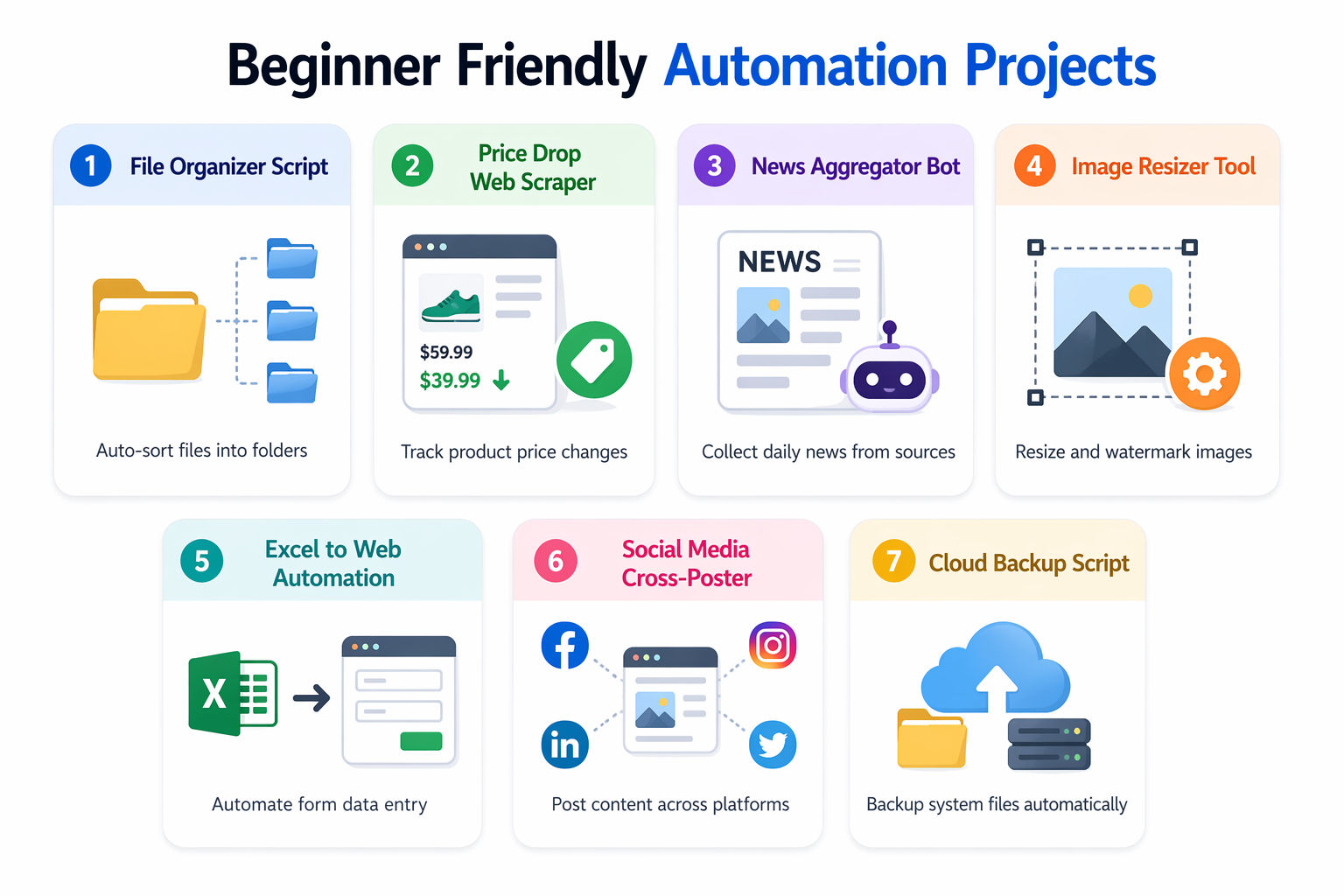
1. Automated Desktop File Organizer

This project teaches you how to interact directly with the local operating system's file directory. You will build a background script that constantly watches your chaotic "Downloads" folder and automatically moves files into categorized folders based on their extensions.

Tools and Technologies Used

  • Python: For the core scripting logic.
  • os and shutil libraries: Native Python libraries for file manipulation.
  • Watchdog (Python package): To monitor file system events in real-time.

How to Make It

  • Write a Python script that defines a mapping dictionary (e.g., .pdf goes to the "Documents" folder, .mp4 goes to "Videos", .jpg goes to "Images").
  • Implement the Watchdog library to set up an event listener on your target directory (e.g., C:/Users/Downloads).
  • When the listener detects an on_created event (a new file is downloaded), the script extracts the file extension using the os.path module.
  • Use shutil.move() to physically relocate the file from the Downloads folder to its correct designated directory silently in the background.

Also Read: Top 20+ Generative AI Project Ideas in 2026 

2. Price Drop Alert Web Scraper

This project introduces web scraping and automated email notifications. You will build a script that targets a specific e-commerce product page (like Amazon or BestBuy), checks the price daily, and emails you if the price drops below your target budget.

Tools and Technologies Used

  • BeautifulSoup 4: For parsing raw HTML.
  • Requests: To fetch the webpage data.
  • smtplib: To send automated email alerts.

How to Make It

  • Write a function using the requests library to fetch the HTML of the target product page, ensuring you pass user-agent headers so the server doesn't block your script as a bot.
  • Use BeautifulSoup to locate the exact CSS class or HTML ID that holds the price text.
  • Extract the text, strip away currency symbols, and convert the string into a floating-point number.
  • Compare this number against your target price. If the current price is lower, trigger smtplib to log into your Gmail account securely and send an automated "Price Drop!" email to your phone.

3. Automated Daily News Aggregator

This project focuses on pulling structured data from the web and formatting it for readability. You will build an automation that fetches top headlines from various sources every morning and compiles them into a clean, readable digest.

Tools and Technologies Used

  • NewsAPI or RSS feed parsers: To fetch structured news data.
  • Markdown: For clean formatting.
  • Cron (Linux) or Task Scheduler (Windows): For daily execution.

How to Make It

  • Register for a free NewsAPI key or find the raw RSS feed URLs for your favorite tech or finance blogs.
  • Write a script that hits these endpoints, extracting the title, summary, and URL of the top 5 articles from each source.
  • Append this data into a nicely formatted Markdown string, using bold headers for categories.
  • Configure a system-level Cron job to execute this Python script every morning at 7:00 AM, outputting the final digest to a text file on your desktop or sending it to your Telegram account via a simple bot API.

Also Read: 15 Best Full Stack Coding Project Ideas & Topics For Beginners  

4. Bulk Image Resizer and Watermarker

This project is highly practical for digital marketers or photographers. You will build a tool that processes an entire folder of high-resolution images, resizing them for web optimization and automatically applying a transparent logo to the bottom right corner.

Tools and Technologies Used

  • Python: For the iteration logic.
  • Pillow (PIL): The Python Imaging Library for pixel manipulation.
  • Command Line Interface (argparse): To accept source and destination folders.

How to Make It

  • Set up a script that accepts an input folder containing raw .jpg or .png files.
  • Use a for loop to iterate through every image in the folder. Use the Pillow library to open the image and apply a thumbnail reduction (e.g., scaling down to a maximum width of 1080px).
  • Open your transparent PNG watermark file, calculate the X and Y coordinates to position it in the bottom corner of the newly resized image, and use the paste() function with an alpha composite mask.
  • Save the newly optimized and watermarked images into an "Output" directory, completely automating hours of manual Photoshop work.

5. Automated Data Entry from Excel to Web Forms

This project bridges local spreadsheets with web automation. You will build a script that reads hundreds of rows from an Excel file and automatically types them into a repetitive online web form, bypassing human data entry.

Tools and Technologies Used

  • Pandas: To read and parse the .xlsx file easily.
  • Selenium WebDriver: To physically control the web browser.
  • Chrome or Firefox: As the target browser.

How to Make It

  • Use Pandas to load your target Excel file into a DataFrame, ensuring the columns map cleanly to the web form fields (e.g., First Name, Last Name, Email).
  • Initialize a Selenium WebDriver instance that opens the target URL containing the web form.
  • Write a for loop that iterates through the DataFrame rows. Inside the loop, use Selenium's find_element functions to locate the exact HTML input fields by their IDs or XPaths.
  • Use the .send_keys() method to type the Excel data into the fields, click the "Submit" button, and wait for the page to refresh before proceeding to the next row.

Also Read: Top 30 Django Project Ideas for Beginners and Professionals  

6. Social Media Cross-Poster

This project teaches you how to interact with OAuth and POST requests across multiple platforms. You will build an automation script where you write a post once in a local text file, and the script automatically publishes it to Twitter, LinkedIn, and Facebook simultaneously.

Tools and Technologies Used

  • Official APIs: Twitter v2 API, LinkedIn API.
  • Tweepy (Python): To simplify Twitter authentication.
  • JSON: For configuring API keys.

How to Make It

  • Register for developer accounts on your target platforms and generate your OAuth access tokens and secrets.
  • Write a Python function that reads the contents of a local draft.txt file.
  • Implement a publishing function for Twitter using Tweepy to send the text as a new tweet.
  • Implement a secondary function using the native requests library to format the exact same text into the specific JSON payload required by the LinkedIn API, executing the POST request to publish it to your professional feed.

7. Automated System Backup to Cloud

This project focuses on disaster recovery and utilizing cloud storage SDKs. You will build a script that automatically zips important local directories and uploads them to a cloud bucket on a weekly schedule.

Tools and Technologies Used

  • Python zipfile module: To compress large directories.
  • AWS SDK (Boto3): To interact programmatically with Amazon S3.
  • Crontab: For scheduling.

How to Make It

  • Define an array of critical local paths (e.g., ~/Documents/Projects, ~/Pictures).
  • Use the Python zipfile library to recursively compress these directories into a single, highly compressed .zip archive, appending the current date to the filename (e.g., backup_2026-04-22.zip).
  • Configure the Boto3 library with your AWS IAM credentials.
  • Write a function that executes an upload_file command to push the massive zip archive directly into a secure Amazon S3 bucket, running automatically every Sunday at midnight.

Also Read: Top 21+ Next.js Project Ideas in 2026 

Intermediate Level Automation Projects

These Automation Projects move away from simple desktop scripts and into the realm of backend automation, DevOps, and connecting disparate enterprise software systems through webhooks and CI/CD pipelines.

1. Automated Server Provisioning (Infrastructure as Code)

This project introduces Infrastructure as Code (IaC). You will write automation scripts that communicate with cloud providers to instantly build, configure, and launch a fully functional web server without ever clicking through a cloud console.

Tools and Technologies Used

  • Terraform: For declarative infrastructure provisioning.
  • Ansible: For configuration management.
  • AWS or DigitalOcean: As the cloud provider.

How to Make It

  • Write a Terraform .tf file defining your desired infrastructure state: a VPC, a firewall allowing port 80 and 443, and a base Ubuntu EC2 instance.
  • Execute terraform apply to instruct the cloud provider's API to physically provision these resources in seconds.
  • Once the server is running, use an Ansible playbook to SSH into the fresh machine automatically.
  • The Ansible script will autonomously run apt-get update, install Nginx, pull your website code from GitHub, and restart the web server, completely automating the deployment from zero to live.

Also Read: Top 45+ Nodejs Project Ideas for Beginners and Professionals  

2. CRM to Accounting Data Sync

This project tackles one of the most common B2B integration problems: keeping sales and finance data perfectly aligned without manual double-entry. You will build a middleware script that syncs "Closed Won" deals from a CRM to an accounting platform.

Tools and Technologies Used

  • HubSpot API: For CRM data.
  • QuickBooks Online API: For accounting data.
  • Node.js or Python: To act as the middleware server.

How to Make It

  • Set up a Webhook in HubSpot that triggers a POST request to your custom Node.js server the moment a sales rep marks a deal as "Closed Won."
  • The Node.js server receives the JSON payload, extracting the customer's name, email, company, and the total deal amount.
  • Write an authentication wrapper to handle QuickBooks' OAuth 2.0 token refreshes.
  • Map the HubSpot data into the exact JSON schema QuickBooks requires, executing an API call to automatically create a new "Customer" record (if they don't exist) and immediately generate an "Invoice" for the agreed deal amount.

3. CI/CD Pipeline for Automated Testing & Deployment

This project is mandatory for modern software engineering. You will automate the process of testing and deploying code, ensuring that a developer only has to push to GitHub, and the automation handles the rest.

Tools and Technologies Used

  • GitHub Actions: The automation runner.
  • Jest or PyTest: For automated unit testing.
  • Docker: To containerize the application.

How to Make It

  • Create a .github/workflows/deploy.yml file in your repository.
  • Configure the workflow to trigger automatically whenever a developer pushes code to the main branch.
  • Step 1: The automation pulls the code, installs dependencies, and runs the entire automated test suite. If any test fails, the automation halts and emails the team.
  • Step 2: If the tests pass, the automation securely logs into your Docker registry, builds a new Docker image from your code, pushes it to the registry, and triggers a webhook to restart your production server with the new image.

Also Read: Top 36+ Python Projects for Beginners in 2026 

4. Automated UI Testing Bot

This project replaces manual Quality Assurance (QA) clicking. You will build an automated suite that physically opens a web browser, logs into your application, and clicks through core workflows to ensure the UI isn't broken.

Tools and Technologies Used

  • Cypress or Playwright: Modern, lightning-fast end-to-end testing frameworks.
  • JavaScript/TypeScript: To write the test assertions.
  • Headless Browsers: For running tests in the background.

How to Make It

  • Install Cypress into your web project and write a suite of "spec" files defining user behaviors.
  • Write an automation script that instructs the browser to navigate to your app's login page, type in a test email and password, and click "Submit."
  • Assert that the URL successfully changes to /dashboard and that the "Welcome" text is visible on the DOM.
  • Write further automations to click "Add Item to Cart" and verify the cart total updates correctly, running this entire visual suite in a headless browser automatically before every major code release.

5. Automated PDF Report Generator

This project focuses on automated data reporting for executives or clients. You will build a system that pulls data from a database, renders it into a beautiful HTML template, and converts it into a PDF emailed to stakeholders every Monday.

Tools and Technologies Used

  • Puppeteer (Node.js): To render HTML to a pixel-perfect PDF.
  • PostgreSQL: The data source.
  • Handlebars.js or EJS: For dynamic HTML templating.

How to Make It

  • Write a SQL query that aggregates weekly business metrics (e.g., total sales, new user signups, churn rate).
  • Feed this JSON data into a Handlebars template, dynamically generating an HTML page with styled tables and embedded Chart.js graphs.
  • Use Puppeteer to launch a headless Chrome instance, open this generated HTML file locally, and utilize the page.pdf() function to "print" the web page perfectly into a physical .pdf file.
  • Attach this newly generated PDF to an automated email service (like SendGrid) and dispatch it to the executive team.

Also Read: 35+ Android Projects with Source Code You MUST Try in 2026 (Beginner to Final-Year)  

6. Cloud Cost Optimizer Auto-Shutdown

This project solves the massive issue of cloud waste by automatically turning off expensive development servers when engineers go home for the weekend.

Tools and Technologies Used

  • AWS Lambda (Python): For serverless execution.
  • Amazon EventBridge: For cron-like scheduling.
  • AWS EC2 API: To manipulate server states.

How to Make It

  • Tag all your non-production development and staging EC2 servers in AWS with a specific tag (e.g., Environment: Dev).
  • Write a Python script using the Boto3 library that scans the entire AWS account for instances containing this exact tag.
  • Iterate through the list of found instances and execute the stop_instances() API command to forcefully shut them down.
  • Deploy this script to an AWS Lambda function, and configure EventBridge to trigger the function automatically every Friday at 7:00 PM, saving the company hundreds of dollars in idle compute costs over the weekend.

7. Intelligent Customer Support Routing

This project combines API webhooks with basic Natural Language Processing (NLP) to route incoming support tickets to the correct department without a human dispatcher.

Tools and Technologies Used

  • Zendesk or Intercom API: For ticket ingestion.
  • OpenAI API or basic Regex: For intent classification.
  • Make (formerly Integromat) or custom Node.js: For workflow orchestration.

How to Make It

  • Set up a webhook to fire a JSON payload to your server every time a new support ticket is created by a customer.
  • Extract the subject line and body text of the ticket. Pass this text to a classification script (either using an LLM or keyword extraction looking for words like "refund", "bug", or "password").
  • Based on the classification, execute a PUT request back to the Zendesk API.
  • Automatically append the tag "Billing" or "Tech Support" to the ticket, and assign the ticket directly to the corresponding team queue, drastically reducing initial response times.

Also Read: 30 Best Cyber Security Projects Ideas in 2026  

Machine Learning Courses to upskill

Explore Machine Learning Courses for Career Progression

360° Career Support

Executive Diploma12 Months
background

Liverpool John Moores University

Master of Science in Machine Learning & AI

Double Credentials

Master's Degree18 Months

Advanced Level Automation Projects

These projects represent enterprise-grade automation. They involve self-healing infrastructure, autonomous AI decision-making, rigorous cybersecurity responses, and complex data pipeline orchestrations handling millions of rows.
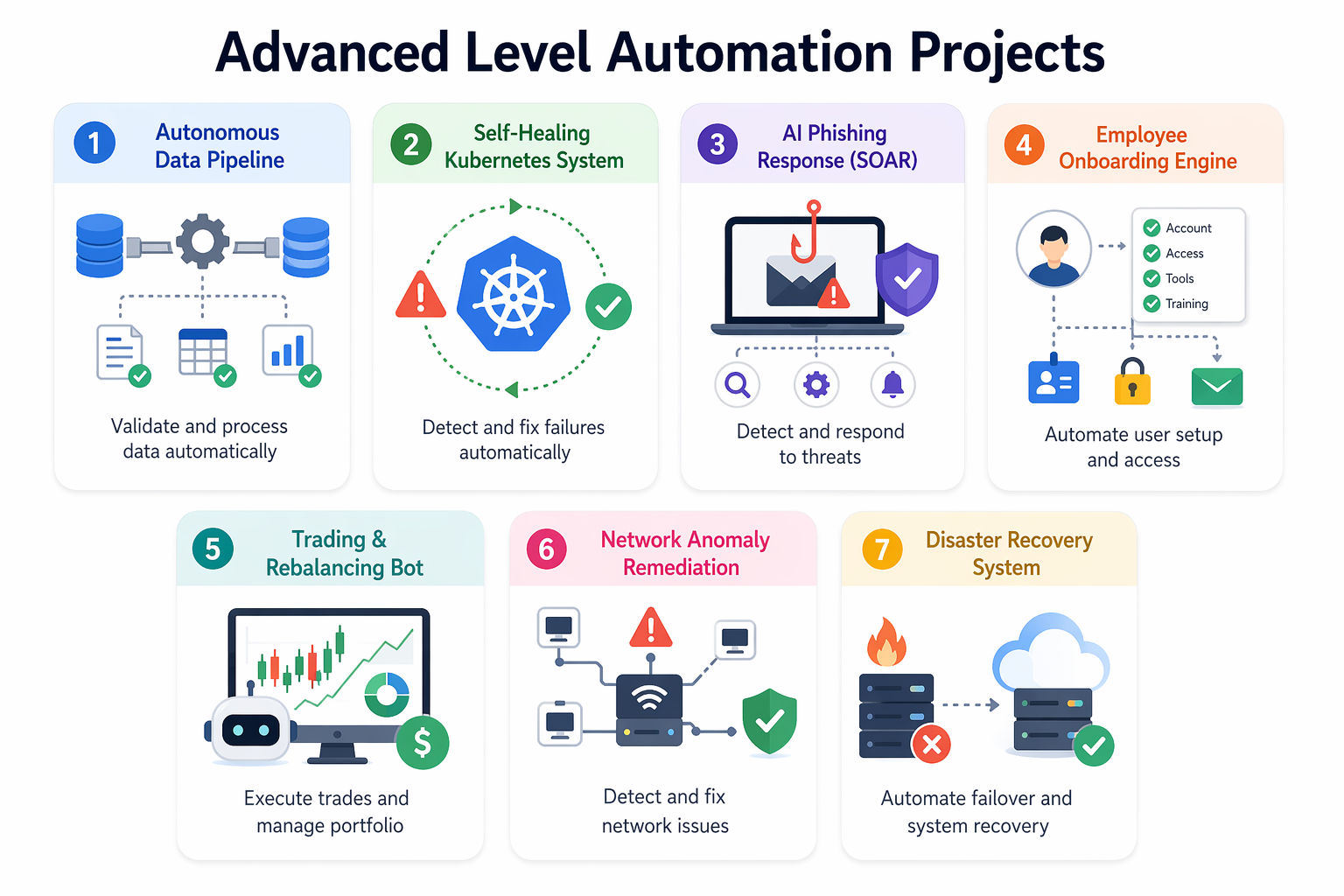
1. Autonomous Data Pipeline with Data Quality Checks

This project is the backbone of Data Engineering. You will build a fully automated pipeline (ETL) that extracts millions of rows from various APIs, cleans them, rigorously tests the data for corruption, and loads it into a data warehouse.

Tools and Technologies Used

  • Apache Airflow: For complex Directed Acyclic Graph (DAG) orchestration.
  • dbt (data build tool): For transforming data in the warehouse.
  • Snowflake or Google BigQuery: As the data warehouse.

How to Make It

  • Write an Airflow DAG in Python that defines strict sequential dependencies.
  • Step 1 (Extract): Airflow triggers a Python script to pull the last 24 hours of transaction data from a Stripe API, dumping the raw JSON into an S3 bucket.
  • Step 2 (Load): A Snowflake COPY INTO command is triggered to load the raw data into a staging table.
  • Step 3 (Transform & Test): Airflow triggers dbt to run SQL transformations, cleaning the data. Crucially, dbt automatically runs data quality tests (e.g., asserting that transaction_amount is never negative and user_id is never null).
  • If a test fails, Airflow immediately halts the pipeline to prevent corrupted data from reaching the executive dashboards, sending a Slack alert to the data engineers.

Also Read: 15+ Web Development Projects  

2. Self-Healing Kubernetes Infrastructure

This project explores the pinnacle of automated site reliability engineering (SRE). You will configure a cluster that automatically detects when an application is crashing or under heavy load and autonomously provisions more servers to fix the issue.

Tools and Technologies Used

  • Kubernetes: The core container orchestrator.
  • Horizontal Pod Autoscaler (HPA): For application-level scaling.
  • Cluster Autoscaler: For infrastructure-level scaling.

How to Make It

  • Deploy a Node.js application across multiple Kubernetes Pods.
  • Configure the HPA to monitor CPU utilization. Define a rule: if the average CPU usage across the pods exceeds 80%, Kubernetes must automatically instantiate new replicas of the pod to spread the load.
  • Configure the Cluster Autoscaler at the cloud provider level (e.g., AWS EKS). If Kubernetes attempts to launch new pods but there is no physical RAM left on the current servers, the Cluster Autoscaler will autonomously communicate with the AWS API to provision a brand new, physical EC2 node, join it to the cluster, and deploy the pending pods—all without human intervention.

3. AI-Driven Phishing Response (SOAR Integration)

This project focuses on Security Orchestration, Automation, and Response (SOAR). You will build an automated pipeline that ingests reported phishing emails, analyzes the attachments and links, and automatically bans malicious domains across the corporate network.

Tools and Technologies Used

  • Microsoft Graph API / Google Workspace API: To read the reported emails.
  • VirusTotal API: For automated malware analysis.
  • Palo Alto or Cisco Firewall APIs: To execute the network ban.

How to Make It

  • Configure a mailbox (e.g., phishing@company.com) where employees forward suspicious emails.
  • Write an automation that constantly polls this inbox, extracting the email headers, URLs, and file hashes of any attachments.
  • Send these URLs and hashes autonomously to the VirusTotal API. If VirusTotal returns a "Malicious" confidence score of > 80%, proceed to the remediation step.
  • The script autonomously triggers the corporate Firewall API to block all outbound traffic to that malicious IP address, and uses the Microsoft Graph API to silently delete that specific email from the inboxes of all other employees who received it.

Also Read: GitHub Project on Python: 30 Python Projects You’d Enjoy  

4. Zero-Touch Employee Onboarding Engine

This project automates the massive IT headache of provisioning software access for new hires. You will build a system that reads from HR software and automatically creates accounts in dozens of SaaS applications simultaneously.

Tools and Technologies Used

  • Workday or BambooHR API: The source of truth for new hires.
  • Okta / Azure Active Directory: For identity management.
  • Python or Node.js: For API orchestration.

How to Make It

  • Set up an automation that listens for a "New Employee" status change in your HR software, extracting their name, role, and department (e.g., "Software Engineer").
  • Execute a POST request to Okta or Active Directory to generate their official corporate email address and set a temporary password.
  • Based on their department, execute conditional API logic: If "Software Engineer", trigger the GitHub API to add them to the engineering organization, trigger the AWS API to grant them developer IAM access, and trigger the Slack API to add them to the #engineering channel.
  • Email the new hire their onboarding credentials, completing the IT setup in seconds rather than hours.

Also Read: 50 Java Projects With Source Code for Beginners  

5. Algorithmic Trading & Portfolio Rebalancing Bot

This project requires complex mathematical automation and absolute precision. You will build a financial bot that monitors your crypto or stock portfolio and automatically executes trades to maintain a specific asset allocation.

Tools and Technologies Used

  • Alpaca API or Binance API: For live market data and executing trades.
  • Python (NumPy): For calculating percentage drifts.
  • AWS EC2 or Heroku: To run the bot continuously.

How to Make It

  • Define your target portfolio allocation (e.g., 60% Bitcoin, 40% Ethereum).
  • Write a script that pings the exchange API every hour to get the current live prices and your current wallet balances, calculating your actual current allocation percentage.
  • If the actual allocation drifts more than 5% from your target (e.g., Bitcoin pumped, so it's now 70% of your portfolio), the script triggers the rebalancing logic.
  • The automation autonomously calculates the exact fractional amount of Bitcoin to sell, executes a Market Sell order via the API, and uses the proceeds to execute a Market Buy order for Ethereum, bringing the portfolio perfectly back to a 60/40 split.

Also Read: Top 20 Real-Time React Projects and Ideas for Beginners in 2026 

6. Intelligent Network Anomaly Remediation

This project merges automation with machine learning anomaly detection. You will build a system that monitors network traffic patterns, detects DDoS attacks or unusual spikes, and automatically reroutes traffic to scrubbers.

Tools and Technologies Used

  • Prometheus & Grafana: For collecting network metrics.
  • Python Scikit-learn: For anomaly detection (Isolation Forests).
  • Ansible: For rapid network configuration changes.

How to Make It

  • Stream live network metadata (packet counts, origin IPs) into a time-series database.
  • Train a lightweight anomaly detection model that learns the "normal" traffic patterns of your servers. Run this model continuously against the live data stream.
  • If the model flags a massive, unexpected spike in traffic originating from a single foreign subnet, it triggers the remediation pipeline.
  • An Ansible playbook is autonomously executed, logging into your core routers via SSH, adding temporary firewall rules to null-route (drop) all traffic from the offending subnet, and alerting the engineering team of the automated defense action.

Also Read: 40 Must-Try JavaScript Project Ideas for Developers of All Levels 

7. Automated Disaster Recovery Failover System

This project guarantees business continuity. You will build a monitor that detects when your primary data center goes entirely offline and automatically reroutes global DNS traffic while promoting a backup database to the primary master.

Tools and Technologies Used

  • Route 53 (AWS) or Cloudflare API: For manipulating global DNS records.
  • PostgreSQL (Patroni): For database replication and promotion.
  • Bash & Terraform: To orchestrate the failover.

How to Make It

  • Set up a primary server in New York and a warm-standby replica server in London, with the database continuously replicating from NY to London.
  • Implement an external "Witness" server that continuously health-checks the New York primary. If the NY server stops responding for 60 seconds, the witness declares a catastrophic failure.
  • The automation triggers Patroni to promote the London database replica to become the new Master database so it can accept write operations.
  • Simultaneously, a script hits the Cloudflare API to update the global DNS A Records, pointing your domain name away from the dead New York IP address and routing all customer traffic to the live London IP address, restoring service automatically.

Also Read: Top 25+ SaaS Project Ideas in 2026 

Conclusion

Automation projects in 2026 move beyond simple scripts to intelligent, self-operating systems. You start with basic task automation, then build agent-driven workflows, real-time monitoring systems, and data pipelines that handle complex operations.

Focus on practical automation projects that use AI, connected devices, and scalable workflows. This helps you build strong problem-solving skills and create systems that deliver real impact in modern industries.

"Want personalized guidance on AI and upskilling opportunities? Connect with upGrad’s experts for a free 1:1 counselling session today!"   

Similar Reads:  

Frequently Asked Question (FAQs)

1. What are the best automation projects for beginners in 2026?

Automation projects for beginners include file organizers, email automation tools, and simple web scrapers. These projects help you understand scripting, scheduling, and basic workflows while building a strong foundation for more advanced automation systems.

2. Where can you find automation project examples to learn from?

You can explore GitHub, developer forums, and online tutorials. These platforms provide real-world examples and step-by-step guides, helping you understand how automation systems are built and deployed.

3. Which tools are commonly used in building automation systems?

Common tools include Python, Selenium, APIs, and workflow tools like Airflow. These tools help you automate tasks, integrate systems, and manage workflows efficiently.

4. Are automation projects useful for building a strong portfolio?

Yes, automation projects show your ability to solve real problems and improve efficiency. They demonstrate practical skills in scripting, integration, and workflow design, which are valuable for many technical roles.

5. How do automation projects help in learning real-world systems?

Automation projects help you understand how tasks are handled automatically in real environments. You learn how to connect systems, process data, and build workflows that improve efficiency and reduce manual effort.

6. What are some beginner-friendly automation ideas to start with?

You can start with tasks like file sorting, scheduled emails, or simple data extraction. These projects help you focus on core concepts without dealing with complex systems.

7. Do you need coding experience to build automation systems?

Basic coding knowledge is helpful, especially in Python. Many tools also provide no-code options, allowing you to start small and gradually improve your skills.

8. What are some advanced automation projects for real-world use?

Advanced automation projects include AI-driven workflows, RPA systems, and data pipeline automation. These projects involve handling large datasets and building scalable systems.

9. How long does it take to complete an automation project?

Simple automation projects can take a few days, while intermediate ones may take weeks. Advanced systems with multiple integrations can take longer depending on complexity.

10. How can automation projects improve your career opportunities?

Automation projects help you build practical skills and show your ability to improve efficiency. This makes your profile stronger for roles in software development, DevOps, and data engineering.

11. What mistakes should you avoid while building automation systems?

Avoid starting with complex systems without understanding basics. Do not ignore testing and error handling. Focus on building simple, reliable workflows before moving to advanced automation solutions.

Rahul Singh

23 articles published

Rahul Singh is an Associate Content Writer at upGrad, with a strong interest in Data Science, Machine Learning, and Artificial Intelligence. He combines technical development skills with data-driven s...

Speak with AI & ML expert

+91

By submitting, I accept the T&C and
Privacy Policy

India’s #1 Tech University

Executive Program in Generative AI for Leaders

76%

seats filled

View Program

Top Resources

Recommended Programs

LJMU

Liverpool John Moores University

Master of Science in Machine Learning & AI

Double Credentials

Master's Degree

18 Months

IIITB
bestseller

IIIT Bangalore

Executive Diploma in Machine Learning and AI

360° Career Support

Executive Diploma

12 Months

IIITB
new course

IIIT Bangalore

Executive Programme in Generative AI for Leaders

India’s #1 Tech University

Dual Certification

5 Months
