Top 20+ Augmented Reality (AR) Projects in 2026
By Rahul Singh
Updated on Apr 17, 2026 | 11 min read | 5.99K+ views
Share:

All courses
Certifications
More
By Rahul Singh
Updated on Apr 17, 2026 | 11 min read | 5.99K+ views
Share:
Table of Contents
In 2026, AR projects are evolving with the integration of generative AI and advanced spatial mapping. This shift is turning AR devices into proactive assistants that can understand environments and deliver real-time, context-aware experiences.
Key AR projects now focus on AI-powered visual inspection in manufacturing, advanced virtual try-ons in retail, and immersive learning experiences in education. With rapid growth in AR hardware and WebAR adoption, developers are building more scalable and accessible applications across industries.
In this guide, you will explore beginner to advanced AR projects, tools to use, and practical ideas to build real-world augmented reality applications.
Build skills for immersive tech and AI-driven applications. Explore upGrad’s Artificial Intelligence Courses to learn how to create AR experiences, work with real-world tools, and start building interactive, future-ready applications.
Popular AI Programs
These AR Projects introduce you to the core fundamentals of spatial computing, including plane detection, image tracking, and rendering 3D assets. They serve as the perfect transition into the wider world of AR VR projects.
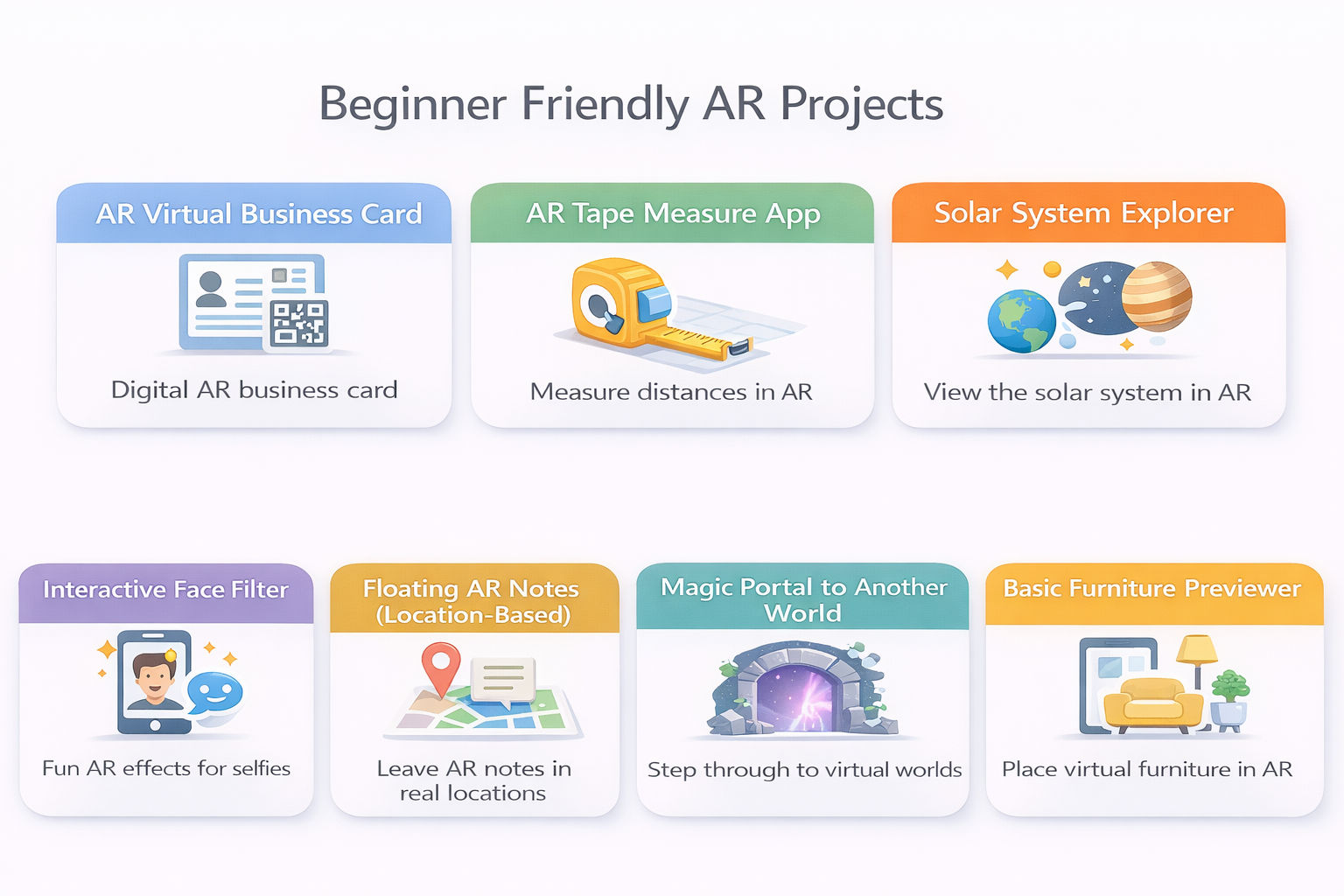
This project teaches the absolute basics of image tracking. You will build an application where hovering a smartphone camera over a physical business card brings it to life, displaying floating 3D social media icons and a video introduction.
Tools and Technologies Used
How to Make It
Also Read: Top 40 AI Project Ideas
This project introduces you to plane detection and spatial mathematics. You will build a utility application that calculates the real-world distance between two points tapped on the screen.
Tools and Technologies Used
How to Make It
This project focuses on rendering complex 3D environments and handling local rotation. You will build an educational app that anchors a to-scale, rotating 3D model of the solar system in the center of the user's living room.
Tools and Technologies Used
How to Make It
This project delves into facial mesh tracking and blend shapes. You will build a social-media-style filter that attaches 3D objects (like glasses or a hat) to a user's face and reacts to their facial expressions.
Tools and Technologies Used
How to Make It
Also Read: 35+ Mini Project Ideas for CSE Students in 2026
This project blends GPS data with spatial rendering. You will build an app where users can leave floating text notes at specific real-world coordinates, which can be discovered by other users walking by.
Tools and Technologies Used
How to Make It
Also Read: Top 25+ DBMS Project Ideas for Students in 2026 [With Source Code]
This project teaches advanced rendering techniques, specifically using stencil buffers to mask objects. You will build an AR door that appears in the user's room; when they walk through the physical space of the door, they are visually transported into a 3D 360-degree environment.
Tools and Technologies Used
How to Make It
This project introduces the fundamentals of e-commerce spatial computing. You will build a tool that lets users select a piece of furniture from a UI menu and place a true-to-scale 3D model of it on their floor to see if it fits.
Tools and Technologies Used
How to Make It
Also Read: Top 35 MERN Stack Project Ideas of 2026 [With Source Code]
Free Courses
These AR Projects require a deeper understanding of user interface design in 3D space, interacting with external databases, and handling occlusion. These are representative of the standard expected in professional AR VR projects.
This project focuses on complex image tracking and multimedia integration. You will build an application for a museum where pointing a phone at a specific painting triggers a 3D animated overlay and synchronized audio narration.
Tools and Technologies Used
How to Make It
Also Read: 40 Best BCA Final Year Project Topics & Mini Project Ideas
This project bridges commercial APIs with augmented rendering. You will build a tablet application for restaurants where patrons can scan a QR code and view hyper-realistic 3D models of their food before ordering.
Tools and Technologies Used
How to Make It
This project deals with complex 3D hierarchies and educational interaction. You will build a medical app that displays a full 3D human body, allowing students to peel back layers of skin, muscle, and bone interactively.
Tools and Technologies Used
How to Make It
Also Read: Top 28 Robotics Project Ideas for Students in 2026
This project tackles the difficult challenge of indoor localization where GPS signals fail. You will build an app that draws an AR path (like a glowing line) on the floor of a supermarket to guide users to specific products.
Tools and Technologies Used
How to Make It
This project introduces networking and shared coordinate spaces, a staple in collaborative AR VR projects. You will build a game where two users on different phones see the exact same 3D game board hovering between them in real-time.
Tools and Technologies Used
How to Make It
Also Read: Top 30 Final Year Project Ideas for CSE Students in 2026
This project leverages advanced object tracking instead of standard image tracking. You will build a tool that recognizes the physical engine bay of a specific car and overlays 3D arrows pointing to the oil dipstick and coolant reservoir.
Tools and Technologies Used
How to Make It
This project requires high-precision face tracking and physically based rendering (PBR) to make digital objects look real. You will build an e-commerce try-on tool for reflective objects like gold necklaces or sunglasses.
Tools and Technologies Used
How to Make It
Also Read: Best Computer Science Project Ideas (2026) for CSE Students
AI Courses to upskill
Explore Artificial Intelligence Courses for Career Progression
These AR Projects represent the absolute bleeding edge of immersive AR VR projects. They require integrating hardware sensors, utilizing artificial intelligence, managing environmental occlusion, and pushing the boundaries of mobile GPU performance.
This project simulates the HUD (Heads Up Display) of future smart glasses. You will build a mobile app that uses Optical Character Recognition (OCR) to read foreign text in the real world and overlay the translated text perfectly on top of the physical sign in AR.
Tools and Technologies Used
How to Make It
Also Read: Top Real Time Project Ideas Every Tech Student Should Try
This project handles complex state machines and environmental occlusion. You will build an immersive game where the user's actual physical room becomes the escape room, forcing them to find digital clues hidden behind physical furniture.
Tools and Technologies Used
How to Make It
This project demands absolute millimeter precision and represents enterprise medical AR. You will build a prototype application that overlays CT scan data onto a physical anatomical training dummy to assist surgeons.
Tools and Technologies Used
How to Make It
Also Read: Top Hackathon Project Ideas for Fast, Scalable Prototypes
This project merges hardware data streams with spatial interfaces. You will build an application for factory workers where pointing a tablet at a physical machine (like a CNC router) displays floating, real-time data charts regarding its temperature and RPM.
Tools and Technologies Used
How to Make It
This project requires master-level database architecture and geospatial math. You will build a massive multiplayer platform where digital resources and monsters spawn at exact physical GPS coordinates across a real-world city.
Tools and Technologies Used
How to Make It
This project bridges different hardware ecosystems. You will build a shared workspace where User A (on a mobile phone in AR) and User B (in a Meta Quest headset in VR) can manipulate the same 3D architectural model simultaneously.
Tools and Technologies Used
How to Make It
This project combines Generative AI with spatial computing. You will build an AR application where a user spawns a 3D historical figure (e.g., Abraham Lincoln) in their room and can have a real-time, spoken conversation with them.
Tools and Technologies Used
How to Make It
AR projects help you build interactive applications that connect digital content with the real world. Start with simple ideas to learn tracking and 3D interaction, then move to advanced systems with AI and real-time features.
Focus on practical AR projects that improve user experience and solve real problems. This approach helps you build strong skills and create impactful augmented reality applications.
"Want personalized guidance on AI and upskilling opportunities? Connect with upGrad’s experts for a free 1:1 counselling session today!"
AR projects for beginners include simple apps like object viewers, AR filters, and measurement tools. These help you understand surface tracking, 3D placement, and interaction without dealing with complex logic, making them a good starting point for learning augmented reality.
You can explore GitHub repositories, developer communities, and online tutorials. These platforms provide complete project examples, helping you understand how AR applications are built and how different tools are used in real scenarios.
Popular tools include Unity, ARCore, ARKit, and WebAR frameworks. These tools help you build and test augmented reality applications across different devices and platforms efficiently.
Yes, AR projects are highly valuable for portfolios. They show your ability to build interactive and real-world applications, which can help you stand out in fields like app development, gaming, and immersive technologies.
AR projects help you understand how digital content interacts with physical environments. You learn tracking, rendering, and user interaction, which are important for building practical applications in industries like retail, education, and healthcare.
You can start with apps like AR object placement, face filters, or simple games. These projects help you learn core concepts without handling complex features or large-scale systems.
Basic coding knowledge is helpful, especially in C# or JavaScript. However, many tools provide visual interfaces, so you can start building simple applications while improving your coding skills gradually.
Advanced AR projects include apps for virtual try-ons, industrial training, and real-time collaboration. These applications involve complex logic, multi-user systems, and integration with other technologies.
Simple AR projects can take a few days, while intermediate ones may take a few weeks. Advanced applications with multiple features and integrations can take longer depending on your experience and project scope.
AR projects help you build practical skills and showcase your ability to create interactive applications. This can open opportunities in fields like gaming, mobile development, and immersive technologies.
Avoid starting with complex ideas too early. Do not ignore performance optimization or user experience. Focus on simple, well-built projects before moving to advanced applications to ensure better learning and results.
97 articles published
Rahul Singh is an Associate Content Writer at upGrad, with a strong interest in Data Science, Machine Learning, and Artificial Intelligence. He combines technical development skills with data-driven s...
Speak with AI & ML expert
By submitting, I accept the T&C and
Privacy Policy
Top Resources
Master's Degree
18 Months
Executive Diploma
12 Months
IIIT Bangalore
Executive Programme in Generative AI & Agentic AI for LeadersIndia’s #1 Tech University
Dual Certification
5 Months