Top 20+ React Native Projects in 2026

By Rahul Singh

Updated on Apr 21, 2026 | 11 min read | 4.93K+ views

Share:

In 2026, React Native project ideas focus on the New Architecture with Fabric and JSI, which improves performance and brings apps closer to native speed. You can now build smoother, faster mobile experiences with better rendering and lower latency.

There is also strong integration of AI and ML features. This lets you create smarter apps like AI assistants, recommendation systems, and real-time data-driven experiences directly inside your React Native projects.

In this guide, you will explore beginner to advanced React Native projects, tools to use, and practical ideas to build mobile apps. 

Build in-demand AI skills with upGrad’s Artificial Intelligence Courses. Learn machine learning, prompt engineering, and real-world tools through hands-on projects. 

Beginner Friendly React Native Projects

These projects introduce you to the core fundamentals of React Native, including the View and Text components, Flexbox styling, and basic state management. They are perfect for web developers transitioning to mobile for the first time.
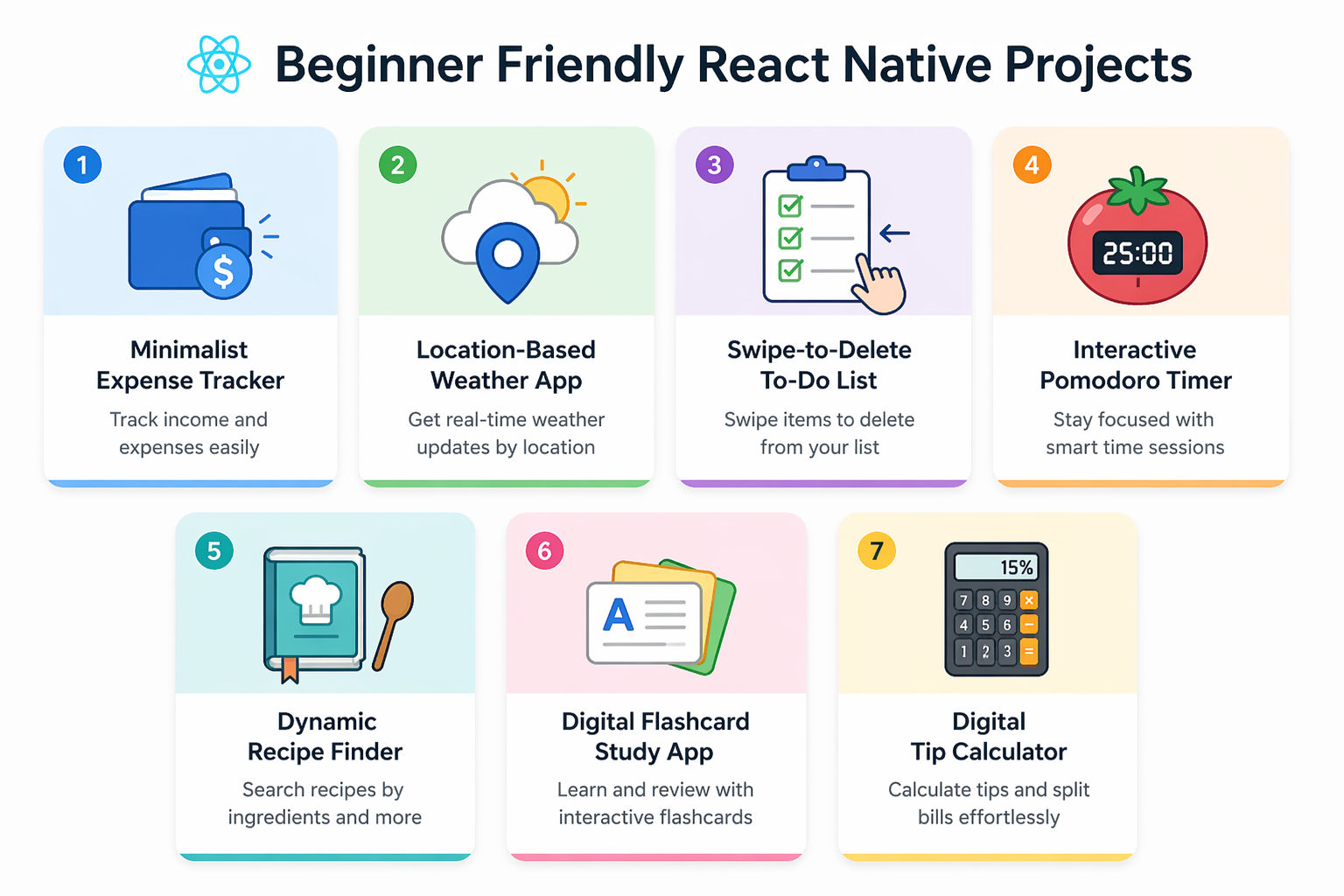
1. Minimalist Expense Tracker

This project helps you understand how React Native handles numerical inputs and local device storage. You will build an application where users log daily financial transactions, categorize them, and view their total spending.

Tools and Technologies Used

  • React Native (Expo): For rapid project initialization.
  • AsyncStorage: To persist data locally so it survives an app restart.
  • React Native Paper: A UI library for pre-styled, Material Design components.

How to Make It

  • Build an intuitive input form utilizing the TextInput component, setting keyboardType="numeric" to automatically open the device's number pad.
  • Create a state management array to hold the list of expense objects (amount, category, date).
  • Render the expenses using a FlatList component, which is highly optimized for scrolling through long lists of data on mobile devices.
  • Write a useEffect hook to serialize the expense array into a JSON string and save it to AsyncStorage every time a new expense is added, reloading it when the app mounts.

Also Read: Top 25+ HTML Projects for Beginners in 2026: Source Code, Career Insights, and More 

2. Location-Based Weather App

This project bridges the gap between your mobile UI, device hardware, and third-party APIs. You will build a dynamic weather dashboard that requests the user's current GPS coordinates and fetches real-time meteorological data.

Tools and Technologies Used

  • Expo Location: To securely access the device's GPS hardware.
  • OpenWeatherMap API: To source accurate climate data.
  • Axios or native Fetch API: For executing network requests.

How to Make It

  • Implement an asynchronous function using expo-location that triggers a native OS permission prompt asking the user to allow location access.
  • Once granted, capture the exact latitude and longitude coordinates of the device.
  • Pass these coordinates into a GET request to the OpenWeatherMap API to retrieve the localized weather JSON payload.
  • Design a visually appealing interface that changes its background color or displays specific vector icons based on the returned weather conditions (e.g., sunny, raining, snowing).

3. Swipe-to-Delete To-Do List

This project introduces mobile-specific interactions that go beyond standard web clicking. You will build a task manager where users can intuitively swipe a task card to the left or right to reveal a hidden "Delete" button.

Tools and Technologies Used

  • React Native Gesture Handler: For recognizing complex touch interactions.
  • React Native Reanimated: To handle smooth, 60fps animations off the JavaScript thread.
  • FlatList: For rendering the task components.

How to Make It

  • Create a standard FlatList that renders an array of to-do items.
  • Wrap each individual task item in a PanGestureHandler or utilize a pre-built component like Swipeable from the gesture handler library.
  • Write animation logic that translates the X-axis of the task card based on the user's finger movement, ensuring it heavily resists swiping past a certain threshold.
  • Render a red "Delete" button in the background view that is revealed as the foreground card slides away, attaching a filter function to permanently remove the item from the array when tapped.

Also Read: A Complete Guide to the React Component Lifecycle: Key Concepts, Methods, and Best Practices 

4. Interactive Pomodoro Timer

This project focuses on managing time, intervals, and continuous UI repainting. You will build a productivity app featuring a countdown timer that alternates between 25-minute work sessions and 5-minute breaks.

Tools and Technologies Used

  • JavaScript setInterval: For the core countdown logic.
  • React Native Animated API: To build a visual progress ring.
  • Expo AV: To play notification sounds.

How to Make It

  • Set up a component state to track the remaining seconds and the current phase (Work vs. Break).
  • Implement a useEffect hook that starts a setInterval when the user presses "Start," decrementing the seconds state exactly once per second.
  • Convert the remaining seconds into a highly readable MM:SS string format.
  • Use the expo-av library to play a chime sound effect the exact moment the timer reaches zero, automatically switching the state to the next phase and resetting the clock.

5. Dynamic Recipe Finder

This project provides excellent practice for managing search parameters, handling complex nested JSON data, and utilizing React Native's powerful image components. You will build a culinary search engine optimized for mobile screens.

Tools and Technologies Used

  • React Navigation: To move between the search screen and recipe detail screens.
  • Edamam API or Spoonacular API: For comprehensive food data.
  • React Native Fast Image (or Expo Image): For aggressive image caching.

How to Make It

  • Construct a visually engaging homepage centered around a search bar.
  • Write a network request that takes the user's search query, fetches data from the recipe API, and stores the results in the state.
  • Create a responsive grid layout to display the search results as cards, utilizing highly optimized image components to ensure smooth scrolling even with heavy food photography.
  • Configure React Navigation so that tapping a recipe card pushes a new screen onto the navigation stack, passing the specific recipe ID as a route parameter to fetch and display the full cooking instructions.

Also Read: Top 50 React JS Interview Questions & Answers in 2026 

6. Digital Flashcard Study App

This project focuses on complex CSS transforms and organizing local data sets. You will build a study aid application where users can review topics by tapping cards that physically flip to reveal answers on the back.

Tools and Technologies Used

  • React Native Animated API: Specifically using interpolate for 3D rotations.
  • Local JSON Data: To store the structured array of questions.
  • SafeAreaView: To ensure the UI does not overlap with device notches.

How to Make It

  • Build a Flashcard component containing two absolutely positioned View elements representing the front and back of the card.
  • Initialize an Animated.Value and create a function that triggers an Animated.spring or timing animation when the card is tapped.
  • Interpolate the animated value from 0 to 180 degrees, applying it to the transform: [{ rotateY }] style property to create a 3D flip effect.
  • Add navigation controls (Next and Previous buttons) that update the main application state to render the next question object from your JSON array.

7. Digital Tip Calculator

This project helps you master form validation, text controllers, and native keyboard handling. You will create a utility app that takes a total bill amount, applies a tip percentage, and splits the final cost.

Tools and Technologies Used

  • React Native TextInput: For data capture.
  • KeyboardAvoidingView: To ensure the keyboard doesn't cover the input fields.
  • Custom UI Buttons: For selecting percentages.

How to Make It

  • Construct an input form containing styled text fields restricted to numerical keyboards.
  • Wrap your main interface in a KeyboardAvoidingView so the screen automatically scrolls up when the native iOS/Android keyboard slides into view.
  • Create a row of selectable percentage buttons (e.g., 10%, 15%, 20%) that instantly update a local state multiplier when tapped.
  • Display the final calculated tip amount and the exact split cost per person in large, easily readable typography at the top of the screen.

Also Read: 20+ Top Front-End Developer Tools in 2026: Uses, Benefits, and More 

Intermediate Level React Native Projects

These React Native Projects require a deeper understanding of mobile architecture, including complex stack and tab navigation, integrating cloud databases like Firebase, and handling device hardware like cameras and microphones.
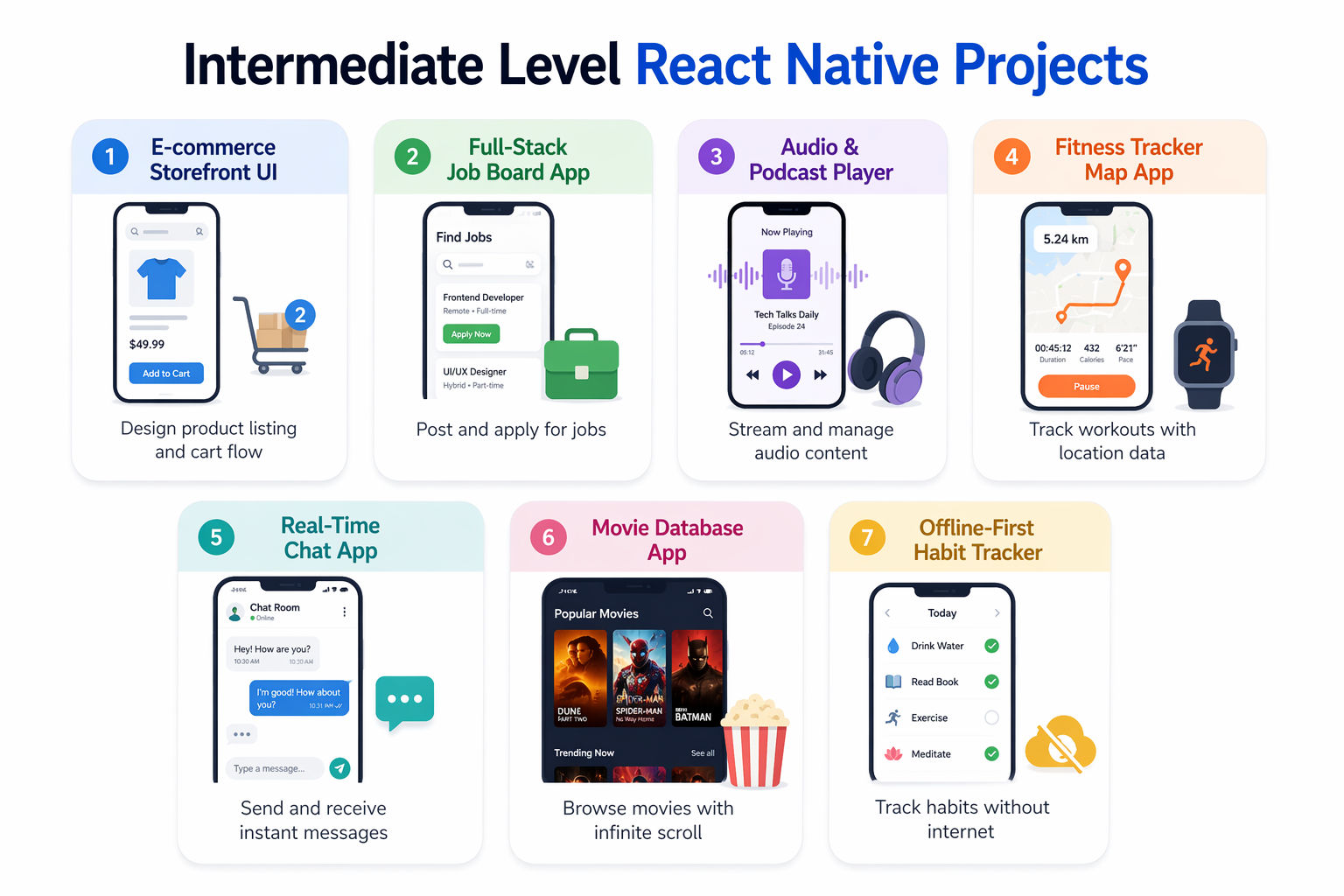
1. E-commerce Storefront UI

This project transitions you from simple layouts to handling multi-screen application state. You will build the front-facing UI of an online store, managing a shopping cart context that persists as users navigate between product pages.

Tools and Technologies Used

  • Expo Router or React Navigation: For deeply nested tab and stack navigators.
  • Zustand or Redux Toolkit: For robust, global state management.
  • Fake Store API: To provide realistic mock product data.

How to Make It

  • Set up a bottom tab navigator featuring tabs for "Shop", "Categories", and "Cart".
  • Fetch the product catalog from the mock API and render a grid utilizing a FlatList with numColumns={2}.
  • Implement a global state store using Zustand to manage an array of cart items, writing logic to increment quantities if the user adds an item they already selected.
  • Build a dedicated Cart screen that subscribes to the global state, dynamically calculating the total price and allowing users to swipe away items to remove them.

Also Read: Full Stack Developer Tools To Master In 2026 

2. Full-Stack Job Board App

This project introduces backend integration and secure user authentication. You will build a functional platform where users must create an account to browse job listings and save their favorites.

Tools and Technologies Used

  • Firebase Authentication: For email/password and social logins.
  • Cloud Firestore: A NoSQL database to store the job postings.
  • React Hook Form: To manage complex form validation.

How to Make It

  • Integrate the Firebase SDK into your React Native project and build a polished Login/Register screen flow.
  • Configure a navigation guard that checks the user's authentication state; if they are not logged in, they cannot access the main job feed.
  • On the main feed, query the Firestore database to retrieve active job postings, displaying them in a list with a search bar that filters results.
  • Implement a "Save Job" feature that writes a new document to a nested Firestore collection under the specific authenticated user's ID.

Also Read: SQL Vs NoSQL: Key Differences Explained 

3. Audio & Podcast Player

This project requires handling continuous background processes and media streaming. You will build a fully functional audio player capable of streaming remote MP3 files, displaying album art, and controlling playback.

Tools and Technologies Used

  • react-native-track-player: The industry standard for robust background audio.
  • Slider Component: For track scrubbing.
  • ListenNotes API: To fetch real podcast feeds.

How to Make It

  • Configure react-native-track-player to handle audio playback even when the app is minimized or the device screen is locked.
  • Fetch a list of trending podcasts and build a UI to browse episodes.
  • Create a persistent "Mini Player" component that sits above the bottom tab bar, allowing the user to pause or play audio while navigating other screens.
  • Sync a visual slider component with the audio stream's current position, allowing the user to drag the slider to scrub forward or backward through the song in real-time.

4. Fitness Tracker Map App

This project explores bridging mobile applications with complex geolocation tracking. You will build a comprehensive fitness tracker that draws a live path on a map as the user runs or cycles.

Tools and Technologies Used

  • react-native-maps: For rendering native Apple and Google Maps.
  • Expo Location (Background Tracking): To track GPS coordinates continuously.
  • Haversine Formula: To calculate distance mathematically.

How to Make It

  • Request high-accuracy foreground and background location permissions from the user.
  • Mount a MapView component to the screen, centering the camera on the user's initial coordinates.
  • Implement a background location task that records the user's latitude and longitude every 5 seconds, pushing these coordinates into an array.
  • Pass this array of coordinates to a Polyline component inside the map, which will draw a continuous red line showing the exact route the user took during their workout, simultaneously calculating total distance covered.

Also Read: MongoDB Tutorial for Beginners: Learn MongoDB in Simple Steps 

5. Real-Time Chat Application

This project dives into the complexities of WebSockets and instant data delivery. You will build a communication platform featuring direct messaging and online status indicators.

Tools and Technologies Used

  • Firebase Realtime Database or Socket.io: For bi-directional event broadcasting.
  • react-native-gifted-chat: A highly customizable chat UI framework.
  • Firebase Cloud Messaging (FCM): For push notifications.

How to Make It

  • Set up a secure authentication flow so users can log in and select a contact to message.
  • Integrate react-native-gifted-chat to instantly generate a professional messaging UI featuring message bubbles, timestamps, and input bars.
  • Hook the chat UI's onSend method to your backend WebSocket or Firebase instance to instantly broadcast the message payload to the recipient.
  • Implement a listener that automatically updates the UI when a new message arrives, ensuring the FlatList automatically scrolls to the bottom to reveal the newest text.

6. Movie Database App with Infinite Scroll

This project requires you to handle complex pagination, aggressive image caching, and large datasets gracefully. You will interface with a professional movie database to build a browsing application.

Tools and Technologies Used

  • TMDB (The Movie Database) API: A comprehensive REST API.
  • FlatList onEndReached: For infinite scrolling logic.
  • React Native Reanimated: For smooth header transitions.

How to Make It

  • Fetch the first page of "Trending" movies and render the results using a grid layout.
  • Utilize the onEndReached prop of the FlatList. When the user scrolls near the bottom of the screen, automatically increment your page state and fire a new API request to fetch the next 20 movies.
  • Append these new movies to your existing array without wiping the previous results, providing a seamless, infinite browsing experience.
  • Build a dynamic movie detail route featuring a massive backdrop image, overlapping poster art, and horizontal scroll views to display the headshots of the acting cast.

Also Read: MongoDB vs PostgreSQL: Key Differences, Similarities, and More 

7. Offline-First Habit Tracker

This project introduces complex local database management, ensuring the app remains blazing fast and functional even without an internet connection. You will build an app where users define daily goals and track their consistency.

Tools and Technologies Used

  • WatermelonDB or SQLite: For high-performance, complex local data storage.
  • react-native-chart-kit: To render analytical graphs.
  • React Native Calendars: For a visual matrix of completed days.

How to Make It

  • Configure WatermelonDB to create a local SQLite database complete with raw schemas to create tables for Habits and Logs.
  • Build a daily checklist view where users can quickly tap checkboxes to mark their routines as finished, executing local database writes instantly.
  • Write complex query logic to calculate the user's current consecutive "streak" of completed days.
  • Feed the queried data into react-native-chart-kit to render an interactive bar chart that visually motivates the user based on their weekly performance.

Recommended Courses to upskill

Explore Our Popular Courses for Career Progression

360° Career Support

Executive Diploma12 Months
background

O.P.Jindal Global University

MBA from O.P.Jindal Global University

Live Case Studies and Projects

Master's Degree12 Months

Advanced Level React Native Projects

These projects represent the absolute bleeding edge of mobile engineering. They require integrating complex hardware features, utilizing native modules, managing environmental processing, and pushing the boundaries of the mobile JavaScript thread.
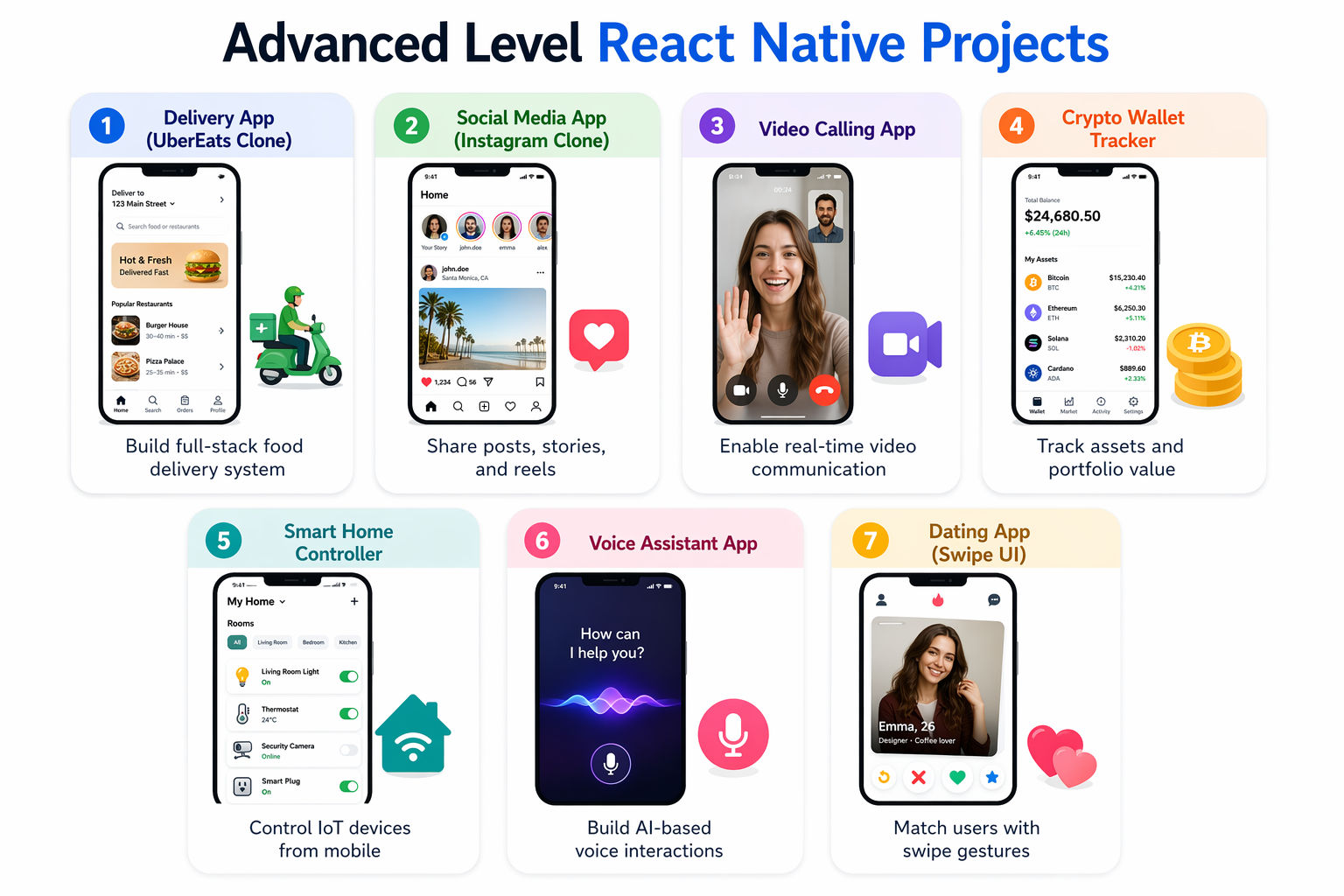
1. Full-Stack Delivery App (UberEats Clone)

This project simulates a complete, enterprise-grade on-demand logistics business. You will build an application featuring live GPS tracking and secure payment processing for ordering food from local restaurants.

Tools and Technologies Used

  • React Native / Expo: For the core application.
  • Google Maps API Directions Service: For routing logic.
  • Stripe React Native SDK: For processing live payments.

How to Make It

  • Design distinct application flows within the same codebase: one for the hungry Customer and one for the Delivery Driver.
  • Integrate the Google Maps SDK to display live, moving markers representing the driver's current location relative to the customer's delivery address.
  • Use the Directions API to calculate the most efficient route and ETA based on live traffic data, rendering the polyline directly on the map.
  • Integrate Stripe's native mobile SDK to securely tokenize credit card information via Apple Pay or Google Pay, processing live transactions before dispatching the driver.

Also Read: Top 30 Final Year Project Ideas for CSE Students in 2026 

2. Social Media Platform (Instagram Clone)

This project tackles the immense complexity of handling heavy media uploads, custom camera interfaces, and complex relational data feeds. You will build a platform where users can post photos, follow others, and leave comments.

Tools and Technologies Used

  • expo-camera & expo-image-picker: To interface directly with device hardware.
  • Firebase Auth, Firestore, and Cloud Storage: For the backend architecture.
  • Reanimated 3: For fluid, gesture-driven UI components.

How to Make It

  • Build a custom camera screen allowing users to toggle front/back cameras, snap photos, or hold a button to record short videos.
  • Implement a robust upload flow that compresses the media locally before pushing it to Firebase Cloud Storage, saving the resulting download URL to a Firestore document alongside the user's caption.
  • Engineer a complex "Feed" algorithm utilizing Firestore queries to aggregate and chronologically sort posts exclusively from the specific accounts the current user is actively following.
  • Implement instant, optimistic UI updates for interactions like "Liking" a post, turning the heart icon red immediately while silently updating the database integer in the background.

3. Real-Time Video Calling App

This project dives into the complexities of WebRTC and peer-to-peer data streaming natively on mobile devices. You will build a communication platform capable of high-fidelity audio and video transmission.

Tools and Technologies Used

  • Agora React Native SDK or WebRTC: For heavy lifting of the video streams.
  • CallKeep / React Native Push Notification: For native incoming call UI.
  • Node.js: For the signaling server.

How to Make It

  • Register for an Agora developer account to handle the complex backend signaling servers required to connect two distinct IP addresses.
  • Request and manage strict native permissions for both the device microphone and the front-facing camera.
  • Integrate CallKeep to trigger the native iOS "CallKit" or Android "ConnectionService" so the phone rings and displays a full-screen caller ID even when the app is completely closed.
  • Implement the live video room interface featuring full-screen remote video rendering, a picture-in-picture local preview, and functional buttons to mute audio or flip the camera.

Also Read: 15+ Web Development Projects   

4. Crypto Wallet & Portfolio Tracker

This project focuses on blockchain integrations, extreme financial security, and real-time data polling. You will build a decentralized wallet application that can hold crypto assets and track live market prices.

Tools and Technologies Used

  • ethers.js or web3.js: To interact with EVM-compatible blockchains.
  • expo-local-authentication: For FaceID / TouchID biometric security.
  • CoinGecko WebSockets: For live price tickers.

How to Make It

  • Use a cryptography library to securely generate a new Ethereum mnemonic phrase and private key entirely locally on the device.
  • Wrap the app access behind biometric authentication, requiring a successful FaceID or fingerprint scan before the wallet balances are revealed.
  • Use ethers.js to connect to a public RPC node, executing read functions to check the exact token balances associated with the user's public address.
  • Build a dashboard utilizing WebSockets to fetch live pricing data for various cryptocurrencies, updating the user's total portfolio value indicator in real-time.

5. Smart Home IoT Controller

This project requires interacting with external hardware devices over local networks or Bluetooth. You will build a centralized dashboard application to control smart lights, thermostats, and security cameras.

Tools and Technologies Used

  • react-native-ble-plx: For robust Bluetooth Low Energy communication.
  • MQTT client package: For lightweight IoT messaging.
  • SVG and Reanimated: For custom knob and slider widgets.

How to Make It

  • Implement a Bluetooth scanning interface that aggressively searches for compatible BLE devices in the immediate vicinity and displays their signal strength.
  • Establish a secure, persistent connection to a target device (like a Raspberry Pi or ESP32) and discover its available read/write characteristics.
  • Design a visually stunning dashboard featuring custom-painted SVG rotary knobs that users can physically drag in a circle to adjust the brightness of a connected smart bulb.
  • Write a robust communication layer that rapidly sends byte arrays over the MQTT protocol to toggle relays or switch thermostat modes instantaneously.

Also Read: GitHub Project on Python: 30 Python Projects You’d Enjoy   

6. AI-Powered Voice Assistant App

This project introduces you to integrating cutting-edge Large Language Models directly into native voice workflows. You will build a voice-activated assistant capable of answering complex questions entirely through audio.

Tools and Technologies Used

  • @react-native-voice/voice: For native speech-to-text recognition.
  • OpenAI API (GPT-4o): For reasoning and conversational responses.
  • expo-speech: For native text-to-speech output.

How to Make It

  • Integrate the native voice plugin to activate immediately upon pressing a large microphone button, converting the user's spoken words into a raw text string.
  • Send the transcribed string securely to the OpenAI backend API along with a custom system prompt instructing the AI on how it should behave.
  • Render the AI's response in a chat-like interface so the user can read the history of the conversation.
  • Pipe the final text response into the expo-speech engine so the mobile device physically speaks the answer back to the user using a natural-sounding digital voice.

7. Dating App with Swipe Mechanics

This project focuses intensely on complex fluid animations and geospatial querying. You will build a highly performant application where users can swipe left or right on potential matches based on physical proximity.

Tools and Technologies Used

  • React Native Gesture Handler & Reanimated 3: Crucial for smooth Tinder-like cards.
  • GeoFirestore or PostGIS: To query users by geographic radius.
  • Firebase: For real-time match notifications and messaging.

How to Make It

  • Design an absolute positioned stack of "Profile Cards" featuring high-quality images and basic bio text.
  • Attach a PanGestureHandler to the top card. Use Reanimated to map the user's finger movement (translationX) to the card's position and rotation, creating a physical drag effect.
  • Implement threshold logic: if the card is dragged far enough to the right and released, animate it off the screen and trigger a "Like" API call; if dragged left, trigger a "Pass".
  • Use geospatial database extensions to only pull profiles into the deck if their last known GPS coordinates are within a 50-kilometer radius of the current user.

Also Read: Top 20 Real-Time React Projects and Ideas for Beginners in 2026  

Conclusion

React Native projects help you build real mobile apps that run across platforms with a single codebase. Start with simple apps to learn components and state, then move to advanced projects with APIs, real-time features, and performance tuning.

Focus on practical React Native projects that solve real problems and use modern features like the New Architecture and AI integration. This helps you build strong skills and create scalable mobile applications.

"Want personalized guidance on AI and upskilling opportunities? Connect with upGrad’s experts for a free 1:1 counselling session today!"    

Similar Reads:   

Frequently Asked Question (FAQs)

1. What are the best React Native projects for beginners in 2026?

React Native projects for beginners include simple apps like to-do lists, weather apps, and notes apps. These projects help you learn components, state management, and basic navigation while building a strong foundation for mobile app development.

2. Where can you find React Native project examples to learn from?

You can explore platforms like GitHub, developer blogs, and online tutorials. These sources provide complete examples, helping you understand how real applications are structured and how features are implemented step by step.

3. Which tools are commonly used in building React Native apps?

Popular tools include Expo, React Navigation, Redux, and Firebase. These tools help you manage app structure, handle navigation, manage state, and connect backend services efficiently.

4. Are React Native projects useful for building a strong portfolio?

Yes, React Native projects are valuable for showcasing your ability to build cross-platform apps. They demonstrate your skills in UI development, API integration, and real-world problem solving, which are important for mobile development roles.

5. How do React Native projects help in learning real-world app development?

React Native projects help you understand how apps work in real environments. You learn how to manage data, handle user interactions, and connect with external services to build complete applications.

6. What are some beginner-friendly mobile app ideas to start with?

You can start with apps like task managers, simple calculators, or basic trackers. These ideas help you focus on core concepts without handling complex features in the beginning.

7. Do you need coding experience to build React Native applications?

Basic knowledge of JavaScript and React is helpful. You can start with simple projects and gradually improve your skills while learning how mobile apps are developed.

8. What are some advanced React Native projects for real-world use?

Advanced React Native projects include social media apps, delivery apps, and real-time chat systems. These projects involve complex features like authentication, real-time updates, and scalable architecture.

9. How long does it take to complete a React Native project?

Simple projects can take a few days, while intermediate apps may take a few weeks. Advanced applications with multiple features and integrations can take longer depending on your experience.

10. How can React Native projects improve your career opportunities?

React Native projects help you build practical skills and showcase your ability to create real applications. This improves your chances of getting roles in mobile development and cross-platform app development.

11. What mistakes should you avoid while building mobile apps?

Avoid starting with complex apps too early. Do not ignore performance and user experience. Focus on building simple, well-structured projects before moving to advanced applications for better learning and results.

Rahul Singh

23 articles published

Rahul Singh is an Associate Content Writer at upGrad, with a strong interest in Data Science, Machine Learning, and Artificial Intelligence. He combines technical development skills with data-driven s...

Get Free Consultation

+91

By submitting, I accept the T&C and
Privacy Policy

Top Resources

Recommended Programs

upGrad

upGrad

Management Essentials

Case Based Learning

Certification

3 Months

IIMK
bestseller

Certification

6 Months

OPJ Logo
new course

Master's Degree

12 Months
