Top 28 Robotics Projects for Students in 2026
Updated on Aug 19, 2026 | 35 min read | 36.85K+ views
Share:

All courses
Certifications
More
Updated on Aug 19, 2026 | 35 min read | 36.85K+ views
Share:
Table of Contents
Quick Overview:
This blog covers some of the most in-demand robotics project ideas for beginners, students, and engineering learners.
Take your robotics skills to the next level with upGrad's Artificial Intelligence courses. Learn machine learning, computer vision, and automation to build intelligent robotics applications.
Popular AI Programs
Each entry in the table below highlights a different focus, from basic sensor usage to advanced IoT-based builds. You can pick a project that matches your current skill level or challenges you to learn new techniques.
| No. | Project | Level | Main Focus | Difficulty |
|---|---|---|---|---|
| 1 | Robotic Arm Project | Beginner | Motor Control & Robotics Mechanics | Easy |
| 2 | Obstacle Avoiding Robot | Beginner | Sensors & Autonomous Navigation | Easy |
| 3 | Line Follower Robot | Beginner | Sensor-Based Path Tracking | Easy |
| 4 | Remote Controlled Automobile (RF) | Beginner | Wireless Communication | Easy |
| 5 | Maze Solver Robot | Beginner | Logic & Pathfinding | Easy |
| 6 | Cleaning Robot | Beginner | Automation & Navigation | Easy |
| 7 | Types of Robot Motors for Navigation | Beginner | Motor Testing & Motion Control | Easy |
| 8 | DTMF Controlled Robot | Beginner | Signal Processing & Remote Control | Easy |
| 9 | Gesture Control Robot | Intermediate | Human-Robot Interaction | Medium |
| 10 | Soccer Robot | Intermediate | Object Tracking & Movement | Medium |
| 11 | Bomb Detection Robot | Intermediate | Detection Systems & Safety Robotics | Medium |
| 12 | Pick and Place Robot | Intermediate | Industrial Automation | Medium |
| 13 | Metal Detector Robotic Vehicle | Intermediate | Sensor Integration | Medium |
| 14 | Solar-Powered Robot | Intermediate | Renewable Energy Robotics | Medium |
| 15 | Autonomous Firefighter Robot | Advanced | Autonomous Decision-Making | Hard |
| 16 | Facial Recognition Security Robot | Advanced | Computer Vision & AI | Hard |
| 17 | Expressive Robotic Head | Advanced | Humanoid Robotics | Hard |
| 18 | Bipedal Robot | Advanced | Balance & Motion Planning | Hard |
| 19 | Quadruped Robot | Advanced | Multi-Legged Locomotion | Hard |
| 20 | Path Planner Robot | Advanced | Indoor Navigation Systems | Hard |
| 21 | Swarm Robotics Simulation | Advanced | Multi-Robot Coordination | Hard |
| 22 | SLAM-Based Robot | Advanced | Mapping & Localization | Hard |
| 23 | Robotic Exoskeleton | Advanced | Wearable Robotics | Hard |
| 24 | Android Controlled Arduino Robot Car | IoT-Based | Mobile-Controlled Robotics | Medium |
| 25 | AI Chatbot Interface for Robots | IoT-Based | Conversational AI & Robotics | Hard |
| 26 | Mobile Patrol/Surveillance Robot | IoT-Based | Remote Monitoring | Medium |
| 27 | Voice-Controlled Robot | IoT-Based | Speech Recognition | Medium |
| 28 | Autonomous Drone | IoT-Based | Autonomous Flight Systems | Hard |
Advance from basic robotics to intelligent automation with the Executive Post Graduate Certificate in AI-Native Software Engineering from IIT Kharagpur. Learn AI, machine learning, computer vision, and software engineering skills for next-generation robotics applications.
Let’s get started with the mini projects on Robotics which are ideal for beginners.
Choosing a mini beginner-friendly robotics project is a great way to build confidence while learning the essentials of robotics.
Also Read: How to Become a Robotics Engineer? 8 Steps, Skills, and Careers for 2026
Let’s get started with the projects now.
A robot arm is a mechanical system that uses motors and joints to move in multiple directions. You can design it to lift small objects or perform simple tasks like stacking blocks.
Here’s what a simple DIY robot arm might look like when it build it for the first time:

By building and coding each joint, you’ll learn how to coordinate movements for smooth motion. You can power it using servo or stepper motors controlled through a microcontroller. It’s one of those robotics projects for beginners that can be expanded by adding sensors for more accuracy or by introducing feedback loops that improve performance.
What Will You Learn?
Also Read: 6 Best IoT Projects Using Arduino
Tools Required for Project Execution
Tool |
Purpose |
| Microcontroller (Arduino or similar) | Sends control signals to the motors |
| Servo or Stepper Motors | Drives the joints of the arm |
| Motor Driver Modules | Manages power distribution for motors |
| Structural Components (metal/plastic) | Forms the core frame and joints |
| Basic Electronics (wires, connectors) | Establishes reliable circuitry |
Skills Required for Project Execution
Real-World Examples Where the Project Can Be Used
Application |
Usage |
| Small-Scale Assembly Lines | Automated picking, placing, or sorting tasks |
| Educational Demonstrations | Teaching motion control principles in labs or workshops |
| Home Automation | Assisting with repetitive tasks such as sorting items on a workbench |
An obstacle-avoiding robot uses sensors like ultrasonic or infrared to detect objects in its path and change course to prevent collisions. This robotics project lets you build a small vehicle that can operate on its own, responding instantly when it senses anything in front of it.
You’ll get hands-on practice with sensor-driven decision-making, motor control, and basic programming. You can also upgrade it later by adding more sensors or writing advanced code for handling various environments.
Also Read: 50 IoT Projects for 2026 to Boost Your Skills (With Source Code)
Tools Required for Project Execution
Tool |
Purpose |
| Microcontroller (Arduino or similar) | Reads sensor data and issues motor commands |
| DC or Gear Motors + Wheels | Provides movement |
| Motor Driver Shield or IC | Controls power delivery to motors |
| Ultrasonic or Infrared Sensors | Detects obstacles in the path |
| Chassis and Basic Wiring Components | Holds everything in place and ensures connections |
Skills Required for Project Execution
Real-World Examples Where the Project Can Be Used
Application |
Usage |
| Home Cleaning | Automated vacuum robots that avoid furniture and walls |
| School Projects | Demonstrating fundamental sensor-based decision-making |
| Warehouse Robotics | Self-driving carts that steer clear of obstacles |
Also Read: Object Detection Using Deep Learning: Techniques, Applications, and More
A line follower robot tracks a marked path on the floor using sensors that detect contrasts or colors. You’ll position these sensors underneath a lightweight chassis, then write code that adjusts the wheel speeds to keep the robot on track.
This is one of those robotics projects for beginners that focus on sensor calibration, feedback loops, and basic motor control, giving you plenty of practice with real-time decision-making in a straightforward setup.
Here’s what a simple line follower robot might look like on your first attempt:
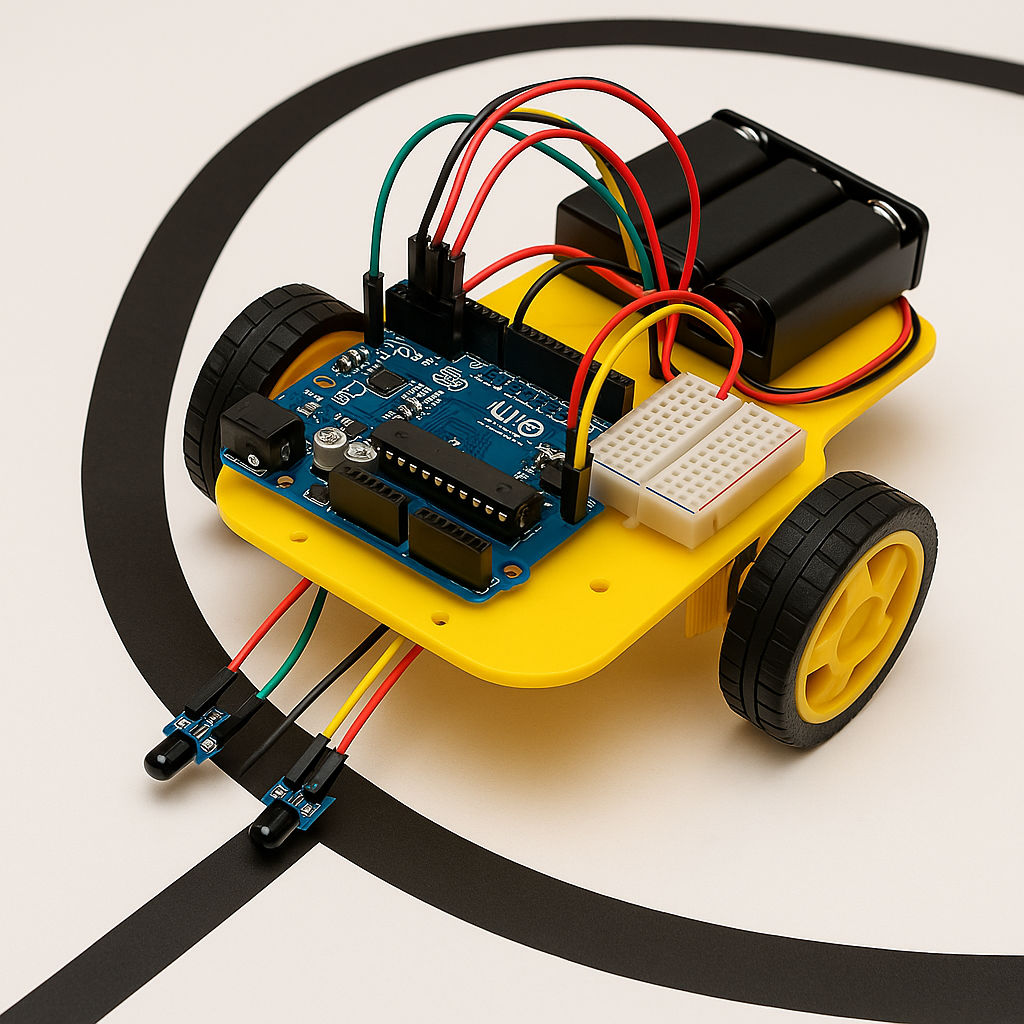
This is one of those robotics projects for beginners that focus on sensor calibration, feedback loops, and basic motor control, giving you plenty of practice with real-time decision-making in a straightforward setup.
What Will You Learn?
Also Read: What is Coding? A Comprehensive Guide to Software Engineers in 2026
Tools Required for Project Execution
Tool |
Purpose |
| Microcontroller (Arduino or similar) | Processes sensor input and controls motors |
| IR or Photoelectric Sensors | Detects line color or contrast on the ground |
| DC Motors + Wheels | Drives the robot forward and turns as needed |
| Motor Driver Shield or Module | Supplies power to motors and receives control signals |
| Robot Chassis | Holds all components securely |
Skills Required for Project Execution
Real-World Examples Where the Project Can Be Used
Application |
Usage |
| Assembly Lines | Automated carts follow predefined routes |
| Warehouse Sorting | Robots trace lines to pick or drop items at stations |
| Educational Kits | Hands-on teaching tools for sensor-based control systems |
Also Read: How to Become RPA Developer? Key Skills and Career Path
A remote controlled automobile (using radio frequency) is a small vehicle that you operate through a handheld transmitter. In this build, you’ll attach an RF receiver, wire up the motors, and write simple code to interpret commands from a handheld transmitter.
You can move it in different directions, change speed, and even add features like lights or a buzzer, making the project both interactive and informative for learning wireless control.
Tools Required for Project Execution
Tool |
Purpose |
| RF Transmitter and Receiver Modules | Sends control signals to the robot |
| DC Motors + Wheels | Enables movement and steering |
| Microcontroller (Arduino or similar) | Processes incoming signals and commands motors |
| Motor Driver (Shield or Module) | Supplies regulated power to the motors |
| Car Chassis | Holds all components in place |
Skills Required for Project Execution
Real-World Examples Where the Project Can Be Used
Application |
Usage |
| RC Car Toys | Commercial models that kids and hobbyists operate |
| Model Prototypes | Testing small-scale vehicles for research |
| Security Patrols | Simple rovers that check areas under user control |
Also Read: What Is the Difference Between Microprocessor and Microcontroller?
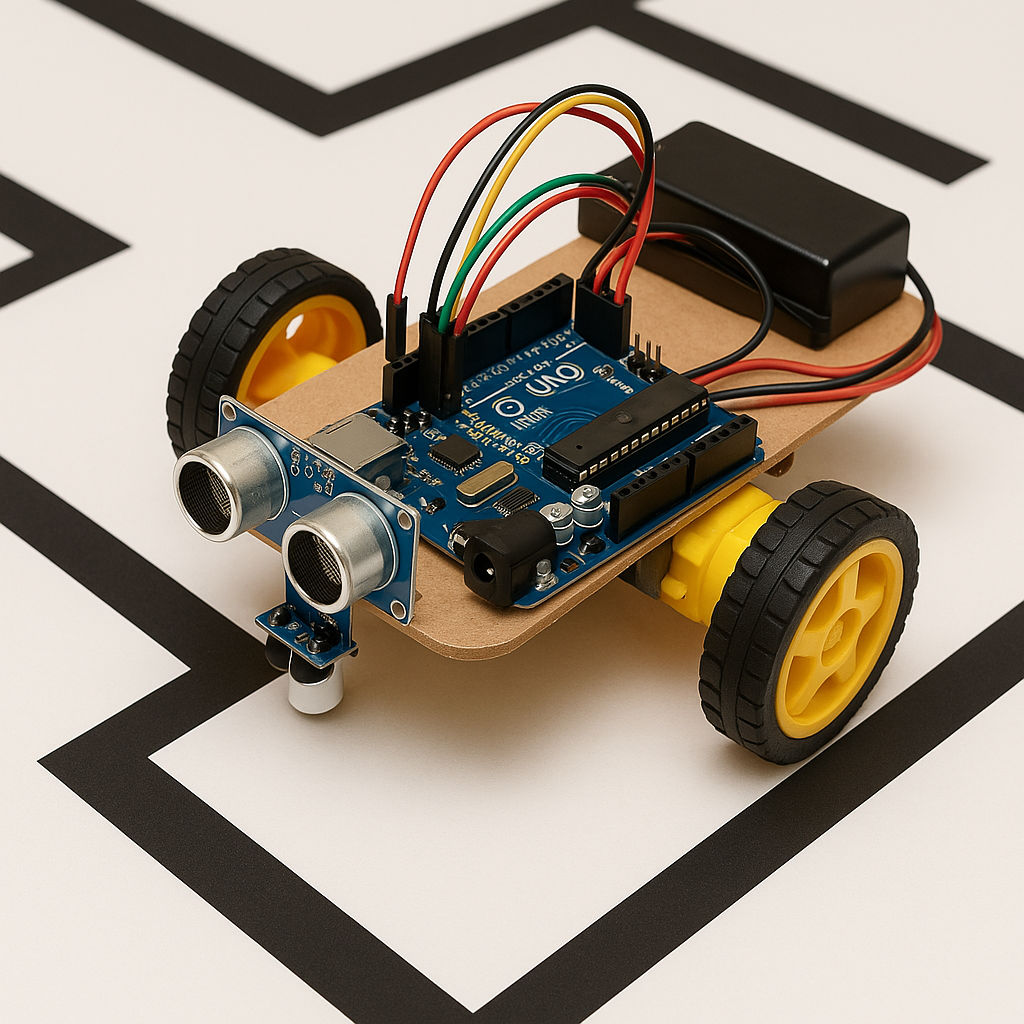
A maze solver robot scans its surroundings with distance sensors and decides which way to turn based on a set of rules. You’ll mount sensors, program a pathfinding algorithm (like following the left wall), and place your robot in a small maze to test its logic. Each success or misstep shows you how well your code handles corners and dead ends, turning trial and error into a real lesson on problem-solving skills.
This robotics project shows you how to handle dynamic data and make logical choices on the go.
This is what a first-time build might look like:
What Will You Learn?
Tools Required for Project Execution
Tool |
Purpose |
| Ultrasonic or Infrared Sensors | Detects walls or obstacles in close range |
| Microcontroller (Arduino or similar) | Runs the maze-solving logic and controls motors |
| DC Motors + Wheels | Moves the robot forward and turns left or right |
| Motor Driver Module | Supplies power to motors |
| Robot Chassis | Houses the sensors and circuit components |
Skills Required for Project Execution
Also Read: Top 36+ Python Projects for Beginners in 2026
Real-World Examples Where the Project Can Be Used
Application |
Usage |
| Warehouse Robots | Automated carts that move through complex aisles to locate items |
| Disaster Response | Search-and-rescue units that explore collapsed buildings or unfamiliar layouts |
| Puzzle Solvers | Competition robots designed to navigate mazes for educational events |
A cleaning robot can sweep, mop, or vacuum an area while avoiding obstacles. It usually uses sensors to detect edges (so it doesn’t tumble off steps) and to recognize barriers like furniture.
In this robotics project, you’ll design the cleaning robot’s chassis, connect motors for both movement and cleaning, and write a simple control program to ensure it covers areas without falling off edges or bumping too hard into furniture. This setup merges practical challenges — like debris handling and efficient coverage — with sensor-based navigation.
Tools Required for Project Execution
Tool |
Purpose |
| Microcontroller (Arduino or similar) | Executes cleaning logic and responds to sensors |
| DC Motors + Wheels | Drives movement around rooms |
| Bump Sensors or Distance Sensors | Detects furniture or walls |
| Small Motor or Fan (for suction or brush) | Collects dust, debris, or other particles |
| Battery Pack | Powers motors and controller for cordless operation |
Skills Required for Project Execution
Also Read: How Does IoT Work? Top Applications of IoT
Real-World Examples Where the Project Can Be Used
Application |
Usage |
| Home Cleaning Appliances | Robotic vacuums that sweep floors autonomously |
| Office Maintenance | Automated floor cleaners moving around desks and hallways |
| Workshops or Labs | Dust collectors that roam around to keep floors tidy |
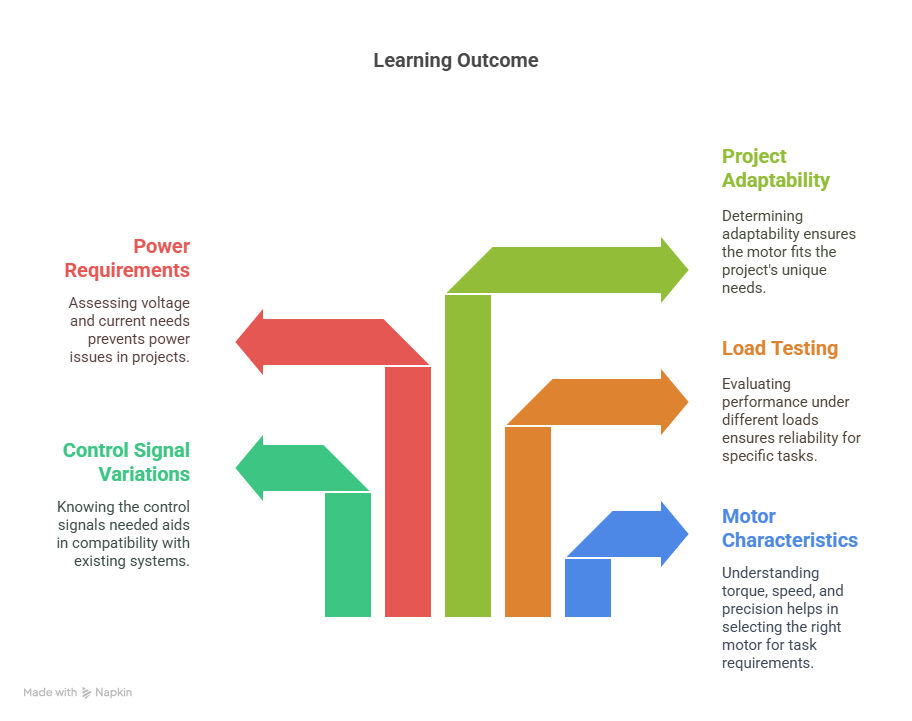
This robotics project focuses on experimenting with different motors — like DC, servo, and stepper — to compare their performance in moving a robot around.
You’ll build a simple platform where you can swap motor types and see how each one affects speed, torque, and control accuracy. This is less about a finished robot and more about understanding motor behavior in real conditions.
What Will You Learn?
Tools Required for Project Execution
Tool |
Purpose |
| DC Motors, Servo Motors, Stepper Motors | Compare performance, speed, and torque |
| Microcontroller (Arduino or similar) | Issues control signals to each motor type |
| Motor Drivers or Shields | Supplies adequate power and signal regulation |
| Chassis or Test Stand | Houses the motors for controlled experiments |
| Power Supply (Battery or Adapter) | Provides stable voltage for multiple motors |
Skills Required for Project Execution
Also Read: IoT: History, Present & Future
Real-World Examples Where the Project Can Be Used
Application |
Usage |
| Research and Development | Testing multiple motors to select the best fit for various prototypes |
| Educational Labs | Demonstrating motor principles to learners |
| Hobbyist Projects | Fine-tuning motor choices for custom builds |
A DTMF-controlled robot reacts to phone keypad tones, letting you drive it forward, backwards, or sideways without using any coding. It’s one of those robotics project ideas for beginners where you’ll build a circuit around a DTMF decoder chip that translates audio frequencies into signals for motor drivers.
This is what your DTMF robot could look like:
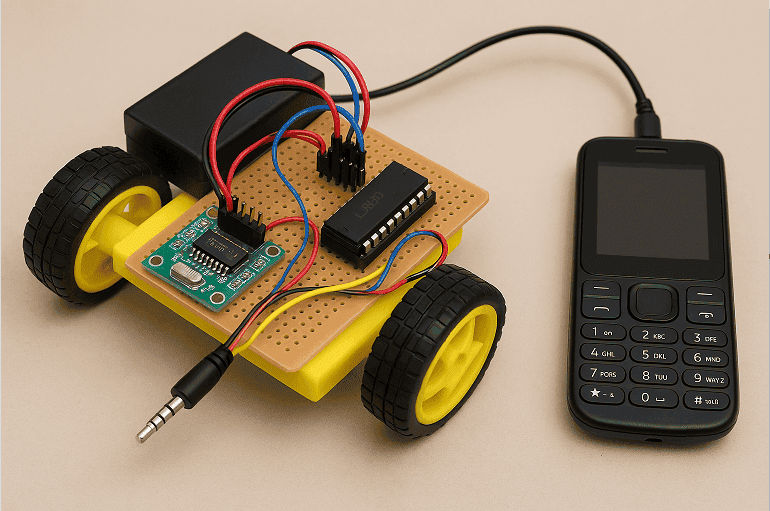
You’ll see how your robot responds to each tone by dialing specific numbers from a phone, revealing a unique hardware-based control system that bypasses digital programming.
What Will You Learn?
Also Read: 30 IoT Examples in Real-Life You Should Know
Tools Required for Project Execution
Tool |
Purpose |
| DTMF Decoder IC (e.g., MT8870) | Converts phone tones into digital signals |
| Telephone or Mobile Device | Sends tone signals through a call or audio jack |
| Motor Driver Circuit | Powers and controls the DC motors |
| DC Motors + Wheels | Propels the robot |
| Basic Electronic Components (Resistors, Caps) | Creates stable inputs and outputs for decoding circuit |
Skills Required for Project Execution
Real-World Examples Where the Project Can Be Used
Application |
Usage |
| Telepresence Devices | Control robots remotely through phone calls |
| Security or Surveillance | Operate rovers from a distance without complex setups |
| Educational Demonstrations | Show how analog signals can drive a robot’s movements |
AI Courses to upskill
Explore Artificial Intelligence Courses for Career Progression
Intermediate-level robotics project ideas move beyond basic builds and introduce more complex mechanics, sensors, or coding structures.
A gesture control robot reads hand signals through sensors like accelerometers or gyroscopes and translates them into movements. You’ll design a wearable glove or handheld controller that captures tilt or motion data and then transmits those signals to the robot.
Here’s what the build could look like:
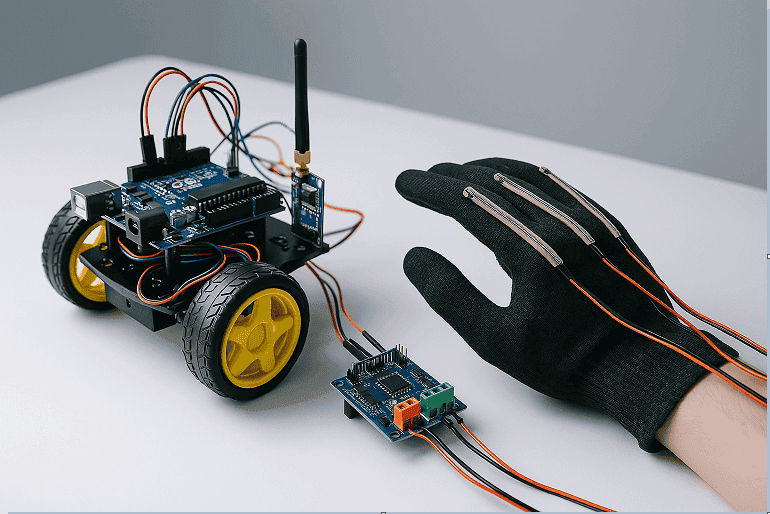
This robotics project combines creative hardware design with responsive software logic, giving you a taste of human-machine interaction.
What Will You Learn?
Tools Required for Project Execution
Tool |
Purpose |
| Accelerometer or Gyroscope Module | Detects hand motion (e.g., ADXL345, MPU6050) |
| Microcontroller (Arduino or similar) | Interprets sensor data and controls motors |
| Wireless Modules (Bluetooth or RF) | Sends signals between controller and robot |
| Motors and Motor Driver | Moves the robot according to the gestures received |
| Basic Electronics (wires, resistors, battery) | Provides connections and power |
Skills Required for Project Execution
Also Read: IoT Career Opportunities [Ultimate Guide 2026]
Real-World Examples Where the Project Can Be Used
Application |
Usage |
| Human-Machine Interfaces | Hands-free control of devices, robots, or drones |
| Virtual Reality Systems | Gesture detection for immersive gaming or simulation |
| Assistive Robotics | Giving mobility to individuals with physical limitations |
A soccer robot detects a ball, moves around the field, and attempts to score a goal. You’ll wire up motors for agile movement, attach sensors or cameras to locate the ball, and code logic for quick direction changes. This robotics project demands teamwork if multiple robots are involved, and it helps you practice fast decision-making plus sensor-based positioning.
What Will You Learn?
Tools Required for Project Execution
Tool |
Purpose |
| Microcontroller (Arduino or similar) | Processes sensor data and controls movement |
| DC Motors or Omni Wheels | Enables fast directional changes on the field |
| Ball-Detecting Sensors (IR, Camera) | Locates the ball through color or proximity |
| Motor Driver Shield | Supplies regulated power to motors |
| Compact Chassis | Holds all components in place |
Skills Required for Project Execution
Also Read: Difference Between IoT and AI: Which is Better?
Real-World Examples Where the Project Can Be Used
Application |
Usage |
| Robotics Competitions | Competitive soccer tournaments for learning |
| Physical Education Research | Studying robot collaboration or movement flow |
| Entertainment | Robotic soccer matches at fairs or demos |
A bomb detection robot carries sensors to spot suspicious objects or chemical traces. You’ll mount a sensor array (e.g., metal detector, gas sensor) on a remote-controlled or semi-autonomous base. It might also have a camera for real-time inspection. Your main tasks in this robotics project include careful sensor selection and robust design for safe, controlled exploration.
What Will You Learn?
Application |
Usage |
| Outdoor Robotics | Research or surveillance in sunny areas |
| Remote Monitoring | Environmental sensors that can recharge on their own |
| Green Technology Education | Demonstrating renewable energy principles in schools |
Tools Required for Project Execution
Tool |
Purpose |
| Metal Detector or Gas Sensor | Identifies metallic objects or chemicals |
| Microcontroller (Arduino or similar) | Collects sensor data and moves the robot |
| Wireless Transmitter/Receiver | Operates the robot remotely |
| Sturdy Chassis + Motors | Supports sensors and manages various terrains |
| Basic Electronics (battery, wiring) | Powers the system and ensures stable signals |
Skills Required for Project Execution
Also Read: Artificial Intelligence Tools: Platforms, Frameworks, & Uses
Real-World Examples Where the Project Can Be Used
Application |
Usage |
| Military or Police Work | Checking restricted areas with minimal human exposure |
| Industrial Safety | Inspecting pipes or sites for hazardous leaks |
| Security Services | Surveying locations for metal objects or suspicious items |
A pick and place robot is an automated arm or gripper that lifts objects from one spot and drops them into another. You’ll design a stable framework, attach motors for each joint, and code the sequences that handle an object with precision. It’s often used in assembly lines, so you can explore how to streamline repetitive tasks and ensure accuracy.
Here’s what a simple build would look like:
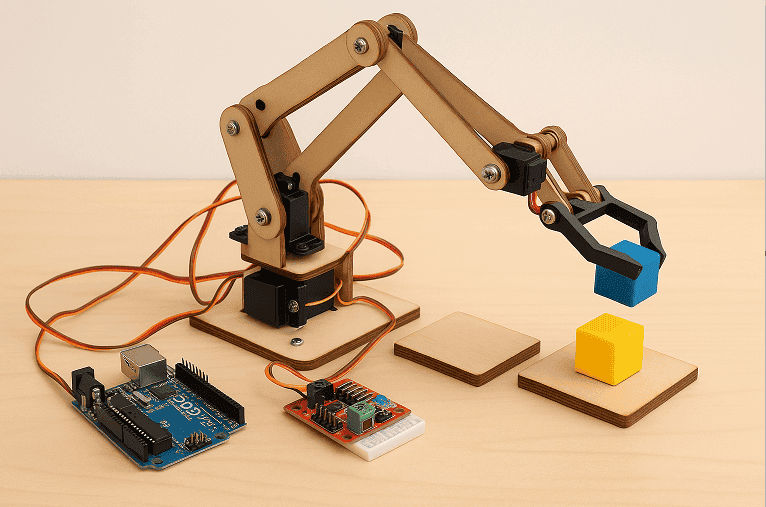
What Will You Learn?
Also Read: What is Generative AI? Understanding Key Applications and Its Role in the Future of Work
Tools Required for Project Execution
Tool |
Purpose |
| Robotic Arm or Custom Jointed Structure | Provides multiple degrees of freedom |
| Servo or Stepper Motors | Controls each axis of the arm |
| Motor Drivers or Shields | Powers the motors and controls their movement |
| Microcontroller (Arduino or similar) | Runs the pick-and-place logic |
| Simple Gripper Attachment | Grasps items during the pick phase |
Skills Required for Project Execution
Real-World Examples Where the Project Can Be Used
Application |
Usage |
| Factory Assembly Lines | Automatically placing components in precise locations |
| Packaging | Sorting and grouping items into boxes |
| Laboratory Automation | Transferring samples or tools with minimal human effort |
A metal detector robotic vehicle roams on wheels and scans the ground for metallic objects. You’ll integrate a metal detection coil and circuit with a mobile platform. As the sensor picks up signals, you can alert the user via a buzzer or display. This robotics project provides lessons in sensor tuning and stable movement over uneven surfaces.
Tools Required for Project Execution
Tool |
Purpose |
| Metal Detector Circuit or DIY Coil Kit | Detects ferrous and non-ferrous metals |
| Microcontroller (Arduino or similar) | Processes detection signals and moves the vehicle |
| DC Motors + Wheels | Propels the robot over various terrains |
| Motor Driver Module | Controls the power delivered to the motors |
| Basic Electronics (battery, wiring) | Powers the system and connects the sensor and motors |
Skills Required for Project Execution
Also Read: How to Learn Artificial Intelligence and Machine Learning
Real-World Examples Where the Project Can Be Used
Application |
Usage |
| Treasure Hunting | Locates coins or small metallic objects underground |
| Archaeological Surveys | Aids in finding buried artefacts in excavation sites |
| Security Checks | Scans for concealed metal items in designated areas |
Advance from basic robotics to intelligent automation with the Executive Post Graduate Certificate in AI-Native Software Engineering from IIT Kharagpur. Learn AI, machine learning, computer vision, and software engineering skills for next-generation robotics applications.
A solar-powered robot draws its energy from sunlight or strong indoor light rather than relying solely on batteries. You’ll attach solar panels, store excess power in capacitors or rechargeable cells, and program the robot for tasks that match its limited energy. This teaches energy management, efficient motor usage, and planning for periods of low light.
This is what a minimalistic build could look like:
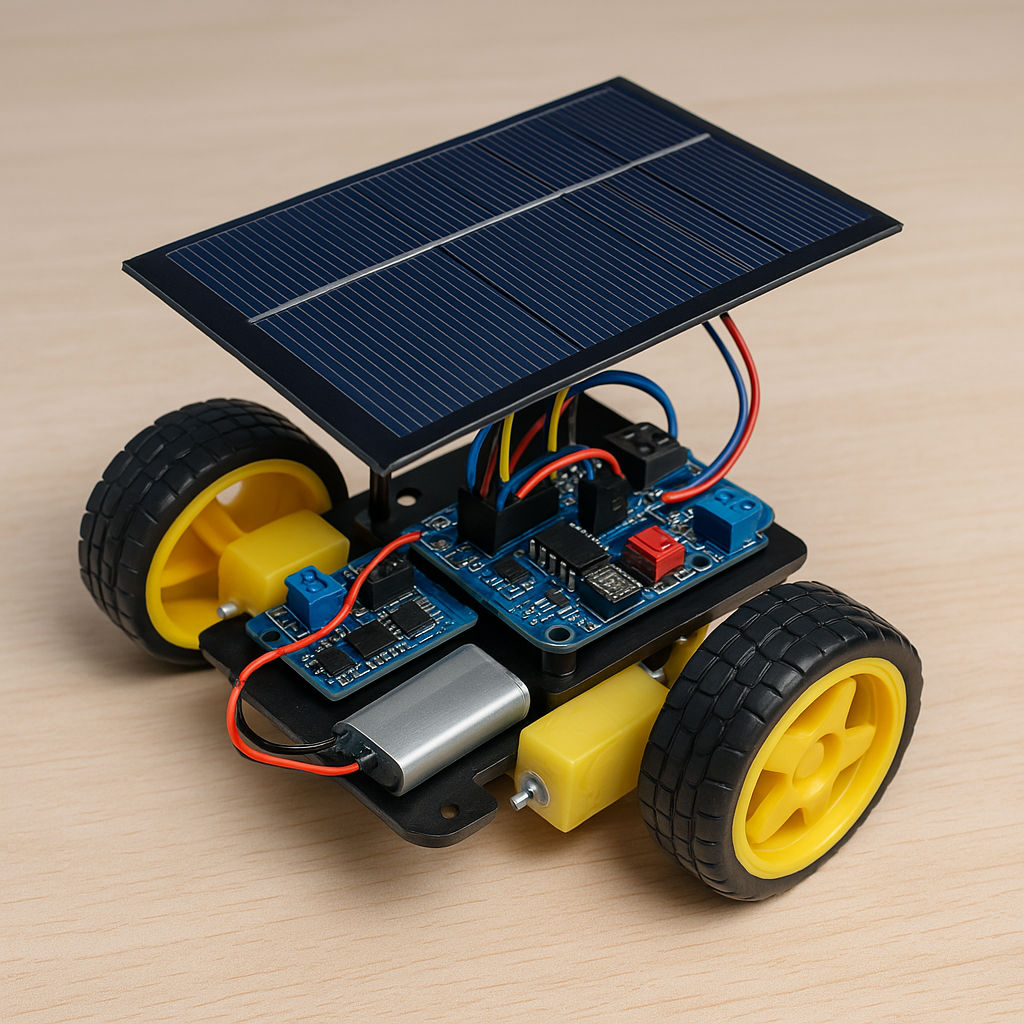
What Will You Learn?
Tools Required for Project Execution
Tool |
Purpose |
| Solar Panels | Collects energy from sunlight |
| Rechargeable Battery or Capacitors | Stores energy for continuous operations |
| Microcontroller (Arduino or similar) | Controls motors and monitors power levels |
| Motor Driver Module | Distributes power to motors |
| Chassis and Basic Electronics | Holds panels, sensors, and circuitry in place |
Skills Required for Project Execution
Also Read: Why AI Is The Future & How It Will Change The Future?
Real-World Examples Where the Project Can Be Used
Application |
Usage |
| Outdoor Robotics | Research or surveillance in sunny areas |
| Remote Monitoring | Environmental sensors that can recharge on their own |
| Green Technology Education | Demonstrating renewable energy principles in schools |
Robotics project ideas at this level involve complex design, multiple subsystems, and advanced control algorithms. You might combine computer vision algorithms, machine learning, AI algorithms, or sophisticated motion planning to achieve a robust end product.
These challenges are ideal for final year students, as they demonstrate a strong command of hardware-software integration and problem-solving.
By taking on these robotics projects for students in the final year, you will develop the following skills:
An autonomous firefighter robot locates and extinguishes small flames by using heat or flame sensors, a water or foam dispenser, and an onboard controller. You’ll design the robot’s drive system, wire in multiple sensors for fire detection, and write control logic for navigation and extinguishing operations.
This is what an advanced firefighter robot could look like when built with precision:
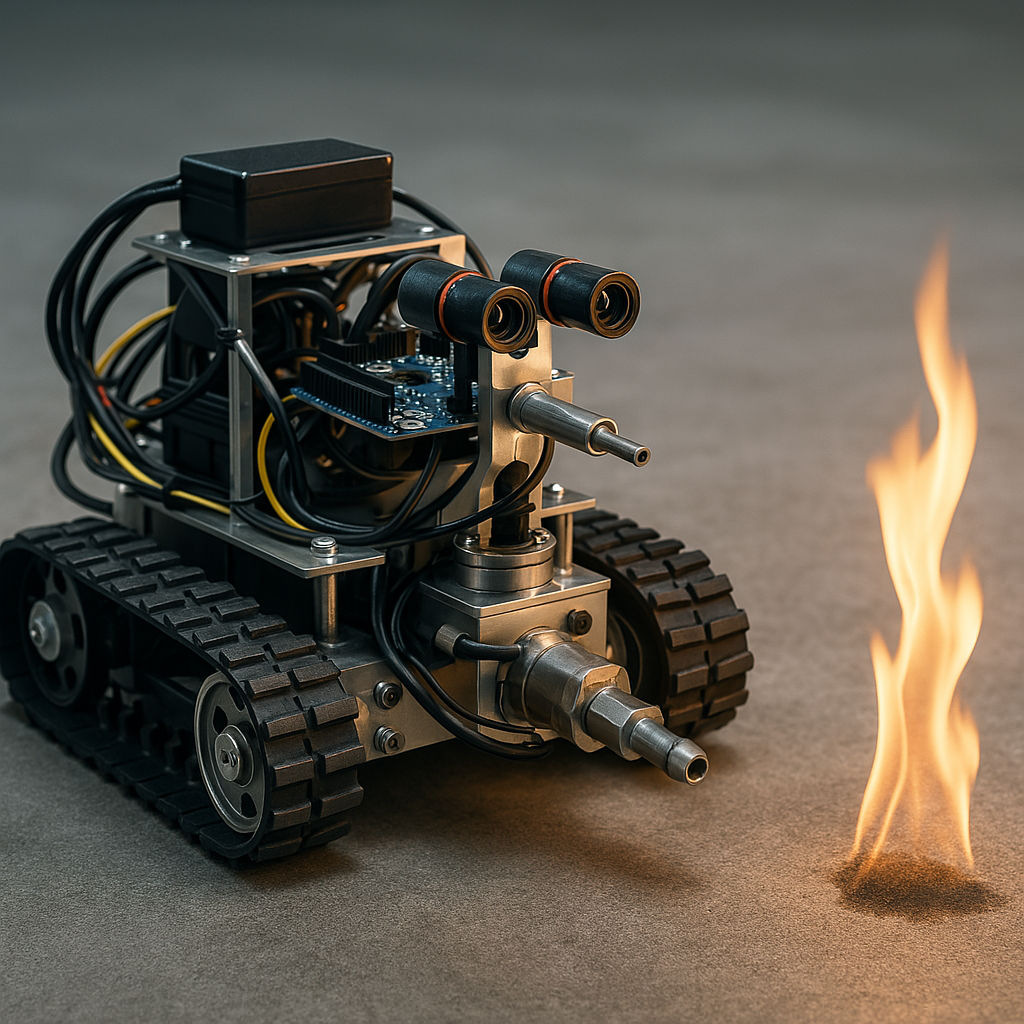
This robotics project shows you how robots can operate in hazardous conditions with minimal human oversight.
What Will You Learn?
Also Read: AI Developer Roadmap: How to Start a Career in AI Development
Tools Required for Project Execution
Tool |
Purpose |
| Flame/Heat Sensors | Detects and locates the fire source |
| Microcontroller (Arduino or similar) | Handles sensor data and movement algorithms |
| Pump or Spraying Mechanism | Delivers water or fire retardant |
| Motor Driver + Motors | Enables autonomous movement |
| Sturdy Chassis + Basic Electronics | Carries sensors, wiring, and extinguishing gear |
Skills Required for Project Execution
Real-World Examples Where the Project Can Be Used
Application |
Usage |
| Industrial Safety | Handling small-scale fires in manufacturing plants |
| Remote Rescue Operations | Minimizing human exposure in dangerous environments |
| Research and Development | Testing fire detection and control algorithms under lab conditions |
A facial recognition security robot combines camera input with computer vision to identify people. You’ll attach a camera to a mobile platform, use face detection and recognition algorithms, and determine how the robot reacts to matching or mismatching faces. This is an advanced robotics project involving image processing and real-time decision-making.
Here’s a prototype of an advanced facial recognition security robot and what it does:

What Will You Learn?
Tools Required for Project Execution
Tool |
Purpose |
| Camera Module (USB or Pi camera) | Captures real-time video data |
| Microcontroller + Single-Board Computer | Processes images (e.g., Raspberry Pi) |
| Motor Driver + Motors | Moves the robot and positions the camera |
| Face Recognition Software (OpenCV) | Detects and identifies faces in the video stream |
| Chassis and Batteries | Provides structure and power for the robot |
Skills Required for Project Execution
Real-World Examples Where the Project Can Be Used
Application |
Usage |
| Security Patrol | Automated checks in restricted premises |
| Visitor Management | Logging known vs unknown visitors in offices |
| Smart Home Surveillance | Integrating recognition with home alarm systems |
An expressive robotic head simulates human facial movements and basic gestures. You’ll build a mechanical frame with servos for the mouth, eyebrows, or eyelids, then program realistic motions. Camera inputs can let the robot track faces or react to certain cues, turning a simple structure into an interactive platform.
What Will You Learn?
Tools Required for Project Execution
Tool |
Purpose |
| Servo Motors | Moves facial features (eyes, mouth, eyebrows) |
| Microcontroller or Single-Board Computer | Processes sensor data and coordinates servo actions |
| Structural Frame (3D Printed or Custom) | Supports motors and mechanical linkages |
| Camera (Optional) | Tracks faces or gestures |
| Basic Electronics (wires, power) | Powers and connects all components |
Skills Required for Project Execution
Also Read: AI Challenges Explained: Key Issues and Solutions for 2026
Real-World Examples Where the Project Can Be Used
Application |
Usage |
| Robotic Companions | Friendly faces for social engagement or therapy |
| Education and Research | Studying human-robot interaction or emotional cues |
| Entertainment | Animatronics for amusement parks or stage shows |
A bipedal robot walks on two legs, maintaining balance through sensors like gyroscopes or accelerometers. You’ll design the mechanical structure of the legs, attach motors for hip, knee, and ankle joints, and write control algorithms that keep it upright and moving.
Here’s an advanced prototype of a bipedal robot:
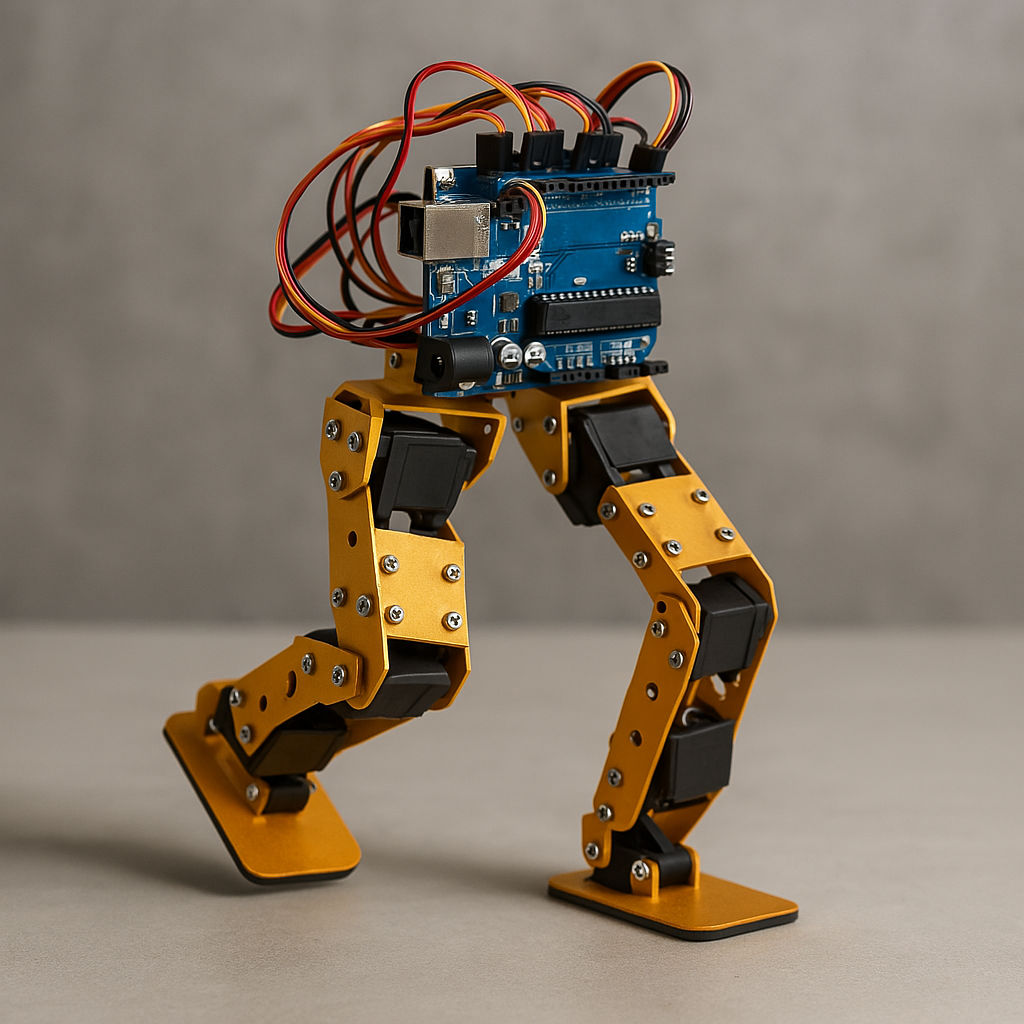
This is a challenging robotics project that exposes you to real-world robotics issues like stability, weight distribution, and precise servo timing.
What Will You Learn?
Also Read: Top 5 Machine Learning Models Explained For Beginners
Tools Required for Project Execution
Tool |
Purpose |
| Servo or Stepper Motors | Drives each joint (hip, knee, ankle) |
| Microcontroller (Arduino or similar) | Handles sensor data and balancing algorithms |
| IMU Sensor (Gyroscope/Accelerometer) | Detects tilt or orientation |
| Robust Mechanical Frame | Supports the robot’s weight in a two-legged design |
| Power Source + Motor Drivers | Supplies and regulates energy for the motors |
Skills Required for Project Execution
Real-World Examples Where the Project Can Be Used
Application |
Usage |
| Research on Human Locomotion | Understanding the physics of walking and balance |
| Entertainment | Humanoid performers or robotic mascots |
| Prosthetics Research | Adapting leg-based designs for assistive technologies |
A quadruped robot has four legs, giving it greater stability than bipedal designs but still posing complex gait challenges. You’ll arrange motors for each leg, program stepping patterns, and possibly add sensors to detect terrain. This setup helps you learn about stable movement, load distribution, and advanced servo synchronization.
Tools Required for Project Execution
Tool |
Purpose |
| Servo or Stepper Motors (12+ DOF) | Drives joints for each leg |
| Microcontroller + Motor Drivers | Executes gait algorithms and sends signals to motors |
| Sensor Package (Optional) | Detects ground contact or tilt |
| Sturdy Frame Material | Maintains rigidity while supporting multiple legs |
| Battery Pack | Provides power for motors and control boards |
Skills Required for Project Execution
Also Read: Types of Algorithms in Machine Learning: Uses and Examples
Real-World Examples Where the Project Can Be Used
Application |
Usage |
| Search and Rescue | Traversing rough terrain where wheeled robots struggle |
| Agricultural Robotics | Inspecting fields with minimal soil disruption |
| Entertainment Robotics | Creatures in theme parks or special effects |
A path planner robot finds efficient routes in indoor environments. You’ll equip it with distance or mapping sensors, store floor plans, and create algorithms for deciding optimal paths around obstacles. This robotics project puts you in touch with advanced concepts like graph traversal, potential fields, or grid mapping.
Tools Required for Project Execution
Tool |
Purpose |
| Microcontroller or SBC (Raspberry Pi) | Executes path planning algorithms |
| Distance Sensors (Ultrasonic/IR/Laser) | Detects obstacles in real-time |
| Motor Driver + Wheels | Moves the robot through the indoor environment |
| Floor Plan or Onboard Mapping System | Tracks walls or known objects |
| Power Source and Basic Electronics | Powers the control board and sensors |
Skills Required for Project Execution
Real-World Examples Where the Project Can Be Used
Application |
Usage |
| Warehouse Logistics | Finding best routes among shelves or pallets |
| Office Assistance | Guiding robots to deliver packages or documents |
| Hospital Navigation | Autonomous stretcher or supply deliveries |
Swarm robotics focuses on multiple robots working together toward a shared goal. Each robot searches for items or signals in a foraging simulation and then communicates its locations to others. You’ll code decentralized algorithms, build simple mobile units, and explore how coordination emerges from collective decisions
Tools Required for Project Execution
Tool |
Purpose |
| Multiple Small Robots (3 or more) | Each with sensors, motors, and a simple microcontroller |
| Wireless Modules (RF or Bluetooth) | Exchanges data among swarm units |
| Simple Sensors (IR, Light, or Color) | Detects objects or markers |
| Motor Drivers + Wheels | Facilitates movement for each robot |
| Base Station (Optional) | Collects data or monitors swarm performance |
Skills Required for Project Execution
Also Read: How to Implement Machine Learning Steps: A Complete Guide
Real-World Examples Where the Project Can Be Used
Application |
Usage |
| Disaster Rescue | Coordinating multiple units to search wide areas |
| Warehouse Operations | Automated picking or sorting in large-scale facilities |
| Ecological Monitoring | Observing and collecting samples over difficult terrains |
A SLAM-based robot performs Simultaneous Localization and Mapping to explore unknown environments. You’ll equip it with sensors like LIDAR or depth cameras, then run algorithms that build a map while tracking the robot’s location. This is a core concept in advanced robotics, giving you hands-on exposure to cutting-edge navigation methods.
Tools Required for Project Execution
Tool |
Purpose |
| LIDAR or Depth Camera | Captures environment data for mapping |
| Single-Board Computer (e.g., Raspberry Pi) | Processes SLAM algorithms in real time |
| Motors + Motor Driver | Moves the robot according to navigation commands |
| IMU (Gyroscope, Accelerometer) | Aids in motion tracking and orientation |
| Chassis + Batteries | Allows movement across indoor or light outdoor areas |
Skills Required for Project Execution
Also Read: Top Machine Learning Skills to Stand Out in 2026!
Real-World Examples Where the Project Can Be Used
Application |
Usage |
| Autonomous Vehicles | Building maps of roads for self-driving systems |
| Warehouse Robots | Navigation in dynamic spaces filled with obstacles |
| Research and Exploration | Mapping uncharted indoor or underground environments |
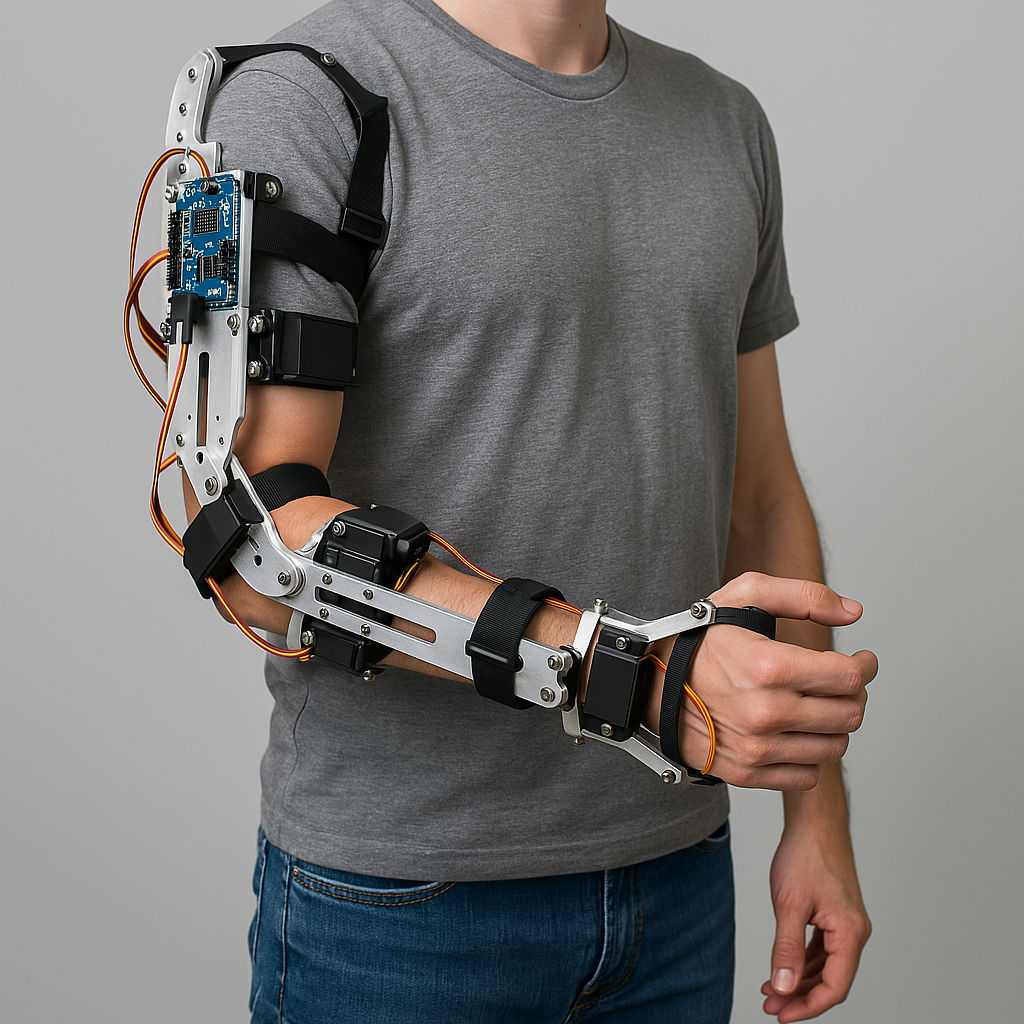
A robotic exoskeleton is a wearable device that augments or assists human movements. You’ll design a frame that fits a limb (e.g., an arm or leg) and add actuators and sensors to track and enhance motion. The robotics project involves advanced mechanical considerations, force sensing, and real-time control, making it a solid challenge for final year students.
Here’s a prototype for your reference:
.
What Will You Learn?
Tools Required for Project Execution
Tool |
Purpose |
| Servo Motors or Linear Actuators | Provides assisted movement for limbs |
| Microcontroller or Single-Board Computer | Reads sensors and drives actuators in real time |
| Force/Torque Sensors | Monitors pressure and load for safety |
| Strong, Lightweight Frame (metal or composite) | Supports structural integrity around a human limb |
| Battery Pack + Motor Drivers | Delivers regulated power for motors |
Skills Required for Project Execution
Also Read: Machine Learning Tools: A Guide to Platforms and Applications
Real-World Examples Where the Project Can Be Used
Application |
Usage |
| Physical Rehabilitation | Helping patients regain strength or mobility |
| Industrial Work Support | Reducing strain during repetitive lifting tasks |
| Military or Defense | Enhancing soldier endurance and load-carrying capacity |
IoT-based robotics projects bring internet connectivity into your builds, letting you control devices from anywhere or collect real-time data for analysis.
Let’s explore the projects in question now!
This build ties your Arduino-based car to an Android application, so you can steer it or control its speed through a simple phone interface. You’ll code a Bluetooth or Wi-Fi module for communication, then create an app that sends commands. It’s a practical way to learn about wireless data exchange and user-friendly mobile controls.
Tools Required for Project Execution
Tool |
Purpose |
| Arduino (or similar microcontroller) | Interprets commands and drives the motors |
| Bluetooth or Wi-Fi Module | Connects the robot car to the Android device |
| DC Motors + Wheels | Moves the robot under user control |
| Motor Driver Shield | Regulates motor power based on signals from Arduino |
| Android Phone | Acts as the controller through a custom app |
Skills Required for Project Execution
Also Read: Full Stack vs Android Developer: Which Career Path Is Right for You in 2026?
Real-World Examples Where the Project Can Be Used
Application |
Usage |
| Educational Demos | Teaching wireless control concepts in workshops |
| Prototyping | Testing remote movement for bigger robotics builds |
An AI chatbot interface connects your robot’s functions with conversational software, letting you issue commands through text or voice. You’ll use a cloud or local NLP engine to interpret user queries and then map those queries to specific robot actions. It’s an engaging way to explore how language understanding and robotics can intersect.
What Will You Learn?
Tools Required for Project Execution
Tool |
Purpose |
| Microcontroller (Arduino or similar) | Receives instructions from the chatbot |
| Single-Board Computer (Raspberry Pi) | Handles NLP and connects to cloud APIs or libraries |
| Voice/Chat APIs (Dialogflow, Watson, etc.) | Interprets user input and produces meaningful outputs |
| Robot Chassis + Actuators | Carries out actions based on chatbot commands |
| Speaker/Microphone (Optional) | Enables voice-based interaction |
Skills Required for Project Execution
Real-World Examples Where the Project Can Be Used
Application |
Usage |
| Home Automation Bots | Voice-driven floor cleaners or pet feeders |
| Service Robots | Conversational interfaces in reception or customer service |
| Research and Education | Demonstrating AI-driven control loops for learning |
A patrol or surveillance robot moves through a defined area, streams video, sends sensor readings, or raises alerts. You’ll equip it with wireless connectivity and a camera module so you can see what’s happening in real time. This robotics project tests your skills in remote monitoring and data handling across networks.
Tools Required for Project Execution
Tool |
Purpose |
| Microcontroller or SBC (e.g., Raspberry Pi) | Processes data and handles camera output |
| Camera Module (USB or Pi camera) | Captures video or still images |
| Wireless Module (Wi-Fi or Cellular) | Streams data to a remote user interface |
| DC Motors + Wheels | Moves the robot around the surveillance area |
| Power Supply + Drivers | Powers all electronics while regulating motor currents |
Skills Required for Project Execution
Also Read: 60 Essential Android Interview Questions and Answers for 2026: A Complete Guide
Real-World Examples Where the Project Can Be Used
Application |
Usage |
| Security Patrol | Monitoring restricted areas without direct human presence |
| Disaster Relief | Gathering info from dangerous or hard-to-reach zones |
| Resource Management | Checking equipment or resources in large facilities |
A voice-controlled robot responds to spoken instructions rather than manual input. In this robotics project, you’ll work with speech recognition software or online APIs that decode voice commands and then map them to movement or actions. This interactive approach highlights the blend of hardware, coding, and AI-driven speech processing.
Tools Required for Project Execution
Tool |
Purpose |
| Microcontroller (Arduino or similar) | Receives final commands to move or act |
| Speech Recognition Module or Cloud API | Converts voice to text or direct command |
| Wireless Modules (Optional) | Sends recognized commands to the robot |
| DC or Servo Motors | Moves the robot in response to voice input |
| Basic Electronics (wires, battery) | Powers and links all components |
Skills Required for Project Execution
Real-World Examples Where the Project Can Be Used
Application |
Usage |
| Assistive Devices | Robots helping those with mobility or speech issues |
| Home Automation | Voice-based controls for household chores |
| Interactive Exhibits | Hands-free demos in museums or tech fairs |
Also Read: Future Applications of Machine Learning in Healthcare
An autonomous drone flies without constant human input by using sensors like GPS, accelerometers, and gyroscopes. You’ll code flight paths, manage altitude, and possibly include obstacle avoidance. Adding an IoT angle to your project, you can track flight metrics online or send real-time video streams to a remote dashboard.
Tools Required for Project Execution
Tool |
Purpose |
| Flight Controller (e.g., Pixhawk, APM) | Regulates motors and stabilizes flight |
| GPS Module | Provides location data for autonomous routes |
| Brushless Motors + ESCs | Drives propellers with precise speed control |
| Frame and Propellers | Forms the main drone body |
| Battery + Power Distribution Board | Powers all onboard systems |
Skills Required for Project Execution
Also Read: Agentic AI vs Generative AI: What Sets Them Apart
Real-World Examples Where the Project Can Be Used
Application |
Usage |
| Aerial Surveying | Mapping land, checking crop health, or studying wildlife |
| Disaster Management | Quick overhead views for rescue missions |
| Delivery Services | Transporting small packages with minimal oversight |
Robotics projects are hands-on applications that combine mechanical design, electronics, sensors, actuators, and programming to create machines capable of performing specific tasks automatically or with minimal human intervention. They help you understand how hardware and software work together while developing practical engineering skills.
These projects offer several learning and career benefits:
Every robotics project requires a combination of hardware and software components. The exact requirements depend on the project's complexity, but the following are commonly used:
Many Arduino robot projects use these components to create line-following robots, obstacle-avoiding robots, robotic arms, and smart automation systems.
Choosing the right platform, components, and development approach can significantly impact your project's performance, cost, and learning experience. Whether you're exploring robotics project ideas for beginners or building advanced robotics projects for engineering students, understanding these comparisons will help you select the best option for your goals.
Arduino and Raspberry Pi are among the most popular platforms used in robotics, but they serve different purposes.
| Arduino | Raspberry Pi |
|---|---|
| Microcontroller-based platform | Single-board computer |
| Ideal for real-time control | Suitable for complex computing tasks |
| Low power consumption | Higher processing power |
| Easy to learn for beginners | Better for AI, computer vision, and robotics applications |
| Widely used in Arduino robot projects | Common in advanced robotics systems |
For simple robots, Arduino is often the better choice. Raspberry Pi is ideal for AI-powered and vision-based robots.
Both Arduino and ESP32 are excellent choices, but ESP32 offers additional connectivity features.
| Arduino | ESP32 |
|---|---|
| Beginner-friendly | Built-in Wi-Fi and Bluetooth |
| Large learning community | Faster processor and more memory |
| Great for standalone robots | Perfect for connected and IoT-based robots |
| Lower hardware complexity | Supports wireless communication without extra modules |
ESP32 is a good option if your robot requires remote monitoring or cloud connectivity.
Although robotics and IoT often overlap, they focus on different objectives.
| Robotics | IoT |
|---|---|
| Focuses on movement and automation | Focuses on connected devices |
| Uses sensors and actuators | Primarily uses sensors for monitoring |
| Performs physical tasks | Collects and exchanges data over networks |
| Often includes AI and control systems | Often emphasizes cloud integration and analytics |
Many modern robotics projects for students combine robotics with IoT to build smarter autonomous systems.
The right project depends on your current skill level.
| Beginner Projects | Advanced Projects |
|---|---|
| Line-following robot | Autonomous delivery robot |
| Obstacle avoidance | AI-powered robotic arm |
| Bluetooth-controlled robot | SLAM-based navigation robot |
| Basic Arduino programming | ROS, computer vision, and machine learning |
Robotics project ideas for beginners focus on learning core concepts, while robotics project ideas for engineering students introduce advanced automation and intelligent decision-making.
These are two of the most common starter robotics projects.
| Line Follower | Obstacle Avoidance |
|---|---|
| Follows a predefined path | Detects and avoids obstacles |
| Uses IR sensors | Uses ultrasonic or LiDAR sensors |
| Simpler programming | More complex navigation logic |
| Ideal for beginners | Introduces autonomous movement |
Both projects provide an excellent foundation before moving to more complex robotics applications.
Motor selection affects how your robot moves and performs.
| Servo Motors | DC Motors |
|---|---|
| Precise angle control | Continuous rotation |
| Best for robotic arms | Best for robot cars and wheels |
| Higher positional accuracy | Faster movement |
| Suitable for controlled motion | Suitable for high-speed applications |
Many robotics projects for engineering students use both motor types depending on the application's requirements.
Communication methods determine how users interact with robots.
| Wired Robots | Wireless Robots |
|---|---|
| Reliable communication | Greater flexibility and mobility |
| Lower latency | Remote operation possible |
| Easier troubleshooting | Uses Wi-Fi, Bluetooth, Zigbee, or RF |
| Limited movement range | Suitable for smart and connected robots |
Wireless communication is increasingly common in modern educational and industrial robotics.
The level of automation is one of the biggest differences in robotics projects.
| Autonomous Robots | Remote-Controlled Robots |
|---|---|
| Make decisions using sensors | Controlled directly by a user |
| Require advanced programming | Easier to build and operate |
| Use AI and navigation algorithms | Use Bluetooth, Wi-Fi, or RF controllers |
| Suitable for industrial automation | Ideal for learning robotics fundamentals |
Many robotics projects for final year engineering students focus on autonomous robots because they combine embedded systems, AI, computer vision, and real-time decision-making to solve real-world engineering problems.
Sensors allow robots to understand their surroundings and respond intelligently to changing conditions. Selecting the right sensor depends on the project's objective.
Sensor |
Common Use |
| Ultrasonic Sensor | Obstacle detection and distance measurement |
| Infrared (IR) Sensor | Line following and object detection |
| PIR Motion Sensor | Human and motion detection |
| Temperature and Humidity Sensor | Environmental monitoring |
| Accelerometer and Gyroscope | Balance, orientation, and motion tracking |
| Camera Module | Computer vision and object recognition |
| Gas Sensor | Air quality and gas leak detection |
| GPS Module | Outdoor navigation and location tracking |
| LiDAR Sensor | Mapping and autonomous navigation |
| Force or Pressure Sensor | Robotic grippers and touch sensing |
Programming is the core of every robot because it controls how the system processes data and performs actions. Different languages are suited to different types of robotics applications.
Learning these programming languages alongside robotics projects for students helps you build practical experience while preparing for advanced robotics and automation careers.
Before working on the project, it is also important to know which project fits best according to your current skills set. Now let's explore what skills you will learn, what challenges are there, and how to choose the right project.
Robotics projects help you combine programming, electronics, mechanics, sensors, and AI into real-world applications. Whether you're building a simple line follower or an advanced autonomous drone, each project develops practical skills that are valuable in robotics, automation, AI, and embedded systems careers.
| Skill | What You Learn | Example Projects |
|---|---|---|
| Motor Control | Control robot movement using DC, servo, and stepper motors | Robot Arm, Line Follower Robot |
| Sensor Integration | Collect and process real-time environmental data | Obstacle Avoiding Robot, Metal Detector Vehicle |
| Embedded Programming | Write code for microcontrollers and robotic systems | Maze Solver Robot, Gesture Control Robot |
| Wireless Communication | Connect robots using RF, Bluetooth, Wi-Fi, or DTMF signals | RF Automobile, Android Robot Car, DTMF Robot |
| Computer Vision | Detect objects, faces, and surroundings using cameras | Facial Recognition Robot, Surveillance Robot |
| Human-Robot Interaction | Control robots using gestures, voice, or chatbot interfaces | Gesture Control Robot, Voice-Controlled Robot, AI Chatbot Robot |
| Autonomous Navigation | Enable robots to move independently and make decisions | Path Planner Robot, SLAM-Based Robot |
| Artificial Intelligence | Build intelligent robots that analyze and respond to inputs | AI Chatbot Robot, Autonomous Drone |
| IoT Integration | Monitor and control robots remotely through connected devices | Android Robot Car, Surveillance Robot |
| Robotics Mechanics | Design robotic structures, joints, and movement systems | Robot Arm, Bipedal Robot, Quadruped Robot |
| Renewable Energy Systems | Power robotic systems using sustainable energy sources | Solar-Powered Robot |
| Multi-Robot Coordination | Program robots to collaborate and work as a team | Swarm Robotics Simulation |
By completing these projects, you build a strong foundation in robotics, automation, AI, IoT, computer vision, and intelligent system design.
Every robotics project comes with challenges, especially when you're building your first robot. Whether you're working on robotics project ideas for beginners, Arduino robot projects, or advanced robotics projects for engineering students, understanding common problems and their solutions can help you complete projects more efficiently.
| Challenge | Solution |
|---|---|
| Robot won't power on | Check the battery, wiring, and power supply. |
| Motors are not working | Verify motor driver connections and power. |
| Sensors give incorrect readings | Calibrate sensors and reposition them if needed. |
| Robot cannot detect obstacles | Test the sensor range and update the code. |
| Bluetooth or Wi-Fi issues | Check module settings and communication range. |
| Slow robot response | Optimize your code and reduce unnecessary processing. |
| Battery drains quickly | Use a higher-capacity battery and efficient components. |
| Robot moves incorrectly | Check motor wiring and control logic. |
Avoid these common mistakes beginners make in robotics projects to build better robots:
Following these best practices will help you build reliable robotics projects for students, improve your Arduino robot projects, and prepare you for advanced robotics projects for final year engineering students.
You might be excited to merge your skills in electronics, coding, or mechanical design, yet choosing the right robotics project can still feel challenging. It helps to reflect on your strengths and the resources you can access.
The right robotics project should keep you engaged and encourage steady growth. Here are some tips that’ll help you choose the right project:
Also Read: Applications of Robotics: Industrial & Everyday Use Cases
A portfolio-ready robotics project demonstrates both your technical skills and your ability to solve real-world problems. Whether you're building robotics projects for students, Arduino robot projects, or robotics projects for final year engineering students, focus on these key elements:
A well-documented project is far more valuable than a complex one. Even robotics project ideas for beginners can strengthen your portfolio if they are built, tested, and presented professionally.
Also Read: 35 Useful Raspberry Pi Projects for Learning & Automation
Subscribe to upGrad's Newsletter
Join thousands of learners who receive useful tips
Building robotics projects for students is one of the best ways to develop practical skills in programming, electronics, automation, and problem-solving. Start with simple robotics project ideas for beginners, gain hands-on experience with Arduino robot projects, and gradually progress to advanced robotics project ideas for engineering students.
With consistent practice and well-documented projects, you'll be ready to tackle complex robotics projects for final year engineering students while building a portfolio that stands out to recruiters and academic evaluators.
You can book a free career counseling call with our experts for further career guidance.
Students can try line-following robots, obstacle-avoiding bots, Bluetooth-controlled cars, or simple surveillance robots. These projects help you learn sensors, motors, and basic movement. They also prepare you for camera-based systems and autonomous tasks once you understand core control and response methods.
Beginner-friendly options include a line follower, basic light tracker, ultrasonic avoider, or a mobile-controlled robot. These require simple wiring and short code. They help you understand movement, sensing, and basic logic, making them ideal for starting your learning journey with minimal components.
You need simple coding knowledge, basic circuit understanding, and awareness of common sensors. These skills develop quickly once you start building your first robot. Students learn most concepts during hands-on work, making robotics accessible even with limited prior exposure.
Most early-stage builds need a microcontroller, IR or ultrasonic sensors, DC motors, a motor driver, a battery, and jumper wires. These parts support basic movement and detection tasks, giving you enough flexibility to complete multiple beginner projects without advanced hardware.
A basic robot usually costs ₹700–₹2,000 depending on the board, motor quality, and sensors. Students can reduce the cost by reusing parts or choosing low-cost alternatives. Most beginner projects stay within a comfortable budget and do not require premium components.
Yes. School students can complete simple tasks like building line followers, light trackers, or mobile-controlled cars. These projects offer clear, hands-on learning without complex code. They help students understand movement and sensing early while building interest in science and technology.
A simple project takes around two to six hours, depending on your pace and familiarity with wiring and coding. Slightly advanced builds may require a full day, including testing. Most students complete their first robot quickly once they understand the basic workflow.
Most early projects use C or C++ in the Arduino IDE. Raspberry Pi tasks rely on Python due to its simple syntax and strong library support. Younger learners can also use block-based tools that help them understand logic without typing complex code.
Arduino suits simple sensing and motor tasks because it handles direct hardware control well. Raspberry Pi works better for camera-based and Python-driven tasks. Students often start with Arduino for basic control and shift to Raspberry Pi when they want advanced features.
Choose a project based on your current skills, budget, available parts, and the time you can invest. Avoid complex systems early. Pick a build that teaches one clear concept at a time so you can progress comfortably and avoid confusion during wiring or coding.
Students can try gesture-controlled robots, Wi-Fi rovers, face-detection bots, or small surveillance systems. These projects introduce sensors, wireless control, and simple computer vision. They also help you learn structured coding and improve your understanding of how robots react to input.
Advanced learners can attempt self-balancing robots, human-following bots, drone-based mapping, robotic arms with detection, or multi-bot systems. These require strong control logic, better sensors, and clear planning. They help you understand complex behavior and prepare you for academic or industry-level tasks.
Students often use Arduino, ESP32, Raspberry Pi, Python tools, and motor control boards. Simple IDEs and online simulators also support learning. These platforms cover basic sensing, wireless communication, and camera tasks, giving starters and advanced learners enough flexibility for various builds.
Yes. Many students begin with zero experience and learn through simple wiring and clear tutorials. Starter kits reduce the difficulty by giving labeled parts and ready examples. As you complete each build, you naturally learn how sensors, motors, and code work together.
Quick builds include simple grippers, soil-moisture alert systems, RFID gates, and heat-triggered bots. These require minimal wiring and short code. They help students practice essential concepts without long setup time and serve as good add-on tasks between larger projects.
Most issues come from loose connections, wrong sensor distances, incorrect motor wiring, or missing code blocks. Start by checking power, wiring, and sensor values. Test one part at a time to isolate faults. This step-by-step approach fixes most errors efficiently.
Yes. These projects show practical problem-solving, hardware understanding, and coding ability. Recruiters value real builds because they prove you can apply concepts outside theory. Even simple robots help you demonstrate initiative, curiosity, and hands-on learning experience in technical roles.
Students can learn from Arduino guides, Raspberry Pi resources, online courses, YouTube engineering channels, and dedicated robotics sites. These sources offer clear wiring steps, code examples, and troubleshooting methods. Regular practice with these materials builds confidence and deeper understanding.
The biggest challenges in robotics include high development costs, power management, sensor accuracy, navigation, real-time decision-making, hardware-software integration, and cybersecurity. Overcoming these challenges is essential for building reliable robots used in industrial, healthcare, and consumer applications.
You can add better sensors, use wireless control, improve your code, attach a camera, or include simple AI logic. Each upgrade expands the project’s ability and teaches you new concepts. This progressive approach helps you grow without starting over each time.
911 articles published
Pavan Vadapalli is the Director of Engineering , bringing over 18 years of experience in software engineering, technology leadership, and startup innovation. Holding a B.Tech and an MBA from the India...
Speak with AI & ML expert
By submitting, I accept the T&C and
Privacy Policy
Top Resources
Master's Degree
18 Months
Executive Diploma
12 Months
IIIT Bangalore
Executive Programme in Generative AI & Agentic AI for LeadersIndia’s #1 Tech University
Dual Certification
5 Months