What is Python Web Scraping?
By Rahul Singh
Updated on Jun 16, 2026 | 9 min read | 4.15K+ views
Share:

All courses
Certifications
More
By Rahul Singh
Updated on Jun 16, 2026 | 9 min read | 4.15K+ views
Share:
Table of Contents
Python web scraping is one of the most useful skills a developer or data professional can learn. Whether you want to track product prices, collect research data, monitor news, or build datasets for machine learning, scraping the web with Python makes it all possible without manual copy-pasting.
In this guide, you will learn everything about web scraping using Python, from understanding what it is, to writing your first scraper, to handling advanced challenges like JavaScript-rendered pages and dynamic content.
Transform your career with upGrad’s Data Science Course. Learn from industry experts, work on hands-on projects, and gain the skills top employer’s demand.
Popular Data Science Programs
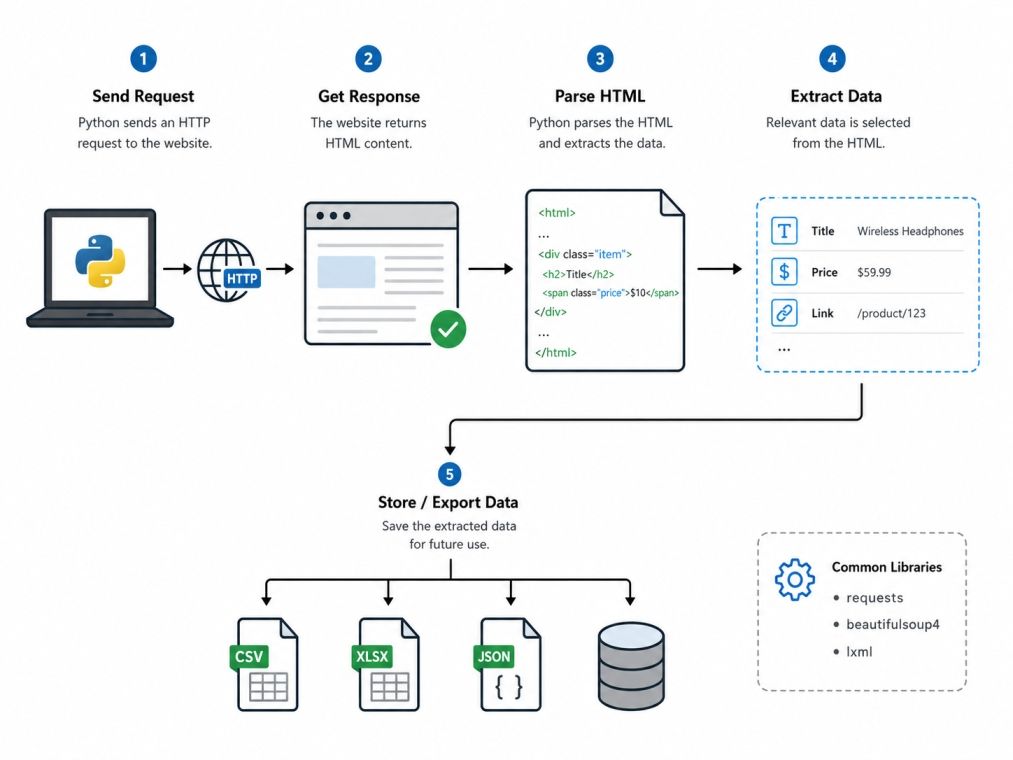
Web scraping is the process of automatically extracting data from websites. Instead of manually visiting pages and copying information, you write a script that does it for you. Python is the most popular language for this because it is simple to write, has powerful libraries, and has a huge community behind it.
Think of it like this: imagine you want to compare the prices of 500 laptops across five e-commerce sites. Doing that by hand would take hours. A web scraping Python script can do it in minutes.
Web scraping is used across many fields and roles:
Also Read: How to Run Python Program
This question comes up a lot. The short answer: it depends. Scraping publicly available data is generally fine, but scraping personal data, copyrighted content, or bypassing authentication is not. Always check a site's robots.txt file and its Terms of Service before scraping. Respecting rate limits and not overwhelming a server with requests is also good practice.
Free Courses
Before writing any code, you need to know which tools to pick. The Python ecosystem has several solid web scraping tools and libraries. Choosing the right one depends on what kind of page you are scraping.
Library |
Best For |
Difficulty |
| requests | Fetching raw HTML from static pages | Beginner |
| BeautifulSoup | Parsing and navigating HTML structure | Beginner |
| lxml | Fast XML and HTML parsing | Beginner to Intermediate |
| Scrapy | Full-scale, production-level scraping | Intermediate to Advanced |
| Selenium | Scraping JavaScript-heavy pages | Intermediate |
| Playwright | Modern browser automation | Intermediate to Advanced |
| httpx | Async HTTP requests | Intermediate |
If you are just starting out, start with requests and BeautifulSoup. These two together form the backbone of most beginner web scrapers. requests fetches the page, and BeautifulSoup helps you find what you need inside the HTML.
Scrapy is a full scraping framework. It handles everything from making requests to storing data. It is built for large-scale scraping projects where you need speed, structure, and features like crawling multiple pages automatically.
Many modern websites load content dynamically using JavaScript. Tools like requests cannot see that content because it is not in the raw HTML. That is where Selenium and Playwright come in. They control a real browser and wait for content to load before extracting it.
Also Read: Top 70 Python Interview Questions & Answers: Ultimate Guide 2026
Data Science Courses to upskill
Explore Data Science Courses for Career Progression
IIIT Bangalore
Executive Post Graduate Certificate in Data Science & AIPlacement Assistance
Let us walk through building a simple web scraper from scratch. We will scrape book titles and prices from a practice site called books.toscrape.com. This site is specifically built for learning, so it is completely safe to use.
Open your terminal and run:
pip install requests beautifulsoup4import requests
from bs4 import BeautifulSoup
url = "http://books.toscrape.com/"
response = requests.get(url)
print(response.status_code) # Should print 200A 200 status code means the request was successful.
soup = BeautifulSoup(response.text, "html.parser")
print(soup.prettify()[:500]) # Preview the HTML structureOpen the website in your browser, right-click on a book title, and inspect the element. You will see that book titles are inside <h3> tags and prices are inside a <p> tag with class price_color.
books = soup.find_all("article", class_="product_pod")

for book in books:
   title = book.h3.a["title"]
   price = book.find("p", class_="price_color").text
print(f"Title: {title} | Price: {price}")import csv
with open("books.csv", "w", newline="", encoding="utf-8") as file:
writer = csv.writer(file)
writer.writerow(["Title", "Price"])
for book in books:
title = book.h3.a["title"]
price = book.find("p", class_="price_color").text
writer.writerow([title, price])You now have a working web scraper that saves data to a CSV file.
Also Read: Top 36+ Python Projects for Beginners in 2026
Most websites have pagination. Here is how to loop through multiple pages:
base_url = "http://books.toscrape.com/catalogue/page-{}.html"

all_books = []

for page in range(1, 6):  # Scrape pages 1 to 5
   url = base_url.format(page)
   response = requests.get(url)
   soup = BeautifulSoup(response.text, "html.parser")
   books = soup.find_all("article", class_="product_pod")

   for book in books:
       title = book.h3.a["title"]
       price = book.find("p", class_="price_color").text
       all_books.append({"title": title, "price": price})

print(f"Total books scraped: {len(all_books)}")Once you are comfortable with the basics, there are more techniques to handle real-world scraping challenges.
Some websites do not serve data in the initial HTML. The content loads after JavaScript runs. Here is a basic example using Selenium:
from selenium import webdriver
from selenium.webdriver.common.by import By
import time

driver = webdriver.Chrome()
driver.get("https://example.com")

time.sleep(3)  # Wait for JavaScript to load

elements = driver.find_elements(By.CLASS_NAME, "product-title")
for el in elements:
   print(el.text)

driver.quit()
For more modern projects, consider Playwright instead. It is faster, more reliable, and supports async by default.
Also Read: Python Libraries Explained: List of Important Libraries
Websites often block requests that do not look like they are coming from a browser. Adding headers helps:
headers = {
   "User-Agent": "Mozilla/5.0 (Windows NT 10.0; Win64; x64) AppleWebKit/537.36"
}

response = requests.get(url, headers=headers)Sending too many requests too fast can get your IP blocked or crash a small website. Always add delays:
import time
import random

time.sleep(random.uniform(1, 3)) # Wait 1 to 3 seconds between requestsGood scrapers handle errors gracefully:
Status Code |
Meaning |
Action |
| 200 | Success | Continue |
| 404 | Page not found | Skip or log |
| 403 | Forbidden | Check headers or rotate IP |
| 429 | Too many requests | Add delay or use proxy |
| 500 | Server error | Retry after a pause |
When scraping at scale, rotate proxies to avoid detection:
proxies = {
   "http": "http://your-proxy-ip:port",
   "https": "http://your-proxy-ip:port"
}

response = requests.get(url, proxies=proxies)There are several ways to store scraped data depending on the size and use case:
For serious projects, Scrapy is the go-to python web scraping library. It is a full framework with built-in support for crawling, middleware, item pipelines, and exporting data.
pip install scrapy
scrapy startproject bookstore
cd bookstore
scrapy genspider books books.toscrape.comimport scrapy
class BooksSpider(scrapy.Spider):
name = "books"
start_urls = ["http://books.toscrape.com/"]
def parse(self, response):
for book in response.css("article.product_pod"):
yield {
"title": book.css("h3 a::attr(title)").get(),
"price": book.css("p.price_color::text").get(),
}
next_page = response.css("li.next a::attr(href)").get()
if next_page:
yield response.follow(next_page, self.parse)scrapy crawl books -o books.jsonScrapy automatically handles retries, delays, and exporting. It is the standard choice for any web scraping python project that needs to run reliably at scale.
Also Read: 12 Incredible Python Applications You Should Know About
Good scraping is not just about working code. It is also about being responsible.
Also Read: Top 50 Python Projects with Source Code
Python web scraping is a skill that pays off fast. You start by learning requests and BeautifulSoup, graduate to handling dynamic pages with Selenium or Playwright, and eventually build full pipelines using Scrapy. Every step gives you more control over how you collect and use data from the web.
The tools are mature, the community is large, and the learning curve is gentle compared to most technical skills. Pick a real project you care about, a price tracker, a job board monitor, a news aggregator, and start building. That is the fastest way to go from beginner to confident.
Want personalized guidance on Python and Data Science and upskilling? Speak with an expert for a free 1:1 counselling session today.
Python web scraping is used for price monitoring, market research, lead generation, news aggregation, and building machine learning datasets. Businesses use it to track competitors, while researchers use it to collect large amounts of public data quickly without manual effort.
Beginners should start with requests and BeautifulSoup. They are simple to install, easy to understand, and well-documented. Once you are comfortable, you can move to Scrapy for large projects or Selenium for pages that need a browser to load content.
Python is widely considered the best choice for web scraping because of its clean syntax and rich ecosystem of libraries like BeautifulSoup, Scrapy, and Playwright. Its simplicity makes it easy for beginners, while its power makes it suitable for production-level scrapers too.
Start by adding proper HTTP headers, especially a realistic User-Agent. If that does not work, add time delays between requests, rotate IP addresses using proxies, or switch to browser-based scraping with Selenium or Playwright to mimic human-like behavior.
BeautifulSoup is a parsing library. It only reads HTML and helps you extract data. Scrapy is a full web scraping framework that handles requests, parsing, crawling, error handling, and data export all in one place. Use BeautifulSoup for small scripts and Scrapy for large or ongoing projects.
Yes. Tools like Selenium and Playwright can control a real browser, wait for JavaScript to load, and then extract the fully rendered page. Standard tools like requests only get the raw HTML and cannot see dynamically loaded content.
You can store scraped data in CSV files for simple use cases, JSON files for nested data, SQLite for local databases, or full databases like PostgreSQL and MongoDB for production scrapers that handle large volumes of data continuously.
robots.txt is a file that websites use to tell bots which pages they allow or disallow crawling. While it is not legally enforceable in all cases, following it is considered ethical. Ignoring it can get your IP banned and may have legal implications depending on the site and your location.
Speed depends on the scraper design, server response time, and delays between requests. A simple requests loop can handle dozens of pages per minute. Scrapy with async support can scrape hundreds or thousands of pages per minute, though you should always throttle responsibly to avoid server overload.
Common errors include 404 (page not found), 403 (access denied), 429 (too many requests), and ConnectionError. Fix these by validating URLs, adding proper headers, using delays and proxies, and writing error-handling code that retries on failure instead of crashing the entire script.
You can handle login-protected websites using requests.Session() to maintain cookies after logging in, or by using Selenium to automate the login form. Always make sure you have permission to access the site's data before attempting to scrape authenticated content.
98 articles published
Rahul Singh is an Associate Content Writer at upGrad, with a strong interest in Data Science, Machine Learning, and Artificial Intelligence. He combines technical development skills with data-driven s...
Speak with Data Science Expert
By submitting, I accept the T&C and
Privacy Policy
Start Your Career in Data Science Today
Top Resources
Master's Degree
18 Months
Executive Diploma
12 Months
Bootcamp
6 Months