What is an API? How it Works, Types, & Examples
By upGrad
Updated on Oct 15, 2026 | 9 min read | 2.37K+ views
Share:

All courses
Certifications
More
By upGrad
Updated on Oct 15, 2026 | 9 min read | 2.37K+ views
Share:
Table of Contents
Key Highlights
Ready to turn data into a career? upGrad’s Data Science courses give you job-ready skills, live mentorship, and career support, all in a flexible online format.
Popular Data Science Programs
An API stands for Application Programming Interface. It is a set of rules that allows two different applications to talk to each other and exchange data. For example, an API can act as a messenger between an application and a web service, forwarding requests and receiving replies.
Like a weather app on your phone. The app does not collect weather data itself. It asks a weather service for the data. The service replies with today’s forecast. The API is the interface to send the inquiry and receive the response.
Free Courses
API works in a loop of requests and responses between programs. The API sits in the middle of this loop. See the diagram below for a clear understanding:
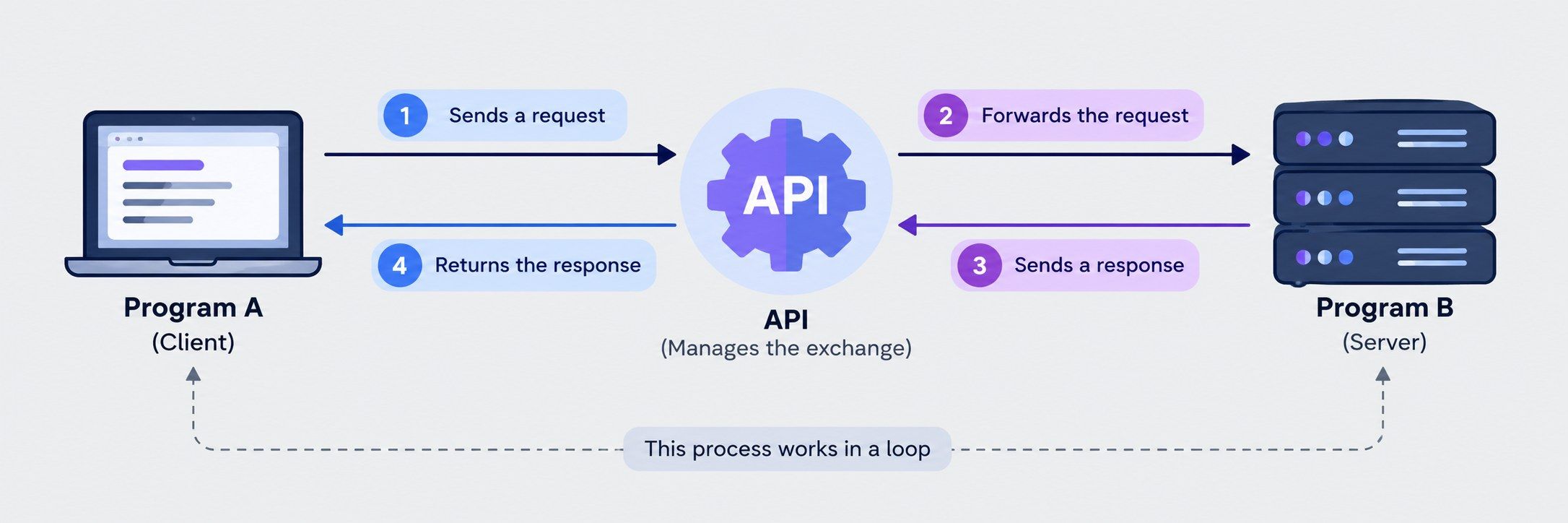
There are two sides in this loop.
The Application Programming Interface consists of a set of rules. Here is how it goes, step by step:
Most web APIs use HTTP. This is the same system your browser uses to load a page. Every request includes a method, which tells the server what action to take. The four main ones are:
Also read: What Is REST API? Main Elements, Examples & Challenges
Data Science Courses to upskill
Explore Data Science Courses for Career Progression
IIIT Bangalore
Executive Post Graduate Certificate in Data Science & AIPlacement Assistance
You can sort APIs in two ways. One is by who is allowed to use them. The other is by how they are built and how they move data. Most APIs fit into both groups. Below are the types of AI based on accessibility and architecture and communication.
This grouping looks at who is allowed to use an API, from anyone on the internet to a single team inside one company.
Anyone can use a public API. You sign up, get a key, and start sending requests. Some are free, and others charge by usage. Google Maps, Stripe, and OpenWeather are good examples.
Companies release public APIs for a reason. Outside developers build apps on top of them. Those apps bring more people to the original service. Twitter, now X, grew a huge ecosystem of third-party tools this way.
Private APIs stay inside one company, and only its own teams use them. A bank’s mobile app, for example, may use a private API to read account data. You use the app but never touch the API. Different teams can build their own services and connect them through APIs, without needing to see each other’s code.
Partner APIs are shared with business partners only. A contract is usually involved. A hotel chain might let a travel site see its room availability. A delivery company might let a store track parcels.
Here, the provider knows who is calling. That makes controlling access, tracking usage, and fixing problems easy. Also, the provider charges for access or shares the revenue with the partner.
A composite API lets an app get several things with one request. Say an app needs your profile, your orders, and your saved addresses. Normally, that takes three separate requests. With a composite API, you send just one and get all three back together. This makes the app load faster and reduces network traffic.
Also read: Top 10 NLP APIs in 2026 for Text and Language Processing
Architecture- and communication-based APIs focus on how an API is built and how it sends data between the client and the server. These APIs are as follows:
Go from data basics to autonomous AI agents. upGrad’s Data Science & Agentic AI program covers SQL, Power BI, machine learning, and RAG through live weekend sessions.
Building an API goes smoothly if you do things in the right order. Here are nine steps.
Before any code, ask two things. What problem does this solve? And who will call it? Your own mobile app, a partner, the whole internet? The answer shapes everything else, so don’t rush it. Jot down the main resources too: users, orders, products, whatever your system deals with.
Most teams go with REST. It’s simple, and nearly every developer already knows it. Need clients to choose their own fields? Look at GraphQL. Building fast service-to-service calls inside your company? gRPC might fit better.
Endpoints are the URLs people will hit. Keep them boring and predictable. Nouns, not verbs. The HTTP method already tells you the action, so you don’t need it in the name.
Stick with what your team knows. Node.js with Express is quick to start. Python’s Flask or FastAPI keeps code tidy. Java with Spring Boot suits bigger, enterprise setups.
Now the real work. Link each endpoint to your database, handle the incoming request, and send back JSON. Use proper status codes: 201 for “created,” 404 for “not found.” And write error messages a tired developer can actually understand at 2 a.m.
Don’t skip this one. An unprotected API gets abused fast, sometimes within hours of going live.
Fire off requests with Postman or cURL. Try the normal case first. Then break things on purpose: wrong inputs, empty fields, an expired token. Whatever fails in your hands would have failed for a user. Automated tests will save you from repeating this by hand.
A great API with bad docs is a frustrating API. Show each endpoint, what it needs, and what it sends back, with real examples. The OpenAPI Specification is the standard format for describing REST APIs. Swagger can turn it into a live page where developers try calls right in the browser.
Put it on a cloud platform, often behind an API gateway that handles security, traffic, and logging in one spot. After launch, watch errors, speed, and usage. And add a version early, like /v1/. Future changes then won’t break people already using your API.
Also read: Natural Language Processing Algorithms
With the help of API, businesses can connect software fast and at a lower cost. Here are some other main benefits of APIs:
Also read: What is Classification in Machine Learning?
API has multiple benefits, but it has some limitations too, and these are as follows:
Also read: Top Machine Learning APIs for Data Science Projects in 2026
Conclusion
API is a way for one app to ask another app for something. You use an API every day of your life, like paying online, logging in with Google, tracking a cab on a map, all of this depends on the API.
An API can be public, private or shared with the partners. REST is the most common and easiest to learn. To build an API, follow steps such as decide what it should do, give each item a clear URL, add a login system, and test every part. Also, write clear instructions so other developers know how to use it.
Have any questions about data science courses? Book a free consultation call with our experts and get personalized guidance on the right learning path for you.
In programming, an API is a set of tools that one piece of code offers to other code. A developer uses these tools without knowing how they work inside. Common examples are a language’s built-in library, an operating system API, and a web API that sends data over HTTP.
In networking, an API lets software control network devices. An engineer can use a script to set up a router, check traffic, or add a firewall rule. This saves them from typing commands by hand. Web APIs also run over networks using HTTP.
No, but they are close. A web service is an API that works over a network, usually the internet. So every web service is an API. But not every API is a web service. A code library on your own computer is an API, and it needs no network.
An API call is one request sent to an API. It asks the server to do one job, like fetching data or saving a record. The server sends back a result and a status code. A 200 means success. A 404 means not found.
An endpoint is the URL where an API takes requests. Each one points to a single item or action, such as https://api.example.com/users/42. You send an API call to an endpoint. The method you use, like GET or POST, tells the server what to do.
An API key is a unique string of characters. It tells the provider which app or user is making the request. You get one when you sign up. Think of it as an ID card for your app. The key is not the API. The API is the set of rules. The key proves you are allowed to use it.
An API key does three main things, identifies which app is calling, controls who can use the API, and lets the provider track usage, set limits, and bill you. A key alone is not strong security. For sensitive data, providers add OAuth 2.0 or JWT tokens. Keep your keys private. Never put them in public code.
An invalid API key is one the server rejects. The cause is often simple. There may be a typo. The key may be deleted or expired. Or you may be using a test key on a live endpoint. The server usually replies with a 401 or 403 error. To fix it, check for copy mistakes. Make sure the key is active in your account. If needed, create a new one.
An API inspector is a tool for viewing and testing API traffic. It shows the request you sent, the headers, the response, the status code, and the time taken. Postman, Insomnia, and the Network tab in your browser all work this way. Developers use them to find bugs.
An API gateway is one entry point in front of your APIs. Every request goes through it first. It handles shared jobs like login checks, rate limits, routing, logging, and caching. This keeps each backend service simple. It helps most in microservice setups, where one app is built from many small services. AWS API Gateway, Kong, and Apigee are common examples.
The OpenAPI Specification is a standard way to describe a REST API. It is written in YAML or JSON. It lists each endpoint, what it accepts, what it returns, and how to log in. Tools can read this file and build docs, run tests, and even create client code. Swagger UI turns the file into an interactive docs page. A clear spec makes an API easier to learn and use.
1277 articles published
We are an online education platform providing industry-relevant programs for professionals, designed and delivered in collaboration with world-class faculty and businesses. Merging the latest technolo...
Speak with Data Science Expert
By submitting, I accept the T&C and
Privacy Policy
Start Your Career in Data Science Today
Top Resources
Master's Degree
18 Months
Executive Diploma
12 Months
Bootcamp
6 Months