Types of Exception in Java: Checked, Unchecked, and Errors Explained
By Sriram
Updated on Jun 09, 2026 | 7 min read | 1.83K+ views
Share:

All courses
Certifications
More
By Sriram
Updated on Jun 09, 2026 | 7 min read | 1.83K+ views
Share:
Table of Contents
Exceptions are one of the most important concepts in Java, and so are the types of exception in Java. They help developers handle unexpected situations that occur while a program is running. Without exception handling, a simple error like dividing by zero or accessing a missing file can cause the entire application to crash.
This blog explains the types of exception in Java, their hierarchy, real-world examples, and how developers handle them effectively. You'll also learn the different types of exceptions in Java with examples and understand where each exception category is commonly used in applications.
Explore upGrad's Data Science, AI, and Machine Learning programs to strengthen your foundation in Java fundamentals, including operators, variables, control flow, and object-oriented programming concepts.
Popular Data Science Programs
An exception is Java's way of saying something went wrong. It's not a bug in the traditional sense. It's a signal that the program hit a condition it wasn't prepared to handle.
Java uses a class hierarchy for this. Every exception is an object. At the top sits java.lang.Throwable. Below it, two branches split out: Exception and Error.
Knowing which branch you're dealing with changes how you respond.
Instead of abruptly terminating the program, Java gives developers a chance to handle the problem and continue execution where appropriate. Consider a banking application. A customer tries to withdraw money from an account that doesn't exist. Rather than crashing, the system can display a meaningful message and ask the user to try again.
Here's what happens when an exception occurs:
Step |
Description |
| Exception occurs | An unexpected condition arises |
| Exception object created | JVM creates an exception object |
| Exception thrown | Control moves to exception handler |
| Exception handled | Program responds appropriately |
| Program continues | Execution proceeds if possible |
Imagine processing thousands of online transactions every minute. A single invalid input shouldn't stop the entire system. That's where exception handling becomes essential.
Exception handling helps developers:
public class Example {
    public static void main(String[] args) {
        int result = 10 / 0;
        System.out.println(result);
    }
}
This code throws an ArithmeticException because division by zero isn't allowed.
The JVM detects the issue instantly. Execution stops unless the exception is handled.
Also read: Checked And Unchecked Exceptions | upGrad Tutorials
Free Courses
Understanding the types of exception in Java starts with understanding the exception hierarchy.
Java exceptions are broadly divided into two categories:
These categories fall under the Exception class, which itself extends the Throwable class.
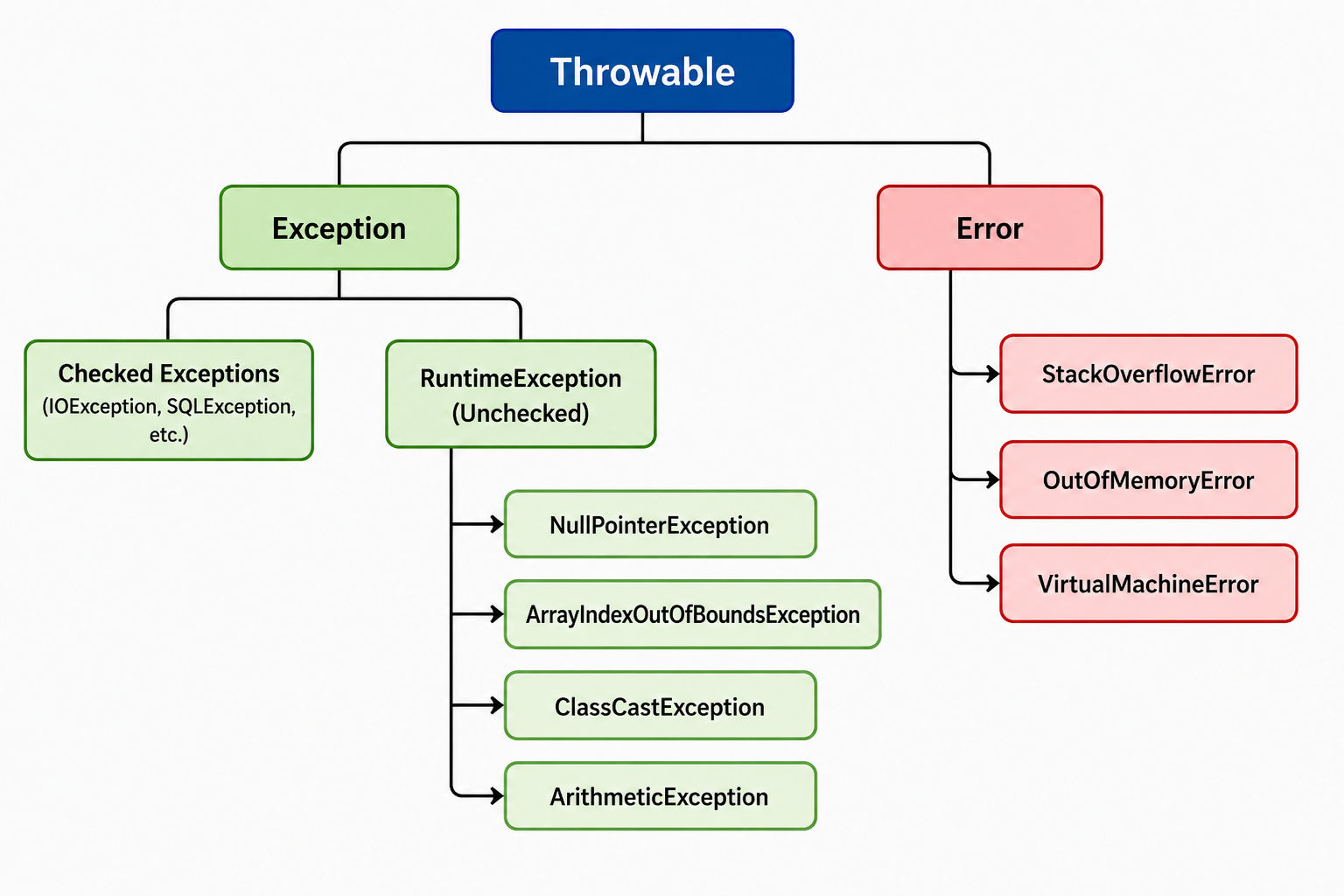
Checked exceptions are the ones the compiler forces you to deal with. If you call a method that throws a checked exception and you don't handle it or declare it, your code won't compile. That's the point. The compiler wants you to think about failure before it happens.
Exception |
When It Occurs |
| IOException | File not found or unreadable |
| SQLException | Database query fails |
| ClassNotFoundException | Class not found at runtime |
| FileNotFoundException | Specific file doesn't exist |
| InterruptedException | Thread interrupted during sleep or wait |
Here's a real example. You're reading a file:
import java.io.*;

public class ReadFile {
    public static void main(String[] args) {
        try {
            FileReader file = new FileReader("data.txt");
            BufferedReader br = new BufferedReader(file);
            System.out.println(br.readLine());
            br.close();
        } catch (IOException e) {
            System.out.println("File error: " + e.getMessage());
        }
    }
}
The try-catch block is mandatory here. Skip it and the code won't compile.
Checked exceptions are your contract with the caller. They say: this operation might fail, and you're responsible for deciding what happens when it does.
One thing worth noting. Wrapping everything in a broad catch (Exception e) block defeats the purpose. Catch specific exceptions. Handle them specifically.
Unchecked exceptions extend RuntimeException. The compiler doesn't enforce handling. These happen at runtime, and that's what makes them tricky.
You don't get a warning. The program just crashes.
NullPointerException
Probably the most common one in Java. It happens when you try to use an object reference that points to nothing.
java
String name = null;
System.out.println(name.length()); // Throws NullPointerException
ArrayIndexOutOfBoundsException
You tried to access an index that doesn't exist.
java
int[] nums = {1, 2, 3};
System.out.println(nums[5]); // Throws ArrayIndexOutOfBoundsException
ArithmeticException
Dividing by zero triggers this.
java
int result = 10 / 0; // Throws ArithmeticException
ClassCastException
Forcing an object into a type it isn't.
java
Object obj = "Hello";
Integer num = (Integer) obj; // Throws ClassCastException
NumberFormatException
Parsing a string that isn't actually a number.
java
int n = Integer.parseInt("abc"); // Throws NumberFormatException
Here's a comparison of the different types of exceptions in Java with examples summarized:
Exception Type |
Checked/Unchecked |
Compile-time Enforced |
| IOException | Checked | Yes |
| NullPointerException | Unchecked | No |
| SQLException | Checked | Yes |
| ArithmeticException | Unchecked | No |
| ClassNotFoundException | Checked | Yes |
| ArrayIndexOutOfBoundsException | Unchecked | No |
Unchecked exceptions don't mean you should ignore them. They mean Java trusts you to write logic that avoids them. If you're calling a method that might return null, check before using it.
Must read: Identifiers in Java: Key Concepts, Syntax, Examples, and Best Practices to Know in 2025
Data Science Courses to upskill
Explore Data Science Courses for Career Progression
IIIT Bangalore
Executive Post Graduate Certificate in Data Science & AIPlacement Assistance
Errors sit outside the Exception branch entirely. They come from Error, and they signal problems that are usually beyond your control.
Don't try to catch most errors. They indicate the JVM is in a state it can't recover from.
StackOverflowError
This happens with infinite or deeply recursive method calls. The call stack fills up.
java
public static void recursive() {
   recursive(); // Keeps calling itself
}
OutOfMemoryError
The JVM runs out of heap space. Usually seen in applications handling large datasets or memory leaks.
AssertionError
An assertion in the code failed. Uncommon in production, but relevant during testing.
You might catch StackOverflowError in some specific frameworks or logging scenarios, but for most applications, errors signal something structurally broken. Fix the code, don't catch the error.
Also read: Control Statements in Java: Types, Flowcharts, and Code Examples
Knowing the types is only half the work. You also need to know the mechanics of types of exception handling in Java.
try-catch
The basic block. Write risky code in try, handle the fallout in catch.
java
try {
   int result = 10 / 0;
} catch (ArithmeticException e) {
   System.out.println("Can't divide by zero");
}
try-catch-finally
The finally block runs no matter what. It's where you close resources.
java
FileReader fr = null;
try {
   fr = new FileReader("file.txt");
} catch (IOException e) {
   System.out.println(e.getMessage());
} finally {
   if (fr != null) fr.close();
}
try-with-resources
Cleaner syntax for auto-closing resources. Introduced in Java 7.
java
try (BufferedReader br = new BufferedReader(new FileReader("file.txt"))) {
   System.out.println(br.readLine());
} catch (IOException e) {
   System.out.println(e.getMessage());
}
throws Keyword
If a method can throw a checked exception and you don't want to handle it there, you declare it with throws. The caller takes responsibility.
java
public void readFile(String path) throws IOException {
   FileReader fr = new FileReader(path);
}
throw Keyword
You can throw your own exceptions manually. Useful when a condition that violates your logic is met.
java
public void setAge(int age) {
   if (age < 0) {
       throw new IllegalArgumentException("Age can't be negative");
   }
   this.age = age;
}
Do read: Types of Variables in Java: The Building Blocks of Clean Code
Java lets you create your own exception types. This is useful when your application has domain-specific error conditions that don't map to any built-in exception.
java
public class InsufficientFundsException extends Exception {
   public InsufficientFundsException(String message) {
       super(message);
   }
}

public class BankAccount {
   private double balance = 500;

   public void withdraw(double amount) throws InsufficientFundsException {
       if (amount > balance) {
           throw new InsufficientFundsException("Not enough balance");
       }
       balance -= amount;
   }
}
Custom exceptions make your error messages meaningful. They also make debugging faster because the exception name itself tells you what went wrong.
Extend Exception for checked custom exceptions. Extend RuntimeException for unchecked ones. Pick based on whether you want to force callers to handle it.
Must read: Data Types in Java: Primitive & Non-Primitive Data Types
Even experienced developers get this wrong. Here are the patterns you want to avoid.
Java's exception system is structured for a reason. Checked exceptions make you plan for predictable failures. Unchecked exceptions flag bugs in your logic. Errors tell you the JVM itself is in trouble.
Once you understand the types of exception in Java clearly, exception handling stops feeling like boilerplate and starts feeling like actual defensive programming. Handle what you can, declare what you can't, and never hide what you don't understand.
If you want to build stronger fundamentals in Java, upGrad's Java programming courses take you from basics to production-level skills with hands-on projects and mentorship.
Ready to start your journey? Book a free consultation with upGrad today to find the best path for your career.
Checked exceptions are verified by the compiler at compile time, so you must handle them with try-catch or declare them using throws. Unchecked exceptions extend RuntimeException and only appear at runtime. The compiler doesn't force you to handle them, but they'll crash your program if they occur unhandled.
NullPointerException is an unchecked exception. It extends RuntimeException, which means the compiler won't warn you about it. It occurs at runtime when you try to call a method or access a field on an object reference that is null. Java 17 and later versions give more helpful NullPointerException messages, making it easier to identify exactly what was null.
Exception represents conditions your application can reasonably handle, like a missing file or a bad database query. Error represents serious problems with the JVM itself, like running out of memory or a stack overflow. You should handle exceptions in your code. You should not generally try to catch or recover from errors.
Yes. Since Java 7, you can use the multi-catch syntax. Write catch (IOException | SQLException e) to handle multiple exception types in one block. This reduces code duplication when the handling logic is the same for both types. Each exception type in the multi-catch list must be unrelated by inheritance.
If an exception isn't caught anywhere in the call stack, the JVM terminates the current thread and prints the exception message along with the stack trace to the console. In a single-threaded program, this means the application stops. In multi-threaded programs, only the affected thread stops unless it's the main thread.
The main types are checked exceptions like IOException and SQLException, which must be handled at compile time; unchecked exceptions like NullPointerException, ArithmeticException, and ArrayIndexOutOfBoundsException, which occur at runtime; and errors like StackOverflowError and OutOfMemoryError, which indicate JVM-level failures. Each type requires a different approach to detection and handling.
The finally block runs regardless of whether an exception was thrown or caught. It's used to release resources like file handles, database connections, or network sockets. This guarantees cleanup happens even if an unexpected exception occurs mid-execution. The try-with-resources syntax introduced in Java 7 is now preferred for auto-closeable resources because it's cleaner and less error-prone.
Create a custom exception when your application has a specific error condition that no built-in exception describes clearly enough. For example, a banking app might need an InsufficientFundsException. Custom exceptions make error messages domain-specific, which makes debugging faster and makes your code more readable to other developers on the team.
Exception chaining lets you wrap one exception inside another. When a low-level exception like an IOException causes a higher-level failure, you can throw a new exception and pass the original as its cause. This is done using new CustomException("message", originalException). It preserves the full context of what went wrong across multiple layers of the application.
Catching Exception catches all checked exceptions and all unchecked exceptions that extend RuntimeException. It does not catch Error subclasses like OutOfMemoryError or StackOverflowError, because those extend Throwable directly, not Exception. If you want to catch absolutely everything including errors, you'd catch Throwable, but that's rarely appropriate in production code.
The throws keyword in a method signature declares that the method may throw one or more checked exceptions without handling them internally. It shifts the responsibility of handling the exception to the method's caller. For example, public void connect() throws IOException tells any code calling connect() that it must either handle IOException with a try-catch or propagate it further with its own throws declaration.
730 articles published
Sriram K is a Senior SEO Executive with a B.Tech in Information Technology from Dr. M.G.R. Educational and Research Institute, Chennai. With over a decade of experience in digital marketing, he specia...
Speak with Data Science Expert
By submitting, I accept the T&C and
Privacy Policy
Start Your Career in Data Science Today
Top Resources
Executive Diploma
12 Months
Master's Degree
18 Months
Bootcamp
6 Months