Indexes in MongoDB: A Complete Guide
Updated on Jul 22, 2026 | 11 min read | 7.23K+ views
Share:

All courses
Certifications
More
Updated on Jul 22, 2026 | 11 min read | 7.23K+ views
Share:
Table of Contents
Key Highlights
This blog explains what is index in MongoDB, explores the types of indexes in MongoDB, and helps you identify the correct syntax for creating an index in MongoDB with practical examples and best practices.
Learn MongoDB, Python, SQL, machine learning, and big data with upGrad's Data Science programs. Gain hands-on experience with real-world databases and analytics tools used across modern data-driven organizations.
Popular Data Science Programs
What is index in MongoDB? It's a mechanism that speeds up searches, filtering, sorting, and aggregation queries while reducing the need to scan every document. However, indexes also consume storage and slightly increase the time required for insert, update, and delete operations because they must be maintained whenever data changes.
A MongoDB collection can contain thousands or even millions of documents. Without an index, MongoDB performs a collection scan, checking every document to find matching results, which slows query performance as the dataset grows.
An index is a separate data structure that stores selected field values in an organized format. Instead of scanning the entire collection, MongoDB searches the index first and quickly retrieves matching documents.
Here's a quick comparison.
Without Index |
With Index |
| Scans every document in the collection | Searches only indexed values |
| Slower query execution | Faster query execution |
| Higher CPU and disk usage | Lower resource consumption |
| Suitable only for very small collections | Recommended for medium and large collections |
Imagine an employees collection with one million records. Without an index, MongoDB scans every document to find a matching email address. After creating an index on the email field, MongoDB searches the index first and retrieves the document much faster. While indexes improve query performance, they also consume storage and increase write overhead, so they should be created based on your application's query patterns.
Also read : Data Cleaning in Machine Learning: A Complete Guide
Free Courses
Now that you know what is index in MongoDB, it's worth understanding what happens behind the scenes.
MongoDB stores most indexes using a B-tree data structure. A B-tree keeps indexed values in sorted order, making it easy for the database to search, filter, and sort data efficiently.
Here's a simplified workflow.
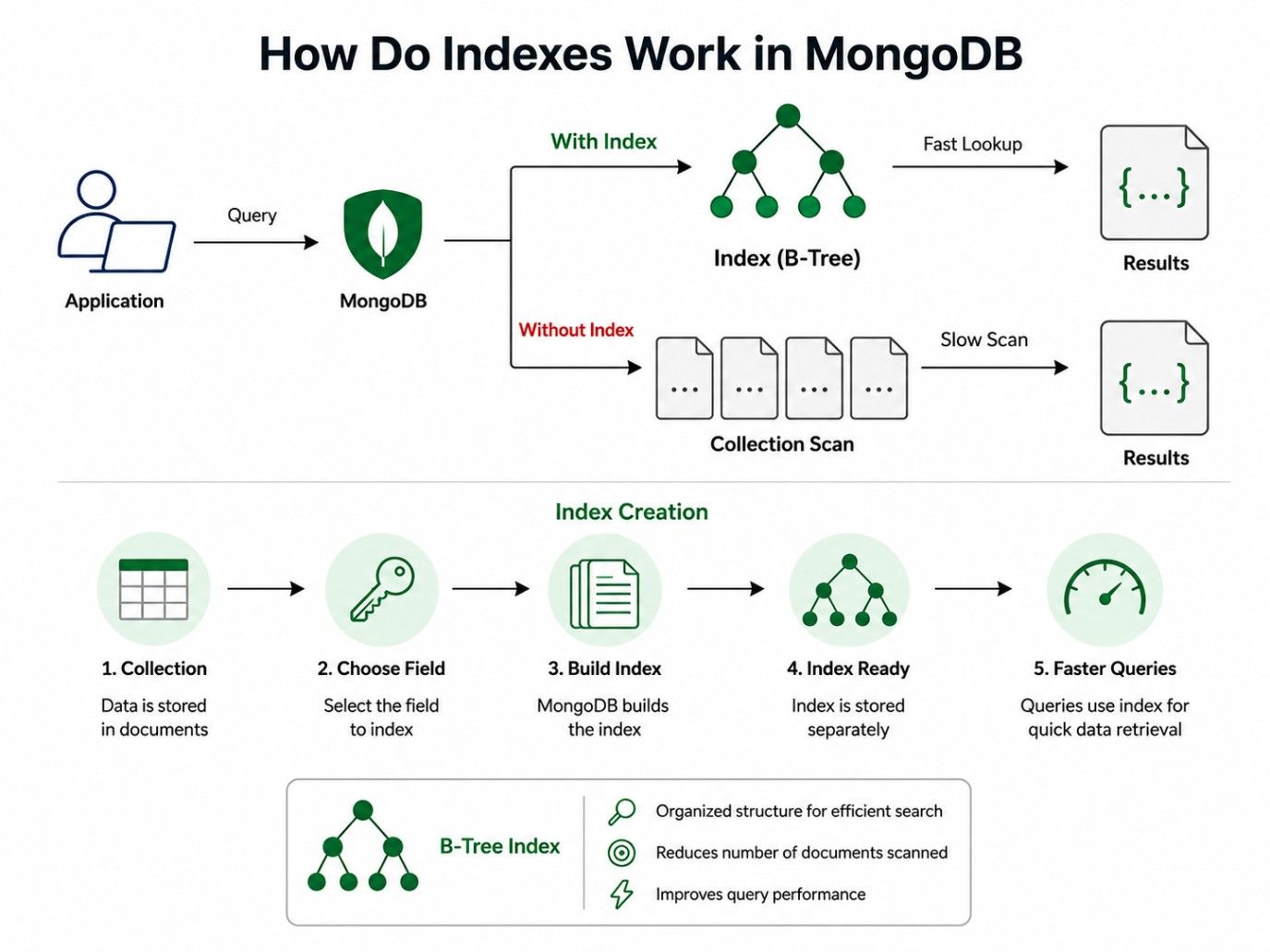
Instead of reading every document, MongoDB traverses the B-tree and reaches the matching records in far fewer operations. Even when a collection contains millions of documents, query performance remains fast because the database searches the index rather than the entire collection.
This is also why indexes play such an important role in applications that process large amounts of data, such as e-commerce platforms, banking systems, content management systems, and analytics dashboards.
Also Read: Steps in Data Preprocessing: What You Need to Know?
Not every collection needs additional indexes. While indexes improve read performance, they also consume storage and increase the time required for insert, update, and delete operations. Instead of indexing every field, create indexes based on your application's query patterns.
Good candidates for indexing include fields that are:
Avoid indexing fields that change frequently, are rarely queried, have low selectivity, or duplicate an existing index. As your application evolves, review your indexing strategy regularly.
Also Read: How to Perform Cross-Validation in Machine Learning?
Yes. A MongoDB collection can have multiple indexes, with each one supporting a different query pattern. For example, you can create separate indexes for email lookups, department-based reports, text searches, and TTL-based session management.
MongoDB automatically selects the most suitable index during query execution. However, avoid creating unnecessary indexes, as each additional index increases storage usage and slows write operations due to index maintenance.
Also read : difference between Big Data and Cloud Computing
Data Science Courses to upskill
Explore Data Science Courses for Career Progression
IIIT Bangalore
Executive Post Graduate Certificate in Data Science & AIPlacement Assistance
After understanding what is index in MongoDB, the next step is knowing why indexes are essential. The primary purpose of indexes in MongoDB is to improve query performance by allowing the database to locate matching documents without scanning the entire collection.
Here are the key benefits of using indexes.
1. Faster Query Performance
Indexes significantly reduce query execution time. Instead of scanning millions of documents, MongoDB searches the indexed field and quickly retrieves the required data. This results in faster applications and more responsive APIs.
2. Better Sorting and Filtering
Indexes help MongoDB sort and filter data efficiently. Queries that filter by fields such as category, brand, or price execute much faster when those fields are indexed, reducing both execution time and resource usage.
3. Improved Scalability
As collections grow from thousands to millions of documents, query performance can decline. Well-designed indexes in MongoDB help maintain consistent performance even as the database size increases.
Yes. While indexes improve read operations, they add extra work during inserts, updates, and deletes because MongoDB must update each related index whenever data changes.
For write-intensive applications, creating too many indexes can affect performance. The best approach is to index only the fields that are queried frequently, balancing read speed with write efficiency.
Understanding what is index in MongoDB and the types of indexes in MongoDB helps you choose the right indexing strategy based on your application's workload instead of indexing every field unnecessarily.
Also Read: The Importance of Data Quality in Big Data Analytics
MongoDB offers different index types to optimize specific query patterns. Understanding the types of indexes in MongoDB helps you choose the right index for faster searches, efficient sorting, full-text search, location-based queries, and better overall database performance.
These are the most commonly used types of indexes in MongoDB. They cover the majority of application queries and are usually the first indexes developers create.
A single field index stores values from one field in sorted order. It's ideal when queries search or sort using a single attribute such as email, username, employee ID, or product ID.
Example
Create an index on the email field.
db.users.createIndex({ email: 1 })
Now MongoDB can quickly execute queries like:
db.users.find({ email: "john@example.com" })
A compound index stores multiple fields in a single index. It's best for queries that filter or sort using more than one field.
Example
Create a compound index on category and price.
db.products.createIndex({ category: 1, price: -1 })
This improves queries like:
db.products.find({ category: "Electronics" }).sort({ price: -1 })
A multikey index is designed for array fields. MongoDB automatically indexes each element inside the array, making searches much faster.
Example
Document:
{
 "skills": ["Python", "MongoDB", "AWS"]
}
Create the index:
db.employees.createIndex({ skills: 1 })
Now MongoDB can efficiently find employees with a specific skill.
db.employees.find({ skills: "MongoDB" })
These indexes solve specific business requirements such as text search, location tracking, data expiration, and distributed databases.
A text index enables full-text search on words and phrases stored in text fields.
Example
db.articles.createIndex({ content: "text" })
Search for documents containing a keyword.
db.articles.find({ $text: { $search: "database indexing" } })
A geospatial index optimizes location-based searches using geographic coordinates.
Example
db.stores.createIndex({ location: "2dsphere" })
This index helps answer queries such as "Find stores within 5 km."
A hashed index stores the hash value of a field instead of its actual value. It's commonly used in sharded clusters for equality searches.
Example
db.users.createIndex({ userId: "hashed" })
Efficient for queries like:
db.users.find({ userId: 1001 })
A Time To Live (TTL) index automatically deletes documents after a specified time.
Example
db.sessions.createIndex(
  { createdAt: 1 },
  { expireAfterSeconds: 3600 }
)
Login sessions older than one hour are removed automatically.
These index types improve data integrity while reducing unnecessary storage usage.
A unique index prevents duplicate values in a field.
Example
db.users.createIndex(
  { email: 1 },
  { unique: true }
)
MongoDB rejects duplicate email addresses automatically.
A sparse index only includes documents where the indexed field exists.
Example
db.customers.createIndex(
  { alternatePhone: 1 },
  { sparse: true }
)
Documents without an alternate phone number are ignored.
A partial index stores only documents matching a specified condition.
Example
db.users.createIndex(
  { email: 1 },
  { partialFilterExpression: { status: "Active" } }
)
Only active users become part of the index.
A wildcard index is useful when documents contain dynamic or unpredictable fields.
Example
db.products.createIndex({ "$**": 1 })
This indexes all fields, making it suitable for product catalogs where attributes vary.
These indexes are primarily used for performance tuning and specialized database workloads.
A hidden index allows you to test whether an index is required without permanently removing it.
Example
db.users.hideIndex("email_1")
MongoDB ignores the hidden index during query planning while keeping it available for future use.
A clustered index stores documents in the same order as the indexed key, improving storage efficiency for sequential data.
Example
A time-series database storing sensor readings by timestamp benefits from clustered indexes because related records are stored together, improving read performance.
Yes. MongoDB supports indexing nested fields using dot notation, allowing faster queries on embedded documents.
Example
Document:
{
 "customer": {
   "address": {
     "city": "Bangalore"
   }
 }
}
Create the index:
db.orders.createIndex({ "customer.address.city": 1 })
Now MongoDB can efficiently execute:
db.orders.find({ "customer.address.city": "Bangalore" })
without scanning every document.
Advance your career with upGrad's Professional Certificate Programme in Data Science with Generative AI. Learn MongoDB, Python, SQL, machine learning, and Generative AI through hands-on projects and industry-relevant case studies.
Once you understand what is index in MongoDB and the types of indexes in MongoDB, the next step is learning how to create and manage them effectively. MongoDB provides simple commands for creating, viewing, hiding, and deleting indexes. Knowing these commands helps you optimize queries while keeping your database organized.
If you're trying to identify correct syntax for creating index in MongoDB, remember that every index starts with the createIndex() method. You can create indexes for one field, multiple fields, text search, geospatial data, and more using the same method with different options.
The first step is understanding the basic syntax.
A single-field index is created using:
db.collection.createIndex({ fieldName: 1 }) If you need to identify correct syntax for creating index in MongoDB for descending sorting, simply replace 1 with -1.
db.employees.createIndex({ salary: -1 })
Here:
MongoDB also lets you create multiple indexes on the same collection, provided they serve different query patterns.
A compound index stores more than one field in a single index.
Example:
db.employees.createIndex( { department: 1, salary: -1 } )
This index helps when queries filter by department and sort by salary.
Field order is important. MongoDB follows the prefix rule, so place the most frequently filtered field first.
If you're learning to identify correct syntax for creating index in MongoDB, understanding field order is just as important as learning the command itself.
Before creating new indexes, check which ones already exist.
Use: db.employees.getIndexes()
This command returns every index associated with the collection, including the default _id index.
Reviewing existing indexes helps avoid duplicate indexes that consume storage without improving performance.
Yes.A collection can contain multiple indexes, each supporting different queries.
For example:
MongoDB automatically chooses the most suitable index during query execution.
That doesn't mean every field needs one. Too many indexes increase storage requirements and slow write operations.Create indexes based on actual query patterns instead of indexing every searchable field.
Yes, but only one.Whenever MongoDB creates a new collection, it automatically creates an index on the _id field.
You don't need to create this index manually.Every additional index must be created explicitly using createIndex().
The _id field uniquely identifies every document in a collection.
MongoDB automatically creates a unique ascending index on this field.
Benefits include:
Since this index already exists, avoid creating another index on the same field.
Deleting an index removes only the index structure.Your documents remain unchanged.
However, queries that relied on that index may become slower because MongoDB has to perform a collection scan until another suitable index is available.
Always evaluate query performance before removing indexes from production databases.
Also Read: Structured Vs. Unstructured Data in Machine Learning
This is one of the most common questions developers ask. The truth is, there isn't a single "best" index.The right choice depends entirely on how your application retrieves data.
Think about your queries first.
Are users searching by one field?
Do they filter by multiple fields?
Do they perform text searches?
Do documents expire automatically?
Answering these questions makes selecting an index much easier.
The table below can help.
Query Pattern |
Recommended Index |
| Search by one field | Single Field Index |
| Filter using multiple fields | Compound Index |
| Search inside arrays | Multikey Index |
| Full-text search | Text Index |
| Location-based queries | Geospatial Index |
| Automatic document expiry | TTL Index |
| Prevent duplicate values | Unique Index |
| Optional fields | Sparse Index |
| Conditional indexing | Partial Index |
| Dynamic document fields | Wildcard Index |
Choose an index based on your application's query patterns, not a one-size-fits-all approach. For example, e-commerce applications often use compound indexes, blogging platforms benefit from text indexes, delivery apps rely on geospatial indexes, and authentication systems commonly use unique indexes.
Review slow queries regularly to identify missing indexes, and always identify correct syntax for creating index in MongoDB before implementation. The right index, created correctly, can significantly improve query performance.
Also read: Types of Cloud Computing & Cloud Computing Services
One of the most common decisions you'll make while working with indexes in MongoDB is choosing between a single field index and a compound index. Both improve query performance, but they solve different problems.
A single field index works well when queries filter or sort using only one field. A compound index is designed for queries that involve two or more fields together. Choosing the wrong one won't break your application, but it can reduce query performance and increase storage usage.
The key is simple.Match the index to your query pattern.
If your application frequently searches using multiple fields in the same query, a compound index is usually the better option.
Consider an employee database where users often search by department and sort employees by salary. Creating separate indexes on department and salary helps to some extent, but a compound index on both fields is usually more efficient because MongoDB can satisfy the filter and sort operation using a single index.
Example:
db.employees.createIndex({ department: 1, salary: -1 })
Remember one important rule.
MongoDB follows the prefix rule. The database uses the index efficiently when queries begin with the leftmost field in the index.
For example, an index on
{ department: 1, salary: -1 }supports:
It doesn't efficiently support queries that search only by salary.
This is why field order should reflect your most common query pattern.
Single Field Index vs Compound Index
Feature |
Single Field Index |
Compound Index |
| Indexed fields | One | Two or more |
| Best for | Simple lookups | Multi-condition queries |
| Sorting support | Limited | Better for combined filtering and sorting |
| Storage usage | Lower | Slightly higher |
| Query performance | Excellent for one field | Better for related fields |
If your queries almost always involve one field, keep the design simple.If users regularly filter by multiple fields, a compound index usually delivers better performance.
Don't create compound indexes simply because they're available. Create them because your queries need them.
Also read : Data Cleaning Techniques: 15 Simple & Effective Ways To Clean Data
Both MongoDB and relational databases use indexes to speed up queries. The goal is the same, but the implementation differs because MongoDB stores data as documents while SQL databases store data in tables.
If you're moving from a relational database to MongoDB, understanding these differences helps you design indexes more effectively.
Feature |
MongoDB Indexes |
SQL Indexes |
| Data model | Document-based | Table-based |
| Default index | _id index | Primary key index |
| Compound indexes | Supported | Supported |
| Text search | Native text indexes | Depends on the database |
| Geospatial indexing | Built-in | Database-specific support |
| Dynamic schema | Fully supported | Limited |
MongoDB also supports specialized indexes such as TTL, Wildcard, Multikey, and Geospatial indexes, making it easier to optimize document-based workloads.
Instead of copying indexing strategies from SQL databases, design indexes around your MongoDB query patterns.
Also Read: Data Cleaning Techniques
Creating indexes in MongoDB is only the first step. Maintaining the right indexes helps improve query performance without increasing storage usage or slowing write operations.: Index Frequently Queried Fields
Create indexes on fields that are frequently used for searching, filtering, and sorting, such as product ID, category, or email. Avoid indexing fields that are rarely queried.
Create indexes on fields that are commonly used in search, filter, sort, and lookup operations, such as product ID, customer email, category, username, or order status. Indexing these high-usage fields significantly improves query performance by reducing the number of documents MongoDB scans. Avoid indexing fields that are rarely accessed, as they add storage overhead and can slow insert, update, and delete operations.
The ESR (Equality, Sort, Range) rule is a best practice for designing compound indexes in MongoDB. Place fields used in equality filters first, followed by fields used for sorting, and then fields used in range queries. This order helps MongoDB scan fewer index entries, improving query performance and reducing execution time.
Creating too many indexes can negatively affect database performance. Every index requires additional storage space and must be updated whenever documents are inserted, modified, or deleted. Focus on indexing fields used in frequent queries, sorting, and filtering to balance read performance with efficient write operations.
Use the explain() method to check whether MongoDB uses an index.
db.employees.find({ department: "HR" }).explain("executionStats")
If the execution plan shows IXSCAN, MongoDB is using an index. COLLSCAN indicates a full collection scan, suggesting a suitable index may be missing.
Regularly review your MongoDB indexes to identify those that are no longer supporting active queries. Unused indexes consume disk space, increase memory usage, and add unnecessary overhead during insert, update, and delete operations. Use MongoDB monitoring tools and query analysis to detect redundant indexes, then remove them to optimize storage, improve write performance, and simplify index management.
Always test new indexes in a development or staging environment. Compare query execution plans using explain() before deploying them to production. Even small changes in field order can significantly impact performance.
Also read : AWS Tutorial for Beginners Is Out. Here’s What In
Understanding real-world use cases makes it easier to see why indexes in MongoDB are essential for improving query performance.
1. E-commerce Applications
Online stores use compound indexes to quickly search and filter products by category, brand, price, and availability, delivering faster product searches.
2. Banking Systems
Banks use indexes to retrieve account details, transaction history, and customer records quickly, helping process large volumes of financial data efficiently.
3. Social Media Platforms
Social media applications rely on text indexes for keyword searches and compound indexes to speed up filtering posts, comments, and user profiles.
4. Delivery and Ride-Sharing Apps
Delivery and ride-sharing platforms use geospatial indexes to locate nearby drivers, restaurants, or service providers in real time.
5. Session and Log Management
Applications use TTL indexes to automatically remove expired user sessions, cache data, verification codes, and temporary logs, reducing manual maintenance and saving storage.
Understanding what is index in MongoDB helps you build faster and more efficient applications. Choosing the right types of indexes in MongoDB based on your query patterns improves search, filtering, and sorting performance while avoiding unnecessary overhead.
Before creating an index, always identify correct syntax for creating index in MongoDB and monitor query performance using explain(). A well-planned indexing strategy keeps indexes in MongoDB efficient and your database responsive as your data grows.
Ready to start your journey? Book a free consultation with upGrad today to find the best path for your career.
An index in MongoDB is a data structure that stores selected field values in a sorted format, allowing the database to locate matching documents quickly. Instead of scanning every document, MongoDB searches the index first, which significantly improves query, filtering, and sorting performance.
MongoDB supports several types of indexes in MongoDB, including Single Field, Compound, Multikey, Text, Geospatial, Hashed, TTL, Unique, Sparse, Partial, Wildcard, Hidden, and Clustered indexes. Each type is designed for a specific query pattern and use case, helping developers optimize database performance efficiently.
The two most commonly used index types are Single Field Indexes and Compound Indexes. A single field index works best for queries on one field, while a compound index improves queries involving multiple fields for filtering or sorting, making it a common choice for production applications.
Indexes in NoSQL databases serve the same purpose as in relational databases. They organize data to speed up searches and reduce the need for full collection scans. In MongoDB, indexes are implemented using B-tree structures and support document-based queries, text search, and geospatial operations.
To identify correct syntax for creating index in MongoDB, use the createIndex() method. The basic syntax is db.collection.createIndex({ fieldName: 1 }), where 1 creates an ascending index and -1 creates a descending index. Additional options can be added for unique, TTL, or partial indexes.
Index fields that are frequently used in search queries, filters, sorting, and aggregation pipelines. Avoid indexing fields that change often or are rarely queried. Choosing indexes based on actual query patterns provides better performance than indexing every field in a collection.
Use the explain("executionStats") method to analyze a query. If the execution plan shows IXSCAN, MongoDB is using an index. If it displays COLLSCAN, the database is scanning the entire collection, which may indicate that an appropriate index is missing.
Yes. MongoDB can evaluate multiple indexes during query planning and choose the most efficient execution strategy. In some cases, it may also perform index intersection, where more than one index is combined to improve query performance for complex searches.
Choose a compound index when your application frequently filters or sorts using multiple fields together. If queries mainly search one field, a single field index is usually sufficient. Matching the index structure to your query pattern delivers the best performance.
Common mistakes include indexing every field, creating duplicate indexes, ignoring compound index field order, and never reviewing index usage. Regularly monitor query performance with explain() and remove unused indexes to keep your database efficient and reduce write overhead.
As collections grow from thousands to millions of documents, indexes help MongoDB retrieve matching records without performing full collection scans. A well-planned indexing strategy reduces query execution time, improves scalability, and keeps applications responsive even as database size increases.
Speak with Data Science Expert
By submitting, I accept the T&C and
Privacy Policy
Start Your Career in Data Science Today
Top Resources
Master's Degree
18 Months
Executive Diploma
12 Months
Bootcamp
6 Months