DML Commands in SQL: A Complete Guide
By Rahul Singh
Updated on Jun 09, 2026 | 10 min read | 4.13K+ views
Share:

All courses
Certifications
More
By Rahul Singh
Updated on Jun 09, 2026 | 10 min read | 4.13K+ views
Share:
Table of Contents
DML stands for Data Manipulation Language, a category of SQL commands used to manage the data stored within database tables. It enables users to insert new records, update existing information, and delete unwanted data, making it an essential part of everyday database operations.
Whether you're managing customer records, processing transactions, updating inventory, or maintaining employee information, DML commands help keep database data accurate and up to date. Because of their role in handling real-world business data, they are among the most frequently used SQL commands.
In this blog, you will learn exactly what DML commands in SQL are, how each command works with real syntax and examples, where to use them, and what mistakes to avoid.
Transform your career with upGrad’s Data Science Course. Learn from industry experts, work on hands-on projects, and gain the skills top employer’s demand.
Popular Data Science Programs
DML commands in SQL are a set of commands used to manipulate data stored inside database tables. They do not change the structure of the table itself. Instead, they work with the actual data sitting inside those tables.
Think of a database table like a spreadsheet. DML commands let you:
There are four core DML commands in SQL:
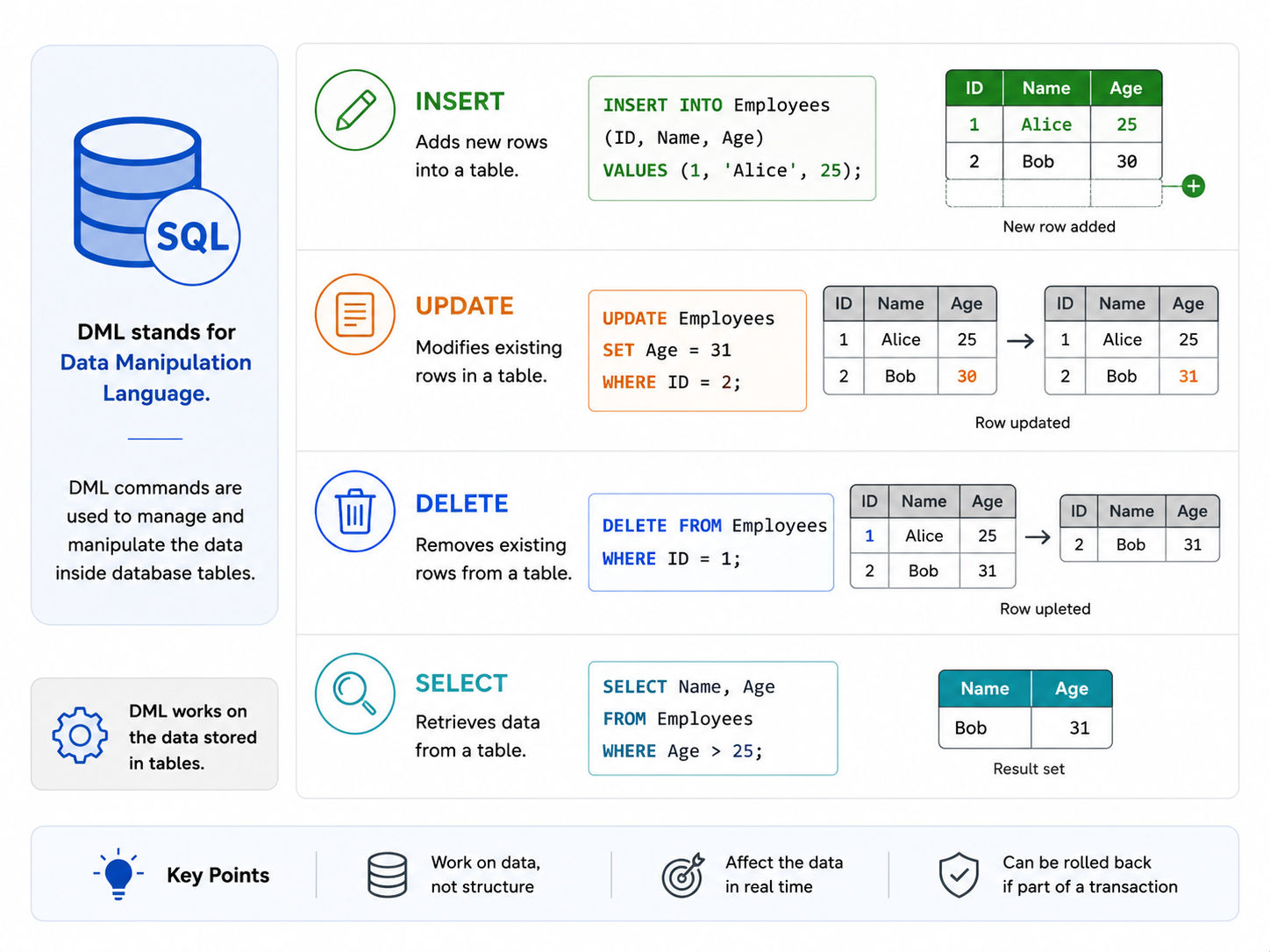
Beginners often confuse DML with other SQL command types. Here is a simple breakdown:
Type |
Full Form |
Purpose |
Example Commands |
| DML | Data Manipulation Language | Work with data | INSERT, SELECT, UPDATE, DELETE |
| DDL | Data Definition Language | Work with table structure | CREATE, ALTER, DROP |
| DCL | Data Control Language | Manage access and permissions | GRANT, REVOKE |
DML is specifically about the data. DDL is about the table design. DCL is about who can do what.
Also Read: DQL Commands in SQL: A Complete Guide with Examples
Free Courses
The INSERT command puts new records into a table. It is the first thing you do when you want to start storing data.
INSERT INTO table_name (column1, column2, column3)
VALUES (value1, value2, value3);Say you have a table called students with columns student_id, name, and age.
Insert a single row:
INSERT INTO students (student_id, name, age)
VALUES (1, 'Riya Sharma', 22);
Insert multiple rows at once:
INSERT INTO students (student_id, name, age)
VALUES (2, 'Arjun Mehta', 24),
      (3, 'Priya Nair', 21),
      (4, 'Vikram Singh', 23);
Insert data from another table:
INSERT INTO students_archive
SELECT * FROM students
WHERE age > 25;Also Read: SQL INSERT INTO With Examples
Data Science Courses to upskill
Explore Data Science Courses for Career Progression
IIIT Bangalore
Executive Post Graduate Certificate in Data Science & AIPlacement Assistance
SELECT is the most frequently used of all DML commands in SQL. It lets you read data from one or more tables. You can fetch everything, or you can filter, sort, and group data as needed.
SELECT column1, column2
FROM table_name
WHERE condition;Fetch all data from a table:
SELECT * FROM students;Fetch specific columns:
SELECT name, age FROM students;Filter data using WHERE:
SELECT name FROM students
WHERE age > 21;
Sort results using ORDER BY:
SELECT name, age FROM students
ORDER BY age DESC;
Count records using aggregate functions:
SELECT COUNT(*) AS total_students FROM students;Clause |
Purpose |
| WHERE | Filter rows based on condition |
| ORDER BY | Sort results (ASC or DESC) |
| GROUP BY | Group rows sharing a value |
| HAVING | Filter grouped results |
| LIMIT | Restrict number of rows returned |
| DISTINCT | Remove duplicate rows from output |
SELECT also powers table joins, which let you combine data from multiple tables.
SELECT students.name, courses.course_name
FROM students
INNER JOIN enrollments ON students.student_id = enrollments.student_id
INNER JOIN courses ON enrollments.course_id = courses.course_id;
SELECT is the backbone of data retrieval. Mastering it means mastering how to ask questions from your database.
The UPDATE command changes values in existing rows. It is one of the most powerful DML commands in SQL and needs to be used carefully.
UPDATE table_name
SET column1 = value1, column2 = value2
WHERE condition;Update a single column:
UPDATE students
SET age = 25
WHERE student_id = 1;
Update multiple columns at once:
UPDATE students
SET name = 'Riya Sharma Kapoor', age = 26
WHERE student_id = 1;
Update using a condition on another column:
UPDATE students
SET age = age + 1
WHERE name = 'Arjun Mehta';Running UPDATE without a WHERE clause will update every single row in the table. That is almost never what you want.
-- This updates ALL rows. Very dangerous.
UPDATE students SET age = 0;

-- This is correct. Only updates one row.
UPDATE students SET age = 0 WHERE student_id = 3;
Always double-check your WHERE condition before running an UPDATE in a production database.
Also Read: What is Natural Join in SQL? Key Features, Implementation, and Best Practices
The DELETE command removes rows from a table. Like UPDATE, it works with a WHERE clause to target specific rows.
DELETE FROM table_name
WHERE condition;Delete a specific row:
DELETE FROM students
WHERE student_id = 4;
Delete rows based on a condition:
DELETE FROM students
WHERE age < 18;
Delete all rows from a table (use carefully):
DELETE FROM students;This is a common confusion point. Here is a clear comparison:
Feature |
DELETE |
TRUNCATE |
| Command Type | DML | DDL |
| Can Use WHERE | Yes | No |
| Rollback Possible | Yes (within a transaction) | No (in most databases) |
| Speed | Slower for large data | Faster |
| Triggers Fired | Yes | No |
Use DELETE when you want to remove specific rows. Use TRUNCATE only when you want to wipe all data quickly and you are certain about it.
Also Read: SQL Delete Statement Example
Subscribe to upGrad's Newsletter
Join thousands of learners who receive useful tips
One of the most useful features of DML commands is that they can be wrapped inside transactions. A transaction lets you group multiple DML operations and either save all of them together or undo all of them if something goes wrong.
BEGIN TRANSACTION;

UPDATE accounts SET balance = balance - 5000 WHERE account_id = 101;
UPDATE accounts SET balance = balance + 5000 WHERE account_id = 102;

COMMIT;
If something fails between the two UPDATE statements, you can roll back:
ROLLBACK;This undoes every change made after the BEGIN TRANSACTION statement. Transactions are critical in banking, e-commerce, and any system where data accuracy matters.
DML commands follow ACID properties:
Property |
Meaning |
| Atomicity | Either all changes happen or none do |
| Consistency | Data stays valid and correct |
| Isolation | Concurrent transactions do not interfere |
| Durability | Committed changes are permanent |
Once you are comfortable with basic DML commands in SQL, these advanced techniques will take your skills further.
You can use a SELECT query inside an INSERT, UPDATE, or DELETE statement.
UPDATE using a subquery:
UPDATE students
SET age = (SELECT AVG(age) FROM students)
WHERE student_id = 5;
DELETE using a subquery:
DELETE FROM students
WHERE student_id IN (
   SELECT student_id FROM enrollments WHERE course_id = 10
);
Also Read: SQL Server Architecture: Core Components, Data Management, and Practical Uses
UPDATE students
SET grade = CASE
   WHEN score >= 90 THEN 'A'
   WHEN score >= 75 THEN 'B'
   WHEN score >= 60 THEN 'C'
   ELSE 'F'
END;Some databases like SQL Server and Oracle support MERGE, which combines INSERT and UPDATE into one statement. It inserts a row if it does not exist and updates it if it does.
MERGE INTO students AS target
USING new_students AS source
ON target.student_id = source.student_id
WHEN MATCHED THEN
   UPDATE SET target.name = source.name
WHEN NOT MATCHED THEN
   INSERT (student_id, name, age)
VALUES (source.student_id, source.name, source.age);Even experienced developers make these errors. Knowing them in advance will save you a lot of trouble.
DML commands in SQL are the foundation of working with data. INSERT, SELECT, UPDATE, and DELETE give you full control over what goes into your database, what you read from it, and what gets changed or removed.
Start with the basics: write simple SELECT queries, practice INSERT with small datasets, and always use WHERE with UPDATE and DELETE. Once that feels comfortable, move on to transactions, subqueries, and advanced patterns like MERGE.
If you want to go deeper into SQL and build real database skills, upGrad offers structured Data Science Courses to take you from beginner to job-ready.
Want personalized guidance on SQL and Data Science and upskilling? Speak with an expert for a free 1:1 counselling session today.
DML stands for Data Manipulation Language. It is a category of SQL commands used specifically to work with the data inside database tables. The four main DML commands are INSERT, SELECT, UPDATE, and DELETE.
Yes, SELECT is considered a DML command in SQL because it retrieves and manipulates data. Some references classify it separately as a Data Query Language (DQL) command, but in most standard SQL classifications, it falls under DML.
DML commands work with the data inside tables, such as adding, reading, updating, or deleting rows. DDL commands work with the structure of the database itself, such as creating or dropping tables. Examples of DDL include CREATE, ALTER, and DROP.
Yes, DML commands can be rolled back when they are executed inside a transaction. If you use BEGIN TRANSACTION before your DML statements and something goes wrong, you can use ROLLBACK to undo all changes made in that transaction.
The basic DML commands in SQL syntax for INSERT is: INSERT INTO table_name (column1, column2) VALUES (value1, value2); You can also insert multiple rows at once by separating value sets with commas.
Running DELETE without a WHERE clause removes all rows from the table. The table structure remains intact, but all data is gone. This is why it is strongly recommended to always use a WHERE condition and to test in a non-production environment first.
INSERT adds a new row to the table. UPDATE changes the values in one or more columns of rows that already exist. You use INSERT when the record does not exist yet, and UPDATE when you need to modify an existing record.
MERGE is an advanced DML command supported in databases like SQL Server and Oracle. It combines INSERT and UPDATE into a single statement, inserting a row when it does not exist and updating it when it does. This is also called an UPSERT operation.
Always use a WHERE clause with UPDATE and DELETE, wrap related changes inside transactions, test your queries on sample or staging data first, avoid SELECT * in performance-critical queries, and always back up your data before running bulk DML operations.
Yes, DML commands in SQL can be used inside stored procedures. In fact, stored procedures often contain multiple INSERT, UPDATE, DELETE, and SELECT statements that execute as a single unit, making them useful for automating repetitive or complex data operations.
DELETE is a DML command that removes specific rows using a WHERE clause and supports rollback within a transaction. TRUNCATE is a DDL command that removes all rows from a table at once, is faster for large tables, and cannot typically be rolled back. Use DELETE for targeted removal and TRUNCATE only when clearing an entire table.
98 articles published
Rahul Singh is an Associate Content Writer at upGrad, with a strong interest in Data Science, Machine Learning, and Artificial Intelligence. He combines technical development skills with data-driven s...
Speak with Data Science Expert
By submitting, I accept the T&C and
Privacy Policy
Start Your Career in Data Science Today
Top Resources
Executive Diploma
12 Months
Master's Degree
18 Months
Bootcamp
6 Months