DQL Commands in SQL: A Complete Guide with Examples
By Rahul Singh
Updated on Jun 03, 2026 | 10 min read | 3.86K+ views
Share:

All courses
Certifications
More
By Rahul Singh
Updated on Jun 03, 2026 | 10 min read | 3.86K+ views
Share:
Table of Contents
Data Query Language (DQL) is a category of SQL commands used to retrieve and view data stored in a database. It allows users to query specific information, filter results, sort records, and generate reports without modifying the database structure or changing the stored data.
The primary command in DQL is SELECT, which enables users to access information from one or more tables. Because DQL focuses solely on data retrieval, it plays a central role in reporting, analytics, and day-to-day database operations.
In this guide, you will learn exactly what DQL Commands in SQL is, how it works, and how to use every important DQL command in SQL with examples.
Transform your career with upGrad’s Data Science Course. Learn from industry experts, work on hands-on projects, and gain the skills top employer’s demand.
Popular Data Science Programs
You do not modify, delete, or insert any data with DQL. You simply ask the database to show you what is stored.
The primary DQL command in SQL is SELECT. Every time you fetch data from a table, you are using DQL.
SQL commands are grouped into categories based on what they do:
Category |
Full Form |
Purpose |
| DDL | Data Definition Language | Create, alter, drop tables |
| DML | Data Manipulation Language | Insert, update, delete records |
| DQL | Data Query Language | Fetch and query data |
| DCL | Data Control Language | Grant and revoke permissions |
| TCL | Transaction Control Language | Manage transactions |
Some textbooks and SQL courses group DQL under DML since SELECT does not change data. But most modern SQL curricula and certification exams treat DQL as its own category because of how widely and specifically SELECT is used.
SELECT is the only command classified strictly under DQL. But in practice, SELECT is paired with many supporting clauses that give it tremendous power. These clauses are what make DQL commands in SQL so flexible and essential.
Also Read: SQL for Data Science: Functions, Queries, and Best Practices
Free Courses
The SELECT statement is the foundation of every data retrieval operation in SQL. Its basic syntax is simple, but its depth grows as you add conditions, functions, and joins.
SELECT column1, column2
FROM table_name;

To fetch all columns:
SELECT * FROM employees;
This returns every row and column from the employees table.
Instead of pulling everything, you can ask for only what you need:
SELECT first_name, last_name, department
FROM employees;
This is cleaner and faster, especially with large tables.
Aliases let you rename a column in the output without changing the actual table:
SELECT first_name AS "First Name", salary AS "Monthly Pay"
FROM employees;
The column headers in your result will show the alias names instead.
You can do calculations directly inside a SELECT query:
SELECT first_name, salary, salary * 12 AS annual_salary
FROM employees;
SQL computes the expression and adds it as a new column in the result.
Also Read: Detailed SQL Syllabus Structure for Data Science Certification
Data Science Courses to upskill
Explore Data Science Courses for Career Progression
IIIT Bangalore
Executive Post Graduate Certificate in Data Science & AIPlacement Assistance
The SELECT statement alone is useful. But the real power of DQL commands in SQL comes from the clauses you attach to it. Each clause filters, sorts, or organises the data you retrieve.
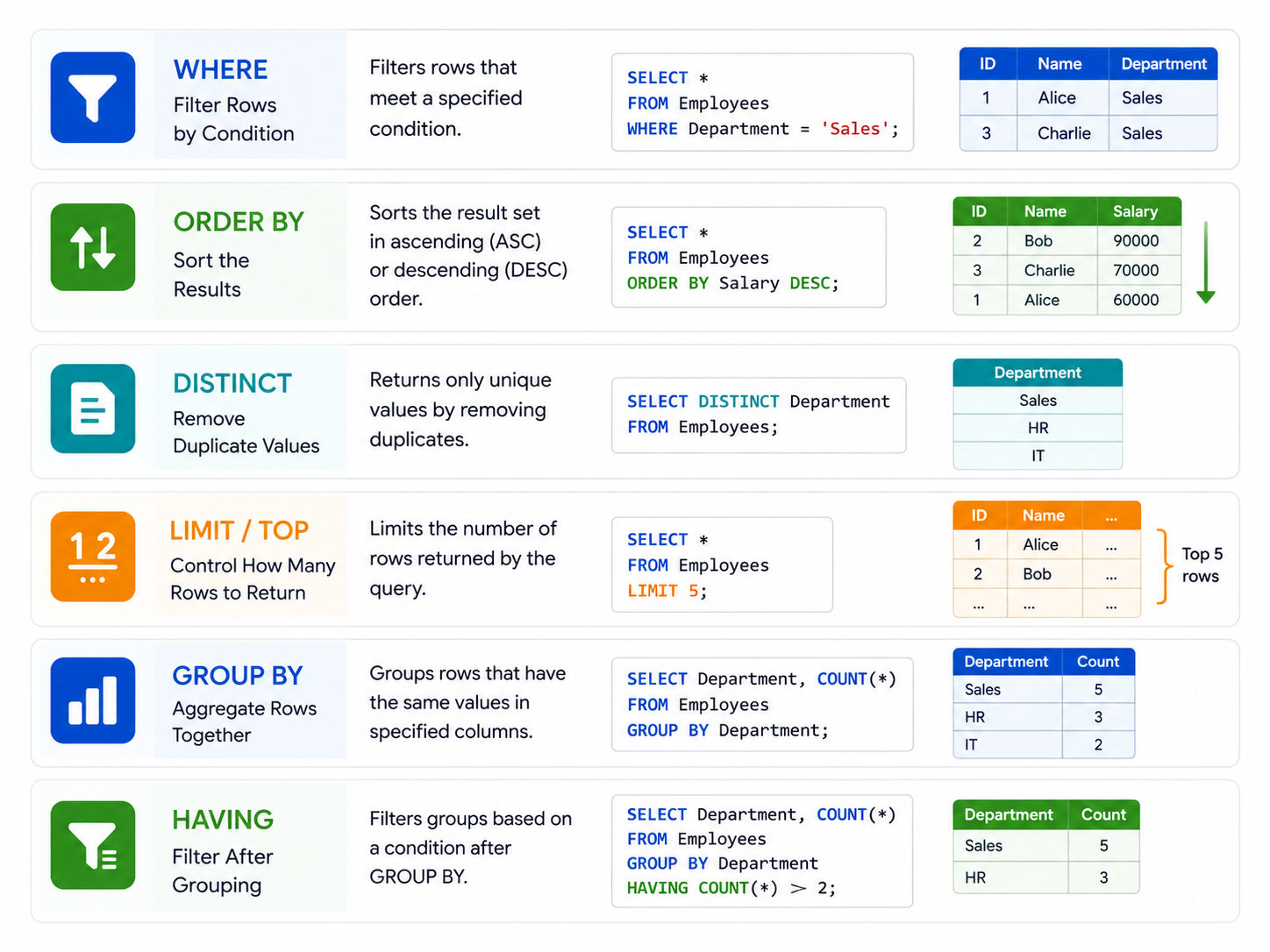
The WHERE clause limits which rows are returned:
SELECT * FROM employees
WHERE department = 'Engineering';
You can use comparison operators like =, >, <, >=, <=, and !=.
Combining conditions:
SELECT * FROM employees
WHERE department = 'Engineering' AND salary > 60000;
Use AND to require both conditions, OR to require either.
Sort your output in ascending or descending order:
SELECT first_name, salary
FROM employees
ORDER BY salary DESC;
ASC is ascending (default), DESC is descending. You can sort by multiple columns:
ORDER BY department ASC, salary DESC;
SELECT DISTINCT department
FROM employees;
This returns each unique department name once, even if multiple employees share the same one.
Also Read: Understanding Clauses in SQL: Types, Examples, Benefits and More
In MySQL or PostgreSQL:
SELECT * FROM employees
LIMIT 10;

In SQL Server (also known as DQL commands in SQL Server):
SELECT TOP 10 * FROM employees;
Both do the same thing: return only the first 10 rows.
SELECT department, COUNT(*) AS total_employees
FROM employees
GROUP BY department;
This groups all rows by department and counts how many employees are in each one.
WHERE filters rows before grouping. HAVING filters after:
SELECT department, AVG(salary) AS avg_salary
FROM employees
GROUP BY department
HAVING AVG(salary) > 55000;
Only departments with an average salary above 55,000 appear in the results.
Also Read: MongoDB vs PostgreSQL: Key Differences, Similarities, and More
Once you are comfortable with SELECT and basic clauses, you can move to more powerful patterns. These are used heavily in production databases and technical interviews.
SQL provides built-in functions to perform calculations on groups of rows:
Function |
What It Does |
Example |
| COUNT() | Counts rows | COUNT(*) AS total |
| SUM() | Adds up values | SUM(salary) |
| AVG() | Calculates average | AVG(salary) |
| MAX() | Finds highest value | MAX(salary) |
| MIN() | Finds lowest value | MIN(salary) |
Example combining multiple aggregates:
SELECT department,
      COUNT(*) AS headcount,
      AVG(salary) AS avg_salary,
      MAX(salary) AS top_salary
FROM employees
GROUP BY department;Joins are one of the most used features in DQL commands in SQL with examples from real-world databases.
SELECT employees.first_name, departments.dept_name
FROM employees
INNER JOIN departments ON employees.dept_id = departments.id;SELECT employees.first_name, departments.dept_name
FROM employees
LEFT JOIN departments ON employees.dept_id = departments.id;A subquery is a SELECT statement nested inside another:
SELECT first_name, salary
FROM employees
WHERE salary > (SELECT AVG(salary) FROM employees);
This finds all employees earning above the company average. The inner query runs first and passes its result to the outer one.
SELECT first_name, salary,
 CASE
   WHEN salary > 80000 THEN 'Senior'
   WHEN salary > 50000 THEN 'Mid-level'
   ELSE 'Junior'
 END AS level
FROM employees;
This creates a new column called level based on conditions you define.
SELECT * FROM employees
WHERE first_name LIKE 'A%';
% matches any sequence of characters. _ matches exactly one character.
-- IN: match any value in a list
SELECT * FROM employees
WHERE department IN ('HR', 'Finance', 'Engineering');

-- BETWEEN: match a range
SELECT * FROM employees
WHERE salary BETWEEN 40000 AND 70000;
Also Read: A Complete Roadmap for Database Administrator Skills in 2025
Most DQL commands in SQL Server follow the same standard SQL syntax. A few things differ:
Feature |
Standard SQL / MySQL |
SQL Server |
| Limit rows | LIMIT n | TOP n |
| String concat | CONCAT() | CONCAT() or + operator |
| Get current date | NOW() | GETDATE() |
| Check NULL | IS NULL | IS NULL (same) |
In DQL commands in SQL Server, the TOP clause is placed right after SELECT:
SELECT TOP 5 first_name, salary
FROM employees
ORDER BY salary DESC;
Everything else, including WHERE, GROUP BY, HAVING, ORDER BY, joins, and subqueries, works the same way.
SQL Server also supports Common Table Expressions (CTEs), which make complex queries more readable:
WITH top_earners AS (
   SELECT first_name, salary
   FROM employees
   WHERE salary > 80000
)
SELECT * FROM top_earners
ORDER BY salary DESC;
CTEs do not modify data. They are purely a DQL tool for organising complex SELECT logic.
Subscribe to upGrad's Newsletter
Join thousands of learners who receive useful tips
Even experienced developers make these errors:
Also Read: What is Database Management System?
DQL commands in SQL are the backbone of data retrieval. Every report, dashboard, analytics output, or app screen that shows data is powered by some form of a SELECT query. Starting with the basics like SELECT, WHERE, and ORDER BY, and building up to joins, subqueries, and aggregates, gives you full control over how you read and interpret data in a relational database.
Whether you are working with MySQL, PostgreSQL, or exploring DQL commands in SQL Server, the core logic stays the same. Practice writing queries on real datasets, study how query performance works, and keep your SELECT statements clean and focused.
Want personalized guidance on SQL and Data Science and upskilling? Speak with an expert for a free 1:1 counselling session today.
DQL stands for Data Query Language. It is the category of SQL commands used to retrieve and query data from a database. The primary DQL command is SELECT, which fetches data without modifying the underlying tables.
Yes, SELECT is the only command formally classified under DQL. However, it works with many clauses like WHERE, GROUP BY, ORDER BY, HAVING, and JOIN, which together make it a powerful data retrieval tool.
DML (Data Manipulation Language) includes INSERT, UPDATE, and DELETE, which change data in the database. DQL includes SELECT, which only reads data without making any changes. They serve entirely different purposes.
No. DQL commands only read and return data. They do not insert, update, delete, or alter anything in the database. This makes SELECT statements safe to run in production without risk of accidental data loss.
The core SELECT syntax remains the same. The main difference is that SQL Server uses TOP instead of LIMIT to restrict row count, and uses GETDATE() instead of NOW() for current date. Joins, subqueries, and aggregates work identically.
The correct order is: SELECT, FROM, JOIN, WHERE, GROUP BY, HAVING, ORDER BY, and then LIMIT or TOP. Writing clauses out of order will cause a syntax error in most database systems.
WHERE filters rows before any grouping or aggregation happens. HAVING filters results after grouping. If you want to filter based on an aggregate like COUNT or AVG, you must use HAVING, not WHERE.
Yes. You can chain multiple JOINs in a single SELECT statement to pull data from three or more tables. Each JOIN connects tables through a matching column, and you specify the type (INNER, LEFT, RIGHT) for each one.
A subquery is a SELECT statement written inside another SELECT statement. For example, you can write a subquery to find the average salary, and use that result in an outer query to filter employees who earn above that average. The inner query runs first.
DISTINCT removes duplicate values from your result set. When you write SELECT DISTINCT column_name FROM table, SQL returns each unique value only once, even if multiple rows share the same value in that column.
Aggregate functions perform calculations across multiple rows and return a single result. Common ones include COUNT, SUM, AVG, MAX, and MIN. They are used with SELECT and usually combined with GROUP BY to calculate values for each group of rows in the result.
98 articles published
Rahul Singh is an Associate Content Writer at upGrad, with a strong interest in Data Science, Machine Learning, and Artificial Intelligence. He combines technical development skills with data-driven s...
Speak with Data Science Expert
By submitting, I accept the T&C and
Privacy Policy
Start Your Career in Data Science Today
Top Resources
Executive Diploma
12 Months
Master's Degree
18 Months
Bootcamp
6 Months