Kali Linux Commands: The Complete List with Examples
By Rahul Singh
Updated on Jul 22, 2026 | 14 min read | 3.7K+ views
Share:

All courses
Certifications
More
By Rahul Singh
Updated on Jul 22, 2026 | 14 min read | 3.7K+ views
Share:
Table of Contents
Quick Overview
In this blog, you will learn Kali Linux basic commands, how Kali Linux installation commands work, how networking and permission commands function, and how to fix common command errors.
If topics like test automation, building reliable locators, and designing frameworks that can handle dynamic, fast-changing web pages interest you, upGrad's Data Science courses can help you build the skills to work with the tools and systems behind them.
Popular Data Science Programs
Kali Linux commands are text based instructions typed into the terminal to interact with the operating system.
Unlike a graphical interface where you click buttons, commands let you control files, users, networks, and software directly. This makes working in Kali Linux faster, more flexible, and better suited for tasks like penetration testing and system administration.
Kali Linux is built on Debian, so most Kali Linux basic commands work the same way they do on Ubuntu or other Debian-based systems.
What makes Kali different is the collection of security tools that come preinstalled, many of which are also run through the terminal.
The terminal is not optional in Kali Linux. Many security tools do not have a graphical version, or the graphical version has fewer features than the command-line tool.
Learning basic Kali Linux commands early makes it much easier to use the rest of the operating system with confidence.
Every Kali Linux command generally follows this pattern:
command [options] [target]
For example, ls -l /home lists the contents of the home directory in a detailed format. The command is ls, the option is -l, and the target is /home. Once you understand this pattern, most commands become easier to read and remember, even before you memorize what each one does. This applies whether you are running kali Linux basic commands or more advanced security tools.
If you're looking to break into this space or move up in your career, the Master of Science in Data Science from Liverpool John Moores University, offered in collaboration with upGrad, gives you the credentials and skills to get there.
Free Courses
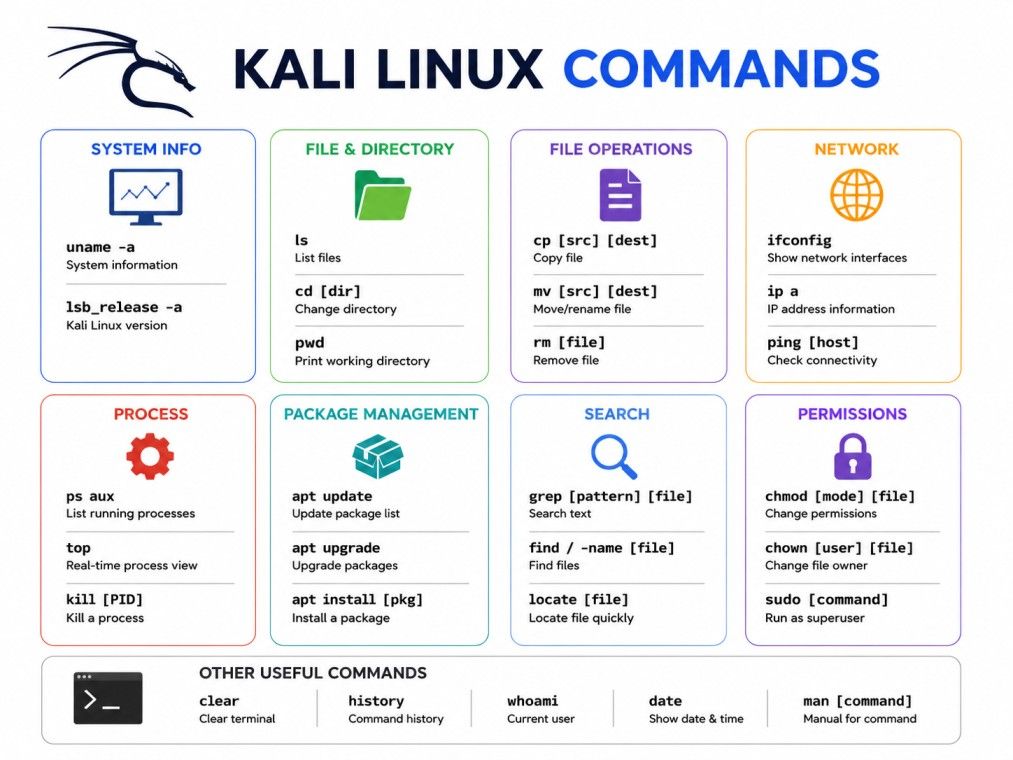
This section covers the basic Kali Linux commands you will use almost every day. These are the same commands found across most Linux distributions, so learning them here also helps if you switch to Ubuntu, Debian, or any other Linux system later.
Command |
Use |
Example |
| pwd | Shows the current working directory | pwd |
| ls | Lists files and folders | ls -l |
| cd | Changes the current directory | cd /var/log |
| mkdir | Creates a new directory | mkdir project1 |
| rm | Removes a file or directory | rm -r project1 |
| cp | Copies a file | cp file1.txt backup.txt |
| mv | Moves or renames a file | mv file1.txt docs/ |
| cat | Displays file contents | cat notes.txt |
Command |
Use |
Example |
| grep | Searches for text inside a file | grep "error" log.txt |
| less | Views file content one page at a time | less report.txt |
| more | Similar to less, shows content page by page | more report.txt |
| sort | Sorts lines in a file | sort names.txt |
| vi | Opens the vi text editor | vi config.txt |
| man | Opens the manual page for a command | man ls |
Command |
Use |
Example |
| whoami | Shows the current username | whoami |
| su | Switches to another user, often root | su root |
| uname | Displays system and kernel information | uname -a |
| uptime | Shows how long the system has been running | uptime |
| users | Lists logged in users | users |
| free | Shows memory usage | free -h |
| date | Displays current date and time | date |
| cal | Shows a calendar | cal |
| history | Shows a list of previously used commands | history |
| echo | Prints text to the terminal | echo "Hello Kali" |
This is not a list of all Kali Linux commands that exist, but these commands form the core of daily terminal use.
Data Science Courses to upskill
Explore Data Science Courses for Career Progression
IIIT Bangalore
Executive Post Graduate Certificate in Data Science & AIPlacement Assistance
Kali linux installation commands cover everything from adding new software to keeping your system current.
Since Kali is based on Debian, it uses the apt package manager, the same tool used across most Debian based Linux systems.
To install a new tool or application, use:
sudo apt install package-name
To remove a package you no longer need:
sudo apt remove package-name
These two Kali Linux installation commands cover most day-to-day software management. Always run them with sudo since installing or removing software needs administrator rights.
Before running any Kali Linux installation commands, it helps to search for the exact package name using apt search package-name. This avoids typos and confirms the tool is available in your current package sources.
Keeping Kali Linux updated is important for security and stability. The kali Linux update command refreshes the list of available packages:
sudo apt update
To actually upgrade installed packages to their latest versions, run:
sudo apt upgrade
It is good practice to run the Kali Linux update command before installing new tools. This makes sure you are pulling the latest, most secure version of any package.
Many installation errors happen simply because the package list was never refreshed.
You can check whether a package is already installed using:
dpkg -l | grep package-name
This avoids reinstalling tools you already have and helps you keep track of your Kali Linux setup over time.
Between the update command, the upgrade command, and basic install or remove commands, you have everything needed to manage software confidently in Kali Linux.
Networking commands are central to how Kali Linux is used, especially in security testing. These commands help you check connections, view network details, and download files directly from the terminal.
Command |
Use |
Example |
| ifconfig | Displays network interface details | ifconfig |
| ping | Checks connectivity to another device | ping google.com |
| wget | Downloads a file from a URL | wget https://example.com/file.zip |
| ip a | Shows IP address details, newer alternative to ifconfig | ip a |
| netstat | Displays active network connections | netstat -tulnp |
ifconfig remains one of the most searched networking commands in Kali Linux because it quickly shows IP addresses, network masks, and interface status. If ifconfig does not work on a fresh install, ip a is the modern replacement.
Wifi commands are used to check wireless adapters, scan for networks, and manage wireless interfaces.
These commands are widely used in wireless security testing, though they require a compatible wireless adapter that supports monitor mode.
Nmap is a network scanning tool built into Kali Linux. A basic scan looks like this:
nmap 192.168.1.1
This checks which ports are open on a target device. Nmap has many options for scan type, speed, and detail level, making it one of the most useful tools in Kali Linux for network analysis and penetration testing.
File and folder permissions control who can read, write, or execute a file. Understanding permission commands prevents many common errors in Kali Linux.
chmod changes what actions are allowed on a file:
chmod 755 script.sh
chown changes who owns a file:
chown user:group file.txt
Permissions in Linux are grouped into three categories: owner, group, and others. Each category can have read, write, or execute access.
A "permission denied" message usually means one of two things. Either the file does not have execute permission, or you do not have the rights to access it. Try:
chmod +x filename
If that does not work, run the command with sudo to temporarily use administrator rights. Be careful with sudo, since it grants full system access and mistakes can affect the whole system, not just one file.
Subscribe to upGrad's Newsletter
Join thousands of learners who receive useful tips
Beyond Kali Linux basic commands for files and networking, Kali Linux also manages users and running processes on the system.
Command |
Use |
| adduser | Creates a new user account |
| deluser | Removes a user account |
| passwd | Changes a user's password |
| usermod | Modifies an existing user account |
These commands are mainly used when Kali Linux is set up for multiple users or in a shared lab environment.
Command |
Use |
| ps | Lists running processes |
| top | Shows live system resource usage |
| kill | Stops a process using its process ID |
| pkill | Stops a process by name |
If a tool freezes or a script runs longer than expected, top helps you identify which process is using too much CPU or memory, and kill lets you stop it safely.
Kali NetHunter is a mobile version of Kali Linux built for Android devices. It brings many of the same tools and Kali Linux NetHunter command options to a phone or tablet, useful for testing on the go.
Common Kali Linux NetHunter command tasks include:
Most standard Kali Linux tools and syntax work the same way inside NetHunter, since it runs a full Kali filesystem.
The main difference is hardware support, since not every Android device supports features like wireless monitor mode.
Anyone comfortable with Kali Linux basic commands on a computer can pick up a Kali Linux nethunter command routine quickly, since the syntax does not change.
Termux is a terminal emulator for Android that can be used alongside or instead of NetHunter for a lighter setup. It does not come with Kali preinstalled, but many users install Kali Linux tools inside Termux.
A common Kali Linux Termux command workflow looks like this:
pkg install wget
pkg install nmap
Termux uses its own package manager, pkg, which works similarly to apt. Once tools are installed, a typical Kali Linux Termux command like ls, cd, or nmap behaves the same way it does on a full Kali Linux install.
Termux is popular for lightweight testing and learning, since it does not need a full Kali Linux installation or a rooted device. It is a practical starting point for anyone who wants to practice a Kali Linux Termux command routine directly from a phone before moving to a full desktop setup.
Kali Linux is widely known for its security testing tools, many of which are run through specific commands. A few commonly used ones include:
These tools should only be used on systems you own or have explicit permission to test. Each of these commands has enough depth for its own dedicated guide, but knowing they exist helps you understand the full range of what Kali Linux can do beyond basic file and system management.
Mastering Kali Linux basic commands first makes these advanced tools far easier to pick up later.
Even experienced users run into errors while working in Kali Linux. Here are the most common ones and how to fix them.
This error means the system cannot locate the program you typed. Common causes and fixes:
If apt shows broken package errors, try these steps in order:
sudo apt --fix-broken install
sudo apt update
sudo apt upgrade
This usually resolves dependency conflicts. If the issue continues, clearing the package cache with sudo apt clean and running the update command again often helps.
Permission denied errors are usually solved with chmod +x or by running the command with sudo. Network related errors, such as a wireless adapter not showing up, often require checking ifconfig or ip a to confirm whether the interface is detected at all.
Here is a quick summary table covering all Kali Linux commands mentioned in this guide, grouped by category for fast reference.
Category |
Key Commands |
| Navigation and Files | pwd, ls, cd, mkdir, rm, cp, mv, cat |
| Text Viewing | grep, less, more, sort, vi, man |
| System Info | whoami, su, uname, uptime, users, free, date, cal, history, echo |
| Installation | apt install, apt remove, apt update, apt upgrade |
| Networking | ifconfig, ping, wget, ip a, netstat |
| Wifi | iwconfig, airmon-ng, airodump-ng |
| Permissions | chmod, chown |
| User Management | adduser, deluser, passwd, usermod |
| Process Management | ps, top, kill, pkill |
| Security Tools | nmap, aircrack-ng, john, metasploit |
Bookmark this table for quick access whenever you need to recall a command without searching through the full guide again.
Kali Linux commands are the foundation for working with this operating system, whether you are a beginner learning basic file operations or a student practicing network scans. This guide has covered kali linux basic commands, kali linux installation commands, the kali linux update command, networking, permissions, user and process management, and even how commands extend to a kali linux nethunter command routine and a kali linux termux command setup on mobile devices.
Want personalized guidance on Data Science and upskilling? Speak with an expert for a free 1:1 counselling session today.
Start with pwd and ls, since they show your current location and the files around you. These two basic Kali Linux commands form the foundation for almost every other command you will use later, from file management to running security tools.
Run sudo apt update followed by sudo apt upgrade. The kali linux update command refreshes the package list first, then the upgrade command installs the newer versions. Running both together keeps your system current and avoids many installation errors.
Yes, mostly. Kali Linux is built on Debian, the same base as Ubuntu, so most basic kali linux commands like ls, cd, and apt install work identically. The main difference is the extra security tools that come preinstalled with Kali.
Yes, through Kali NetHunter or Termux. A kali linux nethunter command runs inside a full Kali environment on supported Android devices, while a kali linux termux command works through Termux's own package manager after installing the needed tools separately.
This usually means the file lacks execute permission or your user account does not have the required access. Try chmod +x filename first, and if that does not resolve it, run the command with sudo to use administrator rights temporarily.
sudo stands for superuser do. It lets a regular user run a command with administrator level permissions, which is required for tasks like installing software, updating packages, or editing protected system files.
There is no single command that prints every possible command, since it depends on installed packages. However, typing compgen -c in the terminal lists all commands and functions currently available in your shell session.
apt update refreshes the list of available package versions without installing anything. apt upgrade then installs the newer versions of packages already on your system. Running update before upgrade is the standard kali linux update command routine.
No. Termux is a terminal emulator for Android that lets you install many Linux tools, including some used in Kali. A kali linux termux command setup is lighter and does not require root access, unlike a full Kali Linux or NetHunter installation.
Use ifconfig or the newer ip a command. Both display network interface details including your IP address, though ip a is more commonly used on recent Kali Linux versions where ifconfig may need to be installed separately.
Start with basic kali linux commands for files, navigation, and permissions before touching security tools. A solid grasp of the fundamentals covered in this guide makes tools like nmap or aircrack-ng far easier to understand and use safely.
96 articles published
Rahul Singh is an Associate Content Writer at upGrad, with a strong interest in Data Science, Machine Learning, and Artificial Intelligence. He combines technical development skills with data-driven s...
Speak with Data Science Expert
By submitting, I accept the T&C and
Privacy Policy
Start Your Career in Data Science Today
Top Resources
Executive Diploma
12 Months
Master's Degree
18 Months
Bootcamp
6 Months