C Preprocessor Directives: A Complete Guide
By Sriram
Updated on Jul 23, 2026 | 17 min read | 4.45K+ views
Share:

All courses
Certifications
More
By Sriram
Updated on Jul 23, 2026 | 17 min read | 4.45K+ views
Share:
Table of Contents
Quick Overview
In this blog, we will break down what preprocessor directives in C actually do, the different types of preprocessor directives in C, and how each one is used with simple examples.
If topics like C programming fundamentals, low-level memory and build control, and writing efficient, portable code interest you, upGrad's Data Science courses can help you build the skills to work with the tools and systems behind them.
What Are Preprocessor Directives in C?
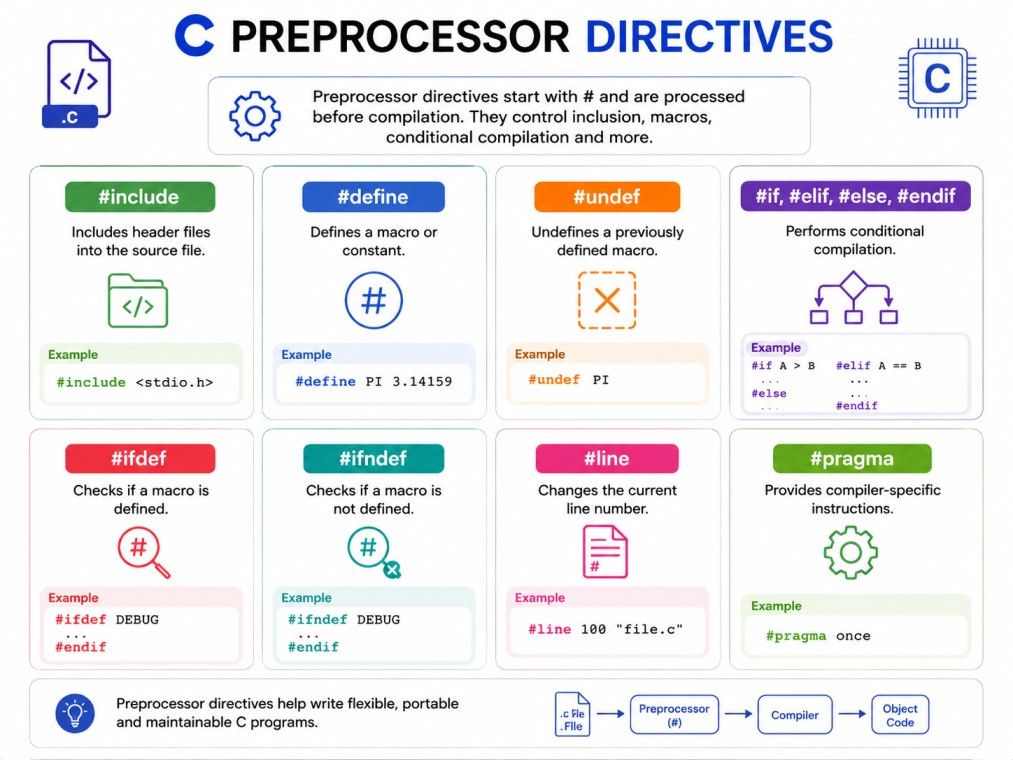
Preprocessor directives in C are instructions that run before your actual C code is compiled. They are not part of the C language grammar in the way that loops or functions are.
Instead, Preprocessor directives in C tell the preprocessor, a separate tool that runs before the compiler, to do something to your source code first.
Every preprocessor directive starts with a hash symbol (#). This is what makes them easy to spot. Unlike regular C statements, they do not end with a semicolon, and they are not evaluated at runtime. They are processed and removed before your code ever reaches the compiler.
Here is a simple example:
#include <stdio.h>
#define PI 3.14
int main() {
   printf("Value of PI is %f", PI);
   return 0;
}
In this code, #include and #define are both preprocessor directives in the C language. Before compilation starts, the preprocessor replaces PI with 3.14 everywhere it appears, and it pulls in the contents of the stdio.h header file.
Also Read: C Tutorial for Beginners
The C compilation process happens in stages, and the preprocessor is the very first one. Here is a quick breakdown:
This means by the time your compiler sees your code, all the #include files are already pasted in, and all your macros are already replaced with their actual values. The compiler never even sees the directives themselves.
This makes preprocessor directives in the C language different from regular statements. They belong to a separate build step, not to the language grammar the compiler checks.
This is why bugs caused by preprocessor directives can feel confusing at first. The error messages often point to code that does not look like what you originally typed, because the preprocessor already changed it.
If you're looking to break into this space or move up in your career, the Master of Science in Data Science from Liverpool John Moores University, offered in collaboration with upGrad, gives you the credentials and skills to get there.
Popular Data Science Programs
The types of preprocessor directives in C broadly fall into a few categories based on what they do. There are five types of C preprocessor directives.
Here is a quick overview table before we go into detail:
Category |
Directives |
Purpose |
| File inclusion | #include | Brings in code from another file |
| Macro definition | #define, #undef | Creates or removes constants and macros |
| Conditional compilation | #if, #ifdef, #ifndef, #else, #elif, #endif | Compiles code only under certain conditions |
| Error and line control | #error, #line | Raises custom errors or adjusts line tracking |
| Compiler instructions | #pragma | Gives compiler-specific instructions |
The #include directive tells the preprocessor to copy the entire contents of another file into your current file. It is the most commonly used of all preprocessor directives in C.
There are two ways to write it:
#include <filename>
#include "filename"
The angle brackets (<>) tell the compiler to look in the standard system directories, usually for standard library headers like stdio.h or stdlib.h. The double quotes ("") tell it to look in your own project folder first, and then fall back to the system directories. This is the version you use for your own custom header files.
The #define directive creates a macro. A macro is basically a name that gets replaced with something else before compilation. There are two kinds:
Object-like macros are usually used for constants. Function-like macros are used when you want reusable logic without the overhead of an actual function call.
Sometimes a macro needs more than one line. You can do this using the backslash (\) character at the end of each line to tell the preprocessor the macro continues on the next line:
#define PRINT_INFO(x) \
printf("Value: %d\n", x); \
printf("Processed\n");
Every line except the last must end with a backslash, and there should be no space after it.
Macros can also call other macros. This is called nesting, and it lets you build more complex logic out of smaller pieces:
#define SQUARE(x) ((x) * (x))
#define CUBE(x) (SQUARE(x) * (x))
Here, CUBE uses SQUARE inside its own definition. Nested macros are powerful, but they can get hard to read if you overuse them, so it is worth keeping them simple.
If you want to remove a macro definition partway through your code, you use #undef. This is useful when you want a macro name to mean different things in different parts of a large project, or when you are including multiple headers that might redefine the same macro name.
#define VERSION 1
#undef VERSION
#define VERSION 2
After the #undef, the old value of VERSION is gone, and the new #define sets it fresh.
C also comes with a set of built-in macros you do not need to define yourself. These are useful for debugging and logging.
Macro |
What It Gives You |
| __FILE__ | Name of the current source file |
| __LINE__ | Current line number |
| __DATE__ | Date the file was compiled |
| __TIME__ | Time the file was compiled |
| __TIMESTAMP__ | Date and time the file was last modified |
These are often combined into custom logging macros:
printf("Error in %s at line %d\n", __FILE__, __LINE__);
This kind of line is extremely common in real production code, because it tells you exactly where a problem happened.
Two operators deserve a special mention because they confuse a lot of beginners.
Both are used in advanced macro programming, especially when generating repetitive code automatically.
Also Read: Uses of C Language - Its Relevance in 2026
Conditional compilation lets you include or exclude parts of your code based on certain conditions. This is one of the most practical types of preprocessor directives in c, especially for writing code that needs to run on different platforms or in different build modes.
The main directives here are #if, #ifdef, #ifndef, #else, #elif, and #endif.
#ifdef DEBUG
printf("Debug mode is on\n");
#else
printf("Running in release mode\n");
#endif
This is commonly used for turning debug logs on and off, or for writing code that behaves differently on Windows versus Linux.
The #error directive stops compilation immediately and shows a custom error message. It is useful when you want to force a build to fail under certain conditions, rather than letting a silent bug slip through.
#ifndef CONFIG_FILE
#error "CONFIG_FILE must be defined before compiling"
#endif
If CONFIG_FILE is not defined, the compiler stops and shows your custom message instead of continuing with a broken build.
The #line directive changes the line number and, optionally, the file name that the compiler reports in error messages. It is mostly used by code generation tools, not by developers writing code by hand.
#line 100 "generated_file.c"
After this line, the compiler will act as if the next line of code is line 100 in a file called generated_file.c. This helps tools produce more meaningful error messages when they generate C code automatically.
Also Read: Structure of a C Program: Sections, Syntax & Best Practices
#pragma gives special instructions directly to the compiler. These instructions are often compiler-specific, meaning different compilers may support different pragmas.
A very common one is:
#pragma once
This tells the compiler to include a header file only once, even if it is included multiple times across your project. It does the same job as header guards, just with less code.
Another example is #pragma pack, which controls how the compiler aligns data inside structures in memory.
Also Read: 29 C Programming Projects in 2026 for All Levels [Source Code Included]
Header guards are one of the most practical C preprocessor directives you will use in real projects. They solve a very specific and very common problem. If a header file gets included more than once in the same compilation, you can end up with duplicate declarations, which causes compiler errors.
A header guard prevents this by wrapping the entire header file in a conditional block:
#ifndef MYHEADER_H
#define MYHEADER_H
// header content goes here
#endif
The first time the header is included, MYHEADER_H is not yet defined, so the code inside runs and defines it. If the same header gets included again anywhere else in the project, MYHEADER_H is already defined, so the preprocessor skips the content entirely.
This is also how you avoid circular includes, where header A includes header B, and header B tries to include header A again, creating a loop. Header guards break that loop automatically.
Some compilers also support #pragma once as a shortcut for the same purpose. It does the same job with a single line, though header guards remain more portable across older or less common compilers.
Free Courses
A common question beginners ask is whether to use a macro or a regular function. Both can do similar things, but they work very differently under the hood.
Aspect |
Macro |
Function |
| Processed by | Preprocessor | Compiler |
| Type checking | No | Yes |
| Speed | Usually faster, no function call overhead | Slightly slower due to call overhead |
| Debugging | Harder, since code is expanded before compiling | Easier, since it appears as-is |
| Code size | Can increase if used repeatedly | Stays compact |
An inline function is often a safer middle ground compared to a function-like macro. It gives you the speed benefit of avoiding a full function call, while still keeping type checking and better debugging support. If your logic is simple and used very frequently, a macro can help. For anything more complex, a function or inline function is usually the safer choice.
Data Science Courses to upskill
Explore Data Science Courses for Career Progression
IIIT Bangalore
Executive Post Graduate Certificate in Data Science & AIPlacement Assistance
Another common comparison is #define versus const. Both can be used to create constants, but they behave differently.
#define MAX_USERS 50
const int MAX_USERS = 50;
The const version is generally preferred in modern C code because it gives you type safety and shows up properly in a debugger. #define is still common for simple constants and for conditional compilation, where const cannot be used at all.
typedef is a different tool altogether. While #define can rename almost anything through text replacement, typedef is specifically for creating aliases for types, and it is processed by the compiler, not the preprocessor. This makes typedef safer for type definitions.
Both #ifdef and #if defined check whether a macro is defined, but they are not exactly the same.
#ifdef DEBUG
// code
#endif

#if defined(DEBUG)
// code
#endif
#ifdef can only check a single macro. #if defined can be combined with logical operators to check multiple conditions at once:
#if defined(DEBUG) && defined(VERBOSE)
// code
#endif
If you only need to check one macro, #ifdef is simpler. If you need to combine multiple conditions, #if defined is the better choice.
Here is a combined example that uses several preprocessor directives in c together, so you can see how they work in a real file:
#include <stdio.h>
#define MAX_USERS 100
#undef MAX_USERS
#define MAX_USERS 200

#ifndef VERSION
#define VERSION 1
#endif

#if VERSION < 2
#error "This code requires VERSION 2 or higher"
#endif

int main() {
   printf("Max users allowed: %d\n", MAX_USERS);
   printf("File: %s, Line: %d\n", __FILE__, __LINE__);
   return 0;
}
This small program shows file inclusion, macro definition, undefining a macro, conditional compilation, and a predefined macro, all working together in a single file.
Subscribe to upGrad's Newsletter
Join thousands of learners who receive useful tips
Once you know the types of preprocessor directives in C, the next step is using them well. Preprocessor directives are useful, but they can also make code harder to read if they are overused. Here are some practical tips:
Following these habits keeps your use of preprocessor directives in C clean and predictable, especially as a codebase grows and more people work on it.
If you define the same macro twice with different values, most compilers will throw a redefinition warning or error.
#define MAX 100
#define MAX 200
To fix this, you have two clean options:
#ifndef MAX
#define MAX 100
#endif
This pattern is common in shared header files where multiple parts of a project might try to define the same constant.
Also Read: Exploring Macros in C: Types, Uses, and Common Pitfalls
If a macro is not expanding the way you expect, a few things are usually to blame:
A quick way to debug this is to check the preprocessor output directly.
Most compilers support a flag like -E (in GCC) that shows you exactly what your code looks like after the preprocessor has run, before compilation even starts. This makes it much easier to see where a macro went wrong.
C preprocessor directives might look small, but they play a big role in how your code gets built. From including files with #include, to defining constants with #define, to controlling what gets compiled with conditional directives, these tools give you control over your code before the compiler even sees it.
Want personalized guidance on Data Science and upskilling? Speak with an expert for a free 1:1 counselling session today.
They fall into five groups: file inclusion, macro definition, conditional compilation, error and line control, and compiler-specific pragma instructions. Each group serves a different purpose, from pulling in header files to controlling what gets compiled.
A preprocessor directive is processed before compilation and always starts with #. A keyword, like int or return, is part of the actual C language and is processed by the compiler itself. Directives never appear in the final compiled code as written.
Yes, most preprocessor directives, including #define and conditional compilation directives, can technically be placed inside a function body. However, #include is almost always placed at the top of a file for readability and to avoid confusing code structure.
Preprocessor directives are not C statements. They are instructions for the preprocessor, which runs as a separate step before the compiler. Since they are not part of the actual program logic, they follow their own syntax rules and do not need a semicolon at the end.
No, #include is not a keyword. It is a preprocessor directive. Keywords like if, while, and return are reserved words in the C language itself, while #include is an instruction handled entirely by the preprocessor before compilation starts.
If a header file without a guard gets included more than once in the same compilation, you will likely get redefinition errors for functions, variables, or structures. This is one of the most common beginner mistakes when working with multiple header files.
No, the C preprocessor does not support loops in the traditional sense. It only supports conditional inclusion through directives like #if and #ifdef. Repetitive code generation is usually handled through nested macros or external code generation tools instead.
#error stops compilation immediately and displays a custom message, making it useful for enforcing required conditions. #warning is a non-standard extension supported by some compilers that shows a message but still allows compilation to continue.
Yes, most modern C compilers including GCC and Clang support the #line directive. It is mainly used by tools that generate C code automatically, so that error messages point back to the original source rather than the generated file.
Yes, preprocessor directives and macro names in C are case sensitive. #define MAX 100 and #define max 100 are treated as two completely different macros, so consistency in naming matters throughout a project.
Yes, this is possible using variadic macros, introduced in C99. You use ... in the macro definition and __VA_ARGS__ to refer to the extra arguments, which is often used for building flexible logging or debugging macros.
730 articles published
Sriram K is a Senior SEO Executive with a B.Tech in Information Technology from Dr. M.G.R. Educational and Research Institute, Chennai. With over a decade of experience in digital marketing, he specia...
Speak with Data Science Expert
By submitting, I accept the T&C and
Privacy Policy
Start Your Career in Data Science Today
Top Resources
Master's Degree
18 Months
Executive Diploma
12 Months
Bootcamp
6 Months