Email Marketing Automation: How It Works and Why It Matters
By upGrad
Updated on Jun 11, 2026 | 7 min read | 1.9K+ views
Share:

All courses
Certifications
More
By upGrad
Updated on Jun 11, 2026 | 7 min read | 1.9K+ views
Share:
Table of Contents
Email marketing automation helps businesses send the right message to the right person at the right time without manually creating and sending every email. It uses predefined workflows, triggers, and customer actions to automate communication across the customer journey.
Manual email campaigns take time. Email marketing automation solves this problem by automatically sending emails based on predefined conditions.
This blog breaks down exactly how email marketing automation works, what workflows to build first, which tools are worth your time, and what mistakes to avoid. Whether you're just starting out or improving what you already have, there's something practical here for you.
Explore upGrad's Digital Marketing programs to build practical skills in email marketing, SEO, SEM, keyword research, website analytics, performance marketing, content strategy, social media marketing, and data-driven campaign optimization.
Email marketing automation means using software to send emails automatically based on triggers, rules, or schedules. You set up the logic once. The software handles the rest.
Think about it this way: a user signs up on your website. Within seconds, they get a welcome email. Three days later, they get a short intro to your product. If they click a link, a different follow-up goes out. None of that requires you to be involved in real time.
Every automation has three core components:
You can keep it simple with a single welcome email or build multi-branch sequences that respond to every action a subscriber takes.
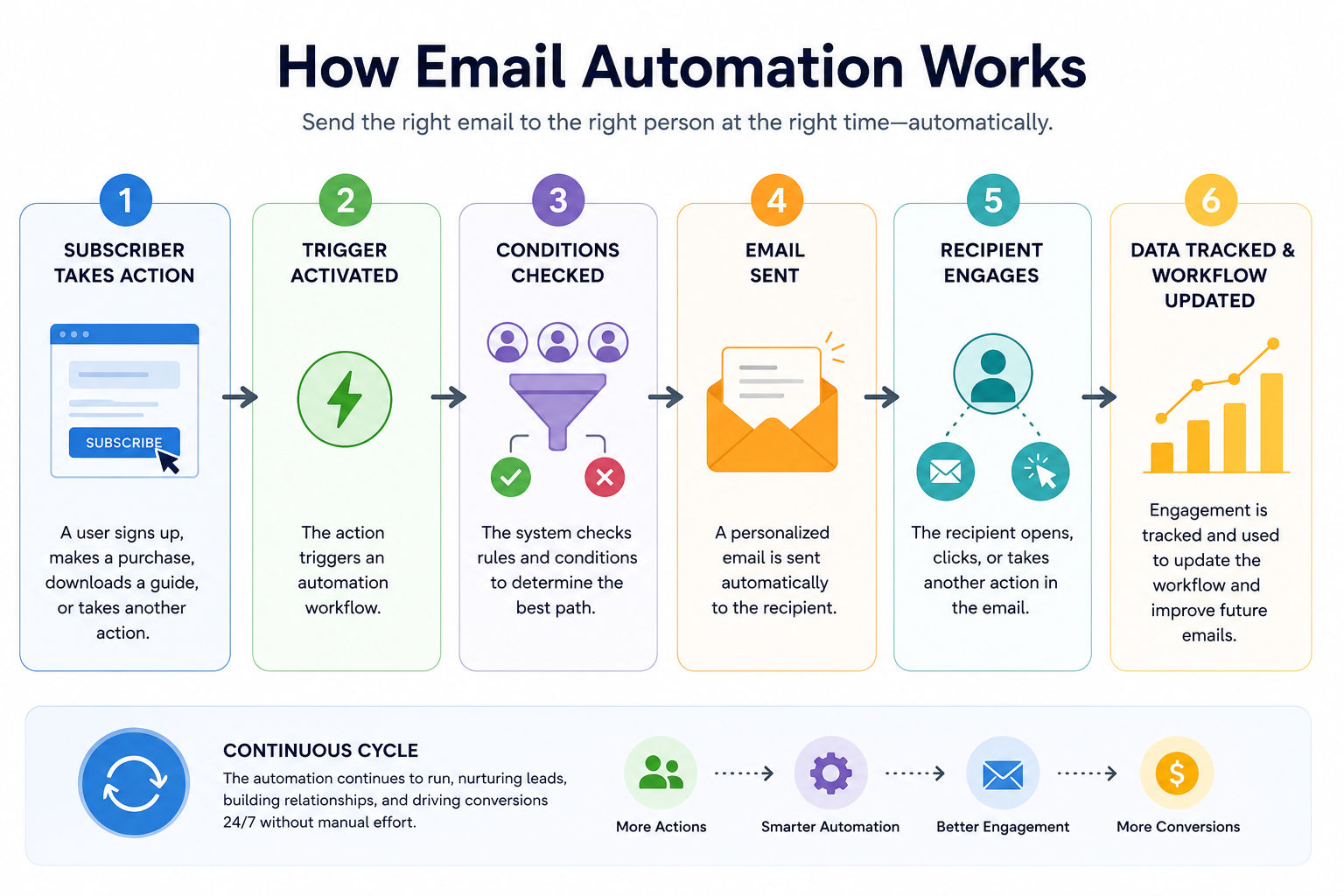
Email marketing automation isn't just for large companies. Platforms like Mailchimp, Brevo, and ConvertKit offer automation features on free or low-cost plans. You don't need a big budget to get started. So even small-scale companies can use email automation.
Do read: Email Marketer Job Description: Salary, Top Companies, and Future
Free Courses
Not all automations serve the same purpose. Some welcome new subscribers. Others recover lost sales or re-engage people who've gone quiet. Knowing which type to build first saves a lot of time than trial and error.
This is the first automation anyone should set up. When someone joins your list, they're most engaged in the first 24 to 48 hours. A welcome sequence introduces your brand, sets expectations, and delivers on whatever you promised, whether that's a free guide, a discount, or a newsletter. Typically 3 to 5 emails over the first week or two.
For e-commerce, this one pays for itself fast. If a shopper adds items to their cart but doesn't complete the purchase, an automated reminder goes out. The first cart recovery email sent within an hour consistently shows the highest recovery rates. Most tools let you build a 2 to 3 email sequence here.
Also read: How To Do Email Marketing [Complete Tutorial]
Not every lead is ready to buy on day one. A nurture sequence sends relevant content over days or weeks to build trust and keep your brand visible. The goal isn't to push a sale in every email. It's to stay useful until the person is ready to act.
Subscribers who haven't opened your emails in 60 to 90 days are considered inactive. A re-engagement campaign sends a targeted message to win them back. If they still don't respond, it's often better to remove them from your list. A smaller, engaged list delivers better deliverability than a large, unresponsive one.
Sending an order confirmation is basic. A proper post-purchase sequence thanks the customer, shares usage tips, requests a review, and cross-sells related products, all on autopilot. It's one of the highest-ROI automations for both e-commerce and SaaS.
Workflow Type |
Best For |
Typical Length |
| Welcome Sequence | All businesses | 3 to 5 emails |
| Abandoned Cart | E-commerce businesses | 2 to 3 emails |
| Lead Nurture | B2B companies, SaaS businesses, and course creators | 5 to 10 emails |
| Re-engagement | Newsletters, apps, and subscription-based businesses | 2 to 4 emails |
| Post-Purchase | E-commerce and SaaS businesses | 3 to 6 emails |
Do read: How to Create Social Media Content Strategy? Everything You Need to Know
Digital Marketing Courses to upskill
Explore Digital Marketing Courses for Career Progression
MICA Executive Alumni Status
Setting this up for the first time can feel overwhelming. Here's a practical order that works whether you're on a basic plan or a more advanced platform.
Your tool determines what's possible. For small lists or simple sequences, Mailchimp or Brevo work fine. If you need more advanced branching logic or deeper CRM integration, look at ActiveCampaign, Klaviyo for ecommerce, or HubSpot. Pick based on your current needs, not a hypothetical future setup.
Don't build an automation just because you can. Each sequence should have one clear goal: welcome a new subscriber, recover an abandoned cart, or re-engage an inactive contact. Vague goals produce confusing email sequences that don't convert.
Sketch out the trigger, the conditions, and each email before you touch the platform. This step alone prevents most of the errors people make when they jump straight into the builder. A simple flowchart on paper works fine.
Each email needs a single focus. Don't cram multiple goals into one message. The subject line should reflect the email's one job. Keep copy short. One clear call-to-action per email is the rule, not the exception.
Send test emails to yourself. Check that triggers fire correctly on a test account. Walk through every branch of your logic. Small mistakes in automation can reach thousands of people before you notice. Testing isn't optional.
Once live, track open rates, click rates, and conversions for each email in the sequence. If one email shows a sharp drop in engagement, investigate. Automation isn't just set and forget. It's set and then monitor.
Must read: 7 Best Email Marketing Examples You Would Not Want To Miss
The email marketing tool landscape is crowded. Here's an honest look at what each major platform is actually good at.
Tool |
Best For |
Starting Price |
| Mailchimp | Beginners and small email lists | Free up to 500 contacts |
| Brevo | Budget-conscious teams | Free up to 300 emails per day |
| ActiveCampaign | Advanced automation and B2B marketing | From approximately $15/month |
| Klaviyo | Ecommerce businesses using Shopify or WooCommerce | Free up to 250 contacts |
| HubSpot | CRM-integrated email automation | Free tier available |
| ConvertKit | Creators, bloggers, and course sellers | Free up to 1,000 contacts |
Mailchimp has become more restrictive on its free plan over the years. If you're in India working with a tight budget, Brevo offers strong automation features at a significantly lower price point. Klaviyo is worth the investment if you're running a Shopify or WooCommerce store since the integration runs deep.
Don't switch tools too soon. The learning curve on any automation platform is very essential. Get good at one before you consider moving to another tool.
Also read: 7 Best Lead Generation Techniques That Work in 2025
Most email automation problems aren't about the tool. They're about how the logic was designed or how the emails were written.
Mistake |
Why It's a Problem |
Best Practice |
| Sending too many emails too fast | Overwhelms subscribers and increases unsubscribe rates | Space emails appropriately to maintain engagement and avoid inbox fatigue |
| Using the same sequence for everyone | Creates irrelevant experiences and reduces engagement | Segment your audience so new and returning customers receive different journeys |
| Forgetting to update automations | Outdated content, expired offers, or discontinued features can damage trust | Review and update active workflows at least once every quarter |
| Ignoring mobile optimization | Poor mobile experiences lead to lower engagement and higher deletion rates | Design responsive emails that display correctly on all screen sizes |
| Not setting an exit condition | Customers continue receiving emails after converting, creating a poor experience | Remove contacts from nurture workflows immediately after they complete the desired action |
These issues show up repeatedly across businesses of every size. So, review your automation map, check your segments, and test every sequence from the subscriber's perspective.
Also read: What is Customer Relationship Management? A Beginner’s Guide
You can't improve what you don't track. But which metrics actually matter for automated sequences?
Metric |
What It Tells You |
Typical Benchmark |
| Open Rate | Measures subject line effectiveness and overall list health | 20% to 40%, depending on industry |
| Click-Through Rate (CTR) | Indicates how engaging your email content and call-to-action are | 2% to 5% average |
| Conversion Rate | Shows whether the email achieved its intended goal, such as a signup or purchase | Varies based on campaign objective |
| Unsubscribe Rate | Signals audience fatigue, content relevance, or targeting issues | Below 0.5% is generally considered healthy |
| Bounce Rate | Reflects email list quality and deliverability issues | Keep hard bounce rates below 2% |
Open rates are getting harder to measure accurately because Apple's Mail Privacy Protection pre-loads emails and inflates open data. Don't obsess over open rates alone. Click-through rates and conversions give you more reliable signals.
For automated sequences, look at where people drop off. If your five-email welcome series shows a sharp decline after email three, that email needs work. Could be the subject line, the content, or that you're asking for too much too soon.
Email marketing automation helps businesses deliver timely, relevant, and personalized communication without relying on constant manual effort. From welcome sequences and lead nurturing campaigns to cart recovery and customer retention workflows, automation supports every stage of the customer journey.
The strongest results come from thoughtful planning, audience segmentation, consistent testing, and customer-focused messaging. When implemented correctly, email marketing automation becomes more than a time-saving tool. It becomes a reliable system for building relationships, increasing engagement, and supporting long-term business growth.
Ready to start your journey? Book a free consultation with upGrad today to find the best path for your career.
Email marketing refers to sending emails to your audience, including newsletters, promotions, and announcements. Email marketing automation specifically means using software to send those emails automatically based on triggers or schedules, without manual involvement each time. Automation makes the process more consistent and far more efficient at scale.
Yes, it's one of the most practical tools a small business can use. Platforms like Brevo and Mailchimp offer automation features on free plans. Even a basic welcome sequence and a post-purchase follow-up can save hours each week while delivering a better experience to your customers.
There's no fixed number. A welcome sequence typically runs 3 to 5 emails. A lead nurture sequence may span 5 to 10 emails over several weeks. The right length depends on your goal, your audience, and how much value you can deliver before you ask them to take action.
Use a verified sending domain, keep your list clean by removing bounced and inactive addresses, avoid spam trigger words in subject lines, and make sure you have permission to email the people on your list. Consistent sending volume over time also helps establish a positive sender reputation.
Yes. Most automation tools support dynamic fields that pull in the subscriber's name, location, purchase history, or browsing behaviour. Personalisation beyond just the first name, like referencing what someone bought or browsed, tends to drive noticeably higher engagement and click-through rates.
Common triggers include form submissions, purchases, link clicks, page visits, date-based events like birthdays or anniversaries, tag additions, and inactivity after a set period. Advanced platforms let you combine multiple conditions into more complex trigger logic for greater precision.
At minimum, review every active automation once a quarter. Check for outdated offers, broken links, or declining performance. Any time you change your product, pricing, or branding, go through all related automations to make sure they're still accurate.
A drip campaign sends a pre-set series of emails at fixed intervals regardless of what the recipient does. A behavioural automation workflow responds to actual actions like opens, clicks, or purchases, and sends different emails based on that behaviour. Drip campaigns are simpler to set up; behavioural workflows are more responsive and typically convert better.
Not at all. Even with a few hundred subscribers, automation saves time and improves consistency. The return from a well-built welcome sequence or cart recovery flow doesn't depend on list size. It depends on how relevant and well-written your emails are.
Brevo and Mailchimp are both solid starting points. Brevo works well for Indian businesses because of its competitive pricing and automation features available even on the free plan. Mailchimp has a large knowledge base and active community, which helps when you're learning and run into questions.
Track click-through rates and conversion rates for each email in your sequence. Look at where subscribers drop off or unsubscribe. Compare conversion rates from automated sequences against manual one-off campaigns. If your platform supports revenue attribution, that's your clearest measure of whether a specific automation is delivering results.
1283 articles published
We are an online education platform providing industry-relevant programs for professionals, designed and delivered in collaboration with world-class faculty and businesses. Merging the latest technolo...
Get Free Consultation
By submitting, I accept the T&C and
Privacy Policy
Level Up Your Digital Marketing Career Today!
Top Resources
MICA
Advanced Certificate in AI-Powered Digital Marketing & Communication from MICAMICA Executive Alumni Status
Certification
5 Specialisation
Classroom
4 Months
Certification
2 Months