Data Science Libraries in Python: The Complete Guide
By Sriram
Updated on Jun 26, 2026 | 5 min read | 1.73K+ views
Share:

All courses
Certifications
More
By Sriram
Updated on Jun 26, 2026 | 5 min read | 1.73K+ views
Share:
Table of Contents
Python’s data science ecosystem is built on a set of powerful libraries, including Pandas, NumPy, Matplotlib, and Scikit-learn, that support everything from numerical computations and data manipulation to visualization and machine learning. Thanks to Python’s modular architecture, developers can leverage these ready-made libraries to accelerate development, improve performance, and maintain cleaner, more scalable code.
Python doesn't do data science on its own. The libraries do the heavy lifting. Whether you're cleaning messy datasets, building machine learning models, or creating visualizations that actually make sense, there's a Python library built for exactly that job.
This blog covers the most important data science libraries in Python, what each one is best at, how they compare, and where beginners typically go wrong when picking which one to learn first.
Explore upGrad's Data Science programs to build practical skills in TensorFlow, PyTorch, deep learning, neural networks, computer vision, NLP, and real-world AI applications.
Popular Data Science Programs
Think about building a house. You wouldn't make every brick yourself.
The same idea applies to programming. Python libraries are collections of pre-written code that developers can reuse instead of solving the same problem repeatedly. A data science library in Python contains functions and tools designed specifically for working with data.
These libraries save time. They also improve code quality and make advanced techniques accessible even to beginners. Whether you're cleaning messy datasets, creating visualizations, training machine learning models, or building recommendation systems, Python libraries used in data science handle much of the heavy lifting.
A typical data science project rarely depends on just one library. Instead, several libraries work together throughout different stages.
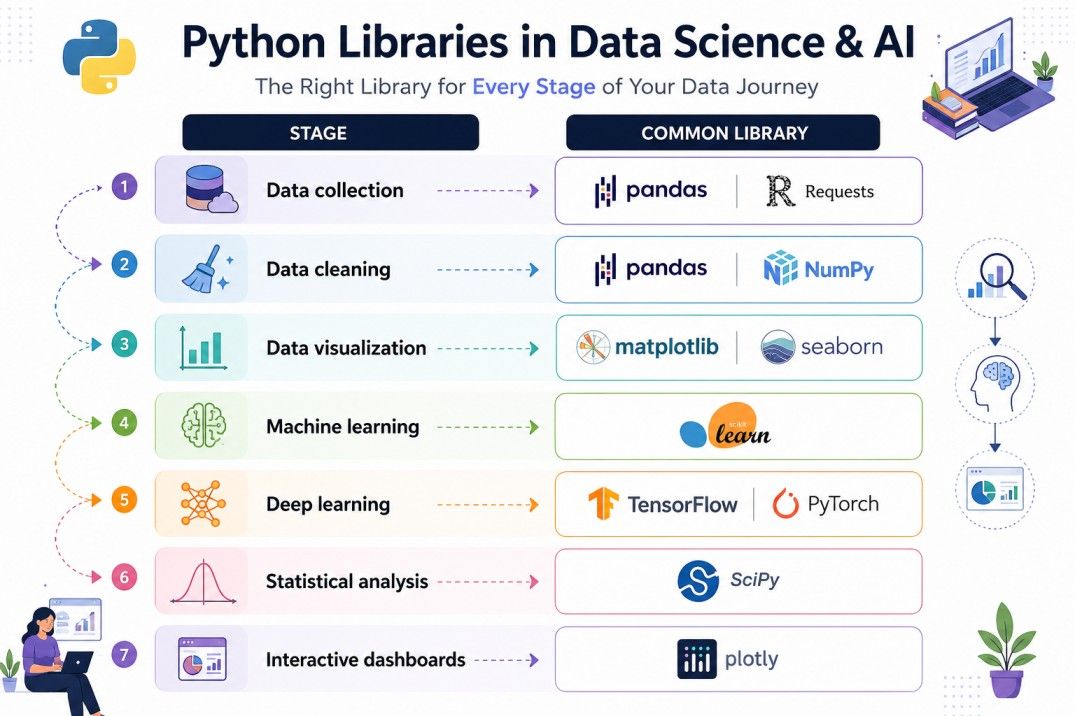
Different projects need different tools.
Also read: Step-by-Step Guide to Learning Python for Data Science
Raw Python is fine for scripting. But data science involves matrices, statistical operations, data manipulation, and visual outputs that plain Python handles poorly. Libraries for data science in Python exist because these problems kept showing up, and someone wrote reusable code to solve them.
The tricky part isn't finding libraries. It's knowing which one solves your current problem, because there's real overlap between them. NumPy and Pandas both deal with data structures. Matplotlib and Seaborn both produce charts. Scikit-learn and XGBoost both handle classification. Choosing wrong doesn't break anything, but it slows you down.
Here's a practical overview before we go deeper:
Library |
Primary Use |
Best For |
| NumPy | Numerical computing | Arrays, math operations |
| Pandas | Data manipulation | Cleaning, filtering, analysis |
| Matplotlib | Data visualization | Custom plots and charts |
| Seaborn | Statistical visualization | Heatmaps, distributions |
| Scikit-learn | Machine learning | Classification, regression, clustering |
| SciPy | Scientific computing | Statistical tests, optimization |
| Statsmodels | Statistical modeling | Regression analysis, time series |
| TensorFlow | Deep learning | Neural networks at scale |
| PyTorch | Deep learning | Research and flexible modeling |
| XGBoost | Gradient boosting | Tabular ML competitions |
These are the libraries Python data science is built on. Let's go through the ones you'll actually use day to day.
Do read: 14 Essential Data Visualization Libraries for Python
Free Courses
NumPy is the base layer. Almost every other data science library in Python depends on it. If you've worked with arrays or matrices, NumPy is what makes those operations fast and usable.
A NumPy array is not the same as a Python list. Lists are flexible but slow for numerical work. NumPy arrays are typed, memory-efficient, and built for vectorized operations where you apply a function to an entire array at once instead of looping through it element by element.
That speed difference is significant. Running a calculation across a million rows takes seconds in NumPy and much longer with a native Python loop.
What you'll actually use it for:
One limitation worth knowing: NumPy arrays hold only one data type. You can't mix integers and strings in the same array. For mixed-type data (which is most real-world data), Pandas is the better fit.
import numpy as np

arr = np.array([10, 20, 30, 40])
print(arr * 2)  # Output: [20 40 60 80]
Also read: Python for Data Science Cheat Sheet: Pandas, NumPy, Matplotlib & Key Functions
Data Science Courses to upskill
Explore Data Science Courses for Career Progression
IIIT Bangalore
Executive Post Graduate Certificate in Data Science & AIPlacement Assistance
If there's one library that defines working data science more than any other, it's Pandas. It's not the flashiest. It doesn't train models or draw charts. But you'll open it in practically every project because data never arrives clean.
Pandas gives you two core structures: the Series (a single column) and the DataFrame (a table with rows and columns). DataFrames are where the real work happens. You load your CSV, Excel file, or database query into a DataFrame and start exploring.
What Pandas is genuinely good at:
Here's a typical real-world scenario. You get a sales dataset with 50,000 rows, missing values in the revenue column, and inconsistent date formats. You'll spend more time with Pandas than with any ML model, because bad data produces bad results regardless of the algorithm.
import pandas as pd

df = pd.read_csv("sales_data.csv")
df.dropna(subset=["revenue"], inplace=True)
print(df.groupby("region")["revenue"].sum())
The one thing Pandas struggles with is very large datasets. If your data exceeds available RAM, you'll need tools like Dask or Polars. But for most projects, Pandas handles it fine.
Do read: Adding New Column To Existing Dataframe In Pandas
Numbers without context are hard to interpret. Visualizations make patterns obvious. These two python libraries used in data science handle that job, and they work differently from each other.
Matplotlib is the foundation. It gives you full control over every element of a chart: axes, labels, colors, grid lines, font sizes. That control is useful, but it also means more code for a basic plot. Matplotlib is the right choice when you need something specific that higher-level libraries don't support out of the box.
Seaborn is built on top of Matplotlib. It's designed for statistical graphics and produces cleaner outputs with much less code. Correlation heatmaps, distribution plots, pair plots for exploring relationships between variables. Seaborn handles all of these better than raw Matplotlib.
Feature |
Matplotlib |
Seaborn |
| Control | Full | Moderate |
| Default style | Basic | Polished |
| Learning curve | Steeper | Gentler |
| Best for | Custom charts | Statistical plots |
| Built on | Itself | Matplotlib |
They're not competitors. You'll use both. Seaborn for quick, clean statistical plots and Matplotlib for customization when Seaborn's defaults don't fit.
Explore upGrad's Master's in Data Science program at Liverpool John Moores University to build practical skills in Python, machine learning, data visualization, big data, statistical modeling, and real-world analytics through hands-on projects.
Scikit-learn is the most widely used library for machine learning in Python. It's not designed for deep learning. It's designed for the kind of ML that solves real business problems: classification, regression, clustering, and model evaluation.
What makes Scikit-learn practical for beginners is consistency. Every model follows the same pattern: instantiate, fit, predict. You learn that workflow once and it applies across dozens of algorithms.
Algorithms available in Scikit-learn:
It also handles things that don't get enough attention in tutorials: preprocessing (scaling, encoding), cross-validation, hyperparameter tuning with GridSearchCV, and model evaluation metrics.
from sklearn.ensemble import RandomForestClassifier
from sklearn.model_selection import train_test_split

X_train, X_test, y_train, y_test = train_test_split(X, y, test_size=0.2)
model = RandomForestClassifier()
model.fit(X_train, y_train)
print(model.score(X_test, y_test))
Don't start with deep learning frameworks. If you haven't used Scikit-learn yet, that's where your time belongs right now.
Must read: Importance of Statistics for Machine Learning Systems
These two libraries don't come up in every beginner tutorial, but they matter more than most people realize. They're important libraries in Python for data science that goes beyond basic ML.
SciPy extends NumPy with scientific computing tools. Think statistical tests, signal processing, optimization algorithms, and integration. If you need to run a t-test to check whether two groups are statistically different, SciPy is how you do it in Python.
Statsmodels is built for statistical modeling. It's what you reach for when you want proper regression output, with p-values, confidence intervals, and model diagnostics. Scikit-learn trains models. Statsmodels explains them.
Feature |
SciPy |
Statsmodels |
| Core strength | Scientific computation | Statistical analysis |
| Output style | Numerical result | Detailed model summary |
| Best for | Hypothesis testing | Regression, time series |
| Works with | NumPy arrays | Pandas DataFrames |
A data analyst trying to understand which features actually matter in a regression model will find Statsmodels more useful than Scikit-learn for that specific question. Both are worth knowing.
Deep learning isn't the first thing you should learn in data science. But when you're ready for it, these two libraries are the standard options.
TensorFlow was built by Google. It's production-ready, works well for deploying models at scale, and has a high-level API called Keras that makes building neural networks significantly easier. It's widely used in industry.
PyTorch was built by Meta. Researchers prefer it because the code is more flexible and easier to debug. When something goes wrong with your model, PyTorch makes it easier to see what's happening. Most cutting-edge AI research comes out in PyTorch first.
Do you need to pick one now from PyTorch vs TensorFlow? Not really. If your goal is building and deploying models in a company setting, TensorFlow has a slight edge. If you're interested in research or want to understand what's happening inside your models, PyTorch is better.
Both are important libraries in Python for data science at the advanced level. Both have large communities and solid documentation. You won't go wrong with either.
Also read: Exploring the Types of Machine Learning: A Complete Guide
XGBoost became famous because it won nearly every structured data competition on Kaggle for years. It's a gradient boosting library, which means it builds many weak models sequentially and combines them into a strong one.
It's fast. It handles missing values internally. It works on tabular data better than most deep learning approaches. And it's relatively easy to tune once you understand the key parameters.
LightGBM is Microsoft's answer to XGBoost. It's faster on large datasets, uses less memory, and often produces comparable or better results. Many practitioners now default to LightGBM for large-scale tabular problems.
Feature |
XGBoost |
LightGBM |
| Speed on large data | Moderate | Fast |
| Memory usage | Higher | Lower |
| Default accuracy | High | High |
| Community support | Large | Growing |
| Best use case | Mid-size tabular data | Large-scale tabular data |
You don't need both immediately. Start with XGBoost to understand gradient boosting, then explore LightGBM when dataset size becomes a concern.
Do read: Image Recognition Machine Learning: Brief Introduction
Here's something tutorials often skip. These libraries don't work in isolation. A real data science project moves through stages, and different libraries handle each stage.
A typical project workflow:
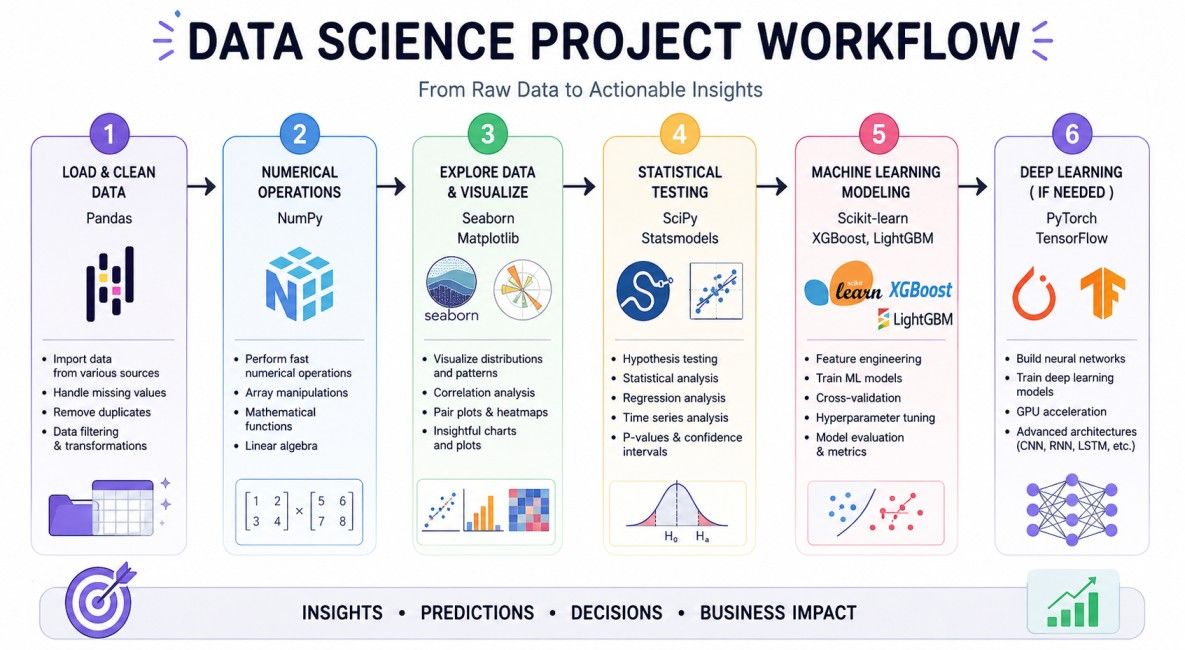
That's the flow. You won't always need all of them. Some projects are pure analysis with no ML. Some are pure modeling with minimal visualization. But understanding how they connect means you're not confused about where to look when you hit a wall.
Learning data science libraries in Python isn't about collecting as many tools as possible. It's about knowing which library solves a specific problem and how different libraries work together throughout a project.
For most beginners, NumPy, Pandas, Matplotlib, Seaborn, and Scikit-learn offer the strongest starting point. As your projects become more advanced, TensorFlow, PyTorch, SciPy, Plotly, and Statsmodels naturally become part of your toolkit. Focus on solving real problems, not memorizing APIs, and your understanding will grow much faster.
Ready to start your journey? Book a free consultation with upGrad today to find the best path for your career.
If you're just getting started, begin with Pandas and NumPy. Pandas helps you clean and organize datasets, while NumPy handles fast numerical operations. Together, they form the foundation for most data science libraries in Python, making it much easier to learn visualization and machine learning libraries later.
Yes. Many professionals use libraries for data science in Python solely for data cleaning, reporting, and visualization. Business analysts, financial analysts, and researchers often work extensively with Pandas, NumPy, Matplotlib, and Seaborn without building predictive machine learning models.
Almost all popular Python libraries used in data science are open source and free. Libraries such as Pandas, NumPy, Scikit-learn, Matplotlib, TensorFlow, and PyTorch can be downloaded without licensing fees, making Python one of the most affordable ecosystems for learning data science.
Jupyter Notebook is the preferred choice for beginners because it lets you write code, view charts, and document your work in one place. As projects become larger, many developers switch to Visual Studio Code or PyCharm for better project management and debugging features.
Yes, but it depends on the dataset size. Pandas performs well for datasets that fit into memory, while larger datasets often require tools like Dask, Polars, or PySpark. Choosing the right data science library in Python depends on your available system resources and project scale.
No. Install only the libraries required for your current project. Most beginners start with NumPy, Pandas, Matplotlib, Seaborn, and Scikit-learn. You can add TensorFlow, PyTorch, or XGBoost later as your projects become more advanced and your learning needs expand.
A module is a single Python file containing reusable code. A package groups related modules into one directory, while a library is a broader collection of packages and modules built to solve specific tasks. Most important libraries in Python for data science include multiple packages working together.
For traditional forecasting and statistical analysis, Statsmodels is widely used because it includes ARIMA and seasonal decomposition models. If you're building machine learning-based forecasting solutions, Scikit-learn, XGBoost, or deep learning frameworks like TensorFlow can also be effective depending on the dataset.
Absolutely. Software developers, marketing analysts, financial professionals, healthcare researchers, and operations teams regularly use Python libraries for automation, reporting, forecasting, and data visualization. Learning these libraries opens opportunities far beyond traditional data science roles.
Most major Python libraries used in data science are maintained by active open-source communities and organizations. They receive frequent updates for performance improvements, security fixes, compatibility with newer Python versions, and support for emerging AI and machine learning techniques.
No. Employers typically expect candidates to understand the core workflow rather than every available library. Strong knowledge of Pandas, NumPy, visualization tools, and at least one machine learning framework is usually more valuable than having superficial familiarity with dozens of libraries.
730 articles published
Sriram K is a Senior SEO Executive with a B.Tech in Information Technology from Dr. M.G.R. Educational and Research Institute, Chennai. With over a decade of experience in digital marketing, he specia...
Speak with Data Science Expert
By submitting, I accept the T&C and
Privacy Policy
Start Your Career in Data Science Today
Top Resources
Master's Degree
18 Months
Executive Diploma
12 Months
Bootcamp
6 Months