Components of SQL: What They Are and How They Work
By Sriram
Updated on Jun 11, 2026 | 8 min read | 1.83K+ views
Share:

All courses
Certifications
More
By Sriram
Updated on Jun 11, 2026 | 8 min read | 1.83K+ views
Share:
Table of Contents
The components of SQL form the foundation of how databases store, retrieve, update, and manage data. Whether you're querying customer records, updating inventory, or analyzing business data, SQL uses a structured set of commands and elements to interact with databases efficiently.
SQL or Structured Query Language, is built on a structure. Every query you write, every table you create, every permission you grant, they all fall under one of the core components of SQL.
This blog breaks down each SQL component clearly. You'll see what it does, when you'd use it, and how it fits into the bigger picture. Whether you're starting out or filling gaps in your knowledge, this guide covers it all in plain language.
Explore upGrad's Data Science, AI, and Machine Learning programs to build practical skills in SQL, database management, data analysis, data visualization, statistical modeling, machine learning, and data-driven decision-making for real-world business applications.
Popular Data Science Programs
SQL consists of several components that help users communicate with relational databases. Each component serves a specific purpose. SQL is divided into five main components, each serving a distinct purpose. Some retrieve data, while others modify, secure, or control database operations.
Think of it this way: you wouldn't use a hammer to tighten a screw. The same logic applies here. Each component handles a specific type of operation, and mixing them up leads to errors or, worse, unintended data changes.
| Component | Full Form | What It Does |
| DDL | Data Definition Language | Defines and modifies database structure |
| DML | Data Manipulation Language | Inserts, updates, and deletes data |
| DQL | Data Query Language | Retrieves data from tables |
| DCL | Data Control Language | Manages user access and permissions |
| TCL | Transaction Control Language | Handles transaction commits and rollbacks |
Each component plays a role in the overall lifecycle of data from creating the structure to querying it, controlling who touches it, and making sure changes are safe and reversible.
Every SQL operation depends on these building blocks. Without clauses, you couldn't filter data. Without operators, comparisons wouldn't work. Without constraints, databases would quickly become inconsistent because invalid data could enter tables and spread across applications, reports, and business processes.
Also read: SQL For Data Science: Why Or How To Master Sql For Data Science
Free Courses
SQL commands are the most important components of SQL because they tell the database what action to perform. Every interaction with a database begins with a command. Most SQL commands fall into five categories.
DDL is the set of SQL commands that define and modify the structure of your database, think tables, schemas, indexes, and constraints. It's where your database takes shape. DDL works at the schema level, building the framework everything else relies on. You don't use DDL to insert or fetch data. It doesn't touch rows at all.
CREATE: builds a new table, view, index, or database
ALTER: changes an existing table structure, like adding a column
DROP: permanently deletes a table or database
TRUNCATE: removes all rows from a table, but keeps the structure intact
RENAME: renames a database object
DDL commands in most databases are auto-committed. That means they can't be rolled back. Run a DROP TABLE by mistake and the data is gone. This is why most production environments require elevated permissions before anyone can execute DDL.
Here's a quick example. Creating a table called students would look like this:
CREATE TABLE students (
  student_id INT PRIMARY KEY,
  name VARCHAR(100),
  enrollment_date DATE
);
That's DDL setting up the structure before any data goes in.
Must read: SQL Server Architecture: Core Components, Data Management, and Practical Uses
DML is what most people actually spend their time writing. It's the component of SQL that deals with the data inside your tables, adding new records, changing existing ones, and deleting what you don't need.
Unlike DDL, DML commands are transactional. You can roll back a DML operation if something goes wrong, which makes it much safer to work with in production environments.
INSERT: adds new rows to a table
UPDATE: modifies existing rows based on a condition
DELETE: removes rows from a table
MERGE: combines insert and update based on a match condition (supported in some databases)
Forgetting the WHERE clause on an UPDATE or DELETE can affect every single row in the table. Always double-check your conditions before running either of those commands.
Here's an example of updating a student's name:
UPDATE students SET name = 'Priya Sharma' WHERE student_id = 5; DML is the workhorse of day-to-day database work. If you're building an app, a CRM, or anything that stores user data, you'll be writing DML constantly.
Do read: CRUD Operations in ASP.NET MVC: The Foundation Every Developer Should Know
DQL has one command and only one job and that is to retrieve data. The SELECT statement is the entirety of DQL, and it's arguably the most written SQL command in any database system.
That said, SELECT can get very complex, joins, subqueries, aggregations, and window functions. The command itself is one word, but what it can do spans most of applied SQL.
A straightforward example:
SELECT name, enrollment_date FROM students WHERE enrollment_date > '2023-01-01'; Some database textbooks classify DQL as a subset of DML since SELECT is sometimes grouped under it.
Also read: Top SQL Queries in Python Every Python Developer Should Know
DCL is about access. Who can read the data? Who can change it? Who gets locked out? These questions are answered and enforced through DCL commands.
In any real-world system with multiple users or roles, DCL isn't optional, it's how you protect your data from both mistakes and misuse.
GRANT: gives a user specific privileges on a database object
REVOKE: removes previously granted privileges
Privileges can be specific. You might grant a user the ability to SELECT from a table but not UPDATE or DELETE. That's a practical use case in read-only reporting roles.
Example:
GRANT SELECT ON students TO analyst_user;
REVOKE SELECT ON students FROM analyst_user;
DCL works hand-in-hand with database roles and user management. It's often handled by database administrators, but developers working in multi-tenant or regulated environments need to understand it too.
TCL manages the flow and safety of transactions. A transaction is a group of SQL operations that are treated as a single unit, either all of them succeed, or none of them do.
That's the fundamental guarantee TCL provides. It's what stops a bank transfer from deducting money from one account without adding it to another.
COMMIT: saves all changes made in the current transaction permanently
ROLLBACK: undoes all changes made since the last COMMIT or SAVEPOINT
SAVEPOINT: marks a point within a transaction to roll back to if needed
SET TRANSACTION: defines properties like isolation level for the transaction
Here's a scenario where TCL matters. Say you're running two operations: deduct 5,000 from Account A and add 5,000 to Account B. If the second operation fails, ROLLBACK brings everything back to the starting state. Without it, you'd lose data integrity.
BEGIN;
UPDATE accounts SET balance = balance - 5000 WHERE account_id = 1;
UPDATE accounts SET balance = balance + 5000 WHERE account_id = 2;
COMMIT;
TCL is what makes SQL databases reliable for financial, medical, and any other critical data. The ACID properties in SQL databases means Atomicity, Consistency, Isolation, Durability depend heavily on TCL working correctly.
Do read: Master ER Diagram in DBMS: A Guide to Database Design & Management
Data Science Courses to upskill
Explore Data Science Courses for Career Progression
IIIT Bangalore
Executive Post Graduate Certificate in Data Science & AIPlacement Assistance
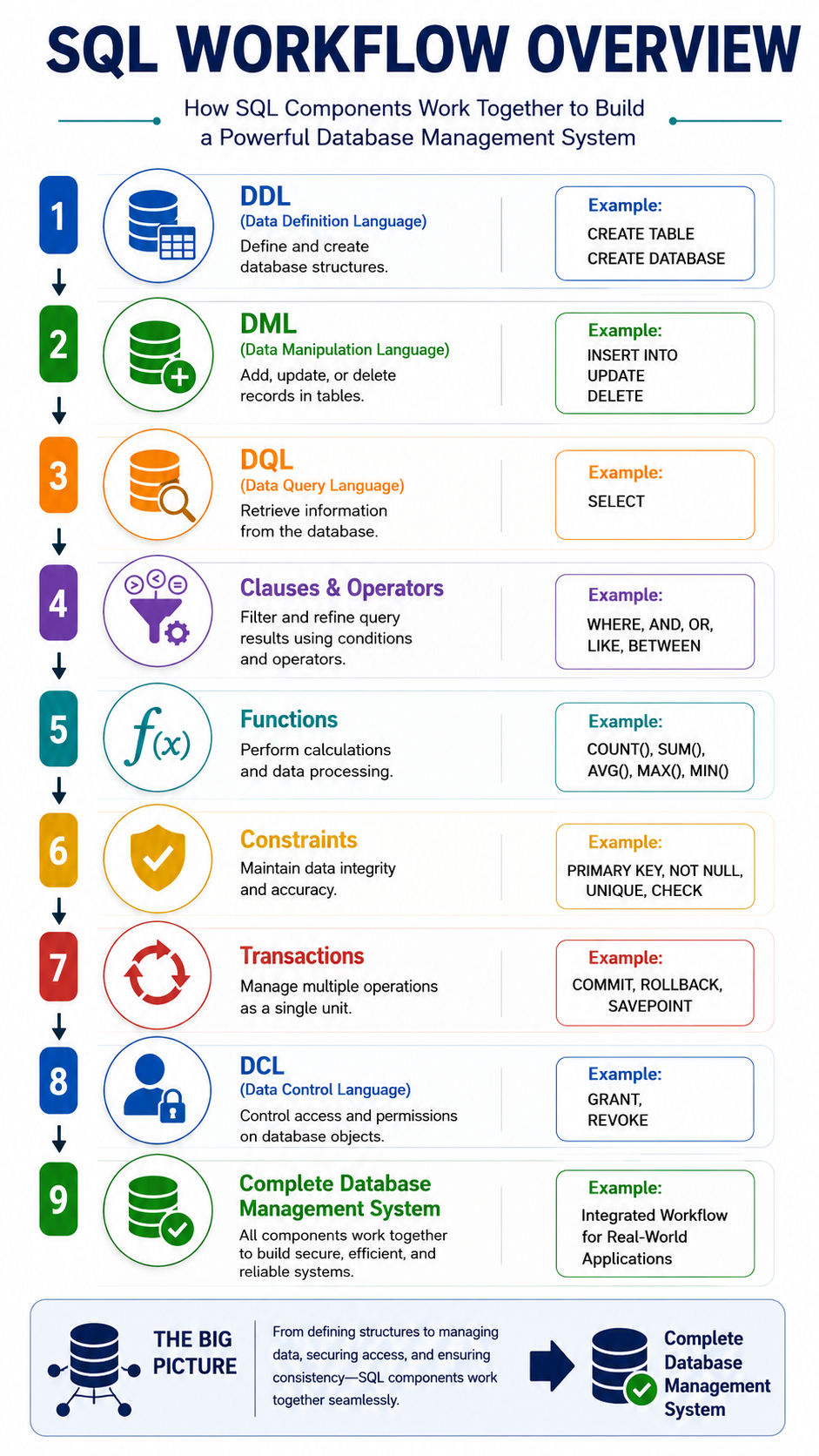
Each component is useful on its own, but they're designed to work as a system. A typical workflow might look like this:
Step |
SQL Component |
Purpose |
Example Action |
| 1 | DDL (Data Definition Language) | Create and define database structures | Create tables using CREATE TABLE |
| 2 | DML (Data Manipulation Language) | Add, update, or delete records | Insert data using INSERT INTO |
| 3 | DQL (Data Query Language) | Retrieve information from databases | Fetch records using SELECT |
| 4 | Clauses and Operators | Filter and refine query results | Use WHERE, AND, OR, LIKE |
| 5 | Functions | Perform calculations and data processing | Use COUNT(), SUM(), AVG() |
| 6 | Constraints | Maintain data integrity and accuracy | Apply PRIMARY KEY, NOT NULL, UNIQUE |
| 7 | Transactions | Manage multiple operations as a single unit | Use COMMIT and ROLLBACK |
| 8 | DCL (Data Control Language) | Control database access and permissions | Grant access using GRANT |
| 9 | Integrated Workflow | All SQL components work together | Build secure, efficient, and reliable database systems |
A customer management system, e-commerce platform, hospital database, or banking application all depend on these components working together. While individual commands may seem straightforward, combining them effectively is what separates beginner SQL users from skilled database professionals.
Also read: Mastering SQL AND Operator: Explore the Different Aspects of SQL AND Operator
Many learners encounter issues such as:
Understanding how each component interacts reduces errors and improves database performance over time.
The components of SQL provide the structure needed to manage relational databases effectively. Commands define actions, queries retrieve information, clauses refine results, operators perform comparisons, functions process data, constraints protect integrity, and transactions maintain consistency.
When you explain the components of SQL in practical terms, they aren't isolated concepts. They work together to support every database operation, from simple record retrieval to complex enterprise applications. Mastering these building blocks creates a strong foundation for database administration, software development, data analytics, and business intelligence.
Ready to start your journey? Book a free consultation with upGrad today to find the best path for your career.
SQL commands perform actions such as creating tables, inserting data, or retrieving records. Clauses, on the other hand, modify how those commands behave. For example, SELECT is a command, while WHERE and ORDER BY are clauses that help filter and organize the results returned by that command.
SQL is divided into categories because database tasks are fundamentally different. Creating a table requires different operations than updating records or managing user permissions. These categories make SQL easier to learn, maintain, and secure in real-world database environments
Most beginners start with DQL and the SELECT statement because it allows them to retrieve and view data without changing anything in the database. Once they're comfortable querying data, learning DML and DDL becomes much easier because they already understand the underlying table structure.
This depends on the database documentation and teaching approach. Most modern SQL resources classify SELECT under Data Query Language (DQL) because its sole purpose is data retrieval. Some older references group it under DML, which often creates confusion for beginners.
An UPDATE statement without a WHERE clause affects every row in the table. This is one of the most common SQL mistakes made by beginners and experienced developers alike. In production environments, a missing WHERE clause can overwrite thousands of records within seconds.
Transactions group multiple database operations into a single unit of work. If one operation fails, all previous changes can be rolled back automatically. This prevents incomplete updates and helps maintain accurate data, especially in banking, healthcare, and e-commerce systems.
Constraints act as automatic validation rules. They prevent duplicate entries, missing values, and invalid relationships between tables. As databases grow, constraints become even more important because manually checking data quality across millions of records isn't practical.
Basic data retrieval is possible without functions, but meaningful analysis becomes difficult. Functions help calculate totals, averages, counts, and other metrics, while operators enable filtering and comparisons. Together, they transform raw data into useful business insights.
SQL permissions allow administrators to control exactly who can view, modify, or delete data. For example, a reporting analyst might only have permission to read customer records, while a database administrator can perform structural changes and manage user access.
A typical application uses DDL to create tables, DML to add and update records, DQL to retrieve information, constraints to validate data, TCL to manage transactions, and DCL to control access. Each component contributes to building a reliable and secure database system.
A simple way to explain the components of SQL is to describe their roles. DDL creates database structures, DML manages data, DQL retrieves information, DCL controls permissions, and TCL handles transactions. Adding a practical example demonstrates a deeper understanding than memorizing definitions alone.
727 articles published
Sriram K is a Senior SEO Executive with a B.Tech in Information Technology from Dr. M.G.R. Educational and Research Institute, Chennai. With over a decade of experience in digital marketing, he specia...
Speak with Data Science Expert
By submitting, I accept the T&C and
Privacy Policy
Start Your Career in Data Science Today
Top Resources
Executive Diploma
12 Months
Master's Degree
18 Months
Bootcamp
6 Months