Computer Use Agents: What They Are, How They Work, and Where They Fit
By Sriram
Updated on Jul 29, 2026 | 16 min read | 4.34K+ views
Share:

All courses
Certifications
More
By Sriram
Updated on Jul 29, 2026 | 16 min read | 4.34K+ views
Share:
Table of Contents
Quick Overview
In this blog, you will get a clear, no-fluff explanation of what computer use agents are and how they function. We will walk through the technology behind them, compare them with automation tools you may already know, look at real use cases, cover safety and testing, and address their current limitations.
If topics like building computer use agents, working with vision language models, and developing production-ready AI systems that can operate real interfaces interest you, upGrad's Agentic AI Programs can help you develop the practical skills to build, deploy, and scale AI applications with confidence.
Agentic AI Courses to upskill
Explore Agentic AI Courses for Career Progression
IIIT Bangalore
Executive Diploma in Machine Learning and AI360° Career Support
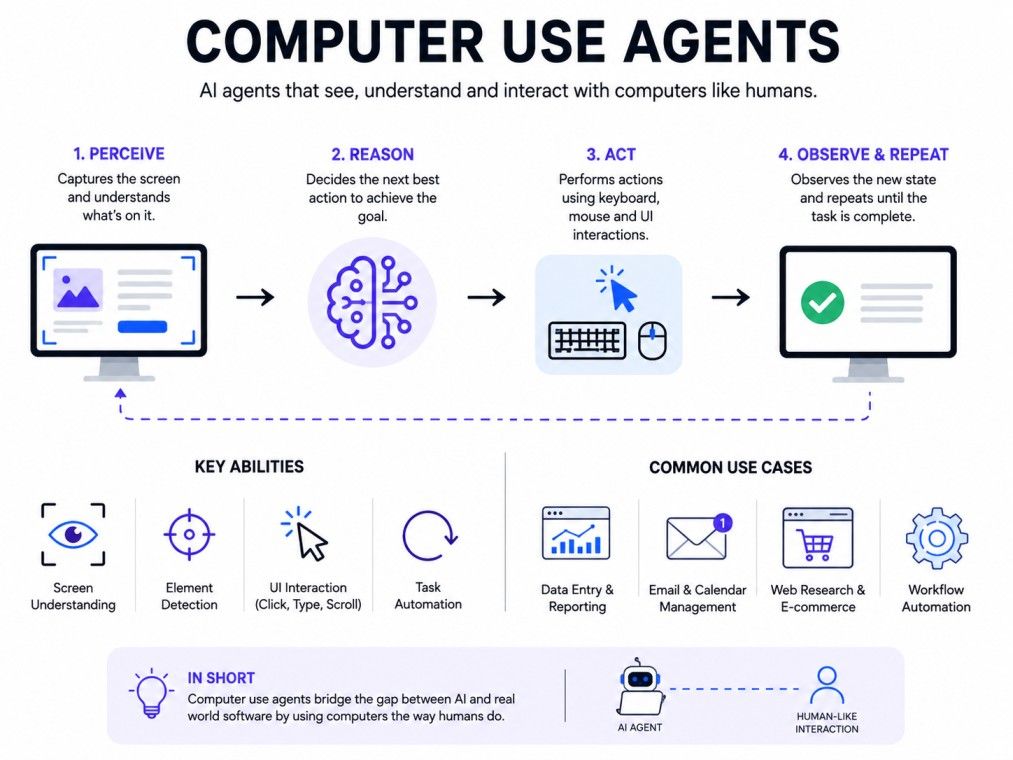
A computer use agent is an AI model trained to interact with a computer's graphical interface just like a human would. It does not need a special API or backend connection to an app. Instead, it looks at the screen, identifies buttons, text fields, menus, and icons, and then performs actions like clicking, typing, dragging, or scrolling to get a task done.
Think of it as the difference between giving someone a set of keys to a specific door versus teaching them to open any door they come across. Traditional automation tools need a direct connection or a coded path to work. It just needs to see the screen and understand it, the same way you would if you sat down at an unfamiliar computer.
Also Read: Types of Agents in AI: A Complete Guide to How Intelligent Agents Work
A lot of software in the real world has no clean way to connect to it. Old internal dashboards, government portals, and niche desktop tools often were never built with an API in mind.
Before this technology existed, automating work on these systems meant either writing brittle scripts that broke with every update, or accepting that some tasks simply could not be automated. Agents that can see and use a screen directly close that gap.
This is why the approach is considered a big shift in how AI interacts with software. Earlier AI tools were limited to text boxes or specific APIs.
They can, in theory, use any application that a human can use, whether that is a browser, a spreadsheet, a design tool, or even an old desktop program.
The term is often used alongside "AI agents" or "autonomous agents," but the key difference is that this type interacts directly with a visual interface rather than working purely through code or APIs.
This makes them useful in situations where no clean API exists, which happens far more often than people expect in real business software.
For beginners, the simplest way to think about it is this: it works like a digital employee who can see your screen and use your apps, following instructions you give it in plain language.
The IIM Kozhikode Strategic AI for Business Professionals program in partnership with upGrad is built for turning technical know-how into real business impact. It helps you move from working with AI tools to leading AI strategy, decisions, and teams at a business level.
Computer use agents follow a loop that repeats until the task is done. This loop has three core parts: perceiving the screen, reasoning about the next step, and taking an action. Understanding this loop makes it much easier to understand why these agents behave the way they do.
Every agent runs through the same basic cycle:
This loop repeats continuously. After every action, the agent checks the screen again to see what changed, then decides on the next move. It is a slow, step by step process, but it mirrors exactly how a person would complete an unfamiliar task on a computer.
It helps to see this loop applied to an actual task. Say the goal is: "Open the company travel portal and book a flight from Delhi to Bangalore for next Monday."
Here is roughly how the agent would work through it:
At each step, the agent is re-reading the screen before deciding what to do next. If a pop-up appears unexpectedly, like a cookie banner or a login prompt, it adjusts by handling that first before continuing with the original goal.
This is what separates it from a fixed script, which would simply fail the moment something on the screen looked different from what it expected.
Also Read: No Code AI: A Beginner’s Guide to Building AI Without Writing Code
To understand a screen, the agent needs to identify individual elements like buttons, text fields, checkboxes, and menus.
This is not as simple as reading text. The agent has to figure out what each element does and where it sits on the screen.
Modern systems like these rely on vision language models for this. These are AI models trained on both images and text, which lets them look at a screenshot and describe what they see in a way that can guide decision making.
This is the same underlying technology that powers many multimodal AI systems today, adapted specifically for screen understanding.
The set of possible actions an agent can take is called its action space. For most of these agents, this includes:
The agent chooses from this action space at every step of the loop, based on what it sees and what it is trying to achieve.
Behind the scenes, the agent is usually given a system prompt that sets its rules and boundaries, along with a defined set of tools it is allowed to call, such as "click," "type," or "scroll."
This setup is similar to how other AI agents are given tool access, except here the tools map directly to screen actions instead of external functions. Keeping this list of tools small and well-defined tends to make the agent more predictable and easier to debug.
Also Read: What Is Agentic AI? The Simple Guide to Self-Driving Software
This is not just a research idea. It is already being tested and used across different types of work, especially tasks that involve repetitive screen based actions.
Large organizations often deal with legacy software that has no modern API. They can step in here because they do not need an API at all.
They can navigate old dashboards, fill out internal forms, or move data between systems that were never designed to talk to each other.
This deserves its own mention because it is one of the strongest real-world applications right now. Many companies run on decades-old internal software that is too risky or too expensive to replace.
Rewriting these systems can take years. An agent that can operate the existing interface directly gives teams a way to automate work on old systems without touching the underlying code at all.
This is especially common in banking, insurance, healthcare records, and government back-office work, where legacy systems are the norm rather than the exception.
Testing teams use this technology to simulate real user behavior on apps and websites. Instead of writing rigid test scripts that break the moment a button moves, an agent can adapt because it is actually looking at the screen, not following a fixed path.
Developers use this technology to automate parts of their workflow, such as testing UI changes, filling out repetitive forms during development, or checking how an application behaves across different screens and states.
Many day to day business tasks are not single actions. They involve several steps across multiple tools, like pulling data from a spreadsheet, logging into a CRM, updating a record, and then sending a confirmation email.
This is where the technology shows its real value, since it can chain many small actions together toward one larger goal, adjusting along the way if something on screen changes.
Here is a quick look at where they fit into different types of work:
Use case |
What the agent does |
| Enterprise automation | Navigates legacy systems without needing an API |
| Legacy modernization | Automates old software without rewriting the backend |
| QA and testing | Simulates real user actions to test software |
| Developer workflows | Automates repetitive UI based development tasks |
| Business workflows | Moves data or completes multi-step tasks across apps |
| Customer support | Handles repetitive ticket actions or lookups |
| Data entry | Fills forms and transfers data between systems |
These use cases show why this technology is gaining attention. They fill a gap that other automation tools could not, especially when dealing with software that was never built to be automated in the first place.
Also Read: AI Agents for Business: Complete Guide for Modern Organizations
It helps to compare this approach with the automation tools people already know. This makes it easier to understand what makes them different and where each approach still makes sense.
Traditional automation relies on fixed, pre-written rules. If a button moves or a page layout changes, the automation often breaks. This kind of agent adapts because it reads the screen in real time instead of following a hardcoded path.
Robotic Process Automation, or RPA, is similar in spirit but usually depends on structured workflows and specific selectors tied to an application's code. This approach works at the visual level instead, which means it can generalize across apps that RPA tools would need to be separately configured for.
Browser agents are a narrower category, built specifically to operate inside a web browser. This technology is broader. It can work across desktop applications, not just websites, which gives it a wider range of use.
API-based agents connect directly to a software's backend through documented endpoints. This is often faster and more reliable when an API exists. But many tools, especially older or internal systems, do not have usable APIs, and this approach does not need one.
Here is a simple side by side comparison:
Approach |
How it works |
Best suited for |
| Traditional automation | Fixed scripts and rules | Stable, unchanging workflows |
| RPA | Structured, selector based workflows | Repetitive tasks in known apps |
| Browser agents | Operates within web browsers only | Web based tasks and websites |
| API-based agents | Connects via software APIs | Apps with strong API support |
| Computer use agents | Reads and acts on the screen directly | Any app, including ones without APIs |
No single approach is universally better. This method is most valuable when there is no clean API to rely on, or when a task spans multiple apps that were never meant to connect.
Also Read: Agentic AI vs Generative AI: What Sets Them Apart
A growing number of AI labs and platforms now offer this capability, either as a standalone feature or built into a broader agent product. Rather than naming specific tools, it is more useful to understand the categories these platforms generally fall into:
If you are evaluating platforms, focus less on brand names and more on three things: how well the agent handles your specific applications, what safety controls it offers, and how easy it is to monitor and correct its behavior.
This technology is powerful, but it is not perfect. It is important to understand where it still struggles before relying on it for important tasks.
Because these agents can click and type on real systems, safety is a serious concern. Most of them include safeguards such as:
These measures exist because an agent acting on a live system can cause real damage if it misunderstands a task.
They still face real challenges:
Accuracy depends heavily on the complexity of the interface and the clarity of the task given. Simple, well-structured screens see much higher success rates than cluttered or unusual layouts. Accuracy generally improves when tasks are broken into smaller, clearer steps rather than one large instruction.
To improve accuracy, teams often:
Some common problems include the agent clicking the wrong element, getting stuck in a loop repeating the same action, or slowing down on pages that load content dynamically.
Most of these issues improve with better prompts, added wait times for slow-loading pages, and periodic human checks during longer tasks.
Giving an AI system the ability to click and type on a real computer raises questions that go beyond simple accuracy.
Because the agent operates the same way a human user would, it typically needs some level of access to the same systems, logins, and data a human employee would have.
This creates a few specific risks worth planning for:
None of this means the technology is unsafe to use. It means access should be scoped tightly, sensitive actions should require confirmation, and every action should be logged. Treat a computer use agent the way you would treat a new employee with system access: give it only what it needs, and review its work until you have reason to trust it.
Because these agents act on real systems, testing before a full rollout matters more than it would for a typical script.
Most teams start by running the agent in a simulated or sandboxed version of the environment, one that looks and behaves like the real system but has no connection to live data.
This lets the team see how the agent handles a task without any risk of real consequences. Once it performs reliably in simulation, testing can move to a live environment, usually starting with low-stakes tasks before anything sensitive is involved.
Red-teaming means intentionally trying to break the agent before real users or real tasks do. This can involve giving it confusing screens, unexpected pop-ups, or ambiguous instructions to see how it responds.
The goal is to find failure points in a controlled setting rather than discovering them during an actual business process.
Testing does not stop once an agent goes live. Screens, apps, and workflows change over time, and an agent that worked well last month can start failing quietly if a website redesigns its layout or a form adds a new field.
Ongoing monitoring, along with a simple feedback loop where flagged errors get reviewed and fixed, keeps the agent reliable as the systems around it keep changing.
This is the question most people actually want answered. The honest answer is that it depends on the task.
Computer use agents have improved quickly, but they are still an emerging technology. They work well for structured, well-defined tasks on clear interfaces. They are less reliable for highly complex, fast changing, or unusual applications. Treat them as capable assistants rather than fully autonomous employees, at least for now.
Before rolling this out at scale, consider:
If your workflow involves an app without an API, or spans multiple tools that do not connect well, this approach is worth testing. Start small. Pick one repetitive task, run it with supervision, and measure how often it succeeds. This will tell you far more than reading about the technology ever could.
This space is moving quickly. Accuracy on standard interfaces has improved a great deal in a short time, and the range of applications these agents can reliably handle keeps expanding. Expect a few clear trends going forward:
The direction is clear even if the exact timeline is not. This is likely to become a standard part of the automation toolkit rather than a niche capability.
Also Read: How to Build Your Own AI System: Step-by-Step Guide
Computer use agents represent a genuine shift in how AI interacts with software. Instead of being limited to APIs or chat boxes, they can now see a screen and act on it, opening up automation for tools that were never built to be automated.
Computer use agents are not perfect yet, and they need oversight, careful testing, and tight access control, especially for sensitive tasks. But for the right use case, they can save real time and effort. The best way to know if they fit your workflow is to try them on a small, low-risk task and see how they perform.
Want to get started with Agentic AI? Speak with an expert for a free 1:1 counselling session today.
A chatbot responds with text and cannot interact with software interfaces. A computer use agent can actually see a screen and perform actions like clicking and typing to complete tasks, going far beyond just answering questions in a chat window.
In theory, yes, since they interact with the screen visually rather than through code. In practice, accuracy varies by app. Clean, simple interfaces work best, while cluttered or unusual layouts can still cause it to misread elements.
Most of them run through cloud based AI models, so they need an internet connection to process what they see and decide on actions. Some setups may run locally, but cloud based processing is currently the most common approach.
No. Browser extensions are limited to web pages and rely on predefined scripts. This technology can work across desktop applications as well as browsers, and it reasons about the screen dynamically instead of following fixed rules.
This depends on the setup. Many implementations avoid giving agents direct access to credentials and instead have a human complete login steps, with the agent taking over once the session is active. This reduces security risk.
Not currently. They are best used as assistants that handle repetitive, well-defined tasks. Complex judgment calls, unusual situations, and sensitive decisions still need human involvement and oversight.
Building one typically requires knowledge of AI models, particularly vision language models, along with software engineering skills. Managing or using an existing tool requires far less technical skill, mostly clear task instructions.
This usually happens when the interface is cluttered, elements look visually similar, or the task instruction was vague. Clearer instructions and simpler interfaces significantly reduce these errors.
They can be, but only with proper safeguards like confirmation steps, restricted access, and human review for sensitive actions. Without these measures, using them on sensitive data carries real risk.
A script follows a fixed, pre-written path and breaks if anything changes on the screen. This kind of agent reads the current screen every time and adapts its next action accordingly, making it far more flexible than a static script.
Industries dealing with legacy software and repetitive digital tasks, such as enterprise IT, software testing, banking, insurance, and healthcare records, are among the earliest adopters. These sectors often lack modern APIs, which makes this technology especially useful.
727 articles published
Sriram K is a Senior SEO Executive with a B.Tech in Information Technology from Dr. M.G.R. Educational and Research Institute, Chennai. With over a decade of experience in digital marketing, he specia...
Speak with AI & ML expert
By submitting, I accept the T&C and
Privacy Policy