Cloud Native Application: Architecture, Benefits, Development, Examples & Best Practices
By Sriram
Updated on Jul 17, 2026 | 11 min read | 7.14K+ views
Share:

All courses
Certifications
More
By Sriram
Updated on Jul 17, 2026 | 11 min read | 7.14K+ views
Share:
Table of Contents
Key Highlights
This blog explores what a cloud native application is, how it works, its architecture, benefits, lifecycle, development process, and real-world examples. It also compares cloud native and traditional applications to help you understand why businesses are adopting this modern approach.
Ready to build cloud native applications? Explore upGrad's Data Science programs to master cloud architecture, Kubernetes, DevOps, and data-driven application development through hands-on projects.
Popular Data Science Programs
A cloud native application is built specifically for cloud environments using technologies like microservices, containers, and automation. It enables faster development, automatic scaling, high availability, and continuous updates.
Common cloud native applications include streaming platforms, online banking systems, and e-commerce websites that need to deliver reliable performance and support millions of users.
A cloud native application usually includes:
These technologies allow development teams to release new features frequently without rebuilding the entire application.
Must read: AWS Architecture Explained: Function, Components, Deployment Models & Advantages
A virtual machine hosted on a cloud provider is still a traditional application if it wasn't designed for cloud environments. A cloud native application, on the other hand, is created with flexibility and automation in mind from the start.
It usually follows these principles:
This design helps applications recover quickly if one component fails. Instead of affecting the whole system, only the failed service is restarted.
Organizations need applications that can keep up with changing customer expectations.
Imagine an online shopping platform during a festive sale. Traffic can increase ten times within a few minutes. A traditional application might struggle or even stop responding. A cloud native application can automatically allocate more computing resources to handle the demand.
That's one reason businesses across industries are investing in cloud native application development. It allows teams to release updates faster while maintaining application availability.
Also read : AWS Tutorial for Beginners Is Out. Here’s What’ In
Free Courses
Every successful cloud native application follows a set of core design principles that make software faster to build, easier to deploy, and more resilient in production. These characteristics enable organizations to deliver new features quickly, scale efficiently, and maintain high availability without increasing operational complexity.
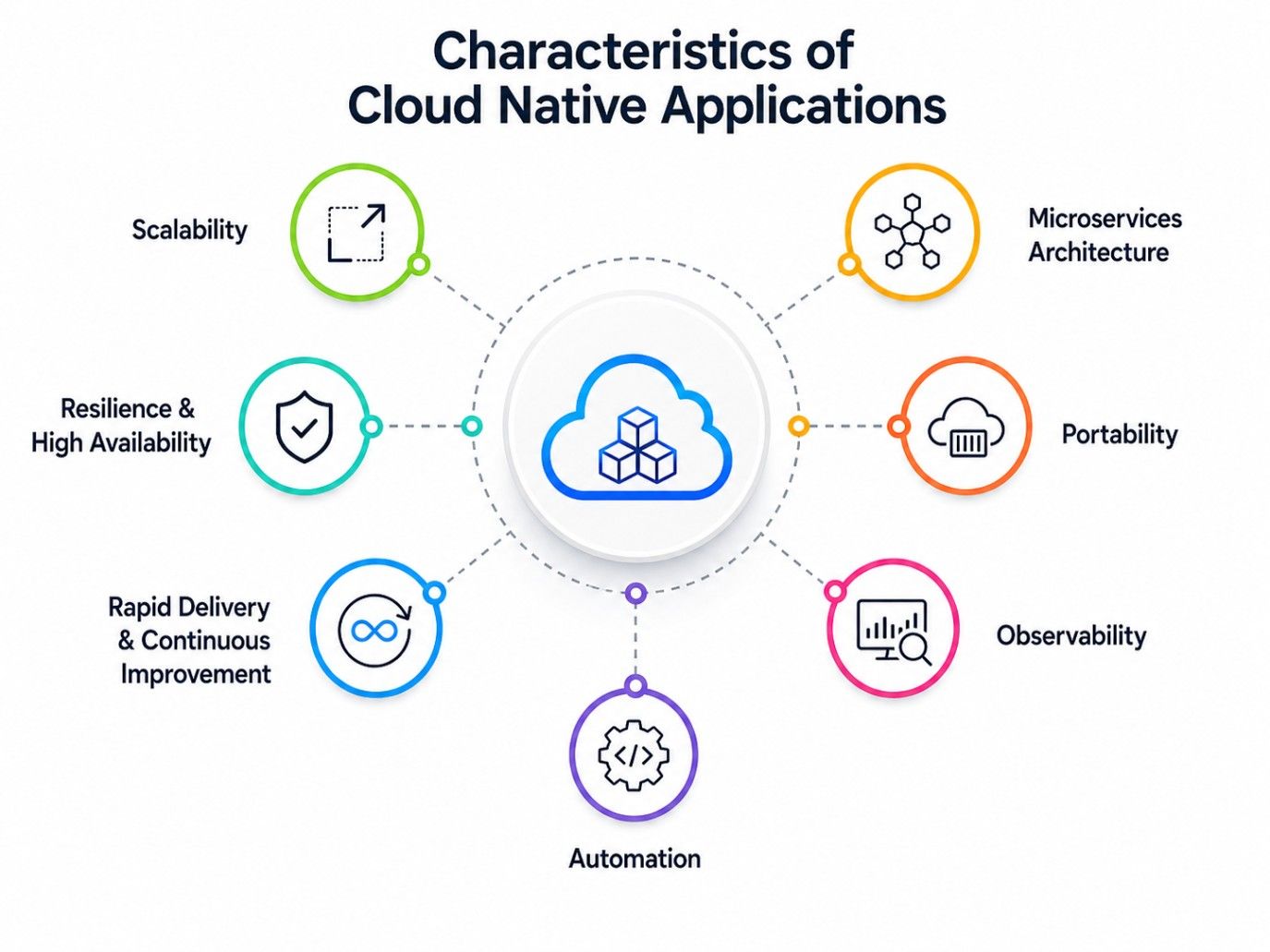
Instead of building a single large application, cloud native systems divide functionality into smaller, independent services known as microservices. Each service is responsible for one specific business function and can be developed, deployed, and updated independently.
For example, an online food delivery platform may have separate microservices for user authentication, restaurant listings, payments, and order tracking. If the payment service requires an update, developers can deploy only that service without affecting the rest of the application.
Benefits:
Containers package an application along with its dependencies, libraries, and runtime environment into a single portable unit. This ensures the application behaves consistently across development, testing, and production environments. Containerization eliminates compatibility issues and simplifies deployments, making it a fundamental component of cloud native application development.
Advantages :
Also read : application of cloud computing.
Cloud native applications rely on APIs to enable communication between independent services and external platforms. Instead of tightly coupling components, APIs provide standardized interfaces for seamless data exchange.
For example, an application can securely integrate with payment gateways, authentication providers, notification services, and analytics platforms through APIs without disrupting the overall system architecture.
Benefits:
Automation reduces manual effort across the software development lifecycle by handling repetitive operational tasks. This enables teams to release updates faster while minimizing human errors.
Common automated processes include:
Automation is one of the primary reasons organizations adopt cloud native application development, as it supports continuous delivery and faster software releases.
Application workloads fluctuate throughout the day. A news portal may experience traffic spikes during breaking events, while a streaming platform sees increased demand during live broadcasts.
Cloud native applications automatically scale computing resources up or down based on real-time demand. This ensures consistent performance while avoiding unnecessary infrastructure costs.
Benefits:
Cloud native applications are designed to handle failures without disrupting the entire system. If a server becomes unavailable or a service crashes, only the affected component is restarted while the remaining services continue operating normally.
This fault-tolerant architecture minimizes downtime and improves application reliability.
Benefits:
Deployment is only one phase of the application lifecycle. Cloud native environments continuously monitor application health and operational metrics to identify issues before they affect users.
Teams typically track:
Continuous monitoring enables proactive maintenance, faster troubleshooting, and ongoing performance optimization, ensuring cloud native applications remain reliable as they evolve.
Also read : Top 10 Steps to Get a Job in Cloud Computing
Data Science Courses to upskill
Explore Data Science Courses for Career Progression
IIIT Bangalore
Executive Post Graduate Certificate in Data Science & AIPlacement Assistance
A cloud native application architecture is built using independent, loosely coupled components that work together to deliver scalable, resilient, and easy-to-maintain applications. Instead of relying on a single monolithic system, it distributes functionality across specialized services, enabling faster development, seamless updates, and improved reliability.
Core Components of Cloud Native Application Architecture:
Component |
Role |
| Microservices | Break the application into independent services, allowing teams to develop, deploy, and scale each service separately. |
| Containers | Package applications with their dependencies to ensure consistent performance across development, testing, and production environments. |
| APIs | Enable secure communication between microservices and external systems without creating tight dependencies. |
| Kubernetes | Automates container deployment, scaling, load balancing, and recovery to simplify application management. |
| Databases | Allow each microservice to manage its own data, improving scalability and reducing dependencies. |
| Monitoring & Logging | Continuously track application health, performance, resource usage, and errors for faster issue detection and troubleshooting. |
A customer places an order through the mobile app. The request first reaches an API gateway. From there, it is routed to separate services for authentication, restaurant selection, payment, and order management.
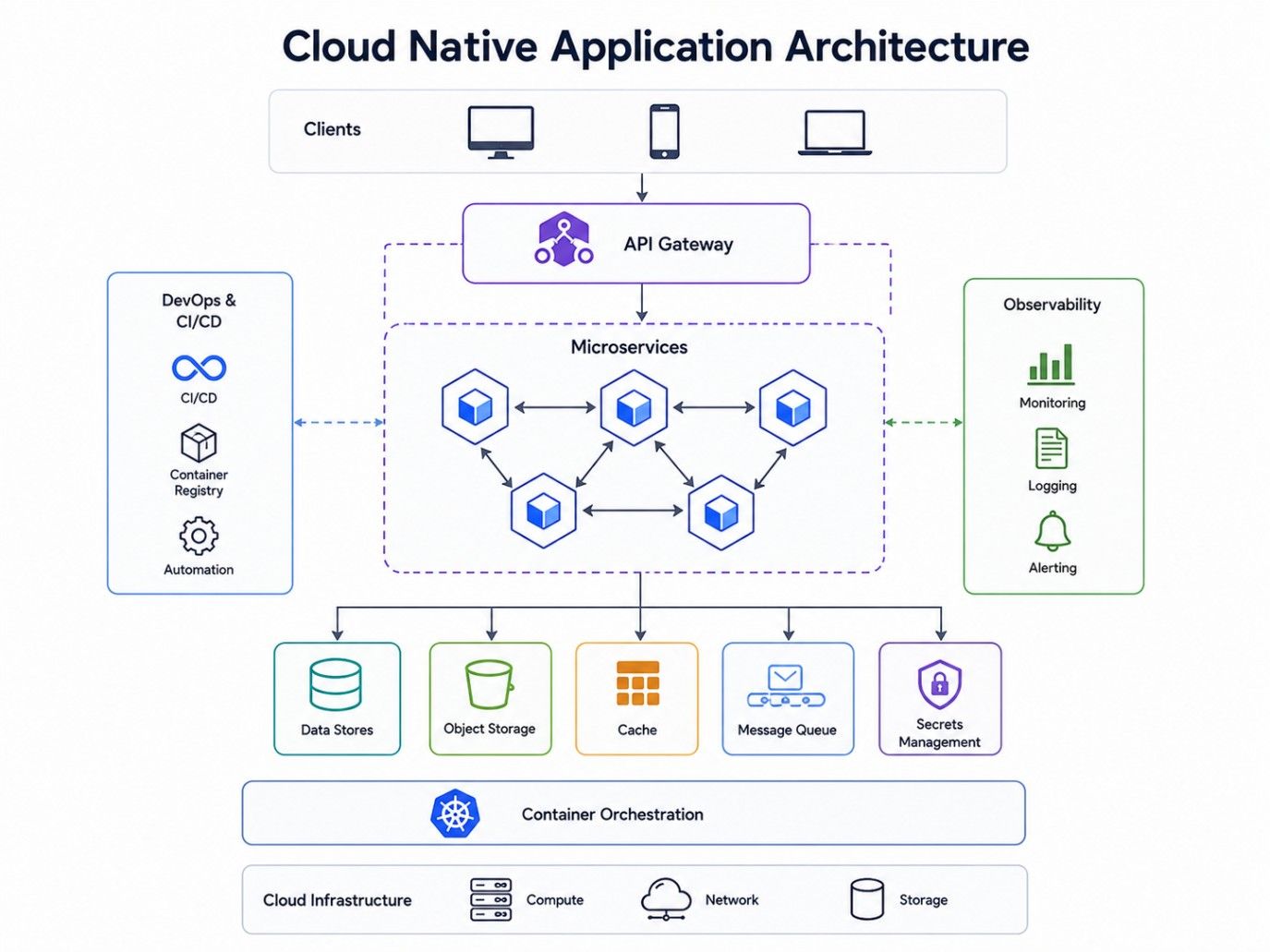
Each service processes its task independently before sending the result back. If the payment service becomes unavailable, the other services continue running without interruption.
Also read : difference between Big Data and Cloud Computing
Cloud native applications process user requests through a series of independent components that work together to deliver fast, scalable, and reliable performance. This architecture allows applications to efficiently handle thousands of simultaneous requests while maintaining high availability.
Step 1: User Request
A user performs an action such as logging in, placing an order, booking a service, or streaming content. The request is sent to the application's API Gateway.
Step 2: API Gateway Routes the Request
The API Gateway identifies the appropriate microservice and forwards the request. For example:
Step 3: Microservice Processes the Request
The selected microservice performs its specific business function independently. Multiple microservices can process requests simultaneously, improving speed and scalability.
Step 4: Container Executes the Service
The microservice runs inside a container, ensuring a consistent runtime environment across development, testing, and production.
Step 5: Kubernetes Manages Resources
Kubernetes automatically deploys, scales, and manages containers based on application demand, ensuring high availability and efficient resource utilization.
Step 6: Data Storage
The application stores or retrieves data from the appropriate database. Each microservice can use its own database to improve flexibility and performance.
Step 7: Continuous Monitoring
Monitoring tools track key metrics such as:
These insights help teams quickly identify issues, optimize performance, and maintain application reliability.
Take your cloud career to the next level. With upGrad's Executive Diploma in Data Science & Artificial Intelligence from IIIT Bangalore (IIITB), learn the skills needed to design scalable cloud-native applications and solve real-world business challenges.
Cloud native application development follows a continuous lifecycle that enables faster releases, improved reliability, and easier maintenance. Instead of large, infrequent updates, teams continuously build, test, deploy, and improve applications.
Also read : What is AWS: Introduction to Amazon Cloud Services
Subscribe to upGrad's Newsletter
Join thousands of learners who receive useful tips
Every application goes through multiple stages, from planning to retirement. The cloud native application lifecycle is different because it supports continuous improvement instead of one-time releases. Teams build, test, deploy, monitor, and refine applications in small cycles, allowing them to respond quickly to user feedback and business needs.
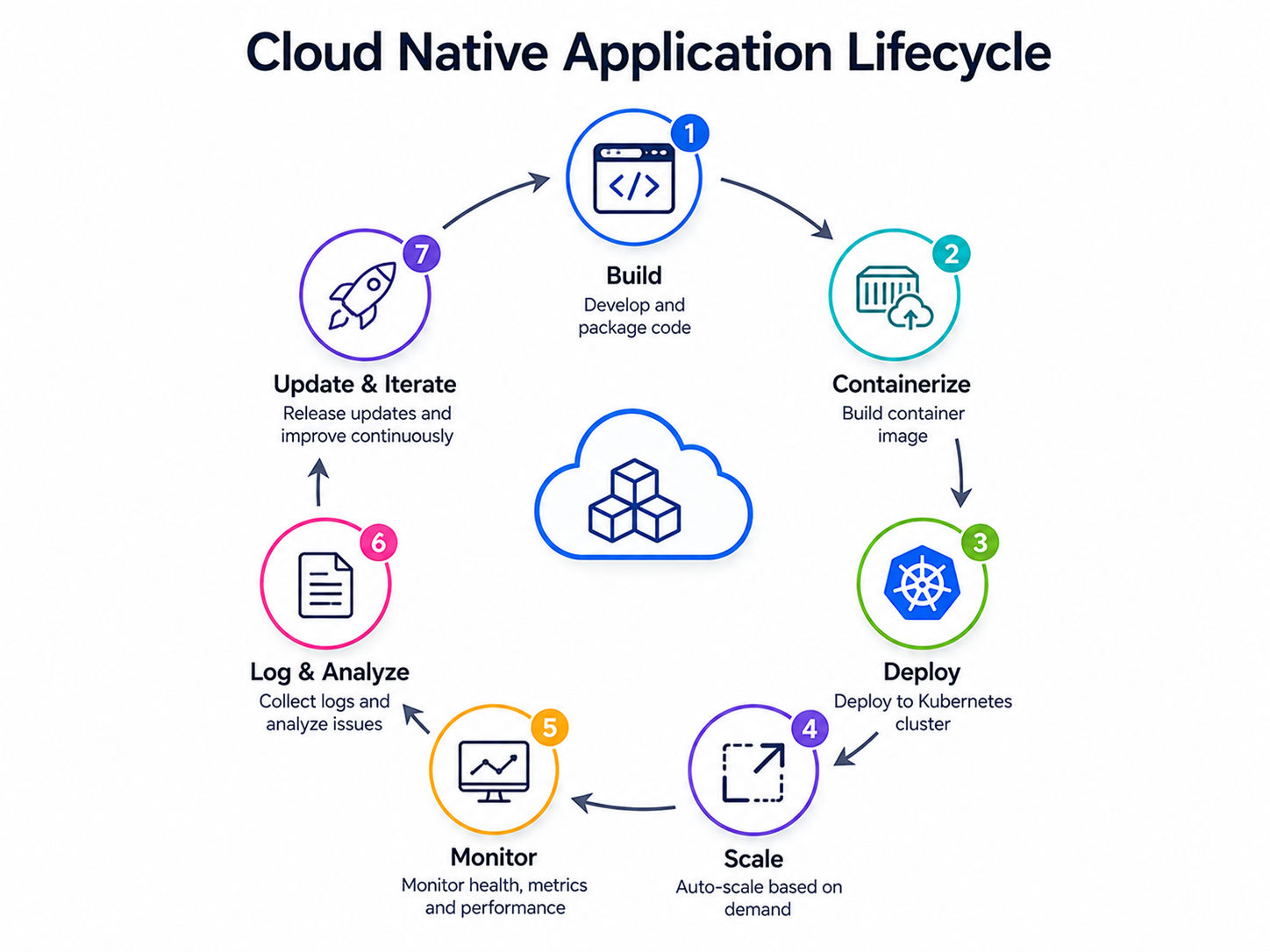
Understanding the cloud native application lifecycle also helps explain why organizations choose cloud native application development. Rather than waiting months to deliver new features, developers can release updates frequently without disrupting users.
Also read : key characteristics defining cloud computing
Choosing between modern and legacy software architectures depends on business goals, team expertise, and application requirements. Understanding cloud native vs traditional applications helps organizations decide whether it's time to modernize or continue with existing systems.
Traditional applications are usually built as a single unit and deployed on fixed infrastructure. A cloud native application is designed for cloud environments and uses distributed services, containers, and automation.
Key Differences :
| Feature | Cloud Native Applications | Traditional Applications |
| Architecture | Microservices | Monolithic |
| Deployment | Continuous and automated | Manual and scheduled |
| Infrastructure | Cloud-based | Physical or virtual servers |
| Scaling | Automatic | Manual |
| Updates | Frequent | Less frequent |
| Availability | High | Depends on infrastructure |
| Maintenance | Independent services | Entire application |
| Resource Usage | Dynamic | Fixed |
Cloud native architecture is the right choice when your applications need to scale quickly, support continuous updates, and remain highly available. It is especially valuable for businesses building modern, customer-facing applications or managing dynamic workloads.
A cloud native approach is suitable when you need:
Traditional applications may still work well for smaller internal systems that rarely change and don't require large-scale growth.
One of the most common questions developers ask is about cloud native vs monolithic architecture. While both approaches can solve business problems, they differ in how applications are built and maintained.
A monolithic application combines all features into one codebase. Even a small update usually requires rebuilding and redeploying the entire application.
A cloud native application separates functionality into independent services. Each service can be updated without affecting the rest of the system.
Comparison:
| Feature | Cloud Native | Monolithic |
| Code Structure | Independent services | Single application |
| Deployment | Individual services | Complete application |
| Scalability | Service-level scaling | Entire application scaling |
| Fault Isolation | High | Low |
| Development Speed | Multiple teams | One large team |
| Maintenance | Easier | More difficult as applications grow |
A startup building a new SaaS platform may benefit from cloud-native architecture because it supports continuous growth.
A small internal reporting system with limited users may work perfectly well as a monolithic application.
The right choice depends on business requirements rather than technology trends.
Organizations across industries continue investing in cloud native application development because it delivers both technical and business advantages. While every organization has different priorities, the benefits of cloud native applications generally revolve around speed, flexibility, reliability, and cost efficiency.
Let's look at the most important advantages:
Benefit |
Description |
| Faster Software Delivery | Enables frequent updates through automated development and deployment pipelines. |
| Better Scalability | Automatically adjusts resources based on changing application demand. |
| Improved Reliability | Keeps applications running by isolating failures and recovering quickly. |
| Lower Infrastructure Costs | Reduces cloud expenses by using only the resources required. |
| Faster Innovation | Allows teams to develop and deploy features independently. |
| Better User Experience | Provides faster performance, higher availability, and minimal downtime. |
Also read: Top 20+ Cloud Computing Projects GitHub For Beginners (With Source Code)
While the benefits of cloud native applications are significant, adopting this approach also introduces new challenges. Organizations should understand these early so they can plan effective solutions.
Here are the challenges while adopting a cloud-native application:
Challenge |
Description |
| Operational Complexity | Managing multiple microservices requires efficient deployment, monitoring, and maintenance. |
| Security Risks | Protecting APIs, containers, data, and cloud infrastructure requires a strong security strategy. |
| Data Management | Maintaining data consistency across independent services can be complex. |
| Skills Gap | Teams need expertise in containers, Kubernetes, automation, and cloud-native tools. |
| Cost Visibility | Without proper monitoring, cloud resource usage can lead to higher operational costs. |
Also read : dive into the history of cloud computing
Many of the world's leading technology companies rely on cloud native applications to deliver scalable, reliable, and high-performance digital services. By adopting microservices, containers, and automation, these organizations can support millions of users while continuously releasing new features.
Examples :
Company |
How It Uses Cloud Native Applications |
| Netflix | Uses microservices to manage streaming, recommendations, user accounts, and billing independently, enabling seamless updates and high availability. |
| Spotify | Relies on microservices and containers to power playlists, search, recommendations, and user profiles, allowing teams to release features faster. |
| Uber | Runs independent services for ride matching, payments, driver tracking, and notifications to efficiently handle high traffic and real-time operations. |
| Airbnb | Uses cloud native architecture to manage listings, bookings, messaging, and payments, with each service scaling independently based on demand. |
| Amazon | Operates thousands of microservices for inventory, recommendations, payments, shipping, and customer support, ensuring scalability and reliability across its platform. |
Cloud native applications are widely adopted across industries that require scalability, high availability, and rapid software delivery. Their flexible architecture enables organizations to handle growing workloads while delivering reliable digital experiences.
Also read: Types of Cloud Computing & Cloud Computing Services
Building a successful cloud native application requires more than adopting modern technologies. Following proven best practices helps improve scalability, security, reliability, and long-term maintainability while enabling faster software delivery.
Also read : Best Cloud Computing Course & Certification Online to Upgrade Your Career [2026]
Organizations often face challenges when adopting cloud native architectures due to planning or implementation mistakes. Avoiding these common pitfalls can help ensure better application performance, security, and operational efficiency.
A cloud native application is designed to fully leverage cloud technologies such as microservices, containers, APIs, automation, and continuous delivery. This approach enables organizations to build scalable, resilient, and flexible applications that can evolve quickly with changing business needs.
As cloud adoption continues to grow, cloud native application development helps businesses deliver faster updates, improve reliability, and optimize costs. Choosing the right cloud native architecture enables organizations to innovate faster while providing a better experience for users.
Ready to start your journey? Book a free consultation with upGrad today to find the best path for your career.
A cloud-hosted application is usually a traditional application moved to cloud infrastructure without changing its architecture. A cloud native application is designed specifically for the cloud using microservices, containers, APIs, and automation. This allows it to scale more efficiently and recover from failures more quickly.
No. While microservices are common in cloud native application development, they aren't mandatory. Some smaller applications begin as modular applications and gradually evolve into microservices as business requirements become more complex.
Kubernetes is widely used because it automates container deployment and management, but it isn't required. Small applications can run containers without Kubernetes. As applications grow, orchestration platforms become more valuable for managing resources efficiently.
Developers build cloud-native applications using languages such as Java, Go, Python, JavaScript, C#, and Rust. The language matters less than designing applications around cloud-native principles like automation, independent services, and containerization.
Yes, but it usually requires more than moving the application to cloud infrastructure. Teams often redesign the architecture, divide functionality into services, and modernize deployment processes to create a true cloud-native solution.
Yes. Small businesses can benefit from cloud native application development, especially if they expect future growth. Cloud services allow organizations to start with limited resources and expand infrastructure only when demand increases.
Industries such as banking, healthcare, retail, manufacturing, media, logistics, and software services commonly adopt cloud-native architecture because they require continuous availability, rapid feature delivery, and the ability to support changing workloads.
Developers should understand containers, APIs, cloud platforms, DevOps practices, continuous integration, monitoring, and distributed system design. Strong programming skills combined with cloud knowledge create a solid foundation for cloud-native development.
Containers package applications together with their dependencies, allowing them to run consistently across different environments. This consistency simplifies deployment, improves portability, and supports faster software releases.
Organizations often face challenges related to architecture redesign, team training, security, operational complexity, and cost management. Careful planning and gradual adoption help reduce these risks while improving long-term success.
Start by understanding what are cloud native applications and the principles behind them. Learn containers, Docker, Kubernetes, cloud platforms, APIs, and CI/CD pipelines through hands-on projects. Building small cloud-native applications is one of the fastest ways to gain practical experience.
730 articles published
Sriram K is a Senior SEO Executive with a B.Tech in Information Technology from Dr. M.G.R. Educational and Research Institute, Chennai. With over a decade of experience in digital marketing, he specia...
Speak with Data Science Expert
By submitting, I accept the T&C and
Privacy Policy
Start Your Career in Data Science Today
Top Resources
Executive Diploma
12 Months
Master's Degree
18 Months
Bootcamp
6 Months