
All courses
Agentic AI
Agentic AI

IIIT Bangalore
Executive Programme in Generative AI for LeadersArtificial Intelligence
Degree / Exec. PG

IIIT Bangalore
Executive Diploma in Machine Learning and AI
OPJ Global University
Master’s Degree in Artificial Intelligence and Data Science
Liverpool John Moores University
Master of Science in Machine Learning & AI
Golden Gate University
DBA in Emerging Technologies with Concentration in Generative AIExecutive Certificate

IIITB & IIM, Udaipur
Chief Technology Officer & AI Leadership Programme
IIIT-B & IIM, Udaipur
Chief Data and AI Officer ProgrammeOffline Bootcamps

upGrad
Data Science and AI-MLDoctorate
For All Domains
IIITB & IIM, Udaipur
Chief Technology Officer & AI Leadership Programme
Swiss School of Business and Management
Global Doctor of Business Administration from SSBM
Edgewood University
Doctorate in Business Administration by Edgewood UniversityGolden Gate University
Doctor of Business Administration From Golden Gate University
Rushford Business School
Doctor of Business Administration from Rushford Business School, SwitzerlandGolden Gate University
Doctor of Technology in Applied & Agentic AI-d9bdeff6165f4eb1ba2adcebde78e961.svg)
University of Waterloo
Chief Technology and AI Officer ProgramLeadership / AI
Golden Gate University
DBA in Emerging Technologies with a concentration in Generative and Agentic AIMachine Learning
Machine Learning
Data Science
Degree / Exec. PG
O.P Jindal Global University
Master’s Degree in Artificial Intelligence and Data ScienceIIIT Bangalore
Executive Diploma in Data Science & AILiverpool John Moores University
Master of Science in Data ScienceExecutive Certificate

upGrad | Microsoft
Gen AI Foundations Certificate Program from MicrosoftIIIT-B & IIM, Udaipur
Chief Data and AI Officer ProgrammeupGrad | Microsoft
Gen AI Mastery Certificate for Data AnalysisupGrad | Microsoft
Gen AI Mastery Certificate for Software DevelopmentupGrad | Microsoft
Gen AI Mastery Certificate for Managerial ExcellenceupGrad | Microsoft
Gen AI Mastery Certificate for Content CreationBootcamp
Offline Bootcamps
upGrad
Data Science and AI-MLMBA
Masters

Liverpool John Moores University
Master of Business Administration from Liverpool John Moores University (LJMU) with IIM Udaipur CertificationO.P.Jindal Global University
MBA (with Career Acceleration Program by upGrad)Edgewood University
MBA from Edgewood UniversityO.P.Jindal Global University
MBA from O.P.Jindal Global UniversityExecutive Certificate
Marketing
Executive Certificate
upGrad | Microsoft
Gen AI Foundations Certificate Program from MicrosoftupGrad | Microsoft
Gen AI Mastery Certificate for Content CreationOffline Bootcamps
upGrad
Digital MarketingManagement
Degree
O.P Jindal Global University
MSc in International Accounting & Finance (ACCA integrated)
Golden Gate University
Master of Arts in Industrial-Organizational PsychologyExecutive Certificate
IIIT-B & IIM, Udaipur
Chief Technology Officer & AI Leadership ProgrammeIIIT-B & IIM, Udaipur
Chief Data and AI Officer Programme
IIM Kozhikode
Human Resource Analytics Course from IIM-KupGrad | Microsoft
Gen AI Foundations Certificate Program from MicrosoftBootcamp
HDFC Life
Insurance Fundamentals ProgramEducation
Education

Northeastern University
Master of Education (M.Ed.) from Northeastern UniversityEdgewood University
Doctor of Education (Ed.D.)Edgewood University
Master of Education (M.Ed.) from Edgewood UniversityCertifications
Project Management
Certification

Knowledgehut
Leadership And Communications In ProjectsKnowledgehut
Microsoft Project 2007/2010-ae8d039bbd2a41318308f8d26b52ac8f.svg)
Knowledgehut
Financial Management For Project ManagersKnowledgehut
Fundamentals of Earned Value Management (EVM)Knowledgehut
Fundamentals of Portfolio ManagementKnowledgehut
Fundamentals of Program Management-35c169da468a4cc481c6a8505a74826d.webp&w=128&q=75)
Knowledgehut
CAPM® CertificationsKnowledgehut
Microsoft® Project 2016Certifications & Trainings
-7f4b4f34e09d42bfa73b58f4a230cffa.webp&w=128&q=75)
Knowledgehut
PMP® CertificationKnowledgehut
PMI-RMP® CertificationKnowledgehut
PMP Renewal Learning PathKnowledgehut
Oracle Primavera P6 V18.8Knowledgehut
Microsoft® Project 2013Knowledgehut
PfMP® Certification CourseKnowledgehut
Project Planning and MonitoringPrince2 Certifications

Knowledgehut
PRINCE2® FoundationKnowledgehut
PRINCE2® PractitionerKnowledgehut
PRINCE2 Agile Foundation and PractitionerKnowledgehut
PRINCE2 Agile® Foundation CertificationKnowledgehut
PRINCE2 Agile® Practitioner CertificationManagement Certifications
Knowledgehut
Project Management Masters Certification ProgramKnowledgehut
Change ManagementKnowledgehut
Project Management TechniquesKnowledgehut
Product Management Certification ProgramKnowledgehut
Project Risk Management- Study abroad
- Offline centres
- uGSOT - B.Tech
More

%20(2)-db0b6f38da9c485faf76e366793c9b9e.webp&w=128&q=75)



6. JDK in Java
7. C++ Vs Java
16. Java If-else
18. Loops in Java
20. For Loop in Java
46. Packages in Java
53. Java Collection
56. Generics In Java
57. Java Interfaces
60. Streams in Java
63. Thread in Java
67. Deadlock in Java
74. Applet in Java
75. Java Swing
76. Java Frameworks
78. JUnit Testing
81. Jar file in Java
82. Java Clean Code
86. Java 8 features
87. String in Java
93. HashMap in Java
98. Enum in Java
101. Hashcode in Java
105. Linked List in Java
109. Array Length in Java
111. Split in java
112. Map In Java
115. HashSet in Java
118. DateFormat in Java
121. Java List Size
122. Java APIs
128. Identifiers in Java
130. Set in Java
132. Try Catch in Java
133. Bubble Sort in Java
135. Queue in Java
142. Jagged Array in Java
144. Java String Format
145. Replace in Java
146. charAt() in Java
147. CompareTo in Java
151. parseInt in Java
153. Abstraction in Java
154. String Input in Java
156. instanceof in Java
157. Math Floor in Java
158. Selection Sort Java
159. int to char in Java
164. Deque in Java
172. Trim in Java
173. RxJava
174. Recursion in Java
175. HashSet Java
177. Square Root in Java
190. Javafx
Lambda Expressions in Java: A Complete Guide [2025]
Ever wanted to write a function without all the formal ceremony of declaring a method? That's the power of lambda expressions in Java. Introduced in Java 8, they provide a clean, concise syntax for creating anonymous functions on the fly, making your code more readable and expressive.
This powerful feature is the cornerstone of modern functional programming in Java, simplifying everything from list processing to event handling. This tutorial is your deep dive into lambda expressions in Java, covering their syntax, real-world applications, and best practices to help you write cleaner code.
So, let’s start by understanding first what Lambda Expressions in Java is.
Enhance your Java programming skills with our Software Engineering courses and take your learning journey to the next level!
What is Lambda Expression in Java?
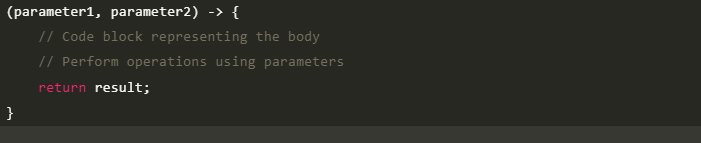
A lambda expression is an anonymous function—one without a name. It allows you to treat code as data, making it easier to pass behavior as an argument to methods or store it in variables. Lambda expressions in Java consist of three essential parts: parameters, an arrow token, and a body. Here's an example:

Functional Interface
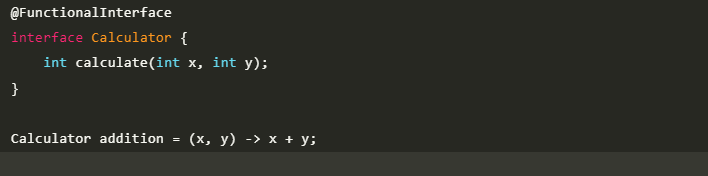
To understand lambda expressions fully, we need to grasp the concept of functional interfaces. A functional interface is an interface that contains a single abstract method and is used as the basis for lambda expressions. It serves as the contract for the behavior passed through the lambda expression. Let's explore this concept further with an example:
Take your Java programming skills to the next level and gain expertise for a thriving tech career. Discover top upGrad programs to master data structures, algorithms, and advanced software development.
- AI-Driven Full-Stack Development Bootcamp
Lambda Expression Syntax
The syntax of lambda expressions involves specifying parameters, an arrow token, and a body. Let's break it down with a simple example:
Also Read: Java Language History: Why Java Is So Popular and Widely Used Today
Functional Interface of Lambda Expression
As mentioned earlier, lambda expressions are based on functional interfaces. These serve as the contract for the behavior encapsulated within lambda expressions. Let's explore a few examples of functional interfaces commonly used with lambda expressions:
- Consumer: Represents an operation that accepts a single input and returns no result.
- Predicate: Represents a boolean-valued function that takes an argument and returns a boolean result.
- Supplier: Represents a supplier of results, generating values without taking any input.
Sorting Without Lambda Expression
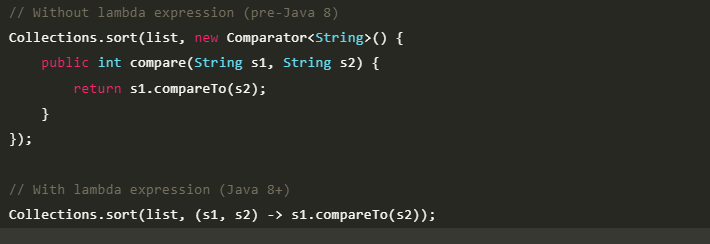
Before the introduction of lambda expressions in Java 8, achieving similar functionality required using anonymous inner classes.
Example of sorting a list with and without lambda expressions.
Examples of Lambda Expression in Java
Let's explore various examples of using lambda expressions in different scenarios to understand their versatility and power.
1. Java Lambda Expression Example: No Parameter
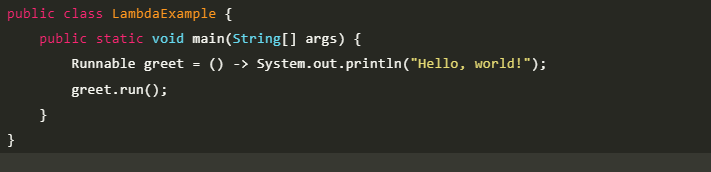
Lambda expressions can represent functions with no parameters. Here's an example of a lambda expression representing a simple greeting.
Output:

The code defines a lambda expression assigned to a Runnable variable greet. The lambda expression () -> System.out.println("Hello, world!") prints the message "Hello, world!" to the console.
2. Java Lambda Expression Example: Single Parameter
Lambda expressions can also represent functions with a single parameter. Let's consider an example of squaring a number.
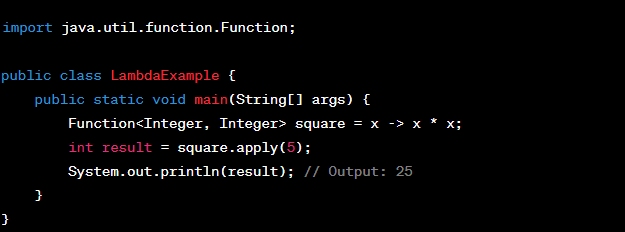
Output:

In the code, a lambda expression is assigned to a Function<Integer, Integer> variable named square. The lambda expression x -> x * x takes an Integer parameter x and returns the square of x by multiplying it with itself.
Also Read: A Brief Introduction to Command Line Arguments in Java
3. Java Lambda Expression Example: Multiple Parameters
Lambda expressions can handle functions with multiple parameters. Let's consider an example of adding two numbers.
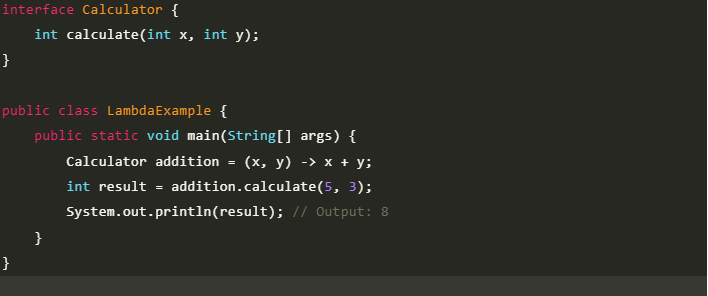
Output:

The code uses a lambda expression (x, y) -> x + y to add two integers. When the calculate method is called on the Calculator object with values 5 and 3, the lambda expression computes their sum, which is 8.
4. Java Lambda Expression Example: With or Without Return Keyword
Lambda expressions can be written with or without the explicit use of the return keyword. The compiler infers the return type based on the context.
Here's an example of a lambda expression that calculates the square of a number.
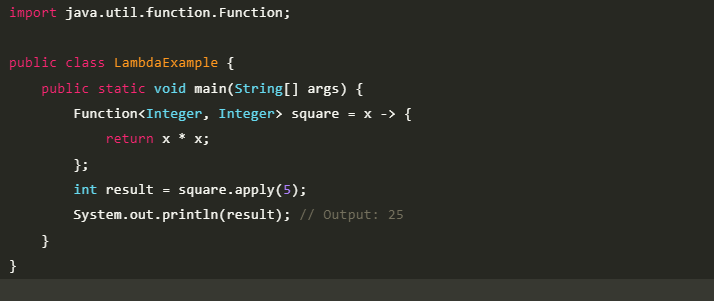
Output:

The code defines a lambda expression that calculates the square of an integer. By applying the lambda expression to the value 5, the output 25 is obtained.
5. Java Lambda Expression Example: Foreach Loop
Lambda expressions are commonly used with for each loops to iterate over collections. Let's consider an example of printing all elements in a list.
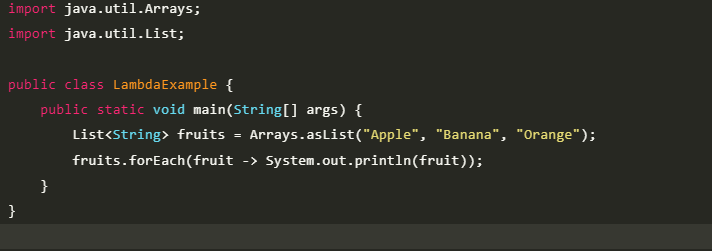
Output:

Also Read: Looping Statements in Java: Types, Syntax, Examples & Best Practices
6. Java Lambda Expression Example: Multiple Statements
Lambda expressions can comprise multiple statements within the body. Here's an example of a lambda expression that prints a greeting followed by the name.
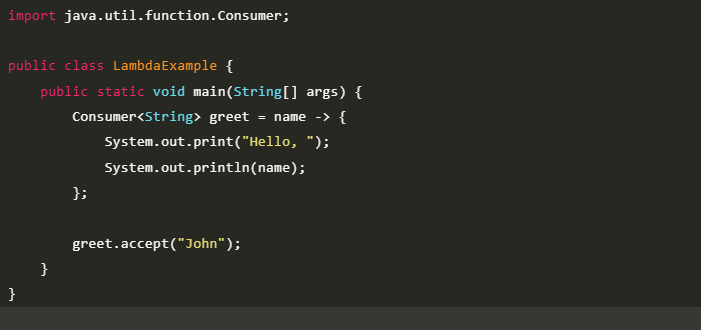
Output:

7. Java Lambda Expression Example: Creating Thread
Lambda expressions can be used to simplify the creation of threads. Let's consider an example of creating a new thread using a lambda expression.
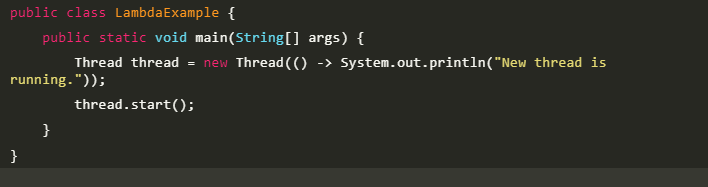
Output:

8. Java Lambda Expression Example: Comparator
Lambda expressions are commonly used in sorting algorithms. Here's an example of sorting a list of names alphabetically.
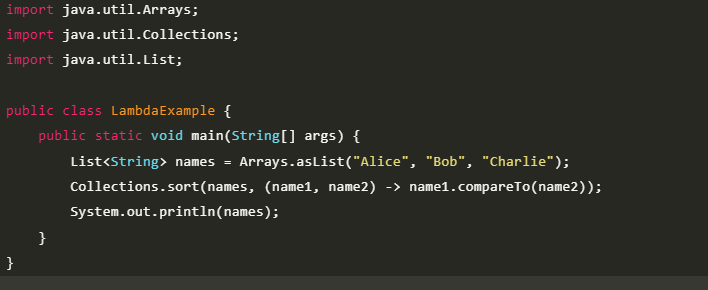
Output:

Also Read: Comparable vs Comparator: Difference Between Comparable and Comparator
9. Java Lambda Expression Example: Filter Collection Data
Lambda expressions are often used to filter data in collections based on specific conditions. Let's consider an example of filtering a list of numbers to retrieve only the even ones.
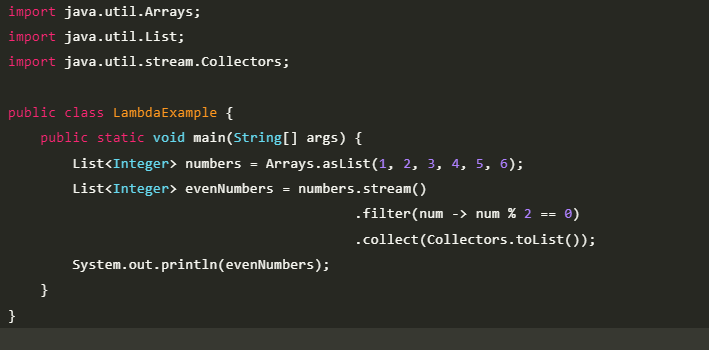
Output:

10. Java Lambda Expression Example: Event Listener
Lambda expressions can simplify event handling in graphical user interfaces. Here's an example of adding an action listener to a button.
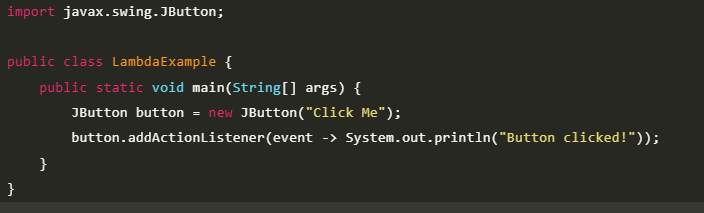
The output for the given code will depend on when the button is clicked. The message "Button clicked!" will be printed on the console when it is done.
Also Read: Event Handling in Java
Functionalities of Lambda Expression in Java
Lambda expressions in Java serve various functionalities and enable powerful programming paradigms. Let's explore some of the key functionalities and use cases.
- Lambda Expression Syntax:
As discussed earlier, the syntax of lambda expressions involves specifying parameters, an arrow token, and a body. The body can comprise a single statement or a block of code.
- Lambda Expression Parameters:
Lambda expressions can accept zero or more parameters. The parameters define the input values passed to the lambda expression.
- Lambdas as Objects:
Lambda expressions in Java allow us to treat them as objects and can be assigned to variables, passed as arguments, or returned from methods. They provide a powerful and flexible way to encapsulate behavior.
- Accessible Variable
Lambda expressions can access variables from their enclosing scope. These variables can be categorized into local, instance, and static variables.
Lambda Expressions vs. Anonymous Interface Implementations
- Lambda expressions provide a concise and expressive alternative to implementing anonymous interfaces.
- They eliminate the need for verbose syntax and provide a cleaner approach to writing code.
Lambda Expression in Java 8
In Java 8, lambda expressions were introduced as a powerful feature to enhance the functionality of the language. Lambda expressions provide a concise and expressive way to represent anonymous functions or methods. They play a significant role in enabling functional programming paradigms in Java. Let's check the specifics of lambda expressions in Java 8.
Lambda expressions in Java 8 are based on functional interfaces. A functional interface is an interface that contains only one abstract method. The lambda expression provides a compact syntax for implementing the abstract method of a functional interface. This means that lambda expressions can be used wherever a functional interface is expected, making the code more expressive and concise.
The return type of a lambda expression in Java 8 is inferred by the compiler based on the context in which the lambda expression is used. Since functional interfaces have a single abstract method, the compiler can determine the return type based on the method signature defined in the functional interface. The return type is not explicitly specified in the lambda expression itself.
Let's consider an example to understand lambda expressions and their return types in Java 8:
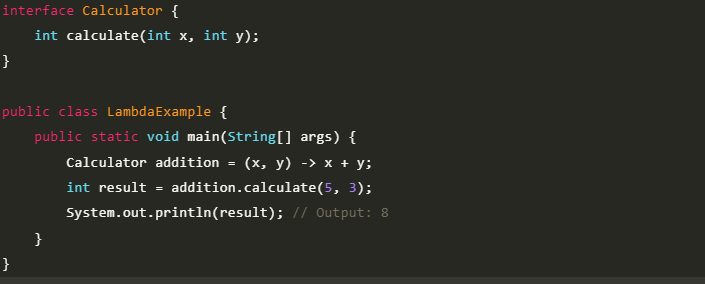
Output:

In the code, a functional interface Calculator is defined with a single abstract method calculate, that takes two integers x and y as parameters and returns an integer.
Advantages of Lambda Expressions in Java
Lambda expressions offer several advantages in Java programming:
- Concise and Readable Code: Lambda expressions in Java reduce boilerplate code and make the code more readable by focusing on the core logic.
- Enhanced Productivity: With lambda expressions, developers can write code more quickly and efficiently, saving time and effort.
- Improved Debugging: Lambda expressions encourage modular and focused code, making it easier to debug and maintain.
- Functional Programming Paradigm: Lambda expressions promote a functional programming style, enabling developers to write more elegant and efficient code.
Disadvantages of Lambda Expression in Java
While lambda expressions offer numerous benefits, it's also essential to consider their limitations.
- Learning Curve: Lambda expressions in Java introduce a new concept that developers need to learn and understand before utilizing them effectively.
- Compatibility: Lambda expressions were introduced in Java 8, which means they are not compatible with earlier versions of Java.
- Limited Use Cases: Lambda expressions are primarily suited for functional programming and scenarios where behavior needs to be passed as an argument. In other cases, traditional methods may be more appropriate.
Java Lambda Expression VS. Regular Method in Java
- Regular methods and lambda expressions have comparable functions but different syntax and flexibility.
- Lambda expressions are anonymous, but regular methods have names.
- Lambda expressions can be handled as objects and are frequently shorter.
Best Practices for Using Java Lambda Expressions
To ensure effective and maintainable code when using lambda expressions, consider the following best practices:
- Prefer Using Standard Functional Interfaces: Utilize existing functional interfaces provided by Java's standard library whenever possible to enhance code readability and maintainability.
- Make a Habit of Using @FunctionalInterface Annotation: Apply the @FunctionalInterface annotation to functional interfaces to enforce their proper usage and prevent accidental additions of additional abstract methods.
- Avoid Overuse of Default Methods in Functional Interfaces: Default methods in functional interfaces should be used sparingly and only when necessary to avoid confusion and maintain clarity.
- Avoid Overloading Methods With Functional Interfaces as Parameters: Overloading methods with functional interfaces can lead to ambiguity. It's recommended to have separate methods with different names to handle different functional interfaces.
Lambda Expression in JavaScript
Lambda expressions, also known as arrow functions, are a feature introduced in JavaScript ES6 (ECMAScript 2015) to provide a more concise syntax for writing functions. Lambda expressions in JavaScript allow you to define anonymous functions in a shorter and more expressive way.
Here's an example to demonstrate the usage of lambda expressions in JavaScript.
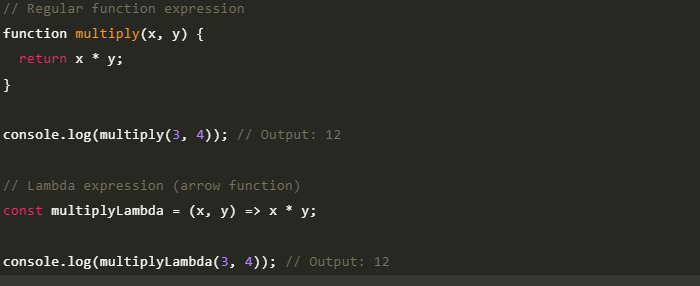
Output:

In the given code, both the regular function expression and the lambda expression perform the multiplication of two numbers. The regular function multiply uses the return keyword, while the lambda expression multiplyLambda directly returns the multiplication result.
Conclusion
Lambda expressions in Java have fundamentally changed the way developers write code. They are not just a feature; they are a gateway to a more modern, functional, and expressive style of programming.
By replacing bulky anonymous classes with a clean and concise syntax, lambda expressions in Java allow you to reduce boilerplate and focus on the core logic of your application. Mastering them is a key step in writing more efficient and readable code. Start using them in your projects, and you'll quickly see the power they bring to your toolkit.
FAQs
1. How do lambda expressions simplify functional programming in Java?
Lambda expression in Java simplify functional programming by enabling concise and expressive code. They facilitate the representation and passing of behavior as data. They also support functional programming constructs like higher-order functions and functional interfaces, promoting a focus on behavior rather than implementation details.
2. How does a lambda expression differ from a regular method in Java?
Lambda expressions are anonymous functions without formal declarations or separate method bodies. They can be defined inline at the point of use, resulting in more concise code.
3. How are lambda expressions used in JavaScript?
In JavaScript, lambda expressions, also known as arrow functions, provide a concise syntax for function definitions. They are commonly used for shorter function expressions, especially as callbacks or event handlers. Lambda expressions in JavaScript have implicit return statements, automatically returning the result of the expression without requiring an explicit return keyword
-9cd0a42cab014b9e8d6d4c4ba3f27ab1.webp&w=3840&q=75)
Take the Free Quiz on Java
Answer quick questions and assess your Java knowledge

FREE COURSES
Start Learning For Free





Author|911 articles published




Top Resources
Recommended Programs

upGrad Learner Support
Talk to our experts. We are available 7 days a week, 10 AM to 7 PM

Indian Nationals

Foreign Nationals