Unique Key in DBMS: Definition, Example, and Difference From Primary Key
By upGrad
Updated on Sep 29, 2026 | 8 min read | 3.47K+ views
Share:

All courses
Certifications
More
By upGrad
Updated on Sep 29, 2026 | 8 min read | 3.47K+ views
Share:
Table of Contents
Key Highlights
Ready to go beyond databases and work with real data? Check our Data Science courses and learn SQL, Python, statistics, and machine learning with hands-on projects and expert mentors. Start building job-ready skills today.
Popular Data Science Programs
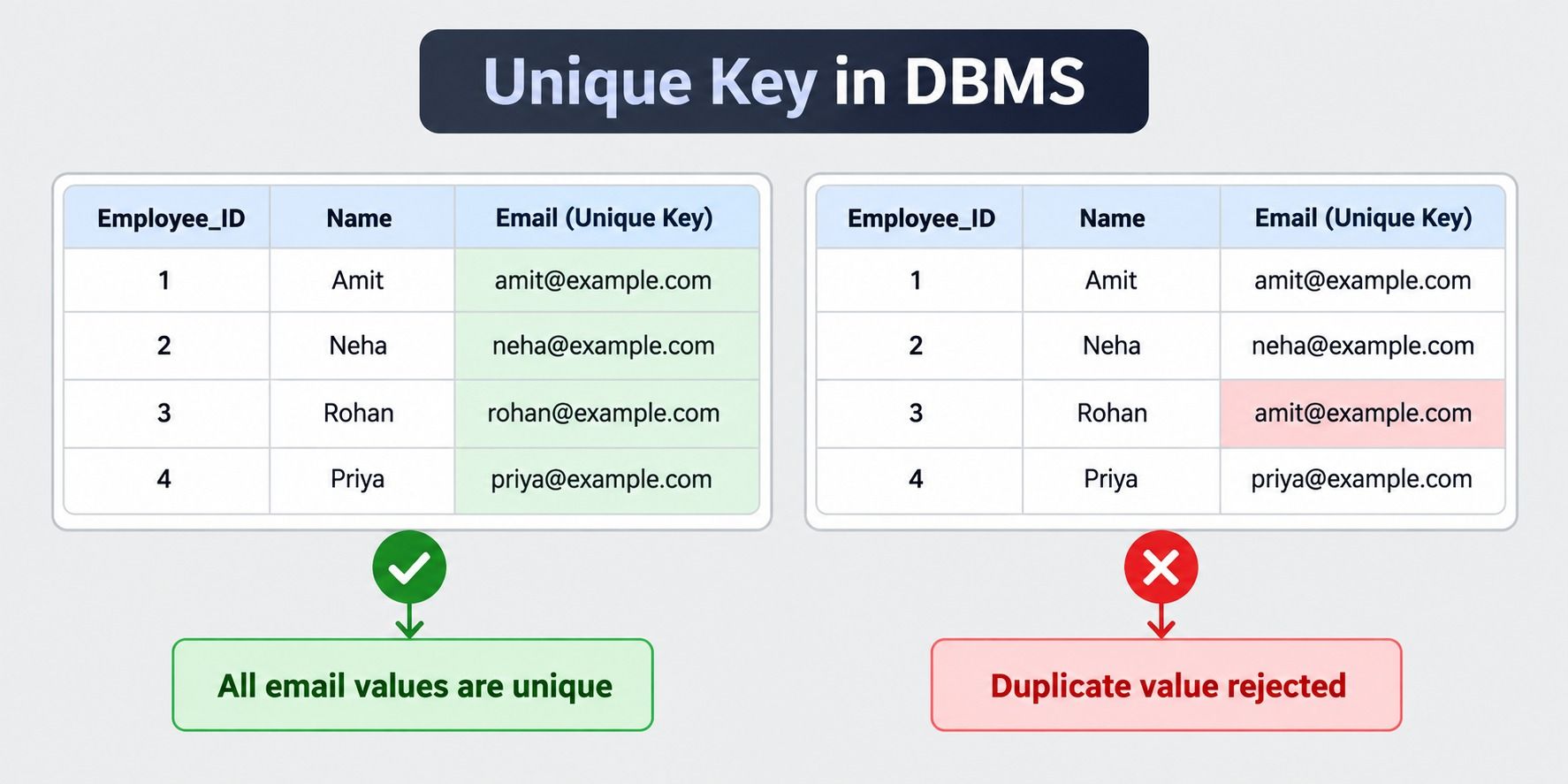
A unique key in DBMS is a constraint that stops duplicate values from being stored in a column. If you put a unique key on the email column, no two rows can have the same email. You can also apply it to more than one column. Then the combination of those columns has to be different in every row, but each column can repeat on its own.
Say you try to insert a value that already exists. The database refuses the insert and gives you an error. The same thing happens if you update a row to match a value that another row already has.
A few things are worth knowing about unique keys:
Take an employee's table. You could make employee_id the primary key and add unique keys on email and phone_number. Only employee_id is the official identifier, though.
A primary key in DBMS identifies each record and can never be NULL. A foreign key in DBMS connects a row to a row in another table. A unique key does neither. It only makes sure a value doesn't repeat.
Must read: What Are The Types of Keys in DBMS? Examples, Usage, and Benefits
Free Courses
Before a row goes in, the database checks the value against what is already stored. It does this on every INSERT and every UPDATE.
Found a match? The statement is rejected and you get an error. The table stays as it was.
To make this fast, the database builds a unique index on the column. Most systems use a B-tree for this. The index is sorted, so finding a value takes very little time, even with millions of rows.
Let's see it on a small users table:
CREATE TABLE users (
 id INT PRIMARY KEY,
 email VARCHAR(100) UNIQUE
);

INSERT INTO users VALUES (1, 'amit@example.com');
INSERT INTO users VALUES (2, 'amit@example.com');
The first insert works. The second one fails. The id is new, but the email is already taken.
MySQL shows a "Duplicate entry" error. PostgreSQL calls it a unique constraint violation. A composite unique key follows the same logic. The difference is that the database compares the whole combination.
Say the unique key covers student_id and course_id. The pair (101, 5) can only appear once. But student 101 can still join other courses. And course 5 can still have other students.
A few details catch people off guard.
You could check for duplicates in your app code instead. But that is risky. A bulk import, another script, or a manual edit can skip your code.
Also read: Primary Key vs Unique Key
Data Science Courses to upskill
Explore Data Science Courses for Career Progression
IIIT Bangalore
Executive Post Graduate Certificate in Data Science & AIPlacement Assistance
A unique key can guard one column or several. That gives you two types: single-column and composite. The rule works the same way in both. Only the thing the database compares is different.

Put a unique key on one column, and no value in it can repeat. Email is the classic case. Usernames and passport numbers work too.
CREATE TABLE members (
    member_id INT PRIMARY KEY,
    email VARCHAR(100) UNIQUE,
    mobile VARCHAR(15) UNIQUE
);
Here, email and mobile each have their own unique key. Two members can't share an email. They can't share a mobile number either. The database checks each column separately.
Replace the closing lines of the single-column part:
Both email and mobile carry their own unique key. A member can't register with an email that's already taken, and a mobile number can't be reused either. Each column is checked separately.
Sometimes one column can't tell you whether a row is a duplicate. Take a meeting room booking system. Room 5 will be booked many times, and slot 1 will be booked many times too. What you can't allow is Room 5 in slot 1 being booked twice.
A composite unique key handles this. It looks at the pair, not at each column alone.
CREATE TABLE room_bookings (
    booking_id INT PRIMARY KEY,
    room_id INT,
    slot_id INT,
    UNIQUE (room_id, slot_id)
);
booking_id |
room_id |
slot_id |
Allowed? |
| 1 | 5 | 1 | Yes |
| 2 | 5 | 2 | Yes |
| 3 | 6 | 1 | Yes |
| 4 | 5 | 1 | No |
Row 4 is rejected because room 5 in slot 1 is already taken by row 1. Rows 2 and 3 are fine, since each repeats only one value.
Two things to remember with composite keys:
Also read: Super Key in DBMS
Let's say a small company keeps its people in a staff table. The ID is the primary key. Email and mobile number must never repeat, so both get a unique key.
CREATE TABLE staff (
    staff_id INT PRIMARY KEY,
    full_name VARCHAR(50),
    email VARCHAR(100) UNIQUE,
    mobile VARCHAR(15) UNIQUE
);
Now add three people.
INSERT INTO staff VALUES (1, 'Riya Sharma', 'riya@company.com', '9876543210');
INSERT INTO staff VALUES (2, 'Karan Mehta', 'karan@company.com', '9123456789');
INSERT INTO staff VALUES (3, 'Neha Verma', 'neha@company.com', NULL);
All three go through. The emails are different, and so are the mobile numbers. Neha has no mobile number yet, and most databases accept that.
staff_id |
full_name |
mobile |
|
| 1 | Riya Sharma | riya@company.com | 9876543210 |
| 2 | Karan Mehta | karan@company.com | 9123456789 |
| 3 | Neha Verma | neha@company.com | NULL |
Now try to break the rule with a new hire who reuses Riya's email.
INSERT INTO staff VALUES (4, 'Amit Singh', 'riya@company.com', '9000000001');This fails. The ID and the mobile number are new, but the email already belongs to staff 1. One duplicate is enough to reject the whole row.
Updates are checked the same way. Here we try to give Neha Karan's email.
UPDATE staff
SET email = 'karan@company.com'
WHERE staff_id = 3;
The database blocks this too, because the change would create a duplicate.
Good data is where AI starts. The Universal AI Program by MIT Open Learning teaches you Python, machine learning, and large language models at your own pace.
You can create a unique key in two ways. You can define it when you create the table. Or you can add it later to a table that already exists.
You can also remove it when you no longer need it.
The basic syntax is similar across most databases. The small differences appear mainly when you drop a constraint. We cover those below.
The easiest time to add a unique key is when you build the table. There are two ways to write it.
CREATE TABLE users (
    user_id INT PRIMARY KEY,
    username VARCHAR(50) UNIQUE,
    email VARCHAR(100) UNIQUE
);
This is short and easy to read. It works well for single-column rules.
The database gives the constraint a default name. That name is often hard to read, so you may want to set your own.
CREATE TABLE users (
    user_id INT PRIMARY KEY,
    username VARCHAR(50),
    email VARCHAR(100),
    CONSTRAINT uq_users_username UNIQUE (username),
    CONSTRAINT uq_users_email UNIQUE (email)
);
A named constraint is easier to manage. When an error appears, the name tells you which rule failed. It also makes the drop command simple later.
Table-level syntax is the only choice for composite keys.
CREATE TABLE enrollments (
    enrollment_id INT PRIMARY KEY,
    student_id INT,
    course_id INT,
    CONSTRAINT uq_student_course UNIQUE (student_id, course_id)
);
A good naming habit is uq_tablename_columnname. It keeps things clear as your schema grows.
Sometimes the table already exists. You realize a column should have been unique all along. Use ALTER TABLE.
ALTER TABLE users
ADD CONSTRAINT uq_users_phone UNIQUE (phone_number);
For a composite key, list the columns inside the brackets.
ALTER TABLE enrollments
ADD CONSTRAINT uq_student_course UNIQUE (student_id, course_id);
There is one catch. The table must not already contain duplicates in those columns. If it does, the command fails.
Check for duplicates first. This query finds them.
SELECT phone_number, COUNT(*)
FROM users
GROUP BY phone_number
HAVING COUNT(*) > 1;
If it returns rows, you have duplicates. Fix or remove them first. Then run the ALTER TABLE command again.
On large tables, adding a unique constraint can take time. The database has to build an index over all existing rows. Some systems may lock the table while it does this. Run it during a quiet period if you can.
You may need to drop a unique key if the business rule changes. The command depends on your database.
ALTER TABLE users
DROP INDEX uq_users_phone;ALTER TABLE users
DROP CONSTRAINT uq_users_phone;This is why naming your constraints matters. If you used a default name, you first have to look it up. In MySQL, you can run SHOW INDEX FROM users;. In PostgreSQL, you can use \d users in the psql tool.
Dropping a unique key also removes its index. Searches on that column may become slower afterward. Also, check whether another table depends on it. A foreign key can point to a unique column. If it does, you must drop the foreign key first.
Also read: Primary Key in SQL Database: What is, Advantages & How to Choose
Subscribe to upGrad's Newsletter
Join thousands of learners who receive useful tips
A unique key is one of several constraints in a database. Constraints are rules that control what data a table can hold. The database enforces them automatically.
A unique constraint has one job. It stops duplicate values in a column or a group of columns.
The constraint applies at the database level. It does not matter whether the change comes from an app, a script, or a person typing a query. The rule holds every time.
Here is how a unique constraint behaves in practice:
A unique constraint works alongside other constraints. Each one solves a different problem.
Constraint |
What it does |
Allows NULL? |
Allows duplicates? |
| UNIQUE | Stops duplicate values | Usually yes | No |
| PRIMARY KEY | Identifies each row | No | No |
| FOREIGN KEY | Links to another table | Yes | Yes |
| NOT NULL | Blocks empty values | No | Yes |
| CHECK | Tests a condition | Yes | Yes |
| DEFAULT | Sets a value when none is given | Yes | Yes |
A few of these are worth a closer look.
CREATE TABLE users (
    user_id INT PRIMARY KEY,
    email VARCHAR(100) NOT NULL UNIQUE
);
This is a good pattern for fields like email or username. You do not want blank values, and you do not want duplicates.
CREATE TABLE departments (
    dept_id INT PRIMARY KEY,
    dept_code VARCHAR(10) UNIQUE
);

CREATE TABLE employees (
    emp_id INT PRIMARY KEY,
    dept_code VARCHAR(10),
    FOREIGN KEY (dept_code) REFERENCES departments(dept_code)
);
Here, employees.dept_code refers to a unique column, not the primary key. This works because dept_code is guaranteed to be distinct. To learn more about how tables link together, read our guide on foreign key in DBMS.
CREATE TABLE products (
    product_id INT PRIMARY KEY,
    sku VARCHAR(20) UNIQUE,
    price DECIMAL(10,2) CHECK (price > 0)
);
Each sku must be different. Each price must be above zero.
Use one when a value must be one of a kind but is not the main row ID. Good examples include:
Skip it when repeats are normal. A city name, a job title, or an order date will repeat many times. A unique constraint on them would cause problems.
Also think before you add one to a very large table. The new index needs storage. It also adds a small cost to every insert and update. For the main row identifier, use a primary key in DBMS instead. It is built for that purpose.
Also read: Candidate key DBMS
Primary key and unique key look alike. Both stop duplicate values. Both can create an index. But they serve different purposes.
A primary key is the official identity of a row. A unique key protects a column that must not repeat.
Think of a school. Each student has a roll number. That is the primary key. Each student may also have a unique email address. That is a unique key. The roll number is how the school tracks the student. The email is another value that cannot be shared.
Basis |
Primary Key |
Unique Key |
| Purpose | Identifies each row | Prevents duplicate values |
| NULL values | Not allowed | Allowed in most databases |
| Number per table | Only one | Many |
| Duplicates | Not allowed | Not allowed |
| Columns covered | One or more (composite) | One or more (composite) |
| Index type | Clustered in many systems by default | Non-clustered in many systems by default |
| Foreign key target | Common choice | Possible in most databases |
| Required? | Recommended for every table | Optional |
Also read: What Are Attributes in DBMS ? 10 Types and Their Practical Role in Database Design
A unique key is a simple rule that keeps data clean without extra code. It has clear benefits and a few limits.
Also read: DBMS Tutorial For Beginners: Everything You Need To Know
Conclusion
A unique key keeps a column, or a group of columns, free of duplicates. The database checks it on every insert and update, so the rule holds no matter which app or script changes the data.
It differs from a primary key in three ways. A table can have many unique keys but only one primary key. A unique key usually allows NULL. And it protects a value rather than naming the row.
Use a unique key for fields like email, mobile number, or a product code. Check how your database treats NULL before you rely on it. And keep the primary key as the main identifier of every table.
Have any questions about Data Science courses? Book a free consultation call with our experts and get personalized guidance on the right learning path for you.
Yes, in most databases. A NULL is not counted as a duplicate, so MySQL, PostgreSQL, and Oracle allow several of them. SQL Server allows only one. In PostgreSQL 15 and later, you can write UNIQUE NULLS NOT DISTINCT to allow just one.
Yes. The update works as long as no other row already holds the new value. If a foreign key in another table points to that column, the update may also be blocked or passed on, depending on the foreign key rule.
Yes, but be careful. If two rows fall back to the same default, the second insert fails. Defaults suit unique columns only when the default is NULL.
You can write it, but there is no point. A primary key already blocks duplicates. Adding UNIQUE on top only creates a second index that does the same work.
A table can hold only one primary key, so drop the current one first. Make sure the column is NOT NULL. Then run ALTER TABLE table_name ADD PRIMARY KEY (column_name);. You can drop the old unique key afterward, since it is now redundant.
A unique key works inside its own table and stops a value from repeating. A foreign key points to a column in another table and links the two. Foreign key values can repeat, but each one must exist in the linked column. A foreign key can also point to a unique key. Read more in our guide on foreign key in DBMS.
They do the same job, but they are not the same thing. A constraint is the rule in your table design. An index is how the database enforces it. Most systems create a unique index for you when you add a unique constraint. In MySQL, the two are treated almost alike.
Query information_schema.table_constraints and filter for constraint_type = 'UNIQUE'. This works in MySQL, PostgreSQL, and SQL Server. In Oracle, use user_constraints and look for type U.
It depends on the system. MySQL allows up to 16 columns in an index. PostgreSQL and SQL Server allow up to 32. In practice, two or three columns is plenty. Wider keys make the index larger and slower.
Not directly in every system. MySQL needs a prefix length, such as UNIQUE (notes(100)), and then only the first 100 characters are compared. For long text, use VARCHAR or store a hash of the text and put the unique key on that.
Some do. MongoDB lets you create a unique index on a field, and it rejects duplicate values in the same way. Others, such as Cassandra, have no built-in unique constraint, so you handle it in your data model or app.
1000 articles published
We are an online education platform providing industry-relevant programs for professionals, designed and delivered in collaboration with world-class faculty and businesses. Merging the latest technolo...
Speak with Data Science Expert
By submitting, I accept the T&C and
Privacy Policy
Start Your Career in Data Science Today
Top Resources
Master's Degree
18 Months
Executive Diploma
12 Months
Bootcamp
6 Months