What Is Cloud Scalability? Types, Benefits, Examples, and Challenges
By upGrad
Updated on Sep 29, 2026 | 9 min read | 2.36K+ views
Share:

All courses
Certifications
More
By upGrad
Updated on Sep 29, 2026 | 9 min read | 2.36K+ views
Share:
Table of Contents
Key Highlights
Scalable systems create value only when someone can turn their data into decisions. Our data science courses teach Python, SQL, machine learning, and cloud-based data tools through hands-on projects with real datasets.
Popular Data Science Programs
Scalability in cloud computing is the ability to increase or decrease resources like processing power, memory, storage, and network capacity as your workload changes.
This is often called scalable computing over the internet. You don't own the servers. You rent them from a cloud provider and resize them within minutes.
That's why cloud computing provides elastic scalability. Buying hardware for your busiest week, then letting it sit idle all year, is hard to justify.
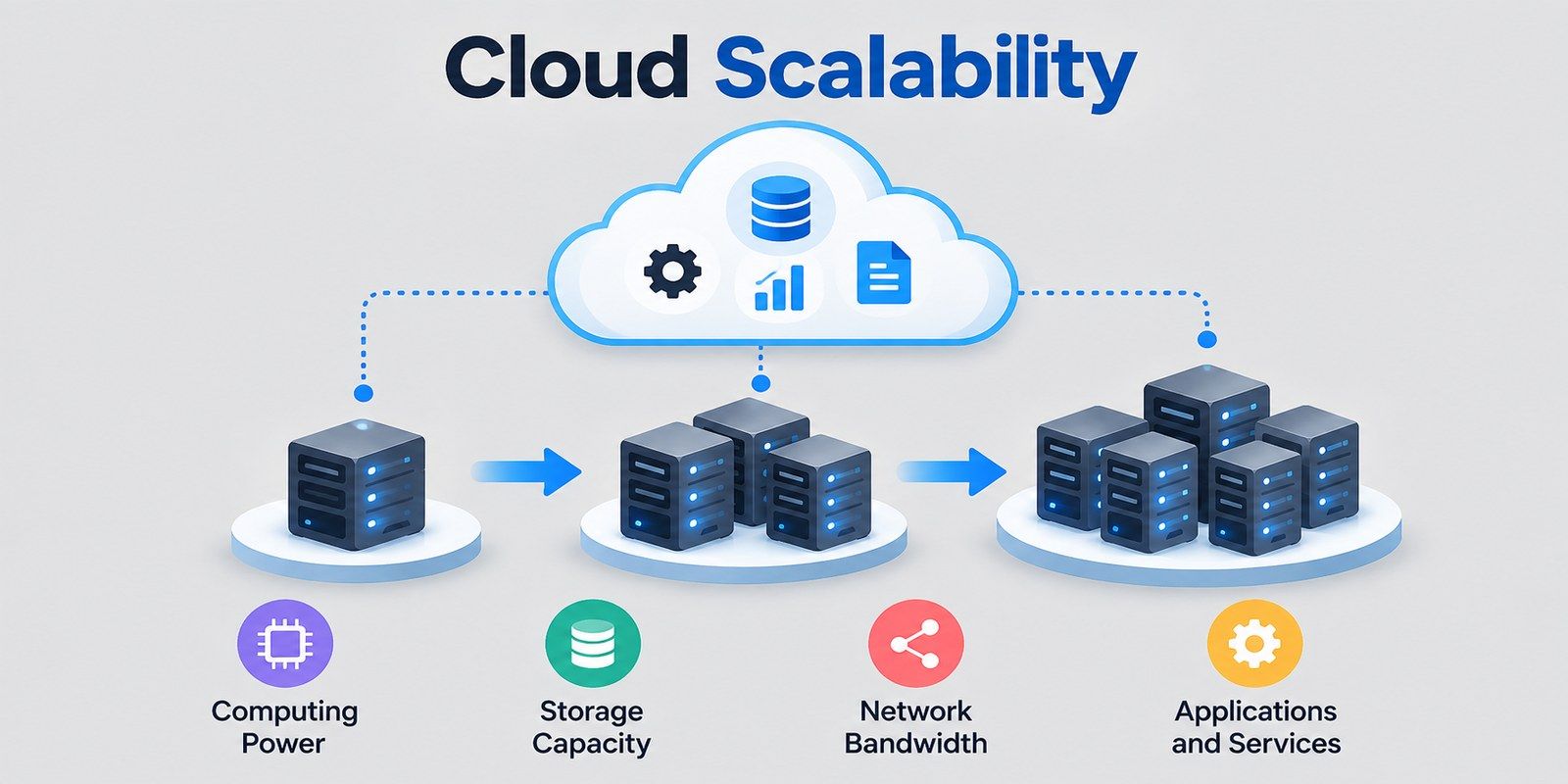
The scalability works by matching the available resources to the workload. Here is the basic flow of cloud scalability:
The four building blocks make scalability possible, and these are as follows:
Free Courses
Cloud scalability comes in three types. You can make one server stronger, add more servers, or do a bit of both.
Vertical scaling means making one server stronger. You add more CPU, memory, or storage to the machine you already have. This is called scaling up. Taking those resources away is called scaling down.
It suits databases well, since they often need more memory, not more machines. Older apps that can't run on several servers at once also rely on it.
The problems show up as you grow. Every server has a limit, and the price climbs fast near the top. Resizing may need a restart, which causes a short outage. And if that one server fails, the whole app stops.
Horizontal scaling means adding more servers to share the load. This is called scaling out. Removing servers when traffic falls is called scaling in.
Busy websites, microservices, and containerized apps use this method most. Streaming and e-commerce platforms favor it because there is no real cap. You keep adding machines as demand grows. It also handles failure well and works smoothly with auto-scaling too, so capacity follows traffic without manual effort.
Diagonal scaling mixes the first two methods. You scale up a server until further upgrades stop making financial sense. After that, you scale out by adding more servers.
For example, a young app starts on one modest server. As users arrive, you add memory and CPU. When the next upgrade costs more than it's worth, you add a second and third server instead.
This keeps early costs low and leaves room to expand later. Many teams end up here without planning it.
This table shows the three types side by side.
Factor |
Vertical |
Horizontal |
Diagonal |
| Method | Add power to one server | Add more servers | Scale up first, then out |
| Growth limit | Hardware ceiling | Very high | High |
| Downtime risk | Often needed for resizing | Low | Low to medium |
| Fault tolerance | Low, single point of failure | High | High |
| Complexity | Low | Medium to high | Medium |
| Cost pattern | Rises sharply at high tiers | Grows gradually | Balanced over time |
| Best for | Databases, legacy apps | Web apps, microservices | Growing businesses |
New projects usually start with vertical scaling because it is quick. Once traffic outgrows one machine, horizontal scaling takes over. Diagonal scaling lets you use each one at the right stage.
Ready to move beyond cloud basics into advanced data roles? Explore the Master's in AI and Data Science from Jindal Global University and build the skills to design, train, and scale intelligent systems.
Data Science Courses to upskill
Explore Data Science Courses for Career Progression
IIIT Bangalore
Executive Post Graduate Certificate in Data Science & AIPlacement Assistance
Cloud scalability helps you control costs, keep apps fast, and grow without rebuilding your setup. Here is what that looks like in practice.
Visitors leave when pages load slowly. Scalable systems add resources as traffic climbs. This helps in moments like:
Whether 100 people are online or 100,000, users get the same fast experience.
Ordering and installing physical servers can take weeks. In the cloud, new capacity is ready in minutes.
Want to test a new feature? Open in a new region? Handle a surprise spike? Your team can do any of it without waiting on approvals. That speed helps you catch chances slower competitors miss.
Auto-scaling adds and removes resources based on rules you set. No one has to watch dashboards all night or add servers at 2 a.m. That time goes back into improving the product.
Because capacity follows demand, you get two clear gains:
A short campaign or pilot launch doesn't need a long-term hardware deal. If the idea works, you scale it. If it doesn't, you shut it down and lose very little. Because failure costs so little, teams are more willing to try new ideas.
Also read: Must-Know Features of Cloud Computing
These both matter when you look at elasticity and scalability in cloud computing, but they solve different problems.
Factor |
Scalability |
Elasticity |
| Main goal | Handle long-term growth | Match resources to short-term demand |
| Time frame | Weeks, months, or years | Minutes or hours |
| Direction | Mostly upward | Up and down |
| How it happens | Planned, manual or automated | Automatic and rule-based |
| Trigger | Business growth | Traffic spikes and dips |
| Cost impact | Supports growth with controlled spend | Cuts waste by releasing unused capacity |
| Example | Adding servers as your user base doubles | Adding servers during a flash sale, then removing them |
Also read: Cloud Computing Architecture [With Components & Advantages]
Scalability comes from design choices made early and reviewed often. These six steps matter most.
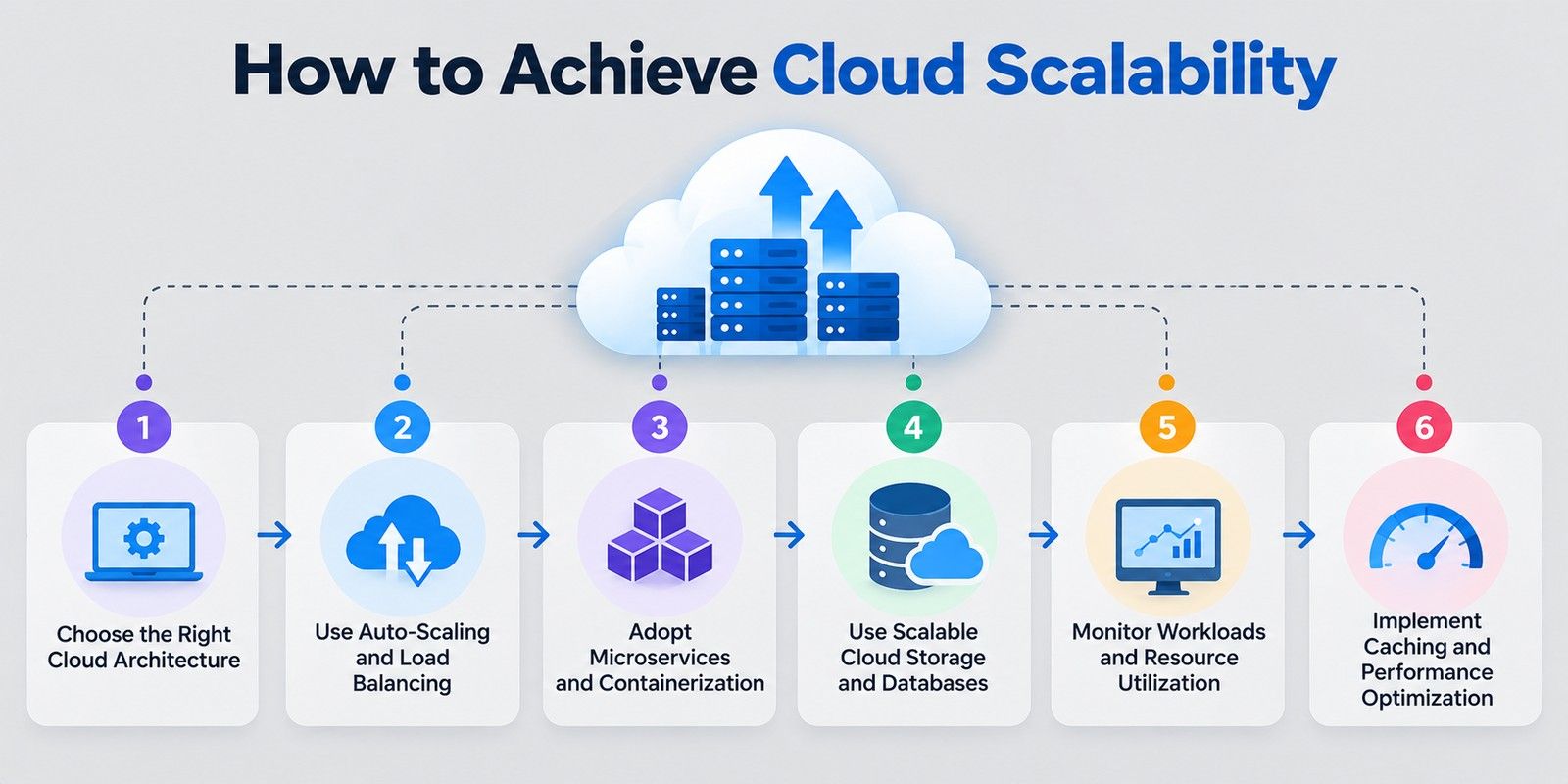
Your architecture sets how far and how easily you can scale. Fixing a poor choice later costs far more than getting it right at the start.
Public cloud scale fastest. Private cloud offer tighter control but less room to stretch. Hybrid keeps sensitive data in-house and runs the rest in the public cloud.
Also build your app to be stateless. If servers don't store user sessions locally, any server can handle any request, which makes scaling out much easier.
Auto-scaling controls how many servers you run. Load balancing controls where each request goes. You need both.
Set auto-scaling rules based on CPU, memory, or request count, plus a minimum and maximum so you never overspend. The load balancer shares traffic across servers and stops sending requests to any that fail.
AWS, Azure, and Google Cloud all offer both as managed services.
If only your checkout page is overloaded, a single large app still forces you to scale everything.
Microservices split the app into smaller parts, like login, search, and payments. Each one scales on its own. Containers such as Docker package each service to run the same way anywhere, and Kubernetes adds or removes them as demand changes.
The trade-off is complexity, so this suits growing products more than small ones.
Adding servers won't help if the database can't keep up.
Object storage grows on demand for files and images. For databases, managed services can scale for you. At larger sizes, two techniques help:
Choose the database based on your workload, not on trends.
You can't scale well without seeing what's happening.
Track CPU, memory, disk, network traffic, response times, and error rates. Set alerts for unusual patterns, and review trends over several weeks. Run load tests before big launches to find weak points early.
Monitoring also exposes waste. A server sitting at 10% use for weeks is money spent on nothing.
The cheapest request is the one your servers never process.
Caches like Redis and Memcached keep frequently used data in fast memory. A content delivery network (CDN) serves images, scripts, and pages from locations close to the user.
Small fixes help too. Compress images, rewrite slow queries, and remove unnecessary code. A faster app needs fewer servers for the same traffic.
Also read: Top 25 Advantages of Cloud Computing For an Organization
Here are the five challenges you're most likely to meet in cloud scalability.
Some applications simply can't run on more than one server. Older ones often store sessions locally or depend on a single large database, so adding servers breaks them or does nothing.
The fix may mean redesigning parts of the app. It's better to find this out during planning than during a traffic spike.
Copying a web server is easy. Copying data is not. When many servers query the same database, it becomes the slowest part of the system. Read replicas, caching, and sharding all help, but each one adds its own complexity. Use them when monitoring shows a real problem, not before.
Ten servers are easy to watch. Hundreds of containers spread across regions are a different story. Without central logging, clear dashboards, and useful alerts, problems stay hidden until users report them. Set these up before you scale, not after.
Provider-specific tools make scaling quick today and switching painful later. Moving away can mean rewriting large parts of your setup. Open standards such as containers and Kubernetes keep your options open.
Also read: Career in Cloud Computing: Top 11 Highest Paying Jobs, Tips, and More
Conclusion
Cloud scalability means your system can get bigger or smaller as your workload changes. You use more resources when demand is high and fewer when it is low, so your app stays fast and your bill stays fair.
Think of it as three options. You can upgrade a single server, add more servers to share the work, or do both in stages. On top of that, elasticity lets the cloud add or remove resources by itself in real time.
Getting it right takes a few habits. Start with a flexible setup, let auto-scaling and load balancing handle traffic, and use caching to cut repeat work. Watch your usage closely. Also plan ahead for the usual trouble spots: costs that grow quietly, databases that slow down, weak security, and gaps in team skills.
Have questions about which course fits your career goals? Book a free consultation call with our experts today.
Users hit a load balancer, which routes requests to a group of servers that grows and shrinks. Databases and storage sit below, while monitoring triggers the changes.
Beyond vertical, horizontal, and diagonal, systems scale by what grows: load (more users), storage (more data), geographic reach (new regions), and functional scope (new features).
Serverless and SaaS scale with the least effort because the provider handles it. PaaS needs some setup. IaaS gives the most control but requires you to build scaling rules.
No. Many need auto-scaling turned on and rules set. Providers also apply default quotas per region, so check limits before a big launch.
No. Performance is how fast your app runs under the current load. Scalability is whether that speed holds as load grows.
No. High availability keeps your app running when something fails. Scalability lets it handle more work. Most production systems need both.
Run load tests and watch response times, error rates, and throughput as users increase. If doubling servers gives far less than double the capacity, something is limiting you.
AWS offers EC2 Auto Scaling and Lambda. Azure has Virtual Machine Scale Sets and Functions. Google Cloud provides managed instance groups and Cloud Run.
Yes. They can start with low monthly costs and grow only as customers arrive. Managed and serverless options also reduce the need for an infrastructure team.
For sudden, unpredictable traffic, often yes, since functions start on demand. Virtual machines suit steady workloads better, and serverless can get costly at constant high volume.
Watch for rising response times, higher error rates, or CPU and memory staying high for long periods. Act on these early signals, not on customer complaints.
1001 articles published
We are an online education platform providing industry-relevant programs for professionals, designed and delivered in collaboration with world-class faculty and businesses. Merging the latest technolo...
Speak with Data Science Expert
By submitting, I accept the T&C and
Privacy Policy
Start Your Career in Data Science Today
Top Resources
Master's Degree
18 Months
Executive Diploma
12 Months
Bootcamp
6 Months