Cloud Based Inventory Management: The Complete Guide
By Sriram
Updated on Jul 09, 2026 | 11 min read | 3.63K+ views
Share:

All courses
Certifications
More
By Sriram
Updated on Jul 09, 2026 | 11 min read | 3.63K+ views
Share:
Table of Contents
Quick Overview
In this guide, you will learn what cloud based inventory management means, how cloud based inventory management software works, and why so many businesses are moving away from manual tracking. We will walk through its core features, real benefits, common challenges, implementation steps, and how it compares to on-premises systems and spreadsheets. You will also find practical tips on choosing the right software, fixing common problems, understanding pricing, and applying it to your specific type of business, so you can decide if it is the right move for you.
If topics like real-time stock tracking, cloud infrastructure, and building systems that keep supply chains running smoothly interest you, upGrad's Data Science courses can help you build the skills to design and manage the systems behind them.
Popular Data Science Programs
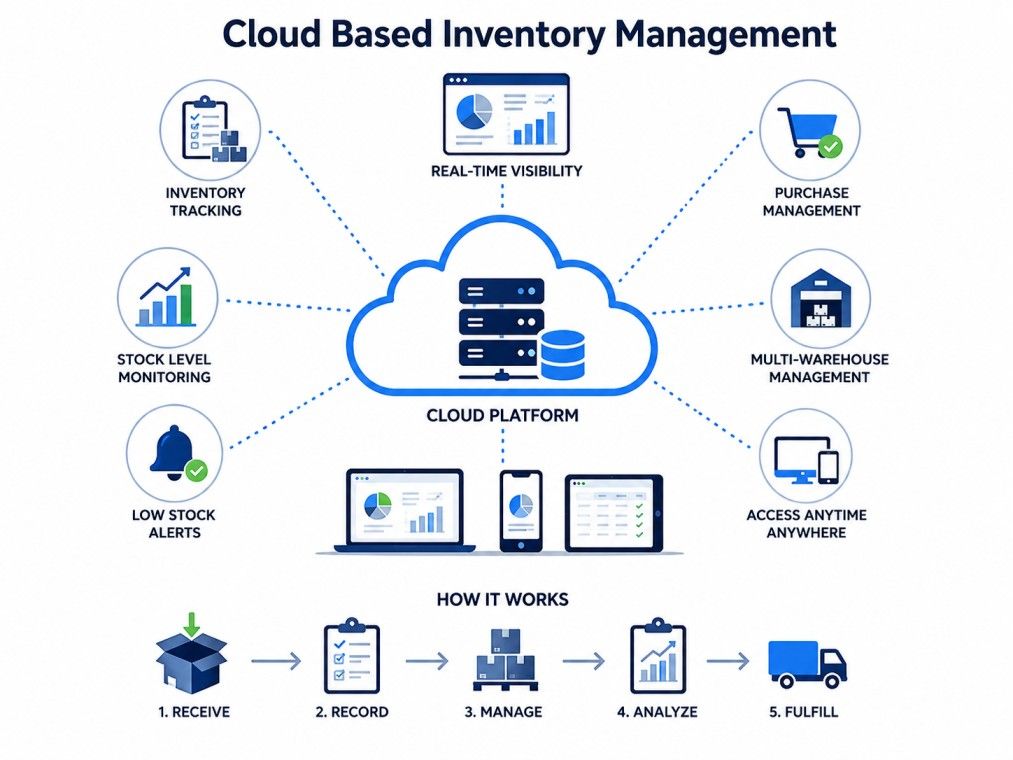
Cloud based inventory management refers to inventory tracking software hosted on remote servers rather than on a computer or in-house IT setup.
Instead of installing software on a single machine, you access it through a web browser or app. Data updates occur in real time and automatically sync across all devices connected to the system, eliminating the lag associated with manual updates.
Also Read: What Is Inventory Management?
Cloud-based inventory management stores inventory data in the cloud, enabling real-time stock tracking, automatic updates, and secure access from any device, anywhere.
This differs from traditional inventory management systems, where inventory records often reside on a single local server and updates can lag behind actual stock movements.
For instance, a warehouse worker in one city and a store manager in another city both see the same live count, reducing confusion during busy periods.
Free Courses
Not all cloud based inventory management software works the same way. Some are simple standalone tools, while others connect deeply into a business's finance and operations stack. Knowing the difference up front helps you narrow down the right fit before you start comparing vendors.
Type |
Best For |
| Standalone SaaS inventory software | Small to mid-sized businesses needing simple stock tracking |
| Cloud ERP inventory modules | Larger businesses that need inventory tied to finance, sales, and HR |
| Industry-specific cloud systems | Retail, manufacturing, or food businesses with special compliance needs |
| Hybrid cloud systems | Businesses that want some data stored locally and some in the cloud |
This is the most common starting point for small and mid-sized businesses. It is a subscription-based tool designed solely for inventory tracking, with features such as barcode scanning, stock alerts, and basic reporting.
Setup is quick, pricing is predictable, and there is little to no technical overhead. Most businesses moving off spreadsheets start here before considering anything more complex.
Also Read: What is SaaS: A Beginner’s Guide to Software as a Service
Larger businesses often need inventory data integrated with finance, sales, and procurement in a single system. Cloud ERP platforms bundle inventory management with these functions, so stock movements automatically reflect in accounting and order records.
This setup takes more effort to implement but removes the necessity to reconcile data across separate tools.
Some sectors have needs that generic software cannot satisfy. Food and pharmaceutical businesses, for example, need a batch and expiry tracking mechanism to meet compliance standards. Retailers may need size and variant tracking built in.
Industry-specific cloud systems are built around these requirements from the ground up, rather than being added on as extra features.
Hybrid systems keep some data on local servers while syncing the rest to the cloud. This suits businesses that want the flexibility of real-time access while needing to keep certain data in-house, often due to compliance rules or existing infrastructure investments.
It offers a middle ground, though it usually comes with more setup complexity than a fully cloud-based system.
Choosing between these depends on business size, budget, and the extent to which inventory needs to connect with other operations. A single-location retailer usually does fine with standalone SaaS software, while a manufacturer running production across three facilities may need the deeper connectivity that comes with cloud ERP.
Managing real-time systems like cloud inventory platforms takes more than just picking the right software, it takes people who understand cloud architecture from the ground up. If you're looking to build that expertise, upGrad's Executive Diploma in Data Science & Artificial Intelligence from IIITB, gives you the skills to design, deploy, and manage the cloud systems that power businesses today.
Data Science Courses to upskill
Explore Data Science Courses for Career Progression
IIIT Bangalore
Executive Post Graduate Certificate in Data Science & AIPlacement Assistance
A good cloud based inventory management software does more than just keep a count of the stock. It brings together tracking, automation, and reporting in one place, giving a clearer picture of what is moving and what is not. Here are the features that matter most and why each one earns its place in a modern setup.
These features work together, not in isolation. A retailer using barcode scanning alongside real-time tracking, for example, gets accurate counts without extra manual work, and that accuracy feeds directly into better forecasting down the line.
Switching to a cloud based inventory management software changes how a business runs its day-to-day operations, not just how it counts stock. The advantages go beyond convenience, cost efficiency, accuracy, and customer experience directly.
Benefit |
What It Means in Practice |
| Increased visibility | Everyone, from warehouse staff to management, sees the same live data |
| Greater accuracy | Automation reduces manual entry mistakes and double counting |
| Lower IT costs | No need for in-house servers or heavy maintenance |
| Remote access | Teams can manage stock from any location with internet access |
| Scalability | Systems grow with the business without major infrastructure changes |
| Better customer experience | Accurate stock data means fewer order cancellations and delays |
| Faster decision-making | Live dashboards mean managers act on current numbers, not last week's report |
For small businesses, the cost savings on hardware and IT staff alone can be significant. There is no server room to maintain, no dedicated IT team needed just to keep the system running. For larger businesses, the biggest win is usually the ability to manage multiple locations from one dashboard, which used to require separate systems or manual reconciliation between sites.
No system is perfect, and cloud inventory management comes with its own set of trade-offs. Knowing these upfront helps businesses plan better and avoid surprises after switching over.
These challenges are manageable for most businesses, but they matter more for companies operating in remote areas, handling sensitive data, or working under strict regulatory requirements around data storage location.
Subscribe to upGrad's Newsletter
Join thousands of learners who receive useful tips
Businesses often compare cloud systems against the two older alternatives before making a decision. Here is how they stack up across the factors that matter most.
Factor |
Cloud Based |
On-Premise |
Spreadsheets |
| Setup cost | Low to moderate | High | Minimal |
| Real-time updates | Yes | Limited | No |
| Remote access | Yes | Rarely | Depends on sharing method |
| Maintenance | Handled by provider | In-house IT required | Manual |
| Scalability | High | Limited | Very limited |
| Data security | Provider-managed, generally strong | Fully in-house control | Weak, prone to human error |
| Best for | Growing or multi-location businesses | Businesses with strict data control needs | Very small operations with few SKUs |
Spreadsheets work fine for a handful of products, but they break down quickly once order volume grows or multiple people need to update stock simultaneously.
On-premises systems offer more control but entail higher upfront and maintenance costs and require dedicated IT support. Cloud based inventory management sits in the middle, offering flexibility and lower overhead without the heavy infrastructure burden that on-premise setups require.
Security and cost are usually the two biggest concerns businesses raise before switching to a cloud system. Both deserve a closer look before signing up with any provider.
Reputable cloud inventory providers use encryption, regular backups, and access controls to protect data. Look for vendors offering:
It is worth asking any vendor directly where their servers are located and what happens to your data if you cancel your subscription. A good provider should have clear answers to both.
Most cloud inventory management software follows a subscription model, usually billed monthly or annually. Costs vary based on:
Pricing Tier |
Typical Range |
Best For |
| Free or starter plans | $0 to $50/month | Very small businesses testing the waters |
| Mid-tier plans | $50 to $300/month | Growing businesses with moderate SKU counts |
| Enterprise plans | Custom pricing | Large businesses with complex needs |
Many providers offer free trials, which is a good way to test the system before committing.
Even reliable cloud inventory management software runs into hiccups. Most issues are fixable quickly once you know where to look.
Most of these problems come down to setup and process, not the software itself. A little routine maintenance, like scheduled audits and permission reviews, goes a long way toward keeping the system running smoothly.
Moving from spreadsheets or an on-premise system to a cloud based one takes some planning. Rushing the switch usually leads to messy data and frustrated staff, so a structured rollout works better.
Start by listing out your must-have features and comparing shortlisted vendors against them. Involve the people who will actually use the system daily, not just management, since their feedback often catches usability issues that a demo alone will not reveal.
Moving historical inventory data into a new system is one of the trickiest parts of implementation. Clean up existing data before migration by removing duplicate or outdated SKUs. It also helps to run the new system alongside the old one for a short overlap period, testing integrations with accounting or ecommerce tools before going fully live.
Even the best software fails if staff do not know how to use it properly. A short, focused training session covering daily tasks, such as scanning stock or generating reports, usually works better than a single long session covering everything at once. Most providers also offer onboarding support or documentation, which is worth using fully during the first few weeks.
Cloud inventory management suits a wide range of business types, though the specific needs vary by industry and scale.
If your business handles more than a few dozen SKUs or operates from more than one location, cloud based inventory management is worth serious consideration. Even businesses with a single location often find the automation and reporting benefits worth the switch once order volume grows.
There is no single best cloud based inventory management system for every business. The right choice depends on the company's size, industry, and how closely the tool needs to connect with the rest of your operations.
Here is a quick look at some well-known names and where each one tends to fit.
Software |
Known For |
| Zoho Inventory | Affordable, easy setup for small and midsize retail or distribution teams |
| Cin7 | Multi-channel selling, combining inventory, POS, and warehouse automation |
| NetSuite | Full cloud ERP, suited to larger businesses needing finance and inventory in one place |
| Fishbowl | Strong QuickBooks integration, popular with manufacturers |
| Katana | Real-time production tracking for small manufacturers |
| inFlow | Simple interface, good fit for small businesses managing multiple locations |
These are starting points, not final answers. Pricing, support quality, and feature depth change often, so it is worth checking current reviews and running a free trial before committing to any one platform.
Choosing the right cloud based inventory management system comes down to matching software capabilities with actual business needs, not just picking the most popular option. A few practical steps make the decision easier.
Taking the time to evaluate these factors upfront saves a lot of hassle down the line, especially once historical data is already loaded into the system and switching becomes harder.
Cloud based inventory management is a practical choice for businesses that need accurate, real-time stock visibility without heavy infrastructure costs. It solves problems that spreadsheets and on-premises inventory management systems struggle with, particularly around remote access, scalability, and cross-team visibility. That said, it is not without trade-offs, and internet dependence or subscription costs matter more for some businesses than others.
The right approach is to weigh your business size, growth plans, and budget against what cloud systems offer. Start with a clear list of must-have features, test a couple of options through free trials, and involve your team in the evaluation process. For most growing businesses, especially those managing multiple locations or sales channels, cloud based inventory management is worth the investment, both in time saved and in accuracy gained.
Want personalized guidance on Data Science and upskilling? Speak with an expert for a free 1:1 counselling session today.
Cloud inventory management stores data on remote servers and updates in real time, accessible from any device with internet. Traditional inventory management typically relies on local servers or manual records, which often lag behind actual stock movement and require in-house IT support to maintain.
Yes, many cloud inventory management systems offer affordable plans or free tiers designed for small businesses. These plans usually cover basic stock tracking, barcode scanning, and simple reporting, without the high setup costs associated with on-premise systems.
SaaS inventory management refers to inventory software delivered as a subscription service over the internet. Businesses pay a recurring fee instead of buying software outright, and updates, maintenance, and security are handled by the provider rather than in-house teams.
Most cloud systems require an active internet connection for real-time updates. Some providers offer limited offline functionality that syncs once connectivity returns, but this varies by vendor, so it is worth checking before choosing a system.
Reputable providers use encryption, regular backups, and role-based access controls to protect inventory data. Security levels vary between vendors, so businesses should check for compliance certifications and data protection practices before selecting a provider.
Yes, most cloud inventory management systems offer integrations with popular accounting tools like QuickBooks or Xero. This allows stock data to sync automatically with financial records, reducing manual data entry and reconciliation work.
Cloud inventory management focuses specifically on stock tracking and warehouse operations. Cloud ERP is broader, combining inventory with finance, HR, and other business functions in one connected system, which suits larger organizations with complex operations.
Pricing varies widely based on business size, number of users, and features needed. Small business plans often start at a low monthly fee, while enterprise-level systems with advanced forecasting and multi-warehouse support cost significantly more.
Yes, most modern cloud inventory management systems sync stock across multiple sales channels, including physical stores, ecommerce websites, and marketplaces. This helps prevent overselling and keeps stock counts consistent everywhere.
During an outage, real-time updates may pause temporarily, but stored data is typically unaffected since providers maintain regular backups. Most vendors publish status updates and restore service quickly, minimizing disruption to daily operations.
For businesses with more than a handful of products, cloud based inventory management is generally more reliable than spreadsheets. It reduces manual errors, updates in real time, and scales easily, while spreadsheets become harder to manage as order volume grows.
730 articles published
Sriram K is a Senior SEO Executive with a B.Tech in Information Technology from Dr. M.G.R. Educational and Research Institute, Chennai. With over a decade of experience in digital marketing, he specia...
Speak with Data Science Expert
By submitting, I accept the T&C and
Privacy Policy
Start Your Career in Data Science Today
Top Resources
Executive Diploma
12 Months
Master's Degree
18 Months
Bootcamp
6 Months