Memory Management in Operating System
By Sriram
Updated on Aug 23, 2026 | 10 min read | 4.31K+ views
Share:

All courses
Certifications
More
By Sriram
Updated on Aug 23, 2026 | 10 min read | 4.31K+ views
Share:
Table of Contents
Key Highlights
Ready to build practical skills in data, analytics, and machine learning? Explore upGrad’s data science online training and take the next step toward a data-driven career.
Popular Data Science Programs
When several programs run at the same time, they all need memory to store their data and instructions. Since RAM is limited, the operating system must decide how to share memory among these programs. This is where memory management in operating system becomes important. It helps the OS allocate memory, track its usage, protect processes, and release space when it is no longer needed.
In short, memory management helps the system use RAM efficiently while keeping running programs separate and stable.
Memory management follows a continuous process rather than one single operation. The OS receives memory requests, assigns suitable locations, tracks those allocations, protects process memory, and releases the space when programs no longer need it.
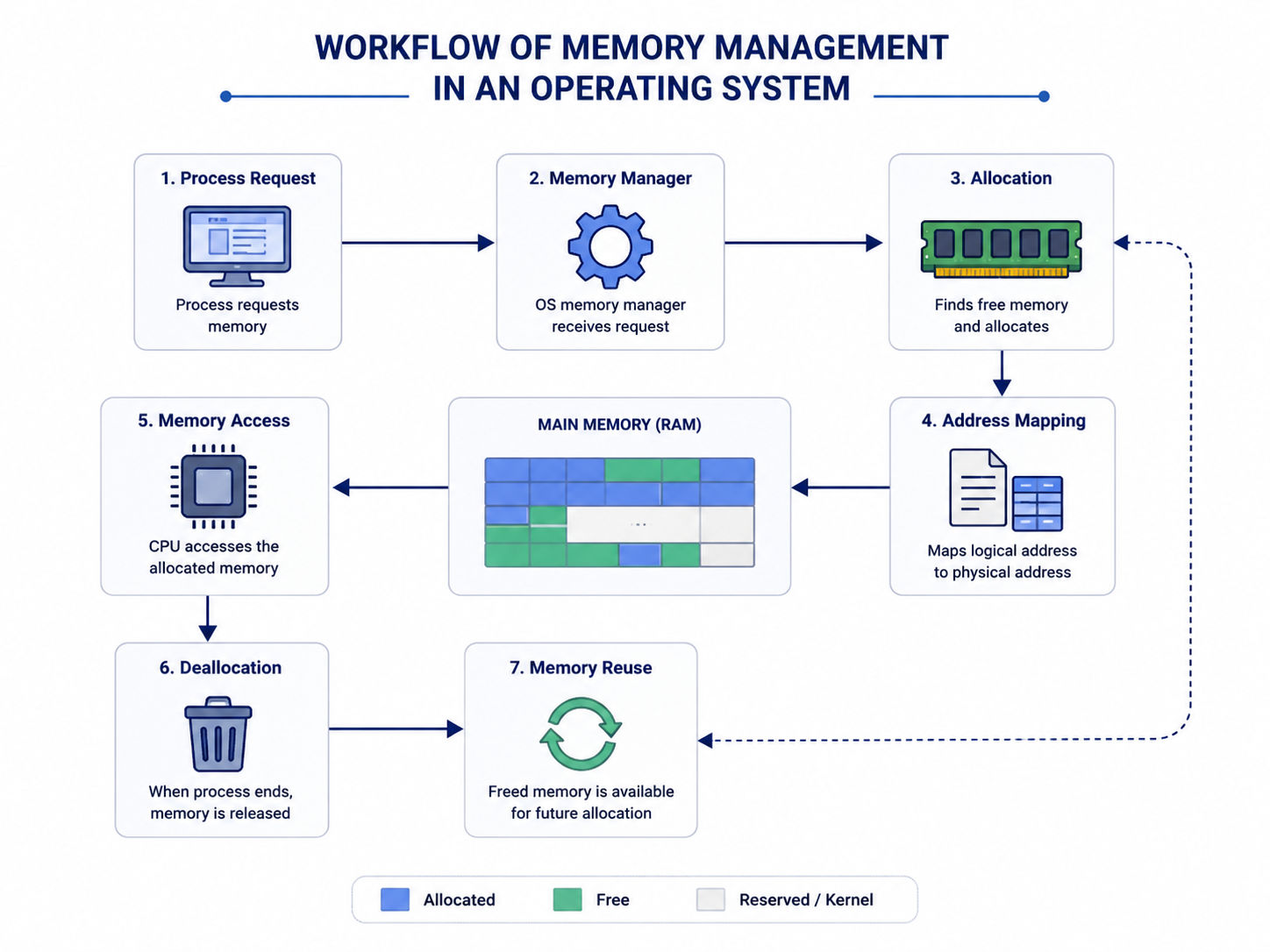
Things get more challenging when several processes need memory at once and RAM is limited. The OS uses techniques such as paging and virtual memory to manage space more efficiently.
A process works with its own address space, while the OS and MMU map those addresses to physical RAM. The OS also tracks memory usage and frees the allocated space when a process ends.
Free Courses
Memory management covers more than allocation. The OS has several responsibilities that work together to keep processes running correctly.
The major responsibilities include:
A process doesn't need to know every physical detail. That's the point.
The OS handles those details behind the scenes, so applications can request memory without manually managing every physical RAM location.
Data Science Courses to upskill
Explore Data Science Courses for Career Progression
IIIT Bangalore
Executive Post Graduate Certificate in Data Science & AIPlacement Assistance
The main functions of memory management in operating system revolve around allocation, tracking, protection, and efficient use of RAM. Each function addresses a different problem that appears when several processes compete for limited memory.
Memory allocation gives a process the space it needs to execute. The OS identifies an appropriate free area and assigns it to the process.
This sounds simple until several programs request memory simultaneously. The OS must make allocation decisions without wasting too much available space.
When a process finishes using memory, the OS needs to release that space.
Otherwise, unused memory could remain marked as occupied. Releasing memory allows another process to use it.
The OS needs to know which portions of memory are free and which belong to active processes.
This information changes constantly. A program might request more space, release part of its allocation, or terminate completely.
Each process needs controlled access to memory.
Protection mechanisms stop one process from modifying memory assigned to another process. That's especially important when several applications run at the same time.
Programs work with addresses from their own address spaces. Physical RAM has its own locations.
The OS and MMU work together to map those addresses correctly, so a process can access the data it needs without directly managing physical memory.
Modern operating systems run many processes together.
The OS has to distribute memory among them while maintaining isolation and keeping enough resources available for active tasks. That's where efficient memory management in operating system becomes essential.
Ready to build real-world AI solutions and sharpen your technical skills? Explore upGrad’s Building AI Products, Systems & Services EPGC by IIT KGP and take your AI expertise to the next level.
Memory can be organized in different ways depending on how processes are placed and accessed. The two broad approaches are contiguous and non-contiguous memory allocation.
With contiguous allocation, a process occupies one continuous area of physical memory.
This approach is easy to understand. If a process needs 100 MB, the OS looks for one suitable continuous block.
Older systems relied heavily on this method because it was relatively simple. The problem appears when free memory becomes divided into smaller gaps.
Fixed and variable partitioning are common examples.
Read: Big Data Architects Salary in India: For Freshers & Experienced
Non-contiguous allocation doesn't require an entire process to occupy one continuous physical block. A process can be divided into smaller units that reside in different memory locations. Paging is the most common example discussed in modern OS concepts.
This approach gives the operating system more flexibility when physical memory is fragmented.
Factor |
Contiguous allocation |
Non-contiguous allocation |
| Process placement | One continuous area | Multiple memory areas |
| Flexibility | Lower | Higher |
| Fragmentation concern | Significant | Lower external fragmentation with paging |
| Address management | Simpler | More complex |
| Common technique | Partitioning | Paging |
The choice affects how efficiently available RAM can be used. That's why allocation isn't just about finding space. The OS also has to consider how that space will affect future memory requests.
Memory allocation techniques decide how the OS gives available memory to a process. They are an important part of the concept of memory management in operating system, especially when several free memory blocks are available.
First Fit choose the first free block that is large enough for the process. It is simple and quick because the search stops once a suitable block is found. However, small unused gaps may build up near the beginning of memory.
Best Fit looks for the smallest free block that can hold the process. This can leave less unused space after allocation, but the search may take longer. Over time, it can also create many small gaps that are hard to use.
Worst Fit assigns the largest available block to the process. The remaining space may still be large enough for another process. However, it can waste larger blocks and may not make the best use of memory.
These techniques are mainly used in memory management in operating system when free memory is handled through contiguous allocation. In memory management in real time operating system, predictable allocation and response time are often more important than simply choosing the largest or smallest available block.
A simple comparison helps:
Strategy |
Selection rule |
Main concern |
| First Fit | First suitable block | Early fragmentation |
| Best Fit | Smallest suitable block | Small leftover gaps |
| Worst Fit | Largest suitable block | Larger search and wasted space |
These strategies are useful for understanding allocation decisions, but they don't solve every memory problem. When memory becomes fragmented, paging provides a different approach.
Read: What Is Data Science? Courses, Basics, Frameworks & Careers
Paging is a way of managing memory without keeping a process in one continuous block of RAM. The OS divides logical memory into fixed-size pages and physical memory into frames of the same size.
For example, a process may need four pages. These pages can be placed in different frames across RAM. A page table records where each page is stored, while the MMU uses this information to find the required physical address.
Paging is an important part of the concept of memory management in operating system because it makes better use of available memory.
The page number identifies the page, while the offset points to the exact location inside it. The page table connects the page with its physical frame.
One benefit of paging is that free frames don't need to be next to each other. However, page tables use extra memory, and address translation adds some processing work.
The basic flow is:
Logical address → Page number + Offset → Page table → Frame number + Offset → Physical address
A page fault happens when a process needs a page that isn't currently in RAM. The OS loads the page from secondary storage into a suitable frame and updates the page table.
If all frames are occupied, the OS may need to remove another page first. This connects paging closely with virtual memory and memory management in operating system.
Also Read: 7 Common Data Science Challenges
Virtual memory allows a system to provide processes with an address space that can be larger than the available physical RAM. It does this by keeping some data in secondary storage and bringing required portions into RAM when needed.
This doesn't mean storage suddenly becomes as fast as RAM. It doesn't.
Storage is much slower, so excessive movement between RAM and storage can hurt performance. Virtual memory is useful because programs don't always need every part of their address space in physical memory at the same time.
Demand paging loads a page only when the process actually needs it.
If a required page isn't in RAM, a page fault occurs. The OS retrieves the page and places it into an available frame.
This approach saves physical memory because unused pages don't have to occupy RAM immediately.
If RAM has no free frame, the OS needs to decide which existing page should leave memory.
Common page replacement algorithms include:
Algorithm |
Basic idea |
| FIFO | Replaces the page that entered memory first |
| LRU | Replaces the least recently used page |
| Optimal | Replaces the page that won't be needed for the longest future period |
The optimal algorithm is mainly useful as a theoretical benchmark because an operating system can't know the future perfectly.
Factor |
Virtual memory |
Physical memory |
| Meaning | Address space presented to processes | Actual RAM |
| Location | Uses address space backed by RAM and storage | RAM hardware |
| Capacity | Can exceed physical RAM | Limited by installed RAM |
| Speed | Depends on where data resides | Faster than storage-backed access |
The concept of memory management in operating system becomes much easier when virtual and physical memory are kept separate in your mind.
Memory management in a real-time operating system (RTOS) is different from a general-purpose OS because tasks often have strict time limits. Memory operations need to be predictable so that a task can finish within its deadline.
An RTOS aims to keep memory allocation and release times predictable. This helps tasks get the memory they need without unexpected delays.
1.Static allocation: assigns memory before the system starts running. It is easier to predict and is commonly preferred when timing is critical.
2.Dynamic allocation gives memory when a task needs it. While flexible, frequent allocation and release can cause fragmentation and unpredictable delays.
3.Memory Constraints
Many RTOS applications run on embedded devices with limited RAM. The system must use memory carefully and avoid unnecessary allocation.
4. Memory Protection
Memory protection prevents one task from accessing or changing memory assigned to another task. This helps keep the system stable and prevents errors from spreading between tasks.
Read: Data Science Career Growth
A delayed memory operation can cause a task to miss its deadline. For this reason, RTOS designs generally avoid memory-management methods that can introduce unpredictable delays.
| Factor | General-Purpose OS | RTOS |
| Main focus | Overall performance and resource use | Predictable response |
| Memory allocation | Static and dynamic | Often prefers predictable allocation |
| Timing | Flexible | Time-critical |
| Memory constraints | Usually more resources | Often limited |
| Fragmentation concern | Important | Can be especially problematic |
Fragmentation happens when memory can't be used as efficiently as its total free space might suggest. It mainly appears in two forms, internal fragmentation and external fragmentation.
Internal fragmentation occurs when allocated memory contains some unused space inside the allocated block.
For example, if a system allocates memory in fixed-size units and a process doesn't need the entire unit, the remaining portion is wasted.
External fragmentation occurs when free memory exists, but it's divided into separate gaps.
A process might need a large continuous block even though the total free memory is sufficient. The problem is that the available pieces aren't arranged as one usable block.
Paging helps reduce this problem because pages can occupy separate frames.
Swapping moves processes or memory contents between physical memory and secondary storage when the system needs to manage limited RAM.
The basic idea is straightforward.
A process that isn't actively needed can have its memory moved out of RAM. The freed space can then be assigned to another process that needs it.
Swapping can help when RAM is under pressure, but frequent movement between RAM and storage can slow the system considerably.
This is different from paging. Paging usually works with individual pages, while traditional swapping can involve larger process-level movement.
Thrashing happens when the system spends too much time moving pages between RAM and storage instead of doing useful work.
It can occur when too many active processes compete for limited physical memory. The result is frequent page faults and heavy memory activity.
The symptoms are noticeable. Programs become sluggish, response times increase, and the system may spend a large share of its resources handling memory operations.
Reducing the number of active processes or giving processes enough frames can help control thrashing.
Memory protection stops one process from accessing another process's memory without permission. It is an important part of the concept of memory management in operating system, especially when several programs run together.
Without protection, a faulty program could overwrite another application's data or access information it shouldn't. The OS uses page permissions, address boundaries, and process isolation to control access.
For example, a memory page can be marked as readable, writable, or executable based on its purpose. This shows how memory management in operating system focuses on both efficient memory use and safe access.
A program's addresses don't always correspond directly to physical RAM locations. Address binding connects program addresses with actual memory locations at different stages of execution.
Binding can happen at compile time, load time, or execution time, depending on how the program and operating system are designed.
The Memory Management Unit handles much of the address translation work while the program runs.
The MMU can translate a virtual address into a physical address using structures such as page tables. A Translation Lookaside Buffer, or TLB, can speed up repeated translations by storing recently used mappings.
This matters because programs make memory accesses constantly. Even a small delay repeated millions of times can affect performance.
Read: Future of Data Science in India
A simple laptop example can show how the operating system handles memory when several applications are open at the same time.
Suppose a laptop is running a browser, video player, and document editor with limited RAM.
This is how memory management in operating system handles memory as programs open, use resources, and close.
Memory management can face several issues when processes compete for limited RAM or memory is not used efficiently. The table below highlights common problems and how the operating system handles them.
Problem |
What causes it |
How the OS handles it |
| External fragmentation | Free memory is split into gaps | Paging or compaction |
| Internal fragmentation | Allocated blocks contain unused space | Better allocation or smaller units |
| Page faults | Required page isn't in RAM | Load page from storage |
| Thrashing | Excessive page movement | Control process and memory pressure |
| Memory access violations | Invalid process access | Protection mechanisms |
| Limited RAM | More memory demand than physical capacity | Virtual memory |
A method that reduces one problem can introduce another cost. Paging reduces external fragmentation but creates page-table overhead. Virtual memory expands the available address space but can slow the system when page faults become excessive.
Memory management in operating system decides how RAM is given to processes, tracked, protected, and freed when no longer needed. It includes techniques such as allocation, paging, segmentation, and virtual memory
Learning these basics makes it easier to understand page faults, fragmentation, swapping, and thrashing. Good memory management helps several programs run together, keeps their memory separate, and makes better use of the available RAM.
Ready to start your journey? Book a free consultation with upGrad today to find the best path for your career
When RAM becomes full, the operating system can use virtual memory mechanisms to manage the pressure. It may move less-used pages to secondary storage and load required pages when needed. If this happens too frequently, the system can slow down because storage access is much slower than RAM.
A page table records the relationship between a process's virtual pages and physical memory frames. Without that mapping, the system couldn't determine where a requested page currently resides. The MMU uses this information during address translation so programs can access their data correctly.
A page frame is a fixed-size block of physical memory used to hold a page. Physical RAM is divided into frames, while a process's virtual address space is divided into pages. Matching page and frame sizes allows the OS to place pages into available physical memory locations.
Memory protection prevents processes from accessing memory that they aren't permitted to use. Without it, one application could accidentally overwrite another application's data or access restricted information. Hardware and OS mechanisms work together to control read, write, and execute permissions for memory areas.
A page fault isn't necessarily an error. It occurs when a process requests a valid page that isn't currently in physical memory, allowing the OS to retrieve it. A memory access error occurs when a process attempts an invalid or unauthorized memory operation.
No. Virtual memory doesn't add physical RAM to a computer. It gives processes access to a larger virtual address space by using RAM together with secondary storage. When too much data moves between storage and RAM, performance can fall sharply because storage is slower.
Fragmentation leaves portions of memory difficult or impossible to use for particular allocation requests. External fragmentation creates separated free gaps, while internal fragmentation leaves unused space inside allocated blocks. Both reduce how effectively the available memory can serve active processes.
Segmentation remains an important operating system concept, but its practical role depends on the processor architecture and operating system. Modern systems rely heavily on paging and virtual memory. Segmentation is still useful for understanding logical memory organization and historical memory-management designs.
Thrashing usually occurs when active processes don't have enough physical memory for their current working needs. The system then experiences frequent page faults and spends substantial time moving pages between RAM and storage. Reducing memory pressure can help restore normal execution.
A Translation Lookaside Buffer stores recently used virtual-to-physical address mappings. When a matching entry is found, the processor can avoid performing a full page-table lookup. This reduces address-translation overhead, which matters because programs perform memory accesses constantly during execution.
Contiguous allocation is usually the easiest starting point because a process occupies one continuous memory area. Paging is the next useful concept because it explains how modern systems can place parts of a process in separate physical frames while maintaining one virtual address space.
730 articles published
Sriram K is a Senior SEO Executive with a B.Tech in Information Technology from Dr. M.G.R. Educational and Research Institute, Chennai. With over a decade of experience in digital marketing, he specia...
Speak with Data Science Expert
By submitting, I accept the T&C and
Privacy Policy
Start Your Career in Data Science Today
Top Resources
Master's Degree
18 Months
Executive Diploma
12 Months
Bootcamp
6 Months