MCP vs RAG: Core Differences and Use Cases
By upGrad
Updated on Oct 27, 2026 | 7 min read | 24.35K+ views
Share:

All courses
Certifications
More
By upGrad
Updated on Oct 27, 2026 | 7 min read | 24.35K+ views
Share:
Table of Contents
Quick Insights:
Exploring MCP vs RAG is a great start. Take the next step with upGrad’s Generative AI & Agentic AI programs and build skills to prepare for the evolving world of AI.
Agentic AI Courses to upskill
Explore Agentic AI Courses for Career Progression
IIIT Bangalore
EPGP in Applied AI and Agentic AIIIIT Bangalore
Executive Diploma in Machine Learning and AI360° Career Support
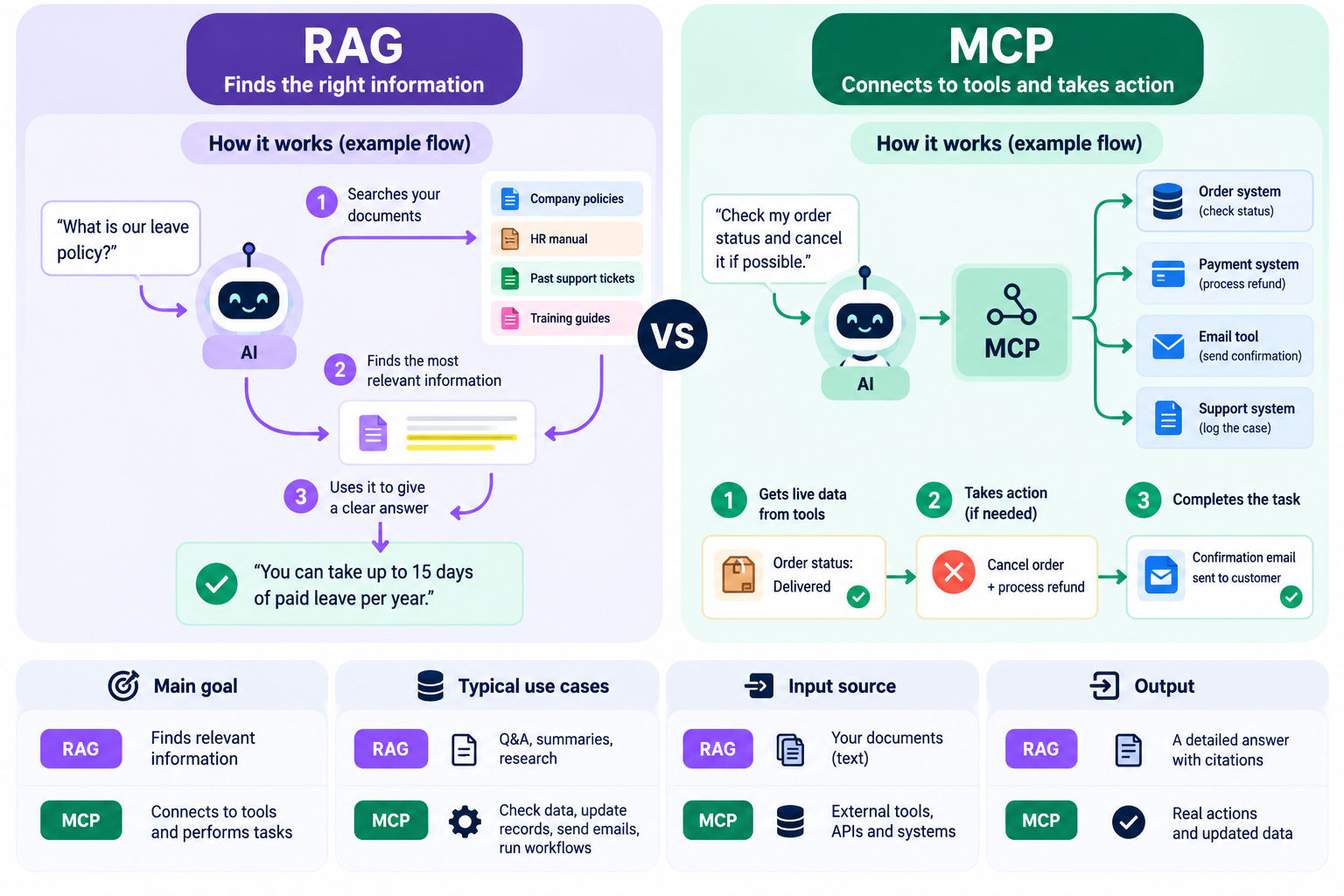
RAG helps AI find the right information, while MCP connects AI to tools and data sources. Below are the Key differences.
| Feature | RAG | MCP |
| Purpose | Helps AI answer using relevant information. | Connects AI to tools and data. |
| How it works | Finds useful content and shares it with the AI model. | Connects AI applications to MCP servers. |
| Data sources | PDFs, documents, emails, wikis. | APIs, databases, calendars, business apps. |
| Actions | Mainly retrieves information. | Can retrieve information and perform tasks. |
| Use cases | Chatbots, document search, research. | AI agents, coding assistants, workflow automation. |
So, RAG is a method for finding information and MCP is a protocol that connects AI applications to tools and data. They can also work together for a common AI application.
Also Read: Difference Between RAG vs LLM
Want to build real-world systems using modern Agentic AI Frameworks? Enroll in our Executive Post Graduate Programme in Applied AI and Agentic AI and advance your AI career today.
Because of RAG or Retrieval Augmented Generation AI applications can search documents and use the information to answer questions.
An Example: If an employee asks a chatbot about his company's leave policy, to answer that question the chatbot can search the HR documents.
RAG helps AI applications in:
Also Learn About: RAG Agents: What They Are and How They Work
RAG system has four main steps:
The system looks at the meaning of a question, not just the words used. For example, if someone asks how to take time off work, it can find information in a company's leave policy.
RAG is useful when information is stored in many documents. Here are some common uses:
Explore: Top 25+ RAG Project Ideas
MCP or Model Context Protocol is used to give AI applications a common way to connect with external tools, apps, data sources.
When MCP was not there, developers used to build separate connections for different AI apps and tools. MCP made these connections easier. Think of it like USB-C, which lets different devices connect using the same type of port.
MCP has three main parts:
Learn: How is LangChain different from MCP?
How it works:
MCP gives AI applications a way to connect to outside tools and data. This lets them do more than answer questions; they can also carry out tasks using required tools.
Read More: MCP vs API: Key Differences and Use Cases
Take the next step in your leadership journey with IIM Kozhikode’s Strategic AI for Business Professionals programme. Learn how to use AI to make smarter business decisions, improve business outcomes, and lead confidently in an AI-first world, all without coding.
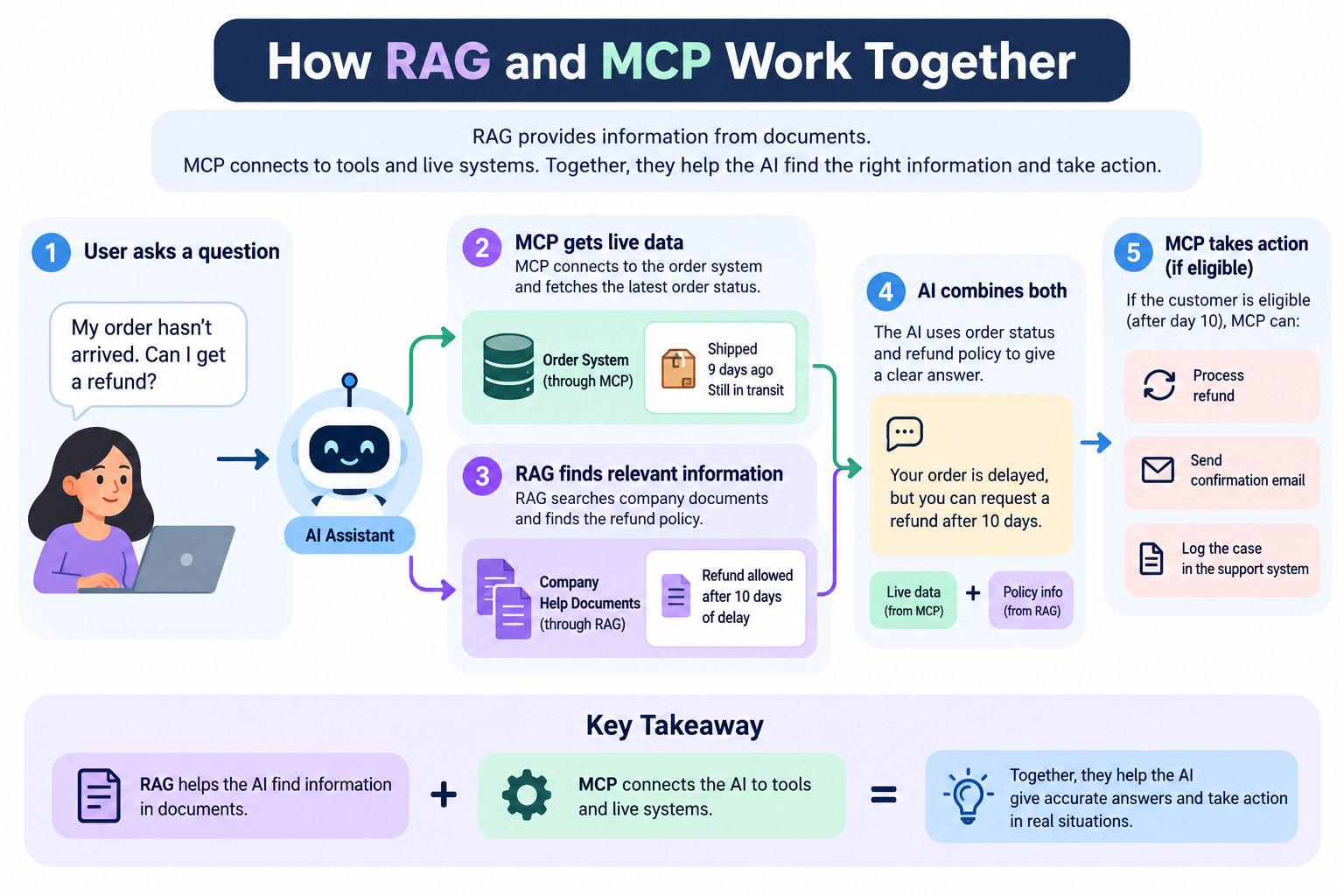
MCP and RAG can work together for any AI application.
MCP can also connect an AI application to a vector database. This allows the AI to search documents through an MCP tool whenever it needs information.
When should you use each one?
Read More: Difference Between Agentic RAG and Agentic AI
Imagine a support assistant for an online store.
A customer writes: "The item that I ordered has not arrived. Can I get my money back?"
In this example, RAG supplied the rules and MCP supplied the live data and the actions. It took both MCA and RAG to get the job done.
Do Read : Agentic AI Learning Path
Conclusion:
Choosing between MCP vs RAG depends on what task you want your AI application to do. RAG helps AI find information in documents and MCP connects it to tools and live data.
Use RAG when your AI needs information from documents. Use MCP when it needs to access tools or perform tasks. If your application needs both, you can use them together.
Want personalized guidance on AI and upskilling opportunities? Connect with upGrad’s experts for a free 1:1 counselling session today!
Also Read:
We can’t decide which is better, it depends on the situation. Both have different purposes. RAG is useful when AI needs to find information in many documents. MCP is useful when AI needs to connect to tools, access live data, or perform tasks. The right choice depends on what you want your AI application to do.
Yes. They work well together. RAG helps AI find the right information, while MCP connects it to tools and live systems. An AI agent can use RAG to find facts and MCP to perform tasks.
No. MCP and RAG have different purposes. MCP connects AI to tools and data and RAG helps AI find useful information in documents. You can also connect a RAG search system through MCP so an AI application can use it as a tool.
RAG finds relevant and useful information and adds it to the prompt so the AI can give a better answer. MCP connects AI applications to external tools and data, allowing them to access information and perform tasks.
Yes. MCP can connect AI applications to APIs, databases, and other live systems. This allows them to get the latest information when needed, rather than relying only on saved documents.
No. RAG is still useful for finding information in large collections of documents. MCP does not replace this process. It helps AI connect to tools and data, while RAG helps it find relevant information.
Most RAG systems use a vector database to find information based on meaning. However, it is not always required. Some systems use keyword search, while others combine keyword search with meaning-based search. This is called hybrid search.
No. MCP can connect AI applications to many types of tools and data sources, including databases, files, APIs, and apps. It can also connect to a vector database if needed.
RAG is actually a little easier to start with if you want AI to answer questions from documents. MCP can be easier to set up when a ready-made MCP server is available for the tool you need. Both can become more complex as your application grows.
No. Anthropic introduced MCP, but it is an open standard that other AI applications and coding tools can also support. It is not limited to Claude.
No. RAG finds and retrieves information, but it does not send emails or perform other tasks on its own. To do that, an AI application needs tools, such as those connected through MCP, or another tool-calling method.
Yes. Both need proper security measures.
AI agents can use both. RAG helps them find the information they need, while MCP lets them connect to tools and perform tasks. Using both can help an agent make better decisions and act on them.
Start by asking two questions:
If your project needs both, you can use MCP and RAG together.
1321 articles published
We are an online education platform providing industry-relevant programs for professionals, designed and delivered in collaboration with world-class faculty and businesses. Merging the latest technolo...
Speak with AI & ML expert
By submitting, I accept the T&C and
Privacy Policy