Top Cloud Platforms: A Complete Guide
By Sriram
Updated on Jul 14, 2026 | 5 min read | 1.74K+ views
Share:

All courses
Certifications
More
By Sriram
Updated on Jul 14, 2026 | 5 min read | 1.74K+ views
Share:
Table of Contents
Key Takeaway
This blog walks you through what cloud platforms actually do, how they work under the hood, and the different types you'll come across.
Explore upGrad's AI programs to build practical skills in artificial intelligence, machine learning, deep learning, generative AI, natural language processing, computer vision, and AI-powered application development through hands-on projects and real-world case studies.
Popular AI Programs
A cloud platform is a set of computing resources, delivered over the internet, that businesses use to build, run, and manage applications. Think servers, storage, databases, and networking, all bundled together and available on demand.
You don't own any of this hardware. A provider like AWS or Google Cloud Platform owns and maintains it. You just pay for what you use.
Cloud platforms sit at the center of cloud computing. They're the actual product you interact with, while cloud computing is the broader concept describing how computing services get delivered over a network.
Cloud Platform |
Traditional Infrastructure |
| Resources managed by the provider | Hardware managed in-house |
| Scales up or down instantly | Fixed capacity, hard to change quickly |
| Pay only for what you use | Big upfront hardware cost |
Small teams use cloud platforms to launch products fast. Large enterprises use them to run entire operations without owning a single data center.
Also read: 30 Beginner to Final Year Cloud Computing Project Ideas
Free Courses
The following cloud platforms are among the leading choices in 2026. Each offers unique strengths, making them suitable for different workloads, from AI and data analytics to enterprise applications, hybrid cloud deployments, and startup environments.
AWS remains the largest cloud provider globally, with the broadest range of services covering compute, storage, machine learning, and IoT. It's the go-to choice for startups and enterprises alike because of its mature ecosystem and extensive documentation.
Strengths: Widest service catalog, strong global data center presence, mature partner network
Best for: Companies that need flexibility across a huge range of use cases
Azure has built a strong foothold in enterprises already using Microsoft products like Windows Server, Active Directory, and Office 365. Its hybrid cloud capabilities make it popular among organizations that aren't ready to move everything to the cloud at once.
Strengths: Seamless integration with Microsoft tools, strong hybrid cloud support, robust compliance certifications
Best for: Enterprises with existing Microsoft infrastructure
GCP stands out for data analytics, machine learning, and container orchestration since Google itself created Kubernetes. It's a favorite among companies building data-heavy or AI-driven applications.
Strengths: Strong data and AI tools, competitive pricing, excellent network performance
Best for: Data-driven startups and AI/ML projects
IBM Cloud focuses on hybrid and multi-cloud solutions along with AI capabilities through Watson. It appeals to industries like banking, healthcare, and government that need strict compliance and legacy system support.
Strengths: Strong enterprise support, hybrid cloud focus, AI integration through Watson
Best for: Regulated industries needing legacy system compatibility
OCI is built for organizations already using Oracle databases and enterprise software. It offers competitive pricing on compute and storage along with strong performance for database workloads.
Strengths: Optimized for Oracle databases, competitive pricing, strong performance benchmarks
Best for: Businesses running Oracle-based enterprise systems
Alibaba Cloud leads the market in China and much of Asia. It's growing its presence in India and other emerging markets, offering competitive pricing for regional businesses.
Strengths: Strong presence in Asia-Pacific, competitive pricing, growing global data center network
Best for: Businesses targeting Asian markets
DigitalOcean is known for its simplicity and developer-friendly experience. It offers cloud services such as virtual machines, managed databases, Kubernetes, storage, and networking through an intuitive interface with straightforward pricing.
Strengths: Easy-to-use platform, predictable pricing, developer-friendly tools, managed Kubernetes
Best for: Startups, small businesses, independent developers, and small development teams
Explore upGrad's Executive Diploma in Data Science & Artificial Intelligence to build practical skills in Python, SQL, machine learning, deep learning, generative AI, data visualization, and predictive analytics through hands-on projects, capstone work, and real-world business case studies.
AI Courses to upskill
Explore Artificial Intelligence Courses for Career Progression
While every provider offers core services such as computing, storage, networking, and security, each has strengths in different areas. Understanding these differences makes it easier to select a platform that aligns with your requirements.
Cloud Platform |
Market Position |
Best For |
Key Strengths |
Pricing Model |
Potential Limitation |
| Amazon Web Services (AWS) | Market leader | Startups, SMBs, and enterprises | Broadest range of cloud services, extensive global infrastructure | Pay-as-you-go, Reserved Instances, Savings Plans | Pricing can become complex as usage grows |
| Microsoft Azure | Strong second | Enterprise workloads and Microsoft-based organizations | Deep integration with Microsoft ecosystem, strong hybrid cloud capabilities | Pay-as-you-go, Azure Hybrid Benefit, Reserved Instances | Learning curve for beginners and extensive service catalog |
| Google Cloud Platform (GCP) | Fast-growing provider | AI, machine learning, analytics, Kubernetes, cloud-native applications | Advanced data analytics, AI/ML services, open-source and Kubernetes leadership | Pay-as-you-go, Sustained Use Discounts, Committed Use Discounts | Smaller market share than AWS and Azure |
| IBM Cloud | Niche enterprise provider | Regulated industries and hybrid cloud deployments | Enterprise security, hybrid cloud, AI capabilities with Watson | Pay-as-you-go, Subscription-based pricing | Smaller service ecosystem compared to leading providers |
| Oracle Cloud Infrastructure (OCI) | Niche enterprise provider | Database-intensive and enterprise applications | High-performance databases, enterprise software integration | Pay-as-you-go, Universal Credits | Fewer global regions than larger cloud providers |
| DigitalOcean | Developer-focused provider | Small businesses, startups, and developers | Simple interface, predictable pricing, easy deployment | Simple monthly and hourly pricing | Limited advanced enterprise services and global footprint |
| Alibaba Cloud | Asia-Pacific market leader | Asia-focused businesses and regional expansion | Strong presence across Asia-Pacific, broad cloud services | Pay-as-you-go, Subscription | Less adoption outside the Asia-Pacific region |
Do read: Top 7 Cloud Computing Applications in the Real World
A cloud platform works by pooling physical servers into a shared resource pool, then dividing that pool into virtual chunks anyone can rent.
Here's the cloud platform architecture, which tells you what happens when you request a resource.
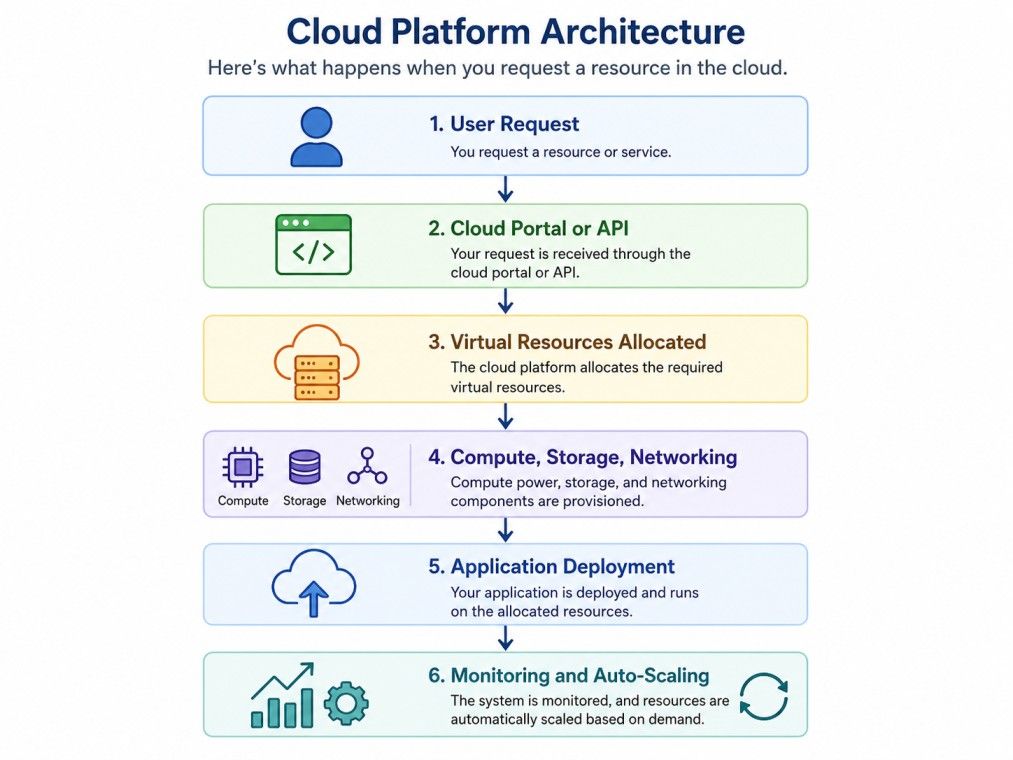
Physical servers don't have to run just one workload anymore. Virtualization creates multiple virtual machines on the same hardware, and each one functions like its own independent computer with dedicated resources. This allows cloud platforms to make better use of available infrastructure while keeping workloads isolated from one another.
Need more computing power? You submit a request through a web portal, command-line tool, or API, and the platform allocates the required resources automatically. There's no need to install new hardware or wait for manual configuration. As your application runs, built-in monitoring continuously tracks performance and adjusts resources when traffic increases or decreases.
This is also where platform as a service in cloud computing becomes valuable. Instead of managing servers, operating systems, software updates, and runtime environments, developers can focus entirely on building applications. The platform takes care of the infrastructure behind the scenes, allowing teams to develop and release software more quickly.
Also read: Cloud Computing Architecture: A Comprehensive Guide For Beginners
The three main types differ in who owns the infrastructure and who gets access to it.
Public cloud platforms are owned and operated by third-party providers and shared across multiple customers. Google Cloud Platform, AWS, and Azure all fall into this category. They're cheap to start with and scale fast, though you have less control over the underlying hardware.
A private cloud is built for a single organization. It could sit in a company's own data center or be hosted by a provider, but it's never shared with other customers. Banks and government agencies often lean toward private clouds for compliance reasons.
Hybrid setups mix public and private cloud, letting sensitive workloads stay private while everything else runs on cheaper public infrastructure. A lot of enterprises land here because it balances cost against control.
Multi-cloud is worth a quick mention too. It's when a business uses more than one public cloud provider at once, say AWS for compute and Google Cloud Platform for AI tools, to avoid depending on a single vendor.
Here are the differences between them:
Feature |
Public Cloud |
Private Cloud |
Hybrid Cloud |
| Best For | Startups, SMBs, and rapid scaling | Regulated industries and sensitive workloads | Mixed workloads and enterprise environments |
| Cost | Low | High | Medium |
| Control | Low | High | Medium to High |
| Scalability | High | Limited by infrastructure | High |
| Security | Provider-managed with shared responsibility | Greater control and customization | Balanced security with flexibility |
| Deployment Speed | Fast | Moderate | Moderate |
| Common Use Cases | Web apps, SaaS, development | Banking, healthcare, government | Disaster recovery, seasonal workloads, legacy modernization |
Must read: How Does Cloud Computing Work? Different Cloud Models Explained
What makes a cloud platform actually useful? A handful of features separate cloud platforms from traditional servers sitting in a closet.
Feature |
Description |
Benefit |
| Scalability | Add resources as workloads grow | Supports business growth without new hardware |
| Elasticity | Auto-adjusts resources in real time | Handles traffic spikes while reducing costs |
| High Availability | Keeps workloads running during failures | Minimizes downtime |
| Automation | Automates deployment, backups, and scaling | Saves time and reduces manual effort |
| Pay-as-You-Go Pricing | Pay only for resources used | Improves cost efficiency |
People often confuse scalability with elasticity. Scalability is planned growth, you decide to add more servers ahead of time. Elasticity is automatic, the platform adds or removes capacity on its own within minutes.
Built-in monitoring tools track performance and flag issues before they become outages. That's a genuine time saver for small teams without a dedicated ops person.
Do read: Cloud Computing Projects in Java
Cloud platforms bundle several categories of services together. Here's what you're actually renting. services provided by cloud platforms
Service |
Purpose |
Example Use |
| Compute | Runs applications and workloads | Hosting a web app |
| Storage | Holds files, backups, and databases | Storing customer records |
| Networking | Connects resources and users | Load balancing traffic |
| Databases | Manages structured and unstructured data | Running a CRM |
| Containers | Packages apps for consistent deployment | Microservices |
| Serverless | Runs code without managing servers | Event-driven functions |
This matters a lot for businesses running cloud based CRM platforms, since customer data needs to stay available, backed up, and fast to query at any hour. A CRM that goes down during a sales call costs real money.
AI services are increasingly bundled in too, though most businesses only touch a fraction of what's on offer.
APIs tie everything together. They let developers automate tasks instead of clicking through a dashboard every time. This layered structure is exactly what allows platform as a service in cloud computing to abstract away infrastructure management from developers.
Must read: Top 20+ Cloud Computing Projects GitHub For Beginners in 2026 (With Source Code)
Security worries stop a lot of businesses from moving to the cloud. Fair concern, but modern cloud platforms build in serious protection.
Security Feature |
Purpose |
| Identity and Access Management (IAM) | Controls user access and permissions |
| Encryption | Protects data at rest and in transit |
| Firewalls & Network Segmentation | Secures network traffic and isolates workloads |
| Continuous Monitoring | Detects unusual activity and potential threats |
| Compliance Certifications | Supports standards such as ISO 27001 and SOC 2 |
| Automated Backups & Disaster Recovery | Protects data and enables faster recovery |
Providers secure the infrastructure, but you're still responsible for configuring access controls correctly. Misconfigured permissions cause most data leaks, not some sophisticated hack.
Also read: Must-Know Features of Cloud Computing
Should you run your own servers or rent from a provider? Here's the comparison that actually matters. cloud platforms vs on premises infrastructure
Feature |
Cloud Platforms |
On-Premises |
| Cost | Pay-as-you-go, low upfront | High upfront investment |
| Scalability | Instant, on demand | Slow, hardware-dependent |
| Maintenance | Handled by provider | Handled in-house |
| Security | Shared responsibility | Fully your responsibility |
| Deployment | Minutes to hours | Weeks to months |
On-premises still makes sense for organizations with strict data residency rules or legacy systems that don't play well with virtualization. For everyone else, cloud platforms usually win on speed and cost.
Also read: Types of Cloud Computing & Cloud Computing Services
Why do businesses keep moving toward cloud platforms year after year? Here are the benefits of the cloud platforms:
Benefit |
What It Means |
Business Value |
| Lower Infrastructure Costs | Pay for resources as needed instead of buying hardware | Reduced capital investment |
| Faster Deployment | Deploy applications within minutes | Shorter project timelines |
| Business Continuity | Built-in backups and failover across locations | Reduced downtime and faster recovery |
| Improved Collaboration | Secure access to applications from anywhere | Better remote teamwork |
| Flexibility | Scale resources based on changing demand | Adapts to business growth and seasonal traffic |
| Support for Innovation | Quickly test and launch new applications | Faster product development |
| Reliability | Multiple data centers improve availability | Higher service uptime and user satisfaction |
A small ecommerce business can handle a holiday traffic spike without buying servers that sit idle the rest of the year. That flexibility used to be out of reach for anyone without a large IT budget.
Do read: Top 25 Advantages of Cloud Computing For an Organization
Consider these factors before committing to a provider:
There's no single "best" cloud platform since the right choice depends on your specific needs, budget, and existing technology. AWS offers the broadest range of services, Azure fits naturally into Microsoft-heavy environments, and Google Cloud excels at data and AI workloads.
Cloud platforms have become the backbone of how modern businesses build and run software. They cut costs, speed up deployment, and remove the burden of managing physical hardware.
Whether you're comparing public, private, or hybrid setups, the right choice comes down to your budget, compliance needs, and growth plans. Get those three right, and the platform decision usually follows naturally.
Ready to start your journey? Book a free consultation with upGrad today to find the best path for your career.
There's no single best option, but AWS, Microsoft Azure, and Google Cloud Platform all offer beginner-friendly learning paths and free-tier services. If you're new to cloud computing, start with one platform, understand the fundamentals, and then explore others as your skills grow.
Yes. Many organizations follow a multi-cloud strategy by using services from different cloud providers for different workloads. For example, a company might use AWS for application hosting while using Google Cloud Platform for AI and data analytics to avoid depending on a single provider.
Platform as a service in cloud computing provides developers with a managed environment that includes operating systems, runtime environments, and development tools. Infrastructure as a Service only provides virtual infrastructure such as servers, storage, and networking, leaving software management to the user.
Yes. Many businesses run cloud based CRM platforms because they offer secure access to customer data, automatic backups, and easy scalability. Since the infrastructure is managed by the cloud provider, organizations can focus on improving customer relationships instead of maintaining servers.
Amazon Web Services (AWS) remains the global market leader, while Microsoft Azure and Google Cloud Platform continue to expand rapidly. The right platform depends on your workload, existing technology stack, compliance needs, and long-term business goals rather than overall market share.
Yes. Most organizations migrate applications gradually instead of moving everything at once. They typically begin with less critical workloads, evaluate performance, and then migrate larger business systems after confirming compatibility, security, and operational requirements.
Cloud platforms are widely used across banking, healthcare, retail, manufacturing, education, media, and government. Each industry benefits differently, whether it's handling large datasets, supporting remote teams, improving customer experiences, or meeting strict regulatory and compliance requirements.
Enterprise platforms increasingly rely on cloud infrastructure to deliver applications, process data, and support collaboration across locations. The cloud provides the computing resources, while enterprise platforms use those resources to run business operations more efficiently and scale as organizational needs change.
The learning timeline depends on your background and goals. Beginners can understand cloud fundamentals within a few weeks, while becoming proficient with services, networking, security, and deployment typically requires several months of consistent hands-on practice and real-world projects.
Not always. Many cloud services can be configured through graphical dashboards, making them accessible to beginners. However, learning basic scripting languages such as Python or Bash becomes valuable as you automate deployments, manage infrastructure, and work with DevOps or cloud engineering roles.
Businesses should evaluate pricing, security features, compliance support, available services, regional data centers, integration with existing software, technical support, and future scalability. Comparing these factors helps organizations choose a platform that fits both current requirements and long-term growth plans.
695 articles published
Sriram K is a Senior SEO Executive with a B.Tech in Information Technology from Dr. M.G.R. Educational and Research Institute, Chennai. With over a decade of experience in digital marketing, he specia...
Speak with AI & ML expert
By submitting, I accept the T&C and
Privacy Policy
Top Resources
Master's Degree
18 Months
Executive Diploma
12 Months
IIIT Bangalore
Executive Programme in Generative AI & Agentic AI for LeadersIndia’s #1 Tech University
Dual Certification
5 Months