Vector Database: A Complete Guide
By Sriram
Updated on Aug 26, 2026 | 15 min read | 7K+ views
Share:

All courses
Certifications
More
By Sriram
Updated on Aug 26, 2026 | 15 min read | 7K+ views
Share:
Table of Contents
Key Highlights
Ready to build practical skills in AI, machine learning, and data analytics? Explore upGrad’s Data science programs develop industry-relevant skills and work on real-world projects.
Popular Data Science Programs
Keyword search struggles when the wording changes. For example, someone searching for “I can’t access my account” may also need results about password resets or login issues.
A vector database stores and searches vector embeddings. These embeddings turn text, images, or audio into numbers that capture meaning. The database then finds content with similar representations.
Simply put, traditional search looks for matching words, while vector search looks for related meaning.
Embeddings are numerical representations of data. An embedding model converts content into a vector containing many numbers.
For example, “How can I change my password?” and “I forgot my login password” use different words but have a similar meaning. Their embeddings can therefore be close in vector space.
This is what makes semantic search possible.
A vector search compares a query's embedding with stored embeddings and finds the closest matches.
Common methods include cosine similarity, Euclidean distance, and dot product. For large datasets, vector databases use nearest-neighbour techniques to find relevant results faster.
For example, a search for “returning a damaged product” can find content about damaged-item refunds even without the exact phrase.
Free Courses
Using a vector database starts with the data you want to search. Raw documents aren't ready for similarity search. You first need to prepare the content, create embeddings, store them, and then retrieve relevant results when someone searches.
Here’s the basic process.
Start with the content your application needs to search. This could include product descriptions, support articles, company documents, research papers, website content, or customer records.
Clean the data first. Remove duplicate content, unnecessary formatting, and irrelevant sections where needed.
Long documents should also be split into smaller chunks. A huge chunk can contain too much unrelated information, while a tiny chunk might lose the context needed to answer a question.
The goal is simple. Keep each chunk focused and useful.
Also Read: Top 10 Data Modeling Tools You Must Know
Once the content is ready, pass each chunk through an embedding model.
The model converts the text into a numerical representation called a vector. Store the vector with useful details such as the original text, document ID, title, category, source, or date.
Metadata can improve search later.
For example, if someone wants product information released after 2025, the application can combine vector similarity with a date filter instead of relying on similarity alone.
Next, add the vectors to your chosen vector database.
The database indexes them so similar vectors can be found efficiently. Different indexing methods affect search speed, memory use, indexing time, and retrieval quality.
Don't assume one setup will work everywhere.
A configuration that performs well with 10,000 vectors might need changes when the dataset grows to millions.
When a user enters a question, the application sends that query through an embedding model. This creates another vector representing the user's search intent.
The vector database compares it with the stored vectors and identifies the closest matches using a selected similarity measure. That's the core retrieval step.
The application can now use the matching content based on its purpose.
For a semantic search tool, it might show the most relevant documents. A recommendation system could return similar products or articles.
In a RAG application, the retrieved passages can be provided to an LLM as context. The model can then use that information to generate a more relevant response.
The basic flow looks like this:
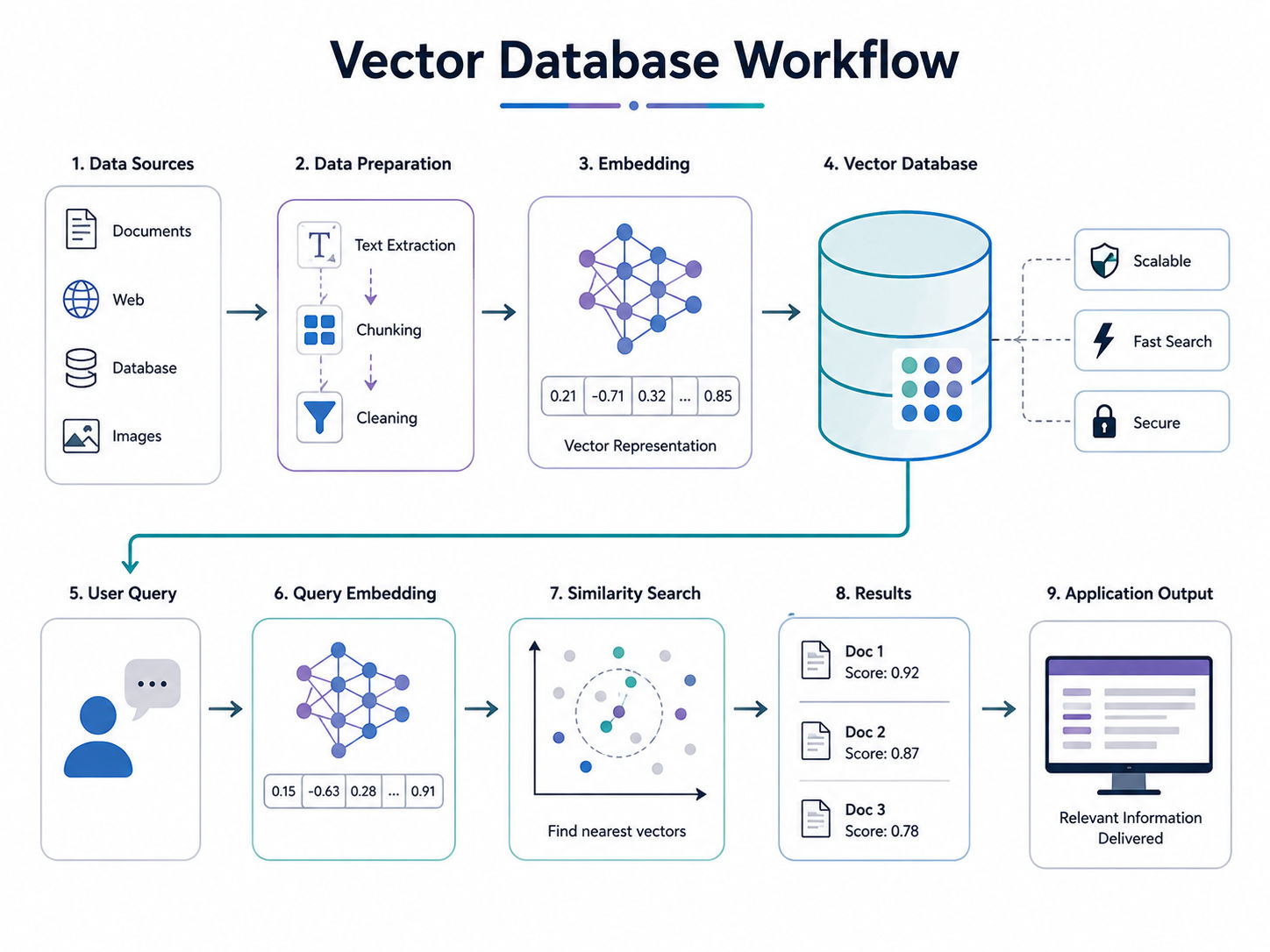
Getting results doesn't mean the system is working well.Test it with real questions and check whether the returned content actually answers them. Look at relevance, response time, chunk size, filters, and the number of results retrieved.
If the results aren't useful, don't immediately replace the database.
The problem could be the embedding model, poor chunking, weak queries, missing metadata, or low-quality source content. Testing each part helps you find the actual issue.
Explore upGrad’s Executive Post Graduate Certificate in AI-Native Software Engineering and learn how to apply AI across the software development lifecycle through practical, industry-focused learning.
Data Science Courses to upskill
Explore Data Science Courses for Career Progression
IIIT Bangalore
Executive Post Graduate Certificate in Data Science & AIPlacement Assistance
Vector databases come in different forms. The right choice depends on your data, application, infrastructure, and how much control your team needs.
The main types include dedicated vector databases, relational databases with vector support, NoSQL databases with vector search, and managed vector database services.
These databases are built mainly for storing embeddings and running similarity searches.
They typically support vector indexing, similarity calculations, metadata filtering, and APIs for AI applications. They're a good fit when semantic search is a major part of the product.
For example, an AI search application with millions of document embeddings may use a dedicated vector database to retrieve relevant content quickly.
Also Read: Getting Started with Data Exploration: A Beginner's Guide
Some relational databases now support vectors alongside regular tables and SQL queries.
This can be useful when your application already stores structured data such as customers, orders, products, and prices. You can keep that data in the same system while adding product embeddings for semantic search or recommendations.
It can also reduce the need to move data between multiple databases.
Some NoSQL databases also support vector search.
This option can suit applications that already use document-based or distributed data models. Instead of adding another database just for embeddings, the team can keep existing application data and vector data together.
The decision should depend on the application's existing architecture and query needs.
Managed services take care of much of the infrastructure. Your team usually works through an API or SDK while the provider handles servers, indexing, updates, and availability.
That's useful when you want to spend less time maintaining database infrastructure.
Before choosing one, check pricing, data location, query limits, vendor lock-in, and how easily you can move your data later.
Read: Future of Data Science in India
Vector databases are useful when an application needs to find content based on meaning, similarity, or context rather than exact words. Here are some common examples.
Imagine a company with 20,000 support documents. A customer asks, “My payment went through, but my order isn’t showing.”
A keyword search may focus on words such as “payment” and “order.” A vector database can find related content about payment confirmation, delayed orders, or payment processing problems.
The system converts the question into an embedding, searches for similar vectors, and returns the most relevant passages. Those passages can then be shown to the customer or passed to an LLM.
Online stores can use vector databases to recommend similar products.
For example, a customer views a laptop. The system can compare its embedding with other product embeddings and find similar laptops, accessories, or alternatives.
The same idea works for videos, music, courses, articles, and other content where similarity matters.
Also Read: Difference Between RAG and LLM
Vector databases can also work with images.
Suppose a customer uploads a photo of a jacket to a fashion website. The application converts the image into an embedding and searches for products with similar visual features.
This can help with visual search, product discovery, and image-based recommendations.
Retrieval-Augmented Generation (RAG) is another common use case.
A company can split internal documents into smaller chunks, convert them into embeddings, and store them in a vector database. When an employee asks a question, the system retrieves relevant passages and gives them to the LLM.
This lets the model use company-specific information without needing to store every document
Also Read: LLM vs Generative AI
AI applications frequently need to find relevant information before producing an answer.
That's where vector retrieval fits.
A vector database in AI can store embeddings generated from documents, conversations, images, products, or other data. An application then searches those embeddings to retrieve information that is semantically related to a user's request.
This supports several AI workloads.
RAG connects retrieval with generation.
The application first searches a knowledge base. Relevant passages are then supplied to an LLM as context.
The model can use that context when generating its answer.
This approach is useful for internal knowledge assistants, customer support systems, document question answering, and domain-specific chat applications. But retrieval quality matters.
If the database returns irrelevant passages, the LLM has poor context to work with. A bigger model won't automatically fix bad retrieval.
Semantic search focuses on meaning rather than exact wording.
A user might search for "ways to reduce cloud spending" while a relevant document uses the phrase "cloud cost optimisation."
A keyword-only system might struggle to connect those phrases. Vector retrieval can identify their semantic relationship when the embeddings represent that meaning effectively.
That's useful for enterprise search, websites, knowledge bases, and documentation portals.
Products, articles, videos, or users can be represented as vectors. Similarity search can then identify related items based on their representations.
The exact recommendation quality depends on how those vectors are produced.
A weak embedding model won't magically produce good recommendations.
AI assistants need access to useful information.
A vector database can act as one retrieval layer for an assistant by storing relevant documents, previous knowledge, product information, or other application data.
Agent systems can query this information when they need context.
The database doesn't replace the AI model. It provides a searchable memory layer that the application can query.
Read: What Is Data Science? Courses, Basics, Frameworks & Careers
A vector database is useful whenever an application needs to find similar information rather than only exact matches.
Common applications include semantic search, RAG, recommendation engines, image retrieval, anomaly detection, conversational AI, and multimodal search.
Here's a quick view.
Use case |
What the system retrieves |
| Semantic search | Content with related meaning |
| RAG | Relevant document passages |
| Recommendations | Similar products or content |
| Image search | Visually related images |
| Chatbots | Relevant knowledge and documents |
| Anomaly detection | Unusual or distant data points |
| Multimodal search | Related text, images, audio, or video |
If your application mainly needs structured records, transactions, joins, and exact filtering, a traditional database may be a better fit. Many modern database systems now combine conventional data handling with vector search, so teams can choose an architecture that matches their actual workload.
A traditional database is built for structured queries. For example, you might search for orders above ₹10,000 or employees from the sales department.
A vector database looks for meaning and similarity. If you search for “refund policy,” it can also find content about getting money back after cancelling an order, even when the exact phrase isn't used.
Neither database is better for every task. They serve different needs.
Feature |
Traditional Database |
Vector Database |
| Search style | Exact and structured queries | Similarity-based search |
| Common data | Structured records | Embeddings and unstructured content |
| Query method | SQL conditions | Vector similarity |
| Main strength | Managing structured data | Finding related content |
| AI use | Application data and transactions | RAG, semantic search, recommendations |
| Typical example | Find orders by amount | Find documents with similar meaning |
Consider a customer support assistant. A vector database can find relevant help articles, while a relational database checks the customer's order status, payment details, or account information.
The two systems handle different jobs. That's often more practical than forcing one database to manage everything.
Read: Big Data Architects Salary in India: For Freshers & Experienced
Choosing a vector database depends on your application's needs, not just its features. Check its search performance, integration, security, scalability, and operating cost before making a decision.
Also Read: Top Agentic AI Tools in 2026 for Automated Workflows
A vector database can make information retrieval much more useful when exact keyword matching isn't enough. But it isn't the right answer for every database problem. Its results depend on embeddings, indexing, data quality, and how the application handles retrieved information.
Vector databases are useful when an application needs to understand relationships between pieces of information rather than simply match words. That's why they're widely used in AI-powered search and retrieval systems.
Key advantages include:
Also Read: Types of AI: From Narrow to Super Intelligence with Examples
The quality of the results depends heavily on the data and embedding process. If the source content is poorly structured or the embedding model doesn't represent the information well, the retrieved results might not match the user's intent.
Common limitations include:
So, what is a vector database good at? It's particularly useful for similarity-based retrieval. It shouldn't be treated as a replacement for every type of database.
Read: What Is Data Science? Courses, Basics, Frameworks & Careers
Good results depend on more than the database itself. Your embedding model, chunk size, metadata, search settings, and testing process all affect retrieval quality.
1. Choose the Right Embedding Model
Pick an embedding model that fits your content and search needs. A model that works well for product descriptions may not perform the same way on technical documents.
Test it with real queries before settling on one.
2. Create Meaningful Chunks
Break long documents into smaller sections before creating embeddings.
Chunks that are too large may include unrelated content. Very small chunks can lose important context. Keep related paragraphs or ideas together.
3. Store Useful Metadata
Store details such as document ID, title, category, date, source, or access permissions along with each vector.
Metadata filters can then narrow results before or during the search.
4 .Choose a Suitable Similarity Metric
Common options include:
The right choice depends on your embedding model and use case. Test the options with real search queries instead of choosing one by default.
5. Test Retrieval Quality
Check whether searches return useful results. Use real questions and look for irrelevant, missing, duplicate, or poorly ranked content.
This matters even more in RAG systems because weak retrieval leads to poor context for the LLM.
6. Use Metadata Filters
Filters can remove unrelated results from the search. For example, a product search could filter results by category, location, or price range before ranking similar products.
7. Monitor Performance and Cost
Track search latency, storage, indexing time, embedding costs, and infrastructure usage. As your vector collection grows, these numbers can change.
8. Review Results Regularly
New documents, queries, chunking methods, or embedding models can change search quality. Review real queries from time to time and check whether the retrieved results still match what users need.
A vector database helps applications find information by meaning, not just exact words. It supports semantic search, RAG, recommendations, image search, and AI assistants.
Understanding what is a vector database starts with its basic workflow. Data becomes embeddings, vectors are stored, and similar results are retrieved when a user searches.
Good results also depend on the embedding model, chunking, metadata, and search setup. Choose a database based on your data and actual retrieval needs.
Ready to start your journey? Book a free consultation with upGrad today to find the best path for your career
Popular options include Pinecone, Weaviate, Milvus, Qdrant, and Chroma. The best choice depends on factors such as scale, filtering, deployment, integrations, and cost. Some teams also use existing databases with vector search instead of adding a separate vector database to their technology stack.
No. SQL is a language used to query relational databases, not a database itself. However, several SQL databases now support vector storage and similarity search. This lets developers keep structured application data and embeddings together instead of maintaining separate database systems.
Neo4j is primarily a graph database, not a dedicated vector database. However, it supports vector indexes and vector similarity search, allowing applications to combine semantic retrieval with relationships between entities. This can be useful when an AI application needs both graph-based and vector-based retrieval.
Examples include Pinecone, Deviate, Milvus, Qdrant, and Chroma. There are also databases that have added vector capabilities to their existing platforms. The difference matters because a dedicated system focuses heavily on similarity search, while a general-purpose database can combine vectors with other data types.
MongoDB can be used as a vector database through MongoDB Vector Search. It lets developers store embeddings alongside application data and perform semantic searches with filtering. MongoDB also supports combining vector search with full-text search, which can be useful for hybrid retrieval applications.
Seven commonly discussed database categories are relational, NoSQL, object-oriented, hierarchical, network, graph, and distributed databases. Vector databases are often treated as a separate category because they're designed around similarity search, although some existing database types now include vector search capabilities.
Yes. Images and videos can be converted into embeddings and stored for similarity-based retrieval. For example, a shopping application could compare an uploaded product photo with stored product embeddings. This makes vector search useful for visual discovery, recommendations, and other multimodal applications.
Not always. RAG systems need a way to store and retrieve embeddings, but that doesn't necessarily mean using a dedicated vector database. Some relational and NoSQL databases now provide vector search, so the right option depends on your existing architecture, workload, and retrieval requirements.
Hybrid search combines semantic vector search with keyword or full-text search. This can help when both meaning and exact terms matter. For example, a technical search might need to understand the user's intent while still matching a specific product code, error message, or technical term.
There's no single limit for every vector database. Capacity depends on vector dimensions, index type, hardware, storage architecture, and deployment model. A small application may need only thousands of vectors, while enterprise systems can require infrastructure designed to handle millions or billions of embeddings.
Yes. A vector database doesn't require an LLM. It can support semantic search, image similarity, recommendations, duplicate detection, and content discovery on its own. An LLM becomes useful when retrieved information needs to be turned into conversational answers or generated content.
724 articles published
Sriram K is a Senior SEO Executive with a B.Tech in Information Technology from Dr. M.G.R. Educational and Research Institute, Chennai. With over a decade of experience in digital marketing, he specia...
Speak with Data Science Expert
By submitting, I accept the T&C and
Privacy Policy
Start Your Career in Data Science Today
Top Resources
Executive Diploma
12 Months
Master's Degree
18 Months
Bootcamp
6 Months