Order Management System: Definition, Features, Process, and Benefits
By Sriram
Updated on Aug 11, 2026 | 9 min read | 4.3K+ views
Share:

All courses
Certifications
More
By Sriram
Updated on Aug 11, 2026 | 9 min read | 4.3K+ views
Share:
Table of Contents
Key Highlights
Build practical business, operations, and decision-making skills to manage modern business processes effectively with upGrad Management Certification Courses.
Popular Management Programs
An order management system helps businesses capture, process, track, and fulfill customer orders. It connects sales channels, inventory, fulfillment, shipping, and tracking in one workflow.
For example, when a customer buys a phone, the system can check stock, select a fulfillment location, process the order, and provide tracking updates.
The setup depends on the business. Small sellers may need basic tracking, while larger retailers may require advanced routing and fulfillment.
OMS means Order Management System. It is a software that manages and co-ordinates different stages of the customer order lifecycle.
An OMS is designed to work with an ecommerce platform, not replace it. The ecommerce platform takes care of browse, cart and checkout, and the OMS takes care of inventory, fulfilment, shipping, tracking and returns.
In simple terms, the website accepts the order. OMS helps to determine the next step.
Order Management is the process of receiving, processing, fulfilling, tracking and completing customer orders.
It becomes more difficult to manage these activities manually as order volumes and sales channels increase. An order management system connects order status, inventory, and fulfilment and delivery information together in one workflow.
If a warehouse is out of stock but an adjacent store has the item, the system can direct the order to that store. Good order management is all about speed and accuracy.
Free Courses
An order management system moves an order through a series of connected steps.
The exact workflow varies by business, but a typical journey looks like this:
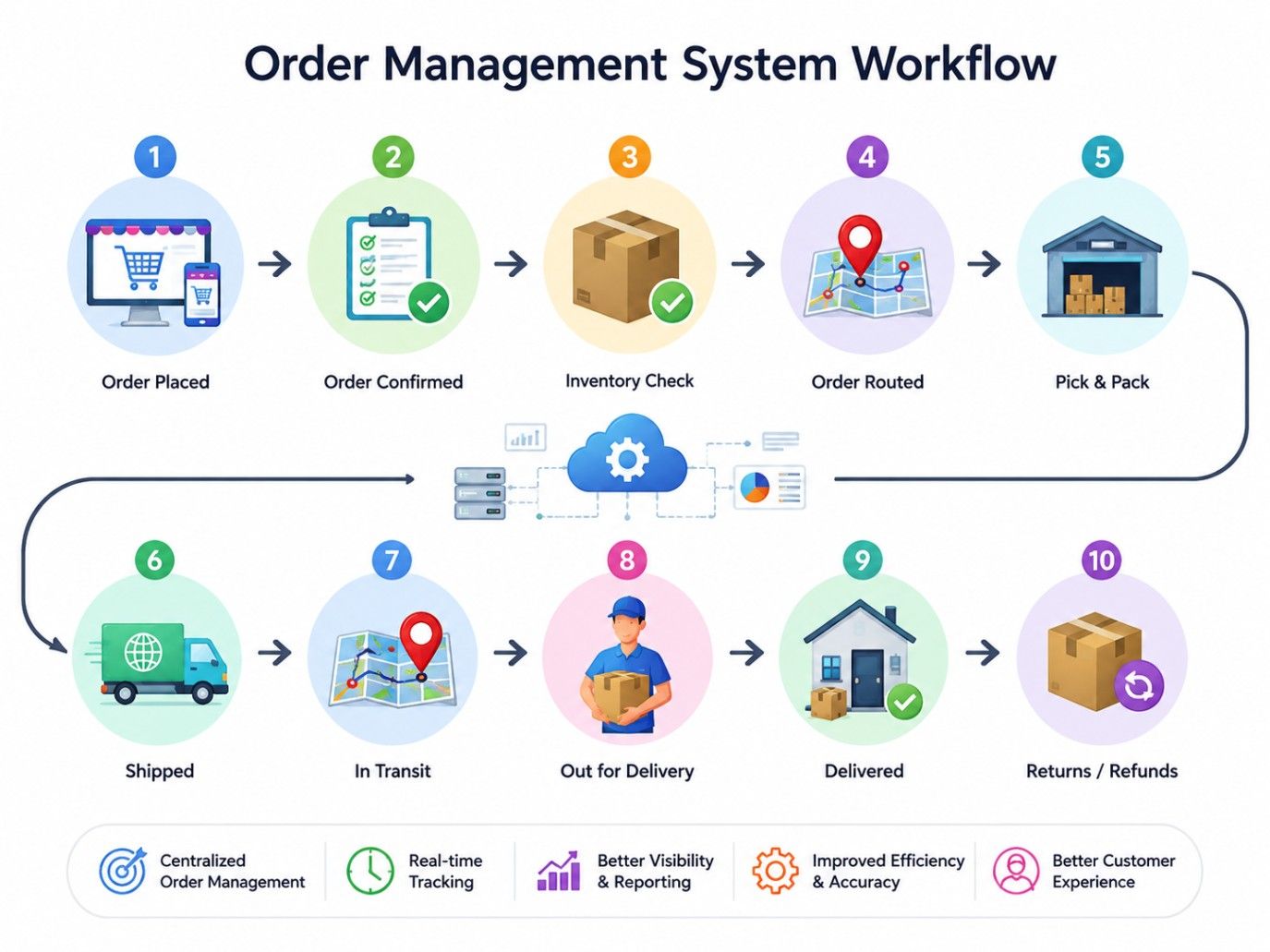
It sounds simple until exceptions appear.
Say a customer orders something that appears to be in stock online , but the warehouse inventory is off . The system needs to identify the problem before the order reaches the wrong fulfilment stage.
Depending on the rules, the mail may be held, redirected to another location, or sent for manual review.
Read: What is Supply Chain Management: Components, Process & Benefits
Management Courses to upskill
Explore Management Courses for Career Progression
IIIT-B & IIM, Udaipur
Chief Technology Officer & AI Leadership ProgrammeThe most useful features are the ones that help teams understand what is happening with each order and take action when needed.
Here, the table highlights the features of OMS and their purpose:
| Feature | Purpose |
| Order capture | Collects incoming orders |
| Inventory visibility | Shows available stock |
| Order routing | Selects suitable fulfillment locations |
| Fulfillment management | Coordinates order preparation |
| Shipping management | Supports dispatch activities |
| Order tracking | Shows order status |
| Returns management | Handles returns and exchanges |
| Notifications | Sends relevant updates |
| Reporting | Provides operational information |
| Automation | Reduces repetitive work |
If you're researching what is order management system software, these features help explain why it differs from basic order-entry tools.
Build the skills to manage technology, digital operations, and AI-driven business processes with upGrad’s Chief Technology Officer Program - CTO & AI Course & Certification.
An OMS consists of several connected components. The exact setup varies according to the business, but the main building blocks usually support orders, inventory, fulfillment, shipping, returns, reporting, and integrations.
1. Order Management Engine
This component handles order information and workflow rules.
It can support validation, status changes, routing, and exception handling.
2. Inventory Visibility
Inventory information helps the system determine where products are available.
This supports better fulfillment decisions and reduces unnecessary manual checks.
3. Fulfillment and Shipping
These components connect orders with the physical process of picking, packing, dispatching, and delivering products.
4. Returns and Reporting
Returns management connects post-purchase activity with the original order.
Reporting helps teams review order volumes, delays, fulfillment performance, and returns.
5. System Integrations
An OMS can connect with:
When these systems exchange information correctly, employees don't have to enter the same details repeatedly.
Order lifecycle management tracks an order from the moment it's placed until it's delivered, returned, or cancelled.
It helps businesses monitor each stage and quickly identify delays or issues.
A typical lifecycle looks like this
Create → Confirm → Process → Allocate → Fulfill → Ship → Track → Deliver → Return or Exchange
A customer might cancel an order before fulfilment. A product might become unavailable. A delivery might fail. That means lifecycle management needs to account for exceptions as well as standard steps.
Read: Distributor and Consumer Management System for Modern Businesses
Order management covers the broader customer order journey.Fulfillment is one part of that journey.
For example, validating an order and allocating inventory fall within order management. Picking, packing, and shipping are fulfillment activities.They're closely connected, but they aren't the same thing.
A small business handling a few orders through one channel might manage perfectly well with simpler tools.
The need becomes clearer when order volume and operational complexity increase.
Signs include:
Also Read: Guide to Product Data Management: Features, Tools, Challenges, and Career Opportunities
An order tracking system lets businesses and customers see where an order stands.
It provides updates from processing and packing to shipping and final delivery.
A typical order moves through these stages:
Confirmed → Processing → Packed → Shipped → Out for Delivery → Delivered
The status names can differ depending on the business and shipping provider.
Customers don't have to contact support for every update. They can check the order status and get a clearer idea of when their package should arrive.
For businesses, tracking makes it easier to spot delayed, failed, or unusual orders before they turn into bigger customer service issues.
An OMS connects this tracking information with the wider order journey. So, teams can see not just where an order is, but what happened before it and what needs to happen next.
Read: What is Logistics Management? Understanding Its Types, Functions, Processes, and More
An order management system helps businesses handle orders with less manual effort.
It improves accuracy, inventory visibility, fulfillment, and customer service.
1. Faster Order Processing
Automates repetitive tasks and reduces manual data entry.
This helps teams process orders faster as volumes grow.
2. Better Inventory Visibility
Provides a clearer view of available stock across locations.
This helps reduce overselling and stock-related order issues.
3. Fewer Order Errors
Validates order details and identifies problems early.
This reduces mistakes during processing and fulfillment.
4. Better Customer Experience
Provides accurate order status and delivery updates
Customers can track purchases without contacting support repeatedly.
5. Easier Returns
Links return information with the original customer order.
This makes exchanges, refunds, and return tracking easier to manage.
Read: 6 Types of Supply Chain Models To Know
Choosing an OMS should start with the actual order process.
Don't begin with the longest feature list. First, understand how orders enter the business, where products are stored, how fulfillment happens, and where delays occur.
Check Order and Channel Requirements
List every source of customer orders.
This might include an ecommerce website, marketplace, physical store, sales team, or another channel.
Review Inventory and Fulfillment Needs
Look at how stock is stored and how orders are fulfilled.
Businesses with multiple warehouses or stores should pay close attention to inventory visibility and routing.
Evaluate Integrations
Identify which systems need to exchange information with the OMS.
This might include ERP software, ecommerce platforms, warehouse tools, payment systems, CRM software, and shipping providers.
Consider Automation and Reporting
Identify repetitive activities that consume employee time.
Then decide which should be automated and which reports teams actually need.
Think About Implementation
Implementation involves more than installing software.
Data migration, testing, employee training, integrations, and process changes all need attention before the system goes live.
Also Read: Basic Components of Supply Chain Management
Order problems often appear when information gets lost between teams or systems.
| Challenge | How an OMS can help |
| Manual order entry | Centralizes incoming orders |
| Poor stock visibility | Connects inventory information |
| Processing errors | Adds validation and workflow rules |
| Slow fulfillment | Supports order routing |
| Limited tracking | Centralizes status updates |
| Difficult returns | Connects returns with original orders |
| Multiple channels | Brings order information together |
If inventory data is inaccurate, the system will still work with inaccurate information. If fulfillment rules aren't clear, automation won't know what decision to make.
Also Read: What is Customer Relationship Management? A Complete Guide
Good order management depends on clear processes and reliable information.
Businesses should:
Start with repetitive activities that create frequent errors or consume significant employee time. Once those workflows are stable, automation can be expanded where it provides real value.
An order management system connects the activities that turn a customer purchase into a completed order. It brings together order processing, inventory visibility, fulfillment, shipping, tracking, and post-purchase activities within one connected workflow.
The right setup can reduce repetitive work and give teams a clearer view of what's happening. It won't fix poor data or unclear processes by itself.
For a growing business, the real question is whether the current order process still gives employees and customers the visibility they need.
Ready to start your journey? Book a free consultation with upGrad today to find the best path for your career.
The seven common steps are order placement, order processing, inventory allocation, picking, packing, shipping, and delivery. The exact workflow varies by business, but these stages cover the core movement of a product from customer purchase to the final destination.
SAP isn't solely an OMS. It's primarily an ERP platform, but SAP products and modules provide order management capabilities that can support complex enterprise workflows. Businesses may use SAP for order-related operations while also connecting it with dedicated ecommerce, warehouse, or fulfillment systems.
SAP supports order management by connecting sales orders with processes such as availability checks, delivery, billing, inventory, and finance. Its broader ERP environment allows order information to move between departments, which is particularly useful for businesses with complex operations and multiple processes.
Order management is a business operations function rather than a field limited to IT or BPO. Companies may manage it internally or outsource parts of the process to BPO providers. The work can involve order entry, customer service, fulfillment coordination, tracking, and returns.
No. SAP isn't primarily a content management system. SAP provides enterprise software covering areas such as finance, supply chain, sales, procurement, and customer-related processes. A CMS, by contrast, is designed mainly to create, organize, manage, and publish digital content.
The SAP Order-to-Cash process covers the journey from receiving a customer order to collecting payment. It typically involves sales order creation, availability and credit checks, delivery, picking, goods issue, billing, accounts receivable, and payment processing across connected business functions.
SAP Sales and Distribution, commonly called SAP SD, is a key module for sales order processing and related fulfillment activities. The wider O2C workflow also connects with areas such as inventory, logistics, and finance, so order management isn't handled by one isolated function.
An OMS focuses mainly on managing customer orders and their fulfillment journey. An ERP covers a much wider range of business operations, including finance, procurement, inventory, and supply chain activities. Some ERP platforms provide order management capabilities, but their scope is much broader.
Yes. An OMS can integrate with SAP to exchange information about orders, inventory, fulfillment, billing, or other relevant processes. This setup can let a dedicated OMS handle customer-order workflows while SAP continues supporting broader enterprise processes and financial records.
The order can be evaluated against available inventory at other fulfillment locations. Depending on the business rules, it may be routed to another warehouse or store, split across locations, placed on hold, or handled manually when no suitable stock is available.
Integration becomes useful when order information needs to move between ecommerce, ERP, inventory, warehouse, payment, or shipping systems. Connecting these systems can reduce duplicate data entry and give teams a more consistent view of orders without forcing every process into one application.
730 articles published
Sriram K is a Senior SEO Executive with a B.Tech in Information Technology from Dr. M.G.R. Educational and Research Institute, Chennai. With over a decade of experience in digital marketing, he specia...
Get Free Consultation
By submitting, I accept the T&C and
Privacy Policy
Top Resources
Certification
3 Months
Certification
6 Months
O.P. Jindal Global University
Masters in International Accounting and Finance (Accredited by ACCA, UK)Master's Degree
12 Months