What is Incident Management: Definition, Process, Tools, & Benefits

By upGrad

Updated on Sep 13, 2026 | 8 min read | 3.47K+ views

Share:

Key Highlights

  • Incident management is how a business finds, handles, and fixes unexpected problems, so normal work can start again as fast as possible.
  • A good process turns panic into order, everyone knows their job, and the fix happens faster.
  • Fixing what is visible on the surface is not enough, the real cause needs attention too, or the same issue shows up again later.
  • In this article, you will learn the five step process, common tools, best practices, and the real benefits of having a solid incident management plan.

In a business, all kinds of challenges appear and how you will handle them matter more. Check out our management programs to build the skills you need to lead with confidence and keep things running smoothly.

What is Incident Management

Incident management is the process to detect, respond and resolve the unplanned disruption in organizations. Its goal is to restore the normal business operations as soon as possible. 

Mostly this concept is used in IT and software companies. It has five stages of management: 

  1. Detection: you find an error by monitoring systems or a user reports it.
  2. Triage & Classification: the team checks everything and then decide the severity of the incident.
  3. Response & Investigation: the incident commander or the on-call engineer coordinated with the team to solve the root cause of the problem. 
  4. Resolution: the problem is fixed, services are restored and all the business operations are running smoothly.
  5. Post-incident review: the team documents everything, what happened, why it happened, and what will change to prevent the recurrence.

Why Incident Management is Important for Businesses

Every business deals with problems in day-to-day operations, but how can they solve those problems. That is a real question.

If a problem appears and nobody knows what to do in that situation, then it will take longer to fix and it will become costly. So, these are some points why incident management is important for businesses: 

  • Businesses lose money when systems are down, so fixing issues quickly is required for less financial damage.
  • If customers face problems like if the site is taking longer to load, then the user will go to another site for a query. Customers end up with your competitor, so fix those issues first that are related to the customers. 
  • Once the problem is fixed, the team must look for the reason why an incident occurs and do the fixes. So, it cannot appear again in the future.
  • Some industries have strict rules about data safety and system uptime. Good incident management helps a business stay within these rules and avoid fines.

Events When Businesses Required Incident Management

These are some of the situations where businesses need incident management:

  • Server or Website Downtime. If an ecommerce site goes down during a sale, every minute means lost orders. Fast response saves the sale.
  • Data Breaches. Hackers stealing customer data is the biggest safety issue. A plan should be ready to stop the leak and inform affected users.
  • Payment System Failures. Banks and payment apps cannot afford long outages. If people cannot pay or withdraw money, trust drops fast.
  • Third Party Service Failure. Businesses depend on outside services like cloud hosting or APIs. When one fails, it is not the company's fault, but they still need a plan.
  • Insider Mistakes. Not every incident comes from outsiders. An employee might delete something by accident or misconfigure a server. This needs the same response as external threats.
  • DDoS Attacks. Attackers flood a system with traffic to bring it down. Companies need to detect this early and block it fast.

Also read: Top 45+ Incident Management Interview Questions to Prepare for in 2026

Free Courses

Explore courses related to Management
Introduction to Ratio Analysis
4.86K+ learners
5 hrs of learning
How to be a Successful Business Analyst
24.59K+ learners
1 hrs of learning
Introduction to Digital Banking
2.83K+ learners
6 hrs of learning

5 Steps Incident Management Process

Each incident follows the same stages of handling and these stages are as follows:
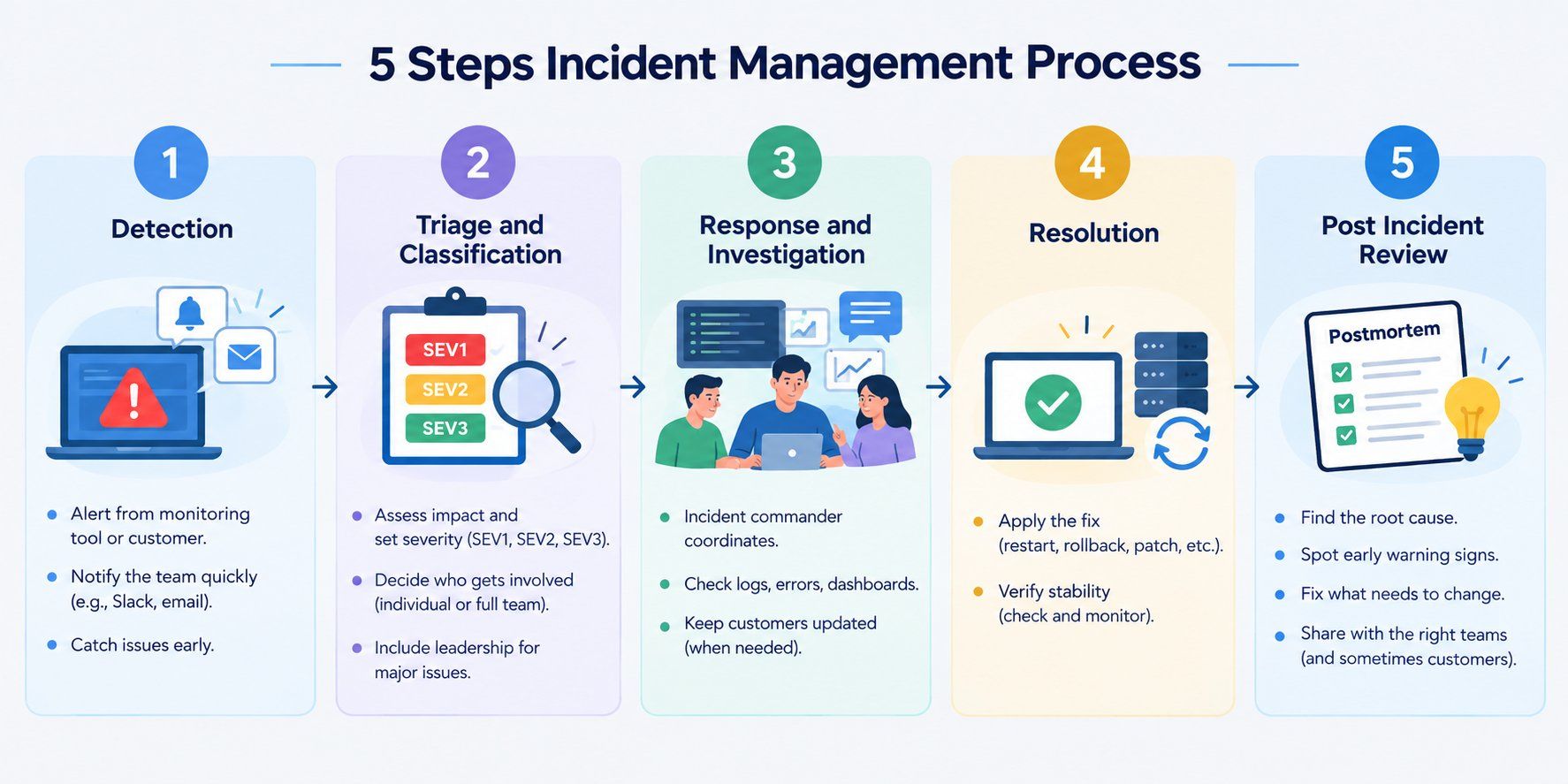
5-step incident management process showing Detection, Triage and Classification, Response and Investigation, Resolution, and Post-Incident Review.

Step 1: Detection

Someone notices that something is wrong in the business operation, it can be a monitoring tool sends an alert, or a customer reports an issue. The earlier a detection will happen, the better it is. 

Some companies use automated alerts that can ping the team if any unusual activity happens. Finding out from a customer first is a bad sign for a business.

Step 2: Triage and Classification

Not all incidents are equal. A typo on a page is not the same as the whole website going down. So someone has to look at it and decide how bad it really is. 

Most teams use severity levels like SEV1, SEV2, SEV3 and so on. SEV1 means everything is on fire, SEV3 means issue in small things. 

Step 3: Response and Investigation

This is where people try to find out what broke and why.

  • An incident commander runs things, but their job is coordinating with teams, not fixing the bug themselves.
  • They make sure two people are not doing the same thing at the same time.
  • The team checks logs, error reports, dashboards for clues
  • If the issue is visible to customers, someone sends updates too, even a short "we're aware, working on it" helps.

Step 4: Resolution

Once the cause is clear, the fix goes in. Sometimes that's as simple as restarting a server or rolling back an update. Other times it takes hours, patching code, replacing hardware, whatever the case needs. Before calling it done, most teams check things are actually stable. Because if you fix it too fast without checking, it just breaks again later and you're back at square one. 

Step 5: Post Incident Review

Once everything is back to normal, the team sits down and looks at what happened

  • Why did it happen in the first place.
  • What could have caught it sooner.
  • What needs to change so it doesn't repeat.
  • Who needs to know about it, other teams, leadership, sometimes even customers.

This step is about fixing the problem. Some teams write this up as a document, sometimes called a postmortem, and share it with other teams. Skip this step enough times and you will notice the same incidents keep coming back.

Want to understand what really drives people and performance at work? Check out our Master of Arts in Industrial-Organizational Psychology to build a career around workplace behavior, employee wellbeing, and organizational growth.

Management Courses to upskill

Explore Management Courses for Career Progression

Certification 6 months
Certification6 Months

Incident Management Best Practices

For incident management having a set process is one thing but following it properly is another thing. Here are some best practices for incident management.

  • Monitor before things break. Do not wait for angry customers to tell you something is wrong. Good monitoring catches problems early, sometimes before anyone notices at all.
  • Keep a clear on-call schedule. Someone should always know they're responsible right now. Confusion about who's on duty just eats up precious time during a real incident.
  • Sort incidents by severity. Not every issue deserves the whole team's attention. Ranking problems by how serious they are helps you use people and time wisely.
  • Let one person handle communication. Usually this is the incident commander. When too many people send updates, stakeholders just get mixed signals and more confusion.
  • Review every incident, even small ones. Skipping this for minor issues is exactly how bad habits creep in. Small problems ignored today turn into major headaches down the road. 
  • Test your plan regularly. A response plan sitting in a document does nobody any good. Some teams run fake incidents just to check if people actually know what to do.

Also read: What Are ITSM Tools? Types, Features, Benefits & Use Cases

Incident Management​ Tools

You don't need to build everything from scratch. Most companies mix a few tools together instead of relying on just one.
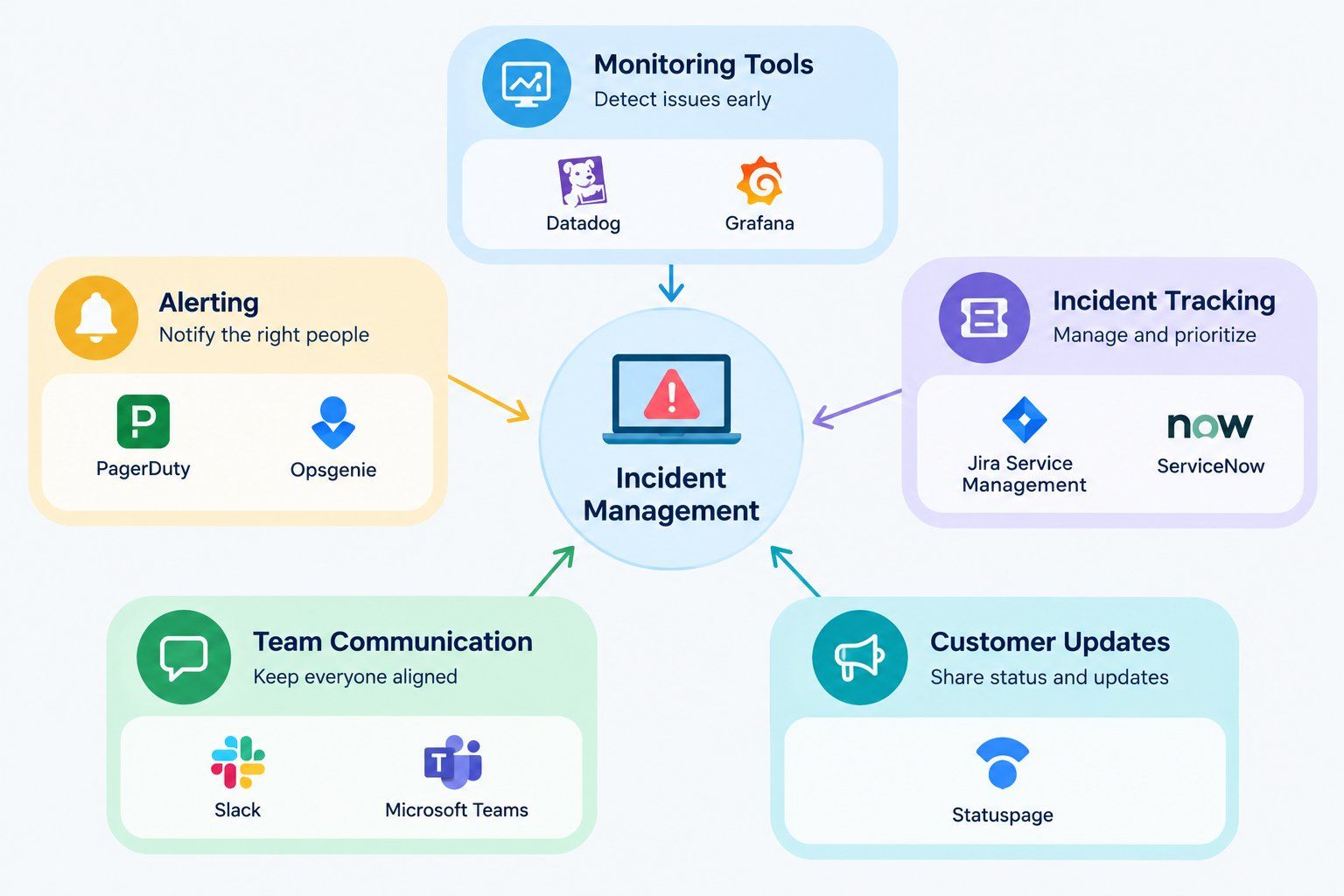
Incident management tool ecosystem connecting monitoring, alerting, incident tracking, team communication, and customer updates.
  • PagerDuty. Alerts the right person the moment something breaks. No guessing who should respond.
  • Opsgenie. Same idea as PagerDuty, made by Atlassian. Fits well if your team already uses Jira.
  • Jira Service Management. Tracks incidents right alongside regular tickets.
  • ServiceNow. More of an enterprise tool. Covers the whole IT service process, not just incidents.
  • Datadog. Monitoring tool. Usually the first thing to spot a problem, before a human does.
  • Grafana. Dashboards for system health. Helps catch weird patterns early.
  • Slack or Microsoft Teams. Not built for this specifically, but most teams coordinate the actual response here.
  • Statuspage. Keeps customers updated during an outage, so support isn't flooded with "is it down" messages.

Also read: Cyber Security Threats: What are they and How to Avoid

Key Benefits of Incident Management

The key benefits of incident management are as follows:

  • Less downtime. Problems get caught and fixed faster, so systems stay up longer.
  • Lower costs. Every minute of downtime can cost money. Quick fixes mean less financial damage.
  • Better customer trust. People stick around when issues get handled fast and communicated clearly.
  • Fewer repeat problems. Post incident reviews catch the root cause, not just the symptom.
  • Smoother teamwork. Clear roles mean people aren't scrambling or duplicating work during a crisis.
  • Stronger compliance. Helps businesses meet industry rules around data safety and system uptime.
  • Better decision making. Logs and reviews from past incidents give teams real data to plan around, instead of guessing.

Also read: Complete Guide to Resource Management Projects

Conclusion

No business is fully safe from problems. Something will break at some point, a bug, a mistake, or an attack from outside. What matters most is how ready the company is when it happens.

If a company has a clear plan, the right people ready, and looks back at old mistakes, it comes back online faster than a company that just reacts without a plan. It also means less confusion inside the team and less trouble for the people using the service.

This is not only about tech. It affects how much money a company saves, how much customers trust it, and whether the same problems keep coming back. Get these basics right, and the rest becomes much easier.

Ready to start your journey? Book a free consultation with upGrad today to find the best path for your career.         

Frequently Asked Questions (FAQs)

1. What is SLA in incident management?

SLA stands for Service Level Agreement. It is a set time limit within which a team must respond to and resolve an incident, based on how severe the issue is.

2. What is an ITIL incident?

In ITIL terms, an incident means any unplanned event that lowers or disrupts a service. ITIL provides a standard framework for logging, tracking, and resolving such events across a company.

3. What is P1, P2, P3, P4 SLA?

These are priority levels used to rank incidents by urgency. P1 usually means a total outage needing immediate action, while P4 covers minor issues that can wait a while.

4. What are the five C's of incident management?

The five C's usually stand for Communication, Coordination, Cooperation, Control, and Continuity. These are the qualities a team needs to handle a crisis well and stay in control throughout.

5. What is a major incident?

A major incident is a large scale disruption that affects many users or important business functions. It usually needs fast, coordinated action from more than one team at once.

6. How is incident management different from problem management?

Incident management focuses on restoring service as fast as possible. Problem management digs deeper, looking for the actual root cause behind the incident so the same issue does not repeat.

7. What skills are needed for an incident management job?

Common skills include troubleshooting, staying calm under pressure, and communicating clearly. Knowing how to use monitoring tools also helps a lot, along with strong coordination skills during real incidents.

8. What roles exist in an incident management team?

Typical roles include the incident commander, on-call engineers, a communication lead, and subject matter experts. These experts get pulled in depending on what part of the system actually broke.

9. Can incident management be automated?

Yes, parts of it can be automated. Automated alerts, auto scaling, and automatic rollbacks handle routine tasks, which frees up human effort for the parts of the job that need real judgment.

10. How long should incident resolution take?

It depends on how severe the issue is. Critical incidents often need resolution within an hour, while minor issues might get a day or more, depending on the SLA in place.

11. Who is responsible for incident management in a company?

It usually falls on IT or DevOps teams, led by an incident commander whenever an incident is active. Leadership also gets involved when the disruption is major and affects the whole business.

upGrad

967 articles published

We are an online education platform providing industry-relevant programs for professionals, designed and delivered in collaboration with world-class faculty and businesses. Merging the latest technolo...

Get Free Consultation

+91

By submitting, I accept the T&C and
Privacy Policy

Top Resources

Recommended Programs

upGrad

upGrad

Management Essentials

Case Based Learning

Certification

3 Months

IIMK
bestseller

Certification

6 Months

OPJ Logo
new course

Master's Degree

12 Months
