What is BIRCH Algorithm? Working Process, Implementation & Limitations
By Mukesh Kumar
Updated on Jul 23, 2026 | 19 min read | 4.15K+ views
Share:

All courses
Certifications
More
By Mukesh Kumar
Updated on Jul 23, 2026 | 19 min read | 4.15K+ views
Share:
Table of Contents
Quick Overview:
In this blog, you’ll learn how the BIRCH algorithm works in machine learning, how to implement it, and its limitations.
Master clustering algorithms like BIRCH and build practical machine learning skills with upGrad's Artificial Intelligence Courses. Learn through hands-on projects, real-world datasets, and industry-focused curriculum.
Popular AI Programs
The BIRCH algorithm was introduced in 1996 by Tian Zhang, Raghu Ramakrishnan, and Miron Livny as a solution for clustering large datasets in data mining. In simple terms, BIRCH (Balanced Iterative Reducing and Clustering using Hierarchies) is a clustering algorithm that efficiently handles massive amounts of data.

It uses a Clustering Feature Tree (CF Tree) to represent the data, allowing it to process data incrementally. The BIRCH algorithm’s efficiency stens from its unique structure and ability to handle large datasets. Here are some key features that make BIRCH stand out:
Also Read: Clustering vs Classification: What is Clustering & Classification
A Clustering Feature (CF) is the core data structure used by the BIRCH clustering algorithm. Instead of storing every data point individually, BIRCH stores a compact summary of each cluster. This reduces memory usage and speeds up clustering on large datasets.
Components of a Clustering Feature:
| Component | Meaning | Purpose |
|---|---|---|
| N | Number of data points | Tracks the size of the cluster. |
| LS (Linear Sum) | Sum of all feature values | Used to calculate the cluster centroid. |
| SS (Squared Sum) | Sum of squared feature values | Helps calculate cluster radius and variance. |
For a cluster containing data points (x_1, x_2, ..., x_n):
Using these values, BIRCH can compute important cluster statistics without storing every point.
For example, the centroid is calculated as:
Centroid = LS / N
This allows BIRCH to compare clusters quickly while keeping memory usage low.
Suppose a cluster contains three one-dimensional data points:
2, 4, and 6
The CF values are calculated as follows:
| CF Component | Calculation | Value |
|---|---|---|
| N | Number of points | 3 |
| LS | 2 + 4 + 6 | 12 |
| SS | 2² + 4² + 6² = 4 + 16 + 36 | 56 |
The cluster centroid becomes:
Centroid = LS / N = 12 / 3 = 4
Instead of storing all three points, BIRCH only stores (N = 3, LS = 12, SS = 56). As new data arrives, these values are updated directly, allowing the algorithm to process millions of records while using far less memory than traditional clustering methods.
The BIRCH algorithm works by incrementally clustering data through an efficient process that combines data summarization and hierarchical clustering. It starts by building a Clustering Feature (CF) Tree, which stores compact summaries of data points, enabling it to handle large datasets with minimal memory usage.
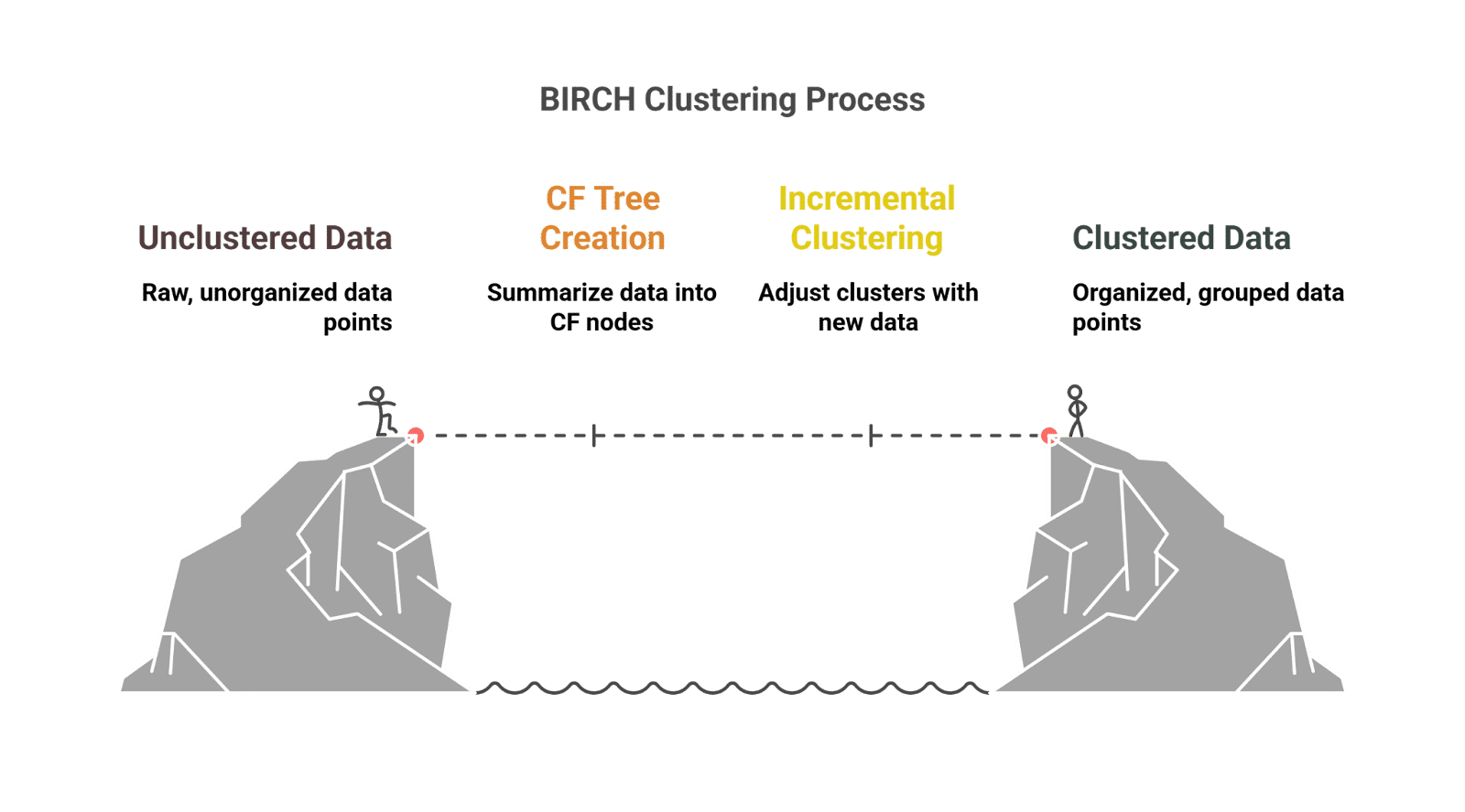
The process is split into multiple stages, allowing for scalable and efficient clustering, even with data that continuously grows or changes.
Here’s a detailed breakdown of the BIRCH algorithm's process:
This approach makes it an ideal choice for large-scale data mining tasks. With its memory efficiency and scalability, BIRCH can process even the most extensive datasets while maintaining accuracy and performance.
As you’ve seen, the effectiveness of BIRCH clustering largely depends on how its key parameters are set. These parameters directly impact the granularity, accuracy, and efficiency of the clustering process. Let's look at how adjusting these parameters can further optimize its clustering abilities.
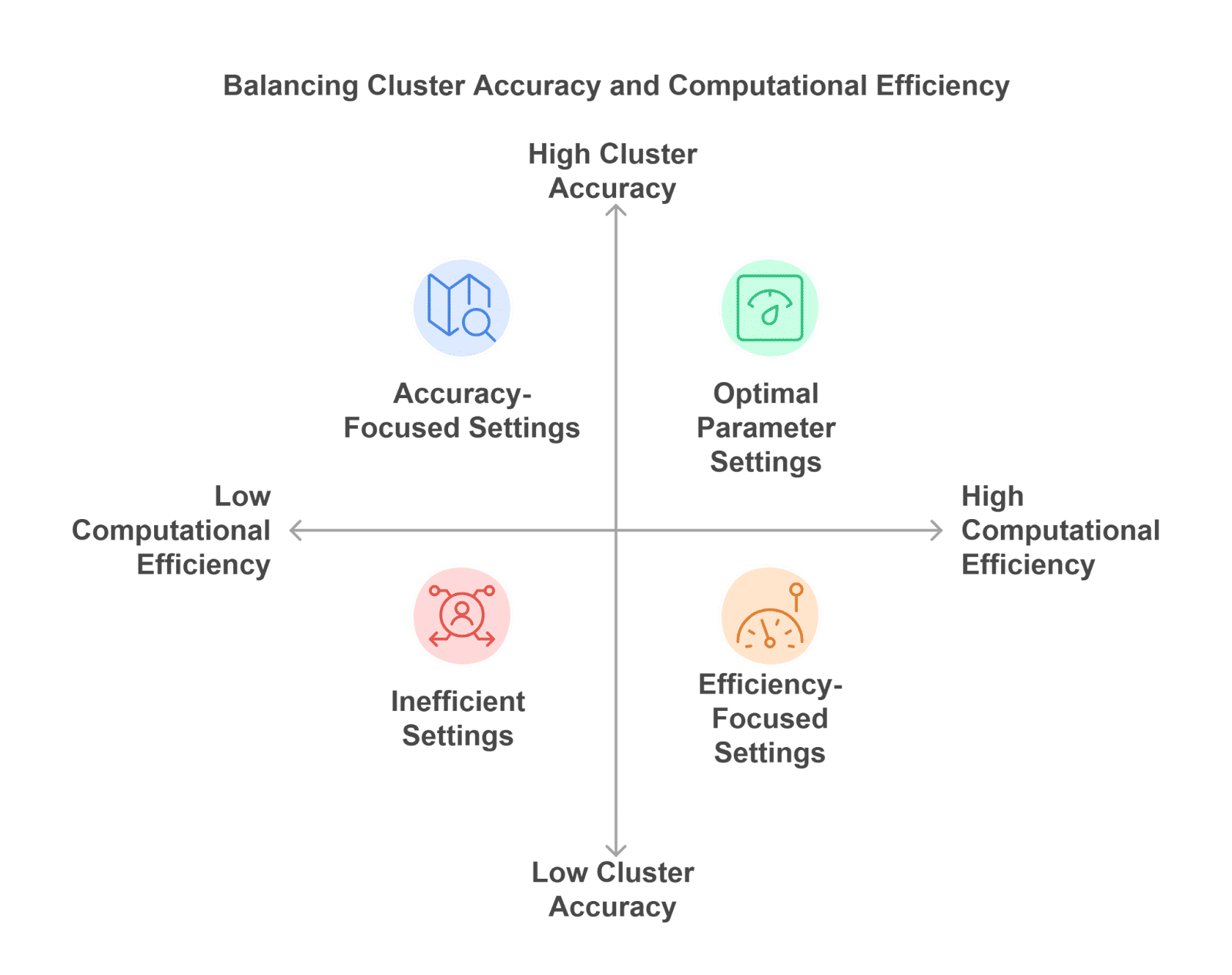
The significance of these parameters lies in their ability to control the balance between cluster accuracy and computational efficiency, making them crucial for handling real-life datasets. Adjusting these parameters properly can lead to more meaningful clusters and faster processing in real-life applications.
Here’s a brief overview of what each of these parameters represents:
Threshold (t): Determines the maximum distance allowed between a data point and the centroid of a cluster for that point to be included in the cluster. It helps in controlling the compactness of clusters.
For example, in customer segmentation, a small threshold might create precise clusters for specific customer behaviors, whereas a large threshold could group diverse behaviors into a single cluster.
Handling Outliers: Points that do not fit into any cluster (based on the threshold) are considered outliers and are not added to the CF Tree. This prevents noise from distorting the clustering results.
For example, in fraud detection, BIRCH will identify and exclude suspicious transactions that don't match any cluster of normal activities, ensuring that only legitimate patterns are used for analysis.
Also Read: Outlier Analysis in Data Mining: Techniques, Detection Methods, and Best Practices
To further enhance BIRCH's performance, optimizing its parameters and balancing memory, speed, and accuracy are essential. By fine-tuning key settings, you can ensure the algorithm runs efficiently, especially with large datasets or noisy data, while maintaining high-quality clustering results.
Here are specific strategies to optimize BIRCH:
Also Read: Anomaly Detection and Outlier Detection: Techniques, Tools & Use Cases
With the right balance, BIRCH becomes a powerful tool for clustering even the most complex datasets. By carefully adjusting these settings, you can improve performance and handle large datasets more effectively. The next step is to put these optimizations into practice by implementing BIRCH on your own data.
Instead of storing every data point, BIRCH clustering algorithm builds a compact Clustering Feature (CF) Tree that summarizes clusters, making it much more scalable than many traditional clustering algorithms.
| Complexity | Value | Impact |
|---|---|---|
| Time Complexity | O(n) (average case) | Processes data incrementally, making it suitable for very large datasets. |
| Space Complexity | O(n) (worst case), often much lower in practice | The CF Tree stores cluster summaries instead of all pairwise distances, reducing memory consumption. |
The actual performance depends on factors such as the branching factor, threshold value, and data distribution. Smaller thresholds create deeper CF Trees and require more memory, while larger thresholds speed up processing by forming fewer, larger clusters.
The BIRCH algorithm is designed to efficiently handle large datasets by using a Clustering Feature (CF) Tree to store summaries of the data. It performs clustering incrementally, which makes it suitable for situations where memory is limited or data is too large to fit into memory all at once.

Let’s break down the process into manageable steps:
Step 1: Set Up the Environment
Before diving into the implementation, make sure you have the necessary libraries installed. BIRCH is available in scikit-learn, a popular machine learning library.
pip install scikit-learnFor our example, we’ll also use matplotlib for plotting and numpy for handling arrays. Make sure these are installed as well:
pip install matplotlib numpyStep 2: Import Required Libraries
Now that you have your environment set up, let’s import the necessary libraries.
import numpy as np
import matplotlib.pyplot as plt
from sklearn.datasets import make_blobs
from sklearn.cluster import Birch
Struggling with data manipulation and visualization? Check out upGrad’s free Learn Python Libraries: NumPy, Matplotlib & Pandas course. Gain the skills to handle complex datasets and create powerful visualizations. Start learning today!
Step 3: Prepare the Dataset
For this demonstration, we’ll use make_blobs to generate synthetic data. This is a simple placeholder dataset chosen for its ease of use and clarity, and it's readily available within the scikit-learn library, a popular tool for machine learning.
You can replace it with your real-life dataset later to apply BIRCH clustering to more complex data.
# Generate synthetic dataset with 3 clusters
X, y = make_blobs(n_samples=1000, centers=3, random_state=42)

# Visualize the generated data
plt.scatter(X[:, 0], X[:, 1], s=10, cmap='viridis')
plt.title("Generated Data")
plt.show()
Output:
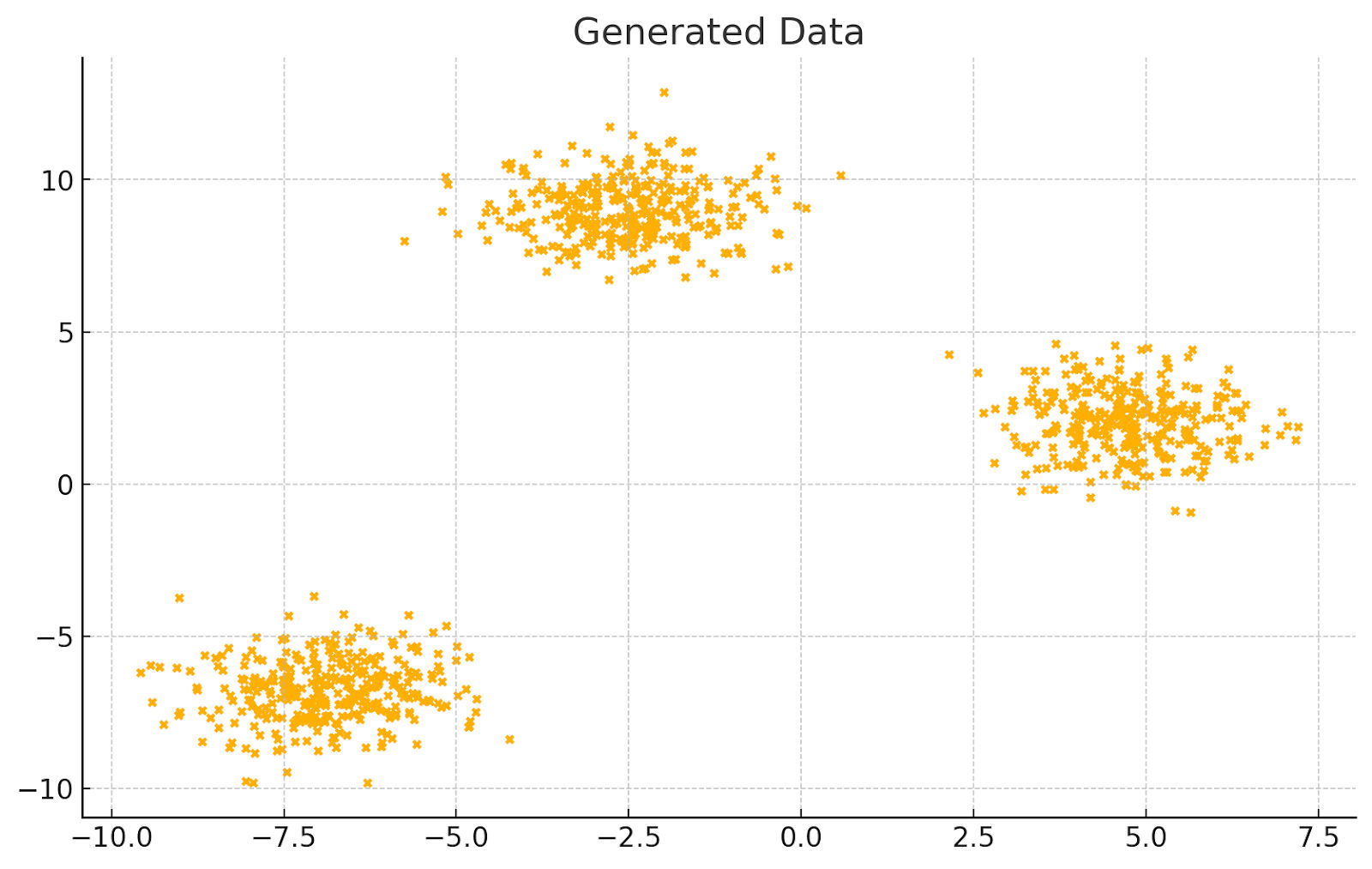
Tip: In real-life scenarios, replace make_blobs with your actual dataset. For example, if you’re working with customer data, you might load it from a CSV using pandas.
Want to apply clustering algorithms like BIRCH to real-world machine learning problems? Enroll in upGrad's Executive Diploma in Machine Learning & AI with MLOps, Gen AI & Agentic AI to build hands-on skills in unsupervised learning, model development, MLOps, and production-ready AI systems through industry-relevant projects.
Step 4: Initialize the BIRCH Model
Now, let's initialize the BIRCH algorithm in data mining. The key parameters for BIRCH include the branching factor (b) and threshold (t). The branching factor determines the maximum number of children each node in the CF Tree can have, and the threshold sets the maximum radius of a cluster.
# Initialize BIRCH model
birch_model = Birch(branching_factor=50, threshold=0.5, n_clusters=3)

# Fit the model to the data
birch_model.fit(X)Explanation:
Step 5: Predict the Clusters
Once the BIRCH model is trained on the data, you can use it to predict the cluster labels.
# Get the cluster labels
labels = birch_model.predict(X)
# Visualize the clustering result
plt.scatter(X[:, 0], X[:, 1], c=labels, cmap='viridis', s=10)
plt.title("BIRCH Clustering Results")
plt.show()
Output:
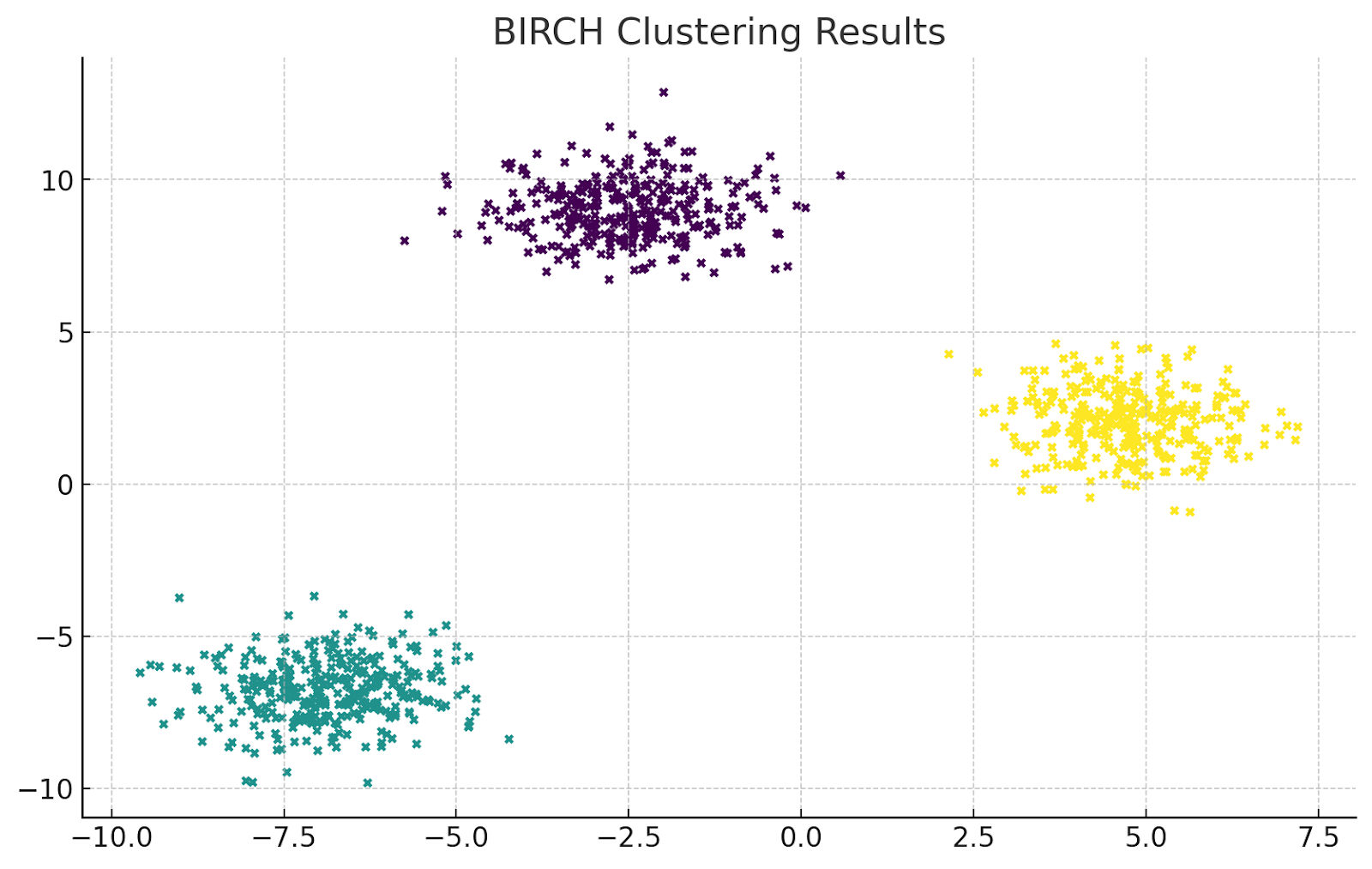
Tip: The predict function assigns each data point to a cluster. If your dataset is large, consider using .fit_predict() to combine the fitting and prediction steps.
Step 6: Evaluate the Results
To evaluate the clustering, you can use metrics like silhouette score to measure how similar points are within their own cluster compared to other clusters. A higher silhouette score indicates better-defined clusters.
from sklearn.metrics import silhouette_score
# Calculate silhouette score
score = silhouette_score(X, labels)
print(f"Silhouette Score: {score:.3f}")
Output:
Silhouette Score: 0.844Explanation:
Tip: If the score is low, try adjusting the threshold or branching factor. You may also experiment with different n_clusters values depending on your data.
Step 7: Handling Edge Cases
BIRCH handles outliers by not including them in the CF Tree if they do not fit within any cluster. However, you should check for outliers before running BIRCH to avoid unexpected results.
You can use Isolation Forest or DBSCAN to detect and remove outliers before clustering.
from sklearn.ensemble import IsolationForest

# Detect and remove outliers
iso_forest = IsolationForest(contamination=0.1)
outliers = iso_forest.fit_predict(X)

# Keep only non-outlier points
X_cleaned = X[outliers == 1]BIRCH struggles with high-dimensional data due to the CF Tree’s limitations. If you're working with data that has more than 10-20 features, consider reducing dimensionality using techniques like PCA or t-SNE.
from sklearn.decomposition import PCA

# Reduce dimensionality using PCA
pca = PCA(n_components=2)
X_reduced = pca.fit_transform(X)
Step 8: Fine-Tuning BIRCH for Better Performance
Tip: Always test different combinations of these parameters and evaluate the results using metrics like silhouette score or adjusted Rand index to find the best fit for your data.
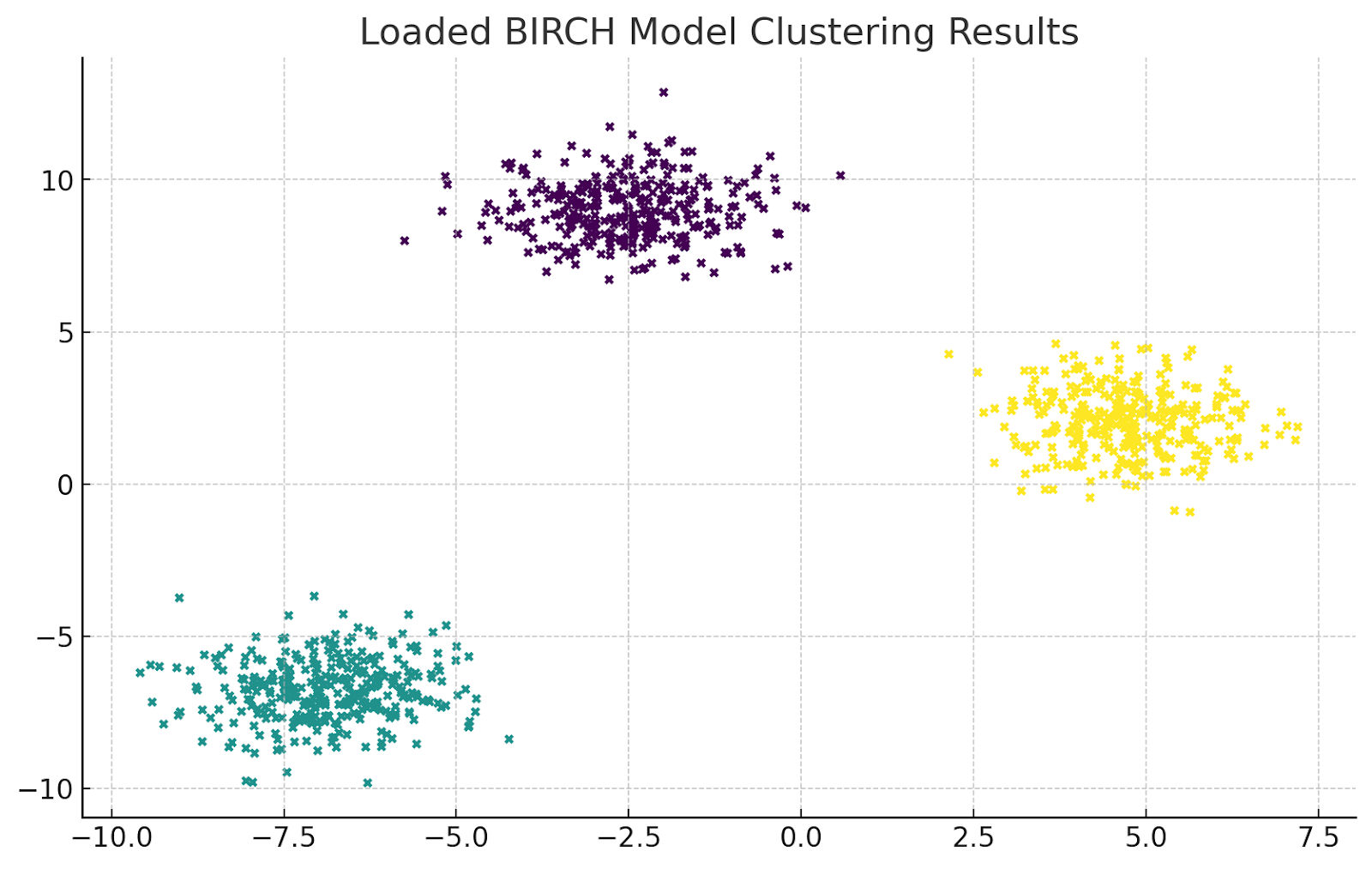
Step 9: Save and Load the Model
You can save the trained BIRCH model for later use, which is helpful for large datasets where retraining every time isn’t feasible.
import joblib

# Save the model
joblib.dump(birch_model, 'birch_model.pkl')

# Load the model
loaded_model = joblib.load('birch_model.pkl')
Output:
Step 10: Apply BIRCH to a Real CSV Dataset
So far, you've used a synthetic dataset created with make_blobs(). In real projects, you'll usually work with CSV files containing customer records, transactions, sensor readings, or sales data. Loading a CSV with Pandas follows the same BIRCH workflow while making the implementation suitable for production datasets.
For this example, assume you have a customer dataset named customers.csv with numerical features such as Age, AnnualIncome, and SpendingScore.
import pandas as pd
from sklearn.cluster import Birch

# Load CSV dataset
df = pd.read_csv("customers.csv")

# Select numerical features
X = df[["Age", "AnnualIncome", "SpendingScore"]]

# Initialize the model
birch = Birch(
    branching_factor=50,
    threshold=0.5,
    n_clusters=5
)

# Train the model
birch.fit(X)

# Assign cluster labels
df["Cluster"] = birch.predict(X)

print(df.head())
Output:
| Age | Annual Income | Spending Score | Cluster |
|---|---|---|---|
| 19 | 15 | 39 | 2 |
| 21 | 15 | 81 | 0 |
| 20 | 16 | 6 | 1 |
| 23 | 16 | 77 | 0 |
| 31 | 17 | 40 | 2 |
fit() vs fit_predict()
Scikit-learn provides two common ways to train a BIRCH model:
| Method | When to Use |
|---|---|
| fit() | Trains the model only. Use predict() later when you want to cluster new or unseen data. |
| fit_predict() | Trains the model and returns cluster labels in a single step. Best for clustering the same dataset immediately. |
Using fit_predict() makes the code shorter:
birch = Birch(
    branching_factor=50,
    threshold=0.5,
    n_clusters=5
)

df["Cluster"] = birch.fit_predict(X)
Output:
| Index | Cluster |
|---|---|
| 0 | 2 |
| 1 | 0 |
| 2 | 1 |
| 3 | 0 |
| 4 | 2 |
Use fit() when you plan to reuse the trained model for future data. Use fit_predict() when you only need cluster labels for the current dataset.
By following these steps, you can implement the BIRCH algorithm to efficiently cluster large datasets while optimizing performance based on your specific needs. Whether you're working with customer data, fraud detection, or other data mining tasks, BIRCH provides a scalable and memory-efficient solution. Keep experimenting with parameter tuning and use edge case handling to ensure your model performs well on all types of data.
Also Read: Top 10 Dimensionality Reduction Techniques for Machine Learning(ML) in 2026
Now, let's take a closer look at how BIRCH compares with other clustering algorithms to understand its strengths and limitations.
AI Courses to upskill
Explore Artificial Intelligence Courses for Career Progression
While BIRCH is a powerful tool for clustering large datasets, it’s essential to understand how it compares to other popular clustering algorithms like DBSCAN, K-Means and Hierarchical Clustering. Each of these methods has its own strengths and weaknesses, which depend on factors such as data size, density, and the shape of the clusters.
Let's break down the differences between BIRCH vs K-Means, DBSCAN, and Hierarchical Clustering.
| Aspect | BIRCH | K-Means | DBSCAN | Hierarchical Clustering |
|---|---|---|---|---|
| Memory Usage | Low, thanks to the CF Tree | Moderate, stores centroids and data | Depends on data density | High, stores pairwise distances |
| Cluster Shape | Best for compact, spherical clusters | Best for spherical clusters | Handles arbitrary shapes well | Handles both simple and complex shapes |
| Scalability | Excellent for very large datasets | Good for large datasets | Moderate for large datasets | Limited for large datasets |
| Outlier Handling | Detects and ignores outliers | Sensitive to outliers | Naturally identifies noise | No built-in outlier handling |
| Number of Clusters | Optional during final clustering | Must specify K beforehand | Determined automatically | Determined by cutting the dendrogram |
| Time Complexity | O(n) average | O(n × k × i) | O(n²) worst case | O(n³) worst case |
| Best Use Case | Large-scale incremental clustering | Customer segmentation and simple clustering | Noisy data with irregular clusters | Small datasets requiring hierarchical relationships |
Take the next step by applying BIRCH to real-life datasets and experiment with clustering, anomaly detection, or customer segmentation. Adjust the algorithm’s parameters, such as the branching factor and threshold, to observe how they impact the clustering results.
Also Read: Image Segmentation Techniques [Step By Step Implementation]
Following this, let's explore the advantages and limitations of BIRCH to understand where it excels, where it falls short, and which clustering algorithm should you choose for different types of datasets.
Understanding the advantages and limitations of the BIRCH algorithm in machine learning is crucial for applying it effectively in data mining. Being aware of these factors ensures you can use BIRCH in scenarios where it excels, while avoiding situations where other techniques might yield better results.
The table below summarizes the key advantages and limitations of BIRCH for quick reference.
Advantages |
Limitations |
Workarounds |
| Efficient memory usage with CF Tree | Struggles with non-spherical clusters | Use PCA or other clustering algorithms like DBSCAN |
| Scalable for large datasets | Sensitive to parameter settings | Experiment with parameters and evaluate using metrics |
| Handles incremental data without reprocessing | High memory overhead in high-dimensional data | Reduce dimensionality before clustering |
| Effectively handles outliers | Requires initial pass through the data | Process data in smaller chunks for streaming |
| Flexible clustering with threshold control | Struggles with uneven cluster sizes | Preprocess data for uniformity or refine with K-Means |
Also Read: Machine Learning Projects with Source Code in 2026
To further build on your knowledge of BIRCH, consider exploring topics like DBSCAN for density-based clustering or K-Means for centroid-based clustering. Hands-on projects such as customer segmentation using real-world datasets or anomaly detection in fraud prevention can deepen your practical understanding of clustering algorithms
Understanding the real-life applications of BIRCH helps bridge the gap between theory and practice. For example, knowing how BIRCH is used for customer segmentation or large-scale anomaly detection can show you its practical value. This insight will make it easier to apply BIRCH in your own projects, allowing you to efficiently tackle complex data clustering challenges.
Below is a table summarizing how BIRCH can be used in various real-world applications:
Application |
Description |
| Customer Segmentation | BIRCH clusters customer data based on purchase behavior and demographics. Used by Amazon for targeted marketing and personalized recommendations. |
| Anomaly Detection in IoT | BIRCH detects unusual patterns in sensor data streams. Implemented by GE to monitor industrial equipment for faults and predict failures. |
| Fraud Detection in Banking | BIRCH identifies anomalous transaction patterns in financial data. Used by HSBC to detect suspicious activities in real-time. |
| Image Compression | BIRCH clusters pixel data for image compression. Applied by Adobe to compress large datasets efficiently without losing key details. |
| Social Media Analytics | BIRCH groups social media interactions to analyze trends and sentiments. Used by Twitter for real-time topic clustering and trend analysis. |
After grasping the basics of BIRCH, consider exploring advanced topics like Deep Clustering for large-scale data, Explore PCA for dimensionality reduction to improve BIRCH's performance on high-dimensional data, or combine BIRCH with K-Means for enhanced clustering accuracy.
These topics will deepen your understanding of clustering algorithms and their real-life applications.
Subscribe to upGrad's Newsletter
Join thousands of learners who receive useful tips
BIRCH is a good choice when you need to cluster large datasets quickly without consuming excessive memory. Its CF Tree structure summarizes data instead of storing every point, making it suitable for incremental and large-scale clustering tasks.
| Scenario | Why BIRCH Works Well |
|---|---|
| Large datasets | Clusters millions of records with low memory usage. |
| Memory-constrained systems | CF Tree stores cluster summaries instead of raw data. |
| Streaming or incremental data | Updates clusters without rebuilding the entire model. |
| Fast preprocessing | Quickly creates initial clusters before refining them with K-Means. |
| Outlier-prone datasets | Excludes points that do not fit existing clusters. |
BIRCH is not the best option for every clustering problem.
| Situation | Better Choice |
|---|---|
| Irregular or non-spherical clusters | DBSCAN |
| Very high-dimensional data | Apply PCA first or use another algorithm |
| Small datasets needing detailed hierarchies | Hierarchical Clustering |
| Clusters with highly varying densities | DBSCAN or Gaussian Mixture Models |
BIRCH performs best on low- to medium-dimensional datasets. As the number of features increases, the CF Tree becomes less effective because distance calculations lose meaning.
You can improve performance by:
Unlike many clustering algorithms that repeatedly scan the entire dataset, BIRCH stores only compact cluster summaries.
This makes it suitable for:
While BIRCH is efficient for clustering large datasets, a few configuration issues can affect its performance. The table below covers common problems, their causes, and practical fixes.
| Challenge | Why It Happens | How to Fix It |
|---|---|---|
| Too many small clusters | Threshold is too low | Increase the threshold gradually. |
| Large, inaccurate clusters | Threshold is too high | Reduce the threshold for tighter clusters. |
| High memory usage | Small branching factor or many clusters | Increase the branching factor or simplify the data. |
| Poor results on high-dimensional data | Distance measures become less meaningful | Apply PCA or remove irrelevant features before clustering. |
| Important points marked as outliers | Strict threshold settings | Increase the threshold after validating the data. |
| Low clustering quality | Features have different scales | Normalize or standardize the dataset before training. |
| Slow performance | Very large or noisy dataset | Remove duplicates, clean noisy records, and tune parameters. |
| Uneven cluster sizes | BIRCH assumes compact clusters | Refine the output using K-Means or use DBSCAN if needed. |
Avoid these mistakes when implementing BIRCH:
Assess your understanding of BIRCH clustering, its key components, advantages, limitations, and real-world applications by answering the following multiple-choice questions.
Test your knowledge now!
Q1. What is the main purpose of BIRCH clustering?
A) To find the optimal number of clusters
B) To reduce the dimensionality of data
C) To group similar data points efficiently in large datasets
D) To assign each data point a unique label
Q2. Which data structure does BIRCH use to store clustering information?
A) Decision tree
B) Clustering Feature (CF) Tree
C) K-D Tree
D) Hash Map
Q3. What is the role of the branching factor in BIRCH?
A) To determine how many clusters BIRCH creates
B) To control the memory usage during clustering
C) To set the number of points per cluster
D) To determine the threshold for merging clusters
Q4. Which of the following is a limitation of BIRCH?
A) Struggles with non-spherical clusters
B) Cannot handle large datasets
C) Does not support incremental clustering
D) Only works with labeled data
Q5. How does BIRCH handle outliers in a dataset?
A) By including them in the nearest cluster
B) By assigning them a separate label
C) By ignoring them in the clustering process
D) By removing them from the dataset completely
Q6. Which technique is often used with BIRCH to improve clustering performance on high-dimensional data?
A) Linear regression
B) Principal Component Analysis (PCA)
C) Decision trees
D) Random forests
Q7. What type of clustering does BIRCH perform?
A) Density-based clustering
B) Hierarchical clustering
C) Partitioning clustering
D) Grid-based clustering
Q8. How does BIRCH’s threshold parameter affect clustering results?
A) Controls the maximum number of clusters BIRCH will create
B) Defines the maximum distance between points in a cluster
C) Controls the number of data points in each cluster
D) Sets the number of iterations BIRCH will run
Q9. In what type of applications is BIRCH most commonly used?
A) Real-time anomaly detection in streaming data
B) Image segmentation for computer vision
C) Clustering for supervised learning tasks
D) Ranking and recommendation systems
Q10. What happens if you set the threshold parameter in BIRCH too high?
A) Clusters will become very tight and small
B) The algorithm will take longer to converge
C) Clusters will become larger and less distinct
D) BIRCH will ignore all outliers
You can also continue expanding your skills in unsupervised learning with upGrad, which will help you deepen your understanding of BIRCH in data mining.
The BIRCH algorithm is a scalable clustering method that processes large datasets with low memory usage through its Clustering Feature (CF) Tree. Its incremental approach makes it suitable for applications such as customer segmentation, fraud detection, IoT analytics, and anomaly detection.
To get the best results, tune parameters like the branching factor and threshold, evaluate cluster quality, and compare BIRCH with algorithms such as K-Means and DBSCAN. Hands-on practice with real datasets will help you choose the right clustering method for different machine learning tasks.
In addition to the courses mentioned, here are some more resources to help you further elevate your skills:
Not sure where to go next in your ML journey? upGrad’s personalized career guidance can help you explore the right learning path based on your goals. You can also visit your nearest upGrad center and start hands-on training today!
Similar Reads:
Expand your expertise with the best resources available. Browse the programs below to find your ideal fit in Best Machine Learning and AI Courses Online.
Discover in-demand Machine Learning skills to expand your expertise. Explore the programs below to find the perfect fit for your goals.
Discover popular AI and ML blogs and free courses to deepen your expertise. Explore the programs below to find your perfect fit.
The BIRCH algorithm (Balanced Iterative Reducing and Clustering using Hierarchies) is a hierarchical clustering method designed for large datasets. It organizes data into a Clustering Feature (CF) Tree, allowing clusters to be created efficiently while reducing memory usage.
The algorithm is widely used to cluster massive datasets without consuming excessive memory or processing power. Its incremental approach makes it a practical choice for applications where data grows continuously or cannot fit into memory all at once.
The BIRCH algorithm in machine learning builds a Clustering Feature Tree that stores compact summaries instead of individual records. These summaries are refined through multiple clustering phases to produce accurate groups while maintaining high processing speed.
A Clustering Feature (CF) is a compact summary of a cluster that stores the number of data points, their linear sum, and squared sum. This representation helps reduce storage requirements and speeds up clustering on large datasets.
A CF Tree is the main data structure used in the BIRCH algorithm. It stores compressed cluster information in a hierarchical format, allowing the algorithm to process large datasets efficiently without repeatedly scanning the entire dataset.
The threshold determines the maximum radius allowed for a subcluster. Smaller values produce compact clusters, while larger values combine more data points into a single cluster. Selecting the right threshold directly affects clustering quality.
The branching factor defines the maximum number of child nodes each CF Tree node can have. It influences the tree's size, memory consumption, and processing speed, making it an important parameter when configuring the algorithm.
Start with a moderate threshold and evaluate the resulting clusters using validation metrics such as the silhouette score. Adjust the value based on cluster compactness and dataset characteristics until the results match your analysis goals.
The BIRCH algorithm in data mining generally performs close to linear time because it processes data incrementally through the CF Tree. This makes it much faster than many traditional hierarchical clustering techniques on large datasets.
The algorithm minimizes memory usage by storing cluster summaries instead of every data point. This compact storage approach enables efficient clustering, even when working with datasets that contain millions of records.
It depends on the dataset. The birch clustering algorithm works well for very large datasets because it builds clusters incrementally, while K-Means is often preferred for smaller datasets with well-defined spherical clusters.
Neither method is universally better. BIRCH is suitable for large-scale clustering with limited memory, whereas DBSCAN performs better when datasets contain irregular cluster shapes or significant noise.
Use the BIRCH algorithm when working with large datasets, limited memory, or continuously growing data. It is commonly applied to customer segmentation, anomaly detection, network analysis, and other large-scale clustering tasks.
Avoid this approach when your data contains highly irregular cluster shapes, varying densities, or many high-dimensional features without preprocessing. In these situations, density-based methods or dimensionality reduction techniques may deliver better results.
Yes. The BIRCH algorithm in machine learning was designed specifically for large datasets. Its CF Tree stores summarized information instead of raw records, reducing memory requirements while maintaining fast clustering performance.
Reference Link:
https://www.linkedin.com/pulse/birch-clustering-method-comprehensive-guide-data-kandavel-phd
306 articles published
Mukesh Kumar is a Senior Engineering Manager with over 10 years of experience in software development, product management, and product testing. He holds an MCA from ABES Engineering College and has l...
Speak with AI & ML expert
By submitting, I accept the T&C and
Privacy Policy
Top Resources
Master's Degree
18 Months
Executive Diploma
12 Months
IIIT Bangalore
Executive Programme in Generative AI & Agentic AI for LeadersIndia’s #1 Tech University
Dual Certification
5 Months
Artificial Intelligence Animation: How AI Is Transforming Animation Process
20 Aug 2026 | 8 min read