Threat Modeling: Process, Methodologies, Benefits, and Examples
By Sriram
Updated on Jul 15, 2026 | 6 min read | 1.74K+ views
Share:

All courses
Certifications
More
By Sriram
Updated on Jul 15, 2026 | 6 min read | 1.74K+ views
Share:
Table of Contents
Key Takeaway
This blog covers what threat modeling actually means, why security teams rely on it, and how the process works step by step.
Explore upGrad's AI programs to build practical skills in artificial intelligence, machine learning, generative AI, secure AI application development, AI system design, and real-world problem-solving through hands-on projects, industry tools, and case studies.
Popular AI Programs
Threat modeling means identifying, documenting, and addressing potential threats to a system before it goes live. It's not a single tool or a checklist. It's a mindset applied early in the design phase.
Every software application has something worth protecting. It could be customer data, payment information, confidential documents, or critical business systems. If these assets aren't considered during design, attackers will eventually find a way to exploit them. The goal isn't to eliminate every risk. The goal is to know your risks well enough to make smart tradeoffs.
Here's the difference between reactive security and threat modelling:
Reactive Security |
Threat Modeling |
| Fixes issues after an attack or audit | Finds issues before code ships |
| Relies on scanners and alerts | Relies on structured analysis |
| Treats security as an afterthought | Treats security as a design input |
Security bugs found in production cost far more to fix than the ones caught on a whiteboard. That alone justifies the practice for most engineering teams.
But there's more to it than cost. Threat modeling changes how teams think.
A good threat model helps teams in the following ways:
Threat modelling also fits into a bigger picture. It touches application security, cloud security, and infrastructure risk management all at once. A single threat model for a payment API, for instance, can inform decisions across all three areas.
Although every organization has its own security goals, most threat modeling exercises focus on four objectives.
Objective |
Why it matters |
| Identify critical assets | Determines what needs the highest level of protection. |
| Discover potential threats | Reveals how attackers could compromise the system. |
| Assess security risks | Helps prioritize threats based on likelihood and impact. |
| Plan mitigation strategies | Reduces security risks before deployment. |
Every threat model includes several building blocks. These provide a complete picture of how a system operates and where security risks might appear.
Component |
What It Means |
Why It Matters |
| Assets | Valuable information or resources that need protection. | They help you identify what requires the highest level of security. |
| Entry Points | Places where users or systems access the application. | These are the areas attackers are most likely to target. |
| Trust Boundaries | Points where data moves between different security zones. | They highlight where additional security controls may be needed. |
| Threats | Possible actions that could compromise the system. | They help teams understand potential attack scenarios. |
| Mitigations | Measures taken to reduce identified risks. | They lower the likelihood or impact of security threats. |
Do read: Cyber Security Threats: What are they and How to Avoid
Free Courses
There's no single "correct" way to how to identify threats during threat modeling. But most mature processes follow a similar shape.
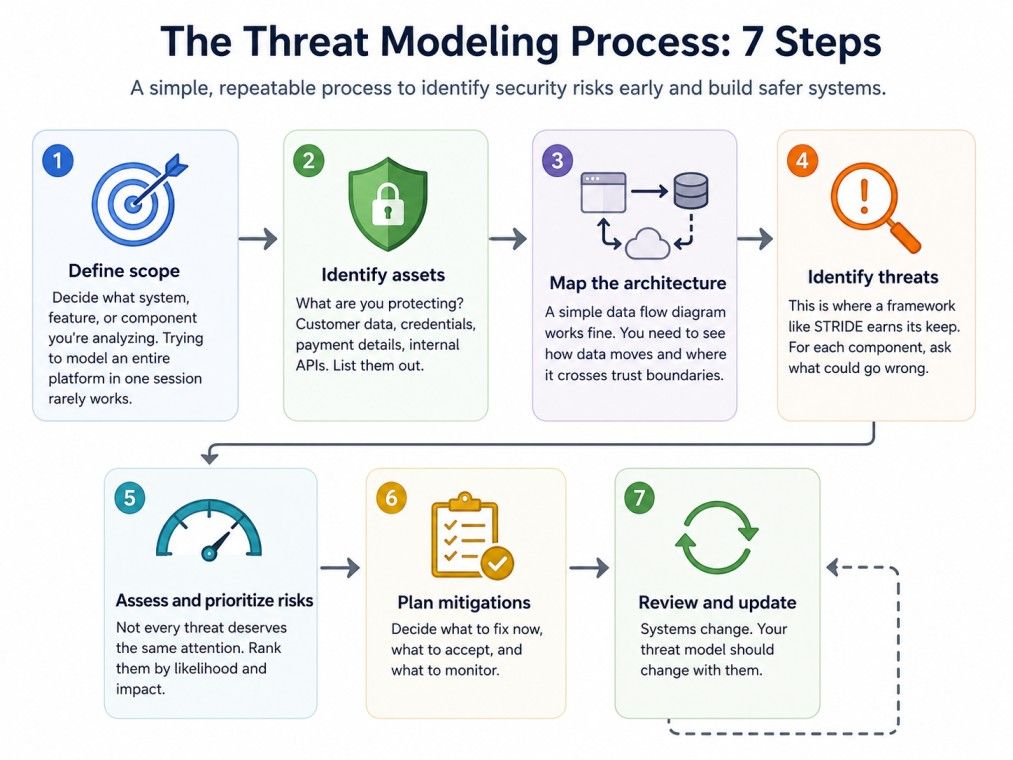
Step 1. Define scope. Decide what system, feature, or component you're analyzing. Trying to model an entire platform in one session rarely works.
Step 2. Identify assets. What are you protecting? Customer data, credentials, payment details, internal APIs. List them out.
Step 3. Map the architecture. A simple data flow diagram works fine. You need to see how data moves and where it crosses trust boundaries.
Step 4. Identify threats. This is where a framework like STRIDE earns its keep. For each component, ask what could go wrong.
Step 5. Assess and prioritize risks. Not every threat deserves the same attention. Rank them by likelihood and impact.
Step 6. Plan mitigations. Decide what to fix now, what to accept, and what to monitor.
Step 7. Review and update. Systems change. Your threat model should change with them.
A threat model built once and never revisited becomes outdated fast, especially in cloud environments where architecture shifts every quarter.
Explore upGrad's Executive Post Graduate Certificate in AI-Native Software Engineering to master AI-first software development, LLMs, RAG, agentic workflows, full-stack AI engineering, and production-ready AI systems through hands-on projects and real-world applications.
AI Courses to upskill
Explore Artificial Intelligence Courses for Career Progression
While methodologies provide the overall framework, techniques are the practical methods used to analyze a system and uncover potential security risks. Most organizations combine several techniques during a threat modeling exercise to gain a complete view of their application's security.
A Data Flow Diagram (DFD) illustrates how data moves through an application and where it interacts with different components. It helps teams visualize the system before identifying possible threats.
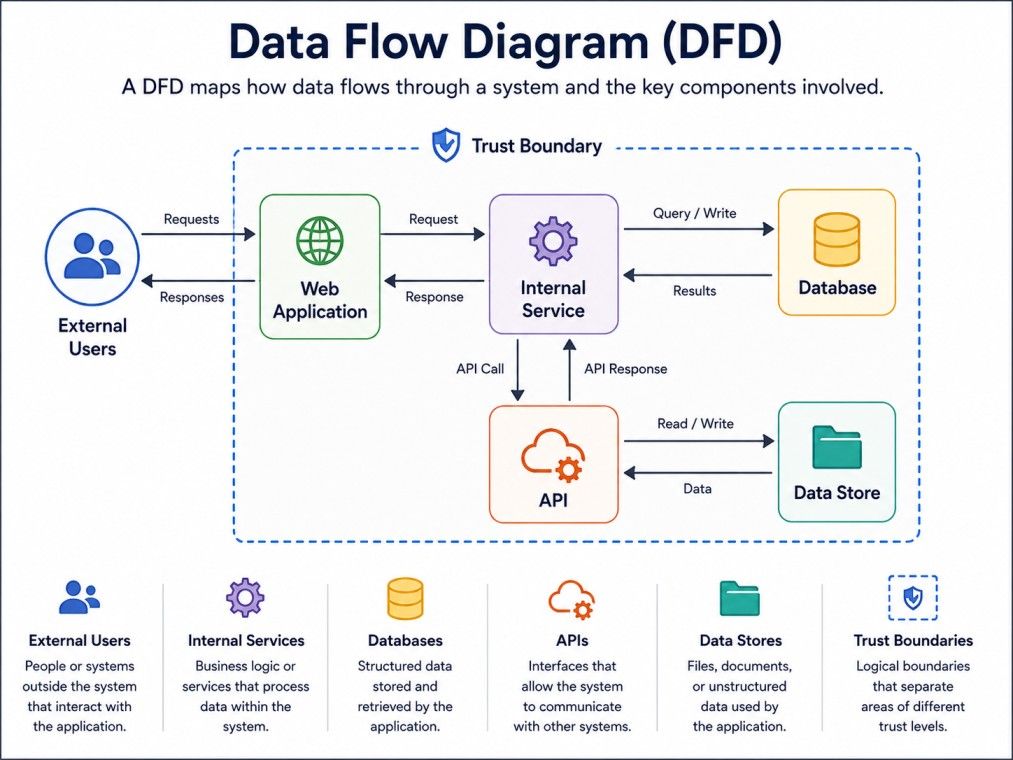
Since attackers often target data as it moves between components, DFDs form the foundation of many threat modeling exercises.
Attack trees help security teams visualize the different ways an attacker could achieve a specific objective.
The diagram begins with the attacker's goal at the top. Each branch then represents a possible attack path that could lead to that outcome. By breaking complex attacks into smaller steps, teams can identify weak points and decide where security controls will have the greatest impact.
Do read: What is Cybersecurity? Types, Career & Salary
Applications rarely operate within a single security zone. Data constantly moves between users, services, databases, and third-party systems.
Trust boundary analysis identifies where information crosses areas with different security levels, such as:
These transition points often require stronger controls such as authentication, encryption, or access validation because they present attractive targets for attackers.
Every system contains assets, but not all of them are equally valuable. Asset identification helps teams determine which resources require the strongest protection based on their business value and security impact.
Common high-value assets include:
By identifying these assets early, teams can focus their security efforts on protecting the resources that matter most instead of applying the same level of protection across every part of the application.
Must read: Top 15 Cybersecurity Analyst Skills for Success
Different methodologies suit different needs. Here's a quick breakdown of the ones you'll run into most.
STRIDE is the most widely used threat modeling methodology, developed by Microsoft. It breaks threats into six categories: Spoofing, Tampering, Repudiation, Information disclosure, Denial of service, and Elevation of privilege. A stride threat model works well for application-level analysis because it maps cleanly onto system components.
PASTA (Process for Attack Simulation and Threat Analysis) takes a risk-centric approach. It ties technical threats back to business impact, which makes it useful for leadership buy-in.
Attack Trees visualize how an attacker might reach a specific goal, branch by branch. They're useful when you need to reason through a single high-value target.
Trike focuses on defining acceptable risk levels for stakeholders first, then builds the threat model around that baseline.
Many teams use the Microsoft Threat Modeling Tool to build these diagrams and apply STRIDE automatically. It's free, it integrates with existing design workflows, and it's a solid starting point if you're new to this. It won't replace human judgment though. The tool flags patterns, but deciding what actually matters still takes a person in the room.
People mix these terms up constantly. They're related but not the same thing.
Feature |
Threat Modeling |
Risk Assessment |
Vulnerability Assessment |
| Primary goal | Identify potential threats during design | Evaluate business and security risks | Discover existing vulnerabilities |
| When performed | Early in the SDLC | Throughout the project lifecycle | Usually after implementation |
| Focus | Possible attack scenarios | Overall organizational risk | Known technical weaknesses |
| Main output | Threat model and mitigation plan | Risk register | Vulnerability report |
| Typical users | Architects, developers, security teams | Risk managers, security teams | Security analysts |
Think of it this way. Threat modeling asks "what could go wrong here." Risk assessment asks "how much does that matter to the business." Vulnerability assessment asks "what's already broken."
Also read: AI in Cybersecurity: Market Trends, Applications, and Future
Let's walk through a simplified example.
System: A mobile banking app that lets users check balances and transfer funds.
Assets: User credentials, account balances, transaction history, session tokens.
Entry points: Login screen, transfer form, API endpoints connecting the app to the bank's core system.
Using STRIDE, a few threats surface quickly. An attacker could spoof a session token to impersonate a user. Someone could tamper with a transfer request mid-transit if it's not properly encrypted. A weak logging setup could allow repudiation, where a user denies making a transaction that actually happened.
Mitigations might include token expiration policies, TLS encryption on every request, and detailed audit logs tied to authenticated sessions.
This whole exercise takes a few hours for a small team. It's far cheaper than discovering these gaps after a breach.
Must read: Penetration Testing In Cyber Security:Types, Pros And Cons
Integrating threat modeling into the Secure Software Development Lifecycle (SDLC) helps teams identify and address security risks before they become expensive problems. Instead of treating security as a final checkpoint, it becomes part of every stage of software development.
Here's how threat modeling fits into each phase of the SDLC:
SDLC Phase |
Role of Threat Modeling |
| Requirements | Identify sensitive assets, security goals, and compliance requirements. |
| Design | Review system architecture, trust boundaries, and potential attack paths. |
| Development | Guide developers in implementing secure coding practices and planned security controls. |
| Testing | Verify that identified threats have been mitigated through security testing and code reviews. |
| Deployment | Check production configurations and confirm security measures before release. |
| Maintenance | Update the threat model whenever new features, integrations, or infrastructure changes introduce new risks. |
By incorporating threat modeling throughout the SDLC, organizations can reduce vulnerabilities early, improve collaboration between development and security teams, and build more secure applications from the start.
Do read: Different Types of Cyber Security & Threats Explained
If you're wondering what are the benefits of threat modeling, the answer goes beyond finding security flaws. It helps organizations identify risks early, improve application design, and make informed security decisions throughout the software development lifecycle. At the same time, threat modeling isn't without challenges. Its effectiveness depends on when it's performed, how thoroughly systems are analyzed, and whether the threat model is kept up to date.
The table below highlights the major benefits alongside the common challenges teams should address.
Benefits |
Common Challenges |
| Finds security risks early. | Starting too late makes issues harder to fix. |
| Reduces the cost of fixing vulnerabilities. | Missing important assets can leave security gaps. |
| Improves application design. | Ignoring business workflows may overlook real risks. |
| Helps prioritize the most critical threats. | Treating it as a one-time activity leads to outdated threat models. |
| Encourages better collaboration across teams. | Limited team involvement can miss valuable insights. |
| Supports security and compliance goals. | Poor documentation makes future reviews difficult. |
| Keeps security aligned with system changes. | Failing to update the model reduces its effectiveness over time. |
Threat modelling isn't about eliminating every possible security risk. Instead, it provides a structured approach to identifying the most important threats, prioritizing mitigation efforts, and continuously improving application security as systems evolve.
Effective threat modeling doesn't have to be overly complicated. A consistent and well-planned approach is far more valuable than an overly detailed exercise that's rarely updated. Following a few practical best practices can help teams identify meaningful risks early and make better security decisions throughout the development lifecycle.
Consider these recommendations:
Security improves through consistency, not through complexity.
Also read: What is Cybersecurity Threat?
Artificial intelligence is changing how security teams approach threat modeling, especially for large and complex applications. AI can quickly process architecture diagrams, identify common attack patterns, and analyze large amounts of security data, allowing teams to spend less time on repetitive tasks and more time evaluating critical risks.
That said, AI is a support tool.
It isn't a replacement for human expertise.
A successful threat model depends on understanding business objectives, application context, and risk tolerance, which still require experienced security professionals.
AI-powered security tools can help teams:
These capabilities speed up the threat modeling process and reduce manual effort, particularly in large enterprise environments with hundreds of interconnected services.
Also read: What is a Cyber Security Framework: Types, Implementation Strategies, and More
AI can identify patterns, but it can't fully understand business priorities or organizational risk.
For example, two applications may share the same architecture, yet one processes public information while the other stores sensitive financial records. Although the technical design is similar, the security controls and acceptable level of risk are very different.
Security professionals are still responsible for:
The best results come from combining AI-driven analysis with human decision-making rather than relying entirely on automation.
One of the most widely used solutions is the Microsoft Threat Modeling Tool, a free application designed to simplify threat modeling during software design.
It enables teams to:
The tool is particularly useful for organizations developing applications within the Microsoft ecosystem. However, the threat modeling principles it follows, such as identifying assets, analyzing data flows, and evaluating security risks, are applicable to software projects across any technology stack.
Modern software can't rely on reactive security alone. Fixing vulnerabilities after deployment is slower, more expensive, and often more disruptive than preventing them during design.
That's why threat modeling has become an important part of secure software development. It helps teams identify valuable assets, understand potential attack paths, prioritize security risks, and build stronger applications from the beginning.
Whether you're developing a small internal application or a large enterprise platform, adopting a structured threat modeling process encourages better security decisions throughout the software lifecycle. Combined with regular testing, risk assessment, and ongoing reviews, it forms a strong foundation for building applications that are prepared for evolving cyber threats.
Ready to start your journey? Book a free consultation with upGrad today to find the best path for your career.
A threat modeling session works best when it includes developers, software architects, security professionals, product owners, and operations teams. Each participant brings a different perspective, helping identify technical risks, business concerns, and design assumptions that a single team might overlook.
No. Existing applications also benefit from threat modelling, especially after major updates, cloud migrations, API integrations, or infrastructure changes. Revisiting the model helps identify new attack paths that may have been introduced since the original design.
Many teams begin by answering four simple questions. What are we building? What can go wrong? What should we do about it? Did we do a good enough job? This structured approach helps keep discussions focused while ensuring important risks aren't overlooked.
The right methodology depends on your project's goals and complexity. The STRIDE threat model is a popular choice for application security because it's easy to understand, while methodologies such as PASTA or LINDDUN are better suited for advanced risk analysis or privacy-focused systems.
A useful threat model documents the system scope, valuable assets, architecture diagrams, trust boundaries, identified threats, risk ratings, mitigation decisions, and key assumptions. Keeping this information updated makes future security reviews faster and more effective.
Yes. The Microsoft Threat Modeling Tool is often recommended for beginners because it simplifies the creation of Data Flow Diagrams and automatically maps common threats using the STRIDE methodology. It provides a practical way to learn structured threat modeling without starting from scratch.
Absolutely. Modern cloud applications benefit from threat modeling because they include APIs, containers, microservices, and third-party services that increase the attack surface. Reviewing data flows and trust boundaries helps identify security gaps before deployment or major architecture changes.
A threat model should be detailed enough to identify realistic risks without becoming difficult to maintain. Focus on the application's architecture, critical assets, major data flows, and likely attack scenarios instead of attempting to document every theoretical threat.
Yes. Many agile teams perform lightweight threat modeling during feature planning or sprint design sessions. Short, focused reviews help identify high-priority risks early while keeping development moving, making security part of the workflow instead of a separate activity.
A security architecture diagram illustrates how a system is designed, while a threat model explains how that design could be attacked and what controls are needed. Architecture provides the structure, whereas threat modeling evaluates the security risks associated with it.
A successful threat modeling exercise identifies meaningful threats, prioritizes the highest risks, defines practical mitigation strategies, and stays relevant as the system evolves. If it influences design decisions and is updated as the application changes, it has delivered real value rather than becoming static documentation.
724 articles published
Sriram K is a Senior SEO Executive with a B.Tech in Information Technology from Dr. M.G.R. Educational and Research Institute, Chennai. With over a decade of experience in digital marketing, he specia...
Speak with AI & ML expert
By submitting, I accept the T&C and
Privacy Policy
Top Resources
Master's Degree
18 Months
Executive Diploma
12 Months
IIIT Bangalore
Executive Programme in Generative AI & Agentic AI for LeadersIndia’s #1 Tech University
Dual Certification
5 Months