Machine Learning Studio: Complete Beginner's Guide
By Sriram
Updated on Jun 25, 2026 | 6 min read | 2.19K+ views
Share:

All courses
Certifications
More
By Sriram
Updated on Jun 25, 2026 | 6 min read | 2.19K+ views
Share:
Table of Contents
Machine learning studio is a way to build, train, test and deploy machine learning models. You do not have to manage every detail by yourself. It is helpful whether you are new to intelligence or building predictive models. A machine learning studio gives you an environment to develop machine learning solutions.
In this blog, you’ll learn what machine learning studio is, how it works, its key features, benefits, practical use cases, and how platforms like Azure Machine Learning Studio help organizations create and manage machine learning projects at scale.
Launch your career in AI and Machine Learning with upGrad’s Machine Learning Courses Online with hands-on training, industry projects, and personalized mentorship.
Popular AI Programs
A machine learning studio is a platform that helps users create and train machine learning models and evaluate them and then deploy these machine learning models through an interface. This way users do not have to build everything from scratch. They can access tools, for getting data ready and developing machine learning models and testing them and monitoring them and deploying them all in one place.
Most machine learning studio platforms support both code-based workflows and no-code workflows. This makes these platforms useful for beginners as well as experienced data scientists who work with machine learning models.
According to Microsoft Azure Machine Learning provides a way to manage the lifecycle of machine learning models including training machine learning models and deploying them and monitoring them and using MLOps capabilities. Sources: Microsoft Azure and Microsoft Learn.
So, when you want to build models with machine learning, you usually need a lot of tools and things to do. A machine learning studio makes it easier by putting everything you need for machine learning, in one place.
Benefits include:
Component |
Purpose |
| Data Preparation | Clean and organize datasets |
| Model Training | Build machine learning models |
| Evaluation | Measure model performance |
| Deployment | Make models available for real-world use |
| Monitoring | Track performance after deployment |
| Collaboration | Enable teams to work together |
Instead of using separate tools for every step, everything can happen inside one platform. Imagine an online retailer that wants to predict future sales. The workflow inside a machine learning studio might look like this:
Microsoft Azure Machine Learning Studio has tools that are easy to use, and it also has advanced tools for machine learning operations, which are also known as MLOps. Microsoft Azure Machine Learning Studio is popular among the users.
Some widely used platforms include:
Free Courses
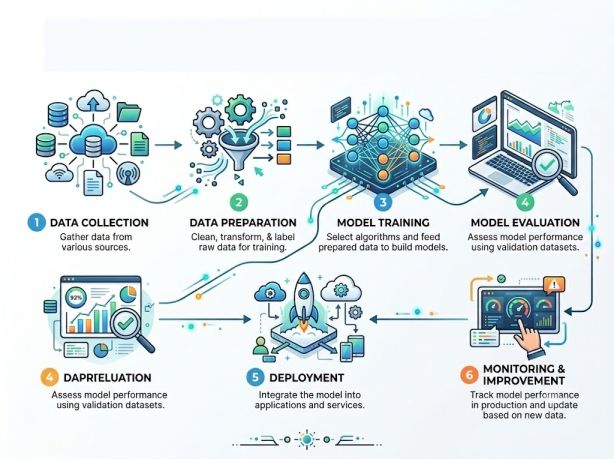
Understanding the workflow helps beginners see how machine learning projects move from raw data to business insights.
Most machine learning studio platforms follow a similar process.
The quality of data often determines the quality of predictions. Machine learning begins with data.
Data may come from:
Raw data is rarely ready for machine learning. Many machine learning studio solutions automate part of this process.
Common preparation tasks include:
Modern platforms often provide automated machine learning features that test multiple algorithms automatically. Microsoft highlights Automated ML as one of the major capabilities of Azure Machine Learning. Once data is prepared, users train machine learning models.
Examples include:
Task |
Model Type |
| Sales prediction | Regression |
| Spam detection | Classification |
| Customer segmentation | Clustering |
| Product recommendation | Recommendation systems |
Users compare results and choose the best-performing model. The system evaluates model performance using metrics such as:
Also Read: Precision vs Recall: Understanding the Key Difference in Machine Learning
A trained model becomes useful only when deployed. One reason many organizations use Azure Machine Learning Studio is its ability to deploy models through managed endpoints and scalable cloud infrastructure.
Deployment options include:
Machine learning is not a one-time process. Models need regular updates because:
AI Courses to upskill
Explore Artificial Intelligence Courses for Career Progression
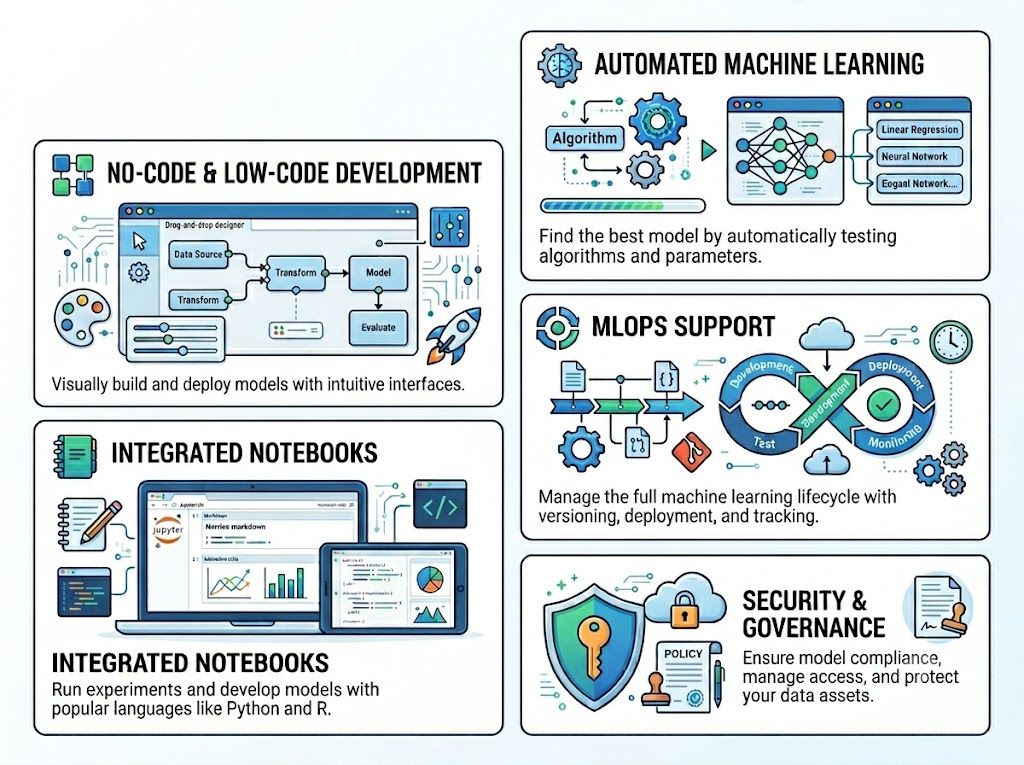
Among platforms, Azure Machine Learning Studio is a top enterprise solution. It offers to use visual tools for beginners and advanced features, for experienced machine learning professionals.
Azure Machine Learning Studio provides these tools to help users work efficiently. The platform supports both tasks and complex machine learning projects.
Users can create machine learning workflows through visual interfaces and get started faster.
This help include:
This significantly reduces experimentation time.
Automated ML can:
Users can work with various tools without leaving the platform.
Tools such as:
MLOps help organizations manage models in production.
Capabilities include:
Large organizations require strict control. According to Microsoft documentation, Microsoft Azure Machine Learning Studio includes:
Benefit |
Impact |
| Faster Development | Reduced project timelines |
| Automation | Less manual work |
| Scalability | Supports growing workloads |
| Collaboration | Teams work together easily |
| Cloud Integration | Easy deployment and monitoring |
| Governance | Better compliance and security |
A useful observation from real-world practitioners is that visual workflows can help beginners understand machine learning concepts faster before moving to more advanced coding approaches. Community discussions frequently highlight this learning advantage.
Organizations use Azure Machine Learning Studio for:
Also Read: Machine Learning Tools: A Guide to Platforms and Applications
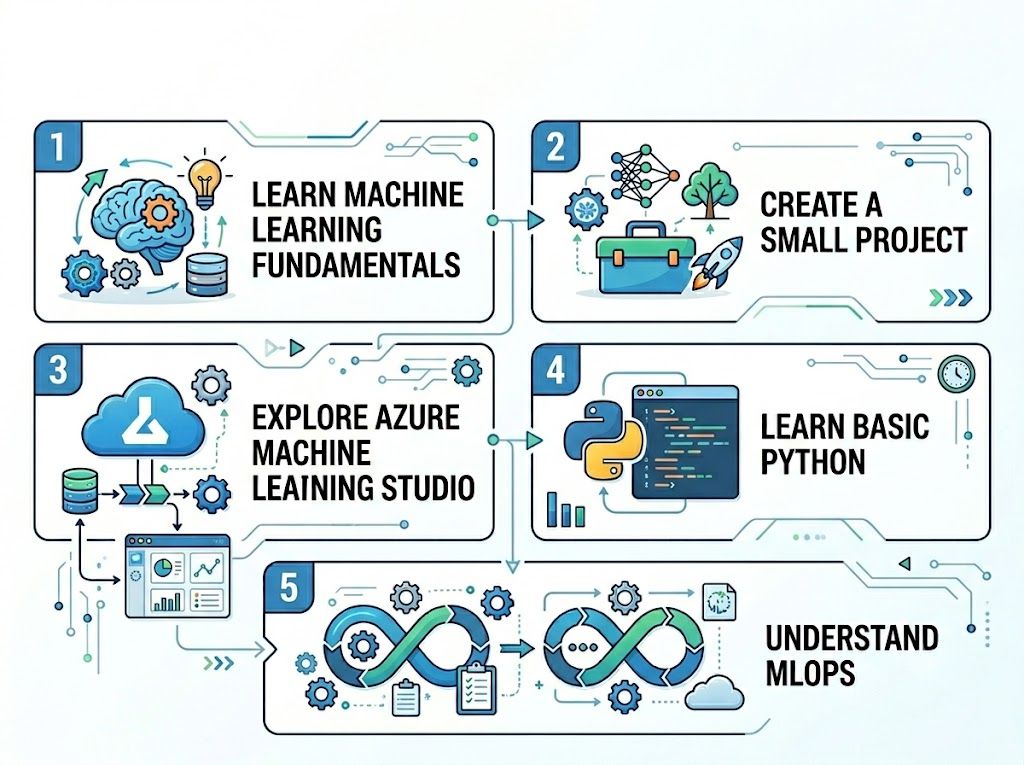
Many beginners assume machine learning requires advanced mathematics and years of coding experience. The reality is different. Modern platforms have significantly lowered the entry barrier.
You do not need to master everything before starting.
Focus on:
Learning by building works better than endless theory.
Good beginner projects include:
Microsoft Azure Machine Learning Studio has tools that help you work with data. It provides interfaces and guided workflows. These make it easy to try out things. Beginners can train models without setting up a lot of infrastructure.
While visual tools help, Python remains valuable for:
Popular libraries include:
As projects become larger, understanding deployment and monitoring becomes essential.
Key areas include:
Mistake |
Better Approach |
| Focusing only on algorithms | Focus on data quality first |
| Ignoring evaluation metrics | Learn how to interpret results |
| Overfitting models | Use proper validation |
| Skipping deployment | Practice real-world implementation |
| Learning without projects | Build practical applications |
As people start using Artificial Intelligence for more platforms, machine learning will become important for companies that want to build and manage machine learning systems in a simple way. Machine learning systems will be a part of this. Companies will use machine learning systems to get things done. Machine learning is what they will use to make this happen.
The future is moving toward:
A machine learning studio simplifies the entire machine learning lifecycle by bringing data preparation, model development, deployment, and monitoring into one environment. It reduces complexity, speeds up experimentation, and makes machine learning more accessible to beginners.
For organizations and professionals looking to build scalable AI solutions, platforms such as Azure Machine Learning Studio and Microsoft Azure Machine Learning Studio provide powerful tools that support both visual development and advanced machine learning workflows. By understanding the fundamentals and practicing with real projects, beginners can quickly gain confidence and start building practical machine learning applications.
Want to explore more about machine learning studio? Book your free 1:1 personal consultation with our expert today.
A machine learning studio is a platform used to build, train, evaluate, deploy, and monitor machine learning models. It combines multiple stages of the machine learning lifecycle into a single environment. Many platforms also provide visual tools that reduce the need for extensive coding.
Some machine learning studio platforms offer free tiers, trial credits, or limited usage plans. For example, Microsoft provides free Azure credits for new users, while ongoing costs depend on computing resources and services used. Always review the latest pricing before starting.
Yes, many beginners can learn machine learning fundamentals within three months through structured study and hands-on projects. The key is consistency. Focus on data analysis, supervised learning, model evaluation, and practical implementation rather than trying to learn every algorithm.
The four major types of machine learning are supervised learning, unsupervised learning, semi-supervised learning, and reinforcement learning. Each approach solves different kinds of problems and is used across industries for prediction, classification, optimization, and decision-making.
Azure Machine Learning Studio focuses on machine learning workflows, model training, deployment, and MLOps. Azure AI Studio is more focused on building generative AI applications and working with large language models. Organizations often use both depending on project requirements.
Not always. Many modern platforms provide drag-and-drop interfaces and automated machine learning features. However, learning basic Python can help users unlock more advanced capabilities and customize workflows when needed.
Yes. Azure Machine Learning Studio offers visual tools, guided workflows, notebooks, and automated machine learning features. Beginners can experiment with machine learning concepts while gradually learning more advanced techniques.
The timeline depends on data quality, project complexity, and business goals. Simple projects may take a few hours, while enterprise-grade systems can require weeks or months of development, testing, deployment, and monitoring.
Industries including healthcare, finance, retail, manufacturing, logistics, telecommunications, and e-commerce use machine learning studio solutions. These platforms help organizations automate decisions, predict outcomes, and improve operational efficiency.
Some tools can run locally, but cloud-based platforms offer greater scalability, collaboration, and deployment capabilities. Many businesses choose cloud solutions because they simplify resource management and support larger workloads.
Microsoft Azure Machine Learning Studio combines automation, security, governance, collaboration tools, and deployment capabilities in one platform. It also integrates with the broader Azure ecosystem, making it attractive for organizations already using Microsoft technologies.
730 articles published
Sriram K is a Senior SEO Executive with a B.Tech in Information Technology from Dr. M.G.R. Educational and Research Institute, Chennai. With over a decade of experience in digital marketing, he specia...
Speak with AI & ML expert
By submitting, I accept the T&C and
Privacy Policy
Top Resources
Master's Degree
18 Months
Executive Diploma
12 Months
IIIT Bangalore
Executive Programme in Generative AI & Agentic AI for LeadersIndia’s #1 Tech University
Dual Certification
5 Months